Repository navigation
[SSL/Transport Error] Unable to restore master branch with 5.0.100-rc.1.20379.10 #9893
Description

Issue moved from dotnet/aspnetcore#24722
- Please respond to @tebeco.
From @tebeco on Sunday, August 9, 2020 6:51:32 PM
Hello everyone ;)
Describe the bug
As I am trying to restore the repository I'm hit by
C:\dev\github\tebeco\aspnetcore\.dotnet\sdk\5.0.100-rc.1.20379.10\NuGet.targets(128,5): error : Unable to load the service index for source https://api.nuget.org/v3/index.json.
C:\dev\github\tebeco\aspnetcore\.dotnet\sdk\5.0.100-rc.1.20379.10\NuGet.targets(128,5): error :   The SSL connection could not be established, see inner exception.
C:\dev\github\tebeco\aspnetcore\.dotnet\sdk\5.0.100-rc.1.20379.10\NuGet.targets(128,5): error :    Received an unexpected EOF or 0 bytes from the transport stream.

It's the second day in a row it happens, and only at the end of the say, not sure if it's related to an outage or a cache somewhere, or ISP ...
The workaround described bellow only worked for less than 24h I would say, and worked again today
To Reproduce
Follow the docs :
https://github.com/dotnet/aspnetcore/blob/master/docs/BuildFromSource.md
> mkdir temp1234
> cd temp1234
> git clone --recursive https://github.com/dotnet/aspnetcore
> cd aspnetcore

> ./eng/scripts/InstallVisualStudio.ps1 -Channel Preview
> npm i -g yarn
> ./restore.cmd
fails
I've just update Windows Insider Dev channel, and I hope there's nothing broken about Certificate :D
Hello everyone ;)
Describe the bug
As I am trying to restore the repository I'm hit by
C:\dev\github\tebeco\aspnetcore\.dotnet\sdk\5.0.100-rc.1.20379.10\NuGet.targets(128,5): error : Unable to load the service index for source https://api.nuget.org/v3/index.json.
C:\dev\github\tebeco\aspnetcore\.dotnet\sdk\5.0.100-rc.1.20379.10\NuGet.targets(128,5): error :   The SSL connection could not be established, see inner exception.
C:\dev\github\tebeco\aspnetcore\.dotnet\sdk\5.0.100-rc.1.20379.10\NuGet.targets(128,5): error :    Received an unexpected EOF or 0 bytes from the transport stream.
To Reproduce
Follow the docs :
https://github.com/dotnet/aspnetcore/blob/master/docs/BuildFromSource.md
> mkdir temp1234
> cd temp1234
> git clone --recursive https://github.com/dotnet/aspnetcore
> cd aspnetcore

> ./eng/scripts/InstallVisualStudio.ps1 -Channel Preview
> npm i -g yarn
> ./restore.cmd
fails
I've just update Windows Insider Dev channel, and I hope there's nothing broken about Certificate :D
More digging
It seems to fail on dotnet tool restore (At first)
Yesterday I had the exact same issue
- ran
dotnet tool restore=> takes VERY LONG TIME => same error - deleted
global.json=>dotnet tool restore=> went weird becausedotnet/arcade dotnet nuget locals --clear all=> same issue
Workaround
Editing global.json to use preview7 (because, well I also use preview7 on side project)
From:
{
  "sdk": {
    "version": "5.0.100-rc.1.20379.10"
  },
  "tools": {
    "dotnet": "5.0.100-rc.1.20379.10",
...
To preview7
{
  "sdk": {
    "version": "5.0.100-preview.7.20366.6"
  },
  "tools": {
    "dotnet": "5.0.100-preview.7.20366.6",
At that time restore.cmd works and if I git checkout global.json and re-run restore.cmd it works again.
I don't get it
Further technical details
-
ASP.NET Core version
master(commit983e7ed635f4d128edce4191b51869bd7be8aced) -
Include the output of
dotnet --info

Further technical details
-
ASP.NET Core version
master(commit983e7ed635f4d128edce4191b51869bd7be8aced) -
Include the output of
dotnet --info
Activity
tebeco commentedon Aug 10, 2020
thx @pranavkm was not sure where to ask TBH
jkotalik commentedon Aug 11, 2020
@tebeco I'm also hitting this as well! Glad it's not just me 😄
tebeco commentedon Aug 11, 2020
ooooo I'm not crazy either :D
As 2020 is a fun year in term of TLS, and sometime OS does try to help you, are you also on Windows Insider ?
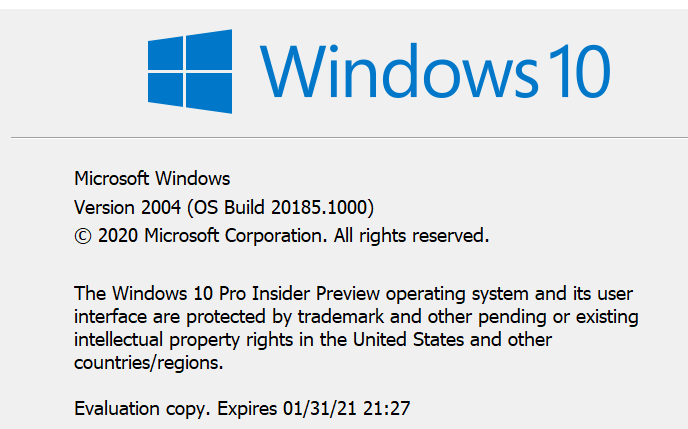
(I mean I have no idea how it does interact at all Client <=> Server except the fact that we were hit about TLS1.2 and deprecated cipher on Windows 2012 R2 last week..., so this might look like a stupid question, but that came to my mind)
jkotalik commentedon Aug 11, 2020
I am, same exact build of windows as well, I honestly was thinking the same thing yesterday:

Maybe an issue with schannel? That's my best guess.
tebeco commentedon Aug 11, 2020
🦆
Tratcher commentedon Aug 11, 2020
Same issue, same OS build.
tebeco commentedon Aug 11, 2020
the weird thing is the work I dont get is why
global.jsonto thepreview7./restore.cmd./restore.cmdis okI would assume cache ? but this also means that this is a combo of both
windows+dotnet 5.0 rc1zivkan commentedon Aug 11, 2020
A few weeks ago I created this gist which is a little program that tests .NET's
HttpClient's ability to connect to api.nuget.org: https://gist.github.com/zivkan/5291f507c8c5724d41a18357b7afcd30Since you're reporting using the .NET 5 SDK, try editing the csproj and add
net5.0as a target framework, and run the tool against the various target frameworks.If the BCL's
HttpClientcan't connect to api.nuget.org when usingSslProtocols.None(this means use operating system defaults, not "don't use security"), then there's little that NuGet can do. If it can't connect withSslProtocols.Nonebut does withSslProtocols.Tls12, then this means either your computer is configured not to use TLS 1.2 by default, or there's a bug lower level than NuGet. I've had one internal colleauge show me evidence that a .NET 5 preview failed to connect, while net472 did connect. If you experience the same issue, please let us know, I'll pass the info to the System.Net.Http team.Tratcher commentedon Aug 11, 2020
Note the restore issue is intermittent. I run restore on our whole repo and it works for a random number of projects before hanging, timing out, and failing.
tebeco commentedon Aug 11, 2020
well, well, well
net5.0
netcoreapp3.1
net48
seems to be stuck on "restore" task for ~3min, but as I'm working within
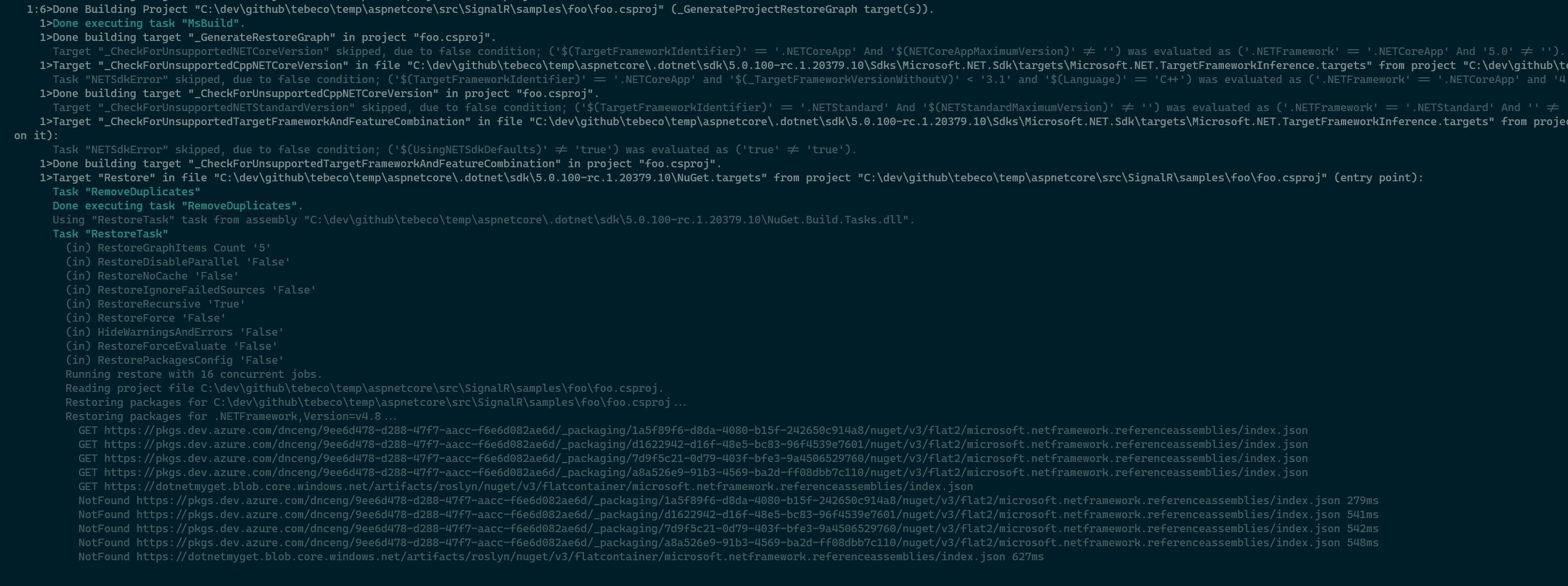

dotnet/aspnetcoreto have the same CLI verion, I'm assuming the root cause is elsewhereThen crash with same error
zivkan commentedon Aug 11, 2020
@tebeco have a look at this blog post, and make sure your machine doesn't have any registry keys that disable TLS 1.2: https://devblogs.microsoft.com/nuget/deprecating-tls-1-0-and-1-1-on-nuget-org/
I'd be interested if you could try running the same app with
net472to see if it behaves the same, or different.Tratcher commentedon Aug 11, 2020
For net472 and netcoreapp3.1 only None and Tls12 work.
For net5.0 Tls12 works but None doesn't.
wfurt commentedon Aug 11, 2020
I'm also on Windows 2004 build 20170 and 5.0.100-rc.1.20411.2
There seems to be some unknot variation causing this.
tebeco commentedon Aug 11, 2020
what
TargetFrameworkwere you targetting ?It fails for
net5.0but notnetcoreapp3.1Also the Windows build having issue seems to be is
20185not20170zivkan commentedon Aug 11, 2020
I reported the problem to dotnet/runtime: dotnet/runtime#40679
Tratcher commentedon Aug 13, 2020
Workaround available: dotnet/runtime#40679 (comment)
aortiz-msft commentedon Aug 24, 2020
Closing as dupe of dotnet/runtime#40679