Metagenome Assembly and Evaluation Pipeline for Long Reads
The aim of this tool is to evaluate HiFi long-reads metagenomic assemblies, and it can either perform the assembly itself using multiple state-of-the-art assemblers (metaMDBG, metaflye, hifiasm-meta), or evaluate user-submitted assemblies. In addition to classifying assembly bins in classical quality categories according to their marker gene content and taxonomic assignment, Mapler analyzes the alignment of reads on contigs. It does this by calculating the ratio of mapped reads and bases, and separately analyzes mapped and unmapped reads via their k-mer frequency, read quality, and taxonomic assignment. These results are displayed in the form of text reports and plots.
Clone the git repository and navigate to the pipeline directory
git clone https://gitlab.inria.fr/mistic/mapler.git
cd mapler
The pipeline requires Snakemake and Conda. If running on a SLURM cluster, the Snakemake SLURM executor plugin is also needed. If they're not already installed, they can be set up in a conda environment:
conda create -n mapler -c bioconda -c conda-forge 'bioconda::snakemake>=8.28' 'conda-forge::conda>=24.1.2' bioconda::snakemake-executor-plugin-slurm
conda activate mapler
The pipeline will handle and download any conda dependencies during the execution.
To install them prior to running the pipeline and speed up the first execution of the pipeline, it's possible to use the following command.
Those environments will be stored in .snakemake/conda
snakemake --use-conda --conda-create-envs-only -c1 --configfile config/config_test.yamlNote that only part of the analysis is run on the test dataset.
To install the environments for other analyses, change the --configfile argument.
Optional databases
To run taxonomic assignment, both Kraken 2 (reads) and GTDB-Tk (bins) require external databases. If used, their path must be indicated in the configfile (kraken2db and gtdbtk_database). If not already available, several Kraken 2 databases are available here, to be chosen depending on targeted taxa and available disk space. The GTDB-Tk reference data can be found here.
To speed this up, config/config_test_evaluation_only.yaml may be used instead of config/config_test.yaml. This will only perform the evaluation, on a precomputed assembly and set of bins.
To verify the installation, launch the pipeline with the test dataset (included in test/test_dataset.tar.gz, decompressed automatically), either locally
./local_pipeline.sh config/config_test.yaml > mylog.txtOr on a cluster:
sbatch pipeline.sh config/config_test.yamlEither way, with 16 CPUs and 15G of RAM, it should require around 15 minutes, not including dependency installation, to produce the following results:
outputs/test_dataset/
└── metaMDBG
    ├── assembly.fasta
    ├── metabat2_bins_reads_alignement
    │   ├── bins
    │   │   ├── bin.1.fa
    │   │   ├── ...
    │   ├── checkm
    │   │   ├── checkm-plot.pdf # A 2D plot of bin completeness and contamination
    │   │   └── checkm_report.txt # A count of near complete, high quality, medium quality and low quality bins, followed by details on each bins
    │   ├── read_contig_mapping_plot.pdf # A visual version of read_contig_mapping.txt
    │   └── read_contig_mapping.txt # A report on the aligned reads and aligned bases ratios, split by bin quality
    └── reads_on_contigs_mapping_evaluation
└── report.txt # A report on the aligned reads and aligned bases ratiosThe pipeline must be launched from within the pipeline directory. Those familiar with snakemake may directly use snakemake commands to launch it. Otherwise, the following commands can be used:
./local_pipeline.sh <configfile> > mylog.txt # for local execution
sbatch pipeline.sh <configfile> # for SLURM execution
./np_pipeline.sh <configfile> # to preview the execution
snakemake --unlock --configfile <configfile> -np # to unlock the working directory after a crash
It is recommended to copy config/config_template.yaml as a configfile, and to tweak it according to the analysis's needs.
Details on how to configure this file are written as comments in the template. The configfile is structured in three parts:
- Inputs: path to samples and external programs (most are optional and only needed for certain analyses)
- Controls: allowing a choice among multiple non-exclusive options, or a binary choice on whether the analysis is run (true) or not (false)
- Parameters: functional parameters define values that can be adjusted for certain analyses, while resource parameters allow users to configure memory, threads, and execution time
Multiple user-provided assemblies and binning
To use multiple user-provided assemblies and binning, you can either run them one at a time, or put the corresponding files (via a copy or the creation of a symbolic link) the assembly and/or bins like this:
outputs/<sample_name>/<custom_assembly_process>/assembly.fasta
outputs/<sample_name>/<assembly>/<custom_binning_process>_bins_reads_alignement/bins/<bins.fa>
Then, in the configfile, insert <custom_assembly_process> in the list of assemblers and/or <custom_binning_process> in the list of binners, and launch the pipeline as usual. It should look something like this:
samples:
   - name: <sample_name>
     read_path: </read/path.fastq>
   - name: <another_sample_name>
     read_path: </read/path.fastq>
[...]
assemblers: # uncomment assemblers to use them
# - metaMDBG
 - <custom_assembly_process>
[...]
binners: # uncomment binners to use them
# - metabat2
 - <custom_binning_process>
Please note that <custom_assembly_process> cannot have the same name as any of the built-in assembly processes (metaMDBG, custom_assembly, metaflye, hifiasm_meta, operaMS). Likewise, the <custom_binning_process> cannot have the same name as any of the built-in binning processes (metabat2, custom)
# Comments describe the required configuration of the config file
outputs
└── <sample_name>
    └── <assembler> # multiple choice in the assemblers field
        ├── assembly.fasta
        ├── fastqc # Requires fastqc: true
        │   └── <fraction_name> # multiple choice in the fractions field
        │       ├── fastqc_report.html
        │       └── <fraction_name>_fastqc.zip
        ├── kat # Requires kat: true
        │   ├── kat-plot.pdf # Requires both "mapped" and "unmapped" fractions
        │   └── <fraction_name>-stats.tsv
        ├── kraken2 # Requires kraken2: true
        │   └── <fraction_name>
        │       ├── kraken2.tsv
        │       ├── krona.html
        │       └── krona.html.files
        ├── metaquast # Requires metaquast: true
        │   ├── report.txt
        │   └── results/
        ├── <fraction_name>_reads.fastq # For either "mapped" or "unmapped" fraction analysis
        ├── <binner>_bins_short_reads_alignement                  # multiple choices in the binners field. Requires short_read_binning: true
        ├── <binner>_bins_cobinning_alignement                    # multiple choices in the binners field. Requires short_read_cobinning: true
        ├── <binner>_bins_additional_reads_cobinning_alignement   # multiple choices in the binners field. Requires additional_reads_cobinning: true
        ├── <binner>_bins_reads_alignement                        # multiple choices in the binners field. Requires binning: true
        │   ├── bins
        │   │   ├── bin.1.fa
        │   │   ├── ...
        │   │   └── contigs_depth.txt
        │   ├── checkm # Requires checkm: true
        │   │   ├── checkm-plot.pdf
        │   │   ├── checkm_report.txt
        │   │   └── quality_report.tsv
        │   ├── gtdbtk # Requires gtdbtk:true
        │   ├── kraken2 # Requires kraken2_on_bins:true
        │   ├── read_contig_mapping_plot.pdf # Requires both checkm: true and read_mapping_evaluation: true
        │   └── read_contig_mapping.txt # Requires both checkm: true and read_mapping_evaluation: true
        ├── reads_on_contigs.bam
        ├── reads_on_contigs.bam.bai
        ├── reads_on_reference.<reference>.bam # Multiple choices in the reference_genomes field. Requires reference_mapping_evaluation:true
        ├── contigs_on_reference.<reference>.bam # Multiple choices in the reference_genomes field. Requires reference_mapping_evaluation:true
        └──  reads_on_contigs_mapping_evaluation # Requires read_mapping_evaluation: true
            └── report.txt
Logs can be found in logs/<analysis_name>/<date_hour>, and contain the SLURM log (only if pipeline.sh was used in a SLURM cluster), the branch and hash of the latest git commit, and a copy of the config file used.
By aligning the reads on the contigs, we can look at two key metrics:
- Aligned read ratio: Aligned read count / Total read count
- Aligned base ratio: Aligned read bases / Total read length
The higher those ratios are, the more representative of the sequenced sample is the assembly. If the aligned read ratio is significantly higher than the aligned base ratio, it is a sign that most reads are only partially aligned to contigs.
reads_on_contigs_mapping_evaluation/report.txt gives a global overview of those ratios, while read_contig_mapping.txt and read_contig_mapping_plot.pdf provide a breakdown of the ratios separated by bin quality.
Here's an example of read_contig_mapping_plot.pdf:

In samples where a significant proportion of the reads is not assembled, it can be useful to compare the set of reads that are represented by the assembly (mapped reads) with the set of reads that are not (unmapped reads). Mapler includes three read set analyses :
FastQC
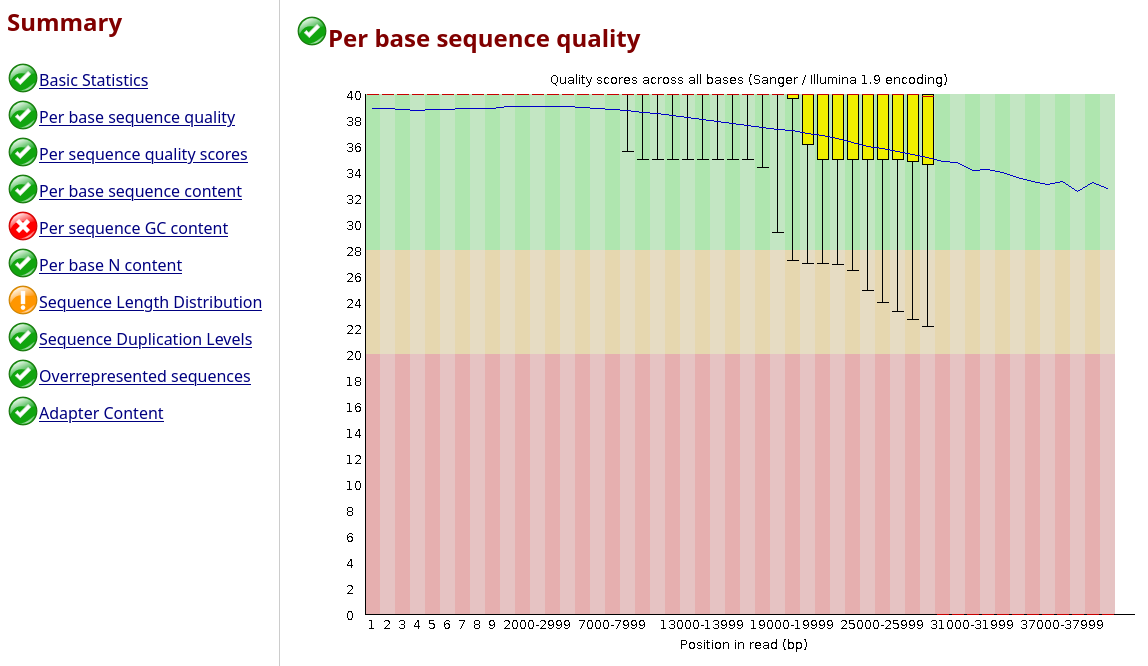
With fastQC, it's possible to look into basic differences between the sets of reads. Generally, the unmapped reads are slightly shorter and of slightly worse quality than the assembled reads on average. They can also tend to have a different GC ratio, but this is unlikely to reflect an actual assembly bias and more likely to be the result of a particular high abundance population being assembled better and happening to have a specific GC ratio.
Here's an example of fastqc_report.html:
Kraken 2
By exploring the Krona plots, it's possible to check whether some taxa are only present in the unassembled portion of the reads, or whether some species have only been partially assembled, being present in both of the assembled and unassembled parts of the assembly.
Here's an example of krona.html:

KAT
By computing the abundance of each read (via its median k-mer abundance) from the full set of reads, it is possible to check whether some abundances are better assembled than others.
Typically, low abundance reads are more libely to be more abundant in the unmapped portions, but the proportion and abundance threshold may very depending on the assembler used.
Here's an example of kat-plot.pdf:

User-provided read categories
Just like with user-provided assemblies, additional read categories can be inserted (via a file copy or the creation of a symbolic link) in the pipeline, and will be treated like any other:
outputs/<sample_name>/<assembler>/<fraction_name>_reads.fastqThen, in the configfile, insert <fraction_name> in the list of read categories, and launch the pipeline as usual. It should look something like this:
fractions:
 - <fraction_name>
# - full #all reads
# - mapped #reads that mapped to a contig, and were successfully assembled
# - unmapped #reads that are not mapped to a contig
Please note that <fraction_name> cannot have the same name as any of the built-in categories (full, mapped, unmapped)
Assembly is performed with: metaMDBG (git, article), hifiasm-meta (git, article), metaflye (git, article), OPERA-MS (git, article). Binning is performed with MetaBAT2 (code, article). Evaluation is performed with: checkM2 (git, article), GTDB-Tk (git, article), MetaQUAST (git, article), FastQC (git, website), Kraken2 (git, article), Krona (git, article), KAT (git, article). Additionally, minimap2, pysam, biopython, pandas, matplotlib and numpy were used to perform custom evaluation
How to run Mapler with low computing resources ?
The default resources in config/config_template.yaml are designed to handle large and complex datasets (150G soil sample).
On smaller or less diverse datasets, it is possible to lower their required memory.
Kraken2 and KAT are both quite memory intensive, if resources are limited, they can be skipped by setting kat: falseand kraken2: falsein the config file.
The assembly is also quite costly. If available, using a precomputed assembly as an input can save computational resources.
How to run taxonomic assignment ?
There are three ways to use taxonomic assignment with mapler :
- Taxonomic assignment of reads : done with kraken2 (
kraken2: truein the config file) - Taxonomic assignment of all bins : done with GTDB-Tk (
gtdbtk: truein the config file) - Taxonomic assignment of specific bins of the bins folder : done with kraken2 (
kraken2_on_bins: truein the config file). It is generally recommended to use GTDB-Tk on bins, but kraken2 can provide a way to check for coherence between the reads and specific bins.
Does mapler accept compressed input files ?
Most rules accept gzip compressed reads, although there is one exception : OPERA-MS assembly. It is however recommended to use uncompressed reads, as Mapler uses multiple programs that would otherwise each decompress the reads internally.
Does mapler require internet access ?
Most rules do not require internet access, although there is one exception : kronadb_download, used to download krona taxonomy for kraken2 analyses. If not already present and included in the config file, the checkm2 database (rule checkm_db_download) and mash (rule gtdbtk_on_bins) databases also require an internet connection to be downloaded the first time they are used.
Nicolas Maurice, Claire Lemaitre, Riccardo Vicedomini, Clémence Frioux, Mapler: a pipeline for assessing assembly quality in taxonomically rich metagenomes sequenced with HiFi reads, Bioinformatics (2025)