Format-Hex Updates #4532


Description

Issue Details
See PowerShell/PowerShell#8674 for full details.
Summary
- In PS 6.2 and below, Format-Hex doesn't handle piped input as a single input (even if it's a single data type), and renders a completely separate block of output for every item input of the pipeline, regardless of the type of input.
- In PS 6.1 and below, Format-Hex only handles byte and string input. (Maybe others? The same as it was in v5, I don't recall the full amount). This was changed in 6.2 (I think; @iSazonov authored the PR that expanded the functionality) and it is now able to handle a larger variety of data types. (Essentially anything it can convert to byte data; strings,
[char],[int], structs, etc., etc.)
With PowerShell/PowerShell#8674 merged, Format-Hex:
- Handles continuous data stream input as a single input stream, and will display it in the same manner for both
Format-Hex -InputObject $byteArrayand$byteArray | Format-Hex- This includes arrays / streams of all basic value types.
- Handles jagged streams of input by clumping input objects according to their type. This is not expected to handle a jagged array passed directly to the
-InputObjectparameter by name. - Adds
ByteCollectionproperties:Label— stores the type name and a random hexadecimal ID. Used to group objects in output formatting. This can be utilised by, for example,Group-Object, in order to enable downstream cmdlets to handle each group ofByteCollectionobjects separately, if needed.Ascii— stores the ASCII representation of the bytes in theByteCollectionHexBytes— stores the hexadecimal representation of the bytes in theByteCollection
- Replaces Unicode control characters in the
Asciiresults with the Unicode<?>glyph0xFFFDinstead, and replaces theNULLcharacter0x0with a space.
Behavioural Details
Piped Input
A Primitive Value
- Each item is converted to
bytesand collected into an input buffer.- The type of the last
InputObjectis stored in a private field.- If a new
InputObjectis received of the same type, it is converted tobytesand added to the buffer.- If a new
InputObjectis received of a different type, the buffer is divided into 16-byte segments and each segment is sent to the success output stream as aByteCollection. Then, the process restarts from the beginning.
System.IO.FileInfo
- If any data is in the primitives buffer, it is output as described above, the buffer is cleared, as well as the information on what the last type was (resetting the grouping logic).
- One
ByteCollectionobject is emitted per 16 bytes of the file.- All
ByteCollectionobjects are tagged with the input file's path as theirLabel, which will group their output into a single table.OffsetandCountare interpreted as applying to each file, the same way as they would be for-Pathinputs.
String
- If any data is in the primitives buffer, it is output as described above, the buffer is cleared, as well as the information on what the last type was (resetting the grouping logic).
- All strings are handled on an individual basis (no grouping), and are converted into
bytesaccording to the-Encodingparameter's value.- One
ByteCollectionobject is emitted per 16 bytes of the string, and each is tagged with theSystem.Stringtype name and a shared random hexadecimal ID to ensure that each string is assigned a separateLabelgroup.OffsetandCountare interpreted as applying to each input string.
Array of Primitives
- If any data is in the primitives buffer, it is output as described above, the buffer is cleared, as well as the information on what the last type was (resetting the grouping logic).
- Each array is treated as a single "group", and will not be grouped with other items in the output.
- All items in the array are converted into a single chunk of
bytes, which then is sliced according toOffsetandCount.- One
ByteCollectionobject is emitted per 16 bytes, and each is tagged with the array's type and a shared random hexadecimal ID to ensure that each array is assigned a singleLabelgroup.
Examples
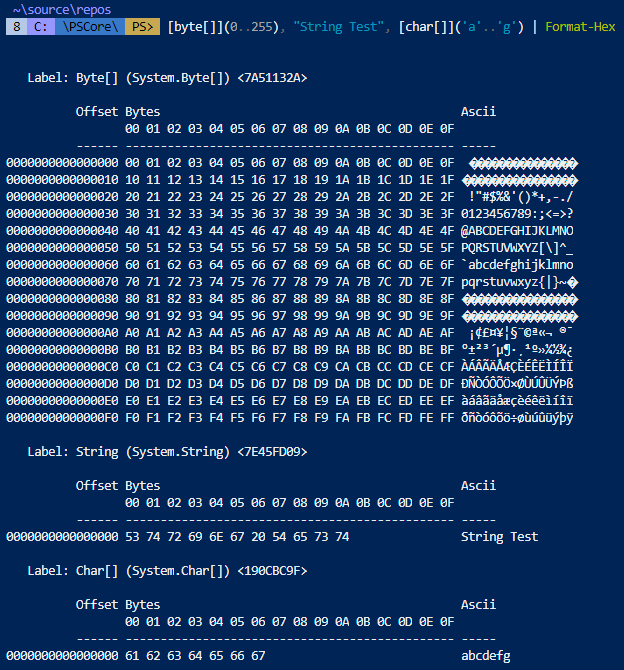
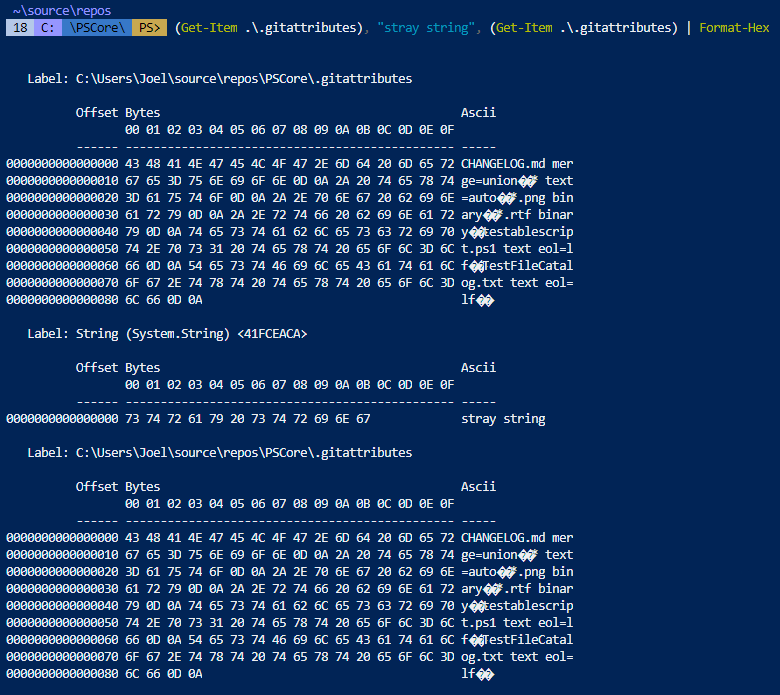
Output
If you plan on processing output from Format-Hex programmatically, note that the output mode is line-by-line; each ByteCollection created by the cmdlet only holds 16 bytes before creating a new object.
If you wish to handle specific segments of output when working with mixed input (as shown in the examples), you can use their .Label property to determine which ByteCollection objects belong together. Group-Object is one way to separate out the groupings into the groups displayed by the formatter, in order to be able to handle them separately.
For example, to collate all byte values for all input collections while retaining the grouping according to input object, you could do something like this:
$input |
    Format-Hex |
    Group-Object -Property Label |
    Select-Object -Property Label, @{ Name = "Bytes"; Expression = { $_.Group.Bytes } }
Version(s) of document impacted
- Impacts 7 document
- Impacts 6 document
- Impacts 5.1 document
- Impacts 5.0 document
- Impacts 4.0 document
- Impacts 3.0 document
Reason(s) for not selecting all version of documents
- The documented feature was introduced in selected version of PowerShell
- This issue only shows up in selected version of the document