Skip to content

Prettify console output using Spectre.Console#39

Merged
Maoni0 merged 18 commits intoMaoni0:mainfrom
ryandle:spectre
Jan 20, 2022
Merged

Prettify console output using Spectre.Console#39
Maoni0 merged 18 commits intoMaoni0:mainfrom
ryandle:spectre

Conversation

@ryandle
Copy link
Copy Markdown
Contributor

@ryandle ryandle commented Dec 31, 2021

This is the PR for issue #21 which updates the console output to use Spectre.Console for pretty formatting and colors.

Here's the before/after comparison between v0.5.0 of the global tool and the changes in this PR:

image

A walkthrough of the changes:

  • New library dependency on Spectre.Console that is used to output the new table format + new stats format + updated message/rule/warning lines.
  • All of the colors/formatting used is defined in Configuration/Theme.cs. The intent is that these could be defined by the yaml config in the future.
  • Helper class ConsoleOut for writing message/rule/warnings to output.
  • LiveOutputTable is a wrapper around a Spectre Live table which outputs GC stats. It uses a System.Threading.Channel to handle communication between the threads receiving GC events and the thread writing to console output.
    • Some of its APIs are async, which created some awkward spots in Program.cs where we are executing in a synchronous event handler.
    • The Heap stats timer now uses Task.Run instead of Timer (which doesn't support async.)
    • The HandleConsoleInput dedicated thread now also uses Task.Run since ThreadStart delegates don't support async.
  • PrintUtilities has copies of most methods that format headers/rows. The original methods output specially aligned strings, and these new methods output lists of spectre marked-up strings that will be passed to the live table.
  • I removed GC# from the start of the row string since it was a little redundant with the table header.

Some concerns I have and would like input on:

  1. There are now two formatting libraries being used, Sharprompt & Spectre.Console - if that is a concern I think we could replace the Sharprompt usage with Spectre.Console (but the other way likely doesn't work as Sharprompt does cover all of the scenarios Spectre does.)
  2. The colors are not currently configurable. I think it is possible to do that, so the question is do we need it up front or add it later? There is one small blocking issue that the colors used in the BreakdownChart in Program.cs are hard-coded. There is a code comment there explaining why (no way to go from string->Spectre.Color for the BreakdownChart as far as I can tell.)
  3. Redirecting console output (e.g. dotnet-gcmon -n <process> > out.txt) doesn't work after this change. I'm not sure if it can be supported with spectre live table. I left the original PrintUtilities methods around so that we could special handle the case where console output is being redirected and fall back to the plaintext formatting. Should I go ahead and do that?
  4. Since I'm using the Async APIs on the Channel, there were a few awkward sync-meets-async places in the code outlined above; should I try to switch to using the blocking Try* APIs on Channel instead, which should remove the async-related changes?

Happy new year!

Outstanding Work

  • Finish light theme support
  • More unit tests to cover yaml theme config
  • Support console redirection
  • Update dcumentation

@MokoSan
Copy link
Copy Markdown
Contributor

MokoSan commented Dec 31, 2021

There are now two formatting libraries being used, Sharprompt & Spectre.Console - if that is a concern I think we could replace the Sharprompt usage with Spectre.Console (but the other way likely doesn't work as Sharprompt does cover all of the scenarios Spectre does.)

Totally agreed - I was experimenting with the Spectre.Console API and it seems like it'll be easy to incorporate. I can start working on a PR to facilitate this once this PR is checked in.

This change looks AMAZING! Looking forward to seeing this in action.

@Maoni0
Copy link
Copy Markdown
Owner

Maoni0 commented Jan 4, 2022

thanks so much for the PR!

I do think the colors would need to be configurable - when I run this in a cmd window with white background, it's not very readable -

image

you could just have 2 defaults though - one for white bg and the other for dark bg. and if you use any other colored bg, you can config it yourself.

There are now two formatting libraries being used, Sharprompt & Spectre.Console - if that is a concern I think we could replace the Sharprompt usage with Spectre.Console (but the other way likely doesn't work as Sharprompt does cover all of the scenarios Spectre does.)

I'm usually for having less components. I take it that Sharprompt does not do colors?

Redirecting console output (e.g. dotnet-gcmon -n > out.txt) doesn't work after this change.

it's definitely convenient to have the console output redirectable. if spectre simply cannot be made work for this, what do you think about making the output configurable, ie, by default it uses spectre but if you want to redirect, use the old way?

Since I'm using the Async APIs on the Channel, there were a few awkward sync-meets-async places in the code outlined above; should I try to switch to using the blocking Try* APIs on Channel instead, which should remove the async-related changes?

what kind of benefits do you believe async would provide here?

@ryandle
Copy link
Copy Markdown
Contributor Author

ryandle commented Jan 8, 2022

  • RE: Color config - Alright, makes sense to me, I will make an update with configurable colors!
  • RE: Sharprompt - I believe Sharprompt supports colors but it's only targted for scenarios where you prompt the user for input, i.e. it won't help with the pretty table output or the stats output. Spectre on the other hand does have prompt support too, so I think it's a good overall fit. @MokoSan was kind enough above to offer to replace Sharprompt usage with Spectre as a follow-up.
  • RE: Console redirect - Supporting redirect also makes sense to me. I think that we can do something like what's happening Add basic support for console redirection #38 and detect the redirect case and automatically handle it? That way the user doesn't have to remember an extra flag.
  • RE: Async apis on channel -None really, I just naturally didn't want to use a Try* pattern. After some reading, the expectation is that the Try* APIs on an unbounded channel would always return true, so I will switch to that and assert true.
    • There will still be a StopAsync method on LiveOutputTable. I don't see a great way to know it is stopped without waiting for the task returned by Spectre's LiveDisplay.StartAsync. Looking at the code behind LiveDisplay, it is doing the console rendering work in a separate task continuation, so in situations like where we need to print stats to the console, we have to wait for the LiveDisplay's task to complete to be sure that it is not still writing to the console.

@ryandle
Copy link
Copy Markdown
Contributor Author

ryandle commented Jan 8, 2022

Working on a light color theme and ran into a small issue with the breakdown chart used in the stats view. Opened this issue to investigate a resolution: spectreconsole/spectre.console#684

…eme defaults. Add CustomTheme that can be defined in yaml and falls back to the default theme when specific properties aren't defined. The default theme is dark, but switches to light if the console background color is White.

- Changed LiveOutputTable.WriteRowAsync to be synchronous
- Cleaned up use of wrong namespace and made it the default for the csproj
- Added two basic UTs; more to come;
…can pass that reference around and not worry about tearing between the datetime & TraceGC data.

- Introduced a new interface for console output responsibilities.Factored the Spectre code into one implementation. Will move the plaintext code back into a 2nd implementation. We'll have a factory method choose the implementation at runtime based on whether output is redirected && config.
- Got rid of Restart in LiveOutput Table...Start/Stop should be enough. Added a check to prevent starting twice.
…ementation)

- Added Factory to decide output based on yaml config or console output being redirected
- Trimmed the IConsoleOuput interface to have only what is needed by Program.cs
@ryandle
Copy link
Copy Markdown
Contributor Author

ryandle commented Jan 9, 2022

Ok, @Maoni0 and @MokoSan I think this is ready for another pass. Here are some notes on the most recent changes:

  • I changed the WriteRowAsync method on the LiveOutputTable to be synchronous. Start/Stop still have to be async because that is the API used by the Spectre.LiveTable.
  • Theming is now fully configurable via yaml. The default is a dark theme, unless we detect Console.BackgroundColor to be white, then it's a light theme. I've updated the readme documentation with information about all of this.
  • For the light theme, here is what I have so far, open to suggestions on better default color choices. (Also note the issue in Spectre I mentioned above about grey always being used in the bar char - that will remain for now until we get input form the Spectre maintainers.)
    image
  • I added plain text support back. There is now an interface IConsoleOutput that has implementations for Spectre and plain text.
  • You can enable plaintext either via the yaml config or by redirecting stdout. I started to add command line parameter support too. I was thinking -nc and --no-color - but the current commandline options library only supports single character 'short' option names, and since p and n are already taken I didn't have a good idea for a param character to represent 'no color'. Open to ideas!

@MokoSan
Copy link
Copy Markdown
Contributor

MokoSan commented Jan 10, 2022

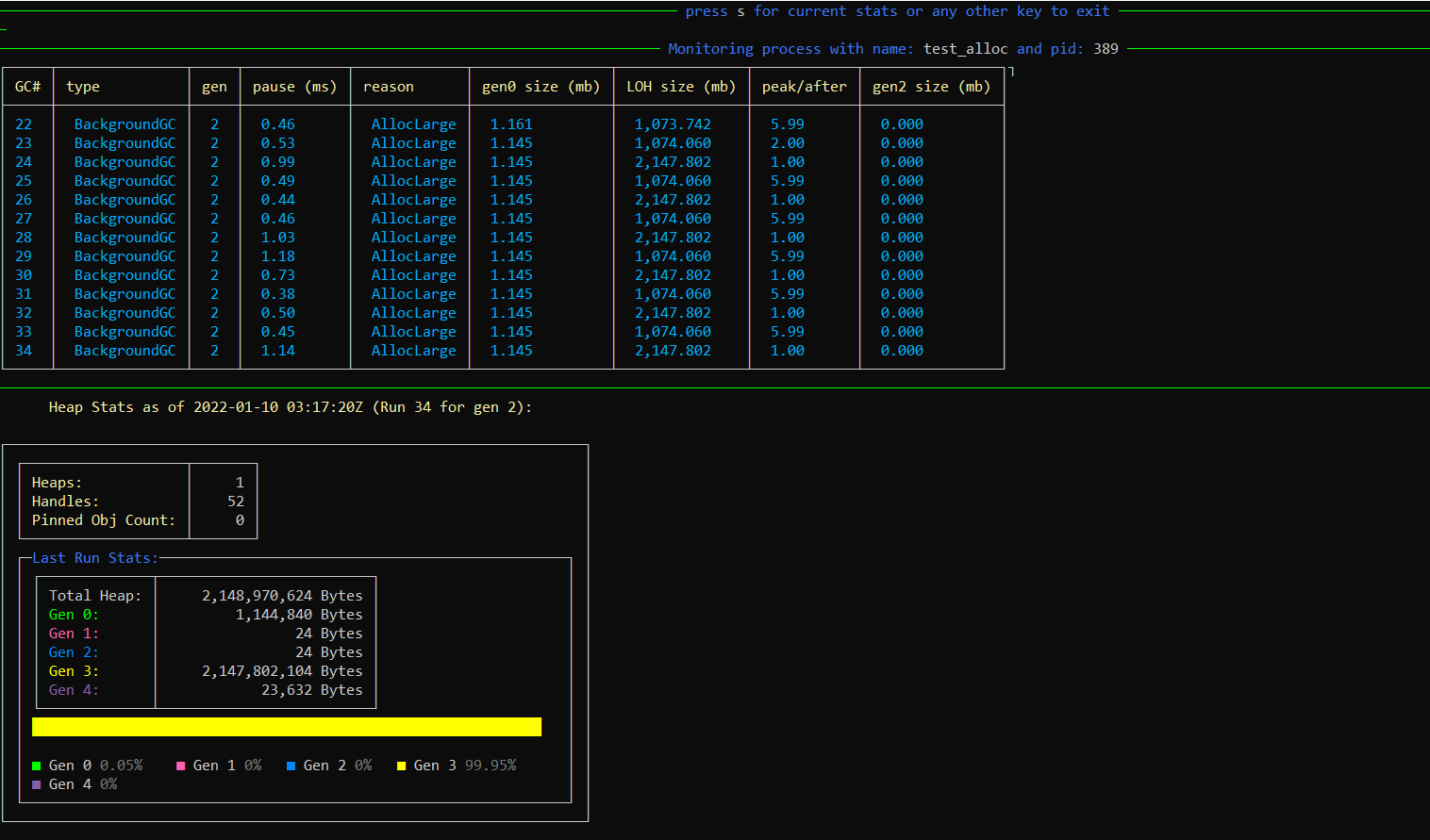
Looks great!! Just tried this out on Linux to make sure we are good there, as well and things look good:

image

Details of the test machine:

MokoSan:GCRealTimeMon:% lsb_release -a                                                                                                                                                                
No LSB modules are available.
Distributor ID: Ubuntu
Description:    Ubuntu 20.04 LTS
Release:        20.04
Codename:       focal

One note I am adding for myself when I tackle #40 is to include a prompt on the configuration side of things to include the ability to change the themes if the user wants to reconfigure the default config.

You can enable plaintext either via the yaml config or by redirecting stdout. I started to add command line parameter support too. I was thinking -nc and --no-color - but the current commandline options library only supports single character 'short' option names, and since p and n are already taken I didn't have a good idea for a param character to represent 'no color'. Open to ideas!

-d => devoid of color? We can still keep --no-color as the long name? LOL, sorry, couldn't think of anything better. 😛

@Maoni0
Copy link
Copy Markdown
Owner

Maoni0 commented Jan 10, 2022

that's wonderful! I will take a look at the changes later today, thanks for making these changes, @ryandle!

@Maoni0
Copy link
Copy Markdown
Owner

Maoni0 commented Jan 11, 2022

btw, do you mind explaining what is a "Spectre.Console live table"? what makes it live? 😀 does it need to look to see if the color specification changes while the process is running?

@hez2010
Copy link
Copy Markdown
Contributor

hez2010 commented Jan 12, 2022

btw, do you mind explaining what is a "Spectre.Console live table"? what makes it live? 😀 does it need to look to see if the color specification changes while the process is running?

The "live" makes it able to update arbitrary widgets in-place, see https://spectreconsole.net/live/live-display

@Maoni0
Copy link
Copy Markdown
Owner

Maoni0 commented Jan 12, 2022

thanks @hez2010. from the video it seems like "live" means "I can overwrite what's already displayed" but that's not what we are doing here - we don't need to overwrite anything that's already displayed. or did I understand it wrong?

@ryandle
Copy link
Copy Markdown
Contributor Author

ryandle commented Jan 12, 2022

@Maoni0 I haven't yet gotten a block of time where I can sit down and reply to everything at once - but figured I should touch on the Live table Q.

So normal Spectre widgets are "Give it all the data at once and print it to the screen in your desired format." So to use a normal Spectre table, you need to give it all data up front and a full table is rendered.

The scenario for this tool is different, we want to "stream" data to the console as GC events happen. That seemed like a good fit for the Live table - which is a table where you can keep appending rows over time - you don't have to have all the data up front.

I originally tried to use the non-live table widget, thinking I could just not write the table header every time there is a new GC event and that might effectively just append a row. It didn't work as well though - IIRC there were still things like spacing before/after each table (i.e. each GC event) that made the data a lot less dense than a single continuous table.

(I also considered not using a table at all and just doing more custom formatting - in the end I thought the table looked the best and also reduced how much custom formatting/layout code we would maintain.)

I hope this helps answer your Q. LMK if you have more! And I will work on adding these details to a code comment on LiveOutputTable so it's clear what is being used and why.

@Maoni0
Copy link
Copy Markdown
Owner

Maoni0 commented Jan 12, 2022

got it, thanks for the explanation, @ryandle! and no worries at all about responding - respond when it's convenient for you :)

@Maoni0
Copy link
Copy Markdown
Owner

Maoni0 commented Jan 18, 2022

did you want to get rid of MessageRuleColor as we discussed above? other than that it looks great to me!

@ryandle
Copy link
Copy Markdown
Contributor Author

ryandle commented Jan 19, 2022

Hey @Maoni0, I'm pushing the change now. One thing I missed above is that in the dark theme the "rule" color was different from the message color, so you had a green ruler w/ blue message like this:

image

And after the change to remove the rule color, we'll just have a single color for both like this:

image

Which is fine (I was using the same color for both already in the Light theme) I just wanted to call it out.

@Maoni0
Copy link
Copy Markdown
Owner

Maoni0 commented Jan 20, 2022

cool; we are good to go. merging now!

@Maoni0 Maoni0 merged commit 94eab22 into Maoni0:main Jan 20, 2022
Sign up for free to join this conversation on GitHub. Already have an account? Sign in to comment

Labels

None yet

Projects

None yet

Development

Successfully merging this pull request may close these issues.

4 participants