Repository navigation
Windows fix for Documents folder not being in the default location. - #51
Merged
Merged
Conversation


Owner
|
Thank you so much for doing this! |

This file contains hidden or bidirectional Unicode text that may be interpreted or compiled differently than what appears below. To review, open the file in an editor that reveals hidden Unicode characters.
Learn more about bidirectional Unicode characters
Sign up for free
to join this conversation on GitHub.
Already have an account?
Sign in to comment


Add this suggestion to a batch that can be applied as a single commit.This suggestion is invalid because no changes were made to the code.Suggestions cannot be applied while the pull request is closed.Suggestions cannot be applied while viewing a subset of changes.Only one suggestion per line can be applied in a batch.Add this suggestion to a batch that can be applied as a single commit.Applying suggestions on deleted lines is not supported.You must change the existing code in this line in order to create a valid suggestion.Outdated suggestions cannot be applied.This suggestion has been applied or marked resolved.Suggestions cannot be applied from pending reviews.Suggestions cannot be applied on multi-line comments.Suggestions cannot be applied while the pull request is queued to merge.Suggestion cannot be applied right now. Please check back later.
Windows allows you to move/store a users subfolders, such as Documents in a different location, This could be another hard drive to make reinstalling not as tedious.
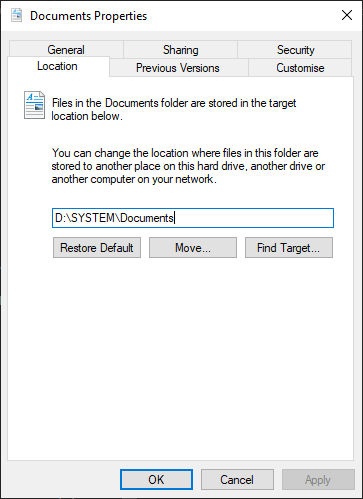
The below code however assumes that these are only stored in the default location, such as
C:\Users\Username.This commit resolves this by wrapping the path in a
getAppPath()function, and attempting to get the path from Windows and falling back on the above method if it fails or not on windows.Attempting to use the Default location can cause strange behavioural issues in windows, depending on how the locations were setup. as well as how the application handles it.
I also believe this could have affected #10 however this issue is stale and I haven't tested Windows 11
Edit: This PR should resolve errors such as
