

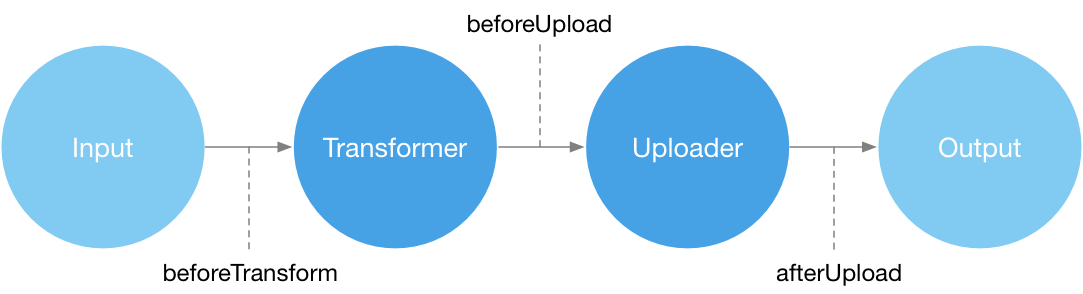

PicList-Core 是一个功能强大的图片上传工具,提供 CLI 和 API 两种调用方式。它在 PicGo-Core 的基础上增强了功能,同时保持插件兼容性。查看 Awesome-PicGo 获取丰富的插件资源。
你可以查看 PiclList-Core 的 DeepWiki 获取更多信息。
原生支持 Typora 集成。
-
多配置支持:
- 每个图床支持多个配置,兼容桌面版PicList配置文件
- 通过
picgo config-list <uploader>列出所有配置 - 通过
picgo config-use <uploader> <configName>切换默认配置 - 通过
picgo config-remove <uploader> <configName>删除配置 - 通过
picgo config-rename <uploader> <oldName> <newName>重命名配置 - 通过
picgo config-show <uploader> [configName]查看配置详情
-
图像处理能力:
- 添加水印、压缩图片和转换格式
- 通过
picgo set buildin watermark和picgo set buildin compressCLI 命令进行配置 - 处理过程发生在 beforeTransform 阶段,确保与所有插件兼容
-
高级重命名:
- 通过
picgo set buildin rename设置自定义重命名规则
- 通过
-
额外内置图床:
- WebDAV、SFTP、本地路径、AWS S3
- 改进的 Imgur 支持,支持账户上传
-
内置服务器:
- 类似于 PicList-Desktop 服务器
- 使用
picgo-server命令启动
-
错误修复:
- 解决了原始 PicGo-Core 的多个问题
PicList 需要 Node.js >= 20
PicList 依赖 sharp,请先安装它:
npm config set sharp_binary_host "https://npmmirror.com/mirrors/sharp"
npm config set sharp_libvips_binary_host "https://npmmirror.com/mirrors/sharp-libvips"
npm install sharpnpm install piclist -g
# 或者
yarn global add piclistnpm install piclist -D
# 或者
yarn add piclist -D你可以使用Docker运行PicList-Core。
将./piclist更改为你自己的路径,该路径是放置config.json文件的位置,并将piclist123456更改为你自己的密钥。
docker run -d \
  --name piclist \
  --restart always \
  -p 36677:36677 \
  -v "./piclist:/root/.piclist" \
  kuingsmile/piclist:latest \
node /usr/local/bin/picgo-server -k piclist123456从本仓库下载docker-compose.yml,或将以下内容复制到docker-compose.yml:
version: '3.3'

services:
  node:
    image: 'kuingsmile/piclist:latest'
    container_name: piclist
    restart: always
    ports:
      - 36677:36677
    volumes:
      - './piclist:/root/.piclist'
command: node /usr/local/bin/picgo-server -k piclist123456你可以将./piclist更改为你自己的路径,该路径是放置config.json文件的位置,并在command中更改密钥。
然后运行:
docker-compose up -d你可以使用docker exec在Docker中安装插件。
docker exec -it piclist sh
picgo install picgo-plugin-xxx你可以使用docker exec在Docker中更新配置。
docker exec -it piclist sh
picgo set xxx你可以使用picgo-server启动服务器,默认端口为36677。
启动服务器:
picgo-server
node ./bin/picgo-server
强烈建议添加
--key参数以避免未经授权的访问。例如:picgo-server --key 123456
显示帮助:
$ picgo-server -h

  Usage: picgo-server [options]

  Options:

    -h, --help          显示帮助信息
    -c, --config        设置配置路径
    -p, --port          设置端口,默认端口为36677
    --host              设置主机,默认主机为0.0.0.0
    -k, --key           设置密钥以避免未经授权的访问
    -v, --version       显示版本号

  Examples:
    picgo-server -c /path/to/config.json
    picgo-server -k 123456
picgo-server -c /path/to/config.json -k 123456/upload?picbed=xxx&key=xxx上传图片,picbed用于设置图床,key用于设置密钥/heartbeat心跳检测
PicList-Core使用
SM.MS作为默认上传图床。
显示帮助:
$ picgo -h

Usage: picgo [options] [command]

Options:
  -v, --version                                 output the version number
  -d, --debug                                   debug mode
  -s, --silent                                  silent mode
  -c, --config <path>                           set config path
  -p, --proxy <url>                             set proxy for uploading
  -h, --help                                    display help for command

Commands:
  install|add [options] <plugins...>            install picgo plugin
  uninstall|rm <plugins...>                     uninstall picgo plugin
  update|up [options] <plugins...>              update picgo plugin
  config-list <uploader>                        list all configs names for an uploader
  config-use <uploader> <configName>            set a config as default for an uploader
  config-remove <uploader> <configName>         remove a config for an uploader
  config-rename <uploader> <oldName> <newName>  rename a config for an uploader
  config-show <uploader> [configName]           show details of a config
  set|config <module> [name] [configName]       configure config of picgo modules, uploader|transformer|plugin|buildin. For uploader, configName is optional (defaults to "Default").
  upload|u [input...]                           upload, go go go
  use [module]                                  use modules of picgo
  i18n [lang]                                   change language, zh-CN, zh-TW, en
help [command] display help for commandpicgo upload /xxx/xx/xx.jpg从剪贴板获取的图片将被转换为
png格式
picgo uploadconst { PicGo } = require('piclist')import { PicGo } from 'piclist'const picgo = new PicGo()
// 从路径上传图片
picgo.upload(['/xxx/xxx.jpg'])
// 从剪贴板上传图片
picgo.upload()