Repository navigation
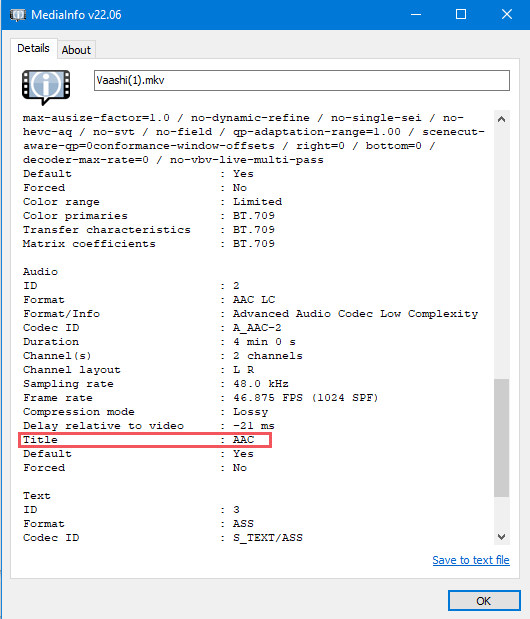
Removing audio track name in the audio tab doesn't remove it in the final file metadata. #4460
Description

Problem Description
I noticed that removing the Track name in the audio tab of the encoding settings doesn't remove the audio name/title in the final file metadata. But if I give a new name it will change to the new name in the final file.


Activity Log, Crash Log or any other details
HandBrake 1.5.1 (2022011000)
OS: Microsoft Windows NT 10.0.19044.0
CPU: Intel(R) Core(TM) i5-3470 CPU @ 3.20GHz
Ram: 8071 MB,
GPU Information:
  Intel(R) HD Graphics - 10.18.10.5161
Screen: 1440x900
Temp Dir: C:\Users\NITIN\AppData\Local\Temp\
Install Dir: C:\Program Files\HandBrake\
Data Dir: C:\Users\NITIN\AppData\Roaming\HandBrake

-------------------------------------------
[08:26:13] hb_init: starting libhb thread

 # Starting Scan ...

[08:26:13] CPU: Intel(R) Core(TM) i5-3470 CPU @ 3.20GHz
[08:26:13]  - Intel microarchitecture Ivy Bridge
[08:26:13]  - logical processor count: 4
[08:26:13] Intel Quick Sync Video support: yes, gpu list: 0
[08:26:13] Intel Quick Sync Video integrated adapter with index 0
[08:26:13]  - Intel Media SDK hardware: API 1.11 (minimum: 1.3)
[08:26:13]  - Decode support:  h264 hevc (8bit: yes, 10bit: yes) av1 (8bit: yes, 10bit: yes)
[08:26:13]  - H.264 encoder: yes
[08:26:13]     - preferred implementation: hardware (1) via D3D11
[08:26:13]     - capabilities (hardware):  breftype vsinfo opt1 opt2+mbbrc+extbrc+trellis+ib_adapt+nmpslice
[08:26:13]  - H.265 encoder: no
[08:26:13] hb_scan: path=C:\Users\NITIN\Videos\Vaashi.mkv, title_index=0
udfread ERROR: ECMA 167 Volume Recognition failed
src/libbluray/disc/disc.c:333: failed opening UDF image C:\Users\NITIN\Videos\Vaashi.mkv
src/libbluray/disc/disc.c:437: error opening file BDMV\index.bdmv
src/libbluray/disc/disc.c:437: error opening file BDMV\BACKUP\index.bdmv
src/libbluray/bluray.c:2646: nav_get_title_list(C:\Users\NITIN\Videos\Vaashi.mkv\) failed
[08:26:13] bd: not a bd - trying as a stream/file instead
libdvdread: DVDOpenFileUDF:UDFFindFile /VIDEO_TS/VIDEO_TS.IFO failed
libdvdnav: vm: vm: failed to read VIDEO_TS.IFO
[08:26:13] dvd: not a dvd - trying as a stream/file instead
Input #0, matroska,webm, from 'C:\Users\NITIN\Videos\Vaashi.mkv':
  Metadata:
    encoder         : libebml v1.4.2 + libmatroska v1.6.4
    creation_time   : 2022-07-19T02:54:47.000000Z
  Duration: 00:04:00.06, start: 0.000000, bitrate: 1447 kb/s
  Stream #0:0: Video: hevc (Main 10), yuv420p10le(tv), 1920x800, SAR 1:1 DAR 12:5, 23.81 fps, 23.81 tbr, 1k tbn, 24 tbc (default)
    Metadata:
      BPS             : 804526
      DURATION        : 00:04:00.042000000
      NUMBER_OF_FRAMES: 5761
      NUMBER_OF_BYTES : 24140029
      _STATISTICS_WRITING_APP: mkvmerge v67.0.0 ('Under Stars') 64-bit
      _STATISTICS_WRITING_DATE_UTC: 2022-07-19 02:54:47
      _STATISTICS_TAGS: BPS DURATION NUMBER_OF_FRAMES NUMBER_OF_BYTES
  Stream #0:1(may): Audio: eac3, 48000 Hz, 5.1(side), fltp, 640 kb/s
    Metadata:
      title           : AAC
      BPS             : 640000
      DURATION        : 00:04:00.064000000
      NUMBER_OF_FRAMES: 7502
      NUMBER_OF_BYTES : 19205120
      _STATISTICS_WRITING_APP: mkvmerge v67.0.0 ('Under Stars') 64-bit
      _STATISTICS_WRITING_DATE_UTC: 2022-07-19 02:54:47
      _STATISTICS_TAGS: BPS DURATION NUMBER_OF_FRAMES NUMBER_OF_BYTES
  Stream #0:2(eng): Subtitle: subrip
    Metadata:
      BPS             : 62
      DURATION        : 00:03:54.542000000
      NUMBER_OF_FRAMES: 48
      NUMBER_OF_BYTES : 1839
      _STATISTICS_WRITING_APP: mkvmerge v67.0.0 ('Under Stars') 64-bit
      _STATISTICS_WRITING_DATE_UTC: 2022-07-19 02:54:47
      _STATISTICS_TAGS: BPS DURATION NUMBER_OF_FRAMES NUMBER_OF_BYTES
[08:26:13] scan: decoding previews for title 1
[08:26:13] scan: audio 0x1: eac3, rate=48000Hz, bitrate=640000 Unknown (E-AC3) (5.1 ch) (640 kbps)
[08:26:14] scan: 10 previews, 1920x800, 23.810 fps, autocrop = 0/0/0/0, aspect 2.40:1, PAR 1:1, color profile: 1-1-1, chroma location: left
[08:26:14] scan: supported video decoders: avcodec qsv
[08:26:14] libhb: scan thread found 1 valid title(s)

 # Scan Finished ...
What Operating System are you running?
Windows 10
What version of HandBrake are you running?
1.5.1
Where did you download HandBrake from?
handbrake.fr
Reacted by luzpaz
Activity
sr55 commentedon Jul 19, 2022
It only overrides the passthru behaviour of the of the audio metadata passthru. There is no option currently to turn this off.
SuperTech22 commentedon Jul 19, 2022
Ok. Thanks. I thought it might be a bug.
SuperTech22 commentedon Jul 20, 2022
When I remove the track name for the subtitles, it removes it correctly in the metadata of the final encoded file also. But the same action does not work for the audio track. I had also unchecked the Passthru common metadata checkbox in the summary tab.
sr55 commentedon Jul 20, 2022
Yeh, it's a behavioural inconsistency. Something we should probably tidy up.
Passthru checkbox on the summary tag doesn't impact this.
Edit: Infact, it may need more thought. There is some auto-naming that goes on regardless if the field is empty
galad87 commentedon Jun 3, 2025
Autonaming is now completely up the UI so there won't be unexpected titles added by libhb.