Repository navigation
[ENHANCEMENT] Only show or visualize major updates based on semver #1557

Description

Please confirm these before moving forward
- I have searched for my feature proposal and not found a work-in-progress/duplicate/resolved/discarded issue.
- This improvements refers to an existing feature. If you want to suggest a new feature, please use this template
- This improvements is not a bug. If you want to report a bug, please use this template
Describe the improvement
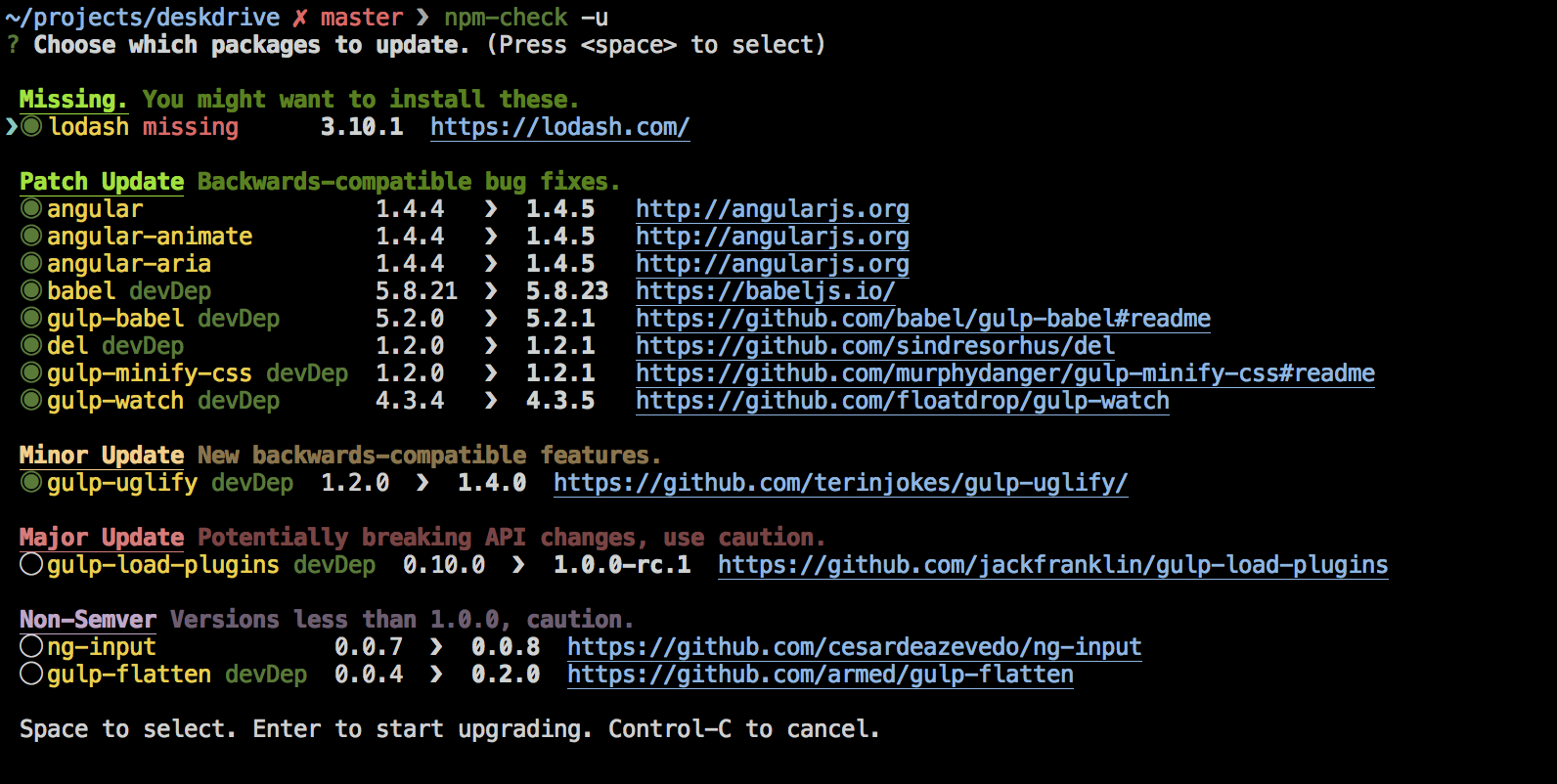
Currently all updates are shown. Lot of package managers however allow to only show major update or resp. show them visually different if the version is a minor or major upgrade.
e.g. show 6.0.1 -> 7.2.4 in red but 6.0.1 -> 6.2.1 in white.

Describe how this improvement could help users.
the reason behind this is that i have a lot of updates and don't necessarly want to update all of them esp. as some software already has updated itself via some internal auto updated. so i only want to get notified about major updates.
Reacted by Łukasz Kurzyniec.pl, Glen, Jonathan Chemla and MrAnyKey
Activity
eikaramba commentedon Nov 10, 2023
i found a similar issue i think ;) #1110
eikaramba commentedon Nov 10, 2023
in order to "parse" the version one could either use semver libraries https://pypi.org/project/semver/ or have a look how this lib is doing it:
https://github.com/dylang/npm-check
marticliment commentedon Nov 10, 2023
They are related, but not actually the same
csoltenborn commentedon Apr 12, 2024
Actually, I would like to be able to configure the according behavior per package. Here's an example: On my machine, I have installed Python 2 for some reason. Now, WingetUI keeps suggesting to update this to Python 3, which is not an option for me. If I now would be able to tell WingetUI that for this package, I only want minor updates to be offered, then I would not have to ignore the Python package (which I have to do now because I don't want to accidentally upgrade to Python 3).
lkurzyniec commentedon Jun 15, 2024
It would be nice to have two options to configure:
mrixner commentedon Apr 7, 2025
To hide minor updates from your updates list, which may be a workaround for a few of you, you can use the new "skip minor updates" installation option on a per-package installation options basis.
jo-chemla commentedon Jul 17, 2025
The
skip minor updatesworkaround is only available when expanding Full Installation option on a single package, not on a package selection - also, thePause updates for xxxcontext menu alternative can only be specified per-package.As a heavy user of winget and UnigetUI, I'm also in favor of that semver check for
major/minor/patchupdates. It could be usefulfilter(for example next to view-mode or order-by), to only show eg major updatesgroup byfeature which would split the Software Updates view the same way eg windows file explorer groups files and folders by date, type, size etc