A full stack web app designed to distribute the stress of labelling datasets and allowing for multiple people to label whenever and wherever they want, even at the same time.

The audience for this web app is for groups of people who need a dataset labelled that want a quick and simple solution while avoiding paying to have it labelled.
- React
- Bootstrap 4
- Firebase (Firestore Database, Cloud Storage, Realtime Database, Analytics, Performance, Authentication)
- Clone the repository on your local machine
- While it clones, create a Firebase project.
- Setup the Firebase services on the Firebase website.
- Setup permissions for services that require it. Here are the permissions used in an instance of this website.
Cloud Storage:
rules_version = '2';
service firebase.storage {
  match /b/{bucket}/o {
    match /{allPaths=**} {
      allow read, write: if request.auth != null;
    }
  }
}
Firestore Database:
rules_version = '2';
service cloud.firestore {
  match /databases/{database}/documents {
    match /{document=**} {
      allow read, write: if request.auth != null;
    }
  }
}
Realtime Database:
{
  "rules": {
    "users": {
      ".read": "auth != null",
      "$uid": {
        ".write": "$uid === auth.uid",
        ".read": "$uid === auth.uid"
      }
    }
  }
}
- Replace the
firebaseConfiginindex.jswith the data from your own Firebase project to link the website to your project. - Import your dataset into Firestore (Firestore & Storage). A script will be provided to help do so. The general database structure can be found below.
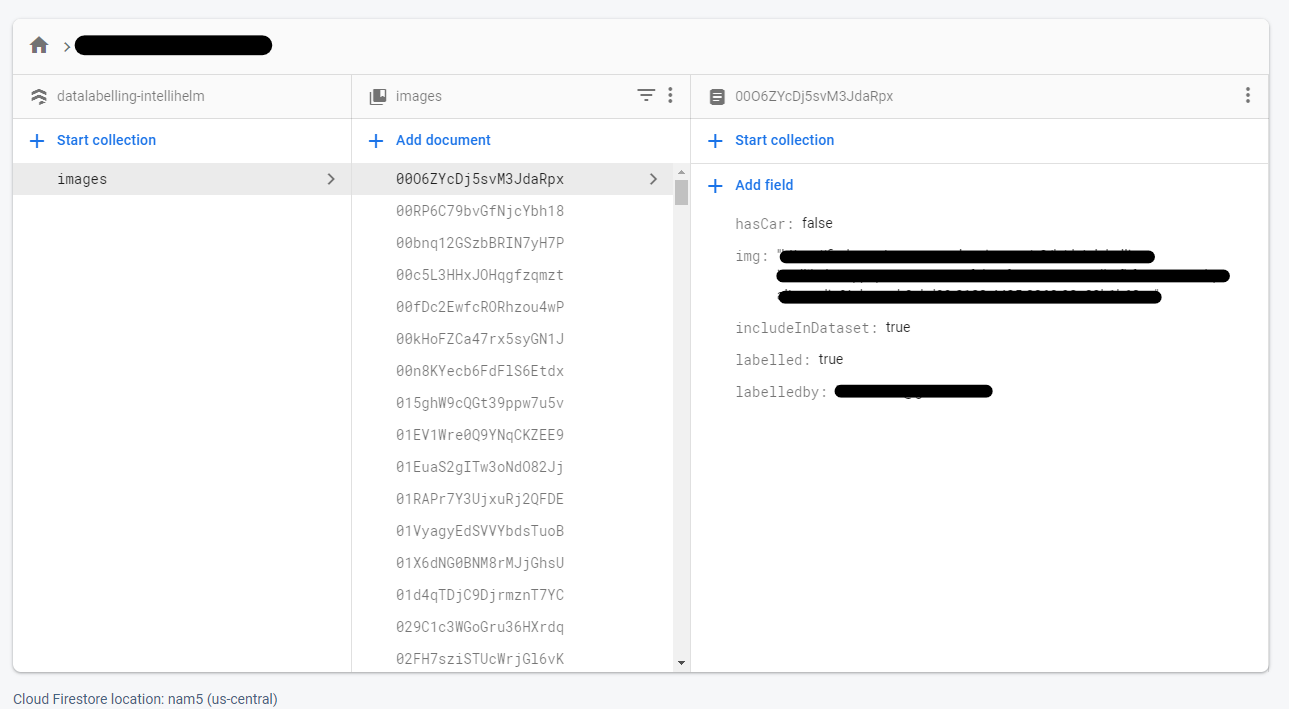
- Publish the website using Firebase Hosting.
- Setup authentication accounts. Since there is no sign-up functionality in the website because the website is meant to be only used by specific people chosen by the developer, accounts must be set up by going to the authentication tab, clicking "Add User", inputting the email of the user and a random password. After creating the account, click the three dots on the right of the account and then "Reset Password". This will allow the user to create their own password after they change their password using the email sent to them.
- Edit a bit of the code to match your case. As of now, it is set to classify cars in their blindspot. However, with some changing of the code, specifically code in the file
Label.jsx, it should match your needs. - You're done! The website should now be accessible by the users you selected.
The usage is similar to a normal website.
- To sign in, enter your email and password.
- After signing in, you should be dropped into the labelling portal.
- Once in the portal, you will be presented with a few key elements:
- A loading bar showing the completion of the dataset, including your own contributions
- The image that you are tasked with labelling
- Four options (by default, you can change this), two of them being:
- "Don't include" for an image that would not make sense for any of the classes
- "Skip image" for an image whose class is disputed
- Logout button
- After determining the class of the image, click the corresponding button, and two things will happen:
- The classification will be stored into the databse
- You will immediately be brought to a new image
- Once all of the images have been labelled, you will be brought to a page notifying you to such.
Made by Aritro Saha, 2021.
This codebase falls under the GNU General Public License v3.0. View the LICENSE file for more information.