Nos dias 22, 24 e 26 de abril de 2024 o INPE em parceria com a UNIFEI realizou o curso: Radar Meteorológico – Fundamentos e Processamento de Dados com Python. Contanto com 180 participantes, foram abordados diversos aspectos téoricos e práticos do processamento de dados de radar. Abaixo, as gravações dos três dias de curso.
NOAA-20 True Color composite created with Polar2Grid
Hi community,
I have created an example notebook on how to download JPSS data directly from the cloud (Google Cloud) and process the HDF5 files using SSEC Polar2Grid, also running on the cloud, using Google Colab. You can also find JPSS data in your GNC-A station, under the /CIMSS/CVIIRS folders.
You may find the examples on the following GitHub page:
AutoMET is a set of functions created to facilitate the access and visualization of satellite imagery and products, NWP data and other meteorological information using simple commands that anyone can use and adapt, including those not familiarized with programming. The examples run directly in the cloud (Google Colab), without the need of installing any tools (but it is also possible to adapt it and run the examples locally). Students may create images processing data available since the launch of each supported satellite.
Supported Datasets (Feb 2024):
Geostationary Ring (EUMETVIEW): Global mosaics (every 3 hours) with GOES-East/West, Meteosat 0°, Meteosat 45.5° and Himawari data. Data available since June 06 2021 18:00 UTC – ‘ir108’, ‘airmass’, ‘natural_color’, ‘ash’ and ‘dust’ RGBs are supported.
GOES-East and GOES-West (AWS): ‘goes16’ data available since July 10 2017, ‘goes17’ since August 28 2018, ‘goes18’ since August 02 2022. Note: please consider that goes-16 generated images every 15 minutes (instead of 10) until a few months after launch. Note: For the sake of speed, only ABI L2 Cloud and Moisture Imagery (Multi-Band Format) – Full Disks – 2 km resolution are supported for now. All 16 bands and more than 20 composites are supported.
Meteosat 0° and Meteosat 45.5° (EUMDAC): ‘msg0’ tested with data since March 26 2004 (every 15 minutes). ‘msg45’ tested with data since February 01 2017. All 12 SEVIRI bands and more than 20 composites are supported.
NWP: open ecmwf data available for download since January 21 2022 00:00 (‘2022-01-21 00:00’). gfs data available for download since February 26 2021 00:00 (‘2021-02-26 00:00’). gfs products: ‘pgrb2.0p25’, ‘pgrb2.0p50’, ‘pgrb2.1p00’. Currently, 15 fields and their variations are supported.
METAR (UNIDATA): metar data available for the last 10 days, for each hour.
LAND SAF and H SAF (EUMETSAT): A variety of products from the SAFs (Satellite Application Facilities). 14 products (LEO and GEO) from the SAFs are supported.
SENTINEL 2 (AWS): True color composites (10 m resolution) for the region of interest. Available since January 2017.
MIMIC TPW ver.2 (CIMSS): Total Precipitable Water composites for the region of interest. Available since 01 October 2016 00:00 UTC.
MetOp ASCAT Winds (NOAA Coastwatch FTP): Daily MetOP A/B/C ASCAT composites available since 07 March 2020.
Links for the latest version of the Example Google Colab Notebooks (you may create a copy and adapt them according to your needs – you may run all scripts online, there’s no need to install tools locally. Also, you may use any kind of plot in a single notebook – I have separated the examples to reduce the notebook file sizes):
Note: These examples were created primarily for use during capacity building activities but they can be adapted for operations and research as well. You may adapt the AutoMET functions the way you need!
Trainees using AutoMET functions during a capacity building event (Uruguay – November 2023):
Among the great open source packages used by AutoMET are:
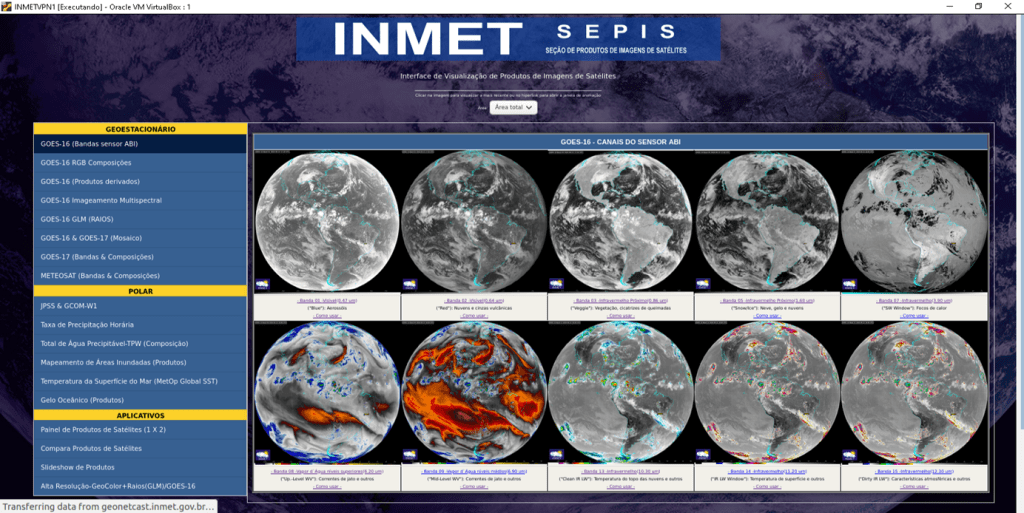
SHOWCast ia a processing and visualization tool for GEONETCast-Americas users, providing a basic HTML structure for product selection and animation, and Python scripts to convert satellite data into imagery automatically. SHOWCast can also be used with other satellite reception mechanisms like GRB, Amazon AWS and UNIDATA THREDDS. The package runs on both Windows and Linux operational systems. The primary goals for the development of SHOWCast are: Provide a free tool that can be customized (both processing and visualization) and put into operations without the need of having a BIG knowledge in programming and web development (human resources issue) and provide a free tool that can be adapted to the available hardware (technology resources issue).
Video: Introduction to SHOWCast:
Demonstration and Community Collaboration: For an online version of SHOWCast, installed, configured and adapted by MARN – El Salvador, please access the following link:




 GNC-A Blog