Please find below presentations made by GNC-A users until May 2020:






Please find below presentations made by GNC-A users until May 2020:
Hi GEONETCasters!
Yesterday we have seen a nice presentation of the Flood Mapping Products now available on GNC-A.
Please find below preliminary Python scripts, that should get you started.
In the next version of SHOWCast, the Flood Mapping Products will be supported by default.
READING THE FLOOD MAP GEOTIFF’s AS PYTHON ARRAYS AND MAKING BASIC MANIPULATION
This opens many possibilities!
#######################################################################################################
# LICENSE
# Copyright (C) 2020 - INPE - NATIONAL INSTITUTE FOR SPACE RESEARCH - BRAZIL
# This program is free software: you can redistribute it and/or modify it under the terms of the GNU
# General Public License as published by the Free Software Foundation, either version 3 of the License,
# or (at your option) any later version.
# This program is distributed in the hope that it will be useful, but WITHOUT ANY WARRANTY; without
# even the implied warranty of MERCHANTABILITY or FITNESS FOR A PARTICULAR PURPOSE. See the GNU General
# Public License for more details.
# You should have received a copy of the GNU General Public License along with this program.
# If not, see http://www.gnu.org/licenses/.
#######################################################################################################
#------------------------------------------------------------------------------------------------------
#------------------------------------------------------------------------------------------------------
# Required modules
#--------------------------------
#to run in a pure text terminal:
import matplotlib
matplotlib.use('Agg')
#--------------------------------
import matplotlib.pyplot as plt                              # Plotting library
import matplotlib.colors                                     # Matplotlib colors
import numpy as np                                           # Scientific computing with Python
import cartopy, cartopy.crs as ccrs                          # Plot maps
import cartopy.io.shapereader as shpreader                   # Import shapefiles
import time as t                                             # Time access and conversion
import os                                                    # Miscellaneous operating system interfaces
import sys                                                   # Import the "system specific parameters and functions" module
from mpl_toolkits.axes_grid1.inset_locator import inset_axes # Add a child inset axes to this existing axes.
from matplotlib.colors import LinearSegmentedColormap        # Linear interpolation for color maps
from datetime import datetime, timedelta                     # Library to convert julian day to dd-mm-yyyy
from osgeo import gdal, osr, ogr                             # Import GDAL
#------------------------------------------------------------------------------------------------------
#------------------------------------------------------------------------------------------------------
# Start the counter
print('Script started.')
start = t.time()

# GeoTIFF file path
path = ("C://VLAB//Samples//Flood-Composite//RIVER-FLDglobal-composite_20200511.part032.tif")
#path = ("C://VLAB//Samples//Flood-Joint//RIVER-FLD-joint-ABI_20200511.part032.tif")
#path = ("C://VLAB//Samples//Flood-ABI//River-Flood-ABI-hourly_20200513_140000.part004.force.tif")

# Get the file name form path
file_name = os.path.splitext(os.path.basename(path))[0]
#------------------------------------------------------------------------------------------------------
#------------------------------------------------------------------------------------------------------

# Get the product type from the file name
if ("ABI" in file_name):
product = "GOES-16 ABI Hourly Composite"
hour = ''.join(filter(str.isdigit, file_name))[8:14]
print(hour)
if ("global" in file_name): product = "Suomi-NPP and NOAA-20 VIIRS 5-day Composite (daily)"
if ("joint" in file_name): product = "Joint VIIRS / ABI flood product (daily)"
print ("Product:", product)

# Get the AOI/Full Disk part, from the file name
part = ''.join(filter(str.isdigit, file_name))[-3:]
print("Part:", part)

# Get the time and date from the file name
date = ''.join(filter(str.isdigit, file_name))[0:8]
print("Date:", date)

#------------------------------------------------------------------------------------------------------
#------------------------------------------------------------------------------------------------------

# Read the GeoTIFF as array
file = gdal.Open(path)
data = file.GetRasterBand(1).ReadAsArray()
print("Size:", data.shape)

# Getting the GeoTIFF extent
geoTransform = file.GetGeoTransform()
min_lon = geoTransform[0]
max_lon = min_lon + geoTransform[1] * file.RasterXSize
max_lat = geoTransform[3]
min_lat = max_lat + geoTransform[5] * file.RasterYSize
# The full GeoTIFF extent
extent = [min_lon, min_lat, max_lon, max_lat]
print("Min Lon:", min_lon, "Min Lat:", min_lat, "Max Lon:", max_lon, "Max Lat:", max_lat)

# The extent I would like to plot
plot_area = [-53.4, -2.04, -51.7, -0.7]
#------------------------------------------------------------------------------------------------------
#------------------------------------------------------------------------------------------------------

# Choose the plot size (width x height, in inches)
dpi = 150
fig = plt.figure(figsize=(data.shape[1]/dpi, data.shape[0]/dpi), dpi=dpi)

# Use the Geostationary projection in cartopy
ax = plt.axes([0, 0, 1, 1], projection=ccrs.PlateCarree())
# The full extent of the GeoTIFF
img_extent = [extent[0], extent[2], extent[1], extent[3]]
# The extent you want to plot (the limit is the full extent above)
ax.set_extent([plot_area[0], plot_area[2], plot_area[1], plot_area[3]], ccrs.PlateCarree())

#------------------------------------------------------------------------------------------------------
#------------------------------------------------------------------------------------------------------

# COLOR SETUP 1
# Define plot colors [VIIRS | Hourly ABI]
c_nodata = '#000000' # 14       (No Data)
c_land   = '#c4a272' # 17 | 43  (Land)
c_clouds = '#c8c8c8' # 30 | 99  (Clouds)
c_supra  = '#b400e6' # 56       (Supra Snow/Ice Water)
c_snow   = '#ffffff' # 70       (Snow)
c_ice    = '#00ffff' # 84       (Ice)
c_water  = '#0000ff' # 99 | 126 (Normal Open Water)
#Floodwater          # 100~200 | 140~254
c_floodwater = ["#3dfaab", "#2df863", "#00f700", "#c6f800", "#faf690", "#f7f701", "#f5c400", "#f79029", "#f75e00", "#ff0000"]
cmap_flood = matplotlib.colors.ListedColormap(c_floodwater)

'''
# COLOR SETUP 2
# Define plot colors [VIIRS | Hourly ABI]
c_nodata = '#000000' # 14       (No Data)
c_land   = '#282828' # 17 | 43  (Land)
c_clouds = '#383838' # 30 | 99  (Clouds)
c_supra  = '#b400e6' # 56       (Supra Snow/Ice Water)
c_snow   = '#ffffff' # 70       (Snow)
c_ice    = '#00ffff' # 84       (Ice)
c_water  = '#0000ff' # 99 | 126 (Normal Oper Water)
#Floodwater          # 100~200 | 140~254
c_floodwater = ["#3dfaab", "#2df863", "#00f700", "#c6f800", "#faf690", "#f7f701", "#f5c400", "#f79029", "#f75e00", "#ff0000"]
cmap_flood = matplotlib.colors.ListedColormap(c_floodwater)
'''
'''
# COLOR SETUP 3
# Define plot colors [VIIRS | Hourly ABI]
c_nodata = '#000000' # 14       (No Data)
c_land   = '#013220' # 17 | 43  (Land)
c_clouds = '#383838' # 30 | 99  (Clouds)
c_supra  = '#b400e6' # 56       (Supra Snow/Ice Water)
c_snow   = '#ffffff' # 70       (Snow)
c_ice    = '#00ffff' # 84       (Ice)
c_water  = '#000033' # 99 | 126 (Normal Oper Water)
#Floodwater          # 100~200 | 140~254
c_floodwater = ["#3dfaab", "#2df863", "#00f700", "#c6f800", "#faf690", "#f7f701", "#f5c400", "#f79029", "#f75e00", "#ff0000"]
cmap_flood = 'Blues'
'''

print("Plotting the Map Elements...")

# Plot the map elements (land, clouds, snow, ice, etc)
if (product == "GOES-16 ABI Hourly Composite"):
cmap = matplotlib.colors.ListedColormap([c_nodata, c_land, c_supra, c_snow, c_ice, c_clouds, c_water])
boundaries = [0, 15, 44, 57, 71, 85, 100, 127]
# Get only the flood from the full data
data_flood = data.astype(np.float64)
data_flood[data_flood < 142] = np.nan
data_flood = data_flood - 140
vmin = 0
vmax = 104
else:
cmap = matplotlib.colors.ListedColormap([c_nodata, c_land, c_clouds, c_supra, c_snow, c_ice, c_water])
boundaries = [0, 15, 18, 31, 57, 71, 85, 100]
# Get only the flood from the full data
data_flood = data.astype(np.float64)
data_flood[data_flood < 100] = np.nan
data_flood = data_flood - 100
vmin = 0
vmax = 100

norm = matplotlib.colors.BoundaryNorm(boundaries, cmap.N, clip=True)
img1 = ax.imshow(data, origin='upper', extent=img_extent, cmap=cmap, norm=norm, zorder=1)

print("Plotting the Floodwater fraction...")

# Plot the floodwater fraction (%)
img2 = ax.imshow(data_flood, vmin=vmin, vmax=vmax, origin='upper', extent=img_extent, cmap=cmap_flood, zorder=2)

#------------------------------------------------------------------------------------------------------
#------------------------------------------------------------------------------------------------------

print("Plotting other elements...")

# Required to put the colorbar inside plot
axins1 = inset_axes(ax, width="100%", height="1%", loc='lower center', borderpad=0.0)

# Add states and provinces
shapefile = list(shpreader.Reader('..//Shapefiles//ne_10m_admin_1_states_provinces.shp').geometries())
ax.add_geometries(shapefile, ccrs.PlateCarree(), edgecolor='white',facecolor='none', linewidth=2.00, zorder=3)
# Add countries
shapefile = list(shpreader.Reader('..//Shapefiles//ne_50m_admin_0_countries.shp').geometries())
ax.add_geometries(shapefile, ccrs.PlateCarree(), edgecolor='black',facecolor='none', linewidth=2.25, zorder=4)
# Add continents
shapefile = list(shpreader.Reader('..//Shapefiles//ne_10m_coastline.shp').geometries())
ax.add_geometries(shapefile, ccrs.PlateCarree(), edgecolor='black',facecolor='none', linewidth=2.50, zorder=5)
# Add coastlines, borders and gridlines
ax.gridlines(color='white', alpha=0.5, linestyle='--', linewidth=2.0, xlocs=np.arange(-180, 180, 0.5), ylocs=np.arange(-180, 180, 0.5), draw_labels=False, zorder=6)

# Put the floodwater fraction (%) colorbar inside plot
ticks = np.arange(0, 100, 10).tolist()
ticks = 10 * np.round(np.true_divide(ticks,10))
ticks = ticks[1:]
cb = fig.colorbar(img2, cax=axins1, orientation="horizontal", ticks=ticks)
cb.outline.set_visible(False)
cb.ax.tick_params(width = 0)
cb.ax.xaxis.set_tick_params(pad=0)
cb.ax.xaxis.set_ticks_position('top')
cb.ax.tick_params(axis='x', colors='black', labelsize=int(data.shape[0] * 0.005))

# Add a title
#plt.annotate(product + " " + date , xy=(int(data.shape[1] * 0.01), data.shape[0] - int(data.shape[0] * 0.016)), xycoords='figure pixels', fontsize=int(data.shape[1] * 0.005), fontweight='bold', color='white', bbox=dict(boxstyle="round",fc=(0.0, 0.0, 0.0), ec=(1., 1., 1.)), zorder=8)

#------------------------------------------------------------------------------------------------------
#------------------------------------------------------------------------------------------------------

print("Saving...")

# Save the figure
plt.savefig('flood_map_example.png', bbox_inches='tight', pad_inches=0, facecolor='white')

# Finish the counter
print('Finished. Total processing time:', round((t.time() - start),2), 'seconds.')

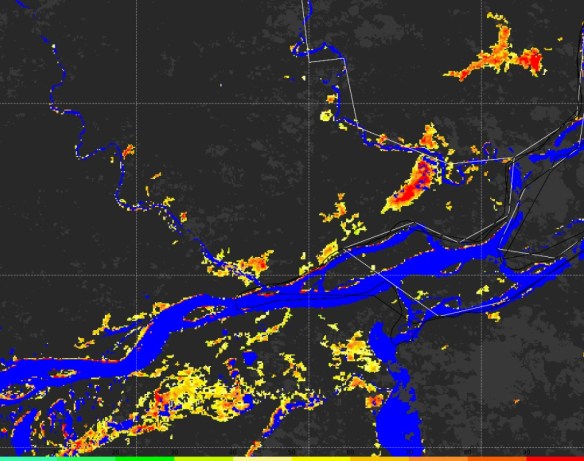
This plot was produced with the “color setup 2” from the example script. It uses dark gray tones for land and clouds, and the same colors for rivers and floodwater fractions and the previous example. It is easy to change the plot colors on the script!
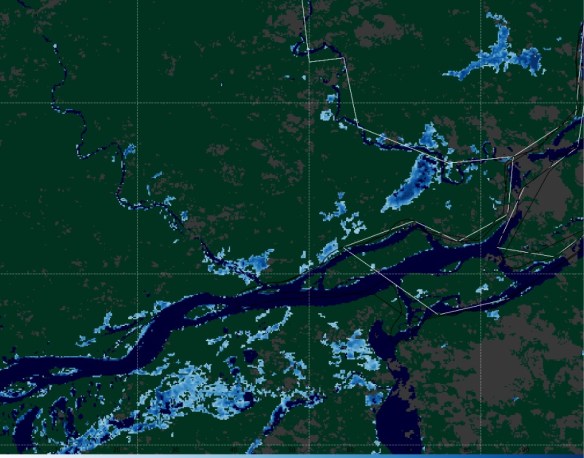
This plot was produced with the “color setup 3” from the example script. It uses dark green for lan, dark gray for clouds, dark blue for rivers and bluish tones for floodwater fraction. It is easy to change the plot colors on the script!
Please download the script by clicking at the image below.

CONVERTING TO KMZ, MOSAICKING AND SUBSECTING SUB REGIONS
#######################################################################################################
# LICENSE
# Copyright (C) 2020 - INPE - NATIONAL INSTITUTE FOR SPACE RESEARCH - BRAZIL
# This program is free software: you can redistribute it and/or modify it under the terms of the GNU
# General Public License as published by the Free Software Foundation, either version 3 of the License,
# or (at your option) any later version.
# This program is distributed in the hope that it will be useful, but WITHOUT ANY WARRANTY; without
# even the implied warranty of MERCHANTABILITY or FITNESS FOR A PARTICULAR PURPOSE. See the GNU General
# Public License for more details.
# You should have received a copy of the GNU General Public License along with this program.
# If not, see http://www.gnu.org/licenses/.
#######################################################################################################
#------------------------------------------------------------------------------------------------------
#------------------------------------------------------------------------------------------------------
# Required modules
#--------------------------------
from osgeo import gdal, osr, ogr                             # Import GDAL
from datetime import datetime, timedelta                     # Library to convert julian day to dd-mm-yyyy
import time as t                                             # Time access and conversion
import os                                                    # Miscellaneous operating system interfaces
import sys                                                   # Import the "system specific parameters and functions" module
import glob                                                  # Unix style pathname pattern expansion
#------------------------------------------------------------------------------------------------------
#------------------------------------------------------------------------------------------------------
# Start the time counter
print('Script started.')
start = t.time()

#------------------------------------------------------------------------------------------------------
#------------------------------------------------------------------------------------------------------
# CONVERTION TO KMZ
print("Example 1: Converting an AOI to KMZ...")

# GeoTIFF file path
path = ("C://VLAB//Samples//Flood-Composite//RIVER-FLDglobal-composite_20200511.part032.tif")

# Converting from GeoTIFF to KMZ (Google Earth)
translate_options = gdal.TranslateOptions(rgbExpand='RGB')
gdal.Translate(path + '.kmz', path, format='KMLSUPEROVERLAY', options=translate_options)
#------------------------------------------------------------------------------------------------------
#------------------------------------------------------------------------------------------------------
# MOSAICKING AOI's AND CONVERTING TO KMZ

print("Example 2: Mosaicking AOI's and converting to KMZ...")

# Mosaicking diferent AOI's (in this example parts 20 to 29 from May 11th):
gdal.BuildVRT('mosaic_1.vrt', sorted(glob.glob( 'C://VLAB//Samples//Flood-Composite//*20200511*part02*.tif'), key=os.path.getmtime))
gdal.Translate('mosaic_1.tif',  'mosaic_1.vrt')

# Converting the Mosaic from GeoTIFF to KMZ (Google Earth)
translate_options = gdal.TranslateOptions(rgbExpand='RGB')
gdal.Translate('mosaic_1.kmz', 'mosaic_1.tif', format='KMLSUPEROVERLAY', options=translate_options)
#------------------------------------------------------------------------------------------------------
#------------------------------------------------------------------------------------------------------
# MOSAICKING AOI's AND CUTTING A REGION

print("Example 3: Mosaicking AOI's and cutting a region...")

# Mosaicking diferent AOI's (in this example parts 20 to 29 from May 11th):
gdal.BuildVRT('mosaic_2.vrt', sorted(glob.glob( 'C://VLAB//Samples//Flood-Composite//*20200511*part02*.tif'), key=os.path.getmtime))
#translate_options = gdal.TranslateOptions(projWin = [-85.0, 16.0, -64.0, 24.0])
translate_options = gdal.TranslateOptions(projWin = [-85.0, 24.0, -64.0, 16.0])
gdal.Translate('mosaic_2.tif',  'mosaic_2.vrt', options=translate_options)
#------------------------------------------------------------------------------------------------------
#------------------------------------------------------------------------------------------------------

# Finish the counter
print('Finished. Total processing time:', round((t.time() - start),2), 'seconds.')
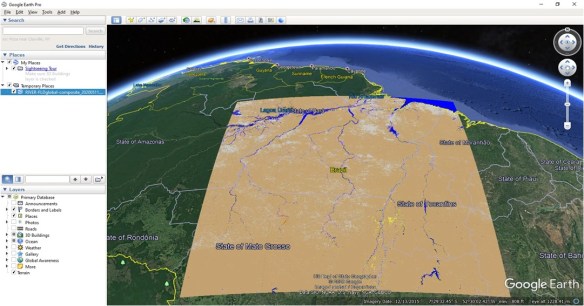
A single Flood Map Area of Interest (AOI’s) converted to KMZ using Python

Areas of Interest (AOI’s) number 21 to 29 mosaicked and converted to KMZ using Python

After mosaicking different AOI’s, the GeoTIFF has been cut to a custom region using the Python script above
Please download the script by clicking at the image below.

Hi GEONETCasters!
Please find below the presentations from the 6th GEONETCast-Americas User Group Webinar (click on the images to download):
GEONETCAST-AMERICAS TRANSITION TO DVB-S2

NOAA GLOBAL FLOOD PRODUCT – GEONETCAST OVERVIEW
GNC-A USER CASE STUDIES
ASUNCIÓN CATHOLIC UNIVERSITY (PARAGUAY)
and
DIRECTORATE OF METEOROLOGY AND HIDROLOGY OF THE NATIONAL DIRECTORATE OF CIVIL AERONAUTICS – DINAC (PARAGUAY)
Thank you to all the participants!
Please find the presentations from the other GEONETCast-Americas User Group Webinars, at the following links:


Topic: NOAA LEO/GEO Flood Mapping Products are now available on GEONETCast Americas (GNC-A)
Date/Time Issued: May 13, 2020 1420 UTC
Product(s) or Data Impacted: n/a
Date/Time of Initial Impact: May 13, 2020
Date/Time of Expected End: n/a
Length of Event: n/a
Details/Specifics of Change: The following NOAA LEO/GEO Flood Mapping Products are now available on GEONETCast Americas (GNC-A) rebroadcast.
• GOES-16 & 17 ABI Hourly Composites: The ABI hourly composite has the best time manner in detecting floods as it is updated every hour under cloud free conditions. Information composited hourly for clouds to provide the best and latest cloud free information of flood extent.This can be very helpful for emergency response providing a low resolution (1-2km) initial flood extent estimate.
• Joint VIIRS / ABI flood product (daily): The joint VIIRS/ABI flood product combines the clear sky VIIRS and ABI daily composites and represents the best daily cloud-free flood extent. Available at ~0800 UTC daily and is useful for flood extent from the previous day.
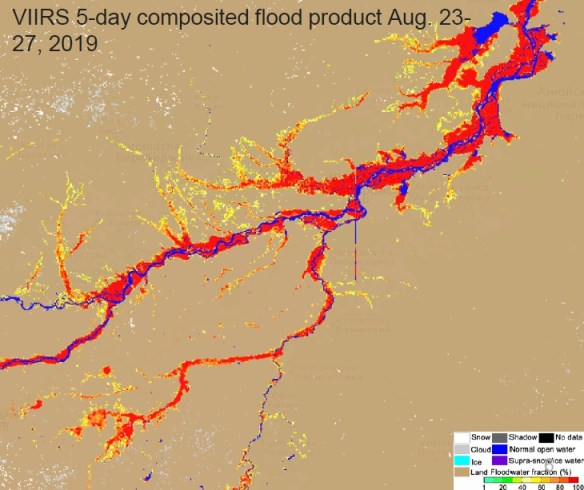
• Suomi-NPP and NOAA-20 VIIRS 5-day Composite (daily): The 5-day VIIRS composite has the best spatial resolution and provides the maximal cloud-free flood extent during the latest five days. Useful for flood investigation during a major flood event.
The Flood Mapping Products on GNC-A are received on the following ingestion folders:
CIMSS/Flood-ABI: GOES-16 ABI Hourly Composites
Naming convention: River-Flood-ABI_YYYYMMDD_HHMNSS.part00X.force.tif
Note: Parts 1 to 4 (full disk divided in 4 regions).
CIMSS/Flood-Composite: Suomi-NPP and NOAA-20 VIIRS 5-day Composite (daily)
Naming convention: RIVER-FLDglobal-composite_YYYYMMDD.part0XX.tif
Note: Parts 01 to 41, according to the areas of interest (AOI’s) shown in slide n°7 (https://www.ssec.wisc.edu/flood-map-demo/)
CIMSS/Flood-Joint: Joint VIIRS / ABI flood product (daily)
Naming convention: RIVER-FLD-joint-ABI_YYYYDDMM.part0XX.tif
Note: Parts 01 to 41, according to the areas of interest (AOI’s) shown in slide n°7 (https://www.ssec.wisc.edu/flood-map-demo/)
The quasi-nearrealtime NOAA LEO/GEO Flood Mapping Products, developed by George Mason University, produced at the University of Wisconsin Space Science and Engineering Center on a best effort basis.
Contact Information for Further Information:
[email protected] for information on GNC-A Program
[email protected] for information on flood mapping Products
Web Site(s) for applicable information:
https://www.ssec.wisc.edu/flood-map-demo/
https://www.geonetcastamericas.noaa.gov/
https://geonetcast.wordpress.com

Tópico: Produtos LEO/GEO de Mapeamento de Inundações da NOAA já estão disponíveis no GNC-A
Data / Hora da Emissão: 13 de maio de 2020, 1420 UTC
Produto(s) ou Dados Impactados: n/a
Data / Hora do Impacto Inicial: 13 de maio de 2020
Data / Hora Esperada para Término: n/a
Duração do Evento: n/a
Detalhes / Mudanças Específicas: Os seguintes Produtos LEO/GEO de Mapeamento de Inundações da NOAA estão agora disponíveis na transmissão do GEONETCast-Americas (GNC-A).
• Composições horárias do ABI do GOES-16 & 17: As composições horárias do ABI possuem a melhor resposta temporal para detecção de inundações, pois são atualizadas a cada hora sob condições livres de nebulosidade. As informações são compostas de modo horário devido às nuvens, proporcionando a melhor e mais atualizada informação da extensão de inundações em zonas livres de nuvens. Este produto pode ser muito útil para respostas em emergências, fornecendo a extensão de inundações em baixa resolução (1-2 km), para a estimativa da extensão inicial de inundações.
• Produto de inundação conjunto VIIRS / ABI (produto diário): O produto de inundação conjunto VIIRS/ABI combina as composições diárias livres de nuvens do VIIRS e ABI e representa a melhor extensão diária de inundação em locais sem nebulosidade. Está disponível diariamente aproximadamente às 0800 UTC e é útil para verificar a extensão de inundações do dia anterior.
• Composição dos últimos 5 dias do VIIRS do Suomi-NPP e NOAA-20 (produto diário): A composição de 5 dias do VIIRS possui a melhor resolução espacial e proporciona a máxima extensão de inundação em locais sem nebulosidade durante os últimos cinco dias. Útil para investigação de inundações durante um grande evente de inundação.
Os Produtos de Mapeamento de Inundações no GNC-A são recebidos nas seguintes pastas de ingestão:
CIMSS/Flood-ABI: Composições horárias do ABI do GOES-16
Nomenclatura: River-Flood-ABI_YYYYMMDD_HHMNSS.part00X.force.tif
Observação: Partes 1 a 4 (o full disk foi dividido em 4 regiões).
CIMSS/Flood-Composite: Composição dos últimos 5 dias do VIIRS do Suomi-NPP e NOAA-20 (produto diário)
Nomenclatura: RIVER-FLDglobal-composite_YYYYMMDD.part0XX.tif
Observação: Partes 01 a 41, de acordo com as áreas de interesse (“AOI’s”) mostradas no slide n°7
(https://www.ssec.wisc.edu/flood-map-demo/)
CIMSS/Flood-Joint: Produto de inundação conjunto VIIRS / ABI (diário)
Nomenclatura: RIVER-FLD-joint-ABI_YYYYDDMM.part0XX.tif
Observação: Partes 01 a 41, de acordo com as áreas de interesse (“AOI’s”) mostradas no slide n°7
(https://www.ssec.wisc.edu/flood-map-demo/)
Os Produtos em tempo quase real LEO-GEO de Mapeamento de Inundações da NOAA são desenvolvidos pela Universidade George Mason e produzidos pelo Centro de Ciências e Engenharia Espaciais da Universidade de Wisconsin com base nos melhores esforços.
Contato para mais informações:
[email protected] para informações sobre o programa GNC-A.
[email protected] para informações sobre os Produtos de Mapeamento de Inundações.
Web site(s) para demais informações:
https://www.ssec.wisc.edu/flood-map-demo/
https://www.geonetcastamericas.noaa.gov/
https://geonetcast.wordpress.com

Tema: Productos LEO/GEO de Mapeo de Inundaciones de la NOAA ya están disponibles en GNC-A
Fecha / hora de emisión: 13 de mayo de 2020, 1420 UTC
Producto(s) o Datos Afectados: n/a
Fecha / hora del impacto inicial: 13 de mayo de 2020
Fecha / Hora de finalización prevista: n/a
Duración del evento: n/a
Detalles del cambio: Los siguientes productos LEO/GEO de Mapeo de Inundaciones de la NOAA ya están disponibles en la transmisión del GEONETCast-Americas (GNC-A).
• Composiciones horarias del ABI del GOES-16 & 17: Las composiciones horarias del ABI tienen la mejor respuesta temporal para la detección de inundaciones, ya que se actualizan a cada hora en condiciones sin nubes. Las informaciones se componen a cada hora debido a las nubes, proporcionando la mejor y más actualizada información sobre el alcance de las inundaciones en áreas libres de nubes. Este producto puede ser muy util para respuestas en emergencias, ya que proporciona el alcance de las inundaciones en baja resolución (1-2 km), para estimar la extensión inicial de las inundaciones.
• Producto e inundación conjunto VIIRS / ABI (producto diário): El producto de inundación conjunto VIIRS/ABI combina las composiciones diarias libres de nubes del VIIRS y ABI y representa la mejor extensión de inundación diária de inundación en zonas sin nubes. Está disponible diariamente aproximadamente a las 0800 UTC y es util para verificar el alcance de las inundaciones del día anterior.
• Composición de los últimos 5 días del VIIRS del Suomi-NPP y NOAA-20 (producto diário): La composición de 5 días del VIIRS tiene la mejor resolución espacial y proporciona la máxima extensión de inundación en zonas sin nubes durante los últimos 5 días. Útil para la investigación e inundaciones durante un gran evento de inundación.
Los Productos de Mapeo de Inundaciones en GNC-A se reciben en las siguientes carpetas de ingestión:
CIMSS/Flood-ABI: Composiones horárias del ABI de GOES-16
Nomenclatura: River-Flood-ABI_YYYYMMDD_HHMNSS.part00X.force.tif
Nota: Partes 1 a 4 (el full disk se dividió en 4 regiones).
CIMSS/Flood-Composite: Composición de los últimos 5 días del VIIRS de Suomi-NPP y NOAA-20 (producto diário)
Nomenclatura: RIVER-FLDglobal-composite_YYYYMMDD.part0XX.tif
Nota: Partes 01 a 41, de acuerdo con las áreas de interés (“AOI’s”) que se muestran en la diapositiva n°7 (https://www.ssec.wisc.edu/flood-map-demo/)
CIMSS/Flood-Joint: Produto de inundação conjunto VIIRS / ABI (diário)
Nomenclatura: RIVER-FLD-joint-ABI_YYYYDDMM.part0XX.tif
Nota: Partes 01 a 41, de acuerdo con las áreas de interés (“AOI’s”) que se muestran en la diapositiva n°7 (https://www.ssec.wisc.edu/flood-map-demo/)
Los productos de mapeo de inundaciones LEO-GEO en tiempo casi real de NOAA son desarrollados por la Universidad George Mason y producidos por el Centro de Ciencia e Ingeniería Espacial de la Universidad de Wisconsin en base a los mejores esfuerzos.
Contacto para más información:
[email protected] para información sobre el programa GNC-A
[email protected] para informaciones sobre los Productos de Mapeo de Inundaciones.
Sitio(s) web para otras informaciones:
https://www.ssec.wisc.edu/flood-map-demo/
https://www.geonetcastamericas.noaa.gov/
https://geonetcast.wordpress.com
Dear Colleagues,
We’ll talk with you in few hours (1700 UTC today) for the User Group Webinar #6, but in the meantime here is an agenda:
Meeting link: https://spsd.webex.com/spsd/j.php?MTID=m3401eb464b909d9840739967b9eace27
Meeting number: 900 061 311
Password: gnc-a6
Please note: we will have a WebEx VoIP for the both slides and voice (NO dial in/call in number). Please make sure you have headsets/headphones or speakers on your computer.
Sli.do will be used to enable participants to request interventions, make comments and ask questions. All participants should monitor sli.do throughout the meeting.
Please go to https://www.sli.do/ and enter the following event code: #47137 OR you can just click this link: https://app.sli.do/event/478bziel
Regards,
NOAA GNC-A Program Manager
Caros colegas,
Nos falaremos em algumas horas (17:00 UTC de hoje) no Webinar #6 do grupo de usuários. Enquanto isso, segue abaixo a agenda da reunião:
● Boas vindas e introdução dos participantes
● Atualização sobre a transição para DVB-S2 (Dave Meadows, Knight Sky LLC)
● Produtos de Mapeamento de Inundações da NOAA (William Straka, University of Wisconsin – Madison)
● Exemplos e Estudos de Caso
Ever Barreto – Universidade Católica de Assunção (Paraguai)
Wilson Caballero – Diretoria de Meteorologia e Hidrologia da Diretoria Nacional de Aeronáutica Civil – DINAC (Paraguai)
● Itens para discussão – Idéias para Agenda Permanente
● Itens de ação e resumo
Link para a reunião: https://spsd.webex.com/spsd/j.php?MTID=m3401eb464b909d9840739967b9eace27
Número da reunião: 900 061 311
Senha: gnc-a6
Observação: teremos um VoIP WebEx para slides e voz (sem número de discagem / número de chamada). Verifique se você possui fones de ouvido ou alto-falantes no seu computador.
O Sli.do será usado para permitir que os participantes solicitem intervenções, façam comentários e perguntas. Todos os participantes devem monitorar sli.do durante a reunião.
Acesse https://www.sli.do/ e digite o seguinte código de evento: # 47137 OU você pode simplesmente clicar neste link: https://app.sli.do/event/478bziel
Atenciosamentee,
Gerente do Programa GNC-A da NOAA
Estimados colegas,
Hablaremos con ustedes en pocas horas (17:00 UTC de hoy) en el seminario web #6 del grupo de usuarios. Mientras, sigue la agenda de la reunión:
● Bienvenida e introducción de los participantes
● Actualización sobre la transición a DVB-S2 (Dave Meadows, Knight Sky LLC)
● Producto de mapeo de inundaciones NOAA LEO / GEO (William Straka, Universidad de Wisconsin – Madison)
● Ejemplos y casos de usuario
Ever Barreto – Universidad Católica de Asunción (Paraguay)
Wilson Caballero – Dirección de Meteorología e Hidrología de la Dirección Nacional de Aeronáutica Civil – DINAC (Paraguay)
● Discusión – Ideas para La agenda permanente
● Acciónes y resumen.
Enlace de la reunión: https://spsd.webex.com/spsd/j.php?MTID=m3401eb464b909d9840739967b9eace27
Número de reunión: 900 061 311
Contraseña: gnc-a6
Tenga en cuenta: tendremos un VoIP de WebEx tanto para las diapositivas como para la voz (NO hay que marcar / llamar). Asegúrese de tener auriculares o altavoces en su computadora.
Sli.do se utilizará para permitir a los participantes solicitar intervenciones, hacer comentarios y preguntas. Todos los participantes deben monitorear sli.do durante la reunión.
Vaya a https://www.sli.do/ e ingrese el siguiente código de evento: # 47137 O simplemente puede hacer clic en este enlace: https://app.sli.do/event/478bziel
Atentamente,
Gerente del Programa GNC-A de la NOAA
Dear Colleagues,
I hope this message finds you and your families in good health and spirits during this challenging time.
NOAA GEONETCast Americas (GNC-A) Program Manager is pleased to invite you the 6th GNC-A User Group webinar to facilitate communication among, and provide updates to GNC-A users.
The webinar will be held on Thursday, May 14, 2020, at 1PM EDT (17:00 UTC) with an anticipated duration of 1.5 hours.
Your interest and participation in these events as well as feedback on desired presentation topics for future webinars are highly valued. Please don’t hesitate to email with any questions or feedback. We are also looking for presenters and user cases.
Please note: we will have a WebEx VoIP for the both slides and voice (NO dial in number). Please make sure you have headsets/headphones or speakers on your computer.
Meeting link: https://spsd.webex.com/spsd/j.php?MTID=m3401eb464b909d9840739967b9eace27
Meeting number: 900 061 311
Password: gnc-a6
Link for sending questions: https://app.sli.do/event/478bziel
Tentative agenda:
● Welcome and Roll Call
● Update on transition to DVB-S2
● NOAA LEO/GEO Flood Mapping Product
● Examples & User Cases
● Discussion Items – Ideas for the Permanent Agenda
● Action items and summary
Upcoming GNC-A User Group webinar schedule in 2020 (all dates are subject to change):
August 20, November 19
Regards,
NOAA GNC-A Program Manager
Caros Colegas,
Espero que ao ler esta mensagem você e sua família estejam com boa saúde e animados durante estes momentos difíceis.
A Gerente do Programa GNC-A da NOAA tem o prazer de convidá-lo para o sexto seminário on-line do Grupo de Usuários GNC-A para facilitar a comunicação e fornecer atualizações para os usuários do GEONETCast Americas.
O webinar será realizado na quinta feira, 14 de maio de 2020, às 13:00 EDT (17:00 UTC) com duração prevista de 1 hora e meia.
O seu interesse e participação nesses eventos, bem como o feedback sobre os tópicos de apresentação desejados para futuros webinars, são muito bem vindos. Não hesite em enviar um e-mail com perguntas ou comentários. Também estamos em busca de voluntários para apresentações e estudos de casos de usuários.
Obs.: Teremos um VoIP WebEx para a transmissão dos slides e voz (NÃO haverá número para ligações). Assegure-se de que você tenha fones de ouvido ou auto-falantes disponíveis no seu computador.
Link da reunião: https://spsd.webex.com/spsd/j.php?MTID=m3401eb464b909d9840739967b9eace27
Número da reunião: 900 061 311
Senha: gnc-a6
Link para o envio de perguntas: https://app.sli.do/event/478bziel
Agenda provisória:
● Boas vindas e introdução dos participantes
● Atualização sobre a transição para DVB-S2
● Produtos de Mapeamento de Inundações da NOAA (LEO e GEO)
● Exemplos e Estudos de Caso (Usuários)
● Itens para discussão – Idéias para Agenda Permanente
● Itens de ação e resumo
Próximos Webinars agendados para 2020 (datas sujeitas a mudanças):
20 de agosto e 19 de novembro
Atenciosamentee,
Gerente do Programa GNC-A da NOAA
Estimados colegas,
Espero que al leer este mensaje, usted y su familia estén bien de salud y animados durante estos tiempos difíciles.
La Gerente del Programa GNC-A de la NOAA tiene el placer de invitarle al sexto seminario on-line del Grupo de Usuarios GNC-A para facilitar la comunicación y proporcionar actualizaciones a los usuarios de GEONETCast Americas..
El webinar se realizará el jueves, 14 de mayo de 2020 a las 13:00 EDT (17:00 UTC) con la duración prevista de 1 hora y media.
Se valora mucho su interés y participación en estos eventos, así como sus comentarios sobre los temas de presentación deseados para futuros seminarios web. No dude en enviar un correo electrónico con cualquier pregunta o comentario. También estamos buscando presentadores y estudios de casos de usuarios.
Nota: Tendremos un VoIP WebEx para la transmisión de diapositivas y voz (NO habrá ningún número para las llamadas). Asegúrese de tener auriculares o altavoces disponibles en su computadora.
Enlace de la reunión: https://spsd.webex.com/spsd/j.php?MTID=m3401eb464b909d9840739967b9eace27
Número de la reunión: 900 061 311
Contraseña: gnc-a6
Enlace para el envio de preguntas: https://app.sli.do/event/478bziel
Agenda provisional:
● Bienvenida e introducción de los participantes,
● Actualizacion sobre la transición a DVB-S2
● Productos de mapeo de inundaciones NOAA (LEO y GEO)
● Ejemplos y estúdios de caso (usuarios)
● Discusión – Ideas para La agenda permanente
● Acciónes y resumen.
Próximos seminarios web programados para 2020 (fechas sujetas a cambios):
20 de agosto y 19 de noviembre
Atentamente,
Gerente del Programa GNC-A de la NOAA

Hi GEONETCasters,
The DVB-S2 signal for GEONETCast-Americas is active since May 1st 2020. You may find more information on the official announcements. Dual illumination on transponder 7D (current) and 19C (new) started on 1 May, 2020. It will run through 30 June, 2020 for 2 months. This gives all users two months to reprogram existing receivers or install new receiver.
Please find below the procedure to configure the NOVRA S300D, one of the most used receivers, using the CMCS command line utility:
DOWNLOADING THE CMCS UTILITY AND THE CMCS MANUAL
CONFIGURING THE NOVRA S300D
Connect the receiver in your configured Ethernet interface (same IP family), connect the coaxial cable from the antenna, and turn on the device. The red “POWER” light should light up.
After unpacking the CMCS utility, execute the following commands in your terminal / prompt.
Enter the CMCS interface, and log on the S300D using the receiver’s IP, as shown in the example below (the IP below is the one from an example receiver. Please confirm the IP of your receiver before trying to connect):
$ cmcs
CMCS> login 192.168.0.11
The interface will ask for a password. If you haven’t changed the S300D factory settings, insert the default password: Novra-S2
After that, please execute the following commands:
Note: The “frequency” number on the S300D configuration is the LNB oscilator frequency (5150 MHz) minus the downlink frequency (4080 MHz for the new DVB-S2 signal). That’s why the configuration is 1070.
IF THIS IS YOUR FIRST TIME CONFIGURING THE S300D
CMCS> mode DVBS2
CMCS> frequency 1070
CMCS> symbolrate 30.00
CMCS> lnb polarization vertical
CMCS> add pid mpe 4201
IF YOU ARE ALREADY RECEIVING THE GNC-A DVB-S SIGNAL AND WILL JUST CHANGE IT TO DVB-S2
CMCS> mode DVBS2
CMCS> frequency 1070
CMCS> symbolrate 30.00
The “LOCK” light should turn on if the antenna is correctly pointed towards the satellite and the “SIGNAL” light should blink when the ingestion begins.

In the case anything goes wrong and you want to return to the DVB-S confguration, please find below the DVB-S configuration:
CMCS> mode DVBS
CMCS> frequency 1310
CMCS> symbolrate 27.69
CMCS> lnb polarization vertical
CMCS> add pid mpe 4201
 GNC-A Blog