GEONETCast-Americas Products Quick Guides

Quick_Guides_GNC_1.jpg

Hi GEONETCasters,

As a complement to the GEONETCast-Americas Illustrated Product List, please find below the links for the Quick Guides of some of the products available on GNC-A (40 quick guides for now). On these Quick Guides you’ll find why the product is important, its impact on operations (primary application), limitations, interpratation and resources.

ABI (Advanced Baseline Imager):

Band 02: 0.64 μm (“Red”) – Link
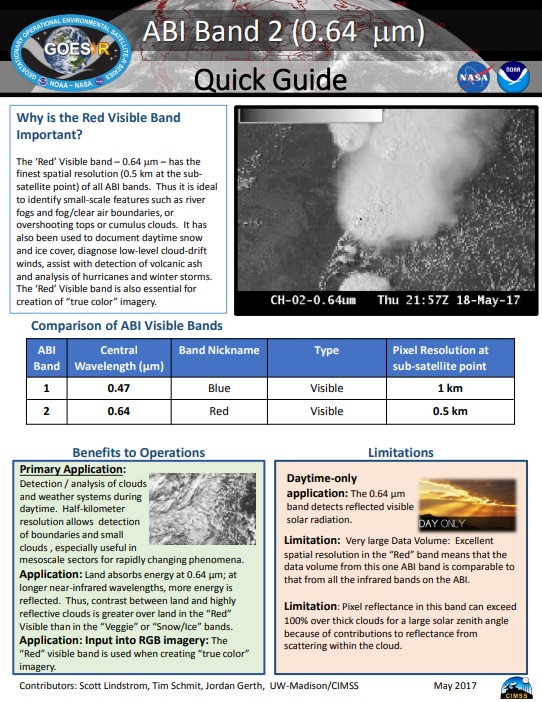
1.jpg

Band 07: 3.9 μm (“Shortware Window”) – Link
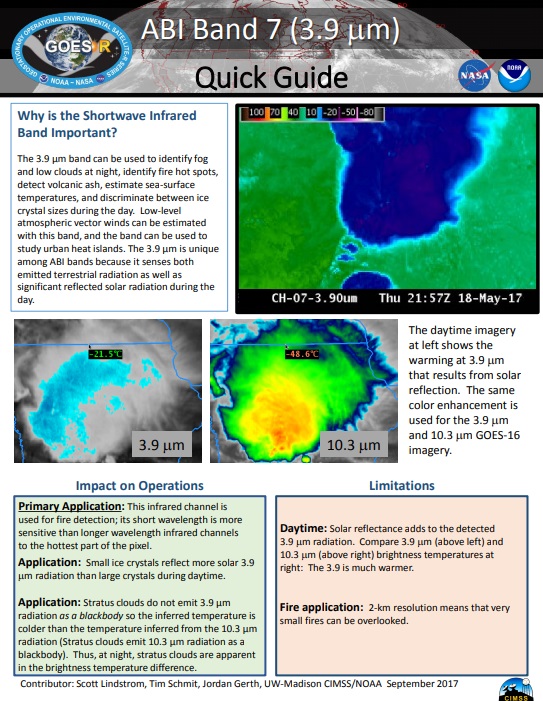
2.jpg

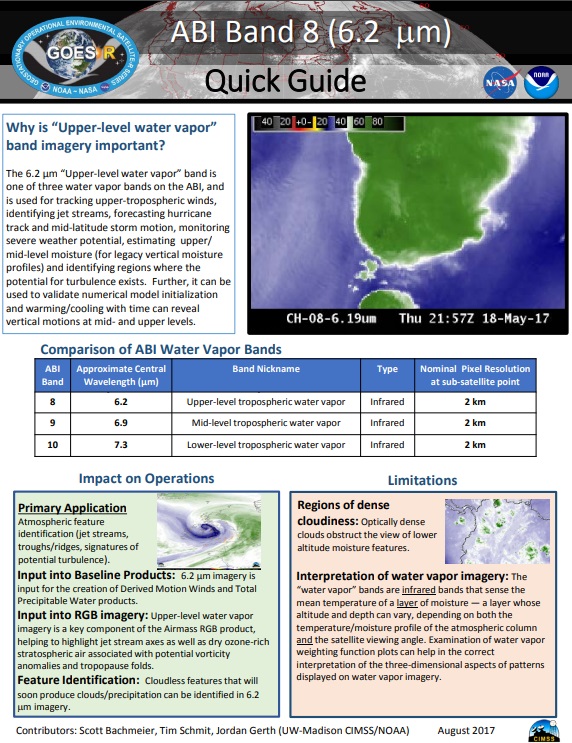
Band 08: 6.2 μm (“Upper-Level Tropospheric Water Vapor”) – Link
3.jpg
Band 09: 6.9 μm (“Mid-Level Tropospheric Water Vapor”) – Link

4.jpg

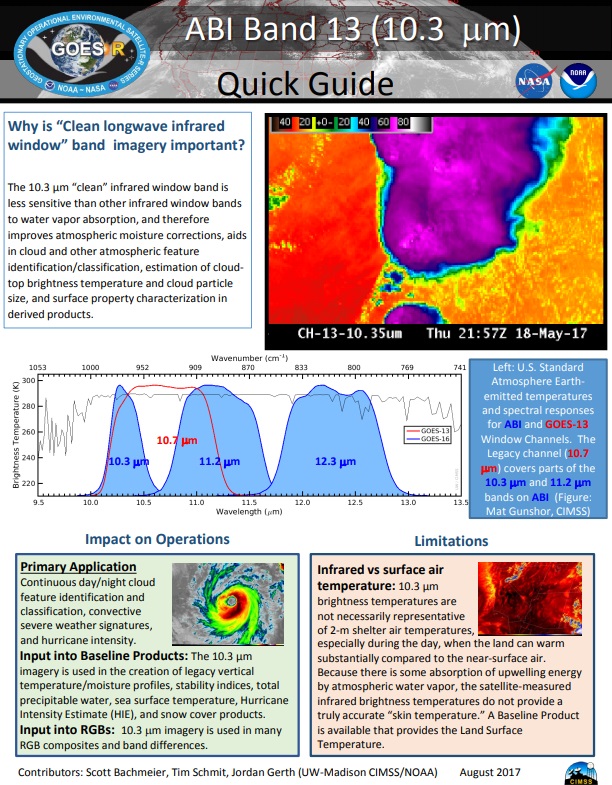
Band 13: 10.3 μm (“Clean” IR Longwave Window) – Link
5.jpg
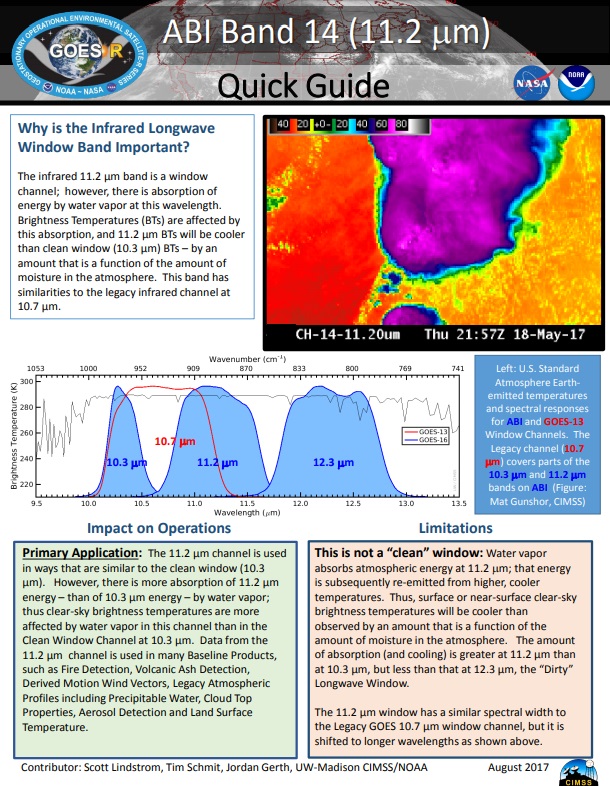
Band 14: 11.2 μm (IR Longwave Window) – Link
6.jpg
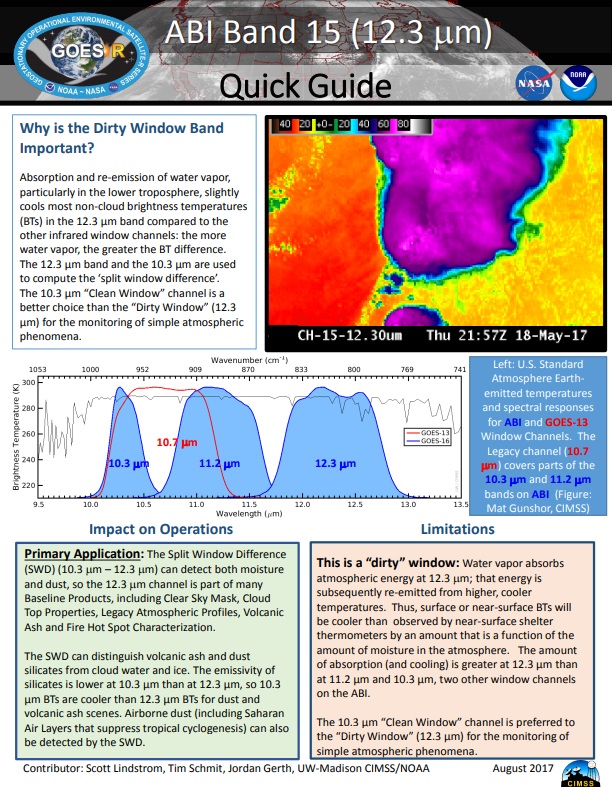
Band 15: 12.3 μm (“Dirty” Longwave Window) – Link
7

GLM (Geostationary Lightning Mapper):

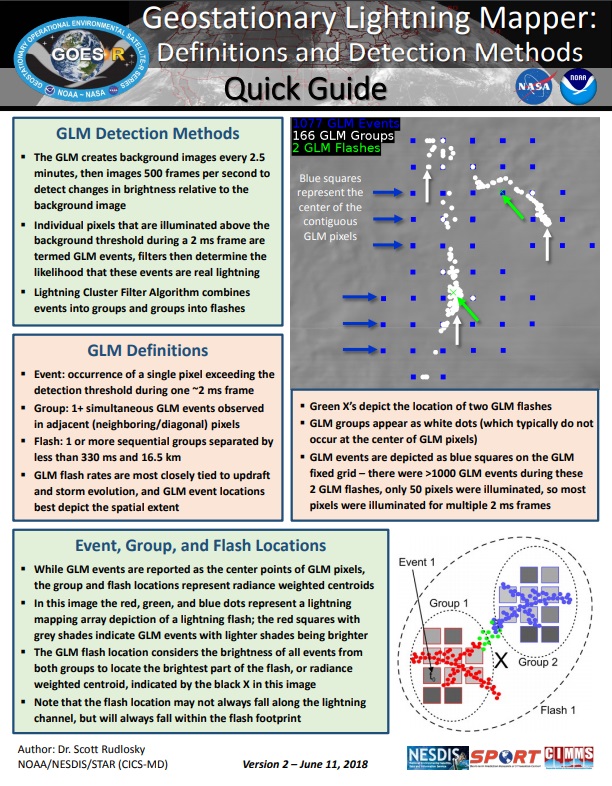
Events, Groups and Flashes (5 minutes) [the gridded product available on GNC-A is not exactly as the one mentioned on the third link, but the general idea is the same] – Link 1, Link 2, Link 3

12.jpg

10.jpg

11.jpg

Baseline Products:

Aerosol Detection (Smoke and Dust) – Link

26
Aerosol Optical Depth – Link

19.jpg
Clear Sky Masks – Link

28.jpg
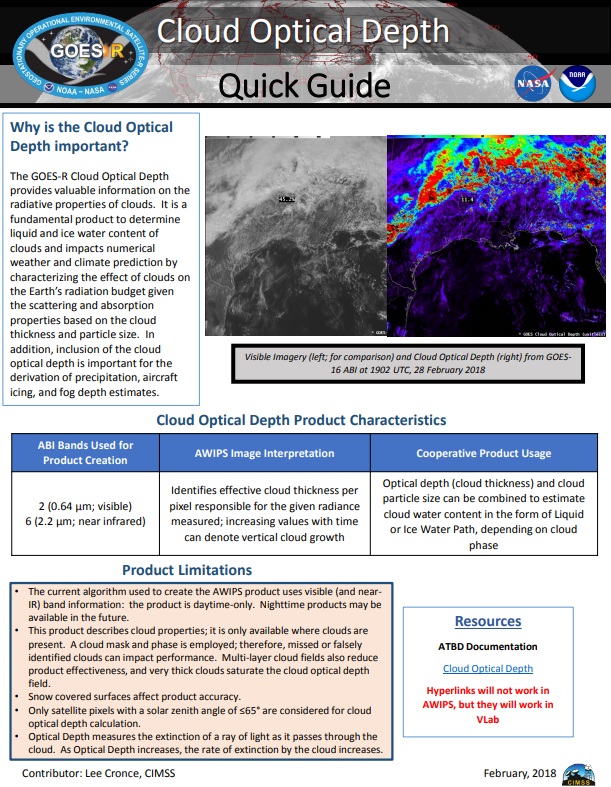
Cloud Optical Depth – Link

23.jpg
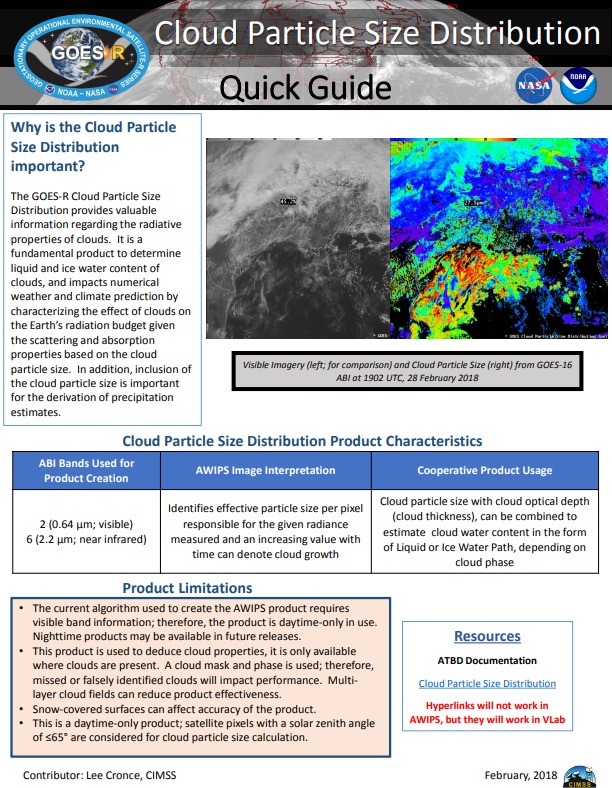
Cloud Particle Size Distribution – Link
21.jpg
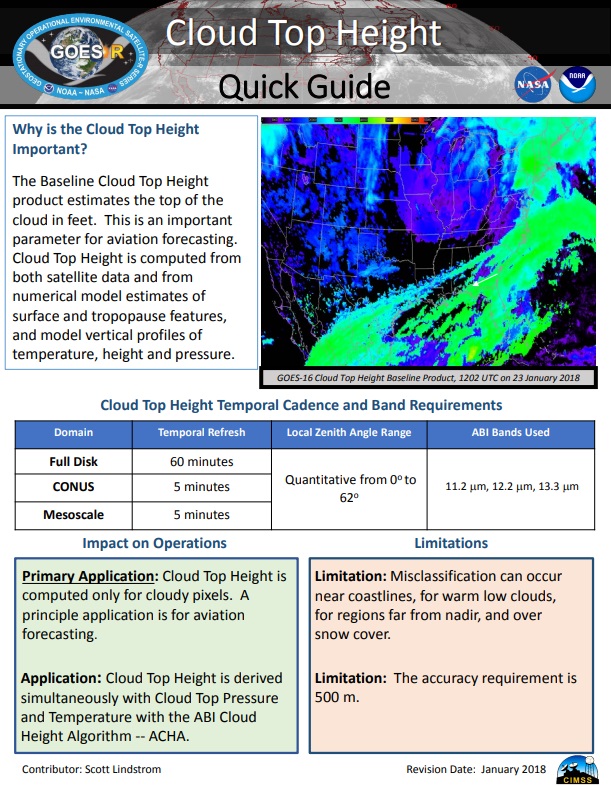
Cloud Top Height – Link

27.jpg
Cloud Top Phase – Link

29.jpg
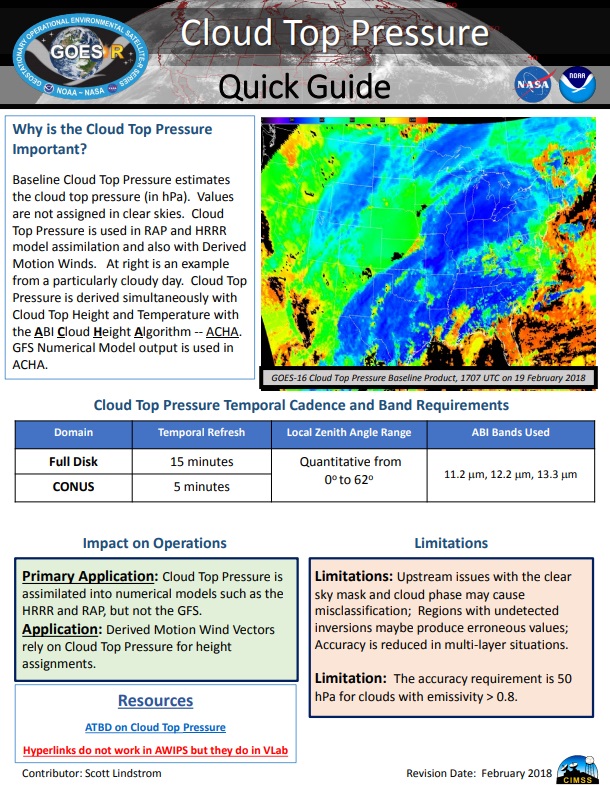
Cloud Top Pressure – Link

24.jpg
Cloud Top Temperature – Link

22.jpg
Derived Motion Winds – Link

20
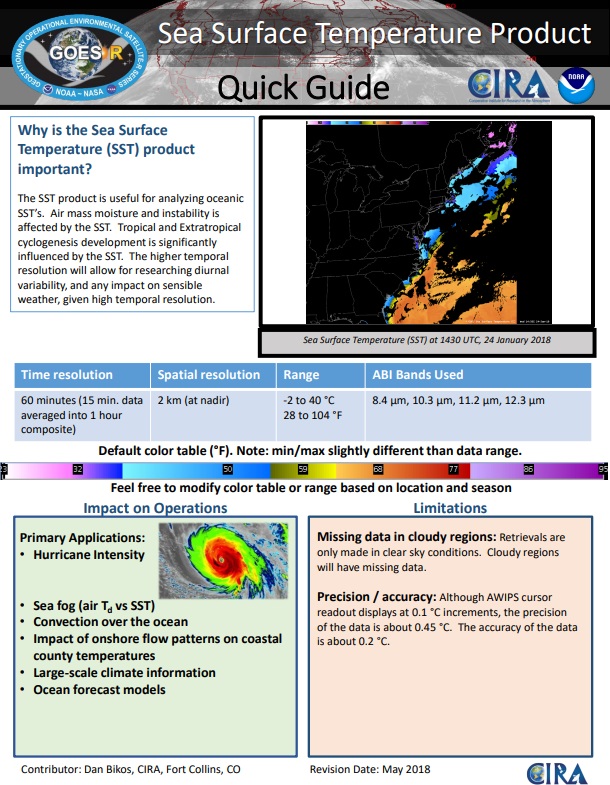
Sea Surface Temperature (Skin) – Link
17.jpg
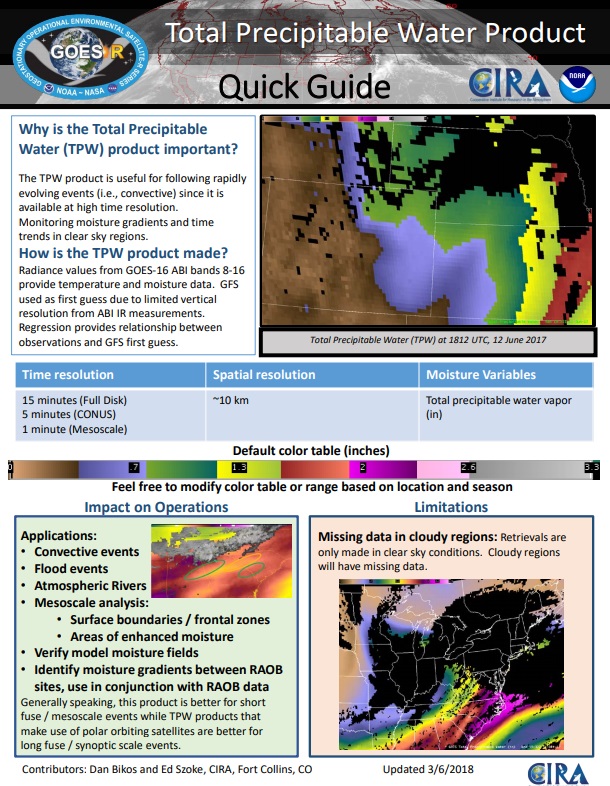
Total Precipitable Water – Link

25.jpg
Volcanic Ash – Link

14.jpg

Multispectral Imagery / RGB Composites:

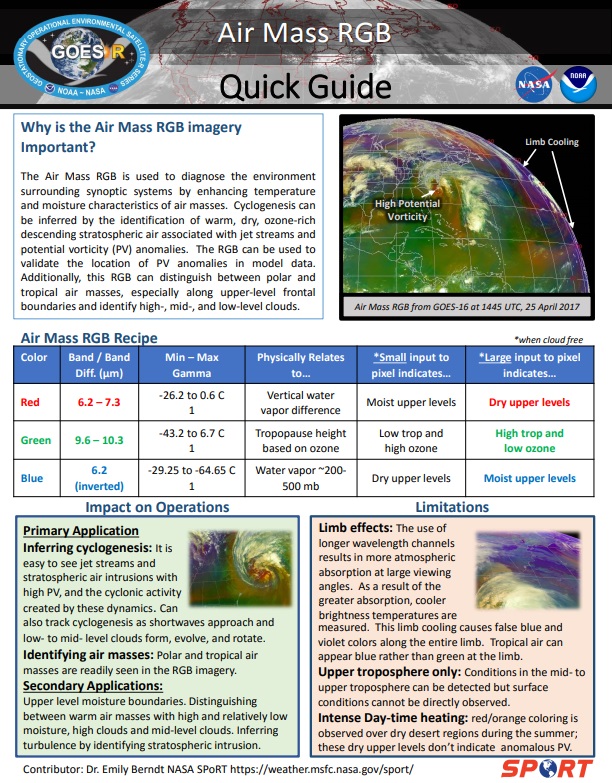
Airmass – Link
ARM_Quick_Guide
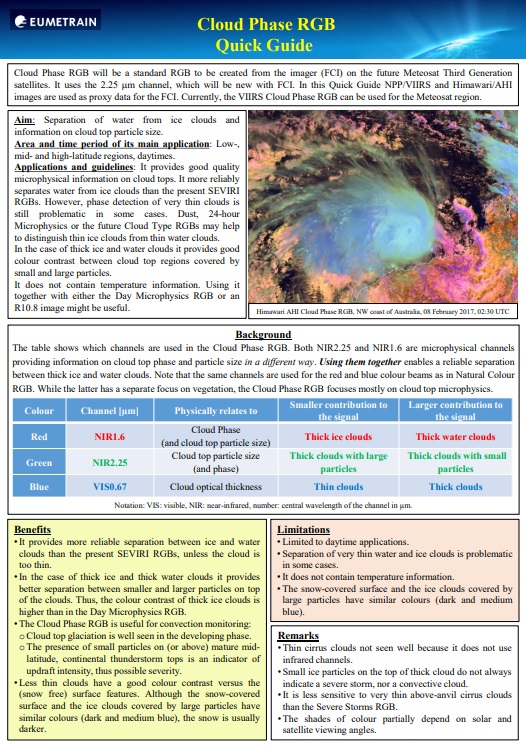
Cloud Phase – Link

CLP_Quick_Guide
Day Cloud Convection – Required post reception processing – Script available! – Link

39.jpg
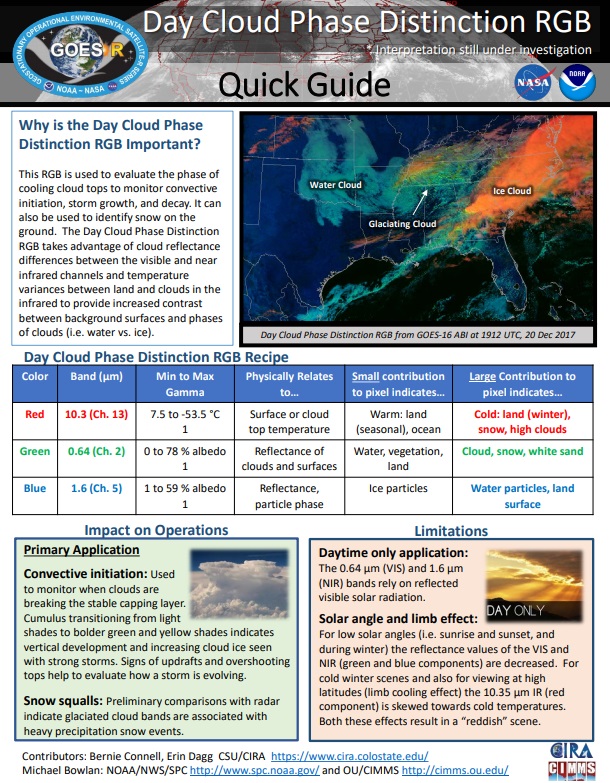
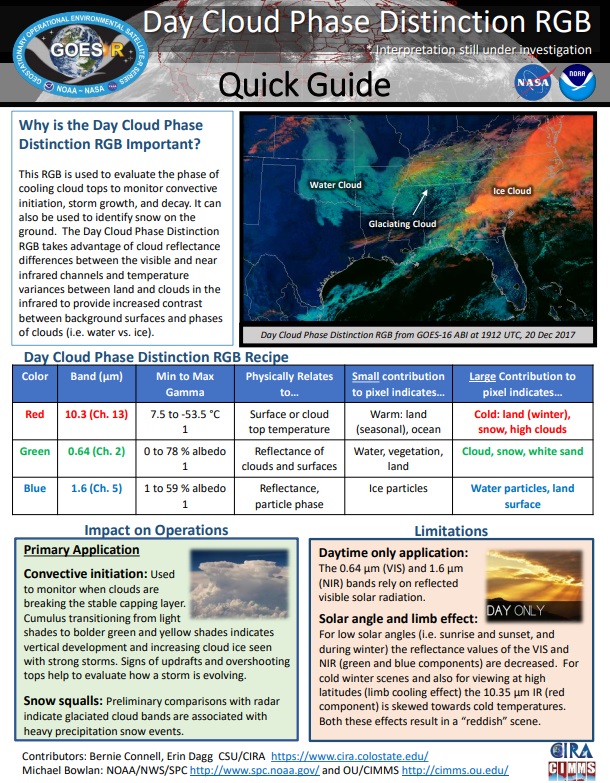
Day Cloud Phase Distinction – Link

DCP_Quick_Guide
Day Convection – Link

CON_Quick_Guide
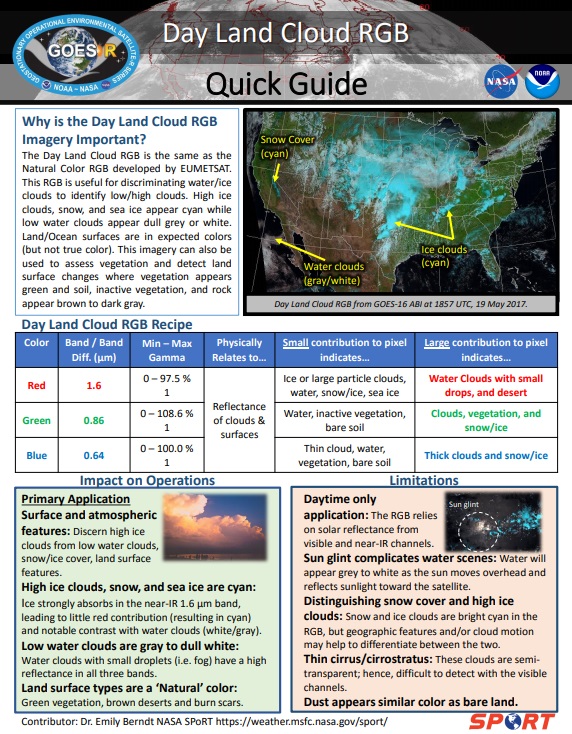
Day Land Cloud – Link

DLC_Quick_Guide
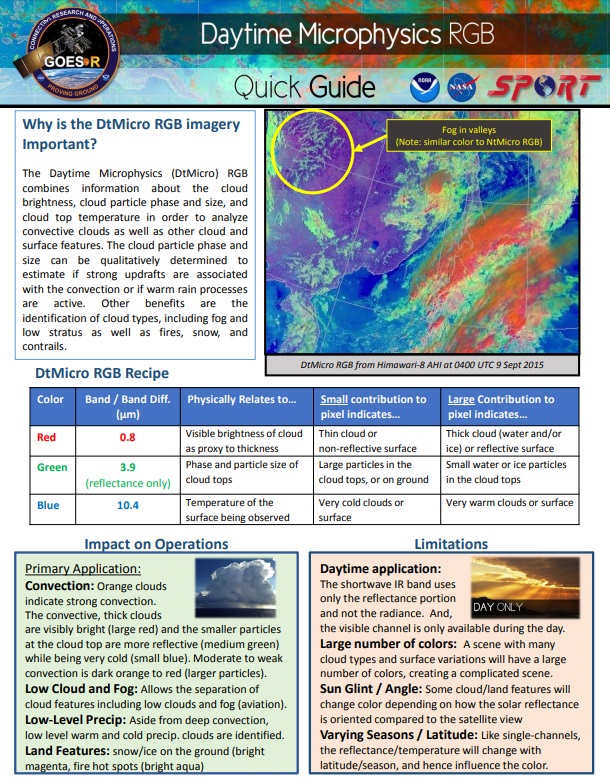
Day Microphysics – Link

DMP_Quick_Guide
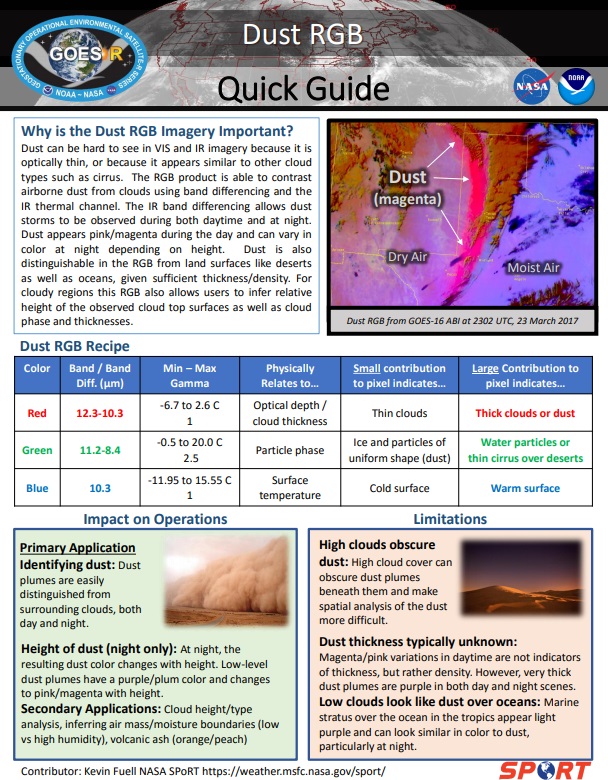
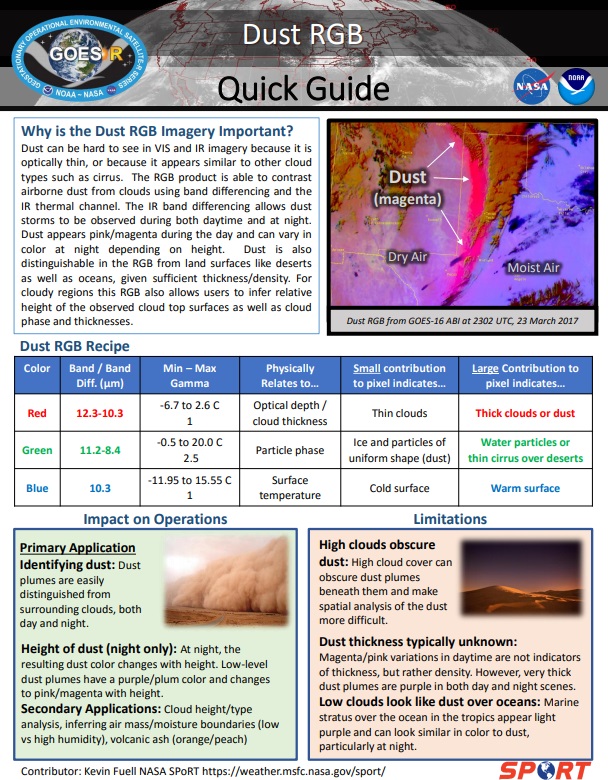
Dust – Link

DST_Quick_Guide
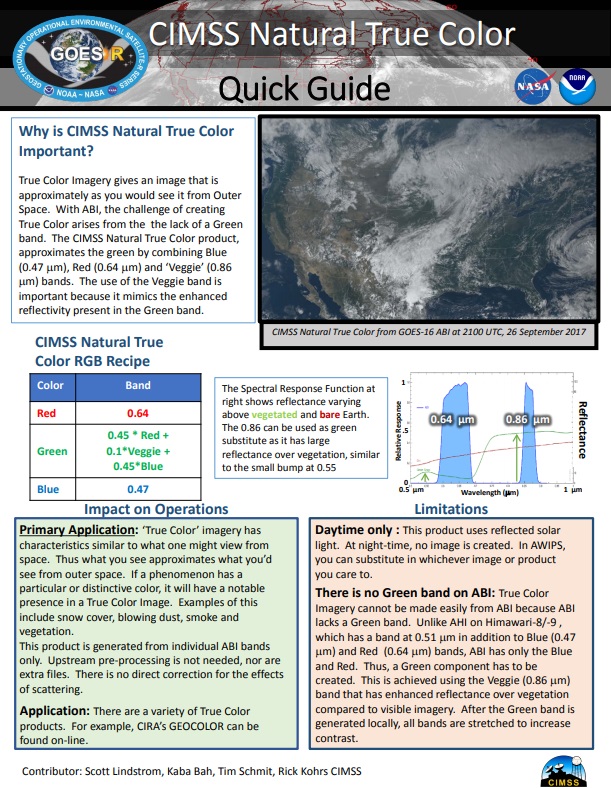
Natural True Color – Link

NTC_Quick_Guide
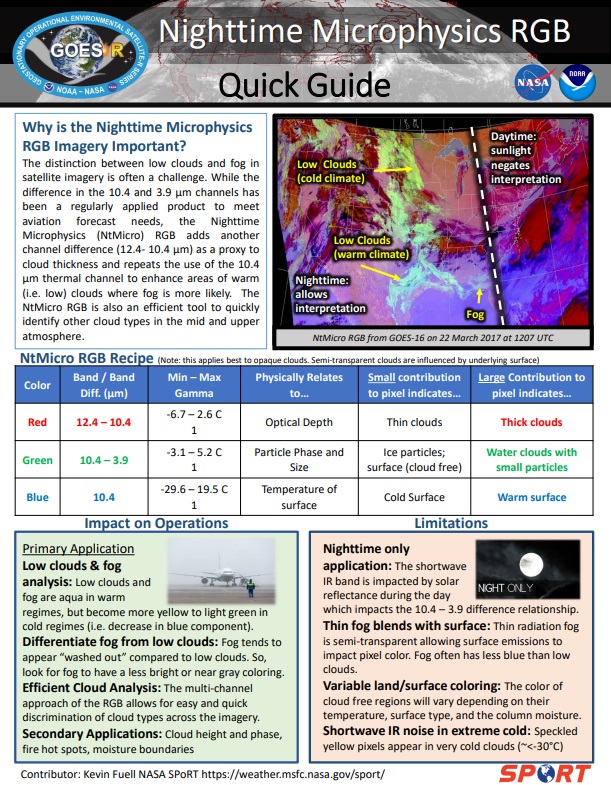
Night Microphysics – Link

NMP_Quick_Guide
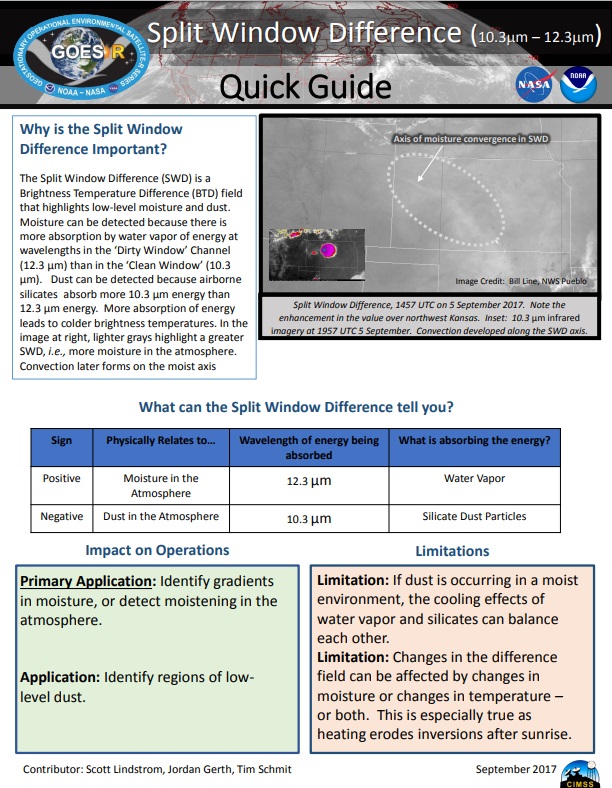
Split Window Difference (10.3 um – 12.3 um) – Required post reception processing – Script available! – Link
40
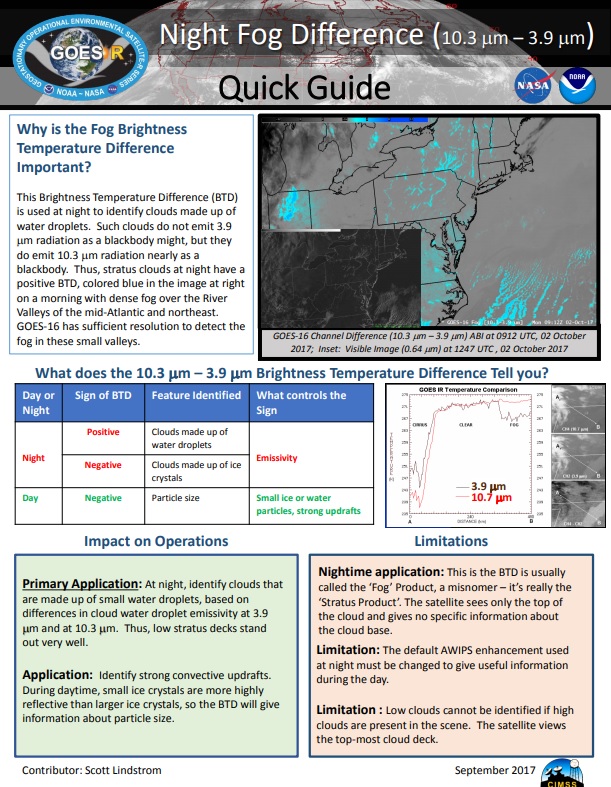
Night Fog Difference (10.3 um – 3.9 um) – Required post reception processing – Script available! – Link
41.jpg

JPSS:

NUCAPS Soundings – Link

15.jpg
Blended TPW – Link

13.jpg
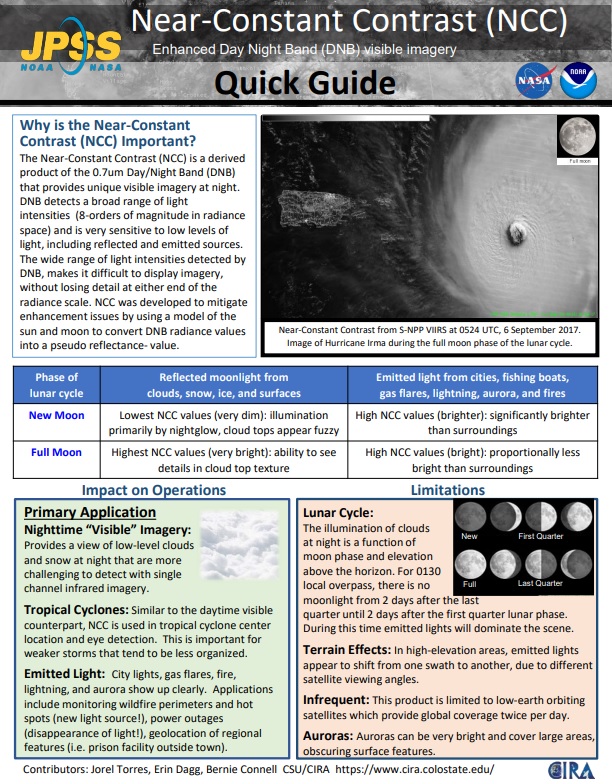
Near-Constant Contrast – Day Night Band: 0.7 um (“Low Light Visible”) – Required post reception processing – Script available! – Link
42.jpg
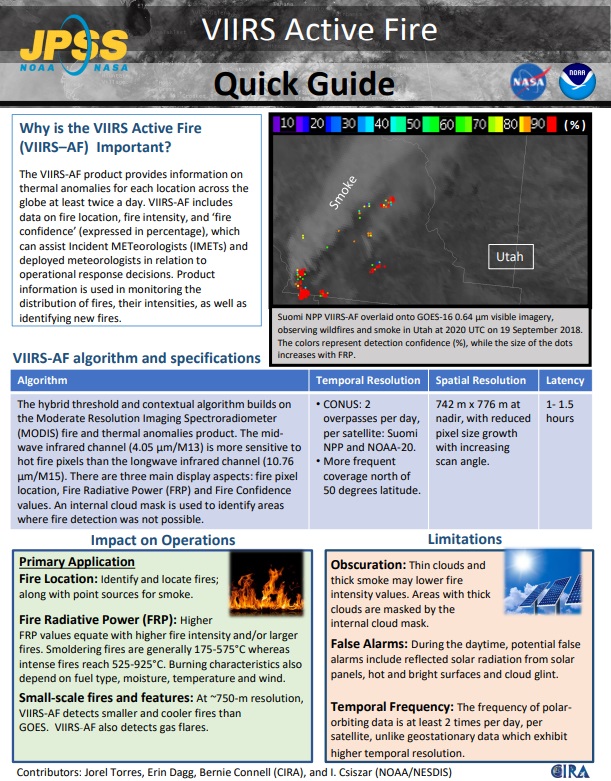
VIIRS Active Fire – Link

8.jpg
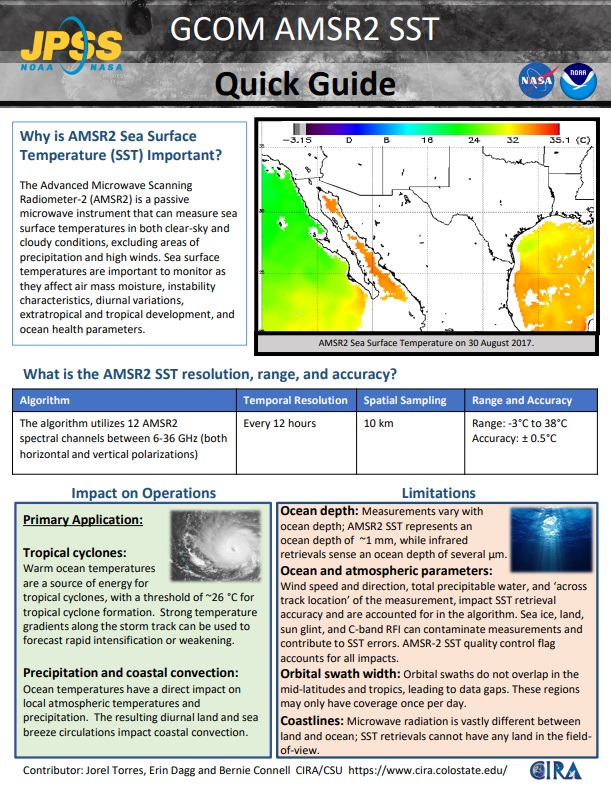
GCOM AMSR2 SST – Link

9.jpg

GNC-A Blog Content: June 2019

Blog Content

Hi GEONETCasters,

As requested by the Blog Readers, please find bellow a summary of the Blog content:

==== WHAT IS GEONETCAST-AMERICAS ====

“What is GEONETCast-Americas?” Series:

==== GNC-A STATION INSTALLATION AND MAINTENANCE ====

GNC-A Station Hardware and Software Tutorial Series:

==== GEONETCAST-AMERICAS CONTENT ====

GEONETCast-Americas Product Additions and Announcements:

“GEONETCast-Americas Imagery of the Day” Series:

==== GEONETCAST-AMERICAS PRODUCT MANIPULATION ====

GOES-16 and Python Tutorial Series:

GNC-A and Python Tutorials and Scripting Examples:

SIGMACast Tutorial Series:

General SIGMACast Blog Posts:

Miscellaneous Tutorials and Scripting examples:

==== THE GEONETCAST-AMERICAS GREAT COMMUNITY ====

“GNC-A Community Map” Series:

“New Operational GNC-A Station” Series:

“Products Generated by the Community” Series:

==== GNC-A BLOG / OUTREACH / SUPPORT ====

GNC-A User Group Webinars:

GNC-A Blog Community Reach:

GEONETCast-Americas Related Events:

GEONETCast-Americas Notifications:

==== NICE THINGS! ====

Updated at June 18, 2019 16:00 UTC

Presentations From The 3rd GEONETCast-Americas User Group Webinar

Hi GEONETCasters!

Please find below the presentations from the 3rd GEONETCast-Americas User Group Webinar (click on the images below to download):

NOAA UPDATE (CHANGES SINCE MARCH WEBINAR, TRANSITION TO DVB-S2 AND PLANNED SATELLITE TRAINING EVENTS)

GNC-A_3UGW_1.jpg

OVERVIEW OF JPSS PRODUCTS (GCOM, MiRS, NUCAPS)

GNC-A_3UGW_2.jpg

OVERVIEW OF JPSS PRODUCTS (VOLCANIC ASH)

GNC-A_3UGW_3

LINK TO THE VOLCAT WEBSITE

GNC-A_3UGW_3b.jpg

LINK TO THE RAMMB SATELLITE FOUNDATIONAL COURSE FOR JPSS

GNC-A_3UGW_2b.jpg

INPE UPDATE (GOES-16 RGB PRODUCTS, COMPLEMENTING GNC-A GOES-R/S IMAGERY WITH DATA FROM THE CLOUD)

GNC-A_3UGW_4.jpg

GNC-A USER CASE STUDIES

CONAGUA – NATIONAL WATER COMISSION – NATIONAL METEOROLOGICAL SERVICE – MEXICO 

GNC-A_3UGW_5.jpg

MARN – MINISTRY OF ENVIRONMENT AND NATURAL RESOURCES – EL SAVADOR

GNC-A_3UGW_6.jpg

Thank you to all the participants!

Please find the presentations from the first and second GEONETCast-Americas User Group Webinars, at the following links:

3rd GEONETCast-Americas User Group Webinar

GNC UGW.png

united_states_of_america_round_icon_640

Dear Colleagues,

NOAA GEONETCast Americas (GNC-A) Program Manager is pleased to invite you the third GNC-A User Group webinar to facilitate communication among, and provide updates to GNC-A users.

The webinar will be held Wednesday, June 12, 2019, at 1:00 p.m. Eastern Daylight Time (17:00 UTC) with an anticipated duration of 1 hour.  Registration is required.

To register, please complete and submit the registration [link to Eventbrite page] form by June 10, 2019. We will notify Invitees via email and provide with instructions and credentials to access the webinar.

Tentative agenda:

  • Welcome and Roll Call
  • NOAA Update
    • Transition to DVB-S2
    • Overview of JPSS products (GCOM, MiRS, NUCAPS, and volcanic ash)
  • INPE Update
    • GOES-R RGB’s
    • Complementing GNC-A GOES-R/S imagery with data from the cloud
  • Examples & User Cases
  • Discussion Items – Ideas for the Permanent Agenda
  • Action items and summary

Regards,
NOAA GNC-A Program Manager

brazil_640

Caros Colegas,

A Gerente do Programa GNC-A da NOAA tem o prazer de convidá-lo para o terceiro seminário on-line do Grupo de Usuários GNC-A para facilitar a comunicação e fornecer atualizações para os usuários do GEONETCast Americas.

O webinar será realizado na quarta-feira, 12 de junho de 2019, às 13:00 EDT (17:00 UTC) com duração prevista de 1 hora. É necessário registrar-se.

Para se inscrever, preencha e envie o formulário de inscrição [link para a página Eventbrite] até 10 de junho de 2019. Notificaremos os inscritos por e-mail e forneceremos as instruções e credenciais para acessar o webinar.

Agenda provisória:

  • Boas vindas e introdução dos participantes
  • Atualizações da NOAA
    • Transição para DVB-S2
    • Overview dos produtos JPSS (GCOM, MiRS, NUCAPS, e cinzas vulcânicas)
  • Atualizações do INPE (Brasil),
    • RGB’s do GOES-R
    • Complementando imagens GOES-R/S da estação GNC-A com dados da nuvem
  • Exemplos e Estudos de Caso (Usuários)
  • Itens para discussão – Idéias para a Agenda Permanente
  • Itens de ação e resumo

Atenciosamente,
Gerente do Programa GNC-A da NOAA

spain_640

Estimados colegas,

La Gerente del Programa GNC-A de la NOAA tiene el placer de invitarle al tercer seminario on-line del Grupo de Usuarios GNC-A para facilitar la comunicación y proporcionar actualizaciones a los usuarios de GEONETCast Americas.

El webinar se realizará el miércoles 12 de junio de 2019 a las 13:00 EDT (17:00 UTC) con la duración prevista de 1 hora. Es necesario registrarse.

Para inscribirse, rellene y envíe el formulario de inscripción [liga para la página Eventbrite] hasta el 10 de junio de 2019. Notificaremos a los inscritos por e-mail y le proporcionaremos las instrucciones y credenciales para acceder al webinar.

Agenda provisional:

  • Bienvenida e introducción de los participantes
  • Actualizaciones de NOAA
    • Transición a DVB-S2
    • Descripción de los productos JPSS (GCOM, MiRS, NUCAPS, y cenizas volcánicas)
  • Actualizaciones del INPE (Brasil),
    • RGB del GOES-R
    • Complementando imágenes GOES-R/S de la estación GNC-A con datos de la nube
  • Ejemplos y estudios de caso (usuarios)
  • Elementos para discusión – Ideas para la Agenda Permanente
  • Elementos de acción y resumen

Atentamente,
Gerente del Programa GNC-A de la NOAA

New GNC-A Illustrated Product Catalog: June 6, 2019

Hi GEONETCasters!

Please download the latest version of the GEONETCast-Americas Illustrated Product Catalog by clicking at the image below. This updated version contains the newly GOES-16 RGB’s added today and some other minor corrections!

Capa


GOES-16 RGB Composites Added To GEONETCast-Americas

DLC_1RGB_Sample_1.jpgRGB_Sample_2.jpgRGB_Sample_3.jpgRGB_Sample_4.jpgRGB_Sample_5.jpgRGB_Sample_6.jpgRGB_Sample_7.jpgDLC_2.jpg

Hi GEONETCasters!

The following GOES-16 RGB Composites (GeoTIFF format) were added to the GEONETCast-Americas broadcast today, June 4th, 2019, 11:20 UTC:

  • Day Land Cloud
  • Natural True Color
  • Airmass
  • Day Microphysics
  • Night Microphysics
  • Day Cloud Phase Distinction
  • Cloud Phase
  • Day Convection
  • Dust

Please find below a sample of each RGB, and their Quick Guides:

— DAY LAND CLOUD RGB —

DLC_1.jpgNaming convention: G16_DLCREG_YYYYMMDDHHMN.tif

Quick Guide (click on the image to access):

DLC_Quick_Guide.jpg

— NATURAL TRUE COLOR RGB —

NTC_1.jpgNaming convention: G16_NTCREG_YYYYMMDDHHMN.tif

Quick Guide (click on the image to access):

NTC_Quick_Guide.jpg

— AIRMASS RGB —

ARM_1.jpgNaming convention: G16_ARMREG_YYYYMMDDHHMN.tif

Quick Guide (click on the image to access):

ARM_Quick_Guide.jpg

— DAY MICROPHYSICS RGB —

DMP_1.jpgNaming convention: G16_DMPREG_YYYYMMDDHHMN.tif

Quick Guide (click on the image to access):

DMP_Quick_Guide.jpg

— NIGHT MICROPHYSICS RGB —

NMP_1Naming convention: G16_NMPREG_YYYYMMDDHHMN.tif

Quick Guide (click on the image to access):

NMP_Quick_Guide.jpg

— DAY CLOUD PHASE DISTINCTION RGB —

DCP_1.jpgNaming convention: G16_DCPREG_YYYYMMDDHHMN.tif

Quick Guide (click on the image to access):

DCP_Quick_Guide.jpg

— CLOUD PHASE RGB —

CLP_1.jpgNaming convention: G16_CLPREG_YYYYMMDDHHMN.tif

Quick Guide (click on the image to access):

CLP_Quick_Guide.jpg

— DAY CONVECTION RGB —

CON_1.jpgNaming convention: G16_CONREG_YYYYMMDDHHMN.tif

Quick Guide (click on the image to access):

CON_Quick_Guide.jpg

— DUST RGB —

DST_1Naming convention: G16_DSTREG_YYYYMMDDHHMN.tif

Quick Guide (click on the image to access):

DST_Quick_Guide.jpg

— GNC-A RECEIVE FOLDER —

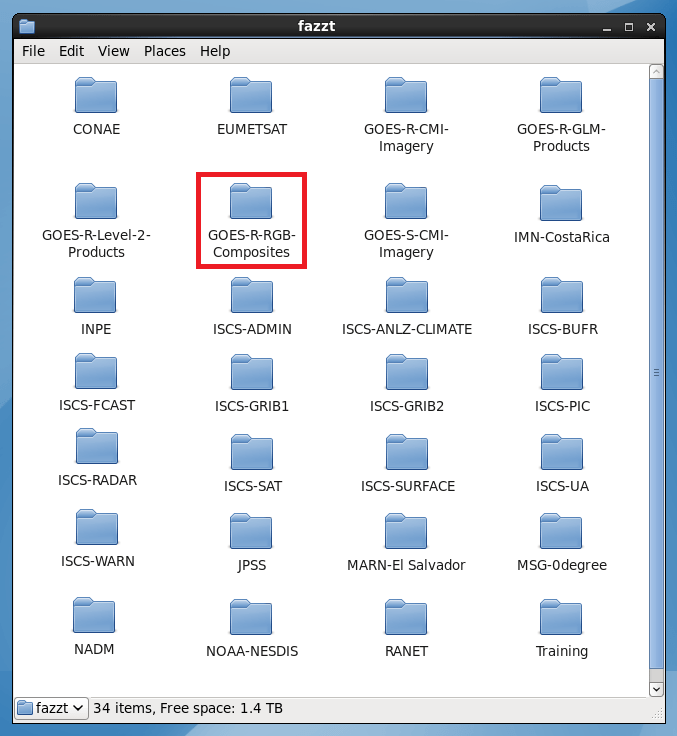
The RGB’s may be found on the new GOES-R-RGB-Composites GNC-A ingestion folder:

Folder.png

— NAMING CONVENTION AND SECTORS —

The RGB’s naming convention is as follows:

G16_RGBREG_YYYYMMDDHHMN.tif

Where:

YYYYMMDDHHMN: Year, Month, Day, Hour and Minutes (UTC)

RGB

  • DLC: Day Land Cloud
  • NTC: Natural True Color
  • ARM: Airmass
  • DMP: Day Microphysics
  • NMP: Night Microphysics
  • DCP: Day Cloud Phase Distinction
  • CLP: Cloud Phase
  • CON: Day Convection
  • DST: Dust

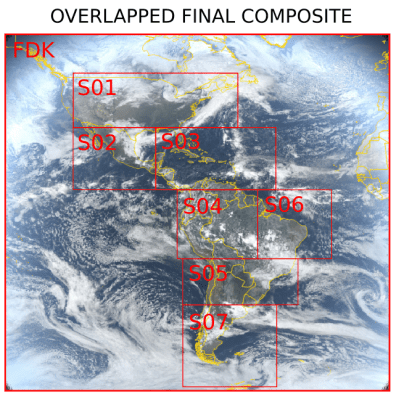
In order to fit the RGB’s in the GNC-A available space, for each time frame, the RGB’s are divided in 8 parts: A Low Resolution Full Disk and 7 higher resolution regions (3 km), as below:

REG

  • FDK: Full Disk (Low Resolution)
  • S01: Sector 01
  • S02: Sector 02
  • S03: Sector 03
  • S04: Sector 04
  • S05: Sector 05
  • S06: Sector 06
  • S07: Sector 07
  • S08: Sector 08

The table below shows the extent of each sector:

Sector

The image below shows the 8 parts of each RGB:

Sectors_2.png

The RGB’s are broadcasted for the following minutes: 00, 20, 30 and 50, each hour.

— JOINING THE SECTORS AND SUBSECT A GIVEN REGION —

Users may join the 8 regions into a single GeoTIFF and subsect it for a given region using a single GDAL instruction, called “gdalwarp”:

gdalwarp FDK.tif* S01.tif* …… S07.tif output.tif -te min_lon min_lat max_lon max_lat -overwrite  

Sectors_3.png

Below, an example instruction to join all the Natural True Color RGB sectors, and cut it to the following region:

  • min lon: -120
  • min lat: 0
  • max lon: -75
  • max lat: 35

gdalwarp G16_NTCFDK_201905311400.tif* G16_NTCS01_201905311400.tif* G16_NTCS02_201905311400.tif* G16_NTCS03_201905311400.tif* G16_NTCS04_201905311400.tif* G16_NTCS05_201905311400.tif* G16_NTCS06_201905311400.tif* G16_NTCS07_201905311400.tif* G16_NTC_201905311400.tif -te -120 0 -75 35 -overwrite

The result GeoTIFF, called G16_NTC_201905311400.tif, is seen below:

Joining.png

Alternatively, you may use the following Python code:


# Required libraries
from osgeo import gdal, osr, ogr  # Import GDAL
import os 			  # Miscellaneous operating system interfaces

# Desired Extent
extent = [-120, 0, -75, 35]

# Define KM_PER_DEGREE
KM_PER_DEGREE = 111.32

# Calculate the total number of degrees in lat and lon
deg_lon = extent[2] - extent[0]
deg_lat = extent[3] - extent[1]

# Calculate the number of pixels
resolution = 2
width = (KM_PER_DEGREE * deg_lon) /  resolution
height = (KM_PER_DEGREE * deg_lat) /  resolution

# Create the mosaic
grid = gdal.BuildVRT('tmp.vrt', ['s8.tif', 's1.tif', 's2.tif', 's3.tif', 's4.tif', 's5.tif', 's6.tif', 's7.tif'])
ds = gdal.Translate('output.tif', 'tmp.vrt', projWin = [extent[0], extent[3], extent[2], extent[1]], width = width, height = height)
grid = None
ds = None

GNC_GOES-r.png