Operational GNC-A Station: DIRMA-FAP (Station n° 85!)

WhatsApp Image 2019-05-29 at 12.07.26 - Copia.jpeg

Hi GEONETCasters,

The Directorate of Aeronautical Meteorology of the Peruvian Air Force (DIRMA-FAP) kindly shared photos of their GEONETCast-Americas station (Callao – Lima).

As for the DVB-S2 Receiver, they are using the NOVRA S300D:

WhatsApp Image 2019-05-29 at 12.29.02

This receiver is DVB-S2 compliant, so it will also work when the system has transitioned to DVB-S2.

Do you have a newly installed GNC-A instation that hasn’t been shown in the Blog? Please send us a photo to [email protected].

“New Operational GNC-A Station” Series:

GOEs-R and JPSS Patches GNC

Cool GOES-R and JPSS-1 patches near a GNC-A receiver.

NOAA NUCAPS Sounding Availability

NUCAPS.png

MIRS_NUCAPS_GNC-A_FOLDER.png

GEONETCast-Americas JPSS ingestion folder, showing the new MIRS and NUCAPS directory

united_states_of_america_round_icon_640

Topic: NOAA NUCAPS Sounding Availability

Date/Time Issued:  May 29 2019 1305 UTC

Product(s) or Data Impacted: NOAA NUCAPS soundings

Date/Time of Initial Impact NSOF: May 22 2019

Date/Time of Expected End NSOF:   Permanent change

Length of Event:  Permanent change

Details/Specifics of Change: We have replaced Suomi NPP NOAA Unique Combined Atmospheric Processing System (NUCAPS) soundings with NOAA-20 NUCAPS soundings on GEONETCast Americas (GNC-A) rebroadcast.
The Cross-Track Infrared Sounder (CrIS) on Suomi NPP satellite suffered an anomaly back in late March. Because of this data outage, NUCAPS soundings are not being produced from S-NPP.

Contact Information for Further Information: [email protected] for information on GNC-A Program

Web Site(s) for applicable information:
https://www.ospo.noaa.gov/Products/atmosphere/soundings/nucaps/pskewt/USACON.html
https://www.ospo.noaa.gov/Products/atmosphere/soundings/nucaps/index.html
http://cimss.ssec.wisc.edu/goes/blog/archives/33221

Training modules on NUCAPS (English):
https://hwt.nssl.noaa.gov/ewp/training_2018/HWT2018_GriddedNucaps_Training.pdf
https://cimss.ssec.wisc.edu/itwg/itsc/itsc20/program/PDFs/2Nov/session12a/12_05_barnet.pdf
http://cimss.ssec.wisc.edu/goes/blog/?s=nucaps

brazil_640Tópico: Disponibilidade dos dados de sondagem NUCAPS da NOAA

Data / Hora da Emissão: 29 de maio de 2019, 13:05 UTC

Produto(s) ou Dados Impactados: Sondagens NUCAPS da NOAA

Data / Hora do Impacto Inicial: 22 de maio de 2019

Data / Hora Esperada para Término: Mudança permanente

Duração do Evento: Mudança permanente

Detalhes / Mudanças Específicas: Nós substituímos os dados de sondagem do Sistema de Processamento Atmosférico Combinado Único (NUCAPS) do satélite Suomi NPP pelos dados NUCAPS do NOAA-20 na transmissão do GEONETCast-Americas (GNC-A)

O Sondador Infravermelho “Cross-Track” (CrIS) no satélite Suomi NPP sofreu uma anomalia no final de março. Devido a essa indisponibilidade de dados, as sondagens do NUCAPS não estão sendo produzidas a partir do S-NPP.

Contato para mais informações: [email protected] para informações sobre o programa GNC-A.

Web Site(s) para demais informações:
https://www.ospo.noaa.gov/Products/atmosphere/soundings/nucaps/pskewt/USACON.html
https://www.ospo.noaa.gov/Products/atmosphere/soundings/nucaps/index.html
http://cimss.ssec.wisc.edu/goes/blog/archives/33221

Módulos de Treinamento sobre o NUCAPS (Inglês):
https://hwt.nssl.noaa.gov/ewp/training_2018/HWT2018_GriddedNucaps_Training.pdf
https://cimss.ssec.wisc.edu/itwg/itsc/itsc20/program/PDFs/2Nov/session12a/12_05_barnet.pdf
http://cimss.ssec.wisc.edu/goes/blog/?s=nucaps

spain_640Tema: Disponibilidad de los datos de sondeo NUCAPS de NOAA

Fecha / hora de emisión: 29 de mayo de 2019, 13:05 UTC

Producto(s) o Datos Afectados: Datos de sondeo NUCAPS de NOAA

Fecha / hora del impacto inicial: 22 de mayo de 2019

Fecha / Hora de finalización prevista: Cambio permanente

Duración del evento: Cambio permanente

Detalles / Cambios Específicos: Hemos reemplazado los datos de sondeo del Sistema de Procesamiento Atmosférico Combinado Único (NUCAPS) del satélite Suomi NPP por los datos NUCAPS del NOAA-20 en la transmisión del GEONETCast-Americas (GNC-A)

El Sondador Infrarrojo “Cross-Track” (CRIS) en el satélite Suomi NPP sufrió una anomalía a finales de marzo. Debido a esta indisponibilidad de datos, los sondeos del NUCAPS no se están produciendo a partir del S-NPP.

Contacto para más información: [email protected] para información sobre el programa GNC-A

Sitio(s) web para otras informaciones:
https://www.ospo.noaa.gov/Products/atmosphere/soundings/nucaps/pskewt/USACON.html
https://www.ospo.noaa.gov/Products/atmosphere/soundings/nucaps/index.html
http://cimss.ssec.wisc.edu/goes/blog/archives/33221

Módulos de entrenamiento sobre el NUCAPS (inglés):
https://hwt.nssl.noaa.gov/ewp/training_2018/HWT2018_GriddedNucaps_Training.pdf
https://cimss.ssec.wisc.edu/itwg/itsc/itsc20/program/PDFs/2Nov/session12a/12_05_barnet.pdf
http://cimss.ssec.wisc.edu/goes/blog/?s=nucaps

UPDATE: GEONETCast-Americas Transition to DVB-S2

DVB-S2.png

united_states_of_america_round_icon_640

Topic:  GNC-A Transition to DVB-S2 Format (Action Required)

Date/Time Issued:  May 28, 2019 2000 UTC

Product(s) or Data Impacted:  GEONETCast Americas (GNC-A) receive stations

Date/Time of Initial Impact NSOF:  September 2019 (TBC)

Date/Time of Expected End NSOF:   Permanent change

Length of Event:  Permanent change

Details/Specifics of Change: Intelsat General intends to convert the existing Digital Video Broadcast, DVB-S transmission channel on IS-21 satellite to the DVB-S2 (Digital Video Broadcast, Second Generation) format at the end of the 3rd quarter (September or later 2019).  This change will require all GNC-A users with DVB-S receivers to upgrade to DVB-S2 receivers. The change will not require re-pointing of antennas. No polarization change or satellite change – only change in center frequency.

ACTION: If the current device supports only DVB-S, you must replace it or the card with a DVB-S2 device. GNC-A service WILL NOT work with a DVB-S device. If your device is compatible with DVB-S2 and you are successfully receiving the current service, then it will also work under DVB-S2.
The transition schedule will be better defined in the next few months as noted above.  GEONETCast Americas (GNC-A) is currently on IS-21 transponder 7C and will move to IS-21 transponder 19C.
Since there is a frequency change, some operator intervention will be required.  However, they expect to provide 30 days of dual-illumination (both DVB-S on 7C and DVB-S2 on 19C at the same time) that would provide a window for end-users to make the change on their own time schedule.

Contact Information for Further Information: [email protected] for information on GNC-A Program brazil_640
Tópico: Transição do GEONETCast Americas (GNC-A) para o formato DVB-S2, Emitido em 28 de maio de 2019 20:00 UTC

Data / Hora da Emissão: 28 de maio de 2019, 20:00 UTC

Produto(s) ou Dados Impactados: Estações de recepção GEONETCast Americas (GNC-A)

Data / Hora do Impacto Inicial: Setembro de 2019 (a ser confirmado)

Data / Hora Esperada para Término: Mudança permanente

Duração do Evento: Mudança permanente

Detalhes / Mudanças Específicas: A Intelsat General pretende converter o atual canal de transmissão “Digital Video Broadcast – DVB-S” do satélite IS-21 para o formato DVB-S2 (Digital Video Broadcast, Segunda Geração) no final do 3º trimestre (em setembro ou posteriormente, em 2019). Essa alteração exigirá que todos os usuários GNC-A com receptores DVB-S façam o upgrade para receptores DVB-S2. A mudança não exigirá um novo apontamento da antena. Não será necessária a mudança de polarização ou mudança de satélite – apenas a frequência central de downlink será alterada.

AÇÃO NECESSÁRIA: se o receptor atual suporta apenas DVB-S, você deve substituí-lo por um receptor que suporta o padrão DVB-S2. O serviço GNC-A NÃO funcionará com um dispositivo DVB-S. Se o seu dispositivo for compatível com DVB-S2 e você estiver recebendo com sucesso o serviço atual, ele também funcionará com o formato DVB-S2.
O cronograma de transição será melhor definido nos próximos meses, conforme mencionado acima.
O GEONETCast Americas (GNC-A) está atualmente no transponder 7C IS-21 e passará para o transponder 19C  IS-21.
Como há uma mudança de frequência, será necessária a intervenção por parte do operador da estação. No entanto, a INTELSAT espera fornecer 30 dias de broadcast duplo (tanto no formato DVB-S no transponder 7C quanto no formato DVB-S2 no transponder 19C, ao mesmo tempo), o que forneceria uma janela de tempo para os usuários fazerem a mudança em sua própria agenda.

Contato para mais informações: [email protected] para informações sobre o programa GNC-A. spain_640
Tema: Transición del GEONETCast Americas (GNC-A) al formato DVB-S2, Emitido en 28 de mayo de 2019 2000 UTC

Fecha / hora de emisión: 28 de mayo de 2019, 20:00 UTC

Producto(s) o Datos Afectados: Estaciones de recepción GEONETCast Americas (GNC-A)

Fecha / hora del impacto inicial: Septiembre de 2019 (a confirmar)

Fecha / Hora de finalización prevista: Cambio permanente

Duración del evento: Cambio permanente

Detalles / Cambios Específicos: Intelsat General pretende convertir el actual canal de transmisión digital “DVB-S” del satélite IS-21 al formato DVB-S2 (Digital Video Broadcast, Segunda Generación) al final del tercer trimestre (en septiembre o posteriormente, en 2019). Este cambio requerirá que todos los usuarios de GNC-A con receptores DVB-S actualizen a los receptores DVB-S2. El cambio no requerirá un nuevo apuntamiento de la antena. No será necesario el cambio de polarización o cambio de satélite, sólo se cambiará la frecuencia central del downlink.

ACCIÓN NECESARIA: Si el receptor actual sólo soporta la tecnologia DVB-S, debe reemplazarlo por un receptor que soporte la tecnología DVB-S2. El servicio GNC-A NO funcionará con un receptor DVB-S. Si su receptor es compatible con DVB-S2 y usted está recibiendo con éxito el servicio actual, también funcionará con el formato DVB-S2.
El calendario de transición será mejor definido en los próximos meses, como se mencionó anteriormente.
El GEONETCast Americas (GNC-A) está actualmente en el transponder 7C IS-21 y pasará al transponder 19C IS-21.
Como hay un cambio de frecuencia, será necesaria la intervención por parte del operador de la estación. Sin embargo, INTELSAT espera proporcionar 30 días de difusión dual (tanto en formato DVB-S en el transponder 7C como en el formato DVB-S2 en el transponder 19C, al mismo tiempo), lo que proporcionaría una ventana de tiempo para que los usuarios realizen el cambio en su propia agenda.

Contacto para más información: [email protected] para información sobre el programa GNC-A

ADDITIONAL INFORMATION

The following DVB-S receivers (known to be used by some GNC-A users) WILL NOT WORK when the transition is done:

s75

  • Manufacturer: NOVRA
  • Model: S75+
  • Supported technology: DVB-S
  • Tutorial from this Blog: Link


20171109_140700.jpg

  • Manufacturer: Technisat
  • Model: SkyStar 2
  • Supported technology: DVB-S
  • Tutorial from this Blog: Link


The following DVB-S2 receivers (known to be used by some GNC-A users) WILL WORK when the transition is done:

s300d

  • Manufacturer: NOVRA
  • Model: S300D
  • Supported technology: DVB-S and DVB-S2
  • Webpage: Link
  • Contact: [email protected] (Lowis K. Wu)
  • Tutorial from this Blog: Link

sr1

  • Manufacturer: AYECKA
  • Model: SR1
  • Supported technology: DVB-S and DVB-S2
  • Webpage: Link
  • Contact: [email protected] (Baruch Kagan)
  • Tutorial from this Blog: Link


Please find below a list of other DVB-S2 receivers that should work when the transition is done (Note: Unlike the two models above, these have not been tested by this Blog):

Omnicom.png

  • Manufacturer: Omicom
  • Model: Pro Omicom 16/32 PSK
  • Interface: PCI
  • OS Support: Windows / Linux
  • Webpage: Link


TBS-1

  • Manufacturer: TBS
  • Model: TBS 6903
  • Interface: PCI-Express
  • OS Support: Windows / Linux
  • Webpage: Link


TBS-2.png


  • Manufacturer: TBS
  • Model: TBS 5927
  • Interface: USB
  • OS Support: Windows / Linux
  • Webpage: Link


TBS-3.png

  • Manufacturer: TBS
  • Model: TBS 5980 and TBS 5990
  • Interface: USB
  • OS Support: Windows / Linux
  • Webpage: Link and Link


Technotrend1.png


  • Manufacturer: Technotrend
  • Model: S2-4100 and S2-4200
  • Interface: PCI-Express
  • OS Support: Windows / Linux
  • Webpage: Link


SkyStar.png


  • Manufacturer: Technisat
  • Model: SkyStar S2 PCI
  • Interface: PCI
  • OS Support: Windows / Linux


GEONETClass: Accessing GRB Data From Unidata THREDDS With Python (Part I)

TDS_Tuto_Banner.png

Hi community,

Until now, we have seen the following satellite data access mechanisms on the blog:

GEONETCast-Americas:

HRIT/EMWIM:

Amazon / Big Data Project:

Web Interfaces:

Imagery on the web:

Let’s see another mechanism today, the Unidata THREDDS Data Server.

Advantage: The greatest advantage from downloading data from THREDDS, for GOES-16 and GOES-17 for example, is that when NOAA’s PDA (Product Distribution and Access) is out for some reason, the data will still be available on the THREDDS Data Server. PDA is the source for NOAA’s GNC-A channel and for the Big Data Project, so when it is out, everything is out. The GOES-16 / GOES-17 data available from TDS, is an exception, because its source is a GRB station.

The Unidada THREDDS Data Server (TDS)

THREDDS stands for: Thematic Real-time Environmental Distributed Data Services 

According to the official webpage:

The THREDDS Data Server (TDS) is a web server that provides metadata and data access for scientific datasets, using OPeNDAP, OGC WMS and WCS, HTTP, and other remote data access protocols. The TDS is developed and supported by Unidata, a division of the University Corporation for Atmospheric Research (UCAR), and is sponsored by the National Science Foundation.

About the goal of this service:

The goal of Unidata’s Thematic Real-time Environmental Distributed Data Services (THREDDS) is to provide students, educators and researchers with coherent access to a large collection of real-time and archived datasets from a variety of environmental data sources at a number of distributed server sites. The THREDDS Data Server (TDS) is a web server that provides metadata and data access for scientific datasets, using a variety of remote data access protocols.

Please access the TDS Fact Sheet at this link.

The THREDDS Data Server Content

When accessing the TDS catalog (link), we see that there are multiple datasets available, among them Forecast Model Data (GEFS, GFS, etc), Forecast Products and Analysis, Radar Data (NEXRAD, etc), Satellite Data (GOES-16, GOES-17, S-NPP, etc), among others.

TDS_Tuto_1

GOES-R / GOES-S content on the THREDDS Data Server

Consider the following tweet:


After taking a look at the mentioned Python Notebook, let’s try to download GOES-R / GOES-S from the GRB folders on the TDS data using Python / Siphon (two week archive from a GRB station).

Let’s take a look at the GOES-16 GRB directory from THREDDS:

TDS_Tuto_2.png

There is a directory for each GOES-16 instrument:

  • Advanced Baseline Imager (ABI)​
  • Extreme Ultraviolet and X-ray Irradiance Sensors (EXIS)​
  • Geostationary Lightning Mapper (GLM)
  • Magnetometer (MAG)
  • Space Environment In-Situ Suite (SEISS)
  • Solar Ultraviolet Imager (SUVI)​

And a directory for the Derived Products.

Inside each dataset directory, the following structure is found:

  • Dataset: ABI
  • Sector: CONUS, FullDisk, Mesoscale-1, Mesoscale-2
  • Channel: Channel01 ~ Channel16
  • Date: YYYYMMDD (last 14 days) or “Current” (last 24 hours)
  • Dataset: EXIS
  • Product: SFEU, SFXR
  • Date: YYYYMMDD (last 14 days) or “Current” (last 24 hours)
  • Dataset: GLM
  • Product: LCFA
  • Date: YYYYMMDD (last 14 days) or “Current” (last 24 hours)
  • Dataset: MAG
  • Product: GEOF
  • Date: YYYYMMDD (last 14 days) or “Current” (last 24 hours)
  • Dataset: SEIS
  • Product: EHIS, MPSH, MPSL, SGPS
  • Date: YYYYMMDD (last 14 days) or “Current” (last 24 hours)
  • Dataset: SUVI
  • Product: Fe093, Fe131, Fe171, Fe195, Fe284, He303
  • Date: YYYYMMDD (last 14 days) or “Current” (last 24 hours)
  • Dataset: Products
  • Sector: CONUS, FullDisk, Mesoscale-1, Mesoscale-2
  • Product: AerosolDetection, AerosolOpticalDepth, CloudAndMoistureImagery, CloudMask, CloudOpticalDepth, CloudParticleSize, CloudTopHeight, CloudTopPhase, CloudTopPressure, CloudTopTemperature, DerivedMotionWinds, DerivedStabilityIndices, FireHotSpot, GeostationaryLightningMapper, LandSurfaceTemperature, LegacyVerticalMoistureProfile, LegacyVerticalTemperatureProfile, RainRateQPE, SeaSurfaceTemperature, TotalPrecipitableWater, VolcanicAshDetection
  • Date: YYYYMMDD (last 14 days) or “Current” (last 24 hours)

Using SIPHON to acess data from the THREDDS Data Server

Let’s see how we may access this data using Siphon, a collection of Python utilities for downloading data from the THREDDS Data Server.

First, download and install Miniconda: https://conda.io/miniconda.html

To install Siphon, let’s create an env called Siphon and install the Siphon utilities:

conda create --name siphon
activate siphon
conda install -c conda-forge siphon

Downloading ABI L1b Data

These are the required imports:

# Required Modules
from siphon.catalog import TDSCatalog # Code to support reading and parsing catalog files from a THREDDS Data Server (TDS)
import urllib.request # Defines functions and classes which help in opening URLs

Let’s start downloading L1b data from ABI. First of all, let’s understant the TDS URL structure for the ABI L1b Data:

https://

thredds-test.unidata.ucar.edu/thredds/catalog/satellite/

goes16/GRB16/ABI/FullDisk/Channel/Date/catalog.html

Considering this, let’s create the catalog url:

# Unidate THREDDS Data Server Catalog URL
base_cat_url = 'https://thredds-test.unidata.ucar.edu/thredds/catalog/satellite/{satellite}/{platform}/{dataset}/{sector}/{channel}/{date}/catalog.xml'

…and create the variables:

# Desired data
satellite = 'goes16'
platform = 'GRB16'
dataset = 'ABI'
channel = ['Channel13','Channel07']
sector = 'FullDisk'
date = 'current'

# Output directory
outdir = "C:\\GRB\\"

To download the most recent data for the selected satellite, sector and channels, use the following code:

# For each channel
for channel in channel:
cat_url = base_cat_url.format(satellite = satellite, platform = platform, dataset = dataset, sector = sector, date = date, channel=channel)
# Access the catalog
cat = TDSCatalog(cat_url)
# Get the latest dataset available
ds = cat.datasets[-1]
# Get the URL
url = ds.access_urls['HTTPServer']
# Download the file
urllib.request.urlretrieve(url, outdir + str(ds))

This is the full script:

# Required Modules
from siphon.catalog import TDSCatalog # Code to support reading and parsing catalog files from a THREDDS Data Server (TDS)
import urllib.request # Defines functions and classes which help in opening URLs

# Unidate THREDDS Data Server Catalog URL
base_cat_url = 'https://thredds-test.unidata.ucar.edu/thredds/catalog/satellite/{satellite}/{platform}/{dataset}/{sector}/{channel}/{date}/catalog.xml'

# Desired data
satellite = 'goes16'
platform = 'GRB16'
dataset = 'ABI'
channel = ['Channel13','Channel07']
sector = 'FullDisk'
date = 'current'

# Output directory
outdir = "C:\\GRB\\"

# For each selected channel
for channel in channel:
cat_url = base_cat_url.format(satellite = satellite, platform = platform, dataset = dataset, sector = sector, date = date, channel=channel)
# Access the catalog
cat = TDSCatalog(cat_url)
# Get the latest dataset available
ds = cat.datasets[-1]
# Get the URL
url = ds.access_urls['HTTPServer']
# Download the file
urllib.request.urlretrieve(url, outdir + str(ds))
'''
OPTIONS:
satellite:
goes16
goes17

platform:
GRB16
GRB17

dataset:
ABI
EXIS
GLM
MAG
Products
SEIS
SUVI

product:
EXIS: SFEU, SFXR
GLM:  LCFA
MAG:  GEOF
SEIS: EHIS, MPSH, MPSL, SGPS
SUVI: Fe093, Fe131, Fe171, Fe195, Fe284, He303
Products: (please see below)

product:
AerosolDetection
AerosolOpticalDepth
CloudAndMoistureImagery
CloudMask
CloudOpticalDepth
CloudParticleSize
CloudTopHeight
CloudTopPhase
CloudTopPressure
CloudTopTemperature
DerivedMotionWinds
DerivedStabilityIndices
FireHotSpot
GeostationaryLightningMapper
LandSurfaceTemperature
LegacyVerticalMoistureProfile
LegacyVerticalTemperatureProfile
RainRateQPE
SeaSurfaceTemperature
TotalPrecipitableWater
VolcanicAshDetection

sector:
CONUS, FullDisk, Mesoscale-1, Mesoscale-2

channel:
Channel01 - Channel16

date:
current (last 24 hours)
YYYYMMDD
'''

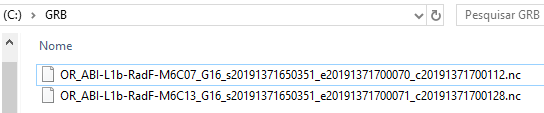
In the selected “outdir” (in our case, “C:\GRB\”), you’ll see the files downloaded from TDS.
TDS_Tuto_3

Stay tuned for news.

GEONETClass: Downloading Data From Amazon AWS With Python and Rclone (Part II)

AWS_Tuto_Logo.png

Hi community!

In the first part of this Blog series, we have learned how to use the Rclone tool to download data from Amazon, first, using Rclone commands and then, using Python scripts.

As a follow up to the previous Blog post, now we are going to show:

  • How to download only GOES-R imagery from minutes 20 and 50 every hour (to compliment the data available on GNC-A).
  • Suggest another scheme to download data from minutes 20 and 50, using the awscli utility and adapting the example script provided by Dr. Marcial Garbanzo at this Blog Post (sugested by Demilson Quintão, a GNC-A user)
  • Suggest another Python solution, without using Rclone (as mentioned by Paulo Alexandre Mello in the Part I comments section)

GOES-R Imagery in GEONETCast-Americas

In GNC-A we have imagery from both GOES-16 and GOES-17 (Bands 02, 07, 08, 09, 13, 14 and 15). Right now there are 4 images available each hour, from minutes 00, 10, 30 and 40. Check out below an example list of files received in GNC-A today for Band 13, since 7 AM:

GNC_Reception_Times.png

Downloading imagery only from minutes 20 and 50

The code snipped below shows an approach to detect if a GOES-R imagery is from minute 20 or 50.

file_name = "OR_ABI-L2-CMIPF-M6C10_G16_s20191300020310_e20191300030029_c20191300030106.nc"
# Search in the file name if the image from GOES is from minute 20 or 50.
# You may change the "20" and "50" to the minute (s) you want.
regex = re.compile(r'(?:s.........20|s.........50)..._')
finder = re.findall(regex, file_name)
# If "matches" is "0", it is not from minute 20 or 50. If it is "1", we may download the file
matches = len(finder)

Please find below the full Python script used to download data from these minutes:

############################################################
# LICENSE
# Copyright (C) 2019 - INPE - NATIONAL INSTITUTE FOR SPACE RESEARCH
# This program is free software: you can redistribute it and/or modify it under the terms of the GNU General Public License as published by the Free Software Foundation, either version 3 of the License, or (at your option) any later version.
# This program is distributed in the hope that it will be useful, but WITHOUT ANY WARRANTY; without even the implied warranty of MERCHANTABILITY or FITNESS FOR A PARTICULAR PURPOSE. See the GNU General Public License for more details.
# You should have received a copy of the GNU General Public License along with this program. If not, see http://www.gnu.org/licenses/.
############################################################
# Required Modules
import os           # Miscellaneous operating system interfaces
import subprocess   # The subprocess module allows you to spawn new processes, connect to their input/output/error pipes, and obtain their return codes.
import datetime     # Basic date and time types
import sys          # System-specific parameters and functions
import platform     # Access to underlying platform’s identifying data
import re           # Regular expression operations
osystem = platform.system()
if osystem == "Windows": extension = '.exe'

# Welcome message
print ("GOES-R Big Data Python / Rclone Downloader")

# Desired Data
BUCKET = 'noaa-goes16'     # For GOES-R the buckets are: ['noaa-goes16', 'noaa-goes17']
PRODUCT = 'ABI-L2-CMIPF'   # Choose from ['ABI-L1b-RadC', 'ABI-L1b-RadF', 'ABI-L1b-RadM', 'ABI-L2-CMIPC', 'ABI-L2-CMIPF', 'ABI-L2-CMIPM', 'ABI-L2-MCMIPC', 'ABI-L2-MCMIPF', 'ABI-L2-MCMIPM']
YEAR = str(datetime.datetime.now().year)                      # Year got from local machine
JULIAN_DAY = str(datetime.datetime.now().timetuple().tm_yday) # Julian day got from local machine
UTC_DIFF = +3                                                 # How many hours UTC is ahead (+) or behind (-) from your workstation time and date
HOUR = str(datetime.datetime.now().hour + UTC_DIFF).zfill(2)  # Hour got from local machine corrected for UTC, with 2 digits

print("Current year, julian day and hour based on your workstation:")
print("YEAR: ", YEAR)
print("JULIAN DAY: ", JULIAN_DAY)
print("HOUR (UTC): ", HOUR)

CHANNEL = ['C09', 'C13']    # Choose from ['C01', 'C02', 'C03', 'C04', 'C05', 'C06', 'C07', 'C08', 'C09', 'C10', 'C11', 'C12', 'C13', 'C14', 'C15', 'C16']
OUTDIR = "C:\\Rclone\\"     # Choose the output directory

# Loop through all channels chosen in the list
for CHANNEL in CHANNEL:
    # Get output from rclone command, based on the desired data
    files = subprocess.check_output('rclone' + extension + " " + 'ls publicAWS:' + BUCKET + "/" + PRODUCT + "/" + YEAR + "/" + JULIAN_DAY + "/" + HOUR + "/", shell=True)
    # Change type from 'bytes' to 'string'
    files = files.decode()
    # Split files based on the new line and remove the empty item at the end.
    files = files.split('\n')
    files.remove('')
    # Get only the file names for an specific channel
    files = [x for x in files if CHANNEL in x ]
    # Get only the file names, without the file sizes
    files = [i.split(" ")[-1] for i in files]
    # Print the file names list
    #print ("File list for this particular time, date and channel:")
    #for i in files:
    #    print(i)
    if not files:
        print("No files available yet... Exiting loop")
        break # No new files available in the cloud yet. Exiting the loop.
    print ("Checking if the file is on the daily log...")
    # If the log file doesn't exist yet, create one
    file = open('goes16_aws_log_' + str(datetime.datetime.now())[0:10] + '.txt', 'a')
    file.close()
    # Put all file names on the log in a list
    log = []
    with open('goes16_aws_log_' + str(datetime.datetime.now())[0:10] + '.txt') as f:
        log = f.readlines()
    # Remove the line feeds
    log = [x.strip() for x in log]
    if files[-1] not in log:
        print(files[-1])
        print ("Checking if the file is from minute 20 or 50...")
        # Search in the file name if the image from GOES is from minute 20 or 50.
        # You may change the "20" and "50" to the minute (s) you want.
        regex = re.compile(r'(?:s.........20|s.........50)..._')
        finder = re.findall(regex, files[-1])
        # If "matches" is "0", it is not from minute 20 or 50. If it is "1", we may download the file
        matches = len(finder)
        if matches == 0: # If there are no matches
            print("This is not an image from minute 20 or 50... Exiting loop.")
            break # This is not an image from minute 20 or 50. Exiting the loop.
        else:
            print("Image is from minute 20 or 50.")
        print ("Downloading the file for channel: ", CHANNEL)
        # Download the most recent file for this particular hour
        os.system('rclone' + extension + " " + 'copy publicAWS:' + BUCKET + "/" + PRODUCT + "/" + YEAR + "/" + JULIAN_DAY + "/" + HOUR + "/" + files[-1] + " " + OUTDIR)
        print ("Download finished!")
        print ("Putting the file name on the daily log...")
	    # Put the processed file on the log
        import datetime   # Basic Date and Time types
        with open('goes16_aws_log_' + str(datetime.datetime.now())[0:10] + '.txt', 'a') as log:
            log.write(str(datetime.datetime.now()))
            log.write('\n')
            log.write(files[-1] + '\n')
            log.write('\n')
    else:
        print("This file was already downloaded.")
        print(files[-1])

And please find below the “Python cron simulator” that will call the script above every 20 seconds (you may change this interval as you wish). Note: You may still use CRON, INCRON, Windows Task Scheduler, etc. This is just an alternative.

############################################################
# LICENSE
# Copyright (C) 2019 - INPE - NATIONAL INSTITUTE FOR SPACE RESEARCH
# This program is free software: you can redistribute it and/or modify it under the terms of the GNU General Public License as published by the Free Software Foundation, either version 3 of the License, or (at your option) any later version.
# This program is distributed in the hope that it will be useful, but WITHOUT ANY WARRANTY; without even the implied warranty of MERCHANTABILITY or FITNESS FOR A PARTICULAR PURPOSE. See the GNU General Public License for more details.
# You should have received a copy of the GNU General Public License along with this program. If not, see http://www.gnu.org/licenses/.
############################################################
import sched, time # Scheduler library
import os          # Miscellaneous operating system interfaces

# Interval in seconds
seconds = 20

# Call the function for the first time without the interval
print("\n")
print("------------- Calling Monitor Script --------------")
script = 'python aws_goes_downloader.py'
os.system(script)
print("------------- Monitor Script Executed -------------")
print("Waiting for next call. The interval is", seconds, "seconds.")

# Scheduler function
s = sched.scheduler(time.time, time.sleep)

def call_monitor(sc):
    print("\n")
    print("------------- Calling Monitor Script --------------")
    script = 'python aws_goes_downloader.py'
    os.system(script)
    print("------------- Monitor Script Executed -------------")
    print("Waiting for next call. The interval is", seconds, "seconds.")
    s.enter(seconds, 1, call_monitor, (sc,))
    # Keep calling the monitor

# Call the monitor
s.enter(seconds, 1, call_monitor, (s,))
s.run()

Another approach, suggested by Demilson Quintão (IPMET Bauru – Brazil)

Demilson, a GNC-A user, is complimenting his GNC-A station data using the example script from the following blog post:

https://geonetcast.wordpress.com/2018/01/10/script-to-download-goes-16-netcdfs-from-amazon-s3/

This is what he is doing:

  • When the GOES-R imagery from minutes 10 or 40 arrives at the GNC-A station, he downloads the data from minutes 20 and 50 from AWS, respectively.
  • Due to the rebroadcast latency from GNC-A, when the files from mintes 10 or 40 arrives, the files from minutes 20 and 50 are already available in AWS.
  • In order to detect that these files have arrived at his Linux Workstation, he uses INCRONTAB. This tool triggers processes based on events from the system. Among these events, there is the IN_CLOSE_WRITE, used by Demilson. This functionality detects when a file is written in the system.
  • INCRON works almos like CRONTAB (options -l, -e, etc…). However, it is much more efficient to use INCRON in this case for the sake of timing. It is activated only when a new file is written, and with CRONTAB you have to choose an interval.

Suggested by Blog Reader (Paulo Alexandre Mello): Downloading Data From AWS without using RClone

Paulo Alexandre Mello, from Brazil, suggested another solution in the first post comment session:

Comments_AWS_Paulo

You may check the goes-py utility at the following link:

https://github.com/palexandremello/goes-py

Thanks for the suggestion Paulo!

Stay tuned for news!


Operational GNC-A Station: Peruvian Navy (Station n° 84!) [Using an Old GVAR Dish]

20180302_130337b.jpg

Recycled GVAR dish antenna used to receive the GNC-A broadcast

Hi GEONETCasters,

The Peruvian Navy kindly shared photos of their GEONETCast-Americas station.

According the MORCOM (the Turn Key solution provider that made the installation):

“Their old GVAR dish antenna was recycled using a non-standard mounting bracket to fix the feedhor and LNB at the focal point. The antenna is surrounded by nearby sources of interference but the noise floor level is not that bad with a signal level of -43 dB. We supplied a small workstation and yet with good computing power using SSD drives in RAID1 working as a file server. It’s been working for more than a year now.” 

The adaptation may be seen at the picture below:

20180308_154355 - Copia.jpg

As for the DVB-S2 Receiver, they are using the NOVRA S300D:

s300d

And the LNB is a NORSAT 3120:

lnb

Thanks for the information, MORCOM!

20180307_135808b.jpg

Do you have a newly installed GNC-A instation that hasn’t been shown in the Blog? Please send us a photo to [email protected].

“New Operational GNC-A Station” Series: