
-
Q1:
I am not able to click on submenu in deesktop mode.
What mistake I have made not able to figure out.
Attached website urlQ2:
I have a Heading text H1 “Data Is Your Superpower.”
Now I want to add span class only for superpower how can I do it in visual editor -
George
Hello.
Q1: Any chance you need to clear your site cache (also Cloudlflare) and try again? Otherwise, could you please provide site credentials so we could have a look for you? Please use the private section of your reply to post them. You can also install the Temporary Login Without Password plugin and send us a login link without using a password. Again, please, use the private area of your reply to send those details.
Q2: Ok, one way is to select the word, the from the toolbar, select Highlight.
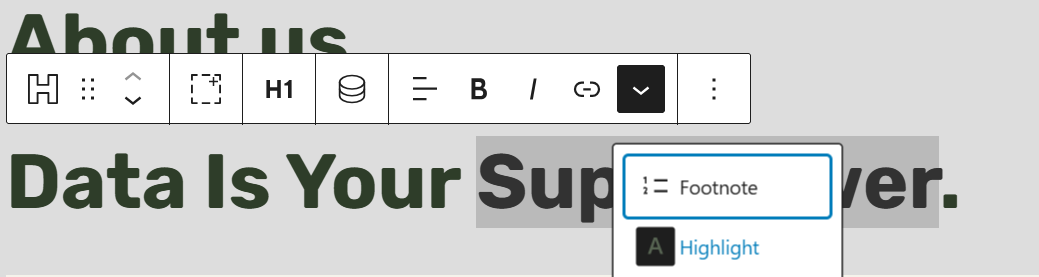
You can select a text color and a background color. If you don’t want to change any colors, just select the original heading color for that part of the text you have highlighted. What this does is it wraps your text with a <mark></mark> tag which you can then style.
Alternatively, you can edit the heading as HTML and add the span markup yourself.


Click the Edit visually button to switch back to the visual mode.
-
I found the issue.
My dropdown menu items (PC Cases / Peripherals) were not clickable because a content wrapper was sitting above the dropdown in the stacking order.
Inner section css:
.section-inner {
margin-left: auto;
margin-right: auto;
max-width: var(–gb-container-width);
padding-left: 1.5rem;
padding-right: 1.5rem;
position: relative;
z-index: 1;
}I think Because of z-index: 1, .section-inner overlapped the dropdown, so clicks were going to the wrapper instead of the submenu links. If I remove the z-index, the menu works.
But no idea how to fix changed z-index for menu 9999 but not working
-
George
The first section on the page has an inner div with the
section-innerclass. That class has a z-index of1.You can remove that value.


- You must be logged in to reply to this topic.