

Description
People are asking AI instead of Googling. Is your site showing up in those answers?
CiteHQ adds an llms.txt file to your WordPress site—the emerging standard that helps AI tools understand and cite your content.
One click. No setup. Works immediately.
Why AI Can’t Find Your Content
When someone asks ChatGPT or Claude a question your content could answer, AI has to guess what your site is about. Most sites get overlooked.
What is llms.txt?
CiteHQ creates an llms.txt file at yoursite.com/llms.txt that tells AI:
- What your site is about
- Which pages matter most
- How to describe your content
It’s like robots.txt, but for AI instead of search engines.
AI Search Statistics
- 400M+ weekly ChatGPT users
- AI search traffic up 527% year-over-year
- 844,000+ sites already have llms.txt
- Used by Anthropic, Stripe, Cloudflare, and others
Early adopters have the advantage. Setup takes 60 seconds.
llms.txt Features
- Instant Setup — Activate and done. Your llms.txt is live.
- Smart Defaults — Automatically includes your published content.
- Full Control — Choose which posts, pages, and media to include.
- Media Library Support — Include images with alt text, captions, and descriptions.
- URL Pattern Exclusion — Exclude URLs using wildcards (e.g., /private/*, *.pdf).
- SEO Friendly — Respects noindex settings from Yoast, Rank Math, and others.
- Auto Updates — Regenerates when you publish new content.
- Full Content Export — Also generates llms-full.txt with complete post content.
Plugin Compatibility
- Yoast SEO, Rank Math, All In One SEO, SEOPress
- Elementor, Divi, Beaver Builder
- WooCommerce
- WP Rocket, LiteSpeed, W3 Total Cache
Privacy
CiteHQ does not collect or transmit any user data. The plugin operates entirely locally on your WordPress installation.
A link to our waitlist page (citehq.com) is included in the settings for users interested in future Pro features. Clicking this link is entirely optional and takes you to an external page where you may choose to provide your email address.
Screenshots

AI Discoverability status — see instantly if you’re visible to ChatGPT, Claude & Gemini 
File generation options — choose between standard llms.txt or full content export 
Content settings — select which post types AI can discover and recommend 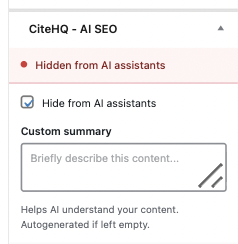
Per-post controls — exclude individual posts or add custom AI descriptions
Installation
- Install from the WordPress plugin directory
- Activate
- Done — visit yoursite.com/llms.txt to confirm
No configuration required. CiteHQ works immediately with smart defaults.
Want to customise? Visit Settings CiteHQ.
FAQ
-
Do I need to configure anything?
-
No. Activate and it works. Customisation is optional.
-
What is llms.txt?
-
A simple text file that helps AI understand your site—like robots.txt for AI instead of search engines. Created by Jeremy Howard (fast.ai founder), now used by hundreds of thousands of sites. Learn more at llmstxt.org
-
Will this help AI find my content?
-
AI tools increasingly look for llms.txt to quickly understand websites. Having a clear, structured summary makes it easier for AI to accurately represent your site.
No guarantees—but zero downside. If AI doesn’t use it, nothing breaks.
-
Which AI tools benefit?
-
Any AI that follows the llmstxt.org standard:
- ChatGPT / OpenAI
- Claude / Anthropic
- Gemini / Google
- Perplexity
- Future AI tools
-
Does this replace SEO?
-
No. SEO helps you rank in Google. CiteHQ helps AI understand and cite your content. Use both.
-
Will this affect Google rankings?
-
No. The llms.txt file has a noindex tag—Google ignores it completely.
-
Can I control which content appears?
-
Yes:
- Choose post types (posts, pages, products, media)
- Exclude individual posts via checkbox
- Add custom descriptions per post
- Exclude URLs by pattern (e.g., /private/*, *.pdf)
- Respect SEO plugin noindex settings
-
Does it work with WooCommerce?
-
Yes. Enable Products in settings to include your catalogue.
-
How often does it update?
-
Automatically when you publish or update content. Or set a schedule (hourly/daily/weekly) in settings.
-
I see a 404 at /llms.txt
-
Go to Settings Permalinks and click Save Changes. This refreshes your site’s URL structure.

Contributors & Developers
“CiteHQ” is open source software. The following people have contributed to this plugin.
Contributors
Translate “CiteHQ” into your language.
Interested in development?
Browse the code, check out the SVN repository, or subscribe to the development log by RSS.
Changelog
1.0.0
- Initial release
- Instant llms.txt at /llms.txt
- Full content export at /llms-full.txt
- Works without configuration
- Post type selection (including Media Library)
- Media support with alt text, captions, and descriptions
- URL pattern exclusion with wildcard support
- Per-post exclusion and descriptions
- SEO plugin integration (Yoast, Rank Math, AIOSEO, SEOPress)
- Auto-regeneration on publish
- Caching plugin compatibility