
Beskriuwing
Makes Google Analytics track clicks to any type of file you host on your web server.
You set which file types are tracked.
No need to edit or customize URLs.
Skermôfbyldings
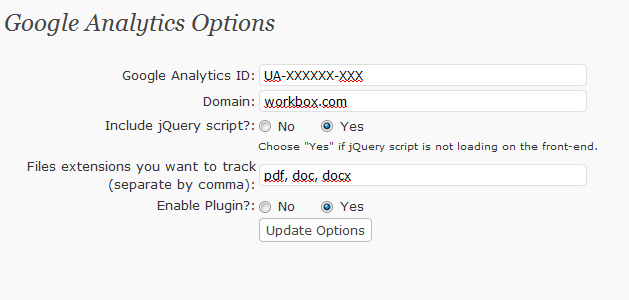
Plugin Settings page
Ynstallaasje
Download and activate the plugin.
The plugin options page (Google Analitics Options) will be available under Settings in the Admin panel.
Plugin options.
- Google Analitics ID – enter your Google Analytics ID.
- Domain – domain name for which the tracking is being configured. By default, the domain is set to the domain name of the site where the plugin is installed.
- Include jQuery Script. The plugin uses jQuery library. If your site is already using this library, select “NO”. If your site is not using it yet – select “YES” (in this case the library will load from the plugin catalog).
- File extensions you want to track – list of file extensions you want to track, comma-delimited. Only letters, digits and underscore and space. To track pdf files, write “pdf”.
- Enable Plugin? turns the plugin on and off.
If your Google Analytics tracking code is already in the page template, please remove it. The plugin will insert the code automatically.
FAQ
- What happens if you don’t remove your Google Analytics code and install our plugin as well?
Answer: Either there will be a javascript error (the page will load fine) or the stats will be submitted twice. So we strongly recommend that you remove your Google Analytics code when you install the plugin.
Resinsjes
D’r binne gjin resinsjes foar dizze plugin.
Meiwurkers & amp; Untwikkelders
“Workbox Google Analytics Plugin” is iepen boarne software. De folgjende minsken hawwe bydroegen oan dizze plugin.
Meiwurkers
Oersette “Workbox Google Analytics Plugin” yn jo taal.
Ynteressearre yn ûntwikkeling?
Blêdzje troch de koade , besjoch de SVN-repository , of abonnearje op it ûntwikkelingslogboek troch RSS .