

Description
StepraEngine Lite turns supported WordPress forms into clean, guided multi-step form wizards — without rebuilding your forms, changing your theme, or replacing your form builder.
Build your form normally in Contact Form 7, WPForms, Elementor Forms, or Forminator. StepraEngine reads the form on the frontend, creates step navigation, adds a progress indicator, validates the current step, and keeps the original form builder responsible for final submission.
Your form plugin still handles fields, email notifications, entries, spam protection, integrations, and server-side validation. StepraEngine improves the visitor experience on top.
Why use StepraEngine Lite?
Long forms can feel overwhelming. StepraEngine Lite helps you break supported forms into smaller steps so visitors move through them one section at a time.
Unlike form builders that force you to rebuild the form inside a new system, StepraEngine works with the form you already made. It adds the multi-step experience while preserving the original form structure, styling, and submission logic.
Supported form builders
StepraEngine Lite supports:
- Contact Form 7
- WPForms standard forms
- Elementor Forms
- Forminator
Each builder can be enabled or disabled from the Stepra settings panel. If a builder is disabled, StepraEngine will not hide, initialize, or split forms from that builder.
How it works
- Install and activate StepraEngine Lite.
- Build your form normally in Contact Form 7, WPForms, Elementor Forms, or Forminator.
- Add your form to a page using your builder’s normal shortcode, block, widget, or embed method.
- Open the Stepra settings panel.
- Choose your progress style, colors, button labels, validation language, and active builders.
- Test the form on desktop and mobile.
StepraEngine Lite supports automatic splitting and manual step control.
Manual step control
You can guide where each step starts by using headings or section fields:
- Contact Form 7: add H3 or H4 headings inside the form template.
- Elementor Forms: add HTML fields containing H3 or H4 headings.
- Forminator: use Forminator Section fields.
- WPForms: Stepra uses WPForms field containers for automatic splitting.
Enable Strict H3 mode if you want only H3 headings to trigger step breaks.
Progress styles
StepraEngine Lite includes two progress styles:
- Classic progress bar
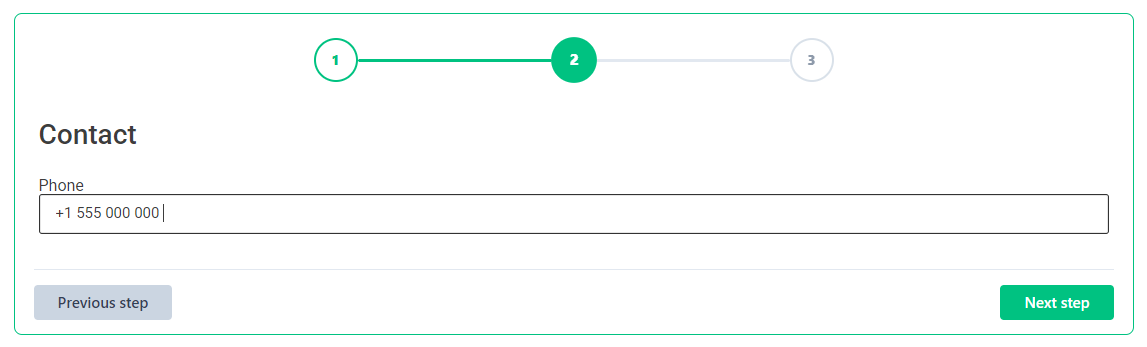
- Numbered 1, 2, 3 step progress
With numbered progress, visitors can click completed previous steps to go back. Future steps stay locked so visitors cannot skip required validation.
Validation and step navigation
StepraEngine checks required fields on the current step before allowing visitors to continue.
Validation includes:
- Required fields
- Email format
- URL format
- Phone number format
- Postal code and zip code format
- Date year range
If a supported form builder returns an error after submission, StepraEngine can move the visitor back to the step containing the invalid field.
Form Builder Targeting
StepraEngine Lite includes simple builder targeting.
You can turn Stepra on or off for each supported builder:
- Contact Form 7
- WPForms
- Forminator
- Elementor Forms
This is useful when you want Stepra to handle one form builder but leave another builder untouched.
Diagnostics
StepraEngine includes diagnostics tools to help you confirm that forms are initialized correctly.
Diagnostics can help check:
- Form detection
- Initialization state
- Visual-ready state
- Progress and navigation counts
- Duplicate controls
- Builder targeting state
Diagnostics only checks structure and state. It does not collect visitor-entered form values.
Key features
- Create multi-step forms without rebuilding your existing forms
- Works with Contact Form 7, WPForms, Elementor Forms, and Forminator
- Classic progress bar and numbered step progress styles
- Current-step validation before visitors move forward
- Automatic splitting for supported long forms
- Manual step control with headings or section fields
- Per-builder enable/disable targeting
- Conflict detection for native multi-step or pagination features
- Responsive step navigation for desktop and mobile
- Configurable colors, button labels, progress style, and validation language
- Diagnostics tools for setup and troubleshooting
- No custom database tables
- No stored visitor form submissions
Good use cases
StepraEngine Lite is useful for:
- Contact forms
- Quote request forms
- Booking forms
- Lead generation forms
- Application forms
- Client onboarding forms
- Service request forms
- Survey-style forms
- Long forms that need a cleaner step-by-step flow
Compatibility notes
StepraEngine Lite does not replace your form builder. Your original form plugin still controls fields, entries, notifications, spam protection, integrations, and final submission.
If your form already uses a native multi-step or pagination feature from the form builder, StepraEngine may pause on that form to avoid conflicts. Disable the native multi-step feature on that form if you want StepraEngine to handle the step experience.
Advanced conditional logic, third-party form add-ons, unusual field templates, payment fields, or heavily customized layouts should be tested after setup.
Privacy and Freemius
StepraEngine Lite does not store visitor form submissions and does not create custom database tables for form entries.
StepraEngine Lite uses the Freemius SDK for optional opt-in, product communication, update/upgrade infrastructure, and deactivation feedback. Users can skip opt-in. StepraEngine Lite remains functional if opt-in is skipped.
Diagnostics are structural only. They do not collect names, emails, phone numbers, addresses, payment details, messages, or any other visitor-entered form values.
Looking for Pro features?
WooCommerce checkout steps, unlimited steps, dynamic summary receipts, and advanced Pro controls are planned for StepraEngine Pro.
StepraEngine Lite focuses on supported standard forms for Contact Form 7, WPForms, Elementor Forms, and Forminator.
Screenshots




Installation
- Install StepraEngine Lite from the WordPress plugin screen or upload the plugin folder to
/wp-content/plugins/. - Activate StepraEngine Lite.
- Go to Stepra in the WordPress admin menu.
- Configure progress style, colors, button labels, validation language, heading behavior, and active builders.
- Open a page with a supported form and test the result on desktop and mobile.
FAQ
-
Do I need to rebuild my form?
-
No. StepraEngine Lite works with supported existing forms on the frontend. Your form builder still handles fields, entries, notifications, spam protection, and submission.
-
Which form builders are supported?
-
Contact Form 7, WPForms standard forms, Elementor Forms, and Forminator.
-
How many steps are available in Lite?
-
StepraEngine Lite supports up to 3 steps.
-
What progress styles are included?
-
Lite includes a classic progress bar and a numbered 1, 2, 3 step indicator.
-
Can visitors click previous steps?
-
Yes. With numbered progress, visitors can click completed previous steps to go back. Future steps remain locked until validation passes.
-
What happens if I do not add headings or sections?
-
StepraEngine can split supported long forms automatically.
-
How do I manually control steps in Contact Form 7?
-
Add H3 or H4 headings inside the Contact Form 7 form template where each new step should begin.
-
How do I manually control steps in Elementor Forms?
-
Add HTML fields containing H3 or H4 headings inside the Elementor form. StepraEngine uses those headings as step dividers.
-
How do I manually control steps in Forminator?
-
Use Forminator Section fields. StepraEngine uses those sections as step dividers.
-
How does WPForms support work?
-
StepraEngine uses WPForms field containers for automatic step creation. If WPForms native multi-page fields are detected, StepraEngine pauses on that form to avoid conflicts.
-
Can I disable Stepra for one builder?
-
Yes. The settings panel includes enable/disable toggles for each supported builder.
-
Does Stepra preserve my form design?
-
Yes. Your theme and form builder still control field width, spacing, labels, typography, and layout. StepraEngine adds step visibility, progress, navigation, and validation flow.
-
Does it work with shortcodes, blocks, widgets, and page builders?
-
Yes, when the supported form builder outputs standard frontend markup. Always test your form after setup.
-
Does StepraEngine work on mobile?
-
Yes. The step layout, progress indicator, and navigation buttons are responsive.
-
Does it work with multiple forms on one page?
-
Yes. StepraEngine detects and initializes supported forms independently.
-
What validation does Stepra perform?
-
Required fields, email format, URL format, phone number format, postal/zip code format, and date year range.
-
Does Stepra submit the form itself?
-
No. Your form builder handles final submission, entries, notifications, spam protection, and integrations.
-
What if my form already has native multi-step or pagination?
-
StepraEngine detects native multi-step or pagination features and pauses on that form to avoid conflicts.
-
Does Lite support WooCommerce checkout?
-
No. WooCommerce checkout is a Pro feature.
-
Does Lite include summary receipts?
-
No. Dynamic summary receipts are a Pro feature.
-
Does the plugin store visitor form data?
-
No. StepraEngine Lite does not store visitor form submissions and does not create custom database tables for entries.
-
Where can I get support?
-
Use the WordPress.org support forum for StepraEngine Lite.
Reviews
There are no reviews for this plugin.
Contributors & Developers
“StepraEngine Lite” is open source software. The following people have contributed to this plugin.
Contributors
Translate “StepraEngine Lite” into your language.
Interested in development?
Browse the code, check out the SVN repository, or subscribe to the development log by RSS.
Changelog
1.1.0
- Added per-builder targeting for Contact Form 7, WPForms, Forminator, and Elementor Forms.
- Added diagnostics tools for form initialization, visual-ready state, navigation, and targeting checks.
- Improved form initialization reliability across supported builders.
- Improved visual readiness and reduced layout flash during form setup.
- Improved builder-specific navigation and submit button handling.
- Improved validation consistency for Elementor Forms.
- Improved settings and button color synchronization.
- Improved Lite and Pro feature separation.
- Improved admin layout with a cleaner settings area and read-only status sidebar.
- Improved PHP sanitization and escaping.
- Added Freemius SDK integration for optional opt-in and deactivation feedback.
1.0.2
- Added an optional numbered 1, 2, 3 progress style.
- Added clickable completed step numbers for safe backward navigation.
- Added animated numbered progress previews in the admin settings.
- Kept the original progress bar style as the default option.
1.0.1
- Reduced visual flash during form initialization and step navigation.
- Improved scroll behavior during Next and Previous step navigation.
- Improved focus handling after navigation.
- Preserved Contact Form 7 field width behavior while switching between steps.
- Updated compatibility metadata after testing with WordPress 7.0.
1.0.0
- Initial release.
- Added support for Contact Form 7.
- Added support for Elementor Forms.
- Added support for Forminator.
- Added support for WPForms standard forms.
- Added automatic form splitting.
- Added H3/H4 heading-based splitting for Contact Form 7 and Elementor Forms.
- Added Forminator Section field support for manual step control.
- Added responsive progress bar and navigation buttons.
- Added required-field validation before advancing to the next step.
- Added inline validation messages.
- Added email, phone, postal code, date, and URL validation helpers.
- Added invalid-field step-jump behavior after supported submission errors.
- Added conflict detection for native multi-step and pagination features.
- Added admin controls for colors, labels, validation language, and heading behavior.