

Description
WP Store Locator est un système de localisation puissant et facile d’utilisation.
Vous pouvez personnaliser l’apparence de la carte et fournir des libelés personnalisés pour les champs d’entrée.
Les utilisateurs peuvent filtrer les résultats par rayon et voir les itinéraires des boutiques à proximité dans
la langue sélectionnée dans le panneau d’administration.
Fonctionnalités incluses :
- Gérer un nombre illimité de magasins.
- Fournir des détails supplémentaires sur les boutiques tels que le numéro de téléphone, de fax, l‘adresse e-maill, l‘URL, la description et les horaires d’ouverture. Des filtres sont disponibles pour ajouter des métadonnées personnalisées.
- Support for custom map styles.
- Choisissez parmi 9 icônes de marqueur prêts pour rétina.
- Afficher les distances en kilomètres ou miles.
- Codes courts qui vous permettent d’ajouter individuellement horaires d’ouverture, adresse ou juste une carte avec un marqueur unique à n’importe quelle page.
- Compatible avec les extensions multilingues telles que WPML and qTranslate X.
- Vous pouvez déplacer le marqueur dans l’éditeur à l’emplacement précis sur la carte.
- Afficher les résultats de recherche sur le côté ou directement sous la carte.
- Show Google Maps in different languages, this also influences the language for the driving directions.
- Show the driving directions to the stores.
- Customize the max results and search radius values that users can select.
- Les utilisateurs peuvent filtrer les résultats par périmètre, quantité et catégorie.
- Supporte les marqueurs en grappe.
- Customize map settings like the terrain type, location of the map controls and the default zoom level.
- Use the Geolocation API to find the current location of the user and show nearby stores.
- Developer friendly code. It uses custom post types and includes almost 50 different filters that help you change the look and feel of the store locator.
- GDPR – Load Google Maps only after the user agrees to it ( requires the Borlabs Cookie plugin ).
Documentation
Veuillez consulter la documentation avant de faire une demande de support.
Options payantes
Gestionnaire CSV
Le Gestionnaire CSV vous permet d’importer, exporter et mettre à jour vos emplacements à partir d’un fichier CSV.
Widget de recherche
Le widget de recherche permet aux usagers de rechercher à partir de n’importe laquelle des zones de widget de votre thème une boutique à proximité et affiche les résultats sur la page d’emplacement de boutique.
Statistiques
Le module Statistiques vous permet de suivre les lieux recherchés par les internautes et de voir où il y a une demande pour un nouveau magasin.
Extenders
Le module Extenders ajoute les fonctionnalités nécessaires aux internautes chevronnés, telles que la gestion des évènements basés sur l‘emplacement, les informations relatives aux réseaux sociaux et les emplacements gérés par d‘autres utilisateurs et utilisatrices connectés.
Captures d’écrans

Interface visiteur de l’extension 
The driving directions from the user location to the selected store 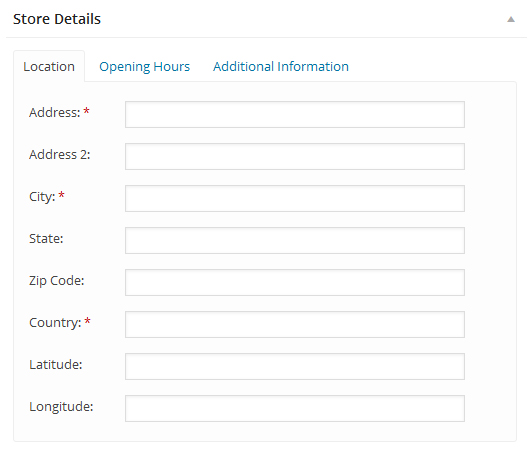
La section « Détails de la boutique » 
Les réglages de l’extension 
Blocs
Cette extension fournit 2 blocs.
- Map Display a WP Store Locator map for specific store locations by ID or category.
- Store Locator Display a WP Store Locator map with search functionality.
Installation
- Upload the
wp-store-locatorfolder to the/wp-content/plugins/directory - Activez-la via le menu Extensions dans l’admin WordPress
- Create a Google API Key and set them on the settings page.
- Set the start point on the settings.
- Add your stores under ‘Store Locator’ -> Add Store
- Add the map to a page with this shortcode: [wpsl]
FAQ
-
Comment puis-je ajouter le localisateur de boutique à une page?
-
Add this shortcode [wpsl] to the page where you want to display the store locator.
-
Oops! Something went wrong
-
You can fix this by setting the browser key on the settings page.
-
There are weird characters in the search results, how do I remove them?
-
This is most likely caused by a plugin like W3 Total Cache that tried to minify the HTML output on the store locator page. You can fix this by excluding the store locator from being minified on the settings page of the caching plugin you’re using. In W3 Total Cache this is done by going to Minify -> Advanced -> Never minify the following pages, and fill in the page you don’t want to have minified. So if your store locator is used on mydomain.com/store-locator, then fill in ‘store-locator’.
-
Can I use different markers for category or individual store locations?
-
How to use custom markers is described here, you can also only use different markers for a few locations, or just for the categories.
-
La carte ne s’affiche pas correctement. Elle est coupée en deux ou ne s’affiche pas du tout.
-
Make sure you have defined a start point for the map under settings -> Map Settings.
-
La carte ne fonctionne plus après l’installation de la dernière mise à jour
-
Si vous utilisez une extension de cache ou un service comme Cloudflare, assurez-vous d’effacer le cache.
-
Je suis incapable de faire disparaître la fenêtre contextuelle qui me demande de joindre la liste de diffusion, comment puis-je solutionner cela ?
-
Il y a probablement une erreur JS dans la zone WP Admin qui empêche la désactivation de la fenêtre contextuelle. Essayez de basculer momentanément vers un thème WP par défaut, désactivez toutes les autres extensions et essayez à nouveau de désactiver la fenêtre contextuelle de lettre d’information.
-
Pourquoi affiche-t-il un lieu que j’ai cherché mais dans un mauvais pays ?
-
Some location names exist in more then one country, and Google will guess which one you mean. This can be fixed by setting the correct ‘Map Region’ on the settings page -> API Settings.
-
Le localisateur de boutique ne se charge pas, il affiche uniquement le chiffre 1 ?
-
This is most likely caused by your theme using ajax navigation ( the loading of content without reloading the page ), or a conflict with another plugin. Try to disable the ajax navigation in the theme settings, or deactivate the plugin that enables it to see if that solves the problem.
If you don’t use ajax navigation, but do see the number 1 it’s probably a conflict with another plugin. Try to disable the plugins one by one to see if one of them is causing a conflict.
If you find a plugin or theme that causes a conflict, please report it on the support page.
You can find the full documentation here.
-
Where do I report security bugs found in this plugin?
-
Please report security bugs found in the source code of the WP Store Locator plugin through the Patchstack Vulnerability Disclosure Program. The Patchstack team will assist you with verification, CVE assignment, and notify the developers of this plugin.
Avis


Contributeurs/contributrices & développeurs/développeuses
« WP Store Locator » est un logiciel libre. Les personnes suivantes ont contribué à cette extension.
Contributeurs
“WP Store Locator” a été traduit dans 19 locales. Remerciez l’équipe de traduction pour ses contributions.
Traduisez « WP Store Locator » dans votre langue.
Le développement vous intéresse ?
Parcourir le code, consulter le SVN dépôt, ou s’inscrire au journal de développement par RSS.
Journal des modifications
= 2.3.0
* Added: Two blocks for the [wpsl] and [wpsl_map] shortcodes
* Added: Temporary notice that enables users to sign up for testing the beta version of the 3.0 update
* Changed: Ensured all code follows the latest WordPress Coding Standards
* Fixed: Authenticated stored XSS vulnerability for the [wpsl_map] shortcode
* Fixed: Shortcode option ‘control_position’ not working in the [wpsl_map] shortcode if the option is disabled on the settings page
* Fixed: Styling issues with the Geocode API Response test dialog and the hours in the admin area