

Description
WP Ghost (formerly known as Hide My WP Ghost) is a professional-grade, comprehensive hack-prevention security solution for WordPress. Built for speed and engineered for maximum defense, WP Ghost provides a multi-layered security architecture designed to block hacker bots, neutralize automated scanners, and stop the hack before the reconnaissance even begins.
While traditional security tools focus on Detection (scanning for malware after a breach) or Signature-Filtering (blocking known exploits), WP Ghost focuses on Architecture. By implementing Paths Security and Site Hardening, we remove the digital footprints that make your site a target for automated botnets, providing a proactive foundation that secures your site before it can even be identified as a target.
WP Ghost Global Stats:
- 10 Million+ Monthly Brute-Force Attempts Blocked
- 100 Million+ Monthly Security Threats Prevented
Official websites:
WP Ghost (wpghost.com)
Hide My WP Ghost (hidemywpghost.com)
Stop Attacks with Paths Security & Architectural Hardening
Most WordPress attacks are automated. Bots scan millions of sites per hour looking for default paths like /wp-admin or /wp-login.php to confirm a site is running WordPress. Once confirmed, they launch targeted exploits against known plugin or theme vulnerabilities.
WP Ghost breaks this cycle. By changing and securing common paths, you reduce your attack surface by up to 90%. This isn’t « obscurity », it’s Site Hardening. We re-engineer the visible structure of your site so it is no longer a low-hanging fruit for global botnets.
Key Protections Included
WP Ghost is packed with advanced defensive mechanisms to protect your site against:
- Brute Force Attacks: Blocks automated password guessing at the source.
- SQL Injection & XSS: Neutralizes malicious query strings and script injections.
- Zero-Day Exploits: Secures paths for plugins before patches are even released.
- XML-RPC & REST API Attacks: Shuts down common remote-access entry points.
- Bot Reconnaissance: Prevents « fingerprinting » that hackers use to map your site.
- Spam & Scrapers: Filters malicious traffic, saving bandwidth and server load.
Over 65 Free Security Features Included
We believe professional security should be accessible to everyone. The free version of WP Ghost includes a massive suite of tools to harden your WordPress architecture.
1. Change and Secure Paths (Paths Security)
- Change wp-admin & wp-login.php: Move your login to a unique URL and show a 404 error to intruders.
- Change Lost Password & Register URLs: Secure all authentication entry points.
- Change wp-content & wp-includes: Secure your core system folders from direct access.
- Anonymize Plugins & Themes: Change visible plugin/theme paths so hackers can’t identify your software version.
- Secure admin-ajax.php & REST API: Change the /wp-json path to prevent data scraping.
- Custom Redirects: Set unique login/logout redirects based on user roles.
2. Next-Gen Firewall & Authentication
- 8G & 7G Firewall Filters: High-speed, lightweight server-edge filtering to block bad bots.
- Passkey Authentication (Passwordless 2FA): Use Face ID, Touch ID, or Windows Hello for un-phishable, device-based logins.
- Standard 2FA (Code & Email): Add an extra verification layer to all user accounts.
- Security Headers: Automatically implement CSP, HSTS, X-Frame-Options, and more.
- IP & User Agent Blocking: Manually blacklist suspicious traffic or referrers.
3. Deep Hiding & Footprint Removal
- Scrub Meta Tags: Remove WordPress version numbers and generator tags.
- Clean HTML Comments: Strip identifiable comments that reveal your tech stack.
- Hide Admin Toolbar: Remove the toolbar for specific roles to hide backend indicators.
- Disable Emoticons & RSD: Remove unnecessary header links that bloat code and reveal info.
4. Advanced Disable Options
- Disable XML-RPC: Shut down the most common vector for DDoS and brute force.
- Disable REST API Access: Restrict API access to authenticated users only.
- Frontend Lockdown: Disable right-click, « View Source, » and text selection to prevent manual reconnaissance.
- Disable Directory Browsing: Ensure your server folders are never visible to the public.
5. Brute Force Protection
- Integrated ReCaptcha: Supports Google V2, V3, Enterprise, and Math ReCaptcha.
- Targeted Protection: Enable brute force defense on Login, Signup, and WooCommerce pages.
- Custom Throttling: Define your own lockout times and attempt limits.
6. Extra Tools & Integrations
- Magic Links: Log in securely without a password via a one-time email link.
- Text & URL Mapping: Change any class name or URL in your source code dynamically.
- CDN & Cache Support: Works perfectly with WP Rocket, Cloudflare, and Litespeed.
Premium Hack-Prevention Features
For agencies and high-traffic sites, WP Ghost Premium adds over 80 advanced features focused on Security Intelligence and Automated Response.
- Advanced File Hardening: Secure sensitive files like wp-config.php, php.ini, and debug.log.
- IP Block Automation: Proactively and automatically block repeat offenders at the firewall.
- Security Threats Monitoring: A professional dashboard to track every blocked scan and exploit.
- User Events Cloud Log: Optional 30-day cloud storage for auditing user activity and detecting internal threats.
- Real-time Email Alerts: Get notified instantly of brute-force attempts or suspicious activity.
- Geo-Security (Country Blocking): Block entire countries known for high malicious traffic.
- Priority Support: Direct access to our security experts and founder-led assistance.
Technical Compatibility
WP Ghost is engineered for the modern WordPress ecosystem:
- Hosting Support: Optimized for WP Engine, Inmotion Hosting, Hostgator Hosting, Godaddy Hosting, Host1plus, Payperhost, Fastcomet, Dreamhost, Bitnami Apache, Bitnami Nginx, Google Cloud Hosting, Amazon AWS Lightsail, Litespeed Hosting, Flywheels Hosting, Kinsta Hosting, Ploi.io, CloudPanel, RunCloud, Rocket Domain, Yunohost.
- Server Support: Fully compatible with Nginx, Apache, LiteSpeed, and IIS.
- Plugin Support: Seamless integration with Woocommerce, WPML, WPMUDEV, W3 Total Cache, Gravity, WP Super Cache, WP Fastest Cache, Hummingbird Cache, Cachify Cache, Litespeed Cache, SiteGround Optimizer, Nitropack, Cache Enabler, CDN Enabler, WOT Cache, Autoptimize, Jetpack by WordPress, Contact Form 7, bbPress, Manage WP, All In One SEO, Rank Math, Yoast SEO, Squirrly SEO, WP-Rocket, Minify HTML, Solid Security, Sucuri Security, Really Simple SSL, WordFence Security, WP Cerber Security, BBQ Firewall, Anti-Malware Security, Back-Up WordPress, Elementor Page Builder, Divi Builder, Weglot Translate, AddToAny Share Btn, Limit Login Attempts Reloaded, Loginizer, Shield Security, Asset CleanUp, WP Hide & Security Enhancer, and more.
Stop the hack before it starts. Join over 100,000 users who trust WP Ghost to secure their digital presence.
Captures d’écrans

WP Ghost Overview: Choose your Level of Security to instantly harden your site architecture. 
Admin Security: Change and secure the wp-admin path to block unauthorized dashboard access. 
Paths Security: Customize and secure your login and registration entry points. 
Core Security: Harden your system paths (wp-content, uploads, includes) against bot reconnaissance. 
API & AJAX Security: Secure the REST API and admin-ajax paths to prevent data scraping. 
8G Firewall Engine: High-performance, server-edge threat filtering for proactive hack prevention. 
Brute Force Defense: Integrated Google reCaptcha and Math protection for all authentication paths. 
Modern Authentication: Secure logins with 2FA and future-proof Passkey (Passwordless) support. 
Text Mapping: Dynamically change class names and IDs in your source code to prevent fingerprinting. 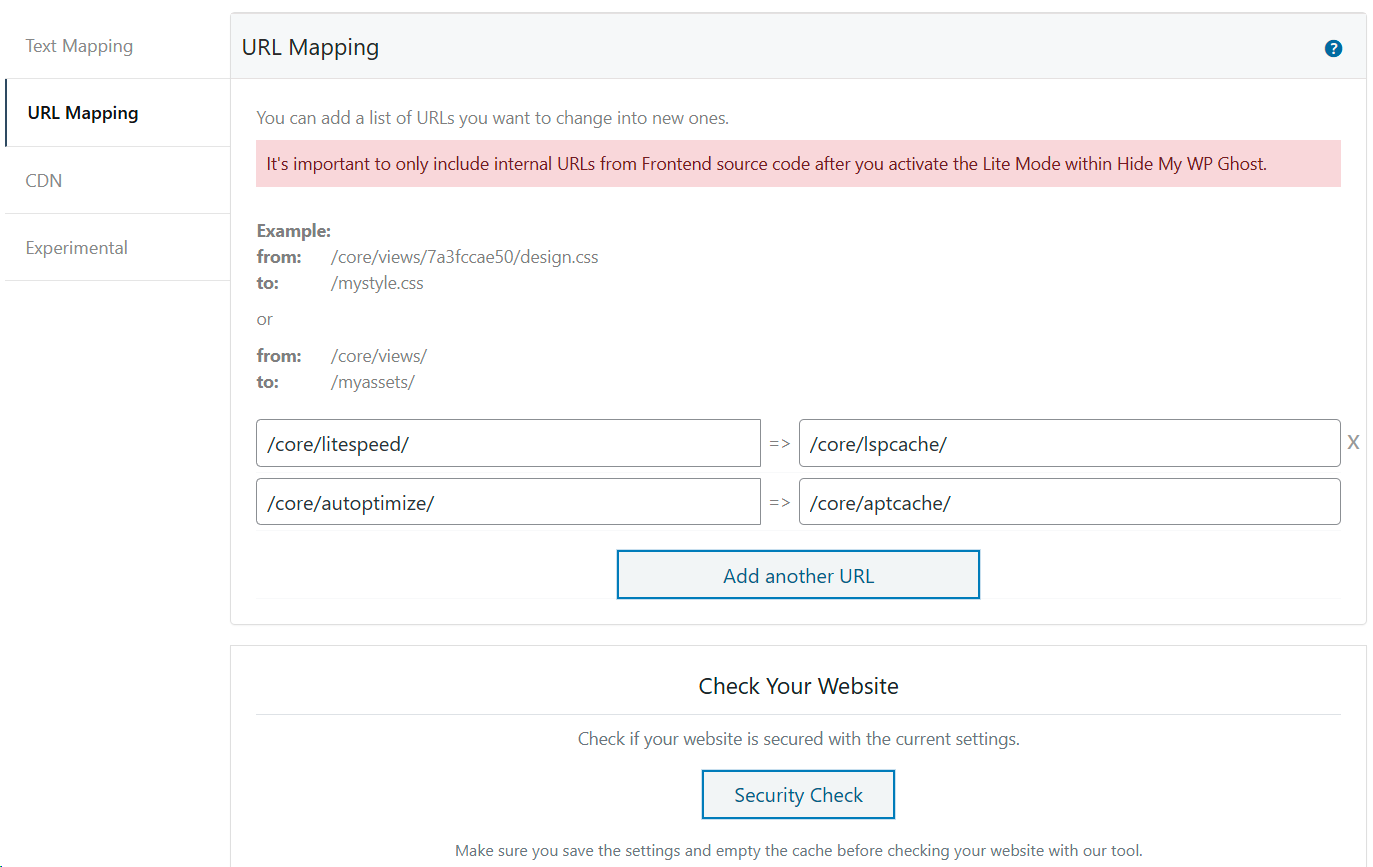
URL Mapping: Re-engineer internal URLs and paths for elite-level site hardening. 
Hardening Tweaks: Deep hide options to remove WordPress version tags and identifiable meta-data. 
Redirect Logic: Custom 404 and role-based redirect options for secured paths. 
Safe Access: Manage Temporary Logins and Magic Links for secure developer access. 
Front-end View: Example of a custom, secured login path (/newlogin). 
Attack Blocked: Default wp-login.php now returns a 404 error to confuse hacker bots. 
Access Denied: Default wp-admin path is fully secured and hidden from public view. 
Source Code Proof: Core WordPress paths transformed and secured to neutralize bot scans.
Installation
From your WordPress Dashboard
Step 1. Navigate to Plugins > Add New.
Step 2. Search for « WP Ghost ».
Step 3. Click Install Now and then Activate.
Step 4. Go to the WP Ghost menu in your sidebar.
Step 5. Enter your email address to receive your instant Free Access Token.
Step 6. Follow the built-in Setup Wizard to begin hardening your paths.
Manual Installation
Step 1. Download the hide-my-wp.zip file from the WordPress repository or your WP Ghost account.
Step 2. Log in to your WordPress dashboard as an Administrator.
Step 3. Navigate to Plugins > Add New > Upload Plugin.
Step 4. Select the .zip file and click Install Now.
Step 5. Click Activate Plugin.
Step 6. Connect the plugin with your email address to activate your security features.
Resources & Guides
For advanced server configurations or detailed walkthroughs, please visit our comprehensive documentation:
How to Install and Setup WP Ghost
FAQ
-
Does WP Ghost physically move or rename my WordPress files?
-
No. WP Ghost utilizes high-performance server rewrite rules (Nginx, Apache, IIS) to change the visible paths in your source code. Your actual WordPress files and directories remain exactly where they are, ensuring zero risk to your site’s stability and core updates.
-
Is WP Ghost a complete standalone solution?
-
For the vast majority of WordPress sites, Yes. By combining Architectural Hardening with an 8G Firewall and Automated IP Blocking, WP Ghost neutralizes the automated reconnaissance and brute-force attempts that account for over 90% of real-world attacks. It provides a foundational defense that is often statistically sufficient on its own, while remaining fully compatible with « Defense in Depth » strategies involving malware scanners or file-integrity monitors.
-
Is it compatible with other WordPress security plugins?
-
Yes! WP Ghost is designed as your « Outer Perimeter » defense. It works perfectly alongside malware scanners and reactive security tools like Wordfence, Sucuri, or Solid Security. By implementing Paths Security first, WP Ghost stops bots before they even get close enough to be scanned by other plugins.
-
Will changing my paths affect my SEO or Google rankings?
-
Not at all. WP Ghost handles Sitemap.xml and Robots.txt mapping automatically. This ensures that Google and other search engines can still index your content perfectly, while malicious bots receive a 404 error when attempting to probe your system paths.
-
What is the difference between Paths Security and « Security through Obscurity »?
-
Obscurity is simply hiding a key under a mat. Paths Security is an architectural hardening strategy—like moving the door to a secure, unique location and changing the lock. It is a recognized technical hardening standard used by enterprise-grade sites to prevent Bot Reconnaissance.
-
Does WP Ghost work on WP Multisite and different server types?
-
Yes. The plugin is fully compatible with WP Multisite (Network-wide configuration) and supports Apache, Nginx, IIS, and LiteSpeed servers.
-
How do I configure WP Ghost on an Nginx Server?
-
WP Ghost fully supports Nginx. Because Nginx does not use .htaccess, you will be guided to add the generated rewrite rules to your nginx.conf file manually. We provide specific tutorials for Kinsta, RunCloud, CloudPanel, CWP7, AAPanel, and Ploi.io.
-
My theme is not loading correctly after changing paths. What should I do?
-
This usually happens if the server rewrite rules are not yet active.
- Purge Cache: Clear your WordPress cache and any server-side caching (Varnish, Nginx FastCGI).
- Manual Rewrites: If your server config file is not writable, copy the rules from WP Ghost and add them manually to your .htaccess or nginx.conf.
- Restart Nginx: If on Nginx, you must reload/restart the service after saving settings.
- Free Support: If the issue persists, contact us and we will set up the plugin for you for free.
-
I am locked out or forgot my custom login URL. How do I get back in?
-
- Safe URL: Use the « Safe URL » text file that was automatically generated and downloaded when you saved your settings.
- Manual Reset: Access your server via FTP/SFTP and rename the folder /wp-content/plugins/hide-my-wp to something else. This temporarily disables the path changes so you can login via the default wp-login.php.
-
Does WP Ghost work for WordPress.com websites?
-
Due to the restricted infrastructure of WordPress.com managed hosting, changes to the administrative and login paths are not allowed. However, you can still use WP Ghost for Site Hardening, the 8G Firewall, Passkey Authentication, and other Hack Prevention features.
-
Is the WP Ghost plugin free of charge?
-
Yes. The Lite version of WP Ghost will always be free and includes essential WordPress Security updates. To unlock advanced features like IP Block Automation, Geo-Security, and Cloud Monitoring, you can upgrade to WP Ghost Premium.
-
How can I hide my site from WordPress Theme Detectors?
-
By using Paths Security to change common directories (plugins, themes, wp-content), you effectively neutralize most automated detectors. For a deep-dive on total anonymity, read our guide: How to Hide Your Site From WordPress Theme Detectors.
-
Is this plugin enough to protect my website from all hackers?
-
WP Ghost provides an elite proactive defense by neutralizing the Reconnaissance phase of an attack. While the Free version blocks the vast majority of bot traffic, we recommend the Premium version for advanced Brute Force Protection and Automated Threat Intelligence.
-
How do I change the WordPress paths in the Admin Dashboard area?
-
By default, WP Ghost only changes paths on the frontend to ensure maximum compatibility. To harden the admin dashboard as well, add
define('HMW_ALWAYS_CHANGE_PATHS', true);to your wp-config.php file and re-save your settings.
Avis


Contributeurs/contributrices & développeurs/développeuses
« WP Ghost (Hide My WP Ghost) – Security & Firewall » est un logiciel libre. Les personnes suivantes ont contribué à cette extension.
Contributeurs
“WP Ghost (Hide My WP Ghost) – Security & Firewall” a été traduit dans 4 locales. Remerciez l’équipe de traduction pour ses contributions.
Traduisez « WP Ghost (Hide My WP Ghost) – Security & Firewall » dans votre langue.
Le développement vous intéresse ?
Parcourir le code, consulter le SVN dépôt, ou s’inscrire au journal de développement par RSS.
Journal des modifications
5.5.04 (26 Mar 2026)
- Update – Firewall rules on WP core init
- Update – Added compatibility with Photo Gallery from 10Web
- Fix – Security Check to properly update the options and handle
- Fix – Small bugs
5.5.02 (10 Feb 2026)
- Fix – Compatibility with IIS Server
- Fix – Compatibility with LiteSpeed Quic Cloud
5.5.01 (22 Dec 2025)
- Update – Added the option to hide WordPress Common Paths with extension html, txt, lock
- Update – Added the option to hide WordPress Common Files like wp-config, readme.html, license.html, php.ini
- Update – Added the option to Hide Source Map References
- Update – Added the option to Hide User Enumeration
5.4.08 (09 Dec 2025)
- Update – Compatibility with WP 6.9
- Fix – Remove the wp-*.php and admin path from prefetch paths in WP 6.9
- Update – 2FA to allow each user to select the 2FA method in the profile
- Update – 2FA to connect through passkey and fingerprint
- Update – 2FA to trust the current browser
5.4.07 (29 Sept 2025)
- Update – Compatibility with the plugin WP Social & WP Social PRO
- Update – Compatibility with LiteSpeed Quic Cloud on IPV6
- Update – Make REST API test work when permalinks are set to the default PHP parameter
- Update – Minimum PHP version required is 8.0 in the Security Check section
- Update – Added New Feature Two-factor Authentication By Passkey (2FA)
- Update – Whitelist more known AI Chatbots in firewall rules
5.4.06 (21 Aug 2025)
- Update – Firewall rules for more compatibility
- Update – Safe URL verification process
- Update – Compatibility with the plugin Debloat
5.4.05 (27 May 2025)
- Update – Add AI support in the plugin settings
- Update – 7G & 8G Firewall for more compatibility with WP Plugins
- Update – Compatibility with Riode theme on Brute Force
- Fix – Compatibility WooCommerce login/register with reCaptcha V3
- Fix – Update check error
5.4.04 (21 Mar 2025)
- Update – Compatibility with the WP 6.8
- Fixed – Function _load_textdomain_just_in_time was called incorrectly
5.4.03 (11 Mar 2025)
- Update – Compatibility with the new WP Engine rewrite rules
- Update – Add the option to customize all active and inactive themes
- Fix – File security when the rewrite rules are not loaded correctly
- Fix – Prevent Brute Force from updating the warning text without space when switched off
- Fix – Prevent PHP warning when IP address unknown in Brute Force IP check
- Fix – Load i18n on login page for password-strength-meter messages when the Clean Login option is activated
- Fix – File security when the rewrite rules are not loaded correctly
- Fix – Dynamic file mapping to load through index.php for better compatibility with all server types
5.4.02 (04 Mar 2025)
- Update – Security update on wp-activate.php path call
- Update – Translations in all languages for the last changes
- Update – the Brute Force to load Google Enterprise reCaptcha
- Update – Brute Force compatibility with other plugins
- Fix – Headers check on Brute Force to get the real IP behind Proxy
- Fix – Include parent theme in the custom theme name list if the child theme is loaded
- Fix – Admin layout issue when other plugins notification is loading in Wp Ghost settings
- Fix – Prevent redirecting URLs to hidden paths like new admin path or new login path
- Fix – Paths changed in cache files when CSS and JS files are loaded dynamically
- Fix – Hide the new login on registration redirect when the registration is deactivated
- Fix – Remove newlines from the rewrite rules
5.4.01 (06 Ian 2025)
- Update – Changed Hide My WP Ghost plugin name with short WP Ghost
- Update – WP Ghost comes with a new logo in 2025
- Update – More security on REST API for user listing when User Security is activated
- Update – Plugin Security and Firewall rules
5.3.02 (08 Nov 2024)
- Update – Compatibility with WP 6.7
- Update – Add Brute Force for comments form in Brute Force
- Update – Translations
- Fix – Issue when changing relative to absolute path in javascript
- Fix – Root domain regarding multisite with subdomains
- Fix – Compatibility with LiteSpeed CDN domains
- Fix – Use WordPress function for all parse url
- Fix – Activate firewall by default when Lite mode option is selected
- Fix – Compatibility with WP Rocket background CSS loader
- Fix – Flush changed to config file when some features are activated in Overview section
- Fix – Clear cache for Litespeed plugin when changing is made in the Mapping section
- Fix – Activate the Text Mapping in CSS and JS files option for hiding class names like elementor or woocommerce
5.3.01 (07 Oct 2024)
- Update – Added Hide My WP Advanced Pack in Plugins suggestion
- Update – Added Drupal 11 in CMS simulation
- Update – Set 404 Not Found error as default option for hidden paths
- Update – The files CSS and JS files from WP 6.6 when Clean Login is selected in Advanced > Compatibility
- Update – Added the option to pause the plugin for 5 minutes for testing purposes
- Update – Compatibility with WP Rocket Background CSS loader
- Update – Map Litespeed cache directory in URL Mapping
- Fix – Redirect to homepage the newadmin when user is not logged in
- Fix – Remove dynamic CSS and JS when Text Mapping is switched off
- Fix – Prevent changing wp-content and wp-includes paths in deep URL location and avoid 404 errors
5.3.00 (20 Sept 2024)
- Update – Added New Feature Magic Link Login Without Password in Hide My WP > Overview
- Update – Added New Feature Two-factor Authentication By Code (2FA) in Hide My WP > Overview
- Update – Added New Feature Two-factor Authentication By Email (2FA) in Hide My WP > Overview
- Update – Added New Feature Temporary Logins Without Password in Hide My WP > Overview
- Update – Compatibility with WP 6.6.2 & 8.3.11
- Update – Brute Force compatibility with UsersWP plugin
- Update – Cookie set on WP Multisite with subdomains
- Update – Brute Force shortcode to work with different login forms
- Update – Brute Force shortcode to work with Elementor login form
- Fix – Compatibility with Nitrocache
- Fix – Compatibility with Squirrly SEO
- Compatibilité avec Autoptimize
- Fix – Compatibility with Woocommerce
- Fix – Compatibility with Wordfence
- Fix – Security Check on admin url and login url
- Fix – Google reCaptcha on frontend popup to load google header if not already loaded
- Fix – Hide New Login Path to allow redirects from custom paths: lost password, signup and disconnect
- Fix – WP Multisite active plugins check to ignore inactive plugins
- Fix – Small bugs
5.2.04 (07 July 2024)
- Fix – Compatibility with WP 6.6
- Fix – Security * Update on wp-login.php and login.php
5.2.03 (04 July 2024)
- Update – Added the option to hide the new login path on redirects
- Update – Hide login.php path together with wp-login.php path from being redirect to the new login
- Update – File permissions check in Security Check to check htaccess and login paths
- Fix – Small bugs
5.2.02 (19 June 2024)
- Update – Added more path in Frontend Test to make sure the settings are okay before confirmation
- Update – Firewall message on blocking process when loading on WP initialization
- Update – Compatibility with Wordfence to prevent rewrite rules * Update on security scan
- Update – Language translation and typos fixed
- Update – Disable click and keys to work without jQuery
- Update – Added the option to immediately block a wrong username in Brute Force
- Update – Sub-option layouts
- Fix – Trim error in cookie when main domain cookie is set
- Fix – Filter words in 8G Firewall that might be used in article slugs
5.2.01 (04 June 2024)
- Update – Added Firewall blacklist by User Agent
- Update – Added Firewall blacklist by Referrer
- Update – Added Firewall blacklist by Hostname
- Update – Added the option to select the level of access for an IP address in whitelist
Removed – Mysql database permission check as WordPress 6.5 handles DB permissions more secure
Moved – Firewall section was moved to the main menu as includes more subsections - Fix – 8G Firewall compatibility with all page builder plugins
- Fix – preg_match warning on firewall.php when checking search engine bots
- Fix – Firewall saving process for Whitelist and Blacklist features
- Fix – Login access when member plugins are used for login process
5.1.03 (20 May 2024)
- Update – Compatibility with WP 6.5.3
- Update – Compatibility with WPEngine rules on wp-admin and wp-login.php
- Update – Add whitelist paths feature
- Update – Select the Whitelist level for IPs and Paths
- Fix – Prevent firewall to record all triggered filters as fail attempts
- Fix – Remove filter on robots when 8G firewall is active
- Fix – Frontend Login Check popup to prevent any redirect to admin panel in popup test
- Fix – Prevent redirect the wp-admin to new login when wp-admin path is hidden
- Fix – Prevent blocking login page on password protection page when the login path is set by another plugin
5.1.02 (30 Apr 2024)
- Update – Security Check verifies the firewall against SQL & Script injection and weak usernames
- Update – Font-sizes and layouts
- Update – Add support to MyList theme
- Update – 7g & 8G firewall to match more WP actions and compatibility with more plugins
5.1.01 (10 Apr 2024)
- Update – Added the 8G Firewall filter
- Update – Added the required header security for Apache and Nginx
- Update – Added the option to block the theme detectors
- Update – Added the option to block theme detectors crawlers by IP & agent
- Update – Added the option to simulate CMSs like Drupal & Joomla
- Update – Added the option on Apache to insert the firewall rules into .htaccess
- Fix – Load Firewall on all server types only in frontend to avoid functionality issues in backend
- Fix – Avoid loading recaptcha on Password reset link
- Fix – Screen 120dpi display layout
- Fix – Hide reCaptcha secret key in Settings
5.0.29 (19 Mar 2024)
- Update – Compatibility with WP 6.5
- Update – Compatibility with CloudPanel & Nginx servers
- Update – Compatibility with WordFence scanning
- Fix – Hide rest_route only for visitors to avoid errors with builders
5.0.28 (14 Feb 2024)
Compatibility with PHP 8.3 and WP 6.4.3
* Update – Compatibility with Hostinger
* Update – Compatibility with InstaWP
* Update – Compatibility with Solid Security Plugin (ex Solid Security)
* Update – Added the option to block the API call by rest_route param
* Update – Added new detectors in the option to block the Theme Detectors
* Update – Security Check for valid WP paths
* Fix – Don’t load shortcode recapcha for logged users
* Fix – Rewrite rules for the custom wp-login path on Cloud Panel and Nginx servers
* Fix – Issue on change paths when WP Multisite with Subcategories
* Fix – Hide rest_route param when Rest API directory is changed
* Fix – Multilanguage support plugins
* Fix – Small bugs & typos
5.0.27 (18 Oct 2023)
- Update – Compatibility with WP 6.4.1 & PHP 8.3
- Update – Option to create a random suffix number instead of the version number to prevent caching on static files in admin
- Fix – Default redirect URL in Tweaks > Redirects
- Update – Compatibility with MainWP Server-Client
- Update – Compatibility with WPML plugin
- Update – Hide rest_route param when Rest API directory is changed
- Fix – URL query args sanitization when the rewrite rules are not added correctly in config file
- Fix – Specify the jQuery on Disable Click feature
- Update – Compatibility with Hostinger
- Update – Compatibility with InstaWP
- Update – Add shortcode on BruteForce [hmwp_bruteforce] for any login form
- Fix – Small Bugs
5.0.26 (28 Aug 2023)
- Fix – Brute Force Math Recaptcha security
- Fix – Compatibility with themes without Brute Force Math Recaptcha
5.0.25 (23 Aug 2023)
- Fix – Paths change in feed for logos and links
- Fix – Security Check report
- Fix – Improved security on login
- Fix – Typos & Bugs
5.0.24 (03 July 2023)
- Update – Frontend Test to check and show the not found links
- Update – Add compatibility with 2FA and Two-Factor plugins for two factor authentication
- Update – Add Compatibility with FlyingPress & WPFrontendAdmin
- Update – WP functions and notifications for PHP 8.2 compatibility
- Update – Add new key combinations in HMWP disable inspect element and view source
- Fix – Prevent login redirect when the prevent slowing website is activated
5.0.23 (29 May 2023)
- Update – Add the option to connect to the custom login path from Cloud
- Update – Compatibility with WP 6.2.2
- Fix – Typos and small bugs
5.0.22 (16 May 2023)
- Update – Add compatibility for Cloud Panel servers
- Update – Add compatibility for CMP Coming Soon & Maintenance Plugin by NiteoThemes plugin
- Update – Add the option to select the server type if it’s not detected by the server
- Update – Add the option to add the rules between the WordPress rewrite rules on Apache/Litespeed servers
- Update – Compatibility with SiteGround
- Update – Compatibility with Avada when cache plugins are enabled
- Fix – Remove the rewrites from WordPress section when the plugin is deactivated
- Fix – User roles names display on Tweaks
- Fix – Combined the Plugin Loading Hook into one option
5.0.20 (03 May 2023)
- Update – File processing when the rules are not set correctly
- Update – Security headers default values
- Fix – Compatibilities with the last versions of other plugins
- Fix – Reduce resource usage on 404 pages
5.0.19 (23 Apr 2023)
- Update – Brute Force protection on lost password form
- Update – Brute Force protection on Woocommerce (login, signup, lost passowrd)
- Update – Compatibility with MemberPress plugin
- Fix – My account link on multisite option
- Fix – Settings to verify the array values on settings saving process
- Fix – Small Bugs
5.0.18 (03 Mar 2023)
- Update – Compatibility with WP 6.2
- Update – Compatibility with more plugins and themes
- Update – Security check when wp-content is customized
- Update – File handle for login, signup, logout
- Update – Compatibility with PHP 8.2
- Update – Remove the atom+xml meta from header
- Update – Remove the noredirect param if the redirect is fixed
- Update – Check the XML and TXT URI by REQUEST_URI to make sure the Sitemap and Robots URLs are identified
- Update – Check the rewrite rules on WordPress Automatic updates too
- Update – Add the option to disable HMWP Ghost custom paths for the whitelisted IPs
- Update – Save all section on backup restore
- Update – Add the option to remove the sitemap style as a separate option from changing the paths in Sitemap.
5.0.17 (19 Dec 2022)
- Update – Compatibility with WP 6.1
- Update – Remove the noredirect param if the redirect is fixed
- Update – Update the verification of the XML and TXT URI
- Update – Get the correct login URL when backend URL is different from frontend URL
- Update – Add the Whitelabel IP option in Security Level and allow the Whitelabel IP addresses to pass login recaptcha and hidden URLs
- Fix – Allow self access to hidden paths to avoid cron errors on backup/migration plugins
- Fix – White screen on iphone > safari when disable inspect element option is on
- Fix – To remove the version from URL even if the ‘ver’ param doesn’t have any value
- Fix – Typo in Security Check
5.0.16 (21 Oct 2022)
- Update – Add the Brute Force protection on Register Form to prevent account spam
- Update – Add the Whitelabel IP option in Security Level and allow the Whitelabel IP addresses to pass login recaptcha and hidden URLs
- Update – Added the option to prioritize the loading of HMWP Ghost plugin for more compatibility with other plugins
- Update – Compatibility with LiteSpeed servers and last version of WordPress
- Update – Compatibility with Breakdance plugin
- Update – Compatibility with Nicepage Builder plugin
- Update – Compatibility with WP 6.0.2
- Fix – Allow self access to hidden paths to avoid cron errors on backup/migration plugins
- Fix – Remove the get_site_icon_url hook to avoid any issue on the login page with other themes
- Fix – Compatibility with ShortPixel webp extension when Feed Security is enabled
- Fix – Fixed the ltrim of null error on PHP 8.1 for site_url() path
5.0.15 (06 Sept 2022)
- Fix – URL Mapping for Nginx servers to prevent 404 pages
- Fix – PHP error in Security Check when the X-Powered-By header is not string
- Correction – Compatibilité avec la dernière version de Wp-Rocket
- Fix – Brute force math issue on woocommerce login when third party woocommerce logins
- Fix – Not to hide the image on login page when no custom image is set in Appearance > Customize > Site Logo
- Fix – Compatibility with ShortPixel webp extension when Feed Security is enabled
- Update – Compatibility with Nicepage Builder plugin
- Update – Compatibility with WP 6.0.2
5.0.14 (17 June 2022)
- Update – Compatibility with Coming Soon & Maintenance Mode PRO
- Update – Compatibility with WordPress 6.0
- Update – Add the option to automatically redirect to admin when access the login page and the user is logged
- Fix – Avoid showing 404 error on Litespeed WP Multisite when a new site is created
- Fix – Avoid showing 404 error on Litespeed WP Multisite when a new taxonomy is created
- Fix – Brute force math security when the math field is deleted
- Fixed the hidden URLs process
5.0.13 (03 May 2022)
- Update – Compatibility with WordPress 5.9.3
- Update – Compatibility with BackUpWordPress plugin
- Update – Compatibility with Themify theme
- Fix – Added the URI in the redirected URL
- Fix – Compatibility with LiteSpeed cache plugin
5.0.12 (08 Mar 2022)
- Update – Added compatibility with Backup Guard Plugin
- Update – Prevent affecting the cron processes on Wordfence & changing the paths during the cron process
- Update – Change the WP-Rocket cache files on all subsites for WP Multisite
- Update – Automatically add the CDN URL if WP_CONTENT_URL is set as a different domain
- Update – Compatibility with WordPress 5.9.1
- Fix – Change Paths for Logged Users issue
- Fix – Show the feature icon in the feature list
- Fix – Show all the rewrite paths for WpEngine with PHP >7.4
- Fix – Frontend test when the plugins paths are not changed
5.0.11 (22 Feb 2022)
- Update – Added 7G Firewall option in Hide My WP > Change Paths > Firewall & Headers > Firewall Against Script Injection
- Update – Fixed the menu hidden issue when other security plugins are active
- Update – Compatibility with Login/Signup Popup plugin when Brute Force Google reCaptcha is activated
- Update – Compatibility with Buy Me A Coffee plugin
- Fix – Library loading ID in HMWP Ghost
5.0.10 (17 Feb 2022)
- Update – Added new option in Login Security: Hide the language switcher option on the login page
- Update – Added the option to reset all settings to default
- Update – Added the Ctrl + Shift + C restriction when Inspect Element option is active
- Update – Added the features text for translation
- Update – Added Firewall & Headers option
- Update – Added the option to ignore the notifications and avoid repeating alerts
- Update – Added the option to disable Right-Click for logged users and user roles
- Update – Added the option to disable Inspect Element for logged users and user roles
- Update – Added the option to disable View Source for logged users and user roles
- Update – Added the option to disable Copy/Paste for logged users and user roles
- Update – Added the option to disable Drag/Drop for logged users and user roles
- Update – Add the option to hide the wp-admin path for non-admin users
- Update – Compatibility with Namecheap hosting
- Update – Compatibility with Ploi.io
- Update – Compatibility with WordPress 5.9
- Update – Compatibility with Coming Soon & Maintenance Mode PRO
- Update – Compatibility with Advanced Access Manager (AAM) plugin
- Update – Compatibility with WPS Hide Login
- Update – Compatibility with JobCareer theme
- Update – Compatibility with Wordfence Security Scan when the wp-admin is hidden
- Update – Compatibility with the Temporary Login Without Password plugin to work with the passwordless connection on custom admin
- Update – Compatibility with the LoginPress plugin to work with the passwordless connection on custom admin
- Update – Compatibility with WordPress Sitemap, Rank Math SEO, SEOPress, XML Sitemaps to hide the paths and style on Nginx servers
- Update – Compatibility with Nitropack
- Update – Compatibility with OptimizePress Dashboard
- Update – Compatibility with Bricks Builder
- Update – Compatibility with Zion Builder
- Update – Compatibility with MainWP
- Update – Compatibility with Limit Login Attempts Reloaded
- Update – Compatibility with Loginizer
- Update – Compatibility with Shield Security
- Update – Compatibility with iThemes Security
- Update – Compatibility with Smush plugin
- Update – Compatibility with Wordfence 2FA when reCaptcha is active
- Update – Added compatibility with JCH Optimize 3 plugin
- Update – Added compatibility with Oxygen 3.8 plugin
- Update – Added compatibility with WP Bakery plugin
- Update – Added compatibility with Bunny CDN plugin
- Update – Update compatibility with Manage WP plugin
- Update – Update compatibility with the Autoptimize plugin
- Update – Update compatibility with Breeze plugin
- Update – Update compatibility with Cache Enabler plugin
- Update – Update compatibility with CDN Enabler plugin
- Update – Update compatibility with Comet Cache plugin
- Update – Update compatibility with the Hummingbird plugin
- Update – Update compatibility with Hyper Cache plugin
- Update – Update compatibility with the Litespeed Cache plugin
- Update – Update compatibility with the Power Cache plugin
- Update – Update compatibility with the W3 Total Cache plugin
- Update – Update compatibility with WP Fastest Cache plugin
- Update – Update compatibility with the iThemes plugin
- Update – Added compatibility with Hummingbird Performance plugin
- Update – Advanced Text Mapping to work with Page Builders in admin
- Update – Changing the paths in sitemap.xml and robots.txt to work with all SEO plugins
- Update – Translate the plugin into more languages
- Update – Select the cache directory if there is a custom cache directory set in the cache plugin
- Update – Show the change in cache files option for more cache plugins
- Update – Removed the WordPress title tag from login/register pages
- Fix – Brute Force blocking Wordfence Cron Job
- Fix – Infinite loop when POST action on unknown paths
- Fix – Remove the login URL from the logo on the custom login page
- Fix – Set Filesystem to direct connection for file management
- Fix – Don’t show the rewrite alert messages if nothing was changed in HMWP
Security:
Two-Factor Authenticator Code
2FA Security
Temporary Login without password
WordPress Security Plugin
Ocultar Mi WP – Plugin de seguridad de WordPress
Ocultar meu WP – Segurança do WordPress
Cacher mon WordPress – Plugin de sécurité WordPress
Verstecken Sie mein WordPress – WordPress Sicherheits-Plugin
Hide My WP – WordPress Security Plugin
Hide WordPress
Security Plugin
Hide My WP free download
Hide wp-login URL