
Description
Stop wasting budget on low-quality leads. ConversionQuality helps you identify which marketing campaigns generate actual qualified prospects, not just form submissions.
The Problem
Traditional analytics show you CONVERSIONS, but not QUALITY:
* Campaign A: 100 conversions at €50 each = €5,000 spent
* But only 20 are qualified leads you can actually close
* Real cost per quality lead: €250 (not €50!)
The Solution
ConversionQuality lets you rate every lead (1-5 stars) after contacting them — via email links or the ConversionQuality.com dashboard — then shows:
* Cost per HIGH-QUALITY lead (4-5 stars)
* Which campaigns/keywords generate qualified prospects
* Which traffic sources waste your budget
* Compare quality across Google Ads, Facebook, organic, direct traffic
Key Features
✓ Multi-Source Lead Tracking
Track leads from ANY traffic source:
* Google Ads (Search, Display, Shopping, Performance Max)
* Facebook & Instagram Ads
* Microsoft Ads (Bing)
* Organic search (Google, Bing)
* Direct traffic
* Email campaigns
* Referral sources
✓ Lead Quality Rating System
* Rate leads 1-5 stars via email links or ConversionQuality.com dashboard
* Mark leads as « Unreachable » if they don’t respond
* Add notes to each lead for context
* See quality breakdown by campaign
✓ Multi-Form Plugin Integration
* Contact Form 7, Ninja Forms, WPForms, Gravity Forms, Formidable Forms, Elementor Pro, Forminator, Fluent Forms, Avada Forms, Quform
* Automatic tracking of form submissions from any supported plugin
* Email rating links sent to you (not the customer)
* One-click rating without WordPress login
* Per-form configuration with individual settings
✓ Conversion Monitor
* See latest conversions in your WordPress admin panel
* View rating status, source, campaign, and landing page at a glance
* Device detection (mobile/desktop) from screen size
* Direct link to full dashboard on ConversionQuality.com
✓ Automatic Tracking (opt-in)
* JavaScript tracker injected on all pages once you enable it in settings
* Captures first visit data (landing page, referrer)
* Tracks UTM parameters, gclid, fbclid
* No cookies — uses localStorage for session data
✓ Privacy & Security
* Cookie-free: uses localStorage (client-side) for visit data, conversions sent server-side via API
* IPs anonymized (only first 2 octets visible)
* Data encrypted in transit (HTTPS)
* Compatible with consent management platforms (Cookiebot, etc.)
Who Is This For?
- B2B companies tracking lead quality from paid ads
- Service businesses (lawyers, consultants, agencies)
- High-ticket offers where lead quality matters more than volume
- Marketing agencies managing campaigns for clients
- Anyone frustrated with Google Ads « conversions » that don’t convert
How It Works
- Install & activate this plugin
- Get your API key from conversionquality.com
- Enter API key in plugin settings
- Enable tracking – tracker.js auto-injected on your site
- Rate leads as they come in (via email links or ConversionQuality.com)
- Analyze data on ConversionQuality platform
Multilingual Support
Fully translated interface:
* 🇬🇧 English
* 🇪🇸 Spanish (Español)
* More languages coming soon (French, German)
Requirements
- WordPress 5.0 or higher
- PHP 7.4 or higher
- Active ConversionQuality account (free trial available)
- One of: Contact Form 7, Ninja Forms, WPForms, Gravity Forms, Formidable Forms, Elementor Pro, Forminator, Fluent Forms, Avada Forms, or Quform (optional, for form integration)
Privacy & GDPR Compliance
This plugin sends conversion data to conversionquality.com servers for analysis:
* Data collected: Page URL, referrer, UTM parameters, anonymized IP, device type, user agent
* Data NOT collected: Personal information, cookies, cross-site tracking
* User rights: Clients can request data deletion at any time
* Legal basis: Legitimate interest for marketing analytics
For full privacy policy, visit: conversionquality.com/privacy
Links
External Services
This plugin is a client for the ConversionQuality SaaS platform. In order to function, it communicates with ConversionQuality servers in the following situations:
-
Tracker script — When the site owner enables « Automatic Tracking » in the plugin settings, a JavaScript file (
tracker.js) is loaded fromhttps://conversionquality.com. This script captures anonymous visit data (landing page, referrer, UTM parameters, anonymized IP, device type) and sends it to ConversionQuality servers each time a tracked conversion event occurs (e.g. a form submission, a click on a tracked link). This feature is disabled by default and must be explicitly enabled by the site administrator. -
Form integration — When a supported form plugin (CF7, Ninja Forms, WPForms, etc.) detects a submission and the site owner has enabled form tracking, a server-side API request is sent to
https://conversionquality.com/api/track.phpto register the conversion. -
Dashboard data — When an administrator views the Conversions tab in the plugin settings, a request is made to
https://conversionquality.com/api/get-leads.phpto retrieve the most recent conversions for display.
No data is ever transmitted without the site administrator having first entered a valid API key and enabled the relevant feature.
Service: ConversionQuality (https://conversionquality.com)
Privacy Policy: https://conversionquality.com/privacy
Terms of Service: https://conversionquality.com/terms
Privacy & Data Collection
What data is collected:
* Page URLs visited on your site
* Referrer (where visitor came from)
* UTM parameters and click IDs (gclid, fbclid, msclkid)
* Anonymized IP address (only first 2 octets, e.g., 192.168.xxx.xxx)
* Device type (mobile, tablet, desktop)
* User agent string (browser information)
* Screen resolution
* Form submission data (if form integration enabled)
What data is NOT collected:
* Cookies
* Personal identifiable information (names, emails) – unless voluntarily submitted via forms
* Cross-site tracking
* Browser fingerprinting
* Behavioral tracking beyond your website
Where data is sent:
All tracking data is sent to ConversionQuality servers (conversionquality.com) via secure HTTPS connection for analytics processing.
Data retention:
* Active leads: Retained as long as your ConversionQuality account is active
* You can delete any lead data at any time from your ConversionQuality dashboard
* Account deletion removes all associated data within 30 days
Legal basis (GDPR):
Legitimate interest for marketing analytics and business optimization.
User rights:
* Right to access: Request copy of your data
* Right to erasure: Request deletion of your data
* Right to objection: Opt-out of tracking
* Contact: [email protected]
For complete privacy policy, visit: https://conversionquality.com/privacy
Captures d’écrans
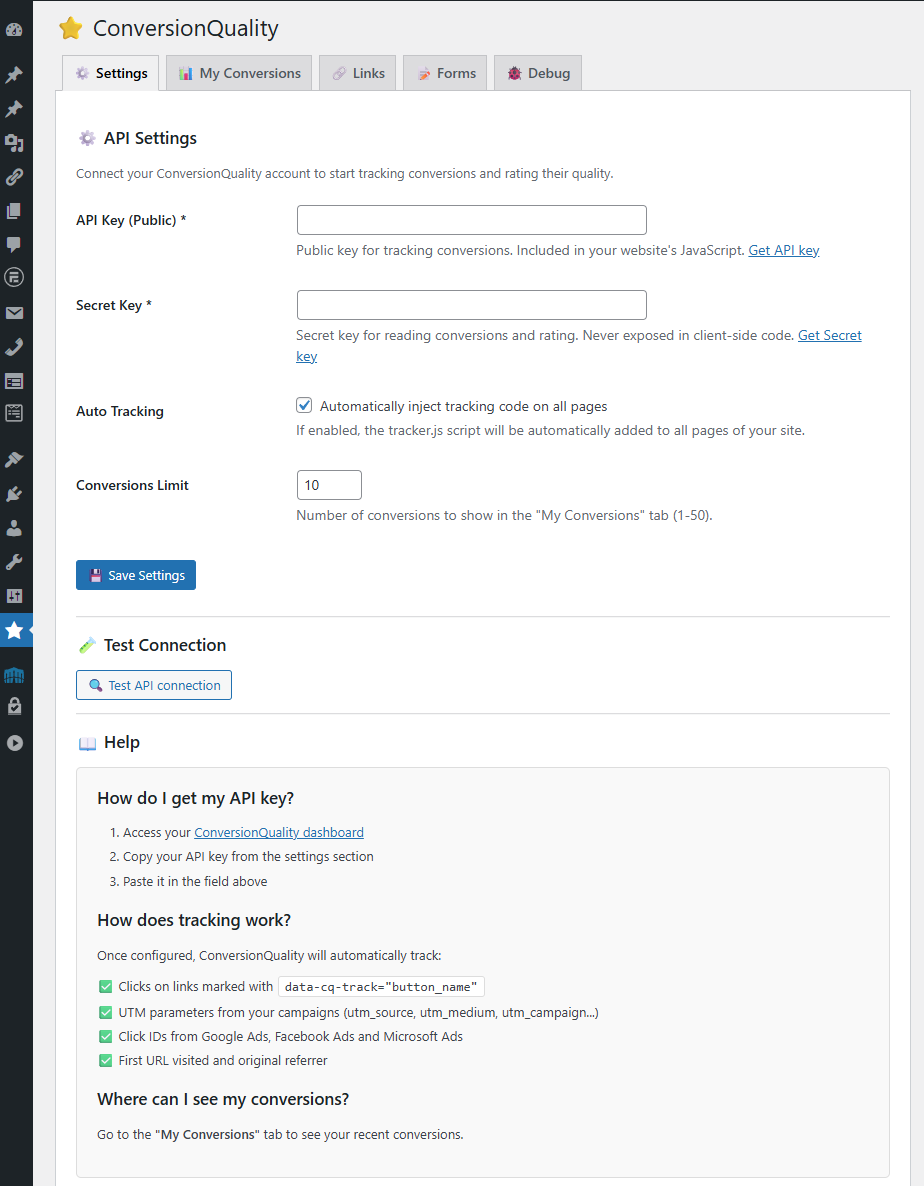
Settings – Configure your API key, enable auto tracking, test connection, and view help documentation 
My Conversions – Read-only activity monitor showing recent conversions with source, campaign, landing page, device type, and rating status 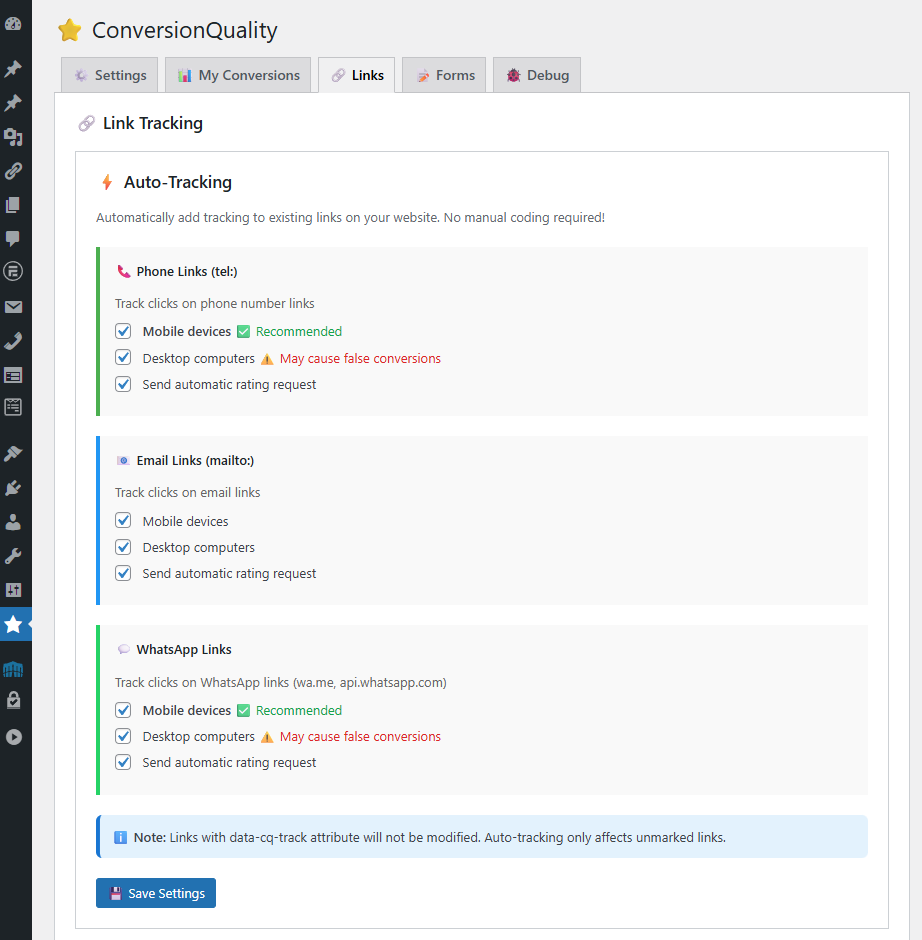
Link Tracking – Auto-track clicks on phone (tel:), email (mailto:), and WhatsApp links with per-device and rating settings 
Forms Integration – Configure tracking for 10 form plugins (CF7, Ninja Forms, WPForms, Gravity Forms, Formidable, Elementor Pro, Forminator, Fluent Forms, Avada, Quform) with per-form email link and field injection options 
Debug Logs – Real-time color-coded logging of form submissions and API responses for troubleshooting (auto-cleans after 7 days)
Installation
Automatic Installation
- Log into your WordPress dashboard
- Go to Plugins > Add New
- Search for « ConversionQuality »
- Click Install Now and then Activate
- Go to ConversionQuality > Settings
- Enter your API key from conversionquality.com
- Enable automatic tracking
- Done! Start rating your leads.
Manual Installation
- Download the plugin ZIP file
- Go to Plugins > Add New > Upload Plugin
- Choose the ZIP file and click Install Now
- Click Activate Plugin
- Configure your API key in ConversionQuality > Settings
Configuration
Basic Setup:
1. Get API key from conversionquality.com
2. Enter it in plugin settings
3. Enable « Automatic Tracking »
4. Set « Conversions Limit » (how many to show in My Conversions tab)
Form Plugin Integration (Optional):
1. Install any supported form plugin (CF7, Ninja Forms, WPForms, Gravity Forms, Formidable, Elementor Pro, Forminator, Fluent Forms, Avada, Quform)
2. Go to ConversionQuality > Forms tab
3. Enable « Forms Integration »
4. Configure per-form tracking settings
5. Rating links will auto-appear in form notification emails
Conversion Monitor:
Latest conversions appear in the My Conversions tab with source, campaign, and rating status.
FAQ
-
Do I need a ConversionQuality account?
-
Yes. This plugin connects to the ConversionQuality platform. You can sign up for a free trial at conversionquality.com.
-
Does this work with Google Ads?
-
Yes! Automatically captures gclid (Google Click ID) and all UTM parameters from Google Ads campaigns.
-
Does this work with Facebook Ads?
-
Yes! Captures fbclid (Facebook Click ID) and UTM parameters from Facebook/Instagram campaigns.
-
Does this replace Google Analytics?
-
No, it complements it. Google Analytics shows traffic and conversions. ConversionQuality adds QUALITY ratings to understand which traffic converts to actual business.
-
Is Contact Form 7 required?
-
No. The plugin works standalone for tracking conversions. Form integration (CF7, Ninja Forms, WPForms, Gravity Forms, Formidable, Elementor Pro, Forminator, Fluent Forms, Avada, Quform) adds automatic form submission tracking + email rating links.
-
No cookies. The tracker uses localStorage (client-side) to temporarily store visit data like landing page and referrer. Conversion data is then sent to ConversionQuality servers via HTTPS API.
-
Is this GDPR compliant?
-
Yes. We anonymize IPs, don’t use cookies, and allow data deletion on request. See Privacy Policy for full details.
-
Will this slow down my site?
-
No. The tracker.js file is tiny (< 10KB) and loads asynchronously. Zero impact on page speed.
-
Can I use this for multiple websites?
-
Yes, but each site needs its own ConversionQuality account/API key. Contact us for agency/multi-site pricing.
-
What happens to my data if I uninstall?
-
Data on ConversionQuality platform remains (you own it). WordPress options are deleted cleanly. You can request full data deletion from your ConversionQuality account.
-
Add the attribute
data-cq-track="button_name"to any link or button:<a href="/contact" data-cq-track="contact_button">Contact Us</a> -
Can I see leads outside WordPress?
-
Yes, you can also access your full dashboard at conversionquality.com
-
How does CF7 integration work?
-
When someone submits a Contact Form 7:
1. A conversion is automatically registered in ConversionQuality
2. A rating link is added to the email you receive
3. Click the link to rate that specific lead (no WordPress login needed) -
Does CF7 integration require database changes?
-
No, it works server-side. No database modifications needed.
-
How do form conversions appear in my dashboard?
-
Form submissions appear with the name
form_cf7_{id}where {id} is the form ID. Example:form_cf7_123 -
Do I need tracker.js for forms to work?
-
No. CF7 integration works independently from the JavaScript tracker. Conversions are registered server-side when forms are submitted.
-
How do I get support?
-
- Documentation: conversionquality.com/docs
- Email Support: [email protected]
- WordPress Forum: Use the support forum here
Avis
Il n’y a aucun avis pour cette extension.
Contributeurs/contributrices & développeurs/développeuses
« ConversionQuality » est un logiciel libre. Les personnes suivantes ont contribué à cette extension.
Contributeurs
Traduisez « ConversionQuality » dans votre langue.
Le développement vous intéresse ?
Parcourir le code, consulter le SVN dépôt, ou s’inscrire au journal de développement par RSS.
Journal des modifications
2.2.2 (2026-03-09)
- Changed: Automatic tracking is now disabled by default on fresh installs — site administrator must opt in explicitly (WordPress.org guideline compliance)
- Removed:
data-cookieconsent="ignore"attribute from injected script tags — tracker respects any CMP configured by the site owner - Security: Quform adapter
get_form_id_from_post()now verifies that at least onequform_*POST key is present before processing, preventing spoofed POST requests from triggering conversion registration - Security: Removed generic
form_idfallback from Quform adapter (was unsafe — any POST with that key could trigger the adapter) - Security: Divi adapter now sanitizes POST key names with
sanitize_key()before logging, preventing stored XSS via crafted POST key names - Docs: Added required « External Services » section to readme.txt disclosing all communication with ConversionQuality servers
2.2.1 (2026-03-02)
- Fixed: CF7 and Ninja hidden fields (first_url, screen_size, referrer) were silently ignored since v2.2.0 due to prefix mismatch
- Improved: Form adapters now use
convqual_*as primary field names withcq_*backwards-compatible fallback - Improved: CF7 adapter injects both
convqual_*andcq_*field names for third-party integration compatibility
2.2.0 (2026-02-26)
- Security: Removed unverified
$_POSTfallbacks from Elementor adapter (CSRF hardening) - Changed: All internal prefixes renamed from
cq_toconvqual_(WordPress.org compliance: 4+ char prefix) - Added: Automatic migration of existing settings from
cq_*toconvqual_*options (transparent to users) - Improved: Uninstall cleanup now removes both old and new option names
- No breaking changes — existing installations are migrated automatically on first admin load
2.1.2 (2026-02-23)
- Improved: Moved all inline scripts and styles to enqueued external files (WordPress coding standards)
- Improved: All function names now use proper
cq_prefix - Fixed: Clarified GDPR/localStorage description in readme (no longer contradictory)
2.1.1 (2026-02-17)
- Fixed: Elementor Pro Forms adapter now compatible with PRO Elements (GPL fork)
- Fixed: Form detection expanded to include Elementor templates (theme builder, popups, global widgets)
- Fixed: Forms inside templates are auto-enabled at runtime when not found in the tracked list
- Improved: All Elementor form handlers protected with try/catch to prevent fatal errors
- Improved: Safe data extraction with $_POST fallback when Form_Record is unavailable
- Technical: Removed class_exists check for Forms\Module (not loaded during AJAX in PRO Elements)
- Technical: Added form_submitted hook as additional fallback for PRO Elements compatibility
2.1.0 (2026-02-14)
- Changed: « My Conversions » tab is now a read-only activity monitor (no more rating from WordPress)
- Removed: Star rating buttons, notes field, and « Unreachable » button from conversion cards
- Removed: « Rating disabled » warning for email-link conversions
- Removed: Expandable details section (IP, gclid, screen size)
- Added: Device type detection (mobile/desktop icon) based on screen size
- Added: Landing page path displayed on each conversion card
- Added: « Pending » status badge for unrated conversions
- Added: « View full dashboard on ConversionQuality.com » link
- Improved: Time display now uses WordPress locale (translatable via human_time_diff)
- Improved: Tab URL changed from
tab=leadstotab=conversions - Cleaned: Removed all rating JavaScript (admin.js) and related CSS
- Cleaned: Removed AJAX rating endpoint and unused i18n strings
- Rating is now done exclusively via email links or ConversionQuality.com dashboard
2.0.0 (2026-02-07)
- New: Multi-form plugin support – now integrates with 10 form plugins: Contact Form 7, Ninja Forms, WPForms, Gravity Forms, Formidable Forms, Elementor Pro, Forminator, Fluent Forms, Avada Forms, Quform
- New: Secret Key for secure API operations (reading leads, rating). API Key is now public-only (tracking)
- New: Per-form settings grouped by plugin – each form has independent tracking, email link, and field injection options
- New: Adapter architecture – shared logic with thin adapters per form plugin
- Improved: GSheetConnector/Zapier field injection now works for all form plugins
- 100% backwards compatible – existing CF7 setups continue working without changes
1.2.1 (2026-01-25)
- Fixed: WP Mail SMTP compatibility – resolved conflict that caused CF7 emails to fail
- Compatible with WP Mail SMTP, Post SMTP, FluentSMTP, and other SMTP plugins
1.2.0 (2026-01-21)
- New: Per-form tracking configuration – enable/disable tracking for each CF7 form individually
- New: Per-form email link and field injection settings
- New: Default settings for newly created forms
- Improved: Event names now use form title instead of ID (e.g.,
cf7_contact_forminstead ofform_cf7_123)
1.1.2 (2026-01-20)
- New: Additional fields for GSheetConnector:
cq_id,cq_timestamp,wp_datetime
1.1.1 (2026-01-20)
- Fixed: SSL certificate errors on some hosting providers (
sslverifycompatibility)
1.1.0 (2025-01-02)
- New: Developer hook
cq_conversion_registeredfor third-party integrations - New: Optional
cq_rating_urlfield injection into CF7 posted data (for GSheetConnector, Zapier, etc.)
1.0.6 (2025-12-02)
- Fixed: Rating links now appear correctly in CF7 emails when duplicate detection is triggered
- Fixed: Backend API returns existing token for duplicate conversions
1.0.5 (2025-01-05)
- Improved: WordPress Coding Standards (WPCS) compliance for WordPress.org approval
- Added: Transients cache system for API calls (5-minute cache duration)
- Improved: Dashboard loads instantly from cache, significantly reducing server load
- Improved: User-friendly error messages with clear, actionable guidance
- Improved: Better error handling for API connection failures with specific messages
- Improved: Automatic cache invalidation when rating leads to ensure fresh data
- Fixed: Proper sanitization of $_SERVER variables following WordPress security standards
- Fixed: Missing translations for « Campaign: », « View page », « Rated: » in dashboard
- Technical: Now uses WordPress native functions wp_get_referer() and is_ssl()
- Technical: Proper escaping of HTML attributes with esc_attr() throughout the plugin
- Performance: Significant speed improvement on admin pages due to caching layer
- Quality: Code ready for WordPress.org submission with full standards compliance
1.0.4 (2025-01-04)
- Fixed: Critical IP detection bug – now captures real client IP instead of server IP
- Improved: Cloudflare compatibility with CF-Connecting-IP header detection
- Improved: Proxy/load balancer support with X-Forwarded-For parsing
- Added: Automatic IP validation with fallback mechanism
- Technical: New get_real_client_ip() method with priority hierarchy (CF-Connecting-IP > X-Forwarded-For > REMOTE_ADDR)
- Backend: API now correctly prioritizes POST[‘ip’] over header detection
- Impact: Conversions now correctly attributed to actual visitor IPs, not server IPs
- Compatibility: Works with Cloudflare, Nginx proxy_pass, Apache mod_proxy, and load balancers
1.0.3 (2025-01-03)
- Added: Full internationalization (i18n) system with text domain support
- Added: Complete Spanish translation (conversionquality-es_ES.po/mo) with ~150 strings
- Added: Complete English translation (conversionquality-en_US.po/mo) with ~150 strings
- Added: Python script (generate_mo.py) to compile .po to .mo files with correct UTF-8 encoding
- Added: New Debug tab with real-time logging of CF7 submissions and API calls
- Improved: Auto-cleanup of logs after 7 days (max 50 entries for privacy/performance)
- Improved: Email translations now respect site language with switch_to_locale(), not admin user locale
- Fixed: UTF-8 encoding for Spanish characters (áéíóú, ñ) – uses HTML entities in emails
- Fixed: Emoji compatibility in emails (📈 instead of direct emoji)
- Backend: track.php now generates tokens ALWAYS, not only when sending email (needed for CF7)
- Backend: rate.php now allows rating leads with enviar_valoracion=0
- Backend: dashboard.php shows ratings correctly (fixed verification order)
1.0.2
- Added: Contact Form 7 integration with automatic conversion tracking
- Added: Email rating links in CF7 notification emails (sent to admin only, not form submitter)
- Added: Forms configuration tab in admin settings
- Added: New CQ_Forms class for handling form integrations
- Improved: HTML email formatting with nl2br() for proper structure
- Improved: Token generation reliability for rating links
- Fixed: Emails only sent to admin, never to user submitting the form
- Fixed: No duplicate emails when CF7 integration is active
1.0.1
- Improved: Error logging and debugging capabilities
- Improved: API connection reliability
- Fixed: Various stability improvements
1.0.0
- Initial release
- Dashboard widget with lead ratings (1-5 stars)
- Automatic tracker.js injection
- API key validation with « Test Connection » button
- Basic Contact Form 7 support
- Multi-language foundation
- UTM parameters and click ID tracking (gclid, fbclid, msclkid)