

Description
CodingBunny Image Optimizer is a powerful and easy-to-use image optimization plugin for WordPress. It helps you improve your site’s performance by optimizing images, converting them to the WebP format, and resizing them automatically upon upload.
Features
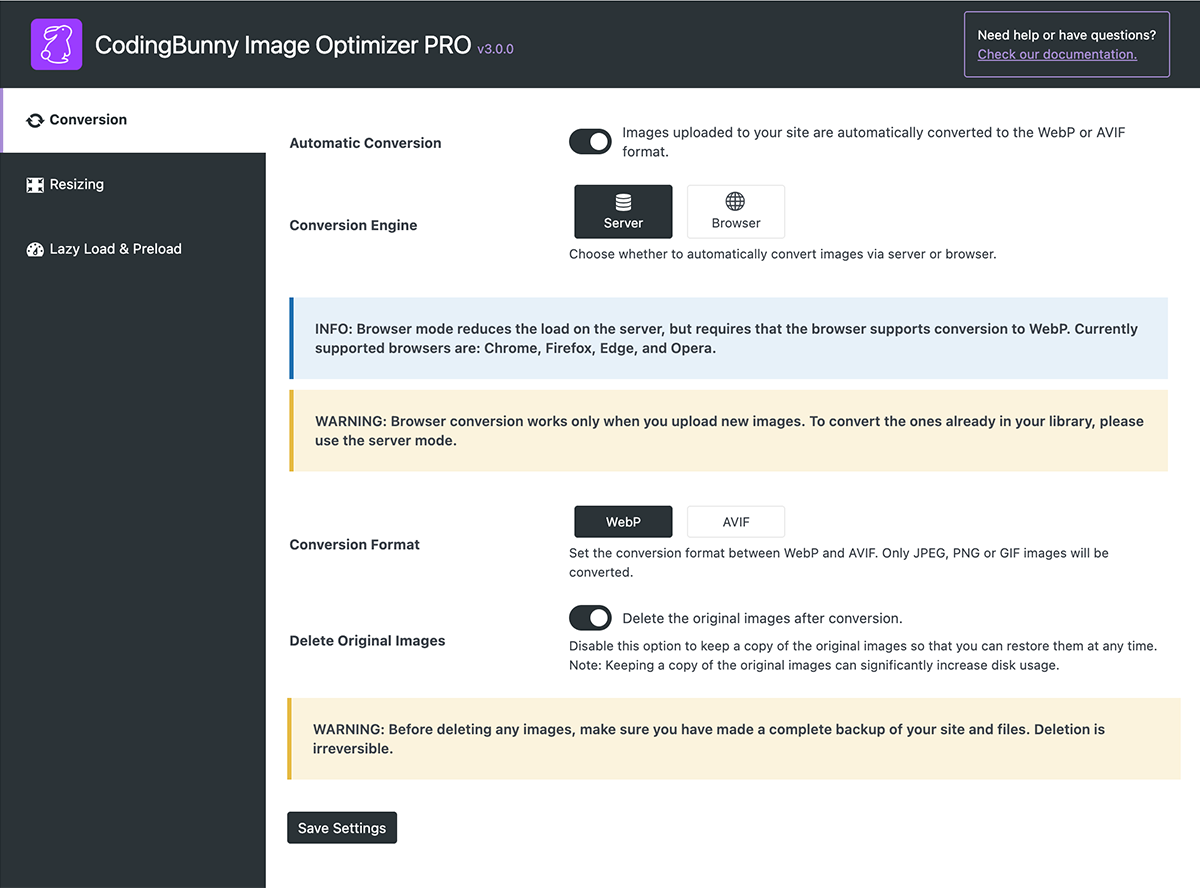
- New conversion method via browser to avoid using server resources.
- Automatic image optimization upon upload.
- Conversion to WebP and AVIF format.
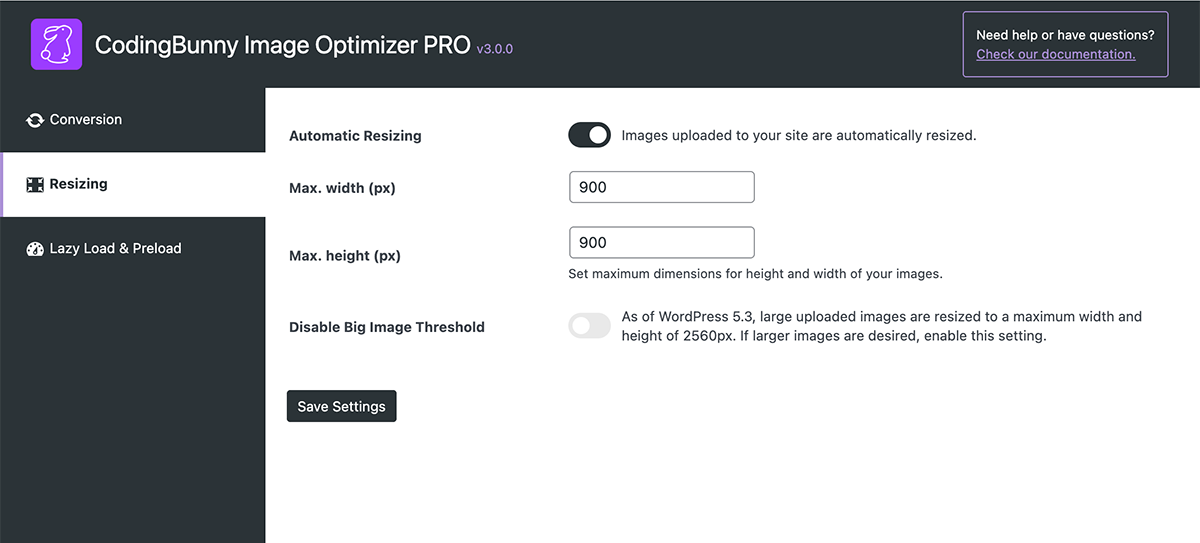
- Automatic image resizing.
- Option to delete original images after conversion.
- Disable WordPress default big image threshold.
- Preload critical image (LCP) for better Core Web Vitals scores.
- Lazy loading: images load only when visible to the user.
PRO Features
- Option to set WebP and AVIF quality conversion
- Disable WordPress unused image thumbnails: WordPress generates multiple thumbnails for each uploaded image. Choose which of these thumbnails you want to include when the images are optimized.
- Bulk image optimisation: this option allows you to simultaneously optimize all or several selected images in the library.
- Fix image attachments: fix all image attachments in the media library.
- Unused images cleaner: this option identifies unused images within the site.
- Duplicate images cleaner: this option identifies duplicate images within the media library.
- Watermark: add a watermark to your images to protect them (now also supports text watermark).
- Orphan Thumbnails cleaner: find and delete orphaned thumbnail files.
- Cleaning Product Images: delete images associated with the WooCommerce product when it is deleted.
- Alternative Text generator: automatically generates the ALT attribute for images.
- Remove Metadata: automatically remove unnecessary metadata from images (requires Imagick).
- Image Protector (add-on): advanced system for protecting against unauthorized copying and downloading of images.
- Image Organizer (add-on): organize your images by assigning custom categories.
Captures d’écrans


Installation
The plugin is simple to install:
- Download coding-bunny-image-optimizer-lite.zip
- Unzip
- Upload coding-bunny-image-optimizer directory to your /wp-content/plugins directory
- Go to the plugin menu page and activate the plugin
FAQ
-
How do I enable automatic image conversion?
-
Go to the plugin settings page and check the ‘Enable Conversion’ option.
-
Can I keep the original images after conversion?
-
Yes, you can. Simply uncheck the ‘Delete Original Images’ option in the plugin settings.
-
How do I set the maximum dimensions for image resizing?
-
You can set the maximum width and height for image resizing in the plugin settings.
Avis

Contributeurs/contributrices & développeurs/développeuses
« CodingBunny Image Optimizer LITE » est un logiciel libre. Les personnes suivantes ont contribué à cette extension.
Contributeurs
Traduisez « CodingBunny Image Optimizer LITE » dans votre langue.
Le développement vous intéresse ?
Parcourir le code, consulter le SVN dépôt, ou s’inscrire au journal de développement par RSS.
Journal des modifications
3.0.0: 2026-01-12
- New: Added a « Dashboard » page to monitor the status of images.
- New: Added an « Account » page to manage licenses and addons. Replaces the old « Manage License » and « Addons » pages (PRO).
- New: Added « Force Re-Optimization » to reconvert images already in WebP or AVIF formats (PRO).
- Improvement: General UI improvements.
- Improvement: General improvements to « Bulk Image Optimization », now faster and more secure (PRO).
- Improvement: General improvements to « Fix Image Attachments », now faster and more accurate (PRO).
- Improvement: General improvements to « Alternative Text », now faster and more secure (PRO).
- Improvement: General improvements to « Lazy Load & Preload », now faster and more secure.
- Fix: Fixed an issue with assigning loading= »lazy » and fetchpriority= »high ».
2.6.3: 2025-11-12
- Improvement: Refactored admin modules and optimized image processing/attachment lookups for better performance and maintainability.
- Improvement: Implemented caching and query optimizations to reduce database load.
- Fix: Enhanced error handling, data validation, and WordPress standards compliance/security in image processing.
2.6.2: 2025-11-07
- Improvement: Updated the CSS style of the tables.
2.6.1: 2025-11-04
- Improvement: Improved assignment of Lazy Load and Preload Critical Images attributes.
2.6.0: 2025-10-28
- New: The Watermark and Clean features are now available in the Image Watermarker and Image Cleaner add-ons.
2.5.1: 2025-10-08
- Fix: Fixed error in the JS of the Fix Image Attachments feature.
2.5.0: 2025-10-01
- New: “Fix Image Attachments” for Media Library corrections (PRO).
- New: “Duplicate Image Scanner” to detect duplicates (PRO).
- New: “Alt Text” column with generator in Media Library (PRO).
- New: SKU variable in Alt Text Generator for product images (PRO).
- Improvement: UX improvements for bulk optimization (PRO).
- Fix: SVG image handling.
- Fix: AVIF conversion bug.
- Fix: Watermarking AVIF images (PRO).
2.4.0: 2025-09-22
- New: Automatic deletion of images with posts/pages (PRO).
- New: « Optimize Selected Images » in Media Library Grid (PRO).
- New: Addons management page (PRO).
- Fix: Alt Text generator formatting (PRO).
2.3.1: 2025-09-04
- Fix: Update system modified (automatic update removed) (PRO).
- Fix: Convert method settings (FREE).
2.3.0: 2025-09-03
- New: Missing Images finder for links without files (PRO).
- Improvement: Watermark Preview (PRO).
2.2.0: 2025-09-01
- New: WebP via browser conversion.
- New: Watermark Preview (PRO).
- New: Watermark padding option (PRO).
2.1.0: 2025-08-28
- New: Alt Text Template (PRO).
- New: Force Overwrite Alt Text (PRO).
2.0.0: 2025-08-25
- New: Text Watermark (PRO).
- New: Orphan Thumbnails cleaner (PRO).
- New: WooCommerce product images auto-cleanup (PRO).
- New: Preload Critical Image for Core Web Vitals.
- New: Lazy Loading Images.
- New: Automatic ALT Text generator (PRO).
- New: Remove Metadata (Imagick) (PRO).
- Improvement: Detection of Unused Images.
- Improvement: Code improvements.
1.6.4: 2025-06-26
- Fix: Image resizing for near-threshold cases.
1.6.3: 2025-06-13
- Improvement: Enable/Disable logs.
- Improvement: Manual image stats update to avoid slowdowns.
1.6.2: 2025-05-29
- Fix: Watermark JavaScript (PRO).
1.6.1: 2025-05-05
- Improvement: Better log messages.
- Fix: Original image deletion bugs.
1.6.0: 2025-04-30
- New: « Logs » and export.
- New: System Information page replaces « Image Stats ».
- Improvement: Bulk conversion process (PRO).
- Improvement: Only delete original files after successful conversion.
- Improvement: New version detection improvements (PRO).
- Improvement: Unified « Image Batch Size » in bulk optimizations (PRO).
1.5.3: 2025-04-17
- Fix: Settings save bug.
1.5.2: 2025-04-16
- Improvement: Automatic updates support (PRO).
1.5.1: 2025-04-11
- Fix: Thumbnail creation (PRO).
1.5.0: 2025-04-04
- New: Disable right-click options.
- New: Custom watermark application (PRO).
- New: Image batch selection for bulk ops (PRO).
- Improvement: Improved performance.
- Improvement: New license management (PRO).
1.4.5: 2025-03-17
- Fix: Unused Images Finder with specific configs (PRO).
1.4.4: 2025-02-20
- New: HEIC image format support (WordPress 6.7+, ImageMagick 7+).
1.4.3: 2025-02-09
- Improvement: Code improvements.
1.4.2: 2025-01-17
- Fix: « Image Stats » widget removal for dashboard performance.
- Fix: Minor bugs.
1.4.1: 2025-01-15
- Fix: PHP errors for archived images.
1.4.0: 2025-01-06
- New: « Unused Images Finder » beta.
- New: « Big Image Threshold ».
- New: Quality conversion presets (PRO).
- New: Enable/disable “Unused Images Finder” and “Bulk Image Optimizer” toolbars (PRO).
- New: « Images Stats » dashboard widget.
- New: System Info panel.
- Improvement: French, German, Spanish languages (PRO).
- Improvement: Finalize « Unused Images Finder » (PRO).
- Improvement: Code security/performance.
- Improvement: UI updates.
- Improvement: PHP 8.4 compatibility.
- Fix: Progress bar in « Bulk Image Optimizer » removed (PRO).
1.3.0: 2024-12-11
- New: « Unused Images Finder » beta (PRO).
1.2.3: 2024-11-30
- Improvement: Thai language support (PRO).
- General code improvement.
- Fix: Bulk Resize translation (PRO).
1.2.2: 2024-11-13
- Fix: Prevent unwanted image enlargement with Imagick.
1.2.1: 2024-11-11
- New: Conversion status bar (PRO).
- Improvement: Safety improvements.
1.2.0: 2024-11-08
- New: Conversion quality setting (PRO).
- New: Convert-all-library-images button (PRO).
- Improvement: Intermediate sizes removed after conversion (PRO).
- Fix: Bulk optimization resizing when disabled (PRO).
1.1.0: 2024-01-30
- New: Bulk optimization for library (PRO).
- Improvement: Interface style.
1.0.0: 2024-10-18
- Initial Release