

Description
L’extension de recherche de produits WooCommerce la plus populaire. Elle offre aux internautes une barre de recherche AJAX avancée avec des suggestions dynamiques.
Par défaut, WooCommerce offre une recherche très simple, sans recherche de produit en direct ni même de recherche d’UGS. FiboSearch (anciennement Ajax Search pour WooCommerce) offre une recherche avancée avec suggestions dynamiques.
Who doesn’t love instant, as-you-type suggestions? In 2025, customers expect smart product search. Baymard Institute’s latest UX research reveals that search autocomplete, auto-suggest, or an instant search feature is now offered on 96% of major e-commerce sites. It’s a must-have feature for every online business that can’t afford to lose customers. Why? FiboSearch helps users save time and makes shopping easier. As a result, Fibo really boosts sales.
Fonctionnalités
✅ Search by product title, long and short description
✅ Search by SKU
✅ Show product image in live search results
✅ Show product price in live search results
✅ Show product description in live search results
✅ Show SKU in live search results
✅ Mobile first – special mobile search mode for better UX
✅ Details panels with extended information – “add to cart” button with a quantity field and extended product data displayed on hovering over the live suggestion
✅ Easy implementation in your theme – embed the plugin using a shortcode, as a menu item or as a widget
✅ Terms search – search for product categories and tags
✅ Search history – the current search history is presented when the user clicked/taped on the search bar, but hasn’t yet typed the query.
✅ Limit displayed suggestions – the number is customizable
✅ The minimum number of characters required to display suggestions – the number is customizable
✅ Better ordering – a smart algorithm ensures that the displayed results are as accurate as possible
✅ Support for WooCommerce search results page – after typing enter, users get the same results as in FiboSearch bar
✅ Grouping instant search results by type – displaying e.g. first matching categories, then matching products
✅ Google Analytics support
✅ Multilingual support including WPML, Polylang and qTranslate-XT
✅ Personalization of search bar and autocomplete suggestions – labels, colors, preloader, image and more
Essayez la version PRO
FiboSearch est également disponible en version PRO, avec un moteur de recherche moderne basé sur un index inversé. FiboSearch PRO fonctionne jusqu’à 10 fois plus vite que la version gratuite ou d’autres solutions de recherche pour WooCommerce.
Passez à PRO et boostez vos ventes !
Fonctionnalités Pro
✅ Moteur de recherche ultra-rapide basé sur l’index inversé – Fonctionne très rapidement, même avec plus de 100 000 produits.
✅ Recherche approximative : fonctionne même avec des fautes de frappe mineures
✅ Recherche dans des champs personnalisés avec prise en charge d’ACF
✅ Rechercher dans les attributs
✅ Rechercher dans les catégories. Avec les miniatures de catégorie.
✅ Rechercher dans les étiquettes
✅ Recherche dans les marques (prise en charge des marques WooCommerce, les marques pour WooCommerce, les marques YITH WooCommerce). Prend en charge les miniatures de marque.
✅ Rechercher par UGS de produit de variation – Affiche également les produits variables dans la recherche dynamique après avoir saisi l’UGS exact correspondant
✅ Rechercher des publications : affiche également les publications correspondantes dans la recherche dynamique
✅ Rechercher des pages : affiche également les pages correspondantes dans la recherche dynamique
✅ Synonymes
✅ Exclusion conditionnelle de produits
✅ Compatibilité TranslatePress
✅ Aide professionnelle et rapide pour intégrer ou remplacer la barre de recherche dans votre thème
✅ et plus…
✅ VOIR TOUTES LES CARACTÉRISTIQUES !
Vitrine
Voyez comment cela fonctionne pour les autres : notre vitrine.
Retour
Any suggestions or comments are welcome. Feel free to contact us via the contact form.
Captures d’écrans

Suggestions de recherche avec le panneau de détails 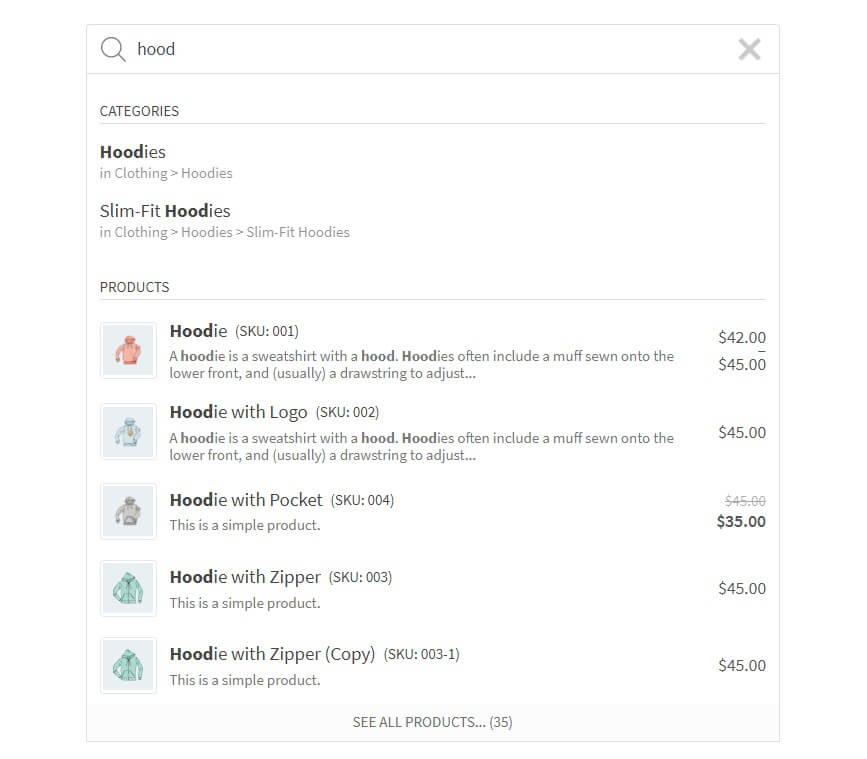
Suggestions de recherche 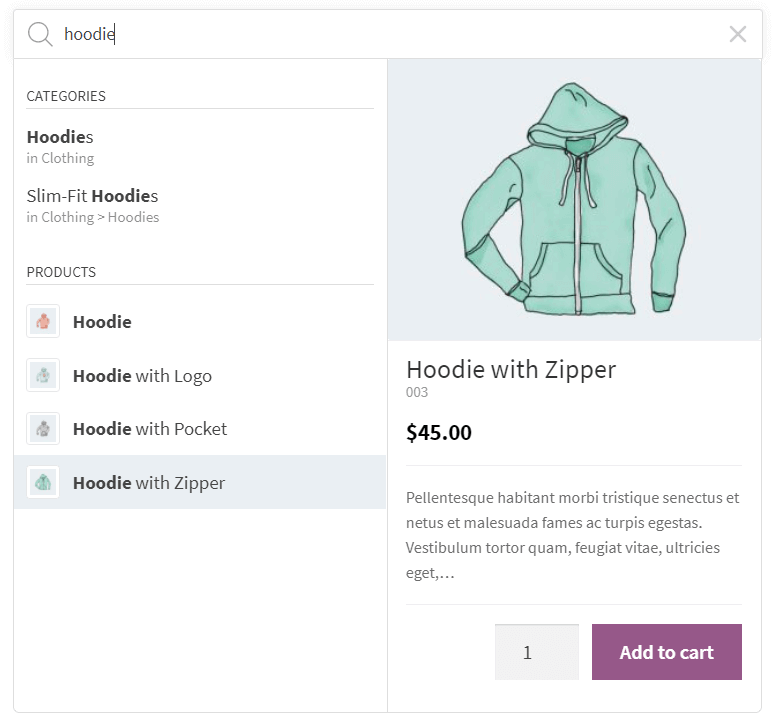
Suggestions de recherche avec le panneau de détails 
Suggestions de recherche (Pirx search style) 
Suggestions de recherche (Pirx compact search style) 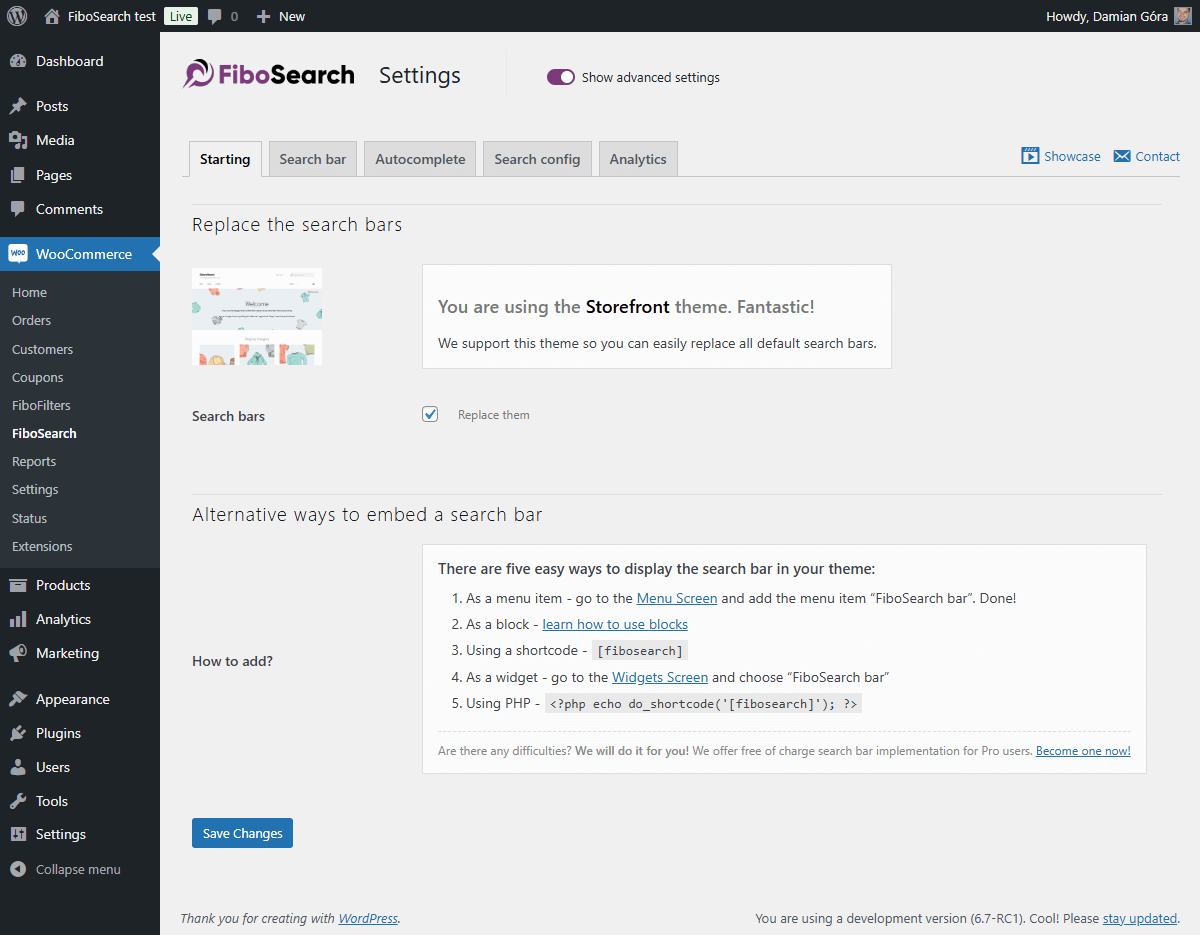
Sample settings page (Starting tab) 
Sample settings page (Search bar tab) 
Sample settings page (Autocomplete tab) 
Sample settings page (Search Analytics tab)
Blocs
Cette extension fournit 2 blocs.
- FiboSearch AJAX (live) search form for WooCommerce
- FiboSearch navigation item AJAX (live) search form for WooCommerce
Installation
- Install the plugin from within the Dashboard or upload the directory
ajax-search-for-woocommerceand all its contents to the/wp-content/plugins/directory. - Activez l’extension depuis le menu « Extensions » de WordPress.
- Allez dans
WooCommerce FiboSearchet définissez vos préférences. - Embed the search bar in your theme.
FAQ
-
Comment intégrer la barre de recherche dans mon thème ?
-
There are many easy ways to display the FiboSearch bar in your theme:
– Replacing the existing search bar with one click – it is possible for dozens of popular themes
– As a menu item – in your WordPress admin panel, go toAppearance Menuand addFiboSearch baras a menu item
– Using a shortcode[fibosearch]– As a widget – in your WordPress admin panel, go to
Appearance Widgetsand chooseFiboSearch
– As a block – learn how to use blocks and FiboSearch together
– Using PHP<?php echo do_shortcode('[fibosearch]'); ?>– We will do it for you! – we offer free search bar implementation for Pro users. Become one now!
Or insert this function inside a PHP file (often, it is used to insert a form inside page template files):
-
Comment remplacer la barre de recherche de mon thème par FiboSearch ?
-
We have prepared a one-click replacement of the search bar for the following themes:
- Storefront
- Divi
- Flatsome
- OceanWP
- Astra
- Avada
- Sailent
- and 46 more… See a complete list of integrated themes on our documentation.
Pour remplacer la barre de recherche dans un autre thème, veuillez contactez notre équipe d’assistance.
Nous vous aiderons à remplacer gratuitement la barre de recherche dans votre thème après la mise à niveau vers la version PRO. -
Yes, you can! Go to
Appearance Menu. You will see a new menu item called “FiboSearch”. Select it and click “Add to menu”. Done! -
Comment puis-je poser une question ?
-
You can submit a ticket on the plugin website and the support team will get in touch with you shortly. We also answer questions on the WordPress Support Forum.
-
Offrez-vous un support de personnalisation ?
-
Depending on the theme you use, sometimes the search bar requires minor improvements in appearance. We guarantee fast CSS corrections for all Pro plugin users, but we also help Free plugin users.
-
Où puis-je trouver les réglages de l’extension ?
-
In your WordPress dashboard, go to
WooCommerce FiboSearch. The FiboSearch settings page is a submenu of the WooCommerce menu. -
A qui s’adresse la version PRO de l’extension ?
-
The Pro plugin version is for all online sellers looking to increase sales by providing an ultra-fast smart search engine to their clients.
La principale différence entre les versions Pro et gratuite est la vitesse de recherche et la portée de la recherche. La version Pro dispose d’un nouveau moteur de recherche rapide et intelligent. Pour certaines boutique en ligne qui proposent de nombreux produits à vendre, la vitesse de recherche peut être augmentée jusqu’à 10 fois, offrant une toute nouvelle expérience aux clients.
All in all, the Pro version is dedicated to all WooCommerce shops where autocomplete suggestions work too slowly.
Vous pouvez en savoir plus et comparer les fonctionnalités PRO et gratuites ici : Comparaison – PRO vs Gratuit.
Avis


Contributeurs/contributrices & développeurs/développeuses
« FiboSearch – Ajax Search for WooCommerce » est un logiciel libre. Les personnes suivantes ont contribué à cette extension.
Contributeurs

“FiboSearch – Ajax Search for WooCommerce” a été traduit dans 14 locales. Remerciez l’équipe de traduction pour ses contributions.
Traduisez « FiboSearch – Ajax Search for WooCommerce » dans votre langue.
Le développement vous intéresse ?
Parcourir le code, consulter le SVN dépôt, ou s’inscrire au journal de développement par RSS.
Journal des modifications
1.32.2, January 05, 2026
- ADDED: Integration with the Themify Builder Pro plugin
- ADDED: Integration with the FOX WooCommerce Currency Switcher plugin
- FIXED: Improved visibility checks for products
- FIXED: Added nonce validation in an AJAX action
- FIXED: Improved detection of visibility plugin integrations
1.32.1, December 15, 2025
- FIXED: The Details panel inside the results wrapper didn’t expand to match the width of the search bar
- FIXED: Improved input handling in TheGem theme integration
- FIXED: The search didn’t work when the « Load JavaScript deferred » feature in WP Rocket was enabled
- FIXED: No search results appeared when using a multilingual setup and the exact SKU match function was triggered
- REFACTOR: Implemented a more consistent and unified PHP code style
1.32.0, November 17, 2025
- ADDED: Integration with the Bacola theme.
- ADDED: Debugger view for active plugin integrations
- ADDED: Helper function for retrieving plugin information
- ADDED: Option to make the search endpoint return only product IDs
- ADDED: Greek language files
- FIXED: Mobile search bar display issue in the WoodMart theme
- FIXED: Compatibility issue in the Bricks theme. The “Enable AJAX add to cart” option now works properly with the FiboSearch details panel
- FIXED: Search replacement issue on the Flatsome theme 404 page
- FIXED: Support for diacritic and accent characters in search and scoring calculation
- FIXED: Infinite loop on mobile devices caused by an Impreza theme event conflict
- FIXED: Improved CSS styles for the details panel in the Bricks theme
- FIXED: Limited the number of suggestions in preview settings to a maximum of 15 items
- FIXED: Removed unnecessary banners from the settings page
- FIXED: Replaced preloader with the correct search bar or icon in Elementor editor preview
- FIXED: HTML semantic issue in category suggestions caused by an unescaped
>character in titles - FIXED: Deprecated PHP
8.3and8.4warnings - FIXED: Protection against external CSS styles (e.g., targeting the
.woocommerceclass) overriding the details panel width - TWEAK: Added a prefix to the Freemius placeholder class to prevent potential conflicts
- TWEAK: Moved Freemius SDK to the vendor directory
- TWEAK: Cleaned up code style
- TWEAK: Passed additional data to filters to improve customization of search results display
- REFACTOR: Moved indexer logs to a separate database table
- UPDATED: Updating the
.potfile - UPDATED: Freemius SDK
1.31.0, July 16, 2025
- ADDED: Info about Elementor widget
- ADDED: Documentation links to Search in SKU and GUID
- ADDED: Add filter to conditionally disable analytics recording (e.g. by IP, phrase, lang)
- ADDED: Add the ARIA label to the search icon for accessibility improvement
- ADDED: Option to skip plugin loading on search page by adding the
nofibosearch=1parameter to the URL - ADDED: Troubleshooting — tests for the minimum required versions of themes and plugins with available integrations
- ADDED: New filter to optionally show “Products” headline when only product suggestions are returned
- ADDED: Filter to always show “See all products” button in autocomplete
- ADDED: Filter to disable inline styles from the
Personalizationclass - ADDED: CSS adjustments in Uncode theme — centered the search bar in the menu
- FIXED: Managing initial search bar interactivity before the main script has loaded
- FIXED: Incorrect language code in speech recognition
- FIXED: Removed the
.woocommerceclass from the FiboSearch bar widget - FIXED: Prevent JS error when
getFormWrapperreturns undefined or emptyjQueryobject - FIXED: Deprecated:
Automatic conversion of false to array(PHP >= 8.1) - FIXED: Styling issues in the Enfold theme
- FIXED: There was an error in the SQL syntax that occurred during the plugin uninstallation process
- FIXED: Escape double quotes in
optionsRawto preventJSON.parseerrors - TWEAK: Moved the JS ‘fibosearch/show-details-panel’ event to just before the preloader is hidden
- TWEAK: Code styling adjustments
- TWEAK: Hiding unwanted banner on settings page
- TWEAK: Optimized database queries
- REFACTOR: Removed Listeo theme integration
- UPDATED: Updating the
.potfile - UPDATED: Freemius SDK
1.30.0, January 27, 2025
- ADDED: “Bricks theme” integration – support for “Products” element on the search results page
- ADDED: “Bricks theme” integration – incorrect order of results on the search results page
- ADDED: Integration with the “Discontinued Product Stock Status for WooCommerce” plugin
- ADDED: The link to edit the FiboSearch bar in Customizer
- ADDED: The
xbutton was added to the review request notice - FIXED: Missing data in the “Details Panel” for product variations
- FIXED: Resolved an error when attempting to insert FiboSearch blocks in the block editor
- FIXED: Eliminated duplicate search results in autocomplete
- FIXED: Enabled searching for products whose variations are all out of stock but have the “allow backorders” status
- FIXED: WCAG “Links do not have a discernible name”
- FIXED: WPML integration – no results when option « use translation if available or fallback to default language » is used
- FIXED: Flatsome theme integration – can’t search in mobile overlay view when search is activated from the mobile menu
- FIXED: Incorrect display of the FiboSearch form when it is embedded in the shop page description
- FIXED: Mobile search in the menu does not work when the Divi Mobile plugin is active
- FIXED: Unnecessary header “Search results for…” when there are no results for post types other than products
- FIXED: Google PageSpeed Insights – avoid non-composited animations
- FIXED: Search icon padding when the search icon is a part of the main menu
- TWEAK: Theme integration is not loaded when the minimal version condition is not met
- TWEAK: Improved clearing of plugin data on uninstall
- TWEAK: Hiding unwanted banner on the settings page
- TWEAK: Remove the “(beta)” suffix from the “User search history” option
- REFACTOR: Remove the “Grouped results” option
- UPDATED: The
.potfile - UPDATED: Freemius SDK
1.29.0, October 29, 2024
- ADDED: Integration with the Listeo theme
- ADDED: New troubleshooting test – warning when “Ajax Search Lite” or “Ajax Search Pro” plugins are active
- ADDED: WCAG improvements – possibility to select and open a search icon using the keyboard
- ADDED: Search icon preloader. In some rare cases, a user can wait longer to display the search icon or search bar. Instead of an empty place, a placeholder is displayed
- FIXED: Generatepress theme integration – incorrect mobile overlay on the checkout in the Generatepress theme
- FIXED: A better way of calculating window width when the breakpoint is checked
- TWEAK: Hiding the XStore theme documentation button on the settings page
- UPDATED: The
.potfile. - UPDATED: Freemius SDK
1.28.1, June 28, 2024
- FIXED: Removed the phrase “polyfill.io” from the JavaScript code comment. FiboSearch has never linked to this compromised library, but some security tools recognize this JavaScript comment as a potential link to malware. All reports are false positive.
- FIXED: PHP deprecated notice in
\DgoraWcas\Helpers::keyIsValid - FIXED: Unnecessary display of warning in Troubleshooting when products are displayed using a widget from “JetSmartFilters”
1.28.0, May 27, 2024
- ADDED: New search bar style – a compact version of a “Pirx” style
- ADDED: Integration with the “Cartzilla theme”
- ADDED: Integration with the “Rey theme”
- ADDED: Placeholders to display custom content for new suggestion types like taxonomy, posts, pages, and product variation
- FIXED: “Woodmart theme” – unable to close the mobile menu after exiting the mobile search overlay
- FIXED: “Flatsome theme” – disappearing search bar on mobile phones
- FIXED: “Flatsome” – cannot change search bar style to Pirx
- FIXED: “Divi theme” – shortcodes are not rendered in the description in the Details Panel for pages
- FIXED: “XStore theme” – the integration doesn’t replace all search forms
- FIXED: Force disabling transition effect on search input to avoid unexpected layout bouncing
- FIXED: Allowing to calculate score including one and two-character words
- FIXED: Better recognition of iOS
- FIXED: Uncode theme – the search icon doesn’t show on the header
- TWEAK: Removed OPcache invalidation for the shortcode template file
- UPDATED: The .pot file
- UPDATED: Freemius SDK to v2.7.2
1.27.0, January 31, 2024
- ADDED: Integration with the “Betheme theme”
- ADDED: Highlight words in search results with Greek letters regardless of accent
- ADDED: Support for “Full-width Search” in the “XStore theme”
- FIXED: Multiple search containers on mobile in the “Astra theme” integration
- FIXED: No focus on search input for mobile devices in the “Astra theme” integration
- FIXED: Allow an HTML
<i>tag in suggestion titles and headlines - FIXED: Multilingual support is active even for one language
- FIXED: Overriding the search icon and form in the header was not working properly in the “WoodMart integration”
- FIXED: Missing filters from “Advanced AJAX Product Filters” plugin in the “Divi theme”
- FIXED: Replace
%for more stable format%%in asprintffunction - FIXED: An unwanted modal after closing the search overlay on mobile in the “Flatsome theme”
- FIXED: Missing colors after updating the “Bloksy theme” to 2.x
- FIXED: Incorrect calculation of a product’s position in search results when it contains Greek letters
- FIXED: Incorrect term language detection in the WPML plugin. Replacing
term_idwithterm_taxonomy_id - FIXED: Unwanted ampersand entity in the product description of search results
- UPDATED: Requires PHP: 7.4
- UPDATED: The
.potfile - UPDATED: Polish translation
- UPDATED: Freemius SDK v2.6.2
1.26.1, October 19, 2023
- FIXED: Details panel – wrong HTML format of stock status element
1.26.0, October 17, 2023
- ADDED: Integration with “Bricks builder”
- ADDED: Integration with “Brizy builder”
- FIXED: Calc score by comparing every word of the search phrase instead of all search phrase
- FIXED: WooCommerce Wholesale Prices plugin – invalid search results e.g. not hidden products and categories in the search results
- FIXED: Flatsome – when there are more search icons, only one is replaced
- FIXED: WPRocket – in some cases search fields/icons are not replaced immediately after the page load
- FIXED: Highlight matched words instead of the whole search phrase
- TWEAK: Allowing access to the
Personalizationclass viaDGWT_WCAS()function - TWEAK: HUSKY – Products Filter Professional for WooCommerce plugin – disable the test in the Troubleshooting module for newer versions of this plugin
- REFACTOR: Replace
.click()withtrigger('click'),.focus()withtrigger('focus'),.blur()withtrigger('blur') - REFACTOR: Replace
jQuery.fn.mouseup()with$(document).on('mouseup') - REFACTOR: Replace
jQuery.isFunction()withtypeof fn === 'function' - UPDATED: Freemius SDK v2.5.12
1.25.0, July 06, 2023
- ADDED: Possibility to search for taxonomy terms regardless of accents in a phrase or term name
- ADDED: Added some new filters to change URLs of results in autocomplete and details panel
- FIXED: Warnings due to
open_basedirrestrictions - FIXED: Integration with the Impreza theme – broken AJAX pagination for Grid element
- FIXED: Integration with the TheGem theme – missing search results when the “Layout Type” option is set to “Products Grid”
- FIXED: Integration with the Divi theme – mobile overlay not showing up
- FIXED: Stronger sanitization of the details panel output
- UPDATED: Freemius SDK v2.5.10
- UPDATED: Polish translation
1.24.0, May 25, 2023
- ADDED: Integration with the “Minimog” theme
- ADDED: Posts, pages, and taxonomy terms are included in the FiboSearch Analytics module
- ADDED: Taking into account a new feature of the dark theme in the Nave theme
- ADDED: Possibility to change the color of a search bar underlay. Only for the Pirx style
- ADDED: New search widget and extended search results for Elementor
- ADDED: TheGem theme – “Header Builder” support
- FIXED: Wrong position of search icons in the history search module
- FIXED: Broken suggestions layout and detailed panel visibility when the “Minimum characters” option is set to less than 1
- FIXED: Compatibility with PHP 8.1
- FIXED: Hide unnecessary modules when constant
DGWT_WCAS_ANALYTICS_ONLY_CRITICALis set to true in the FiboSearch Analytics module - FIXED: Incorrect display of information about constants on the debug page
- FIXED: Other minor bugs in the FiboSearch Analytics module
- FIXED: Integration with the Astra theme – support for version 4.1.0 of the Astra Addon
- FIXED: Integration with the Minimog theme – wrong position of the search history wrapper
- FIXED: Integration with the Enfold theme – the search engine icon disappears when the page finishes loading
- FIXED: A HTML tag
<br>was unnecessarily stripped in the description in the details panel - FIXED: The voice search feature – overlapping icons and disabling functionality on Safari
- UPDATED: French translation
- UPDATED: Freemius SDK v2.5.8
- TESTS: Two integration tests that check saving phrases in a database table
- TESTS: Fix assertion in “Analytics/Critical searches without result”
- REFACTOR: Change order if set settings defaults. Now the defaults are set after calling the
dgwt/wcas/settingsfilter - SECURITY: Added escaping for a “Search input placeholder” option