

Description
Titan Social Login adds OAuth-based sign-in to WordPress so visitors can use their existing social accounts instead of creating new passwords.
Included providers
- Amazon
- X (Twitter)
- Microsoft
Key features
- Adds login buttons to the WordPress login, registration, and lost password screens.
- Optional social login on comment forms.
- Account linking inside WordPress user profiles.
- Shortcodes: [tsl_login], [tsl_account_links].
- Popup or same-window authentication, configurable for desktop and mobile.
- Custom redirect after login or first registration.
- Design controls for layout, spacing, labels, and button styles.
- Placeholder emails for providers that do not return an email address.
This plugin uses external OAuth providers for authentication. See the « External Services » section for details.
Privacy
Titan Social Login does not collect or send any usage telemetry. OAuth requests go directly to the enabled provider during login. The plugin stores its configuration in your WordPress database.
Additional features in the Pro version
- 30+ OAuth providers including Apple, Discord, GitHub, Steam, Telegram, Twitch, Spotify, and more.
- Premium integrations for WooCommerce, BuddyPress, Ultimate Member, and Easy Digital Downloads.
- Statistics dashboard to monitor social login performance.
- Premium updates and priority support.
Pro version and pricing: https://titan.r0bo.dev/#pro
Demo: https://titan.r0bo.dev/wp-login.php
External Services
Titan Social Login connects to third-party OAuth providers to authenticate users. Requests are made only when an administrator enables a provider and a user clicks a login button.
Data sent during OAuth:
– Authorization request: client_id, redirect_uri, response_type, scope, state
– Token exchange: code, client_id, client_secret (if required), redirect_uri
– Profile request: access_token
Data received from providers:
– Provider user ID, name, email address, and profile picture (when available)
Services used:
– Google OAuth API (accounts.google.com, oauth2.googleapis.com, www.googleapis.com). Terms: https://policies.google.com/terms Privacy: https://policies.google.com/privacy
– Facebook Login (www.facebook.com, graph.facebook.com). Terms: https://www.facebook.com/legal/terms Privacy: https://www.facebook.com/privacy/policy
– Amazon Login (www.amazon.com, api.amazon.com). Terms: https://www.amazon.com/gp/help/customer/display.html?nodeId=508088 Privacy: https://www.amazon.com/gp/help/customer/display.html?nodeId=468496
– Microsoft identity platform (login.microsoftonline.com, graph.microsoft.com). Terms: https://www.microsoft.com/servicesagreement Privacy: https://privacy.microsoft.com/privacystatement
– X (Twitter) OAuth 2.0 (twitter.com, api.twitter.com). Terms: https://twitter.com/en/tos Privacy: https://twitter.com/en/privacy
No external requests are made unless the provider is enabled and a user initiates login.
License
PHP code (and any JS that links to WordPress APIs) is licensed under the GNU General Public License v2.0 or later (GPL-2.0-or-later). See /license.txt.
Brand icons in /assets/images/icons are trademarks of their respective owners and are included for identification purposes only. See /THIRD-PARTY-NOTICES.txt.
Trademarks belong to their respective owners; this plugin is not affiliated with or endorsed by them.
Captures d’écran
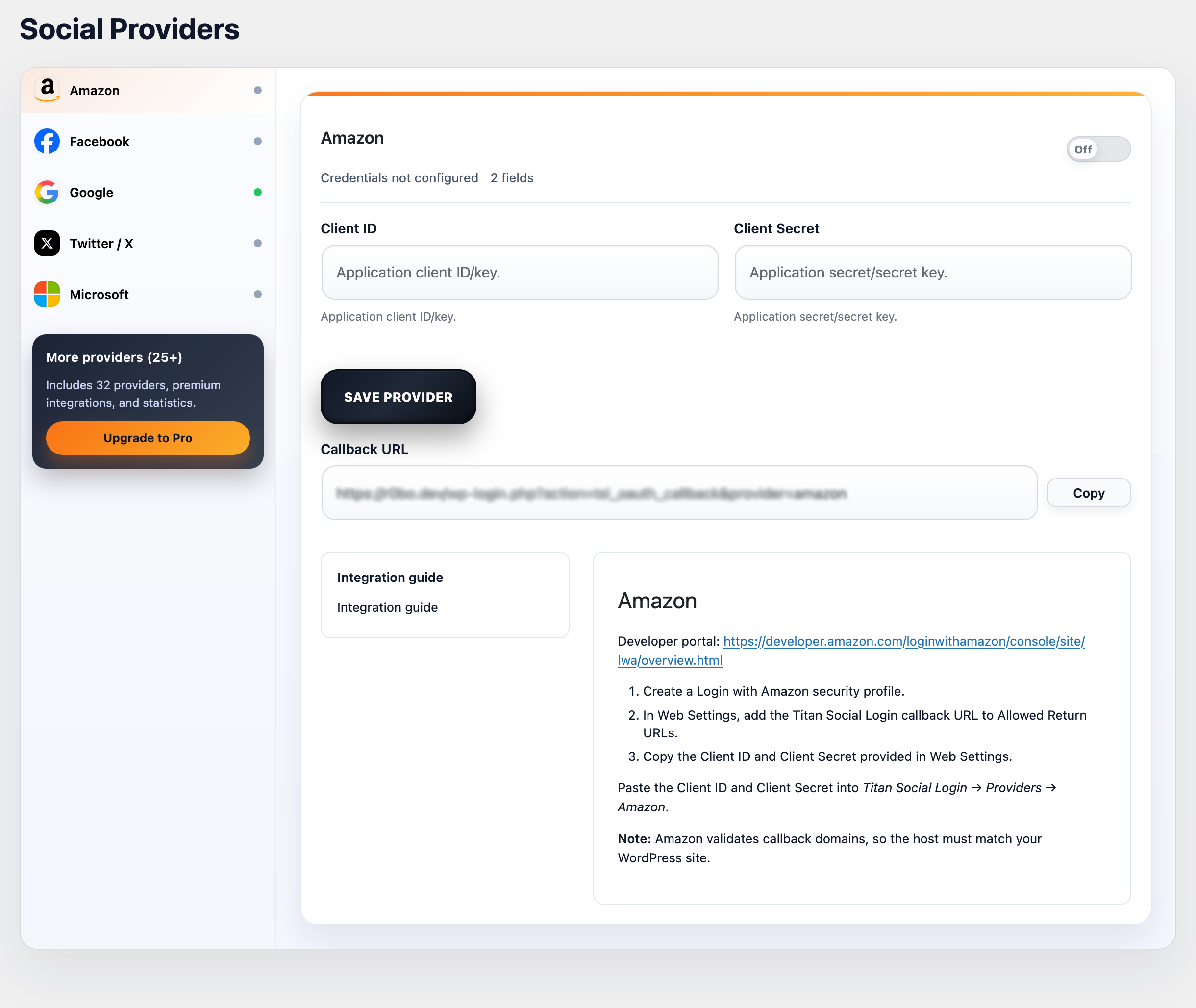
Providers settings page. 
General settings page. 
Design and layout page.
Installation
Automatic installation
- Go to Plugins -> Add New in your WordPress admin.
- Search for « Titan Social Login ».
- Click Install Now, then Activate.
- Open Titan Social Login -> Providers, configure a provider, and enable it.
Manual installation
- Download the plugin ZIP.
- Go to Plugins -> Add New -> Upload Plugin.
- Upload the ZIP and click Install Now.
- Activate the plugin.
- Open Titan Social Login -> Providers, configure a provider, and enable it.
FAQ
-
The plugin adds buttons to the WordPress login, registration, and lost password screens (when enabled in settings). You can also enable buttons on comment forms and place them anywhere with shortcodes.
-
Use the shortcodes in any page, post, or block:
– [tsl_login]
– [tsl_account_links] -
Does the plugin send data anywhere?
-
No telemetry is collected or sent. The only external requests are the OAuth calls to the enabled providers during login.
-
How do I remove all plugin data?
-
Enable « Remove data on uninstall » in the General settings before uninstalling, or remove options manually if needed.
Avis
Il n’y a aucun avis pour cette extension.
Contributeurs & développeurs
« Titan Social Login » est un logiciel libre. Les personnes suivantes ont contribué à cette extension.
Contributeurs
Traduisez « Titan Social Login » dans votre langue.
Le développement vous intéresse ?
Parcourir le code, consulter le SVN dépôt, ou s’inscrire au journal de développement par RSS.
Journal
1.0.2
- Security: hardened admin UI rendering and URL handling.
- Maintenance: small stability improvements.
1.0.1
- Security: added nonce and capability checks for admin actions.
- Compatibility: moved inline JS/CSS to enqueued assets.
- Docs: documented external OAuth services and added policy links.
1.0.0
- Initial release.