
Description
Security Control by Reflecters secures WordPress by detecting new devices, blocking them with a password overlay, and alerting users with sirens and banners.
Key Features
- New Device Detection: Identifies new devices using a secure cookie-based system.
- Siren Password Overlay: Blocks new devices with a full-screen password prompt (default password:
2210). - Broadcast Alerts: Notifies all admin, editor, and author users with a siren sound and warning banner when a new device logs in.
- Master Admin Control: Only the designated master admin can manage settings, block/unblock users, or reset trusted devices.
- IP Blocking: Temporarily blocks IPs after multiple failed password attempts.
- Email Notifications: Sends alerts to admins, editors, and authors for new device logins, blocks, or trusted devices (configurable).
- Trusted Device Management: Allows users to trust their devices after verification and admins to manage trusted devices.
- Customizable Siren: Upload custom MP3 audio for the siren alert.
- Security Headers: Adds X-Frame-Options, X-Content-Type-Options, and Referrer-Policy headers for admin pages.
This plugin is ideal for WordPress sites needing robust security for multi-user environments, ensuring only trusted devices access the admin area while keeping authorized users informed of potential threats.
Additional Notes
- Default Password: The default siren stop password is
2210. Change it in the settings for security. - Security: The plugin uses nonces for AJAX security, secure cookies for device tracking, and hashes passwords client-side before transmission.
- Performance: Uses transients for temporary data (new device detection, IP blocking) to minimize database load.
- Compatibility: Tested with WordPress 6.8. Requires PHP 7.4+ for modern features like typed arrays.
For support, contact Reflecters at [email protected] or visit https://reflecters.com.
Captures d’écran

Master Admin Setup: Prompt to select the master admin on first activation. 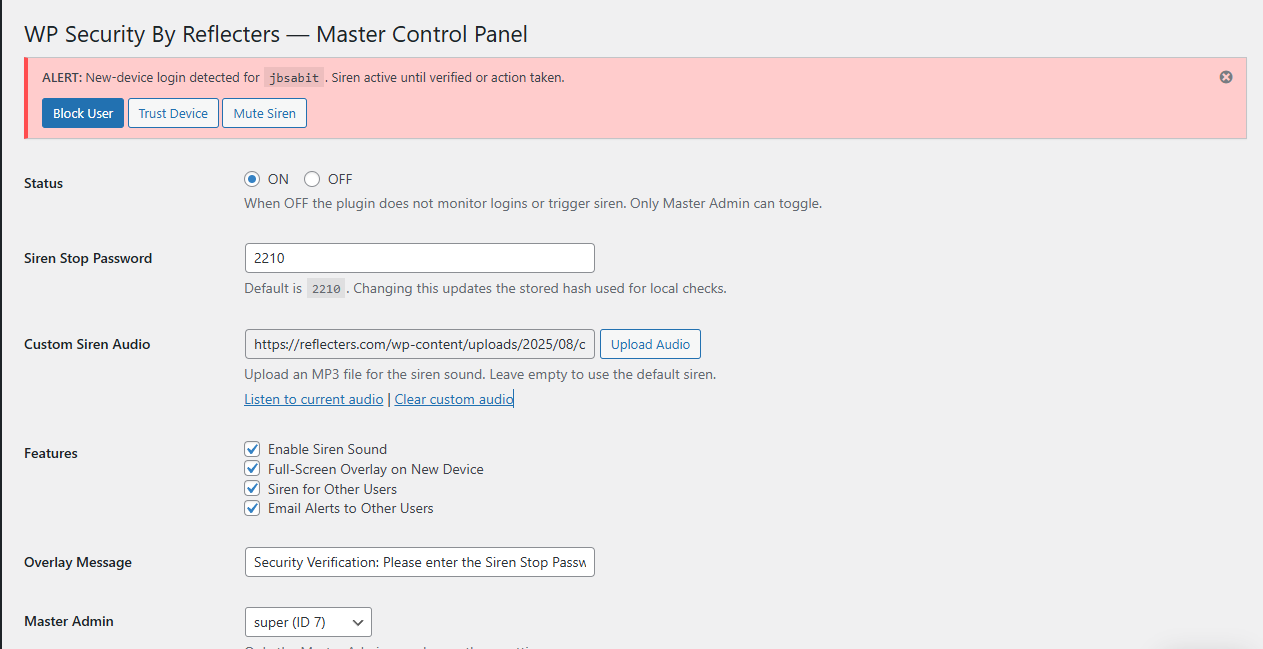
Settings Page: Configure plugin status, siren password, custom audio, and features. 
New Device Overlay: Full-screen password prompt for untrusted devices. 
Warning Banner: Alert for other users when a new device logs in, with trust/block/mute options. 
Trusted Devices Management: View and remove trusted devices in the settings.
Installation
- Download and Upload:
- Download the plugin zip file.
- In your WordPress admin panel, go to Plugins > Add New > Upload Plugin.
- Upload the zip file and click « Install Now. »
- Activate:
- Activate the plugin through the Plugins menu in WordPress.
- Set Up Master Admin:
- Upon activation, a notice will prompt an administrator to set the Master Admin.
- Select an administrator from the dropdown and click « Set Master Admin. »
- Configure Settings:
- Go to Settings > Siren Protector in the WordPress admin menu.
- Enable the plugin (set Status to ON).
- Configure the siren stop password, custom audio, and other features as needed.
- Save settings to activate device monitoring and alerts.
- Folder Structure:
- Ensure the plugin folder (
security-controll-by-reflecters) contains:security-controll-by-reflecters.phpjs/scbr-settings.jsjs/scbr-overlay.jsjs/scbr-broadcast.jscss/scbr-admin.css
- Ensure the plugin folder (
FAQ
-
What happens when a new device logs in?
-
When an admin, editor, or author logs in from a new device, that device is blocked with a full-screen overlay requiring the siren stop password (default:
2210). Other logged-in users (including the same user on trusted devices) see a warning banner and hear a siren (if enabled). The master admin can block the user, or any authorized user can trust the device. -
How do I trust a new device?
-
Enter the correct siren stop password on the new device to trust it automatically. Alternatively, from another trusted device, click « Trust Device » in the warning banner. The master admin can also manage trusted devices in the settings.
-
Who can block or unblock users?
-
Only the master admin can block or unblock users via the warning banner or the settings page. Blocking a user logs them out, clears their trusted devices, and prevents further logins until unblocked.
-
Why don’t I hear the siren?
-
Browsers require user interaction (e.g., click, scroll) to play audio. The siren plays automatically after interaction. Check your browser’s sound settings (e.g.,
chrome://settings/content/sound). You can also mute the siren via the warning banner. -
Can I change the siren sound?
-
Yes, in Settings > Siren Protector, upload an MP3 file for a custom siren sound. Leave it blank to use the default siren.
-
What roles are monitored?
-
The plugin monitors users with admin, editor, or author roles. Contributors and subscribers are not affected.
-
How do I debug issues?
-
Enable
WP_DEBUGinwp-config.php(define('WP_DEBUG', true);). Check the browser console (DevTools > Console) for JavaScript errors and the Network tab for AJAX responses. Verify plugin options inwp_options(scbr_settings,scbr_blocked_users) and transients (scbr_trigger_*,scbr_broadcast).
Avis


Contributeurs & développeurs
« Security Control by Reflecters » est un logiciel libre. Les personnes suivantes ont contribué à cette extension.
Contributeurs
Traduisez « Security Control by Reflecters » dans votre langue.
Le développement vous intéresse ?
Parcourir le code, consulter le SVN dépôt, ou s’inscrire au journal de développement par RSS.
Journal
1.1
- Changed prefix from
wrstoscbrfor all options, transients, user meta, cookies, and scripts to avoid conflicts with other plugins. - Improved script and style enqueuing to load only on relevant admin pages.
- Moved inline scripts and styles to proper JavaScript (
scbr-overlay.js,scbr-settings.js,scbr-broadcast.js) and CSS (scbr-admin.css) files. - Added data migration during activation to preserve existing settings and user data.
- Fixed plugin name to « Security Control by Reflecters » for consistency.
1.0
- Initial release with device-based authentication, siren alerts, master admin control, and IP blocking.
- Features new device detection, broadcast alerts, and trusted device management.
- Supports admin, editor, and author roles with email notifications and customizable siren audio.