Search the Community
Showing results for tags 'videos'.
-
Version 1.1
398 downloads
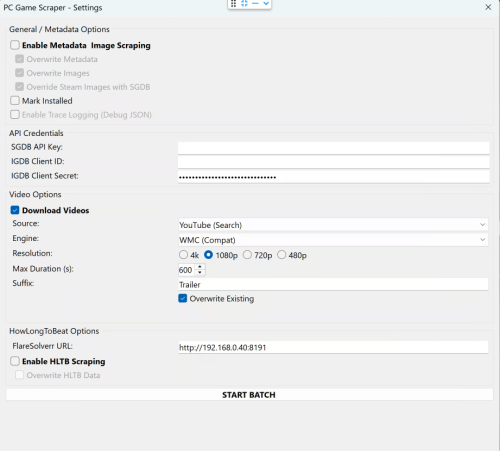
🎮 PC Game Scraper for LaunchBox PC Game Scraper is a robust metadata and media scraping plugin for LaunchBox. It intelligently prioritizes Steam for PC game metadata and IGDB for console titles. It leverages SteamGridDB for high-quality frontend artwork and YouTube (via yt-dlp) for video trailers. The plugin features advanced integration with HowLongToBeat (via FlareSolverr), now upgraded with a dedicated "Console Fork" to pull version-specific completion times directly from the site’s internal data. 🛠️ Dependencies & Requirements To use all features, the following components are required or recommended. I've included everything I can for your convenience. If you are not comfortable with them or do not want to use the optional Deno.exe. You may download your own or remove Deno.exe if you don't plan on using cookies.txt or downloading age gated videos. Required for Core Functionality yt-dlp.exe (Required for Video): The engine that downloads trailers. Must be placed in the plugin folder. ffmpeg.exe (Required for Video): Handles video merging and ensures files play correctly in LaunchBox. Recommended SteamGridDB API Key (Highly Recommended): Required for fallback images not available on Steam. IGDB Client ID & Secret (Highly Recommended): Required for all console game metadata and "Gap Filling" for PC games metadata either not on Steam or difficult to extract. FlareSolverr (Required for HLTB): A local proxy service needed to bypass Cloudflare security when fetching HowLongToBeat playtimes. cookies.txt and Deno.exe (Optional): Helps yt-dlp bypass age-restricted content gates on YouTube and sign in to your premium account. Deno.exe will solve captchas to bypass YouTube's bot protection. ⚠️ Disclaimer This plugin scrapes data from third-party sources. Please use FlareSolverr and yt-dlp responsibly and at your own discretion. ✨ Key Features 🧠 Smart Metadata Routing PC Logic: Scans Steam first. If a game is found, it then uses IGDB to "Gap Fill" fields Steam often lacks, like Series and Age Rating. Console Logic: Automatically skips Steam and routes directly to IGDB based on the game's platform. Manual Search: If automatic matching fails the user is prompted for a new search term, steam app id, steam store or igdb url. 🎬 Video Downloader Source Selector: Select your desired source, Steam or Youtube. Smart Fallback: For PC games, if Steam source is selected it attempts to grab the official Steam Store trailer first. If unavailable allows the user to switch to Youtube, or if the game is a console title, it pivots to a YouTube search and injects the platform in to the search term for better matching. Dynamic Slicer: Automatically applies your "Max Duration" limit to YouTube downloads to save disk space. YouTube videos will be cut off at the time set. A 10 minute gameplay video is cut down to 5 minutes. Resolution: Will attempt to download the desired resolution. If it is not available will scale down until one is found for the selected video. Suffix: Allows user to define desired youtube search term suffix, IE Trailer, Gameplay, etc... ⏱️ HowLongToBeat The plugin now uses two distinct methods to fetch playtimes: PC Logic: Pulls the general "blended average" from the HLTB search results. Console Logic: Loads the game's specific detail page and extracts the exact platform data (e.g., pulling GameCube-specific times for Metroid Prime rather than the Wii Remaster times). Custom Fields: Creates custom fields for dynamic playlist creation. Marathon 60h+, Long 30-60h, Extended 15-30h, Standard 5-15h, and Quick <5h, as well as the exact times provided by HLTB. 🎮 Real-World Workflow Examples If you select a game and run all three functions (Metadata, Images, and Video), here is how the plugin behaves: Example A: Windows Game (Cyberpunk 2077) Identification: Finds the game on Steam via name match. Metadata: Pulls metadata from Steam, then if client id/client secret are populated and correct hits IGDB to add additional fields not available or hard to parse from steam. Images: Grabs all available steam images. If images are missing or if SGDB override is enabled and your SGDB API is present it hits SteamGridDB. Video: Downloads the official trailer directly from the Steam Store servers or YouTube if the video source is YouTube. HLTB: If enabled and flaresolverr is setup. saves the general PC completion times to your custom fields as well as the category times mentioned above. Example B: Console Game (The Legend of Zelda: Twilight Princess for GameCube) Identification: Automatically routes to IGDB after detecting the GameCube platform. Metadata: Pulls the IGDB metadata. Images: Since no Steam ID exists, it goes straight to SteamGridDB to find the community-voted best GameCube media. Video: Recognizes it isn't a PC game and routes to YouTube to search for "The Legend of Zelda: Twilight Princess GameCube Trailer". HLTB: Triggers the Console Fork. It ignores the Wii and Wii U times and pulls only the GameCube platform data. -
PC Game Scraper View File 🎮 PC Game Scraper for LaunchBox PC Game Scraper is a robust metadata and media scraping plugin for LaunchBox. It intelligently prioritizes Steam for PC game metadata and IGDB for console titles. It leverages SteamGridDB for high-quality frontend artwork and YouTube (via yt-dlp) for video trailers. The plugin features advanced integration with HowLongToBeat (via FlareSolverr), now upgraded with a dedicated "Console Fork" to pull version-specific completion times directly from the site’s internal data. 🛠️ Dependencies & Requirements To use all features, the following components are required or recommended. I've included everything I can for your convenience. If you are not comfortable with them or do not want to use the optional Deno.exe. You may download your own or remove Deno.exe if you don't plan on using cookies.txt or downloading age gated videos. Required for Core Functionality yt-dlp.exe (Required for Video): The engine that downloads trailers. Must be placed in the plugin folder. ffmpeg.exe (Required for Video): Handles video merging and ensures files play correctly in LaunchBox. Recommended SteamGridDB API Key (Highly Recommended): Required for fallback images not available on Steam. IGDB Client ID & Secret (Highly Recommended): Required for all console game metadata and "Gap Filling" for PC games metadata either not on Steam or difficult to extract. FlareSolverr (Required for HLTB): A local proxy service needed to bypass Cloudflare security when fetching HowLongToBeat playtimes. cookies.txt and Deno.exe (Optional): Helps yt-dlp bypass age-restricted content gates on YouTube and sign in to your premium account. Deno.exe will solve captchas to bypass YouTube's bot protection. ⚠️ Disclaimer This plugin scrapes data from third-party sources. Please use FlareSolverr and yt-dlp responsibly and at your own discretion. ✨ Key Features 🧠 Smart Metadata Routing PC Logic: Scans Steam first. If a game is found, it then uses IGDB to "Gap Fill" fields Steam often lacks, like Series and Age Rating. Console Logic: Automatically skips Steam and routes directly to IGDB based on the game's platform. Manual Search: If automatic matching fails the user is prompted for a new search term, steam app id, steam store or igdb url. 🎬 Video Downloader Source Selector: Select your desired source, Steam or Youtube. Smart Fallback: For PC games, if Steam source is selected it attempts to grab the official Steam Store trailer first. If unavailable allows the user to switch to Youtube, or if the game is a console title, it pivots to a YouTube search and injects the platform in to the search term for better matching. Dynamic Slicer: Automatically applies your "Max Duration" limit to YouTube downloads to save disk space. YouTube videos will be cut off at the time set. A 10 minute gameplay video is cut down to 5 minutes. Resolution: Will attempt to download the desired resolution. If it is not available will scale down until one is found for the selected video. Suffix: Allows user to define desired youtube search term suffix, IE Trailer, Gameplay, etc... ⏱️ HowLongToBeat The plugin now uses two distinct methods to fetch playtimes: PC Logic: Pulls the general "blended average" from the HLTB search results. Console Logic: Loads the game's specific detail page and extracts the exact platform data (e.g., pulling GameCube-specific times for Metroid Prime rather than the Wii Remaster times). Custom Fields: Creates custom fields for dynamic playlist creation. Marathon 60h+, Long 30-60h, Extended 15-30h, Standard 5-15h, and Quick <5h, as well as the exact times provided by HLTB. 🎮 Real-World Workflow Examples If you select a game and run all three functions (Metadata, Images, and Video), here is how the plugin behaves: Example A: Windows Game (Cyberpunk 2077) Identification: Finds the game on Steam via name match. Metadata: Pulls metadata from Steam, then if client id/client secret are populated and correct hits IGDB to add additional fields not available or hard to parse from steam. Images: Grabs all available steam images. If images are missing or if SGDB override is enabled and your SGDB API is present it hits SteamGridDB. Video: Downloads the official trailer directly from the Steam Store servers or YouTube if the video source is YouTube. HLTB: If enabled and flaresolverr is setup. saves the general PC completion times to your custom fields as well as the category times mentioned above. Example B: Console Game (The Legend of Zelda: Twilight Princess for GameCube) Identification: Automatically routes to IGDB after detecting the GameCube platform. Metadata: Pulls the IGDB metadata. Images: Since no Steam ID exists, it goes straight to SteamGridDB to find the community-voted best GameCube media. Video: Recognizes it isn't a PC game and routes to YouTube to search for "The Legend of Zelda: Twilight Princess GameCube Trailer". HLTB: Triggers the Console Fork. It ignores the Wii and Wii U times and pulls only the GameCube platform data. Submitter spiritedusual Submitted 12/28/2025 Category Third-party Apps and Plugins
-

Version 1.0.0
13 downloads
LaunchBox Video Recovery v1.0 Recover missing playlist and platform videos LaunchBox Video Recovery scans your video library and helps you recover missing platform or playlist videos by finding likely matches elsewhere in your LaunchBox video collection. The script can then optionally create symbolic links to the best matches, restoring videos without duplicating files. This is especially useful for large LaunchBox libraries where videos may already exist but are stored under a different platform or theme folder. What This Script Does LaunchBox Video Recovery can: • Scan LaunchBox Playlist XML files for missing videos • Scan LaunchBox Platform XML files for missing videos • Search your video library for possible matches • Score candidate videos based on similarity • Let you choose the correct match • Create symbolic links to restore missing videos The script helps recover missing videos without copying or duplicating large files. Why This Exists Large LaunchBox video libraries can become fragmented over time. Common causes include: • Media packs installed for the wrong platform • Theme videos stored in different platform folders • Moving media between drives • Playlists referencing videos that no longer exist • Duplicate or renamed videos Instead of manually searching thousands of files, this script finds and links likely matches automatically. Features • Recover Playlist videos • Recover Platform videos • Dry-run mode (test without making changes) • Interactive selection of candidates • Candidate scoring system to identify best matches • Automatic symlink creation for recovered videos • Report generation for all actions Match Score Explanation When the script finds possible replacement videos, it displays them with a '[ match score ]': Missing: Aquarium Collection 0. [1170] H:\LaunchBox\Videos\Final Burn Neo\Theme\Aquarium.mp4 1. [960] H:\LaunchBox\Videos\MAME\Aquarium Gameplay.mp4 2. [820] H:\LaunchBox\Videos\Arcade\Aquarium Trailer.mp4 3. [610] H:\LaunchBox\Videos\Arcade\Aquarium Intro.mp4 The number in brackets is the match score calculated by the script. Higher scores mean the script believes the video is a closer match. Score Guide Score Range Meaning 1000+ Very strong match 700–1000 Likely correct 400–700 Possible match Below 400 Weak guess Example: Missing: Aquarium Collection Candidate: Aquarium.mp4 The script sees: • "Aquarium" → strong match • "Collection" → missing word (small penalty) Result: high score How Matching Works The script evaluates candidate videos using several factors: • Exact word matches • Partial word matches • Filename similarity • Platform folder relevance • Penalties for extra or missing words This helps identify videos that are likely correct even when stored in another platform folder. Requirements • Windows • PowerShell • Administrator privileges (required for symlink creation) LaunchBox does not need to be running while the script runs. How to Run Place the script anywhere and run it with PowerShell from inside that location: powershell -ExecutionPolicy Bypass -File .\LaunchBox-Video-Recovery-v1.0.ps1 The script will guide you through: Selecting Playlist or Platform recovery Choosing dry-run mode (shows what will be changed without changing anything yet) Setting report output folder Selecting video search roots Example Workflow Example scenario: A playlist references a missing video: H:\LaunchBox\Videos\Playlists\Aquarium Collection.mp4 But the actual video exists here: H:\LaunchBox\Videos\Final Burn Neo\Theme\Aquarium.mp4 The script detects the match and can create: H:\LaunchBox\Videos\Playlists\Aquarium Collection.mp4 → symlink to H:\LaunchBox\Videos\Final Burn Neo\Theme\Aquarium.mp4 LaunchBox will then play the video normally. Typical Output Example: Playlist XML files checked : 718 Missing destination videos : 365 Missing: Aquarium Collection 0. [1170] H:\LaunchBox\Videos\Final Burn Neo\Theme\Aquarium.mp4 1. [960] H:\LaunchBox\Videos\MAME\Aquarium Gameplay.mp4 2. [820] H:\LaunchBox\Videos\Arcade\Aquarium Trailer.mp4 You can then select the correct match. Safety The script is designed to be non-destructive. It: • Does not delete videos • Does not overwrite existing videos • Only creates symbolic links to existing files Dry-run mode lets you preview all changes before anything is created. Recommended Usage This script is most useful for: • Very large video libraries • Recovering missing playlist videos • Fixing broken media references • Consolidating video libraries across platforms Feedback If you encounter issues or have suggestions, feel free to post feedback. -
Launchbox Video Recovery - Audit, Find and Fix View File LaunchBox Video Recovery v1.0 Recover missing playlist and platform videos LaunchBox Video Recovery scans your video library and helps you recover missing platform or playlist videos by finding likely matches elsewhere in your LaunchBox video collection. The script can then optionally create symbolic links to the best matches, restoring videos without duplicating files. This is especially useful for large LaunchBox libraries where videos may already exist but are stored under a different platform or theme folder. What This Script Does LaunchBox Video Recovery can: • Scan LaunchBox Playlist XML files for missing videos • Scan LaunchBox Platform XML files for missing videos • Search your video library for possible matches • Score candidate videos based on similarity • Let you choose the correct match • Create symbolic links to restore missing videos The script helps recover missing videos without copying or duplicating large files. Why This Exists Large LaunchBox video libraries can become fragmented over time. Common causes include: • Media packs installed for the wrong platform • Theme videos stored in different platform folders • Moving media between drives • Playlists referencing videos that no longer exist • Duplicate or renamed videos Instead of manually searching thousands of files, this script finds and links likely matches automatically. Features • Recover Playlist videos • Recover Platform videos • Dry-run mode (test without making changes) • Interactive selection of candidates • Candidate scoring system to identify best matches • Automatic symlink creation for recovered videos • Report generation for all actions Match Score Explanation When the script finds possible replacement videos, it displays them with a '[ match score ]': Missing: Aquarium Collection 0. [1170] H:\LaunchBox\Videos\Final Burn Neo\Theme\Aquarium.mp4 1. [960] H:\LaunchBox\Videos\MAME\Aquarium Gameplay.mp4 2. [820] H:\LaunchBox\Videos\Arcade\Aquarium Trailer.mp4 3. [610] H:\LaunchBox\Videos\Arcade\Aquarium Intro.mp4 The number in brackets is the match score calculated by the script. Higher scores mean the script believes the video is a closer match. Score Guide Score Range Meaning 1000+ Very strong match 700–1000 Likely correct 400–700 Possible match Below 400 Weak guess Example: Missing: Aquarium Collection Candidate: Aquarium.mp4 The script sees: • "Aquarium" → strong match • "Collection" → missing word (small penalty) Result: high score How Matching Works The script evaluates candidate videos using several factors: • Exact word matches • Partial word matches • Filename similarity • Platform folder relevance • Penalties for extra or missing words This helps identify videos that are likely correct even when stored in another platform folder. Requirements • Windows • PowerShell • Administrator privileges (required for symlink creation) LaunchBox does not need to be running while the script runs. How to Run Place the script anywhere and run it with PowerShell from inside that location: powershell -ExecutionPolicy Bypass -File .\LaunchBox-Video-Recovery-v1.0.ps1 The script will guide you through: Selecting Playlist or Platform recovery Choosing dry-run mode (shows what will be changed without changing anything yet) Setting report output folder Selecting video search roots Example Workflow Example scenario: A playlist references a missing video: H:\LaunchBox\Videos\Playlists\Aquarium Collection.mp4 But the actual video exists here: H:\LaunchBox\Videos\Final Burn Neo\Theme\Aquarium.mp4 The script detects the match and can create: H:\LaunchBox\Videos\Playlists\Aquarium Collection.mp4 → symlink to H:\LaunchBox\Videos\Final Burn Neo\Theme\Aquarium.mp4 LaunchBox will then play the video normally. Typical Output Example: Playlist XML files checked : 718 Missing destination videos : 365 Missing: Aquarium Collection 0. [1170] H:\LaunchBox\Videos\Final Burn Neo\Theme\Aquarium.mp4 1. [960] H:\LaunchBox\Videos\MAME\Aquarium Gameplay.mp4 2. [820] H:\LaunchBox\Videos\Arcade\Aquarium Trailer.mp4 You can then select the correct match. Safety The script is designed to be non-destructive. It: • Does not delete videos • Does not overwrite existing videos • Only creates symbolic links to existing files Dry-run mode lets you preview all changes before anything is created. Recommended Usage This script is most useful for: • Very large video libraries • Recovering missing playlist videos • Fixing broken media references • Consolidating video libraries across platforms Feedback If you encounter issues or have suggestions, feel free to post feedback. Submitter -McFly- Submitted 03/08/2026 Category Third-party Apps and Plugins
-

Version 1.0.1
3,369 downloads
DISCLAIMER: Use at your own risk! Please read and understand Youtube's terms of service. I will not be held liable for any misuse of any product or service. Overview: This plugin makes use of the open source and unlicensed application yt-dlp (forked from youtube-dl) in conjunction with ffmpeg to download game videos. It first downloads videos from the link provided in the metadata from LaunchBox, skipping videos longer than a specified duration, and then searches for videos for missing games based on input search terms. It is intended for modern Windows games, as this was my need initially. Requirements: Launchbox 13.19 or newer. (Use version 0.5.1 for older Launchbox installations) ytdlp (included in .zip) ffmpeg (included in .zip) Installation Instructions: Extract the contents of the .zip folder and place it in your LaunchBox plugins folder. Usage Instructions: Select a game or multiple games, right-click, and select "Download Video Snap." Select desired quality. Adjust the maximum duration if desired. The "Get Missing Videos" checkbox sets whether or not to search for videos of games that don't have URL's in their metadata. The "Trim videos" checkbox sets whether or not to trim videos after they have been downloaded. Enter desired search terms for missing videos. Click "Start" to start the download process. Games will download asynchronously. Resuming downloads is also supported natively. Other: PLEASE NOTE: I AM NOT A DEVELOPER! I know very little about C# and programming in general, so I probably won't be able to address many issues that you may face. That being said, I will try and fix things where I can. I've provided the spaghetti source code for anyone to modify, improve, etc. (it seems you need to unblock the forms in the "Resources" folder -> RMB->properties->unblock.) As of now, I'm more comfortable with the usability of the plugin; however, there are still probably many issues. Any comments to provide insight/improvement to the code, etc. would be much appreciated. Thanks to @srxz for his source of Youtube Scraper, on which this is based. Credits: @srxz @JoeViking245 @C-Beats maikeru86 -
Hey all! I've never uploaded any files on here and don't want to post anything in the wrong place, or honestly just waste anyone's time. I'm just getting my arcade off the ground and I have a 43" ultrawide marquee (Sceptre brand 43.8", highly recommend it for the price if you have a large arcade), so I've created a few video marquees that are 2880x1080 pixels. I plan to create a lot more as I go along. I've tried to create them so that they loop around on themselves, but I don't know what the optimal length of each video should be? Some are one minute in length, some are shorter. I've uploaded to YouTube so people can see and gauge any interest. If the size is too awkward, length is too long, etc. I can try to adjust the videos to fit some kind of agreed-upon community guidelines if there are any. Here's what I've created so far: Namco System 357: Nintendo Entertainment System: Neo Geo AVS Sega Genesis: PC Games: I don't like calling my Platform Steam/Windows or anything of that sort, and prefer the broader title "PC Games" This isn't a platform, but a playlist, but I'll include it here as well: Contra Collection: 10-01-2024.zip
- 50 replies
-
- 8
-

-

-
- video marquee
- videos
- (and 3 more)
-
CriticalZone / CriticalZone - BlueBox View File Here you can download alternative versions of the CriticalZoneV2 theme that comes bundled with every LaunchBox installation. CriticalZone is a BigBox theme designed for the usage of widescreen platform videos and utilizes videos as backgrounds. This theme was designed for widescreen displays with 16:9 aspect ratios and optimized for a display resolution of 1920x1080. It will also work with other widescreen resolutions and 16:10 aspect ratios but it may not look as polished. Available Versions: - CritcalZoneV2 - BlueBox: A blue color variant of CriticalZoneV2. It features blue texts instead of green and has a different Default background created by @SentaiBrad - BackgroundVideoOnly: All Views, except the TextList Views, will only use video loops as backgrounds. Also available as BlueBox version. - BackgroundFanartOnly: All Views will only use Fanart images as backgrounds. Also available as BlueBox version. -> Use this version if you have performance problems! - 1.8: The original and now old version of CriticalZone. It's officially EOL and won't get supported by me in any way. It's just still here for archiving reasons. There’s also a red 80’s/Cyberpunk themed version of CriticalZone called “CityHunter”. It’s maintained by @keltoigael and can be found here: How to install: Just download the version of choice and extract the archive into: “..\LaunchBox\Themes\” Open the Options menu in BigBox -> go to “Views” and change the Theme to the version you just have installed. IMPORTANT: CriticalZone V2 requires LaunchBox v7.11 or higher! Known issues: - The description texts in all Platform Views and CoverFlowWithDetails Games View won’t fill the whole space of the descriptions box when you use CriticalZone with a higher DPI setting than 100% or a lower display resolution than 1902x1080. It gets progressively worse the higher the DPI settings and/or lower the resolution is. Thanks & Credits: Thanks to @SentaiBrad for creating the new Default background video for the BlueBox variant. Background video of the standard version: In The Deep - FREE Video Background Loop HD 1080p by NIZ.co (http://niz.co/wp/) Submitter CriticalCid Submitted 11/03/2016 Category Big Box Custom Themes
- 627 replies
-
- 13
-
-
- bigbox
- widescreen
- (and 10 more)
-
https://retrolunatics.com/default.asp with details/downloads for this community = amazing JIM in our group wanted to share these amazing video marquees - please enjoy and provide credit where credit is due - drive sellers only with permission via Jim @https://www.facebook.com/groups/arcadelunatics Plenty more on our YouTube channel and no hidden you pay this or dont get that all community driven - https://www.youtube.com/@RetroLunatics
-
Version 1.0.1
4,412 downloads
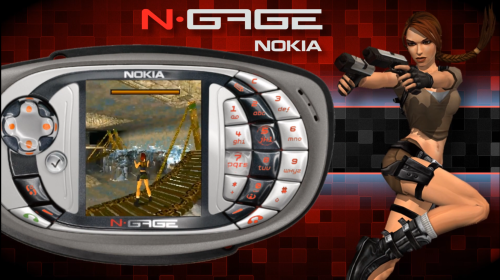
Sharing a collection of simple platform theme videos I made for my collection in the style of RetroHumanoid’s Refried theme pack. Credit @RetroHumanoid for original video boarders and backgrounds This collection contains the following platforms: Aamber Pegasus Alf TV Game Apogee BK-01 Apple Macintosh Classic Applied Technology MicroBee Atari CoJag Atari GX2 Atari System 1 Atari System 2 Atlus Bally Technologies Bandai RX-78 Gundam BANPRESTO C64 Dreams Capcom 68000 Capcom Power System Changer Capcom Sony ZN-1 Capcom Sony ZN-2 Casio PV-2000 Cave 6800 Cave CV1000B Cave CV1000D Cinematronics Coleco ADAM Comad Co Doujin Shoot Em Ups Doujin Soft Dragon 32 Elektronika BK Enterprise Exelvision EXL 100 Fujitsu FM Towns Marty Fujitsu FM-7 Gaelco Gamate Game Wave Family Entertainment System Global VR Hector HRX IBM PCjr Infocom Z-machine Kaneko Konami Bubble System Konami e-Amusement konami gx Konami Handheld Locomalito Luxor ABC 80 M&D Monon Color Matra and Hachette Alice Memotech MTX512 Microsoft MSX Turbo-R Microvision Mitchell Corporation Namco ES3A Namco NA-2 Namco NB-2 NEC PC-8801 NEC PC-9801 Nichibutsu Nintendo 64 HD Nintendo 64 Japan Nintendo Game Boy Color Japan Nintendo Wii U eShop Nokia N-Gage Nuon Othello Multivision PC Games Philips Videopac+ PICO-8 Pinball Arcade Ports Psikyo Raizing Eighting Raw Thrills ResidualVM Sega Ages 2500 Sega ALLS Sega CD 32X Sega Chihiro Sega Dreamcast Indies Sega Game Gear Japan Sega Mega Drive Japan Sega Mega Tech System Sega Mega-CD Japan Sega Naomi 2 Sega Nomad Sega Saturn Japan Sega System 18 Seta Aleck64 Sharp X1 Sinclair ZX81 Singe 2 SNK Hyper Neo Geo 64 Sony Playstation Japan Sony PSP Minis Sony SMC-777 Tandy Memorex VIS Technos Arcade Tecmo Thomson MO-TO Tiger Gizmondo Toaplan Tronica Unico Eletronics VideoBrain Family Computer Visco Classics VTech Socrates VTech V.Smile- 2 comments
-
- 10
-
-

-
-
Version 0.1.9
3,766 downloads
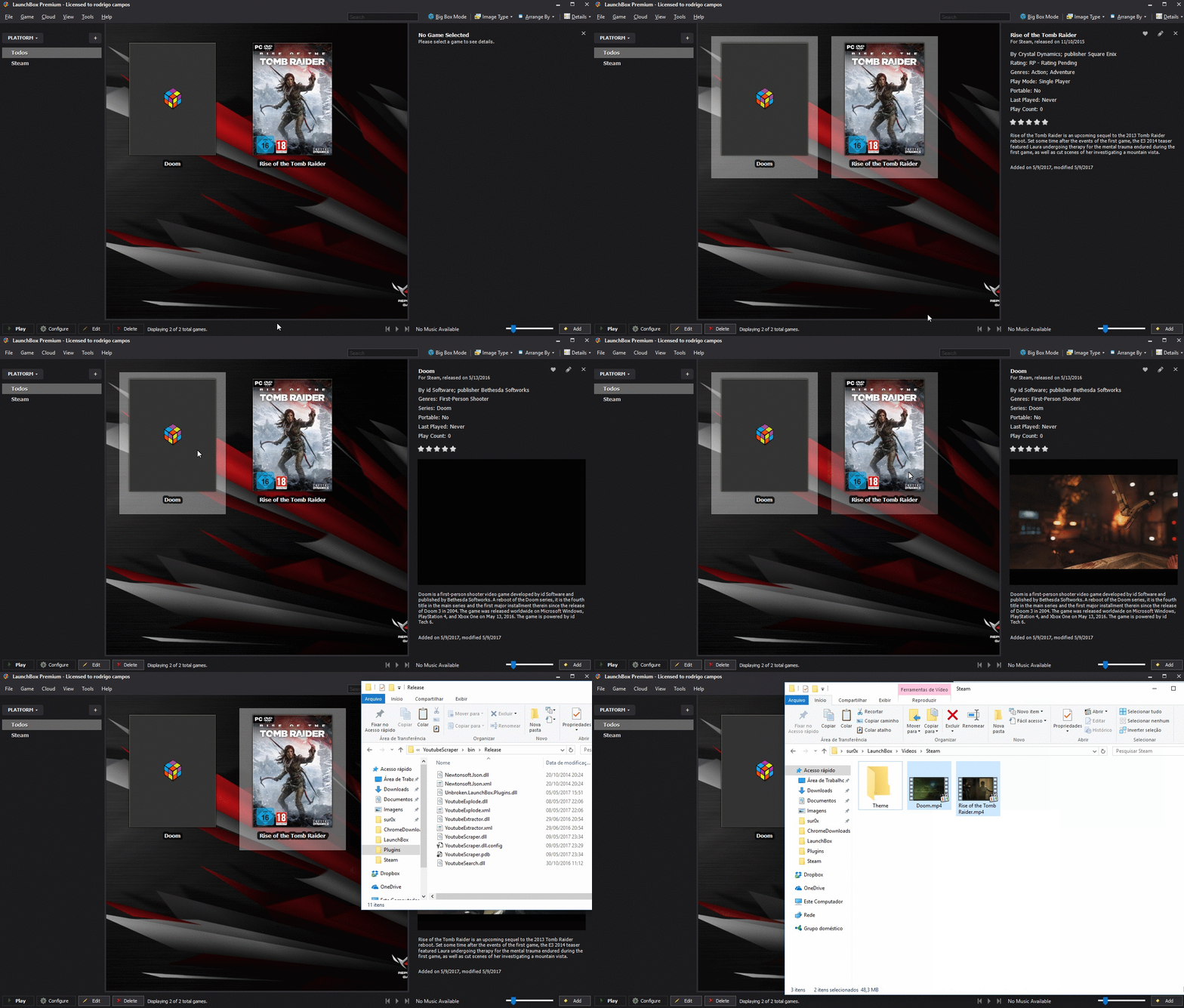
Simple Plugin to automate download videos from youtube. Requirements: Launchbox 8.2+ Install: Extract the content of zip file to : Launchbox/plugins/YoutubeScraper Source code: Github (feel free to make a pull request ) EDIT If you have trouble running the plugin and crashing due CAS error, please right click on the DLL's , properties and then unblock. There's two options: URL Scraper: Just paste entire youtube URL from the desired video One-click downloader: It will search automatically and download the first entry from youtube. Bulk Download supported! -
Vidsnap Scraper View File DISCLAIMER: Use at your own risk! Please read and understand Youtube's terms of service. I will not be held liable for any misuse of any product or service. Overview: This plugin makes use of the open source and unlicensed application yt-dlp (forked from youtube-dl) in conjunction with ffmpeg to download game videos. It first downloads videos from the link provided in the metadata from LaunchBox, skipping videos longer than a specified duration, and then searches for videos for missing games based on input search terms. It is intended for modern Windows games, as this was my need initially. Requirements: Launchbox 13.19 or newer. (Use version 0.5.1 for older Launchbox installations) ytdlp (included in .zip) ffmpeg (included in .zip) Installation Instructions: Extract the contents of the .zip folder and place it in your LaunchBox plugins folder. Usage Instructions: Select a game or multiple games, right-click, and select "Download Video Snap." Select desired quality. Adjust the maximum duration if desired. The "Get Missing Videos" checkbox sets whether or not to search for videos of games that don't have URL's in their metadata. The "Trim videos" checkbox sets whether or not to trim videos after they have been downloaded. Enter desired search terms for missing videos. Click "Start" to start the download process. Games will download asynchronously. Resuming downloads is also supported natively. Other: PLEASE NOTE: I AM NOT A DEVELOPER! I know very little about C# and programming in general, so I probably won't be able to address many issues that you may face. That being said, I will try and fix things where I can. I've provided the spaghetti source code for anyone to modify, improve, etc. (it seems you need to unblock the forms in the "Resources" folder -> RMB->properties->unblock.) As of now, I'm more comfortable with the usability of the plugin; however, there are still probably many issues. Any comments to provide insight/improvement to the code, etc. would be much appreciated. Thanks to @srxz for his source of Youtube Scraper, on which this is based. Credits: @srxz @JoeViking245 @C-Beats maikeru86 Submitter maikeru1986 Submitted 12/16/2020 Category Third-party Apps and Plugins
-
Version 1.0.0
2,178 downloads
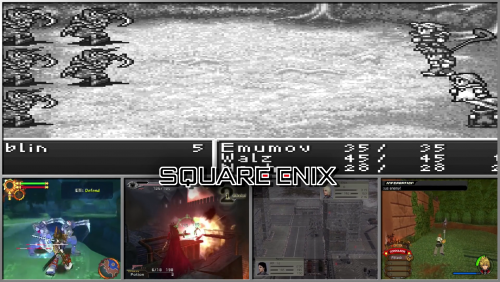
A set of 22 Developer Playlist category videos. Just a handful of my favorite developers,and I do plan to add some more to this set in the future. These match my previous sets which can be found here... -
Refried Style Platform Theme Videos (16:9) View File Sharing a collection of simple platform theme videos I made for my collection in the style of RetroHumanoid’s Refried theme pack. Credit @RetroHumanoid for original video boarders and backgrounds This collection contains the following platforms: Aamber Pegasus Alf TV Game Apogee BK-01 Apple Macintosh Classic Applied Technology MicroBee Atari CoJag Atari GX2 Atari System 1 Atari System 2 Atlus Bally Technologies Bandai RX-78 Gundam BANPRESTO C64 Dreams Capcom 68000 Capcom Power System Changer Capcom Sony ZN-1 Capcom Sony ZN-2 Casio PV-2000 Cave 6800 Cave CV1000B Cave CV1000D Cinematronics Coleco ADAM Comad Co Doujin Shoot Em Ups Doujin Soft Dragon 32 Elektronika BK Enterprise Exelvision EXL 100 Fujitsu FM Towns Marty Fujitsu FM-7 Gaelco Gamate Game Wave Family Entertainment System Global VR Hector HRX IBM PCjr Infocom Z-machine Kaneko Konami Bubble System Konami e-Amusement konami gx Konami Handheld Locomalito Luxor ABC 80 M&D Monon Color Matra and Hachette Alice Memotech MTX512 Microsoft MSX Turbo-R Microvision Mitchell Corporation Namco ES3A Namco NA-2 Namco NB-2 NEC PC-8801 NEC PC-9801 Nichibutsu Nintendo 64 HD Nintendo 64 Japan Nintendo Game Boy Color Japan Nintendo Wii U eShop Nokia N-Gage Nuon Othello Multivision PC Games Philips Videopac+ PICO-8 Pinball Arcade Ports Psikyo Raizing Eighting Raw Thrills ResidualVM Sega Ages 2500 Sega ALLS Sega CD 32X Sega Chihiro Sega Dreamcast Indies Sega Game Gear Japan Sega Mega Drive Japan Sega Mega Tech System Sega Mega-CD Japan Sega Naomi 2 Sega Nomad Sega Saturn Japan Sega System 18 Seta Aleck64 Sharp X1 Sinclair ZX81 Singe 2 SNK Hyper Neo Geo 64 Sony Playstation Japan Sony PSP Minis Sony SMC-777 Tandy Memorex VIS Technos Arcade Tecmo Thomson MO-TO Tiger Gizmondo Toaplan Tronica Unico Eletronics VideoBrain Family Computer Visco Classics VTech Socrates VTech V.Smile Submitter edgemundo Submitted 06/30/2024 Category Platform Theme Videos
-

Version 1.3.0
160,699 downloads
A set of 155 (with more to come) platform videos,that I have created to match perfectly with my Refried theme. I have used the same character,Background,and border art in the videos,that is in the theme, for the majority of the videos. I am sure it's obvious where the influence came from for the theme,but, this whole thing started out as an alternate version to the Unified theme,which sort of took off and became something slightly different overall. While I do have plans for about 60+ more videos to add to this set,I am afraid I cannot take requests,at least until the project,as a whole, is completed. A special Thank you to @RetroNi for allowing me to use his white bordered logo set,with a few changes,for the titles in these videos...As well as @CriticalCid for giving me the unspoken inspiration to even start this project in the first place! Samples - Super Nintendo Entertainment System - Sega CD - AAE - Capcom CPSIII - Pinball FX2 - Nintendo Virtual Boy - Microsoft MS-DOS - The Main Theme can be found here... The Logo set can be found here... -
 Hello everybody, I'm an old premium user of LB and EmuMovies, but I haven't used LB in the few last years because I had not a PC for doing it anymore. In past it all worked fine and using EmuMovies Premium account I was able to download games' videos and I had all videos both for PC games and for ROMS. In the last 2 days I spent about 10 hours setting all up and manually importing a lot of games, but when I went to Big Box I've had the bad surprise. Only about 15 games on 300 got a video downloaded. I tried everything, many times, even asked the AI looking for solutions online, but everything I found didn't help me. There is the option to download from Steam and the other options in EmuMovies menu to download the videos and game video theme, but even if I select them there is no download. Please tell me that there is a solution.
 -
Hi everyone! Not new here really, but I suppose I am newish to posting in the forums here. I mostly hang around libretro forums. I just went public with a youtube channel where I am showcasing various 4K arcade artwork overlays along with megabezel and crt shaders. As of now my focus is on vertical overlays. Please have a look at the channel a bit. There is a gallery for “shorts” and a playlist if you just want to let the vids cycle through their attract modes. Each video is less than 60 seconds each. On mobile, 2160p is available through the youtube app. Or directly on youtube on PC. Downloads are in descriptions for the overlays. I think you can download the video clips from youtube, but if not. I will start posting them here for use in the near future if there is any interest. Thank you for checking it out!

- 15 replies
-
- 1
-
-
- retroarch
- verticaloverlay
- (and 8 more)
-

Version 20230704_Images,XML,Videos
626 downloads
All my Platforms / Playlists / Categories / Icons Image Folders individually zipped up; Banners, Clear logos, 3D Boxes, 3D Carts, Boxes, Carts, Devices, Fanart My .xml files are here - My videos are here - https://drive.google.com/drive/folders/1TEUrBqH8Vbo-EAtlyGJQvlhJdDFiUxwe?usp=sharing Happy Independence Day! -
Platform / Playlist / Categories / Icons | Images| All Zipped UP | XMLs and Video links included | 20230704 - Happy 4th of July! View File All my Platforms / Playlists / Categories / Icons Image Folders individually zipped up; Banners, Clear logos, 3D Boxes, 3D Carts, Boxes, Carts, Devices, Fanart My .xml files are here - My videos are here - https://drive.google.com/drive/folders/1TEUrBqH8Vbo-EAtlyGJQvlhJdDFiUxwe?usp=sharing Happy Independence Day! Submitter -McFly- Submitted 07/04/2023 Category Platform Clear Logos
-
Version 1.2.2
5,431 downloads
Pinball: Love your Pinnies?? well your come to the right place.. The first Pinball maschine dates back to the 1930s, Now there at our finger tips. Ahhh.. Yeah gotta love it! 😍 Easy to setup Pinball FX3 Media and Metadata WHATS IN THE DOWNLOAD..? Clear Logos 3D Boxs Docklet Wheel Art 3D Carts Marquees Pinball Cabinets Gameplay Screenshots Video Snaps Table .bat files PDF Manuals PinballFX3.xml File Easy How To Guild -
Version 1.1.0
187 downloads
These are Theme videos That I thought would make a nice addition to @Suhrvivor's set. These are the ones I've made so far. List of games: 1. Zelda no Densetsu - The Hyrule Fantasy 2. Link no Bouken - The Legend of Zelda 2 3. BS Zelda no Densetsu Kodai no Sekiban 1 4. Legend of Zelda - Tears of the kingdom 5. Link's Crossbow Training 6. Hyrule warriors Legends be sure to check out Suhrvivors set here: What other themes to expect in the future: Zelda - Wand of Gamelon Link - the faces of evil Zelda's adventure Hyrule warriors Hyrule warriors Definitive edition the legend of Zelda 64 - ocarina of time : master quest Tingle's Balloon Fight DS Ripened Tingle's Balloon Trip of Love Freshly-Picked: Tingle's Rosy Rupeeland -
Theme videos for the legend of Zelda View File These are Theme videos That I thought would make a nice addition to @Suhrvivor's set. These are the ones I've made so far. List of games: 1. Zelda no Densetsu - The Hyrule Fantasy 2. Link no Bouken - The Legend of Zelda 2 3. BS Zelda no Densetsu Kodai no Sekiban 1 4. Legend of Zelda - Tears of the kingdom be sure to check out Suhrvivors set here: What other themes to expect in the future: Zelda - Wand of Gamelon Link - the faces of evil Zelda's adventure Hyrule warriors Hyrule warriors Legends Hyrule warriors Definitive edition the legend of Zelda 64 - ocarina of time : master quest Submitter Klopjero Submitted 04/23/2023 Category Playlists & Playlist Media
-
I'm uploading all my current LB / BB videos to https://archive.org/details/mcfly_videos which should be complete later today. I've had several people ask me for individual videos for their collections so here they are. A lot of them were automatically downloaded through LB so they're not all different to some you already have, but there's maybe a few there you need. I've also added a few other videos to the mix that I use for startup videos and others... They're not all great quality. If you have better ones and want to share with us all, feel free!
-
Sorry if this question has already been asked. I tried searching the forum but by the 8th page I had not found what I was looking for. I would like to have it when attract mode kicks on it will play custom videos instead for scrolling through game videos. Is this something that would be possible, or would I need to submit a ticket to maybe have it as a feature? I'm essentially wanting to have the intros to the old gaming cartoon or commercials play instead.
-
Youtube Scraper View File Simple Plugin to automate download videos from youtube. Requirements: Launchbox 8.2+ Install: Extract the content of zip file to : Launchbox/plugins/YoutubeScraper Source code: Github (feel free to make a pull request ) EDIT If you have trouble running the plugin and crashing due CAS error, please right click on the DLL's , properties and then unblock. There's two options: URL Scraper: Just paste entire youtube URL from the desired video One-click downloader: It will search automatically and download the first entry from youtube. Bulk Download supported! Submitter srxz Submitted 05/10/2017 Category Third-party Apps and Plugins
-

pinball Pinball FX3 - Easy to setup Pinball FX3 Media and Metadata
ROD3Z posted a topic in Game Media
Pinball FX3 - Easy to setup Pinball FX3 Media and Metadata View File Pinball: Love your Pinnies?? well your come to the right place.. The first Pinball maschine dates back to the 1930s, Now there at our finger tips. Ahhh.. Yeah gotta love it! 😍 Easy to setup Pinball FX3 Media and Metadata WHATS IN THE DOWNLOAD..? Clear Logos 3D Boxs Docklet Wheel Art 3D Carts Marquees Pinball Cabinets Gameplay Screenshots Video Snaps Table .bat files PDF Manuals PinballFX3.xml File Easy How To Guild Submitter ROD3Z Submitted 02/14/2022 Category Game Media