Search the Community
Showing results for tags 'server'.
Found 7 results
-
Version 1.0.0
14 downloads
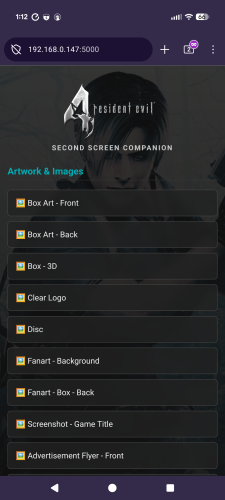
Second Screen Companion - View Manuals, Guides, & Media on your Phone! Second Screen Companion is a lightweight LaunchBox plugin that instantly turns your smartphone or tablet into a dedicated companion hub for whatever game you are currently playing. Whenever you launch a game, the plugin silently starts a local web server. Just scan a QR code, and your phone will instantly load a beautiful, dark-mode hub containing all of the game's manuals, strategy guides, artwork, and media so you can browse them while you play! 🌟 Features The Companion Hub: A sleek, mobile-optimized webpage that automatically uses your game's Clear Logo and Fanart Background for a premium look. Comprehensive Media Scanner: Automatically finds and serves: 📖 Documents: Game Manuals and Strategy Guides (pulled dynamically from your Additional Apps). 🖼️ Artwork: Front/Back Box Art, Discs, Carts, Clear Logos, Fanart, Storefront Posters, and dozens of other image folders. 🎵 Media: Automatically plays your game's Theme Music or Gameplay Videos right in your mobile browser via native HTML5 players. Smart Image Viewer: Transparent PNGs (like Clear Logos or isolated box art) are displayed over a dark-mode checkerboard background so they always look perfect and never vanish into a black screen. One-Click Network Setup: Built-in tools to automatically open the required Windows Firewall ports so you don't have to mess with command prompts. 🛠️ Installation Download the latest release zip file and unpack in your LaunchBox\Plugins\ directory. You might have to right-click the dll file, go to Properties, and check the "Unblock" box at the bottom (this is required by Windows for downloaded DLLs). Extract the Second Screen Companion folder directly into your LaunchBox\Plugins\ directory. (You should have a folder path that looks like: LaunchBox\Plugins\Second Screen Companion\WirelessScreenServer.dll and QRCoder.dll) 📱 How to Set Up & Use Open LaunchBox. Go to the top menu and click Tools -> Second Screen Companion Settings. You can leave the Default Port as 8080, or change it if you have conflicts. Click Apply Network Rules (Admin). This will trigger a Windows prompt to automatically open the port in Windows Firewall for the server. (You only need to do this once!) Click Test Connection QR. Scan it with your phone's camera. If your phone and PC are on the same Wi-Fi network, you will see a green "Success!" screen. Play a game! The next time you launch a game, access the host pc ip on the port assigned. The hub will automatically populate with all the media for the active game. ⚠️ Troubleshooting / Notes Same Network Required: Your phone/tablet and your LaunchBox PC must be connected to the same local network/Wi-Fi. Missing Media? The plugin strictly reads the media you have stored in your LaunchBox folders. If LaunchBox doesn't have a manual or video for the game, the hub won't display it. Browser Caching: Mobile browsers like to cache things. If you swap games and the phone still shows the old game, just pull down to refresh the page!- 2 comments
-
- 1
-

-
- media
- documemtation
- (and 4 more)
-
 Launchbox Second Screen Companion View File Second Screen Companion - View Manuals, Guides, & Media on your Phone! Second Screen Companion is a lightweight LaunchBox plugin that instantly turns your smartphone or tablet into a dedicated companion hub for whatever game you are currently playing. Whenever you launch a game, the plugin silently starts a local web server. Just scan a QR code, and your phone will instantly load a beautiful, dark-mode hub containing all of the game's manuals, strategy guides, artwork, and media so you can browse them while you play! 🌟 Features The Companion Hub: A sleek, mobile-optimized webpage that automatically uses your game's Clear Logo and Fanart Background for a premium look. Comprehensive Media Scanner: Automatically finds and serves: 📖 Documents: Game Manuals and Strategy Guides (pulled dynamically from your Additional Apps). 🖼️ Artwork: Front/Back Box Art, Discs, Carts, Clear Logos, Fanart, Storefront Posters, and dozens of other image folders. 🎵 Media: Automatically plays your game's Theme Music or Gameplay Videos right in your mobile browser via native HTML5 players. Smart Image Viewer: Transparent PNGs (like Clear Logos or isolated box art) are displayed over a dark-mode checkerboard background so they always look perfect and never vanish into a black screen. One-Click Network Setup: Built-in tools to automatically open the required Windows Firewall ports so you don't have to mess with command prompts. 🛠️ Installation Download the latest release zip file and unpack in your LaunchBox\Plugins\ directory. You might have to right-click the dll file, go to Properties, and check the "Unblock" box at the bottom (this is required by Windows for downloaded DLLs). Extract the Second Screen Companion folder directly into your LaunchBox\Plugins\ directory. (You should have a folder path that looks like: LaunchBox\Plugins\Second Screen Companion\WirelessScreenServer.dll and QRCoder.dll) 📱 How to Set Up & Use Open LaunchBox. Go to the top menu and click Tools -> Second Screen Companion Settings. You can leave the Default Port as 8080, or change it if you have conflicts. Click Apply Network Rules (Admin). This will trigger a Windows prompt to automatically open the port in Windows Firewall for the server. (You only need to do this once!) Click Test Connection QR. Scan it with your phone's camera. If your phone and PC are on the same Wi-Fi network, you will see a green "Success!" screen. Play a game! The next time you launch a game, access the host pc ip on the port assigned. The hub will automatically populate with all the media for the active game. ⚠️ Troubleshooting / Notes Same Network Required: Your phone/tablet and your LaunchBox PC must be connected to the same local network/Wi-Fi. Missing Media? The plugin strictly reads the media you have stored in your LaunchBox folders. If LaunchBox doesn't have a manual or video for the game, the hub won't display it. Browser Caching: Mobile browsers like to cache things. If you swap games and the phone still shows the old game, just pull down to refresh the page! Submitter spiritedusual Submitted 03/01/2026 Category Third-party Apps and Plugins
-
- 2
-
-
- media
- documemtation
- (and 4 more)
-
Hi everybody, When I click "manage themes" in BigBox, I get this error: This happens frequently so I don't think it is an issue with my internet. I think this may be to do with when I installed Launchbox, I did have a launchbox/launchbox folder setup. After finding out this caused issues, I copied everything from launchbox/launchbox and moved it to /launchbox and then deleted launchbox/launchbox. Should I run the "Launchbox - 13.17 - setup.exe" again, making sure my filepath is not launchbox/launchbox? Will this fix the issue? You can't change the filepath of where launchbox.exe is, or can you? So I assume reinstalling will fix without overwriting games, themes etc? More info: I have nothing in my updates folder either. I am not sure if this is normal since I just installed 2 days ago, all of my games work fine. Thank you for any advice, Peter

-
Ok So I have launchbox locally installed onto my win10 machine and previously had my images and roms set to my D drive. This was great until i looked at the amount of room the images was taking up. So i decided to move everything to the nas, which gives me the added benefit to playing games from multiple pc. The problem is that after setting up launchbox, the image population takes forever. I have tried maxing out my cache to 4 gb. It still takes about 15 seconds to change games. Would symbolic links fix my issue? if so where would i put the links and for what? Any help appreciated
-
I am highly anticipating the ability to use LaunchBox as a game media server similar to how Plex works for video/audio. Within Plex, there is an ability to add family and friends as plex friends so that they may stream content that I have organized to their device. My question for this forum is Will LaunchBox ever implement such an ability as this within there software or is their goal focused only on its use by one gaming computer? I would imagine such an ability would require screen capturing coding and quality downgrading to fit the speed of the users who stream from it. Streaming is proving to be the new standard of the future. Also some sort of ability to receive controller commands from the user so that they game may be controlled and run on a virtual server machine in the background within its own session without interfering with my personal use on the server. As long as the hardware specs are high, I do not see reason to dismiss such an implementation. I am running a ASUS Geforce GTX 1080Ti on 32GB of DDR3, Intel Core i7 4GHz, 120TB (10TB/slot, 12 sata ports) current total capacity. On 1Gbps internet w/ Netgear CM1000 Modem + Nighthawk X10 Router. I have custom built to tackle this idea. If Project LaunchBox has not made plans to implement such a feature within its software similar to Plex, please consider it or at the very least please assist in educating me of a way to make it possible through customization of other tools. Thanks -PittRipply
-
 Every time I use the launcher, whether adding game titles to the collection, or syncing from the launcher to the site it comes up with the error Could not retrieve filter values: internal server error. I am on windows 8.1, I do not believe this to be a hardware error. I really do not know much about this program, other than the game titles I see in the ps2 section.
-
Hey, I'm in the UK and my download speeds for anything from the LaunchBox server are REALLY slow. I'm on an 80 Mb/s connection and normally see download speeds around 8 MB/s. From the LaunchBox server it's around 40-50 KB/s, or worse it just stops downloading. When updating to the latest beta this morning, it took me around 2 hours to update and downloading a theme is saying it will take 45 minutes, twice now it's just stopped downloading (see attachment). It seems to be fine around the forums, but any downloads are super slow. Any ideas? Thanks.