Search the Community
Showing results for tags 'retro'.
-
(Unl).thumb.png.5a90a15de84296e9430f26780545a1ca.png)
Version 5-12-18
1,119 downloads
TurboGrafx-CD Complete! This is possibly the most accurate set you'll find on the scene! Including 3D case art for all retail, proto, and a bunch of unlicensed games! Thanks to @Kondorito for some sources to help complete this project! ENJOY! -
(SegaNet).thumb.png.77c66cd7d0323611e91124b325af9fad.png)
Version 5-4-18
409 downloads
3D Boxes for all known Japan Exclusive games, some bootlegs, customs I created for prototype games, and a custom box variant for the games that were provided with the Sega Toshokan internet service! Enjoy!!!- 3 comments
- 1 review
-
- 11
-

-

-

-

-
- sega
- mega drive
- (and 4 more)
-
Version 1.1.0
181 downloads
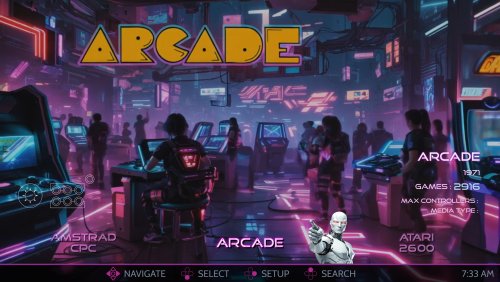
This is the AI-HyperTbox theme. It has been forked from the awesome "AI-HyperTocera" theme done by the The Mini Cake TV folks and they deserve most all the credit for the biggest part of the artwork. Using nice animated AI generated backgrounds. Added over 330 platform and playlist audio clips in SE version (not shown in video) The latest AI-HyperTbox (SE) version has: 5-Platform Views 3-Horizonal Game Wheel Views 4-Vertical Game Wheel Views 2-Game Wall Views Fullscreen Coverflow View Text Games View Platform Marquee View Game Marquee View Settings View Assets Used: AI-HyperTbox (SE) Sound Pack AI-HyperTbox (SE) Start/Exit theme AI-HyperTbox (SE) Pause theme Jarvis Startup Video The AI-HyperTbox theme has two flavors. The SE version (used in the video), available to my BMAC members and the free basic version posted here on the forums Comments, questions and suggestions are always welcome down below. Make sure to like and subscribe to the YouTube video if ya watch it to help out the channel, and do the bell thing to be notified of new videos. Please consider supporting these projects with a "cup of coffee" or by becoming a member @ my BMAC page OR A donation of any size via PayPal - ENJOY!!! • The Papaw 🙏❤️🙏 -
AI-HyperTbox (SE) Theme View File This is the AI-HyperTbox theme. It has been forked from the awesome "AI-HyperTocera" theme done by the The Mini Cake TV folks and they deserve most all the credit for the biggest part of the artwork. Using nice animated AI generated backgrounds The latest AI-HyperTbox (SE) version has: 5-Platform Views 3-Horizonal Game Wheel Views 4-Vertical Game Wheel Views 2-Game Wall Views Fullscreen Coverflow View Text Games View Platform Marquee View Game Marquee View Settings View Assets Used: AI-HyperTbox (SE) Sound Pack AI-HyperTbox (SE) Start/Exit theme AI-HyperTbox (SE) Pause theme Jarvis Startup Video The AI-HyperTbox theme has two flavors. The SE version (used in the video), available to my BMAC members and the free basic version posted here on the forums Comments, questions and suggestions are always welcome down below. Make sure to like and subscribe to the YouTube video if ya watch it to help out the channel, and do the bell thing to be notified of new videos. Please consider supporting these projects with a "cup of coffee" or by becoming a member @ my BMAC page OR A donation of any size via PayPal - ENJOY!!! • The Papaw 🙏❤️🙏 Submitter The Papaw Submitted 01/12/2026 Category Custom Themes
-
Version 4.0.2
688 downloads
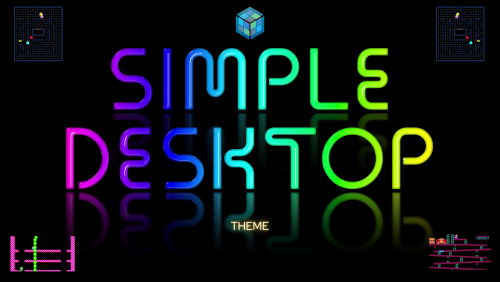
I wanted to change the theme to a more Retro look in Version 4. See changelogs and last few screenshots. I will only be going forward with the two v4 version as it has been to much to keep up with all the versions. I will try to update most of the screenshots soon. I plan on adding vertical and coverflow views soon. I'll leave v3 online as they look quite a bit different. Looking back, I probably should have separated them as different themes Simple Desktop v4 - Uploaded Simple Touch v4 - Uploaded (last 2 screenshots) Simple Desktop v3 (light) - FINAL Simple Desktop v3 (dark) - FINAL (screenshots close to end) Some of the features: New custom Neon platform, platform categories and few playlist Clear Logos (close to 200 of them). Also available in separate DOWNLOAD now. device bezels for game videos (200+ platforms) - (special thanks @Duimon for many of them). Also extra ones in a folder named "unused" and a psd template added Partial Gamepad badge support like Steam does (add a custom field in LB named "Partial Gamepad Support" with a value of "Yes") - dll file below displays nice little message when no game notes are present (see screenshot 5) displays colorful "No Video image" when no game video is present in the bezel ability to choose scratches & smudges on game videos (delete "Scratches.png" file in ..\Themes\Simple Desktop v3 (light)\Media\Overlays) font changes for better visibility colorful 3 second popup for games marked as Completed, Broken or Not Installed in Horizonal & Wall views (see screenshot 7,8,9) Audio announces 200+ Platforms New matching neon "Startup" videos Clean, with a modern look. Works well with all the screen sizes I have been able to test, including large screens and 4K TVs. Responsive and simple, thus "Simple Touch". I needed this for a A-I-O Touch Screen PC I will be installing in a false wall soon. I'll be doing a home remodeling project soon and thought a touch screen jukebox in the wall would be a cool look. I found a great deal on a Lenovo 700 22ish touchscreen on ebay and have been setting it all up before I start the remodel. I wanted to create a BB theme with a similar look to the Jukebox (media center) software I put on the PC. (Most of the Platform videos in the videos in v3 and previous were the Bigbox Cinematic videos, in v4 they showcase the Colorful videos with a few I made) NEW VIDEO: Simple Desktop v4 (11-04-22) VIDEO: Simple Desktop v3 Light (10-07-22) - Sorry it's so long, I was trying to show all the bezels I used to show the game videos for all the platforms. VIDEO: Simple Desktop v3 Dark (10-13-22) Here is the dll file for adding the "Touch Badge" in Launchbox. Drop it into your ..\Launchbox\Plugins folder. (not required, just shows the Touch Badge in Launchbox) Badge Touch.dll Startup Videos: (10 seconds) NEW - Simple Desktop (available in 1080 & 4K) BigBox Simple Desktop (3840 × 2160 px).mp4 NEW - Simple Touch (available in 1080 & 4K) * (you can disable the audio by renaming or deleting the Audio folder within the ..\theme name\Media\Audio folder. If you want to remove the family logo image in the settings page, you can do the same thing with it, located in the ..\theme name\Media\Images folder) "Simple Touch v3" (light or dark), "Simple Desktop v3" (light or dark) are the older versions. * Simple Touch Vertical (vertical version) This one is more of a test version. It's made using 3:4 aspect ratio per request. I had to re-size some things and move a few things around a bit, but pretty much the same. I have nothing to test it with, so not sure how well it will look or work on a actual vertical screen. If you give this one a try, feedback would be awesome (especially some screenshots or a video). As always, special thanks goes out to: @JoeViking245 for helping me with the touch issues @y2guru for sharing CTC with us, thank you @faeran for allowing me to use a bit of his code @Johnny T for all the MFME Fruitbox Machine help @viking for the awesome Colorful stuff and sharing some of his knowledge with me ALL THE USERS Don't forget to leave feedback, post comments, questions or suggestions. Will do the best I can to get back. - Enjoy! BigBox Simple Desktop (1920 × 1080 px).mp4- 10 comments
-
- 9
-
-
-
- touch screen
- simple
- (and 2 more)
-

Version 4K
2,290 downloads
WoodPanels has the old school retro feel of playing games on an old TV in a room with bad, green carpeting, but golden wooden paneled walls. The video game console or platform appears above or beside the television to match that look and feel. It is paired with a set of 8-bit fonts to complete the experience. Now upgraded to 4K resolution! Supports Ultrawide 21:9, Widescreen 16:9, and Fullscreen 4:3 aspect ratios. Playlist support! Watch the video frame and video size dynamically change to match the selected platform and game. Unique views for 50+ platforms with support for game videos, game 3D/2D box art, game cart images, game logos, platform logos, and platform box art. Consoles are paired with a TV from the same decade they were released. PCs likewise are paired with a monitor or setup from the same era. "Wall View" for looking at game boxes on shelves is accompanied by the platform logo and image of the original console packaging. Trailer: Installation and Setup Instructions: Startup Video: List of Supported Platforms: Theme was created using the COMMUNITY Theme Creator by @y2guru -
 These custom console themed overlays were edited and assembled by me to play your retro console games with a unique nostalgic bezel on Retroarch. Please enjoy and have fun. Please give me credit and the others involved if you use it on your Youtube channel. Thanks. The Mega Bezel Reflection Shader is by Hyperspacemadness Some of the original artwork came from ReignStumble Credit is given to RetroKenesis for the bezel frames Here's a Tutorial on how to add them to Retroarch. Older versions...
- 179 replies
-
- 13
-
-
-
-
- video
- orionsangel
- (and 14 more)
-
 Hey guys, Y'all know a store where I can find replacements for my old Sega 32x Cartridge labels? (or someone who sells them)? I'm new here, and I don't know much about how this forum works, but I'm getting started, so if I missed anything, I apologize.
-

Version 3.0.0
1,836 downloads
🌀 Hey! Just a Few Game Themes Each theme usually takes me between 2 and 3 hours to create — from animation to editing, sometimes full-on post-production where I add extra effects just to make it pop. Everything is animated by me. Sometimes I even experiment a bit (lip sync, dynamic effects, timing tweaks, etc.). Let’s just say: hands in the engine, heart in the pixels… and somehow, magic happens ✨ Enjoy! 🎮💜 🆕 New & Upcoming Themes Red Dead Redemption + Nightmare MGS DELTA 2 VERSIONS CRONOS News ! Alan Wake 2 Armored Core VI Baldur's Gate 3 Clair Obscur: Expedition 33 Cronos Cuphead Addon Dead Island 2 DOOM: The Dark Ages Eiyuden Chronicles (HQ 4K) Elden Ring Extension Fatal Fury City of Wolves Final Fantasy Rebirth Final Fantasy VII Rebirth Final Fantasy VII Remake (Sephiroth Version) Final Fantasy XVI Ghost of Tsushima Ghostrunner 2 God of War Ragnarok GTA Vice City Remastered Hellblade 2 Hogwarts Legacy (Epic Version) Horizon Forbidden West Huntdown Indiana Jones Journey Just Cause 3 Apocalypse Edition Just Cause 4 Reload (FR) Kena: Bridge of Spirits King of Fighters XV Lunar Remastered Collection Metal Gear Solid 3: Snake Eater Delta Mortal Kombat 11 Oddworld: Soulstorm Ori and the Will of the Wisps Paprium Red Dead Redemption Resident Evil 4 Remake Robocop Sifu Spider-Man 2 Star Wars: Jedi Survivor Street Fighter 6 Suikoden I & II Remastered Tekken 8 The Banishers The Callisto Protocol The Evil Within 2 The Last of Us Part II FR The Last of Us Part II (English Version) The Last of Us Part II Remastered INTRO The Last of Us Remastered Part II short TMNT: Shredder (Addon Version) --------------------------------------------------------------------- My content sharing here : https://forums.launchbox-app.com/profile/244237-pademonium-prods/content/?type=downloads_file For Follow me : https://www.deviantart.com/pademonium https://www.patreon.com/padcinematic_prod https://www.youtube.com/channel/UC_XcPcxBIY7OEvePbsbDCIg?view_as=subscriber- 1 comment
-
- 11
-
-
-
-
- super disc
- super nintendo cd
- (and 10 more)
-
Version 1.0.0
286 downloads
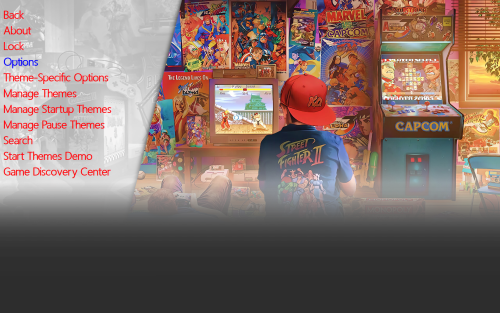
This is Alekfull-XN The theme is originally from Retrobat and Batocera and i really like it. I remember autumn 2024 i took the images and start make it for Launchbox Bigbox and then my laptop got broken luckly i got the files for the theme in (ctc) Community Theme Creator and with a new pc i finally complete this theme and i hope you like this feel free and downlad. cheers Ninjaman- 3 comments
-
- 10
-
-
-
-
-
Alekfull-XN View File This is Alekfull-XN The theme is originally from Retrobat and Batocera and i really like it. I remember autumn 2024 i took the images and start make it for Launchbox Bigbox and then my laptop got broken luckly i got the files for the theme in (ctc) Community Theme Creator and with a new pc i finally complete this theme and i hope you like this feel free and downlad. cheers Ninjaman Submitter Gameon100 Submitted 07/26/2025 Category Custom Themes
-
.thumb.png.632d19a4f33f16491745f891e0ea495b.png)
Version 2.1.0
156 downloads
This is a sample pack from a full set of 142 glossy box arts for SNK Neo Geo AES. Please feel free to make a donation at our crowd-funding page if you would like us to upload the full set! -
.thumb.png.d8248f4f7e6ac686eebb9c1c4d1c451a.png)
Version 2.1
31 downloads
This is a set of standardized 2D Sega SG-1000 cartridge arts. If you found this download to be useful and would like us to upload more of our high quality art packs, consider making a contribution at our crowd-funding page! -
(Disc1)(KeyDisc)(SegaCD).thumb.png.f871615d9008153c8073315db041de44.png)
Version 3.0
114 downloads
This pack is ideal for fe's running in 1080p resolution, but is also sufficient on 4K displays if sized appropriately. If you found this download to be useful and would like us to upload more of our high quality art packs, consider making a contribution at our crowd-funding page! -
Version 1.0.2
111 downloads
This theme is replacing the both the Details & 3D-Details themes. Best to use Windows Media Player in BigBox for the colors to match the "Colorful" video snaps correctly. If you do not plan on using the Colorful video snaps, you need to DELETE or RE-NAME a folder in the theme called "Colorful" (..\LaunchBox\Themes\3D-Details Lite (SE)\Media\Colorful) or without SE if using the Basic version Included Views: Platform 1 (horizontal wheel-bottom) *Platform 2 (vertical wheel on left side) *Platform 3 (vertical wheel on right side) Platform Text View Horizontal Games 1 (horizontal wheel on bottom) *Horizontal Games 2 (horizontal wheel on bottom with different alignment) *Vertical Games 1 (vertical wheel on left side) *Vertical Games 2 (vertical wheel on right side) Full Cover Flow Games Game Text View *Wall Game View Marque View Settings (*SE version) Assets Used in the video: Jarvis Sound Pack Jarvis Startup Video 3D-Details (SE) Startup/Shutdown Theme 3D-Details (SE) Pause Theme Leave comments, suggestions and Reviews here on the forums. If you watch the video, don't forget to like, share and subscribe to help out the channel. If you have a minute, make sure to check out our Buy Me A Coffee page for all the latest updates and information on how gain access to exclusive content to the PSGC and PSMC collections, and while you're there, maybe you'll buy me a cup of coffee and become a member. Or maybe you might make a donation through PayPal. All donations are to be used for my grandson's college fund. -ENJOY! • The Papaw 🙏❤️🙏 -

3D-Details Lite (Details & 3D-Details Replacement)
The Papaw posted a topic in Big Box Custom Themes
3D-Details Lite (Details & 3D-Details Replacement) View File This theme is replacing the both the Details & 3D-Details themes. Best to use Windows Media Player in BigBox for the colors to match the "Colorful" video snaps correctly. If you do not plan on using the Colorful video snaps, you need to DELETE or RE-NAME a folder in the theme called "Colorful" (..\LaunchBox\Themes\3D-Details Lite (SE)\Media\Colorful) or without SE if using the Basic version Included Views: Platform 1 (horizontal wheel-bottom) *Platform 2 (vertical wheel on left side) *Platform 3 (vertical wheel on right side) Platform Text View Horizontal Games 1 (horizontal wheel on bottom) *Horizontal Games 2 (horizontal wheel on bottom with different alignment) *Vertical Games 1 (vertical wheel on left side) *Vertical Games 2 (vertical wheel on right side) Full Cover Flow Games Game Text View *Wall Game View Marque View Settings (*SE version) Assets Used in the video: Jarvis Sound Pack Jarvis Startup Video 3D-Details (SE) Startup/Shutdown Theme 3D-Details (SE) Pause Theme Leave comments, suggestions and Reviews here on the forums. If you watch the video, don't forget to like, share and subscribe to help out the channel. If you have a minute, make sure to check out our Buy Me A Coffee page for all the latest updates and information on how gain access to exclusive content to the PSGC and PSMC collections, and while you're there, maybe you'll buy me a cup of coffee and become a member. Or maybe you might make a donation through PayPal. All donations are to be used for my grandson's college fund. -ENJOY! • The Papaw 🙏❤️🙏 Submitter The Papaw Submitted 04/11/2025 Category Custom Themes -
Version 1.3.0 (final release)
132 downloads
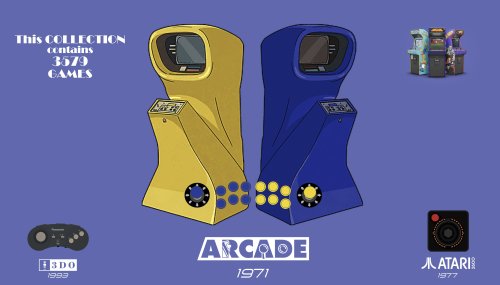
Hey ya'll. This here's another Bigbox theme called Details. It was designed for big screens. It uses the 16:9 aspect ratio, and geared more for using on large 4K TV's. I'm still working on this one and it's not finished. I plan to add more views like a Marquee, Coverflow, etc., I'm just not that far along yet. Best to use Windows Media Player in BigBox for the colors to match the "Colorful" video snaps correctly UPDATED: (see changelog below) The first 4 screenshots were added in last update just to show some of the newly added badges. Included Views: Platform 1 (horizontal wheel-bottom) *Platform 2 (vertical wheel on left side) *Platform 3 (vertical wheel on right side) Platform Text View Horizontal Games 1 (horizontal wheel on bottom) *Horizontal Games 2 (horizontal wheel on bottom with different alignment) *Vertical Games 1 (vertical wheel on left side) *Vertical Games 2 (vertical wheel on right side) Full Cover Flow Games Game Text View *Wall Game View Settings (*included in SE version only) Assets Used in the video: (SE version used in the video) Jarvis Sound Pack: https://bit.ly/46qXWXA Jarvis Startup Video: https://bit.ly/46qXWXA Details (SE) Startup/Shutdown Theme: https://bit.ly/46qXWXA Details (SE) Pause Theme: https://bit.ly/46qXWXA This one has more time and work put into it, more than any theme I've done to date. From graphics to unique views. There are somewhere around 300 view files used in the theme so far and still counting. I've done 100 or so custom wheel items/images for the platform and playlists wheels so far. This time, I went with controllers and year for the wheel items of the platform/playlists views, and game cartridges and discs for wheel items on games views. I love how Launchbox allows us to download our artwork, but I was going for a more consistent look with the game cartridges and discs. I have spent 100's of hours trying to replicate each of the media types used so far, trying to add as much detail to each as I possibly could without going overboard and crippling the theme. I tried keeping the look fairly simple, but this theme is very complex in design. Unlike most themes, I'm not using 2 or 3 fonts. So far, it uses 57 different fonts, as I tried matching fonts that pertained to each included platform or platform clear logo. I tried to match them as best I could. I also tried to throw in a bit of history you might say with some of the artwork. Or making Retro, as Retro can get. Like in some of the art I used in the Arcade platform. I used images of the very first arcade machine ever made for public use. It was called "Computer Space". Or with "Future Pinball", I used a wooden pinball machine. I put a lot of research into this one, even details such as the years that the store fronts were founded in the Store Front playlists. I also set it up to work well with some of the best platform videos out there, the Colorful Platform/Playlists Video Snaps. You don't have to use them, so if you prefer different ones or none at all (choosing none will show random snaps), that's no problem. However, if you don't plan on using the Colorful videos set, you need to DELETE or RE-NAME a folder in the theme called "Colorful" (..\LaunchBox\Themes\Details (SE)\Media\Colorful). This theme relies Heavily on "Fanart Backgrounds" and "Clear Logos". It also needs good metadata for things like ESRB Ratings. The ESRB ratings are used quite a bit on much of the media replication I've done. (I also included an extra PEGI folder for those folks that use that system as well. You may need to do a little file renaming and moving to get them going as you need too, but they are included.) The biggest problem with this theme is the Playlists views. They can be slow. The more platforms used in a specific playlist, the slower the loading. This is because of the way LB/BB is using a "default" view when it's loading everything for that playlist. LB/BB will be loading many different types of cartridges and discs from different systems all at the same time, well, it can get slow. BTW, the little animated trophy means that game has Achievements if you use Retro Achievements. Well that's about it for now. Leave comments, suggestions and Reviews here on the forums. If you watch the video, don't forget to like, share and subscribe to help out the channel. If you have a minute, make sure to check out our Buy Me A Coffee page for all the latest updates and information on how gain access to exclusive content to the PSGC and PSMC collections, and while you're there, maybe you'll buy me a cup of coffee or maybe become a member. Or maybe you might make a donation through PayPal. All donations are to be used for my grandson's college fund. On a side note about Papawson, (my nickname for my grandson), I'm awful proud of the little feller. We started home schooling him starting in the 1st grade, he is only 10 now and should finish the 7th grade in just a couple months. He tells me all the time, Papaw, you know you will have to drive me to college everyday, because I won't be old enough to drive. -ENJOY! • The Papaw 🙏❤️🙏 -
Version 1.1.0
1,175 downloads
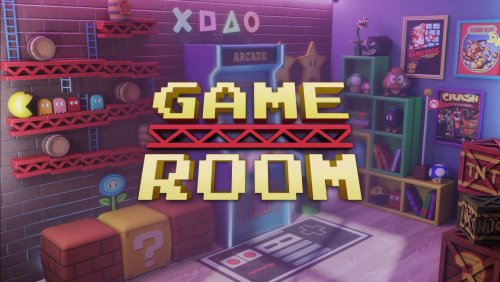
Step into your Game Room and view a virtual collection showcasing your love of video games. Each video game console or platform appears with an authentic looking video screen to match that look and feel. It is paired with a set of classic fonts to complete the experience. Requires BigBox 13.1 or higher to properly function. Designed to support 16:9, 21:9, and 4:3 aspect ratios. Unique views for 54 platforms with game videos, game 3D/2D box art, device packaging, and game cart images. Consoles and PCs are paired with TVs and Monitors from the same decade they were released. "Wall View" for looking at game boxes on shelves is accompanied by platform/game logos and image of the original console packaging. Metadata showing Publisher, Developer, User Score, ESRB Rating, Genre, Play Mode, Region, and Platform Description. Two different platform wheel views to choose from. Full Playlist support, so the video size, platform image, and other relevant media will change to match each individual game. Easily customizable by replacing \Themes\GameRoom\Media\Background\background.jpg with one of several included backgrounds or your own custom one! background.jpg credit goes to Yenifer Macias background_ArcadesAlleyway.jpg credit goes to Todor Vladev background_Bedroom.jpg credit goes to Zhi Rong Liu background_SmallArcade.jpg credit goes to Jason Rumpff background_WoodPanels.jpg credit goes to BMovieBen (me) Theme was created using the COMMUNITY Theme Creator by @y2guru - HUGE thank you, he's responsible for the dynamic video size logic. Project files attached for those brave souls wishing to customize further. Requires version 2.5.4 or higher. -
Version 2.0.0
430 downloads
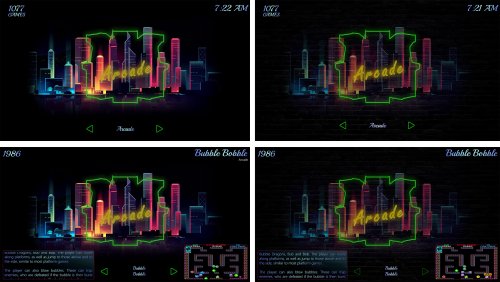
Do you remember neon lights from the 50's and 60's? (Yes, I know I am old) They were everywhere on about every store. The flickers, the sounds? With this theme I tried to capture as much of that as I could figure out how. All the backgrounds are animated as to replicate the flicker of a neon bulb of the platform name and device coming on. (the intro startup video I made even includes the sounds). Also has a second set of backgrounds that replace the neon city with a dark brick as optional download. I sure am not a graphics designer and can use all the help I can get . But I have attempted to create more glass looking clear logos, added lighting and reflections of the neon stuff and attempted to make the light pass through in all the info boxes I used best I could. Between what I could do in photoshop and CTC, this is what I have so far. This theme is the most extensive theme I have done to date. Version 2.0.0 doesn't need the backgrounds like version 1 did. Choose from Neon Skyline or Neon Brick Skyline OPTIONAL (only needed for version 1): If you would like to use the other backgrounds, they are named: BrickBackgrounds - Just dark brick wall Neon Brick Skyline - I combine the brick wall with the neon skyline to make it look like a mural on the wall. To change the backgrounds, just rename or delete the files in the ..\Launchbox\Themes\Neon Skyline\Media\Backgrounds folder. Extract the replacements and drop them in the same place as the originals I was planning on doing all the platforms, but I might wait to see if there is enough interest there before I spend that much time on it. It takes me sometimes hours to do a single platform (I'm old, remember ). Let me know in the comments what ya'll think. Watch the video, download and try it. BTW: Theme has most of my usual stuff (shows partial gamepad support like Steam, little popups for Completed, Broken, Needs Installed, etc.) and runs very smooth on my large BB rig, even in the Arcade platform on my older PCs. Only tested with 16:9 so not sure how it looks on others Sample Video: Startup Video (I have 4K version if anyone is interested) Startup.mp4 Comments, reviews, questions and suggestion are welcome! If you have found any of my efforts useful, let me know! If you'd like to buy me a cup of coffee, I would really appreciate it (via PayPal donation) Enjoy! The Papaw -
Details View File Hey ya'll. This here's another Bigbox theme called Details. It was designed for big screens. It uses the 16:9 aspect ratio, and geared more for using on large 4K TV's. I'm still working on this one and it's not finished. I plan to add more views like a Marquee, Coverflow, etc., I'm just not that far along yet. Best to use Windows Media Player in BigBox for the colors to match the "Colorful" video snaps correctly UPDATED: (see changelog below) The first 4 screenshots were added in last update. Included Views: Platform 1 (horizontal wheel-bottom) *Platform 2 (vertical wheel on left side) *Platform 3 (vertical wheel on right side) Platform Text View Horizontal Games 1 (horizontal wheel on bottom) *Horizontal Games 2 (horizontal wheel on bottom with different alignment) *Vertical Games 1 (vertical wheel on left side) *Vertical Games 2 (vertical wheel on right side) Full Cover Flow Games Game Text View *Wall Game View Settings (*included in SE version only) Assets Used in the video: (SE version used in the video) Jarvis Sound Pack: https://bit.ly/46qXWXA Jarvis Startup Video: https://bit.ly/46qXWXA Details (SE) Startup/Shutdown Theme: https://bit.ly/46qXWXA Details (SE) Pause Theme: https://bit.ly/46qXWXA This one has more time and work put into it, more than any theme I've done to date. From graphics to unique views. There are somewhere around 300 view files used in the theme so far and still counting. I've done 100 or so custom wheel items/images for the platform and playlists wheels so far. This time, I went with controllers and year for the wheel items of the platform/playlists views, and game cartridges and discs for wheel items on games views. I love how Launchbox allows us to download our artwork, but I was going for a more consistent look with the game cartridges and discs. I have spent 100's of hours trying to replicate each of the media types used so far, trying to add as much detail to each as I possibly could without going overboard and crippling the theme. I tried keeping the look fairly simple, but this theme is very complex in design. Unlike most themes, I'm not using 2 or 3 fonts. So far, it uses 57 different fonts, as I tried matching fonts that pertained to each included platform or platform clear logo. I tried to match them as best I could. I also tried to throw in a bit of history you might say with some of the artwork. Or making Retro, as Retro can get. Like in some of the art I used in the Arcade platform. I used images of the very first arcade machine ever made for public use. It was called "Computer Space". Or with "Future Pinball", I used a wooden pinball machine. I put a lot of research into this one, even details such as the years that the store fronts were founded in the Store Front playlists. I also set it up to work well with some of the best platform videos out there, the Colorful Platform/Playlists Video Snaps. You don't have to use them, so if you prefer different ones or none at all (choosing none will show random snaps), that's no problem. However, if you don't plan on using the Colorful videos set, you need to DELETE or RE-NAME a folder in the theme called "Colorful" (..\LaunchBox\Themes\Details (SE)\Media\Colorful). This theme relies Heavily on "Fanart Backgrounds" and "Clear Logos". It also needs good metadata for things like ESRB Ratings. The ESRB ratings are used quite a bit on much of the media replication I've done. (I also included an extra PEGI folder for those folks that use that system as well. You may need to do a little file renaming and moving to get them going as you need too, but they are included.) The biggest problem with this theme is the Playlists views. They can be slow. The more platforms used in a specific playlist, the slower the loading. This is because of the way LB/BB is using a "default" view when it's loading everything for that playlist. LB/BB will be loading many different types of cartridges and discs from different systems all at the same time, well, it can get slow. BTW, the little animated trophy means that game has Achievements if you use Retro Achievements. Well that's about it for now. Leave comments, suggestions and Reviews here on the forums. If you watch the video, don't forget to like, share and subscribe to help out the channel. If you have a minute, make sure to check out our Buy Me A Coffee page for all the latest updates and information on how gain access to exclusive content to the PSGC and PSMC collections, and while you're there, maybe you'll buy me a cup of coffee or maybe become a member. Or maybe you might make a donation through PayPal. All donations are to be used for my grandson's college fund. On a side note about Papawson, (my nickname for my grandson), I'm awful proud of the little feller. We started home schooling him starting in the 1st grade, he is only 10 now and should finish the 7th grade in just a couple months. He tells me all the time, Papaw, you know you will have to drive me to college everyday, because I won't be old enough to drive. -ENJOY! • The Papaw 🙏❤️🙏 Submitter The Papaw Submitted 01/26/2025 Category Custom Themes
-
Version 1.0.0
497 downloads
I am not the author of this startup video, all the credit goes to dmjohn0x. Video was converted to 3440x1440, MP4, 2 Pass, Ultra quality file to fill my whole screen when I start BigBox, handy for owners of UltraWide monitors. Thank you for the best startup video out there! Enjoy. -
WoodPanels View File WoodPanels has the old school retro feel of playing games on an old TV in a room with bad, green carpeting, but golden wooden paneled walls. The video game console or platform appears above or beside the television to match that look and feel. It is paired with a set of 8-bit fonts to complete the experience. Now upgraded to 4K resolution! Supports Ultrawide 21:9, Widescreen 16:9, and Fullscreen 4:3 aspect ratios. Playlist support! Watch the video frame and video size dynamically change to match the selected platform and game. Unique views for 50+ platforms with support for game videos, game 3D/2D box art, game cart images, game logos, platform logos, and platform box art. Consoles are paired with a TV from the same decade they were released. PCs likewise are paired with a monitor or setup from the same era. "Wall View" for looking at game boxes on shelves is accompanied by the platform logo and image of the original console packaging. Trailer: Installation and Setup Instructions: Startup Video: List of Supported Platforms: Theme was created using the COMMUNITY Theme Creator by @y2guru Submitter BMovieBen Submitted 02/07/2020 Category Custom Themes
-
Game Room View File Step into your Game Room and view a virtual collection showcasing your love of video games. Each video game console or platform appears with an authentic looking video screen to match that look and feel. It is paired with a set of classic fonts to complete the experience. Requires BigBox 13.1 or higher to properly function. Designed to support 16:9, 21:9, and 4:3 aspect ratios. Unique views for 54 platforms with game videos, game 3D/2D box art, device packaging, and game cart images. Consoles and PCs are paired with TVs and Monitors from the same decade they were released. "Wall View" for looking at game boxes on shelves is accompanied by platform/game logos and image of the original console packaging. Metadata showing Publisher, Developer, User Score, ESRB Rating, Genre, Play Mode, Region, and Platform Description. Two different platform wheel views to choose from. Full Playlist support, so the video size, platform image, and other relevant media will change to match each individual game. Easily customizable by replacing \Themes\GameRoom\Media\Background\background.jpg with one of several included backgrounds or your own custom one! background.jpg credit goes to Yenifer Macias background_ArcadesAlleyway.jpg credit goes to Todor Vladev background_Bedroom.jpg credit goes to Zhi Rong Liu background_SmallArcade.jpg credit goes to Jason Rumpff background_WoodPanels.jpg credit goes to BMovieBen (me) Theme was created using the COMMUNITY Theme Creator by @y2guru - HUGE thank you, he's responsible for the dynamic video size logic. Project files attached for those brave souls wishing to customize further. Requires version 2.5.4 or higher. Submitter BMovieBen Submitted 01/26/2023 Category Custom Themes
-
Arcade Cabinet Big Font View File Hello, Here my first Big Box Theme release, mainly focusing on Big font, big wheel, big everything. Typical use for Arcade Cabinet with CRT television. But should work on any type or size. I have 2 types of vertical view for wheel. One with image and the other with video selection. Image Vertical view for wheel are for sure more safe for slow CPU. In my case I run a Core Duo only and normal video from emumovie are working fine. The full theme video at the other hand are barely ok. Note : To use normal video rather theme video I just rename the folder of theme video to make sure BB don't find it and use normal video. Thanks to Thimolor, i started my theme base on LV-101 Submitter patrickfx Submitted 10/25/2020 Category Big Box Custom Themes
- 7 replies
-
- 3
-
-
- low resolution
- retro
- (and 4 more)
-
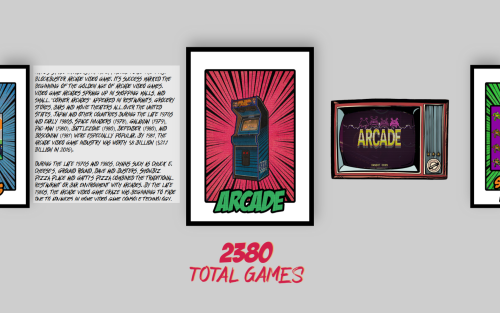
Version 2.0
187 downloads
Hey all! This is my first attempt at a theme. It goes with what my cab will look like once it's all done - it's Pop Art! I don't own any of these images, and borrowed them from all over the internet, modfied others, and even have some images from other themes. Would love to know your thoughts, if you'd like to see any changes. I have two versions, one that should work on a 27 inch monitor (via pc) and one set for a vertical machine (for those that have modfied Arcade 1up's. Enjoy!!!

(Unl).thumb.png.5a90a15de84296e9430f26780545a1ca.png)
(SegaNet).thumb.png.77c66cd7d0323611e91124b325af9fad.png)



.thumb.png.632d19a4f33f16491745f891e0ea495b.png)
.thumb.png.d8248f4f7e6ac686eebb9c1c4d1c451a.png)
(Disc1)(KeyDisc)(SegaCD).thumb.png.f871615d9008153c8073315db041de44.png)