Search the Community
Showing results for tags 'playstation 1'.
Found 8 results
-
does anyone know where I can get a PS1 back cover template. preferable where all the icons and stuff are on a different layer so I can move them around freely. thank you so much
-
- 1
-

-
- playstation1
- cover
- (and 4 more)
-
Version 1.0.1
1,002 downloads
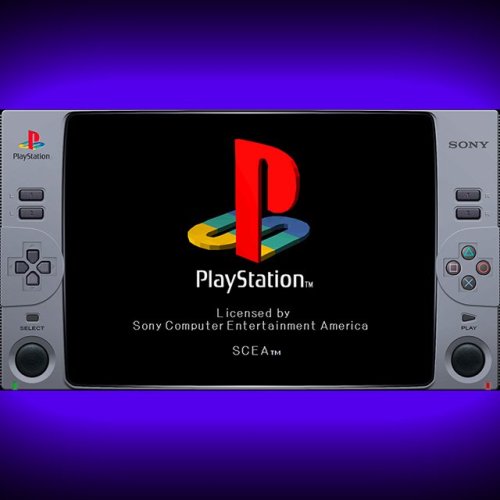
Created this idea , of an hybrid animated control with a Classic Playstation 1 console style. Full HD 1920x1080 Resolution 16:9 Screen Ratio Animated Buttons Recommended Video scale settings: (for a 16:9 screen ratio monitor) SETTINGS >> VIDEO >> SCALING INTEGER SCALE: OFF ASPECT RATIO: 4:3 CROP OVERSCAN: ON Use this setting on fullscreen and you should be good to go. NOTE: Buttons should be responsive to touch/mouse clicks, But was intended to be used as a decorative/cosmetic overlay/border. DO NOT use on systems without hard controls (joypads/keyboards) as it doesn´t have access to the retroarch menu, you'll be stuck! (Mobile compatibily coming in the future) See it in action: -
Hello all I am new to this community and sorry if this ahs been covered 100 times already but I am curious about the best PC build for a MAME/Retro arch machine. I am designing and building a complete cabinet for home and personal use. I would like for this build to have the capability to run everything in my library from PS1 and earlier (before analog controls). I use big box and emumovies with great success they look awesome, I have built mock ups of 8 way sticks and 8 button controllers, all working good. I am currently running this on a Mac Pro from 2009 with win 10 installed on it. I am at the point in the project where I want to start building a dedicated PC for this project that will live in the cabinet. My first question is what is optimal for smooth emulation and snappy front end? Also my game library is pretty large so I would like to access the games fairly quickly, I don't think I need an SSD for this and am currently looking at () what are your thoughts on this HDD selection? My second question is the monitor, I cant decide if its better to keep hunting for a 4:3 24"CRT or to settle and use a 16:9 flat screen? I own a 36" Sony Trinitron that works perfectly but its way to large for a cabinet unfortunately. I have found some CRTs but the shipping is more that the TV. I don't mind continuing to search for the perfect CRT but am I wasting my time? Do you prefer to use widescreen monitor forced to a 4:3? if so do you use filters to smooth/blue pixels, add scanlines etc.? Again sorry if this is already covered content, I did a quick search but did find what I was looking for so I thought I would post new.
-
Playstation 1 - Animated Overlay for Retroarch View File Created this idea , of an hybrid animated control with a Classic Playstation 1 console style. Full HD 1920x1080 Resolution 16:9 Screen Ratio Animated Buttons Recommended Video scale settings: (for a 16:9 screen ratio monitor) SETTINGS >> VIDEO >> SCALING INTEGER SCALE: OFF ASPECT RATIO: 4:3 CROP OVERSCAN: ON Use this setting on fullscreen and you should be good to go. NOTE: Buttons should be responsive to touch/mouse clicks, But was intended to be used as a decorative/cosmetic overlay/border. DO NOT use on systems without hard controls (joypads/keyboards) as it doesn´t have access to the retroarch menu, you'll be stuck! (Mobile compatibily coming in the future) See it in action: Submitter fercho Submitted 05/15/2022 Category Platform Bezels/Overlays
-
I'm trying to set up RetroArch and I have been following the tutorial (1) up to about 5:20 when it goes "associated platforms." I want to emulate PlayStation 1 games but the emulator "Beetle PSX HW" doesn't seem to be on the list of associated platforms. I tried adding a platform by adding "Playstation 1" under [Associated Platfroms] and choosing the file in the Cores folder for [Core] but I don't know what the [Extra Command-Line Parameters] are supposed to be. I assume the [Default Emulator] box should be checked although I hear different PS emulators have different advantages for different games so I might want more than one. Also what is M3U and do I want to check it? 1.
-
Hello, I'm looking for some advice on Playstation performance. I've tried Beetle HW, Beetle SW, and PCSX Rearmed, and they all do the same thing, run at about half speed with choppy audio. I turned on "show internal FPS" in the Beetle HW options to check that, and the FPS is jumping around all over the place, from 10-60. I was having the same (or at least very similar) issues with SNES, so I switched the video driver from GL to D3D11, and it fixed SNES. I've tried every driver with PS1; most have the same issue, some are worse. Any ideas here? Computer is Hades Canyon Intel NUC; Retroarch is 1.7.7; Beetle/Mednafen says it's 0.9.44.1 Using default options, not trying to increase internal resolution or anything

-

Version 1.0.0
214 downloads
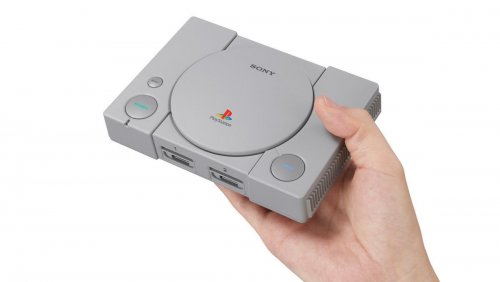
This video is a shortened edit of the PlayStation Classic commercial, made to fit BigBox better. Link to Clear Logo: How to: Add the following 20 games to a new playlist (and mark it as included on your platform-list, if you want it to appear as a console). Battle Arena Toshinden Cool Boarders 2 Destruction Derby Final Fantasy VII Grand Theft Auto Intelligent Qube Jumping Flash Metal Gear Solid Mr Driller Oddworld: Abe’s Oddysee Rayman Resident Evil Director’s Cut Revelations: Persona Ridge Racer Type 4 Super Puzzle Fighter II Turbo Syphon Filter Tekken 3 Tom Clancy’s Rainbow Six Twisted Metal Wild Arms-
- 3
-
-

-
- playstation
- playstation 1
- (and 5 more)
-
PlayStation Classic (2018 mini console) - Platform Video View File This video is a shortened edit of the PlayStation Classic commercial, made to fit BigBox better. Link to Clear Logo: How to: Add the following 20 games to a new playlist (and mark it as included on your platform-list, if you want it to appear as a console). Battle Arena Toshinden Cool Boarders 2 Destruction Derby Final Fantasy VII Grand Theft Auto Intelligent Qube Jumping Flash Metal Gear Solid Mr Driller Oddworld: Abe’s Oddysee Rayman Resident Evil Director’s Cut Revelations: Persona Ridge Racer Type 4 Super Puzzle Fighter II Turbo Syphon Filter Tekken 3 Tom Clancy’s Rainbow Six Twisted Metal Wild Arms Submitter buxilaks Submitted 06/09/2019 Category Platform Theme Videos