Search the Community
Showing results for tags 'orionsangel'.
Found 7 results
-
 These Realistic Arcade Bezels were made by Orionsangel and tested on Windows 10 with Mame and Retroarch. Thanks to HyperSpaceMadness, Mr. RetroLust, ArsInvictus, Duimon, Dreamstate & MQC. As well as Mr. Do. Most of these realistic arcade bezels could not have been made without them. Check out my youtube channel here - https://www.youtube.com/orionsangel
- 830 replies
-
- 18
-

-

-

-

-

-
These custom console themed overlays were edited and assembled by me to play your retro console games with a unique nostalgic bezel on Retroarch. Please enjoy and have fun. Please give me credit and the others involved if you use it on your Youtube channel. Thanks. The Mega Bezel Reflection Shader is by Hyperspacemadness Some of the original artwork came from ReignStumble Credit is given to RetroKenesis for the bezel frames Here's a Tutorial on how to add them to Retroarch. Older versions...
- 179 replies
-
- 13
-
-
-
-
- video
- orionsangel
- (and 14 more)
-
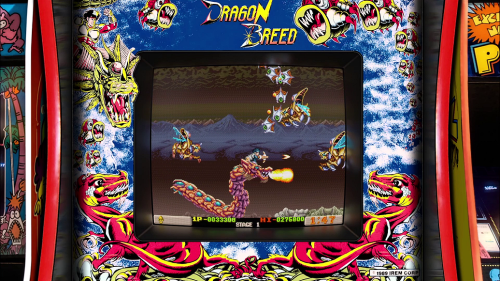
This pack takes two of the best projects in the MAME Arcade emulator scene by combining @Orionsangel Realistic Arcade Bezels with the latest version (and simplified preset methods) of @HyperSpaceMadness Mega Bezel Reflection Shader. Youtube Promo Video - Gameplay Youtube Promo Video - Screenshots Only Current Version: 2.5 Release Date: 01/25/24 - Added missing ffight.png and ffightalt.png (Final Fight) - Added HSM_ASPECT_RATIO_ORIENTATION = "1.000000" and HSM_ASPECT_RATIO_ORIENTATION = "2.000000" to _base.params to force proper orientation on certain games - Full changelog at very bottom of post --------------------------------- --- Intro / Overview --- --------------------------------- This pack takes two of the best projects in the MAME Arcade emulator scene by combining @Orionsangel Realistic Arcade Bezels with the latest version (and simplified preset methods) of @HyperSpaceMadness Mega Bezel Reflection Shader. One of the main components of this setup is HyperSpaceMadness' "Multigame.slangp method". This sets you on the path of having all of the included games (unique custom art per game) to automatically load while also accounting for any other (non included in this pack) MAME game in your library. When you load another game that's not included in this pack, this multigame.slangp method will automatically load either the horizontal or vertical generic blank cabinets to the game while also auto sizing the video to fit properly for the image. (NEW IN v2.0) - Another core component of this setup is the inclusion of 1,147 additional .params files which line up with all of the different regions/variations/versions of the given games. What this means for you is no more requirement on your end to fine tune this pack based on the given version of the ROM you have or your choice of which version you currently have set to launch when playing. This new feature included in this release SHOULD have the vast majority of all variations out for the included games. If anyone launches a game and it doesn't load the proper overlay, please help me and others out by commenting in this thread so I can note it and add it to my ToDo list for the next update. Please be sure to spell out the exact game.zip that you're launching as well. (NEW IN V2.0) - Bezel Width & Height Adjusted. I decided to size down the MEGA Bezel’s width and height thickness for all games. Previously I had the vast majority of them configured at 240 but I’m now going with 175. After taking screenshots of various numbers, 175 is a great fit for OrionsAngels artwork in my opinion. Many of his cabinets have designs that extend past the normal bezel area but I found 175 fits nice for most of these to the point where they don’t spill over to the actual playable game area and stay within the mega bezel. Going from 240 down to 175 is also a big improvement when it comes to the actual playable game area so that’s a really great addition! ** NOTE** : If you personally like a fatter or thinner bezel than this new standard 175, you can change it but doing so will require a lot of custom rework for each game to resize them to fit properly. (NEW IN V2.0) - Vignette Adjusted. After reviewing some screenshots with this setting on vs off, I’ve decided I like this off more than having it on. Having it on does look nice and adds more realism to CRT screens of that era but I personally like what it does to slightly brighten up the variations in color in the game itself. It also showcases the megabezel’s reflections a lot more because of the brightened video near the edge where it meets with the MEGA Bezel. ** NOTE ** : The vignette setting can be turned on or off without having any additional work on your end. \RetroArch\shaders\Mega_Bezel_Packs\OrionsAngel_MagicHat_Arcade\CORE-ASPECT-ORIENT-VERT or HORZ\ _base.params (HSM_SCREEN_VIGNETTE_ON = "0.000000") (NEW IN V2.0) - Includes OrionsAngel Pack 5 release which added 37 new games to the collection. Every game included in this pack has been customized by me to adjust the HSM reflective shader settings to align the shader/tube area around the actual game for a custom fit with each of Orions Angel's art. All of the actual art credits go to Orions Angel (and others) which are all included in each game.params files in this pack. Full game list included in this pack can be found on the following google spreadsheet. https://docs.google.com/spreadsheets/d/1J0hzjiUCEhrxUU-Tn0ccu0ZTeZck8ZK6fzEob8Grjxk/edit?usp=sharing Total Horizontal Games = 129 Total Vertical Games = 64 Total Games = 193 Total OrionsAngel Images = 431 Total Game .params Files = 1340 This spreadsheet will be maintained as OrionsAngel releases new packs. After he releases new packs, I'll customize those and include them on my end of things with this method I put together. Link to project main thread at libretro: https://forums.libretro.com/t/magichats-orionsangel-mega-bezel-mame-arcade-setup/43034 ------------------------------------------------------------------------------------------- --- Download / Install / Configure Launchbox & RetroArch --- -------------------------------------------------------------------------------------------- Retroarch is a requirement for this to function properly but Launchbox is optional. Search youtube and other web sources for the basic setup of RetroArch. I highly suggest installing LaunchBox and using the built in installer for retroarch which pretty much configures everything you need for RetroArch. https://www.retroarch.com https://www.launchbox-app.com https://www.youtube.com/watch?v=qdSOI_FlBrI -------------------------------------------------------------------------------------------------------- --- Download / Install / Configure "Mega Bezel Reflection Shader" by --- HyperSpaceMadness --------------------------------------------------------------------------------------------------------- This is a requirement for this to function properly. Carefully follow the instructions on his thread: https://forums.libretro.com/t/mega-bezel-reflection-shader-feedback-and-updates/25512 --------------------------------------------------------------------------------------------------- --- Download / Extract OrionsAngel_MagicHat_Arcade_2.5.zip --- --------------------------------------------------------------------------------------------------- https://drive.google.com/file/d/1VkpdEZKym7vae1MsmweEvh8f5u7LGaE6/view?usp=sharing Extract the contents of OrionsAngel_MagicHat_Arcade_2.5.zip to the following directory: \RetroArch\shaders\Mega_Bezel_Packs If you don't have this Mega_Bezel_Packs directory already, simply create a new one and name it that. This is the standard format set by HyperSpaceMadness and the Mega Bezel Project. --------------------------------------------------- --- Setup a MAME Core Preset --- --------------------------------------------------- If you want to use this configuration exclusively for all of your MAME Arcade games, you can use a Core Preset which simply references the multigame.slangp file to get this system going. I personally use this method because it covers any MAME game I have in my collection. If I launch a game that Orions Angel has a custom art designed specifically for use with the MEGA Bezel Reflection Shader, and I've created a custom game.params, it will load the proper art and custom fit for the given game. If I launch a MAME game that doesn't have any of Orions Angel's custom game art, it will roll over and use either the horizontal or vertical blank cabinet art and auto adjust the shader/tube around the game. It gives you an all inclusive config to handle every MAME game in your collection whether or not Orions Angel has custom art for it (yet). Any game you launch should load either a custom one or the standard cabinet which is also included in Orions Angel's collection. Follow the steps below to setup a MAME core preset. launch a game in retroarch F1 (quick menu) > shaders > Video Shaders: ON > load > select \shaders\Mega_Bezel_Packs\OrionsAngel_MagicHat_Arcade\Multigame.slangp Once loaded go to Save > Save Core Preset in windows browse to \RetroArch\config\<yourcorename>\ and you should have a new corename.slangp inside that core preset should now have this line in it #reference ":/shaders/Mega_Bezel_Packs/OrionsAngel_MagicHat_Arcade/Multigame.slangp" Using a core preset like this defaults to pointing to this multigame.slangp file for any game launched in this core within retroarch. So you don't have to worry about making any per game .cfg files within \retroarch\<corename>\config\ to point them to this pack. ------------------------------------------------------------------- --- (optional) HSM Shader Intro Variations --- -------------------------------------------------------------------- If you prefer HSM intro animation with just the black and white fuzz fade in without the colored "Mega Bezel" logo, or any other variation, add the following line: HSM_INTRO_LOGO_BLEND_MODE = "0.000000" to both of these files and save \RetroArch\shaders\Mega_Bezel_Packs\OrionsAngel_MagicHat_Arcade\CORE-ASPECT-ORIENT-HORZ\_base.params \RetroArch\shaders\Mega_Bezel_Packs\OrionsAngel_MagicHat_Arcade\CORE-ASPECT-ORIENT-VERT\_base.params --------------------------------------------------------------------------------------------------- --- (Optional) Mega Bezel Reflection Shader Preset Variations --- --------------------------------------------------------------------------------------------------- I set this pack's shader preset to MBZ__3__STD which is considered in the middle of the road as far as resources and hardware specs go. If you want to bring this down or up a notch on the shader presets, do the following: Edit \RetroArch\shaders\Mega_Bezel_Packs\OrionsAngel_MagicHat_Arcade\Multigame.slangp and uncomment the one you want to use: (Follow the notes in that config file for the proper way to uncomment) Reference the following link to help you understand and pick out a shader preset that works best for you https://github.com/HyperspaceMadness/Mega_Bezel#choosing-a-preset ------------------------------------------------------------------------------- --- (Optional) Custom Launchbox Game Playlist --- ------------------------------------------------------------------------------- Launchbox allows you to create custom playlists which are basically folders to organize games in groups. I created one specifically for this collection that you can put in place in your own Launchbox. copy or move \RetroArch\shaders\Mega_Bezel_Packs\OrionsAngel_MagicHat_Arcade\Launchbox Playlist\MagicHat_OrionsAngel_MegaBezel_MAME_Arcade_Setup.xml to: \LaunchBox\Data\Playlists relaunch launchbox if needed In the left side at the top under "search", if you have "Platforms" selected, you should see this playlist under Arcade You can also find it by using the dropdown and selecting "Playlists" This playlist contains all of the games included in this pack but you will only see the ones you have in your actual library ------------------------------------------------------------------- --- (Optional) Per Game Bezel Variations --- ------------------------------------------------------------------- OrionsAngel includes other variations of his realistic bezels. All of his variations are included in this pack and in his original naming format. If you want to change the image used for a given game, edit the specific gamename.params and adjust the following lines: Note: mk2vari is an example variation image in Orion's set for Mortal Kombat 2. ScreenPlacementImage = mk2vari.png BackgroundImage = mk2vari.png BackgroundVertImage = mk2vari.png location of files: \RetroArch\shaders\Mega_Bezel_Packs\OrionsAngel_MagicHat_Arcade\CORE-ASPECT-ORIENT-HORZ\mk2.params \RetroArch\shaders\Mega_Bezel_Packs\OrionsAngel_MagicHat_Arcade\CORE-ASPECT-ORIENT-VERT\1943.params NOTE: **You can easily find out what the main game.params file is based on what's listed in the "MagicHat Main game.params Name" column in the spreadsheet Full game list included in this pack can be found on the following google spreadsheet. https://docs.google.com/spreadsheets/d/1J0hzjiUCEhrxUU-Tn0ccu0ZTeZck8ZK6fzEob8Grjxk/edit?usp=sharing ---------------------------------------------------------------------- --- (Optional) Per Game Shader Preferences --- ---------------------------------------------------------------------- If you want to make further adjustments to a game's shader parameters beyond those that I've set, use the steps below. launch the game with my current base settings included in this pack In retroarch in game: F1 (quick menu) > shaders > shader parameters > (make personal adjustments) Back out to main shaders menu > save > enable "Simple Presets" > then Save Game Preset This saves to \RetroArch\config\<corename>\mk2.params example contents within that file: #reference ":/shaders/Mega_Bezel_Packs/OrionsAngel_MagicHat_Arcade/Multigame.slangp" HSM_BZL_WIDTH = "150.000000" HSM_BZL_HEIGHT = "150.000000" Now when you launch this game, it will use the packs base .params over in /shaders side, and then read this additional \RetroArch\config\<corename>\mk2.params to bring in your adjustments/additions. ------------------- --- Credits --- ------------------- OrionsAngel Libretro Post - https://forums.libretro.com/t/my-realistic-arcade-bezels/10604/977 Launchbox Content Page - https://forums.launchbox-app.com/profile/74235-orionsangel/ Emumovies Content Page - https://emumovies.com/profile/84492-orionsangel/content/?type=downloads_file Youtube Channel - https://www.youtube.com/@OrionsAngel Facebook Group Page - https://www.facebook.com/0rionsangel HyperSpaceMadness Libretro MEGA Bezel Post - https://forums.libretro.com/t/mega-bezel-reflection-shader-feedback-and-updates/25512 Github - https://github.com/HyperspaceMadness/Mega_Bezel Other Libretro Community Member Shoutouts ---- ArsInvictus | Duimon | Cyber | hgoda90 | far327 | K-rnivoro ----------------------------------------------------------- -- FAQ (Frequently Asked Questions) -- ----------------------------------------------------------- What makes this pack different than OrionsAngels official release or others who have repackaged his work? OrionsAngel's latest releases with the MEGA Bezel shader do not come with customized files that have each game's reflective shader custom fit to the cabinet art. I will not speak on his behalf for the reasons for this but if I were to guess why, it would be due to him being an early adopter of the reflective shader. I now know firsthand how much work is involved in just the placement of the image and other shader settings to line things up according to each unique game. I imagine he got so far into customizing games that at one point, HyperSpaceMadness made some key changes on his end of things with newer releases that completely broke all of OrionsAngels previous customizations. Maybe he decided, the time and effort to redo his entire collection with the new naming and other key changes to the newer versions of the MEGA Bezel wasn't worth it to him to upgrade on his end. Maybe he just decided to stay frozen in time with his older version of the shader which still worked for him on his own personal setup and opted to only release the art side to the community and then leave it up to us to do our own customizing from there. Either way, it doesn't matter because his contributions to this scene put him at the top part of the leaderboard so his work is already greatly appreciated by the community and we thank him for all of that! In addition to this pack being fully customized for each game on the newer versions of the MEGA Bezel reflective shader, it also uses HyperSpaceMadness' newer "multigame" method of packaging these configs up so they're more consolidated and fully contained in the retroarch shader side of things. Most other packs use the older traditional methods which consist of multiple other config files and directories to deal with. This method reduces that quiet a bit. Another difference with this pack is the "all inclusive system for MAME Arcade games". If you set this up how I layed it out, you will have 193+ unique MAME Arcade games fully customized with OrionsAngels cabinet art work, while also having his "Generic Cabinet" load for any other MAME game that doesn't already have a custom one built yet. Add in the bonus feature of each game automatically knowing which generic cabinet to load: Horizontal or Vertical! Last but not least, this pack includes 1340 different variations of game rom names for the included 193 games that should auto pick which config it needs to load to pull in everything and load properly. No custom tinkering needed on your end of things. Extract the files where they need to go, get a MAME core preset setup, and off you go! ----------------------------- -- Full Changelog -- ----------------------------- 01/25/24 - Version 2.5 Added missing ffight.png and ffightalt.png (Final Fight) Added HSM_ASPECT_RATIO_ORIENTATION = "1.000000" and HSM_ASPECT_RATIO_ORIENTATION = "2.000000" to _base.params to force proper orientation on certain games 01/18/24 - Version 2.0 Inclusion of 1,147 additional .params files which line up with all of the different regions/variations/versions of the given games. Bezel (base) Width & Height Adjusted down to 175 Vignette now disabled Added OrionsAngel Pack 5 (37 new games) 10/20/23 - Version 1.0 Initial Release Included OrionsAngel packs 1-4

- 1 reply
-
- 2
-
-
- orionsangel
- mega bezel
- (and 3 more)
-
The OrionsAngel ULTIMATE 5 Pack Arcade Bezel Collection featuring the Mega Bezel Reflection Shader View File Here you can more conveniently download all 5 packs of my Realistic Arcade Bezel Collection featuring the Mega Bezel Reflection Shader. Thank you to everyone who helped me along the way. The ones who scanned official bezels and created original bezels. Also the ones who compiled all my work and made it easier for everyone to use. I couldn't have done this without you guys. Thank you! I would like to give shout outs to the following people, ArsInvictus MrRetroLust MQC Raspbear hgoda90 Thechonv2 UDb23 Dreamstate 303george Mr. Do If I forgot anyone let me know. I also want to thank everyone who has given me love and support for all the bezels that I have made over the years. It's kept me going. I appreciate all of you. Now enjoy the bezels and always have fun! Check out and subscribe to my YouTube channel for new updates - https://www.youtube.com/orionsangel You can also find me at, https://twitter.com/0rionsangel https://www.facebook.com/0rionsangel https://www.twitch.tv/orionsangel https://www.instagram.com/orionsangels Submitter Orionsangel Submitted 11/30/2023 Category Platform Bezels/Overlays
-
Here's an exploit in the new game Starfield that lets you keep getting items.
-
Version 1.0.0
348 downloads
Here is Pack #3 my Realistic Arcade Bezel Collection featuring the Mega Bezel Reflective Shader for #Retroarch. Big thanks to HSM for suggesting to me that I use it with my realistic arcade bezels. He was right they work well together. You can now finally download this third collection.- 2 comments
-
- 9
-
-
- orionsangel
- arcade
- (and 8 more)


