Search the Community
Showing results for tags 'new'.
Found 9 results
-
Version 1.0.1
81 downloads
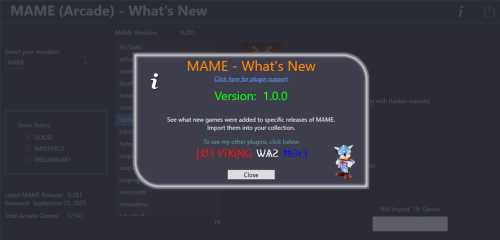
See what new Arcade machines (games) were added for a specific MAME release. Import some or all of those games from your updated MAME ROM set, into your LaunchBox collection. The intent of this plugin is to be able to see what new Arcade machines were added in the latest release of MAME. Then, along with your updated ROM set, provide a means of importing just those new machines into your LaunchBox collection without having to reimport the entire set or attempting to Scan for Added ROMs (which doesn't really work with the Arcade platform anyway). Features: See what new Arcade (ONLY) games were added specific MAME release Hyperlink to Arcade Games Database site for selected game Filter games by Status (Good, Imperfect, Preliminary) Import the new games (from your updated MAME ROM set) (Optional) Add an Additional Application direct link to the Arcade Database for the game A huge and special thanks to motoschifo and his Arcade Database (ADB) website! All data used comes direct from the Arcade Database and is what makes this plugin possible. http://adb.arcadeitalia.net Prerequisites: Requires LaunchBox version 13.19 or newer. Nothing else if you only wish to see what new games were added. If you wish to import the new games An updated MAME romset [containing those ROMs] Installing: Copy the contents of the zip file into your /Plugins/ folder e.g. D:\LaunchBox\Plugins\MAMEarcadeWhatsNew\MAMEarcadeWhatsNew.dll Using: In LaunchBox, go to Tools and select MAME (Arcade) What's New The plugin will attempt to find your MAME emulator If found, the MAME Revision field will populate with your MAME's version and populate the games for that revision To see new games that were added in a different release Change the number in the MAME Revision field Must be formatted 0.xxx e.g. 0.281 Press Enter Un-check/check the Show Status checkboxes to see only ROMs with those status(es) Click a ROM to see brief details about that game Click the Arcade Database logo to navigate to that game on ADB Existing: as seen below the game details refers to, if the game exists anywhere in your collection. Checks across ALL games in ALL platforms (by ROM filename). Below it will show the platform it is in (if "existing") This is useful if you're checking previous releases for that hidden gem you didn't know you were missing Importing: If you've updated your MAME set, you can import the new ROMs into your collection. All new ROMs shown will be imported. You can multi-select games to add just those games selected. If you wish to import just a single game, close the plugin. Then in LaunchBox, press Ctrl+N to add a new game. Click Add Games Select a platform (Arcade is set by default if exists) (optional) Un-Check Use Platforms Default Emulator Select an emulator to assign to the games being imported from the dropdown list Select the folder containing your ROMs (default is the folder your game files are in for the selected platform) If you keep a curated set separate from your MAME fullset, you can select the folder your fullset is in. Then after importing, have LaunchBox copy the ROMs and reset the game ROM path. **(see more below) If you've already placed your new ROMs in your curated set folder, select that. (Optional) Check the box Add link to ADB as Additional App Click Import Games Importing Notes: Games already existing (based on ROM filename) in the platform (step 2) will not be imported Games whose ROM file doesn't exist (step 4) will not be imported After import, a report will show the # of games added and/or skipped Anything in the games Title that is in (parenthesis) will get moved to the games Version field e.g. "Hacha Mecha Fighter (bootleg with Raiden sounds)" Game Title will be saved as "Hacha Mecha Fighter" Game Version will be set to "(bootleg with Raiden sounds)" (Optional) Add an Additional Application direct link to the Arcade Database for the game This will appear as an "Arcade Database" clickable link in the Game Details section (except for LaunchBox version 13.24). Game data set when importing: Title Platform ROMs application path Date Added/Modified Associated Emulator Version (if available) Getting Metadata and Images: After importing, in LaunchBox select all the newly added games Hint: Click Arrange By and select Date Added. Select the 1st new game. Hold down Shift then click the last, new game. Go to Tools - Download - Update Metadata and Media for selected games When asked "Would you like to update games with existing metadata and/or media?" Select "Yes, but do not replace and existing fields and media" Selecting otherwise will remove the Version data (if exists) Metadata Notes: If importing from the latest MAME revision, when you go to Download/Update metadata, the game(s) may not be found. ** Copying the new imported games ROM files to a different ("curated") folder: To Copy the ROMs and reassign their location (as seen by LaunchBox)... After importing, (in LaunchBox) select the newly added games Copying: Go to Tools - File Management and select Export ROM Files from Selected Games to New Folder Have LaunchBox copy the ROMs to the Folder your curated set is in Reassigning: With those games still selected, go to Tools - File Management and select Change Roms Folder Path for Selected Games Change to the Folder your curated set is in Plugin Updates: If an Update for this plugin has been released on the forums, - The Info/Support icon will flash red. - Click the Info/Support icon, then click the Update Available button. This will open the plugins download page in your default browser. Again, a big thanks to the Arcade Database and all its contributors! As always, all thoughts, views, suggestions, comments and accolades are welcome. -
.thumb.png.c9faf450e4d2b690a819048b18173f61.png) MAME (Arcade) - What's New View File See what new Arcade machines (games) were added for a specific MAME release. Import some or all of those games from your updated MAME ROM set, into your LaunchBox collection. The intent of this plugin is to be able to see what new Arcade machines were added in the latest release of MAME. Then, along with your updated ROM set, provide a means of importing just those new machines into your LaunchBox collection without having to reimport the entire set or attempting to Scan for Added ROMs (which doesn't really work with the Arcade platform anyway). Features: See what new Arcade (ONLY) games were added specific MAME release Hyperlink to Arcade Games Database site for selected game Filter games by Status (Good, Imperfect, Preliminary) Import the new games (from your updated MAME ROM set) (Optional) Add an Additional Application direct link to the Arcade Database for the game A huge and special thanks to motoschifo and his Arcade Database (ADB) website! All data used comes direct from the Arcade Database and is what makes this plugin possible. http://adb.arcadeitalia.net Prerequisites: Requires LaunchBox version 13.19 or newer. Nothing else if you only wish to see what new games were added. If you wish to import the new games An updated MAME romset [containing those ROMs] Installing: Copy the contents of the zip file into your /Plugins/ folder e.g. D:\LaunchBox\Plugins\MAMEarcadeWhatsNew\MAMEarcadeWhatsNew.dll Using: In LaunchBox, go to Tools and select MAME (Arcade) What's New The plugin will attempt to find your MAME emulator If found, the MAME Revision field will populate with your MAME's version and populate the games for that revision To see new games that were added in a different release Change the number in the MAME Revision field Must be formatted 0.xxx e.g. 0.281 Press Enter Un-check/check the Show Status checkboxes to see only ROMs with those status(es) Click a ROM to see brief details about that game Click the Arcade Database logo to navigate to that game on ADB Existing: as seen below the game details refers to, if the game exists anywhere in your collection. Checks across ALL games in ALL platforms (by ROM filename). Below it will show the platform it is in (if "existing") This is useful if you're checking previous releases for that hidden gem you didn't know you were missing Importing: If you've updated your MAME set, you can import the new ROMs into your collection. All new ROMs shown will be imported. You can multi-select games to add just those games selected. If you wish to import just a single game, close the plugin. Then in LaunchBox, press Ctrl+N to add a new game. Click Add Games Select a platform (Arcade is set by default if exists) (optional) Un-Check Use Platforms Default Emulator Select an emulator to assign to the games being imported from the dropdown list Select the folder containing your ROMs (default is the folder your game files are in for the selected platform) If you keep a curated set separate from your MAME fullset, you can select the folder your fullset is in. Then after importing, have LaunchBox copy the ROMs and reset the game ROM path. **(see more below) If you've already placed your new ROMs in your curated set folder, select that. (Optional) Check the box Add link to ADB as Additional App Click Import Games Importing Notes: Games already existing (based on ROM filename) in the platform (step 2) will not be imported Games whose ROM file doesn't exist (step 4) will not be imported After import, a report will show the # of games added and/or skipped Anything in the games Title that is in (parenthesis) will get moved to the games Version field e.g. "Hacha Mecha Fighter (bootleg with Raiden sounds)" Game Title will be saved as "Hacha Mecha Fighter" Game Version will be set to "(bootleg with Raiden sounds)" (Optional) Add an Additional Application direct link to the Arcade Database for the game This will appear as an "Arcade Database" clickable link in the Game Details section (except for LaunchBox version 13.24). Game data set when importing: Title Platform ROMs application path Date Added/Modified Associated Emulator Version (if available) Getting Metadata and Images: After importing, in LaunchBox select all the newly added games Hint: Click Arrange By and select Date Added. Select the 1st new game. Hold down Shift then click the last, new game. Go to Tools - Download - Update Metadata and Media for selected games When asked "Would you like to update games with existing metadata and/or media?" Select "Yes, but do not replace and existing fields and media" Selecting otherwise will remove the Version data (if exists) Metadata Notes: If importing from the latest MAME revision, when you go to Download/Update metadata, the game(s) may not be found. ** Copying the new imported games ROM files to a different ("curated") folder: To Copy the ROMs and reassign their location (as seen by LaunchBox)... After importing, (in LaunchBox) select the newly added games Copying: Go to Tools - File Management and select Export ROM Files from Selected Games to New Folder Have LaunchBox copy the ROMs to the Folder your curated set is in Reassigning: With those games still selected, go to Tools - File Management and select Change Roms Folder Path for Selected Games Change to the Folder your curated set is in Plugin Updates: If an Update for this plugin has been released on the forums, - The Info/Support icon will flash red. - Click the Info/Support icon, then click the Update Available button. This will open the plugins download page in your default browser. Again, a big thanks to the Arcade Database and all its contributors! As always, all thoughts, views, suggestions, comments and accolades are welcome. Submitter JoeViking245 Submitted 10/30/2025 Category Third-party Apps and Plugins
MAME (Arcade) - What's New View File See what new Arcade machines (games) were added for a specific MAME release. Import some or all of those games from your updated MAME ROM set, into your LaunchBox collection. The intent of this plugin is to be able to see what new Arcade machines were added in the latest release of MAME. Then, along with your updated ROM set, provide a means of importing just those new machines into your LaunchBox collection without having to reimport the entire set or attempting to Scan for Added ROMs (which doesn't really work with the Arcade platform anyway). Features: See what new Arcade (ONLY) games were added specific MAME release Hyperlink to Arcade Games Database site for selected game Filter games by Status (Good, Imperfect, Preliminary) Import the new games (from your updated MAME ROM set) (Optional) Add an Additional Application direct link to the Arcade Database for the game A huge and special thanks to motoschifo and his Arcade Database (ADB) website! All data used comes direct from the Arcade Database and is what makes this plugin possible. http://adb.arcadeitalia.net Prerequisites: Requires LaunchBox version 13.19 or newer. Nothing else if you only wish to see what new games were added. If you wish to import the new games An updated MAME romset [containing those ROMs] Installing: Copy the contents of the zip file into your /Plugins/ folder e.g. D:\LaunchBox\Plugins\MAMEarcadeWhatsNew\MAMEarcadeWhatsNew.dll Using: In LaunchBox, go to Tools and select MAME (Arcade) What's New The plugin will attempt to find your MAME emulator If found, the MAME Revision field will populate with your MAME's version and populate the games for that revision To see new games that were added in a different release Change the number in the MAME Revision field Must be formatted 0.xxx e.g. 0.281 Press Enter Un-check/check the Show Status checkboxes to see only ROMs with those status(es) Click a ROM to see brief details about that game Click the Arcade Database logo to navigate to that game on ADB Existing: as seen below the game details refers to, if the game exists anywhere in your collection. Checks across ALL games in ALL platforms (by ROM filename). Below it will show the platform it is in (if "existing") This is useful if you're checking previous releases for that hidden gem you didn't know you were missing Importing: If you've updated your MAME set, you can import the new ROMs into your collection. All new ROMs shown will be imported. You can multi-select games to add just those games selected. If you wish to import just a single game, close the plugin. Then in LaunchBox, press Ctrl+N to add a new game. Click Add Games Select a platform (Arcade is set by default if exists) (optional) Un-Check Use Platforms Default Emulator Select an emulator to assign to the games being imported from the dropdown list Select the folder containing your ROMs (default is the folder your game files are in for the selected platform) If you keep a curated set separate from your MAME fullset, you can select the folder your fullset is in. Then after importing, have LaunchBox copy the ROMs and reset the game ROM path. **(see more below) If you've already placed your new ROMs in your curated set folder, select that. (Optional) Check the box Add link to ADB as Additional App Click Import Games Importing Notes: Games already existing (based on ROM filename) in the platform (step 2) will not be imported Games whose ROM file doesn't exist (step 4) will not be imported After import, a report will show the # of games added and/or skipped Anything in the games Title that is in (parenthesis) will get moved to the games Version field e.g. "Hacha Mecha Fighter (bootleg with Raiden sounds)" Game Title will be saved as "Hacha Mecha Fighter" Game Version will be set to "(bootleg with Raiden sounds)" (Optional) Add an Additional Application direct link to the Arcade Database for the game This will appear as an "Arcade Database" clickable link in the Game Details section (except for LaunchBox version 13.24). Game data set when importing: Title Platform ROMs application path Date Added/Modified Associated Emulator Version (if available) Getting Metadata and Images: After importing, in LaunchBox select all the newly added games Hint: Click Arrange By and select Date Added. Select the 1st new game. Hold down Shift then click the last, new game. Go to Tools - Download - Update Metadata and Media for selected games When asked "Would you like to update games with existing metadata and/or media?" Select "Yes, but do not replace and existing fields and media" Selecting otherwise will remove the Version data (if exists) Metadata Notes: If importing from the latest MAME revision, when you go to Download/Update metadata, the game(s) may not be found. ** Copying the new imported games ROM files to a different ("curated") folder: To Copy the ROMs and reassign their location (as seen by LaunchBox)... After importing, (in LaunchBox) select the newly added games Copying: Go to Tools - File Management and select Export ROM Files from Selected Games to New Folder Have LaunchBox copy the ROMs to the Folder your curated set is in Reassigning: With those games still selected, go to Tools - File Management and select Change Roms Folder Path for Selected Games Change to the Folder your curated set is in Plugin Updates: If an Update for this plugin has been released on the forums, - The Info/Support icon will flash red. - Click the Info/Support icon, then click the Update Available button. This will open the plugins download page in your default browser. Again, a big thanks to the Arcade Database and all its contributors! As always, all thoughts, views, suggestions, comments and accolades are welcome. Submitter JoeViking245 Submitted 10/30/2025 Category Third-party Apps and Plugins -
pretty much what the title says...its great that you guys have several emulators already setup for us, but, you DONT allow us to add our own. Emulator of note (that I cannot believe you dont have, its literally the main emulator for this) is PPSSPP. The defacto PSP emulator. I tried to add it, and launchbox wont let me add it, since its not in the pre-defined list of emulators. This is IMO a big oversight and needs to be corrected.
-
Good Sunday from Switzerland everyone! I am basically new to the world of emulators and LaunchBox and whatelse there is out there. But a friend of mine had Ninendo games on his computer, what triggered me to try it myself this weekend. So I ended up downloading RetroArch and Launchbox this morning. I followed the steps of a Youtube tutorial. The next step was to download some games. I just went on Romsmania.cc and got the first game they recommended just to try it out. I downloaded and imported the game. Everything seemed to work. Now there is just one huge problem: The game won`t start. And I have no clue where I went wrong or which settings aren`t the right ones. Is there any one or any thing that could help me?
-
my cemu is no longer launching games from launchbox. it was working yesterday before i got a big box update and now it wont launch my games. it works when i am launching games from cemu but not from launchbox??? Desktop_2018_09.11_-_15_40_18_02.mp4

-
is cemu no longer compatible with big box? i don't have the option to choose that emulator. is there another way to add none supported emulators?
-
I downloaded launchbox today and I got the forever license. I downloaded dolphin and followed every step in the setup tutorial on the launchbox youtube channel, yet none of my gamecube games are playable. If I right click on any gamecube game, the play button is grayed out. LoL and Overwatch are the other two games I have on Launchbox and they work. Please help. I have seen nobody else have this issue. Thanks for help in advance!
-
Hello everyone, It started long ago...so, so long ago. You see, I'm old, so when Nintendo decided to come out with the NES Classic I really wanted one to satisfy my nostalgia (I still own the original)! But, Nintendo decided not to make enough to satisfy the market demand, essentially refusing to take my $60. I said "FU" Nintendo and grabbed myself a raspberry pi - hooray, 3 cheers for retropie!!! I was now bitten by the emulation bug, doing everything possible to my pie box: LED's, on/off switch, etc... I still needed more, so I convinced my wife (aka the boss) that I "needed" a full sized arcade cabinet in the garage! My charm worked and now I am a very happy guy! A big part of my happiness is finding this front end and the amazing beauty and simplicity it brings to my gaming experience! So...a long story short, I want to thank Jason and all that help with LaunchBox/BigBox as well as the very cool community! Cheers, MS79
-
Hello all i am just looking into this front end. I am pretty savvy i think and have my roms and pc games all neatly organized and properly done up. Here lies the problem for me and what i am looking for. In my home my dell t7500 is the big dog in the house dual xeons 192 gb ram with windows 7 pro and the graphics card is a 1050ti. With what i am trying to accomplish is relocating the t7500 out of my room and leaving my wife and my t7400 in our desk. i want to put the t7500 in the cabinet in the garage which is air conditioned and protected with air filters. With moving everything out there i had an idea to "map" a new front end to the network to where me my wife and family can all add a shortcut and serve to each computer from the t7500. To also take it a step further each person maybe get there own account? to avoid people overwriting each others saves {i really hate when my wife deletes my old rpg saves}. so i dont know if i have illustrated what i am trying to do correctly but i guess in a sense i want a launch-able front end for everyone to have access to even guests that are on my network? Before i get the why dont you install and such and such to each computer my t7500 is running a little over 20tb of data so that would be idiotic to replace drives and also for when my friends come over it would be hard to have everyone install and set up the same end as me as i am the techy in the group.
.thumb.png.c9faf450e4d2b690a819048b18173f61.png)


