Search the Community
Showing results for tags 'model 2'.
Found 8 results
-
.thumb.png.9332e12cab6cec0213b9ffd456a9a968.png)
Version 1.0.4
24,847 downloads
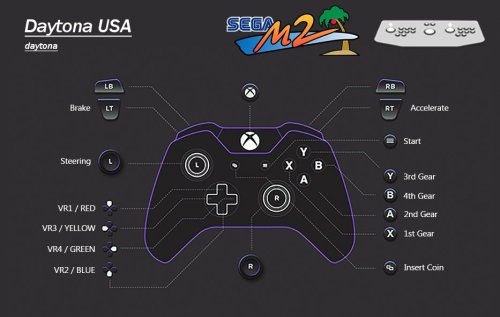
UPDATE: Added cheats to the table below. Another huge thanks to @Joejoe for providing these. UPDATE 2: Fixed ManxTT lack of engine sound and Danger Screen at startup. Dynamite Deka 2 Added. UPDATE 3: Using new LUA scripts that include cheats, a scanline option and more refined widescreen scripting. Added DINPUT control configuration using a PS4 controller. More fixes in change log. You can use F5 to toggle between 16:9 and 4:3 when using widescreen scripts. UPDATE 4: Quite a Big One A whole bunch of inputs moved for better play. Gears are on the face buttons now, fighters have had some inputs moved. Images updated of course. All of the other Daytona USA versions/hacks have been added. ManxTT fixed properly properly. I promise. Changed the rom to the twin version 'manxttc' and set to twin in test menu. No more stupid error every time you turn, which caused a Japanese voiced error audio sample to be played...every time you turned. Very annoying....but it's gone now. ManxTT and Over Rev should now track straight when not holding the stick. This was an error on my part. Now fixed. Full Fat 1440x1080 60FPS 30s Videos have been added. Freshly made by me, clean high quality videos. Clear Logos & Flyer Fronts. I made the other Daytona clear logos up to match the normal one, came out nice actually. Also made up some flyers for some of the Daytona hacks and Sega Rally. Every game has a bespoke clear logo & flyer. No doubles. Custom Platform XML provided. In the description of every game will be my emulation notes for that game & any cheats. Genres/categories/no. of players had been adjusted so auto playlists with catch them correctly. DINPUT better configured. I'm not gonna lie, after looking at what I had previously done I was disgusted. This is now configured just as good as the xinput version. So you know the drill with these releases. The intention is to take these awkward to set up emulators, and make them as plug and play as possible for those using a PC, controller, mouse and light guns. Here is the follow up to the Supermodel project I completed a little while ago. The Model 2 setup was far more forgiving and didn't make me want to trash my computer. That's not to say there aren't some interesting and awkward things going on that needed some attention, however these were far more easy to fix. As per usual many hours have been put into this project with much testing and in the case of getting 2 Player Mouse support, a lot of calibrating. This has only been configured for the parent rom versions only. 1G1R Instructions - Super Simples -Download Model 2 Emulator -Use MERGED ROMS. imma say it again MERGED ROMS. -Download Pre Config File Folders On This Page (Make sure you select your correct input type) -Place in Model 2 folder and replace any files. -Widescreen scripts are being used as default. If you only want 4:3, replace the scrips with the 4:3 ones provided in Scripts Folder. -DONE!!!!! What this configuration will give you: 2 Player Mouse Support for Light Gun Games - Resolution Specific 1920x1080 - If You Change Resolution It Will Be Inaccurate I cant tell you how awkward and difficult it was to get this to work. Due to RawInput being a must for 2 mice, the calibration doesn't scale into different resolutions. This means you can't calibrate it using the auto calibration (shooting targets) in its test menu, as it'll be inaccurate no matter how perfectly you shoot those calibration targets. You can't even calibrate at native resolution to make it 1 to 1 and then increase the resolution. Thankfully Virtua Cop 1 & 2 both have a manual adjustment feature meaning I could off set the adjustment to get PERFECT pin point accuracy. Behind Enemy Lines was awkward but not impossible to get accurate, as it doesn't display where your actual in game cursor position is on screen. Only X and Y coordinates are displayed, which was just enough info to get it accurate. Gunblade on the other hand gives you absolutely no on screen info at all when calibrating, it's as accurate as I can get it. What is really weird is that some of these games are accurate out the box with RawInput off, but needed recalibrating when I enabled RawInput. But now if you turn off RawInput it is still accurate after calibrating for RawInput. That's great as switching between the two is seamless and retains accuracy. Best of both worlds, as having RawInput off for single player gives you more mouse sensitivity. No Screen Flash for Virtua Cop 1 & 2 and House of the Dead LUA scripts are included as standard to remove the screen flash that would happen every time you pull the trigger. All the other Light Gun Games don't have screen flash by design so all of these shooters do not flash. Controls Configured with Images for Every Game All controls have been pre configured for both players. I have also made images for the layout of every game. Controls were tested the most. I found some strange/broken controls that needed some thought. Sky Target has a broken up and down analogue input, however simply mapping this as a digital input to the left stick up and down is a perfect workaround. Desert Tank benefits from no analogue inputs also, I have got it to control exactly like the vehicles in Halo which is neat. Aside from that there are various racing games that have inverted pedals that needed the Invert option checked in the control calibration options. All Games In English - All Games Free Play This speaks for itself. All test menus adjusted to let these games play in English and in Free Play mode. Test Menu Fixes and Unlocked Hidden Game Modes Network Board Not Present.....Done. Unlocking all game modes in Virtua Striker....Done. Calibrating analogue inputs in 'Volume Adjustment' (Yeah I thought it was to do with audio too) so controls are correct and use the entire travel of the analogue range so racing games aren't twitchy....Done. A whole bunch of tweaks from CRT modes giving better brightness to extending game times among a shed load of other crap that enhances the experience in some way.....Done. Optional 16:9 Anamorphic Widescreen LUA Scripts Put these in the scripts folder and boom...proper widescreen no stretching. These work way way way way better than the temperamental widescreen option in the EMULATOR.INI file, which only works half the time depending on how your graphics are scaling etc etc etc etc. Just use the LUA scripts instead for better results and no headaches, I command it. I love this feature, House of the Dead and Gunblade even allow you to shoot into the 16:9 space. DOCUMENTATION / CHECKLIST. THIS HAS BEEN DONE FOR YOU Behind Enemy Lines bel -Calibrated and WORKING. -Calibrated for RawInput 2 Players -Set to Free Play Gun Adjustment Values for Accuracy When Using RawInput at 1920x1080: 29 MIN GUN 1 X 0e MIN GUN 1 Y d5 MAX GUN 1 X f2 MAX GUN 1 Y Daytona USA daytona -Link ID set to 'SINGLE'. Default is 'MASTER' which causes the game to give the Network Board Not Present error preventing you from playing the game. -Country set to 'USA', this changes the language to English. 'Japan' is the Default. -Set to Free Play -Apparently setting Cabinet Type to Deluxe displays correct colours due to it's display type. Dead or Alive doa -Nation set to 'USA', this changes the language to English. 'Japan' is the Default. -Set to Free Play Desert Tank desert -Country set to 'USA', this changes the language to English. 'Japan' is the Default. -Controls took a while to figure out. It is actually better to use digital inputs and NOT use analogue input with this game. Turning the turret is on the right stick with accelerate being up on the left stick. -Set to Free Play Dynamite Baseball 97 dynabb97 -No English option that I know of. -Innings Per Credit set to MAX (3) -Analogue 'Bat' input calibrated in 'Volume Settings'. Which is actually analogue calibration, I assumed it was audio settings, not realising analogue range is expressed in 'volume' also. -Set to Free Play Dynamite Cop dynamcop -Set to Free Play Dynamite Deka dyndeka2 -Japanese version of Dynamite Cop. This version varies with character models and is even more insane than the English Version. Even though this is 1G1R, I consider this to be a separate game due to its differences. -Set to Free Play Fighting Vipers fvipers -Country set to 'USA', this changes the language to English. 'Japan' is the Default. -Display Type looks best set to 'Projector'. Although this is darker, using 'CRT' increases the saturation to the point blacks are -Set to Free Play Gunblade NY gunblade -Country set to 'USA', this changes the language to English. 'Japan' is the Default. -Calibreted both analogue guns in 'Aim Set'. RawInput is on to allow for 2 player mouse support. Due to RawInput implementation this calibration is RESOLUTION SPECIFIC - 1920x1080 -Set to Free Play Gun Adjustment Notes - Resolution Specific 1920x1080: Due to no x or y coordinates being shown it is almost impossible to get this pin point getting the on screen crosshairs to line up. I gave it my best shot. You are welcome to try. House of the Dead hotd -Country set to 'USA', this changes the language to English. 'Japan' is the Default. -Calibrated both guns in 'Aim Set'. RawInput is on to allow for 2 player mouse support. Due to being RawInput this calibration is RESOLUTION SPECIFIC - 1920x1080 -Blood set to 'Red'. The Default is 'Green' -Set to Free Play Manual Gun Adjustment Values for Accuracy When Using RawInput at 1920x1080: ADXMIN = 259 ADYMIN = 119 ADXMAX = 581 ADYMAX = 438 Cheats: NOTE: LEFT refers to player 1's gun RIGHT refers to player 2's gun New Costumes (2 players): At title screen after entering at least 1 credit (2 credits for 2 players game), pull the triggers: LEFT, RIGHT, LEFT, RIGHT, LEFT, RIGHT, START Player 1 Plays as Super G: This code must be done at the title screen, after entering at least one full credit. The following code must be entered very quickly in order to work properly. LEFT, LEFT, RIGHT, LEFT, LEFT, START. Sophie Costumes (2 players): At title screen after entering at least 1 credit (2 credits for 2 players game), pull the triggers: LEFT, RIGHT, RIGHT, LEFT, LEFT, RIGHT, START Show Your Score: Put your coins in and press Left x3 Right x2 then press the start button... remember this has to be done very quickly. Have fun. LEFT, LEFT, LEFT, RIGHT, RIGHT, START Indianapolis 500 indy500 -Steering, Gas & Brake analogue inputs calibrated in 'Volume Settings'. Which is actually analogue calibration, I assumed it was audio settings, not realising analogue range is expressed in 'volume' also. -Set to Free Play Pace Car: Hold the start button, blue view button and brake until you chose your start your race. If you are holding the buttons, the door of your trailer will go up. Reversed Tracks: Hold the shift lever down while starting a game. Secret Camera View: When in the fourth view during a race, press any two view change buttons simultaneously Super-Charged Engine When selecting your transmission, select Manual. Head toward the pit in gear 6. when you exit, you will be in gear 1. DO NOT CHANGE GEAR! From now on, you will have a super charged engine Last Bronx lastbrnx -Set to Free Play -Display set to 'CRT'. This looks brighter and better than 'Projector'. ManxTT Superbike manxtt -Cabinet Type changed to TWIN. This skips the Danger screen and fixes the lack of engine sound. -Country set to 'USA', this changes the language to English. 'Japan' is the Default. -Start is View Change -Set to Free Play Motor Raid motoraid -Country set to 'USA', this changes the language to English. 'Japan' is the Default. -Bank, Accelerate and Brake analogue inputs calibrated in 'Volume Settings'. Which is actually analogue calibration, I assumed it was audio settings, not realising analogue range is expressed in 'volume' also. -Set to Free Play Change Bike Colour to CPU Bike Colour: In order to use the CPU Bike Colour, enter the following code at the Select Player screen: Punch, Kick, Kick, Punch, Punch, Kick, Kick, Punch. Note: The Select Player screen is monochrome, so you will not be able to see the colour change until the game starts. Extra Stage: Segal First play the Practice Mode. The easiest stage. ''Yenda,'' will then be selectable. Next, highlight Yenda at the stage-select screen and enter the following code with handlebar button: Punch, Kick, Kick, Punch, Kick, Kick, Punch, Punch, Kick, Kick. The ''Segal'' stage will now be selectable. Ues Segal Weapons in Any Stage Ordinarily, the Needles and Hammer weapons can only be used in the Segal stage. To access these weapons in any other stage, enter either of the following codes at the Select Player screen: Needles - Kick, Kick, Punch, Kick, kick, Punch, kick, Punch, Punch, Kick. Hammer - Punch, Kick, Punch, Kick, Punch, Punch, Kick, Punch, Punch, Kick. Over Rev overrev -Country set to 'USA', this changes the language to English. 'Japan' is the Default. -Steering, Gas & Brake analogue inputs calibrated in 'Volume Settings'. Which is actually analogue calibration, I assumed it was audio settings, not realising analogue range is expressed in 'volume' also. -Set to Free Play Three Additional Cars: At the 'car selection' screen, press the brake. Pilot kids pltkids -Set to Free Play Rail Chase rchase2 -Country set to 'USA', this changes the language to English. 'Japan' is the Default. -Set to Free Play Gun Calibration Notes: Due to how this game works no calibration is needed or available. Sega Rally Championship srallyc -Country set to 'USA', this changes the language to English. 'Japan' is the Default. -Set to Free Play Sega Rally Pro Drivin' (HACK) srallyp -Think "Sega Rally Remix" with a turbo button when playing this hack. That is exactly what it feels like. -Country set to 'USA', this changes the language to English. 'Japan' is the Default. -Set to Free Play Sega Ski Super G skisuprg -Country set to 'USA', this changes the language to English. 'Japan' is the Default. -Swing and Inclining analogue inputs calibrated in 'Volume Settings'. Which is actually analogue calibration, I assumed it was audio settings, not realising analogue range is expressed in 'volume' also. -Incline inputs were foot pedals on the OG HW intended to be worked independently for jumping and doing tricks. I have set these to the triggers as it's by far the best place for them. -Set to Free Play Sega Touring Car Championship stcc -Country set to 'USA', this changes the language to English. 'Japan' is the Default. -Set to Free Play Sega Water Ski segawski -Country set to 'USA', this changes the language to English. 'Japan' is the Default. This needed the following engineers code to be input into the main test menu -Slide analogue input calibrated in 'Volume Settings'. Which is actually analogue calibration, I assumed it was audio settings, not realising analogue range is expressed in 'volume' also. Set to Free Play Sky Target skytargt -Country set to 'USA', this changes the language to English. 'Japan' is the Default. -Analogue inputs calibrated in 'Volume Settings'. Which is actually analogue calibration, I assumed it was audio settings, not realising analogue range is expressed in 'volume' also. -This game when using an analogue input for up and down is broken. You will ascend only to drop down when you go past a certain threshold with the analogue input. Setting this to a digital input solved the issue. -Set to Free Play Sonic Championship schamp -Set to Free Play -Display set to 'CRT'. This looks brighter and better than 'Projector'. Super GT 24h sgt24h -Country set to 'USA', this changes the language to English. 'Japan' is the Default. -Steering, Gas & Brake analogue inputs calibrated in 'Volume Settings'. Which is actually analogue calibration, I assumed it was audio settings, not realising analogue range is expressed in 'volume' also. -I/O Type left on Default (C) which has inverted pedals. I inverted the controls in the emulator to compensate. You can set I/O Type A which doesn't use inverted pedals but I opted for the former. -Set to Free Play Top Skater topskatr -Analogue inputs calibrated in 'Volume Settings'. Which is actually analogue calibration, I assumed it was audio settings, not realising analogue range is expressed in 'volume' also. -Set to Free Play Play as a Surfer: Press the Left Select button three times, Right select button three times, and then the Left Select button thirteen times. Hidden Track: First chose Advanced Level (doesn't matter which character). Then, right before the board is unlocked, move the board up. Then when the game starts going, miss the first jump on purpose and crash right into the fence on the left side of the church. If you do it right you'll find yourself in the hidden track. Play as Body Boarder: At the course select screen press and hold down the start button. Then at the character select screen press the Right select button six times, the Left select button six times, Right three time, Left three times, Right four times, and the finally let go of the Start button. Super Deformed Mode: At the stage select screen, press the Left select button nine times, the Right select button nine times, the Left select button four times, the Right select button four times, and the Left select button five times. Now lean the board forward and press the Left and Right select buttons simultaneously three times. Virtua Cop vcop -Country set to 'USA', this changes the language to English. 'Japan' is the Default. -Calibrated for RawInput 2 Players. Due to being RawInput this calibration is RESOLUTION SPECIFIC - 1920x1080 -When using RawInput this game must be recalibrated for accuracy. However the 'Gun Adjustment' option didnt work correctly (inaccurate). So I had to use 'Manual Gun Adjustment' instead, using the ability to offset to get pin point accuracy. If RawInput is turned off it will be inaccurate. -Set to Free Play Manual Gun Adjustment Values for Accuracy When Using RawInput at 1920x1080:: ADXMIN = c1 ADYMIN = 24 ADXMAX = 234 ADYMAX = 1a3 Virtua Cop 2 vcop2 -Country set to 'USA', this changes the language to English. 'Japan' is the Default. -Calibrated for RawInput 2 Players. Due to being RawInput this calibration is RESOLUTION SPECIFIC - 1920x1080 -When using RawInput this game must be recalibrated for accuracy. However the 'Gun Adjustment' option didn't work correctly (inaccurate). So I had to use 'Manual Gun Adjustment' instead, using the ability to offset to get pin point accuracy. If RawInput is turned off it will be inaccurate. -Set to Free Play Manual Gun Adjustment Values for Accuracy When Using RawInput at 1920x1080: ADXMIN = 210 ADYMIN = 36 ADXMAX = 582 ADYMAX = 422 Virtua Fighter 2 vf2 -Version set to 2.1 -Display type set to 'Projector'. 'CRT' looks undersaturated and washed out. -Country set to 'USA', this changes the language to English. 'Japan' is the Default. -Set to Free Play Virtua Striker vstriker -Country set to 'USA', this changes the language to English. 'Japan' is the Default. -Match Time set to MAX 3min -G Goal Mode (IF THERE'S A DRAW BY THE END OF THE MATCH) = (EXTRA TIME, NEXT GOAL WINS) Set to MAX Time 1m. OFF is the default. (If extra time goes 1m with no goals the match will go to a Penalty Knockout.) -P K Mode (PENALTY KNOCKOUT) Set to REAL. OFF is the default. (This will let penalties go on until there is a clear winner.) -Set to Free Play Play as FC Sega: Press start on teams starting with the letters of F-C Sega France; Colombia; Spain; England; Germany; Argentina Virtual On von -Time set to 'Deathmatch' (no timer) -Set to Free Play Wave Runner waverunr -Country set to 'USA', this changes the language to English. 'Japan' is the Default. -Analogue inputs calibrated in 'Volume Settings'. Which is actually analogue calibration, I assumed it was audio settings, not realising analogue range is expressed in 'volume' also. -Set to Free Play Zero Gunner zerogun -Set to Free Play- 58 comments
- 12 reviews
-
- 52
-

-

-

-

-
- sega
- sega model 2
- (and 1 more)
-
Sega model 2 emulator has a bunch of great shooting games that work with a mouse or light gun. And the system allows you to configure the controls from within the game, but once you pick a game that is a shooter it hijacks the mouse to use within the game. How the heck do you configure the controls when you cant use the mouse to go to the controls menu and you definitely cant double click to configure a new key. Please help. Thanks.
-
Version 1.0.0
104 downloads
Sega Model 2 Fanart Pack compiled and created by CORE Team. 1920x1080 JPEG format No intro naming-
- 5
-
-
- core
- background
- (and 3 more)
-
I noticed that each time I start a Sega Model 2 game I need to change the machine settings again. For example changing the machine type from "master" to "single" etc. Did some digging and apparently the AutoHotKey script for this emulator maps the Esc key to a Process Close command, which causes the emulator to be killed and not save the file. I changed the script to close the emulator gracefully, like so: WinClose, ahk_exe {{{StartupEXE}}} So, far it seems to work just as well, and the file is being saved. I opened an issue for that (https://bitbucket.org/jasondavidcarr/launchbox/issues/3123/sega-model-2-emulator-ahk-script-fix) but thought I'll write it here too for any one having the same problem.
-
 This is kinda a weird problem I’m having and I’m not sure if it’s just my setup. Any suggestions are welcome. I just setup Sega Model 2 on my cabinet. Everything works great in the emulator (v1.1a) and runs great in launchbox but the problems showed up when I start any Model 2 game from BigBox. When I launch any game in BigBox I get the following error “EMULATOR.EXE - Application Error The application was unable to start correctly (Oxc0000005). Click OK to close the application.” Everything runs great in LB so I exited desktop mode (launchbox) through BigBox exit menu to give it another try… but now I get the same error. This sent me down the rabbit hole but I figured out the following two situations 1. If I start in launchbox I can run model 2 games. If I hit Crtl+B and start BigBox through Launch Box I can run model 2 games. 2. If I start in BigBox I cannot run model 2 games. If I return to desktop mode (LB) I cannot run model 2 games. *If I select exit BigBox and manually start LaunchBox Model 2 works again I checked that both BigBox and launchbox are not being started as admin and seem to have all the same settings in properties > security and compatibility. I am running this cabinet as an administrator user a few specs and info to help and I appreciate any insight. Windows 10 pro (22h2) i9-10850k 32gb 3200 gskill ram (4x8) Asus Rog Strix 3090 Asus Rog Strix z490-e Lb/BB 13.5
 -
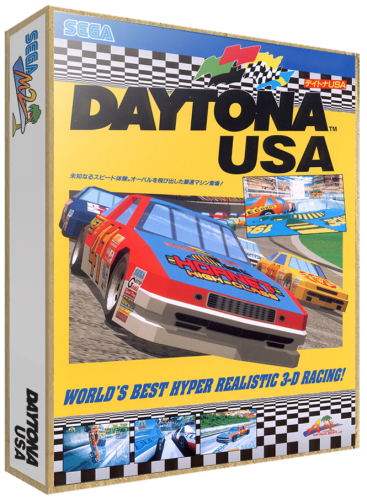
Version 1.0.0
744 downloads
-These have been added to the LaunchBox Database A collection of all flyers converted to 3D Boxes for the Sega Model 2 Arcade System. Complete Set. -
SEGA MODEL 2 3D BOXES (40) View File -These have been added to the LaunchBox Database A collection of all flyers converted to 3D Boxes for the Sega Model 2 Arcade System. Complete Set. Submitter Robin55 Submitted 06/24/2018 Category Game Box Art
-
Hi guys, I was setting up the Model 2 platform this morning and imported my roms. All games appear to be working except Daytona USA. I noticed that LaunchBox imports only 3 of the 5 Daytona roms I have and obviously one of the two it won't import is the parent rom. I have tried re-importing multiple times to force clones, allow duplicates etc., but Launchbox refuses to list the two missing roms. Has anybody got this game working? EDIT: I think I got it sorted. I tried by using the "Add" option in LaunchBox and it seems like it's working ?
.thumb.png.9332e12cab6cec0213b9ffd456a9a968.png)