Search the Community
Showing results for tags 'missing games'.
Found 7 results
-
I love Launchbox, but I am pretty disappointed in the scraper. I am trying to make a Virtual Reality platform (I have hundreds of games) and there are SOO many games that lack the media and information in the Games DB for Launchbox. Steam and especially igdb.com have almost all of the ones I am looking for. Is there any way to scrape from there? Any help would be appreciated. Yes, I know I can add them myself, but that takes a lot of time (and I have done many in the past as well as approved and curated hundreds of others). I would guess that at least half of the 338 VR games I have, half of them scrape wrong, or are not in the database. Even popular titles like, Same & Max: This Time It's Virtual! are not in the DB at all?!? That seems crazy and highly inconvenient to me.
-
Version 2.0.0
251 downloads
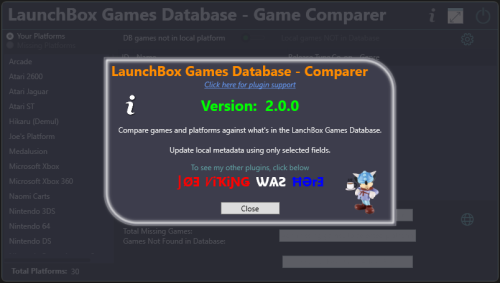
See What You're Missing™ Game/Platform comparer Compare games in your platforms against what's listed in the LaunchBox Games Database See which platforms are in the Games Database that are not in your collection Filter out games by Release Type, Genre and Co-op. Import placeholders (see Game Placeholders below) into to a new platform, those platforms or games not found. (optionally, import missing game placeholders into your existing platform) Output the results to a tab-delimited text file. Custom Metadata Updater (New v2.0.0) Update an individual games metadata or do it in bulk. Select only the fields you want to have updated. All others will be left untouched. Requires LaunchBox 13.19 or newer Installing; Copy the contents of the zip file into your /Plugins/ folder e.g. D:\LaunchBox\Plugins\LBDBcomparer\LBDBcomparer.dll Using: (click or scroll down for using the Custom Metadata Updater) Game/Platform comparer In the Tools menu, select LaunchBox Games Database - Game Comparer Select a platform to compare. (the list excludes platforms you've imported using Add Missing Games to NEW platform [see below]) This will show games listed in the database for this platform that are not found in the selected platform. (this searches and compares by database ID) Click the games ID # to open the LaunchBox Games Database to that game. Other things: Toggle Local games NOT in Database This shows your games that either don't have an associated LaunchBox database ID # or their ID # is not in the database for the selected platform. Toggle Missing Platforms This show database platforms not found in your collection. Search is done by Name Only. Exact match (but Ignore Case). Does not cross-check the platforms Scrape-As value. Does not exclude platforms you've imported using Add Missing Games to NEW platform (see below). Settings: (click the gear icon) Show only games that match the criteria (boxes that are checked). Filter by Release Type, Genre and/or Co-op. Click Save and Close to save the selected filters and close the settings window. Click Reset All, Save and Close to reset all filters to the defaults, save and close the settings window. Click the Close icon to close the window without saving and changes. The column headers will be highlighted Orange if any filters are set for that column. Add/Import options: Add Missing Games to NEW platform This will create a new platform named platform_name (M) e.g. Atari 2600 (M) Add game placeholders of games listed in the datagrid (filtered or otherwise) to the new platform. Re-running it will essentially recreate the platform based on the items in the datagrid. Add missing games to selected platform (not recommended) This will import game placeholders into your existing platform for games listed in the datagrid (filtered or otherwise). Game Placeholders: The imported game placeholders will have set their Title LBDB-ID Broken=True Installed=False With Installed=False, you can set Arrange By and choose Installed. But you can't Filter by it (nor Broken) You can also, on the left panel select View Installed [vs. e.g. Platform Categoy] and then select the No option. This can be helpful if you decide to add them to your existing platform. "Broken" can be used to hide the placeholders. Output Results to A Text File: This will output the results to a tab-delimited text file. The file will be named platform_name (missingGames_count).txt and gets created in /Output/ under this plugins folder. If it's a platform missing from your collection, the filename will be platform_name (M) (missingGames_count).txt e.g. D:\LaunchBox\Plugins\LBDBcomparer\Output\Atari 2600 (137).txt D:\LaunchBox\Plugins\LBDBcomparer\Output\Atari 2600 (M) (137).txt Click the view file icon to view the created file. Click the open folder icon to open you Windows Explorer to the /Output/ folder Notes: This will not check your games that are Additional Versions (Additional Apps). Additional Versions don't contain a LaunchBox database ID # to compare against. It "the numbers don't add up", check your platform for duplicates. Custom Metadata Updater From the LaunchBox main window... Select one or more games. Right-click one of them and select Custom Metadata Updater. If the games' field matches what's in the database, the Database column will show "identical". If they are different, double-click the value in the Database column to update that field in your game. Click the fields name in the left column to see both values in a larger window. (useful for the Notes field) If you selected more than one game, click the arrows to move to the next/previous game. Optionally, you can click Bulk Update, and update only the selected fields for all selected games. (click to go back up to using Game/Platform Comparer) If a plugin update is available, the Info icon will flash red. Click it to find a link to the downloads page.- 7 comments
- 2 reviews
-
- 12
-

-

-
- launchbox games database
- missing games
- (and 2 more)
-
 Missing Games Checker Plugin View File Missing Games Checker (MGC) is a LaunchBox plugin designed to help users identify missing games in their collection based on platform metadata. It provides an easy-to-use interface that lets you view owned and missing games, and export the results. v1.2 is out! NEW and IMPROVED! Enhanced for stability and usability! Instructions for Using the Missing Games Checker (MGC): Requirements: This plugin in the LaunchBox Plugin folder. Installation and Usage: 1. Install the Plugin: Download the latest release of the MGC plugin from this page. Make sure LaunchBox is closed. Unblock the downloaded zip file (Right-click on the zip -> Select Properties -> Click or Check "Unblock" if available) For help on Unblocking files, check out this article. Open the zip file and place the `LBMissingGamesCheckerPlugin.dll` file into your LaunchBox\Plugins folder (example R:\LaunchBox\Plugins). 2. Access the Plugin: Launch LaunchBox, then access the Tools menu and find Missing Games Checker. 3. Using the Plugin: Select a platform from the dropdown menu and click the Confirm Selection button. MGC will display a list of games owned and a list of games missing from your collection based on the LaunchBox metadata. You can export the list of missing games to a CSV file for easy reference. 4. Options/Features: Filter games by Released status if you only want to check released titles. Sort columns by clicking on the column header. Filter select columns by clicking on the filter icon in the column header. If the filtered column has multiple values (ie. North America, Japan) the row will still show if any of the filters are not applied. All values need to be unchecked in the filter to hide the row. *Note: Filtering one column works well. Multiple column filtering may produce incorrect results. Export to CSV if you need to apply better filtering *Will enhance in a future release Window resizing (Right edge only) Click on the highlighted cell data for links to video URLs, Wikipedia links, and the game on the LaunchBox DB (where available). Extra Notes: The Owned Games list is pulled from YOUR collection. If fields are missing information, make sure your collections metadata is up to date. Check out this LaunchBox Video on how to do that. The Missing Games list is pulled from the local metadata.xml file. If you find information is missing, visit the LaunchBoxDB website to see how you can contribute! I've worked HARD to make the plugin as robust and efficient as I can. That being said, some computers may experience delays in processing the metadata at the start, processing any large collections' of games, and filtering/sorting large lists. Please be patient! Once you begin a process, it will complete! But the UI may become unresponsive during processing. As mentioned, filtering works well on one column at a time. Filtering one column, then another may have incorrect data shown. You can click the Reset button in the filter panel to reset the list, or just "Check It!" again to refresh the list again. NO data is modified in this plugin. Data is compared from the local metadata.xml (which updates automatically by LaunchBox) and your collection data reported from LaunchBox. Troubleshooting/Updates: New to v1.2 - DebugLog Click on the "Bug" to open the debug log. If you have issues, provide the relevant debug log here for review. If you've confirmed the above and are still having issues, please provide the following: Click the "Export to CSV" button for the Missing Games table and save the .CSV file. Attach the .CSV file to a post here. (Optional) Attach a screenshot of the app with the error message. I'll review the information and post a fix/suggestion as soon as possible. Also, if you would like to have MGC perform additional tricks, let me know!! I do appreciate the feedback and will enhance the plugin over time based on your findings/suggestions. Special Thanks A huge thanks to the LaunchBox team and their API documentation for making this project possible, as well as Jason's helpful video tutorial. Check out the source code on GitHub if you're interested. Cheers! 🍻 Submitter AgentJohnnyP Submitted 09/07/2024 Category Third-party Apps and Plugins
 -
Version 1.2
544 downloads
Missing Games Checker (MGC) is a LaunchBox plugin designed to help users identify missing games in their collection based on platform metadata. It provides an easy-to-use interface that lets you view owned and missing games, and export the results. v1.2 is out! NEW and IMPROVED! Enhanced for stability and usability! Instructions for Using the Missing Games Checker (MGC): Requirements: This plugin in the LaunchBox Plugin folder. The latest version of LaunchBox (there could be an issue with this plugin in older versions of LaunchBox where it's not being detected). Installation and Usage: 1. Install the Plugin: Download the latest release of the MGC plugin from this page. Make sure LaunchBox is closed. Unblock the downloaded zip file (Right-click on the zip -> Select Properties -> Click or Check "Unblock" if available) For help on Unblocking files, check out this article. Open the zip file and place the `LBMissingGamesCheckerPlugin.dll` file into your LaunchBox\Plugins folder (example R:\LaunchBox\Plugins). 2. Access the Plugin: Launch LaunchBox, then access the Tools menu and find Missing Games Checker. 3. Using the Plugin: Select a platform from the dropdown menu and click the Confirm Selection button. MGC will display a list of games owned and a list of games missing from your collection based on the LaunchBox metadata. You can export the list of missing games to a CSV file for easy reference. 4. Options/Features: Filter games by Released status if you only want to check released titles. Sort columns by clicking on the column header. Filter select columns by clicking on the filter icon in the column header. If the filtered column has multiple values (ie. North America, Japan) the row will still show if any of the filters are not applied. All values need to be unchecked in the filter to hide the row. *Note: Filtering one column works well. Multiple column filtering may produce incorrect results. Export to CSV if you need to apply better filtering *Will enhance in a future release Window resizing (Right edge only) Click on the highlighted cell data for links to video URLs, Wikipedia links, and the game on the LaunchBox DB (where available). Extra Notes: The Owned Games list is pulled from YOUR collection. If fields are missing information, make sure your collections metadata is up to date. Check out this LaunchBox Video on how to do that. The Missing Games list is pulled from the local metadata.xml file. If you find information is missing, visit the LaunchBoxDB website to see how you can contribute! I've worked HARD to make the plugin as robust and efficient as I can. That being said, some computers may experience delays in processing the metadata at the start, processing any large collections' of games, and filtering/sorting large lists. Please be patient! Once you begin a process, it will complete! But the UI may become unresponsive during processing. As mentioned, filtering works well on one column at a time. Filtering one column, then another may have incorrect data shown. You can click the Reset button in the filter panel to reset the list, or just "Check It!" again to refresh the list again. NO data is modified in this plugin. Data is compared from the local metadata.xml (which updates automatically by LaunchBox) and your collection data reported from LaunchBox. Troubleshooting/Updates: New to v1.2 - DebugLog Click on the "Bug" to open the debug log. If you have issues, provide the relevant debug log here for review. If you've confirmed the above and are still having issues, please provide the following: Click the "Export to CSV" button for the Missing Games table and save the .CSV file. Attach the .CSV file to a post here. (Optional) Attach a screenshot of the app with the error message. I'll review the information and post a fix/suggestion as soon as possible. Also, if you would like to have MGC perform additional tricks, let me know!! I do appreciate the feedback and will enhance the plugin over time based on your findings/suggestions. Special Thanks A huge thanks to the LaunchBox team and their API documentation for making this project possible, as well as Jason's helpful video tutorial. Check out the source code on GitHub if you're interested. Cheers! 🍻 -
.thumb.png.c9faf450e4d2b690a819048b18173f61.png) LaunchBox Games Database - Comparer Plus View File See What You're Missing™ Game/Platform comparer Compare games in your platforms against what's listed in the LaunchBox Games Database See which platforms are in the Games Database that are not in your collection Filter out games by Release Type, Genre and Co-op. Import placeholders (see Game Placeholders below) into to a new platform, those platforms or games not found. (optionally, import missing game placeholders into your existing platform) Output the results to a tab-delimited text file. Custom Metadata Updater (New v2.0.0) Update an individual games metadata or do it in bulk. Select only the fields you want to have updated. All others will be left untouched. Requires LaunchBox 13.19 or newer Installing; Copy the contents of the zip file into your /Plugins/ folder e.g. D:\LaunchBox\Plugins\LBDBcomparer\LBDBcomparer.dll Using: (click or scroll down for using the Custom Metadata Updater) Game/Platform comparer In the Tools menu, select LaunchBox Games Database - Game Comparer Select a platform to compare. (the list excludes platforms you've imported using Add Missing Games to NEW platform [see below]) This will show games listed in the database for this platform that are not found in the selected platform. (this searches and compares by database ID) Click the games ID # to open the LaunchBox Games Database to that game. Other things: Toggle Local games NOT in Database This shows your games that either don't have an associated LaunchBox database ID # or their ID # is not in the database for the selected platform. Toggle Missing Platforms This show database platforms not found in your collection. Search is done by Name Only. Exact match (but Ignore Case). Does not cross-check the platforms Scrape-As value. Does not exclude platforms you've imported using Add Missing Games to NEW platform (see below). Settings: (click the gear icon) Show only games that match the criteria (boxes that are checked). Filter by Release Type, Genre and/or Co-op. Click Save and Close to save the selected filters and close the settings window. Click Reset All, Save and Close to reset all filters to the defaults, save and close the settings window. Click the Close icon to close the window without saving and changes. The column headers will be highlighted Orange if any filters are set for that column. Add/Import options: Add Missing Games to NEW platform This will create a new platform named platform_name (M) e.g. Atari 2600 (M) Add game placeholders of games listed in the datagrid (filtered or otherwise) to the new platform. Re-running it will essentially recreate the platform based on the items in the datagrid. Add missing games to selected platform (not recommended) This will import game placeholders into your existing platform for games listed in the datagrid (filtered or otherwise). Game Placeholders: The imported game placeholders will have set their Title LBDB-ID Broken=True Installed=False With Installed=False, you can set Arrange By and choose Installed. But you can't Filter by it (nor Broken) You can also, on the left panel select View Installed [vs. e.g. Platform Categoy] and then select the No option. This can be helpful if you decide to add them to your existing platform. "Broken" can be used to hide the placeholders. Output Results to A Text File: This will output the results to a tab-delimited text file. The file will be named platform_name (missingGames_count).txt and gets created in /Output/ under this plugins folder. If it's a platform missing from your collection, the filename will be platform_name (M) (missingGames_count).txt e.g. D:\LaunchBox\Plugins\LBDBcomparer\Output\Atari 2600 (137).txt D:\LaunchBox\Plugins\LBDBcomparer\Output\Atari 2600 (M) (137).txt Click the view file icon to view the created file. Click the open folder icon to open you Windows Explorer to the /Output/ folder Notes: This will not check your games that are Additional Versions (Additional Apps). Additional Versions don't contain a LaunchBox database ID # to compare against. It "the numbers don't add up", check your platform for duplicates. Custom Metadata Updater From the LaunchBox main window... Select one or more games. Right-click one of them and select Custom Metadata Updater. If the games' field matches what's in the database, the Database column will show "identical". If they are different, double-click the value in the Database column to update that field in your game. Click the fields name in the left column to see both values in a larger window. (useful for the Notes field) If you selected more than one game, click the arrows to move to the next/previous game. Optionally, you can click Bulk Update, and update only the selected fields for all selected games. (click to go back up to using Game/Platform Comparer) If a plugin update is available, the Info icon will flash red. Click it to find a link to the downloads page. Submitter JoeViking245 Submitted 09/03/2025 Category Third-party Apps and Plugins
LaunchBox Games Database - Comparer Plus View File See What You're Missing™ Game/Platform comparer Compare games in your platforms against what's listed in the LaunchBox Games Database See which platforms are in the Games Database that are not in your collection Filter out games by Release Type, Genre and Co-op. Import placeholders (see Game Placeholders below) into to a new platform, those platforms or games not found. (optionally, import missing game placeholders into your existing platform) Output the results to a tab-delimited text file. Custom Metadata Updater (New v2.0.0) Update an individual games metadata or do it in bulk. Select only the fields you want to have updated. All others will be left untouched. Requires LaunchBox 13.19 or newer Installing; Copy the contents of the zip file into your /Plugins/ folder e.g. D:\LaunchBox\Plugins\LBDBcomparer\LBDBcomparer.dll Using: (click or scroll down for using the Custom Metadata Updater) Game/Platform comparer In the Tools menu, select LaunchBox Games Database - Game Comparer Select a platform to compare. (the list excludes platforms you've imported using Add Missing Games to NEW platform [see below]) This will show games listed in the database for this platform that are not found in the selected platform. (this searches and compares by database ID) Click the games ID # to open the LaunchBox Games Database to that game. Other things: Toggle Local games NOT in Database This shows your games that either don't have an associated LaunchBox database ID # or their ID # is not in the database for the selected platform. Toggle Missing Platforms This show database platforms not found in your collection. Search is done by Name Only. Exact match (but Ignore Case). Does not cross-check the platforms Scrape-As value. Does not exclude platforms you've imported using Add Missing Games to NEW platform (see below). Settings: (click the gear icon) Show only games that match the criteria (boxes that are checked). Filter by Release Type, Genre and/or Co-op. Click Save and Close to save the selected filters and close the settings window. Click Reset All, Save and Close to reset all filters to the defaults, save and close the settings window. Click the Close icon to close the window without saving and changes. The column headers will be highlighted Orange if any filters are set for that column. Add/Import options: Add Missing Games to NEW platform This will create a new platform named platform_name (M) e.g. Atari 2600 (M) Add game placeholders of games listed in the datagrid (filtered or otherwise) to the new platform. Re-running it will essentially recreate the platform based on the items in the datagrid. Add missing games to selected platform (not recommended) This will import game placeholders into your existing platform for games listed in the datagrid (filtered or otherwise). Game Placeholders: The imported game placeholders will have set their Title LBDB-ID Broken=True Installed=False With Installed=False, you can set Arrange By and choose Installed. But you can't Filter by it (nor Broken) You can also, on the left panel select View Installed [vs. e.g. Platform Categoy] and then select the No option. This can be helpful if you decide to add them to your existing platform. "Broken" can be used to hide the placeholders. Output Results to A Text File: This will output the results to a tab-delimited text file. The file will be named platform_name (missingGames_count).txt and gets created in /Output/ under this plugins folder. If it's a platform missing from your collection, the filename will be platform_name (M) (missingGames_count).txt e.g. D:\LaunchBox\Plugins\LBDBcomparer\Output\Atari 2600 (137).txt D:\LaunchBox\Plugins\LBDBcomparer\Output\Atari 2600 (M) (137).txt Click the view file icon to view the created file. Click the open folder icon to open you Windows Explorer to the /Output/ folder Notes: This will not check your games that are Additional Versions (Additional Apps). Additional Versions don't contain a LaunchBox database ID # to compare against. It "the numbers don't add up", check your platform for duplicates. Custom Metadata Updater From the LaunchBox main window... Select one or more games. Right-click one of them and select Custom Metadata Updater. If the games' field matches what's in the database, the Database column will show "identical". If they are different, double-click the value in the Database column to update that field in your game. Click the fields name in the left column to see both values in a larger window. (useful for the Notes field) If you selected more than one game, click the arrows to move to the next/previous game. Optionally, you can click Bulk Update, and update only the selected fields for all selected games. (click to go back up to using Game/Platform Comparer) If a plugin update is available, the Info icon will flash red. Click it to find a link to the downloads page. Submitter JoeViking245 Submitted 09/03/2025 Category Third-party Apps and Plugins-
- 1
-
-
- launchbox games database
- missing games
- (and 2 more)
-
 Hello! I started setting up LB for the first time this week, and all but two of my systems have imported as expected. After I import Commodore 64 and Sinclair ZX Spectrum the copying of files and scanning for metadata goes as expected, but the platform is never created. I don't see them on my platform list or when I go to Manage Platforms. All the games are in my LaunchBox/Games folder for the respective platforms but there is no evidence of the platform in LB's UI. I have not allowed all of the metadata and images to download completely as I am importing several platforms and don't want to wait that long, could that be what is causing the issue? Like I said, these are the only two platforms I am having issues with, but I have not allowed any platform to fully download metadata and images yet. In my source folder for the ZX Spectrum roms each game has a folder of 5-6 individual flies but when I import to LB all files seem to get mixed up into a single folder. Does this mean that each file for each game is being recognized as it's own game? Do I need to convert each game folder to a single file of some sort before I import? Is there a way to tell LB to recognize each folder as a single game instead of each file? I have several filetypes in my Sinclair ZX Spectrum Games folder in the LB Games folder. .$b .asm .dsk .fdi .jsw .mgt .rom .scl .sna .tap .trd .tzx .z80 .zxs All of my C64 files are .tap. I have already ensured that I have a core loaded in Retroarch as the emulator for both of these platforms. Any help you can offer would be extremely appreciated!
 -
 So the Retro Achievements website has 'Ys III: Wanderers from Ys' for SNES named 'Wanderers from Ys III.' That is most unfortunate, because I realized earlier that achievements will not show up unless the game is named exactly the way it is on their page. What this means for a user is, that if you want Retro Achievements to work properly for your entire library, you will have to go through and manually rename all of the ones that aren't working. Some of their names are pretty bad (like 'Wanderers from Ys III' ) and I'd never name it that.... but it bothers me, because I want those achievements. Additionally, some games will not show up unless they are listed under the correct platform - Akumajou Dracula X: Chi no Rondo must be listed under NEC TurboGrafx-16, and not 'NEC PC Engine-CD' or 'NEC TurboGrafx-CD.' So, these games should be pulling the achievements another way. I think I've figured out a simple way to resolve this issue. Simply add the following two fields to the PlatformName.xml: <RetroAchievementsTitle></RetroAchievementsTitle> <RetroAchievementsPlatform></RetroAchievementsPlatform> And then make these two fields editable within Launchbox, and then make Launchbox/Bigbox use these two fields when pulling data. This would completely solve all problems - if a user isn't seeing the game they wanted to add, they can manually make it working, without having to compromise the 'Platform' or 'Title' that they prefer. So here's two examples (entries shortened to the relevant fields only: Example 1: <Game> <Platform>Super Nintendo Entertainment System</Platform> <RetroAchievementsPlatform><RetroAchievementsPlatform> <RetroAchievementsTitle>Wanderers from Ys III</Title> <Title>Ys III: Wanderers from Ys</Title> </Game> Example 2: <Game> <Platform>NEC PC Engine CD</Platform> <RetroAchievementsPlatform>NEC TurboGrafx-16<RetroAchievementsPlatform> <RetroAchievementsTitle>Akumajou Dracula X: Chi no Rondo</Title> <Title>Castlevania: Rondo of Blood</Title> </Game> If the the 'RetroAchievements' fields are the same (same as 'title' and 'platform'), they could just be left blank. This is a great feature, let's get it working properly, and for every game that it was intended to work for. I've made an issue for it here: https://bitbucket.org/jasondavidcarr/launchbox/issues/3722/add-and-fields-into-the-platform-xml-for If you like this solution, please vote on it.
- 3 replies
-
- 1
-
-
- retro
- achievements
- (and 1 more)

.thumb.png.c9faf450e4d2b690a819048b18173f61.png)

