Search the Community
Showing results for tags 'metadata'.
-
Version 1.1
394 downloads
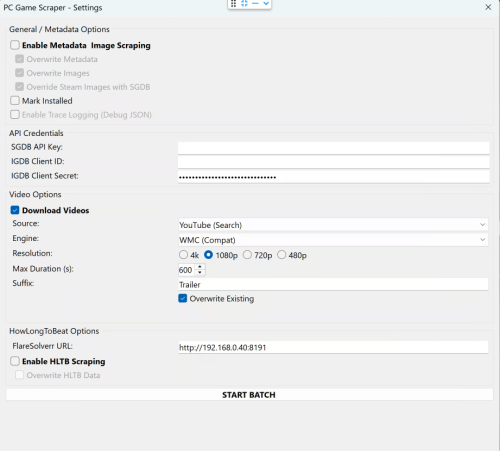
🎮 PC Game Scraper for LaunchBox PC Game Scraper is a robust metadata and media scraping plugin for LaunchBox. It intelligently prioritizes Steam for PC game metadata and IGDB for console titles. It leverages SteamGridDB for high-quality frontend artwork and YouTube (via yt-dlp) for video trailers. The plugin features advanced integration with HowLongToBeat (via FlareSolverr), now upgraded with a dedicated "Console Fork" to pull version-specific completion times directly from the site’s internal data. 🛠️ Dependencies & Requirements To use all features, the following components are required or recommended. I've included everything I can for your convenience. If you are not comfortable with them or do not want to use the optional Deno.exe. You may download your own or remove Deno.exe if you don't plan on using cookies.txt or downloading age gated videos. Required for Core Functionality yt-dlp.exe (Required for Video): The engine that downloads trailers. Must be placed in the plugin folder. ffmpeg.exe (Required for Video): Handles video merging and ensures files play correctly in LaunchBox. Recommended SteamGridDB API Key (Highly Recommended): Required for fallback images not available on Steam. IGDB Client ID & Secret (Highly Recommended): Required for all console game metadata and "Gap Filling" for PC games metadata either not on Steam or difficult to extract. FlareSolverr (Required for HLTB): A local proxy service needed to bypass Cloudflare security when fetching HowLongToBeat playtimes. cookies.txt and Deno.exe (Optional): Helps yt-dlp bypass age-restricted content gates on YouTube and sign in to your premium account. Deno.exe will solve captchas to bypass YouTube's bot protection. ⚠️ Disclaimer This plugin scrapes data from third-party sources. Please use FlareSolverr and yt-dlp responsibly and at your own discretion. ✨ Key Features 🧠 Smart Metadata Routing PC Logic: Scans Steam first. If a game is found, it then uses IGDB to "Gap Fill" fields Steam often lacks, like Series and Age Rating. Console Logic: Automatically skips Steam and routes directly to IGDB based on the game's platform. Manual Search: If automatic matching fails the user is prompted for a new search term, steam app id, steam store or igdb url. 🎬 Video Downloader Source Selector: Select your desired source, Steam or Youtube. Smart Fallback: For PC games, if Steam source is selected it attempts to grab the official Steam Store trailer first. If unavailable allows the user to switch to Youtube, or if the game is a console title, it pivots to a YouTube search and injects the platform in to the search term for better matching. Dynamic Slicer: Automatically applies your "Max Duration" limit to YouTube downloads to save disk space. YouTube videos will be cut off at the time set. A 10 minute gameplay video is cut down to 5 minutes. Resolution: Will attempt to download the desired resolution. If it is not available will scale down until one is found for the selected video. Suffix: Allows user to define desired youtube search term suffix, IE Trailer, Gameplay, etc... ⏱️ HowLongToBeat The plugin now uses two distinct methods to fetch playtimes: PC Logic: Pulls the general "blended average" from the HLTB search results. Console Logic: Loads the game's specific detail page and extracts the exact platform data (e.g., pulling GameCube-specific times for Metroid Prime rather than the Wii Remaster times). Custom Fields: Creates custom fields for dynamic playlist creation. Marathon 60h+, Long 30-60h, Extended 15-30h, Standard 5-15h, and Quick <5h, as well as the exact times provided by HLTB. 🎮 Real-World Workflow Examples If you select a game and run all three functions (Metadata, Images, and Video), here is how the plugin behaves: Example A: Windows Game (Cyberpunk 2077) Identification: Finds the game on Steam via name match. Metadata: Pulls metadata from Steam, then if client id/client secret are populated and correct hits IGDB to add additional fields not available or hard to parse from steam. Images: Grabs all available steam images. If images are missing or if SGDB override is enabled and your SGDB API is present it hits SteamGridDB. Video: Downloads the official trailer directly from the Steam Store servers or YouTube if the video source is YouTube. HLTB: If enabled and flaresolverr is setup. saves the general PC completion times to your custom fields as well as the category times mentioned above. Example B: Console Game (The Legend of Zelda: Twilight Princess for GameCube) Identification: Automatically routes to IGDB after detecting the GameCube platform. Metadata: Pulls the IGDB metadata. Images: Since no Steam ID exists, it goes straight to SteamGridDB to find the community-voted best GameCube media. Video: Recognizes it isn't a PC game and routes to YouTube to search for "The Legend of Zelda: Twilight Princess GameCube Trailer". HLTB: Triggers the Console Fork. It ignores the Wii and Wii U times and pulls only the GameCube platform data. -
PC Game Scraper View File 🎮 PC Game Scraper for LaunchBox PC Game Scraper is a robust metadata and media scraping plugin for LaunchBox. It intelligently prioritizes Steam for PC game metadata and IGDB for console titles. It leverages SteamGridDB for high-quality frontend artwork and YouTube (via yt-dlp) for video trailers. The plugin features advanced integration with HowLongToBeat (via FlareSolverr), now upgraded with a dedicated "Console Fork" to pull version-specific completion times directly from the site’s internal data. 🛠️ Dependencies & Requirements To use all features, the following components are required or recommended. I've included everything I can for your convenience. If you are not comfortable with them or do not want to use the optional Deno.exe. You may download your own or remove Deno.exe if you don't plan on using cookies.txt or downloading age gated videos. Required for Core Functionality yt-dlp.exe (Required for Video): The engine that downloads trailers. Must be placed in the plugin folder. ffmpeg.exe (Required for Video): Handles video merging and ensures files play correctly in LaunchBox. Recommended SteamGridDB API Key (Highly Recommended): Required for fallback images not available on Steam. IGDB Client ID & Secret (Highly Recommended): Required for all console game metadata and "Gap Filling" for PC games metadata either not on Steam or difficult to extract. FlareSolverr (Required for HLTB): A local proxy service needed to bypass Cloudflare security when fetching HowLongToBeat playtimes. cookies.txt and Deno.exe (Optional): Helps yt-dlp bypass age-restricted content gates on YouTube and sign in to your premium account. Deno.exe will solve captchas to bypass YouTube's bot protection. ⚠️ Disclaimer This plugin scrapes data from third-party sources. Please use FlareSolverr and yt-dlp responsibly and at your own discretion. ✨ Key Features 🧠 Smart Metadata Routing PC Logic: Scans Steam first. If a game is found, it then uses IGDB to "Gap Fill" fields Steam often lacks, like Series and Age Rating. Console Logic: Automatically skips Steam and routes directly to IGDB based on the game's platform. Manual Search: If automatic matching fails the user is prompted for a new search term, steam app id, steam store or igdb url. 🎬 Video Downloader Source Selector: Select your desired source, Steam or Youtube. Smart Fallback: For PC games, if Steam source is selected it attempts to grab the official Steam Store trailer first. If unavailable allows the user to switch to Youtube, or if the game is a console title, it pivots to a YouTube search and injects the platform in to the search term for better matching. Dynamic Slicer: Automatically applies your "Max Duration" limit to YouTube downloads to save disk space. YouTube videos will be cut off at the time set. A 10 minute gameplay video is cut down to 5 minutes. Resolution: Will attempt to download the desired resolution. If it is not available will scale down until one is found for the selected video. Suffix: Allows user to define desired youtube search term suffix, IE Trailer, Gameplay, etc... ⏱️ HowLongToBeat The plugin now uses two distinct methods to fetch playtimes: PC Logic: Pulls the general "blended average" from the HLTB search results. Console Logic: Loads the game's specific detail page and extracts the exact platform data (e.g., pulling GameCube-specific times for Metroid Prime rather than the Wii Remaster times). Custom Fields: Creates custom fields for dynamic playlist creation. Marathon 60h+, Long 30-60h, Extended 15-30h, Standard 5-15h, and Quick <5h, as well as the exact times provided by HLTB. 🎮 Real-World Workflow Examples If you select a game and run all three functions (Metadata, Images, and Video), here is how the plugin behaves: Example A: Windows Game (Cyberpunk 2077) Identification: Finds the game on Steam via name match. Metadata: Pulls metadata from Steam, then if client id/client secret are populated and correct hits IGDB to add additional fields not available or hard to parse from steam. Images: Grabs all available steam images. If images are missing or if SGDB override is enabled and your SGDB API is present it hits SteamGridDB. Video: Downloads the official trailer directly from the Steam Store servers or YouTube if the video source is YouTube. HLTB: If enabled and flaresolverr is setup. saves the general PC completion times to your custom fields as well as the category times mentioned above. Example B: Console Game (The Legend of Zelda: Twilight Princess for GameCube) Identification: Automatically routes to IGDB after detecting the GameCube platform. Metadata: Pulls the IGDB metadata. Images: Since no Steam ID exists, it goes straight to SteamGridDB to find the community-voted best GameCube media. Video: Recognizes it isn't a PC game and routes to YouTube to search for "The Legend of Zelda: Twilight Princess GameCube Trailer". HLTB: Triggers the Console Fork. It ignores the Wii and Wii U times and pulls only the GameCube platform data. Submitter spiritedusual Submitted 12/28/2025 Category Third-party Apps and Plugins
-
Version 1.0.1
34 downloads
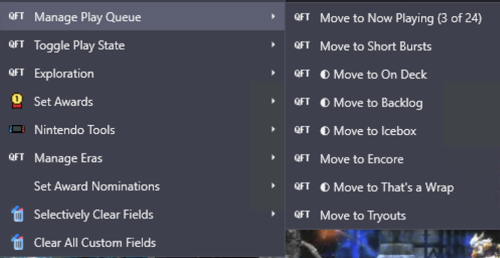
Hey everyone 👋 I built a plugin to solve a problem that's been driving me crazy, and I'm hoping it helps some of you too. The Problem I have 31,000 games in LaunchBox across 70+ platforms. I use custom fields heavily—tracking what I'm playing, managing a backlog, tagging award winners, marking first-party releases, organizing by era. It's a metadata system that works really well for discovery and organization. Except for one thing: actually maintaining it is miserable. You know the drill: Right-click → Edit → Custom Fields tab → scroll → find field → change value → OK That's 6+ clicks per field. Per game. If you're tagging a batch of games, it takes even more steps. When managing a play queue across thousands of titles, the friction compounds fast. I'd put off updating my metadata because it just wasn't worth the hassle. The Solution: QuickFieldToggle QuickFieldToggle puts your custom field actions directly in the right-click context menu. One click. Done. What It Does ✅ Single-click toggling — Toggle any custom field on/off instantly for a single game or multiple titles at once ✅ Create fields on-the-fly — No pre-setup needed, just define them in your config ✅ Multi-field actions — "Move to Now Playing" sets one field AND clears others ✅ Multi-value picker — For semicolon-separated fields, check/uncheck values from a submenu ✅ Conditional menus — Show "Nintendo Tools" only for Nintendo games ✅ Visual indicators — Checkmarks show current state ✅ Custom icons — Use platform icons or your own ✅ Hot reload — Edit config without restarting LaunchBox ✅ 100% JSON config — No coding required Example Use Case • Play Queue — "Move to Now Playing" / "Move to Backlog" / "On Deck" with mutual exclusivity • Award Tracking — Quick-add awards from your existing values, auto-set "Any Award Won" flag • Platform-Specific Tools — "First Party" toggle that only shows for Nintendo games • Era Management — Set console generation, platform era, lifecycle phase • Discovery Tags — "The Best" and "Discovery Bin" for standout titles Download Right here on the Launchbox Forums, or on GitHub: https://github.com/brandontravis/launchbox-quick-field-toggle The download includes two sample configs: • sample-simple.json — Basic play queue to get started • sample-complex.json — My actual working config for 31k games Installation 1. Download the latest release 2. Copy the QuickFieldToggle folder to your Plugins directory 3. Rename quickfieldtoggle.sample-simple.json to quickfieldtoggle.json 4. Restart LaunchBox 5. Right-click any game Documentation The GitHub repo has full documentation: • Configuration Reference — All options, operators, and settings • My Library Walkthrough — How I use QFT with 31k games, including my metadata philosophy and real examples What's Next? I'd love to hear your feedback. What custom field workflows would you like to automate? Any features you'd like to see? If you try it out, let me know how it works for you. And if you run into issues, open a GitHub issue or reply here. Enjoy! -
 QuickFieldToggle v1.0.0 View File Hey everyone 👋 I built a plugin to solve a problem that's been driving me crazy, and I'm hoping it helps some of you too. The Problem I have 31,000 games in LaunchBox across 70+ platforms. I use custom fields heavily—tracking what I'm playing, managing a backlog, tagging award winners, marking first-party releases, organizing by era. It's a metadata system that works really well for discovery and organization. Except for one thing: actually maintaining it is miserable. You know the drill: Right-click → Edit → Custom Fields tab → scroll → find field → change value → OK That's 6+ clicks per field. Per game. If you're tagging a batch of games, it takes even more steps. When managing a play queue across thousands of titles, the friction compounds fast. I'd put off updating my metadata because it just wasn't worth the hassle. The Solution: QuickFieldToggle QuickFieldToggle puts your custom field actions directly in the right-click context menu. One click. Done. What It Does ✅ Single-click toggling — Toggle any custom field on/off instantly for a single game or multiple titles at once ✅ Create fields on-the-fly — No pre-setup needed, just define them in your config ✅ Multi-field actions — "Move to Now Playing" sets one field AND clears others ✅ Multi-value picker — For semicolon-separated fields, check/uncheck values from a submenu ✅ Conditional menus — Show "Nintendo Tools" only for Nintendo games ✅ Visual indicators — Checkmarks show current state ✅ Custom icons — Use platform icons or your own ✅ Hot reload — Edit config without restarting LaunchBox ✅ 100% JSON config — No coding required Example Use Case • Play Queue — "Move to Now Playing" / "Move to Backlog" / "On Deck" with mutual exclusivity • Award Tracking — Quick-add awards from your existing values, auto-set "Any Award Won" flag • Platform-Specific Tools — "First Party" toggle that only shows for Nintendo games • Era Management — Set console generation, platform era, lifecycle phase • Discovery Tags — "The Best" and "Discovery Bin" for standout titles Download Right here on the Launchbox Forums, or on GitHub: https://github.com/brandontravis/launchbox-quick-field-toggle The download includes two sample configs: • sample-simple.json — Basic play queue to get started • sample-complex.json — My actual working config for 31k games Installation 1. Download the latest release 2. Copy the QuickFieldToggle folder to your Plugins directory 3. Rename quickfieldtoggle.sample-simple.json to quickfieldtoggle.json 4. Restart LaunchBox 5. Right-click any game Documentation The GitHub repo has full documentation: • Configuration Reference — All options, operators, and settings • My Library Walkthrough — How I use QFT with 31k games, including my metadata philosophy and real examples What's Next? I'd love to hear your feedback. What custom field workflows would you like to automate? Any features you'd like to see? If you try it out, let me know how it works for you. And if you run into issues, open a GitHub issue or reply here. Enjoy! Submitter idealbrandon Submitted 01/13/2026 Category Third-party Apps and Plugins
 -
 Hey mighty hive-mind! My MS-DOS.XML file is getting over-written with old data. Here are the steps to re-create the issue. Update the 'Progress' metadata for the MS-DOS game 'Lands of Lore: Throne of Chaos' from 'Not Started / Unplayed' to 'Active / In Progress', Launch the game. Close the game. I've manually added the line <Progress>Active / In Progress</Progress> to the MS-DOS.XML file in the following locations: \xml\all (This retains the correct progress value after performing the above steps) \xml\family (This retains the correct progress value after performing the above steps) \Data\Platforms (This version reverts the progress value back to <Not Started / Unplayed</Progress>) Please let me know if you need additional information or questions answered. I appreciate any advice! Attached is the corrected file. Chris MS-DOS.xml
 -
ReloadData Plugin View File A tiny plugin that allows you to refresh all games in Launchbox + Bigbox to show any changes made in the xml files outside of LB/BB. This adds System menu items to LB and/or BB which cause the refresh. You can also edit settings.ini in the plugin directory to customise its operation. Github repo: HERE Submitter stigzler Submitted 08/12/2025 Category Third-party Apps and Plugins
-
Version 1.0.0
12 downloads
A tiny plugin that allows you to refresh all games in Launchbox + Bigbox to show any changes made in the xml files outside of LB/BB. This adds System menu items to LB and/or BB which cause the refresh. You can also edit settings.ini in the plugin directory to customise its operation. Github repo: HERE -
Sorry if this has been asked before, but I'm wondering if there's any option to add at least one -- maybe two -- additional lines of metadata under all of the games in Launchbox using the default theme? Right now, only the game's title and developer are displayed -- "Chono Trigger" and "Square" in the example on the left --, but I'd like to be able to add more metadata to the bottom, such as the genre and a custom field value -- "JRPG" and "100% Completed" in the example on the right: Default: Desired: It would be even better if it could be customized on a per-console basis, so that some consoles might use one custom field value, and other consoles could use a different custom field value, for instance. Is this already possible in the default Launchbox theme, or do I need to make an entire custom theme for it? If it requires making a custom theme, is there a simple way to just copy-paste the default theme folder, rename it to something different, change one or two lines of code, and then just use that new custom theme in Launchbox? It seems like a small enough change that breaking out the community theme creator would be overkill.

-
 Hi. I've got a bunch of Amiga and C64 roms that I've imported into LB. The file names are all without spaces and have version numbers in them, which I think prevents them being found in the LB DB. For example, the file name for It Came From The Desert is 'ItCameFromTheDesert_v1.2_0014'. If I rename it to 'It came from the desert' and hit 'search for metadata' it finds it no problem. But I don't have the energy to do that for all the games. Is there an easy way to fix this?
 -
Hello, I am having issues with Launchbox assigning the appropriate ID for the game I'm searching. It is showing up as "No games found with that Specific Title." I created the game entry in the Database myself back on March 4th, and have waited for it to be synced between the online database and Launchbox. I know sometimes it takes time for the game to sync between the two. Since creating the database entry, I have updated my Launchbox to the latest version. I have also tried to add the game as a "new game" numerous times to no avail. The game is originally purchased from GOG. Here is the game I am trying to search in question: https://gamesdb.launchbox-app.com/games/details/392098-the-thaumaturge I have had this issue in the past before importing games, however it usually takes a few days to be able to search the game in launchbox with a database ID. I tried to edit the a line in the Data folder for the "windows" platform, <DatabaseID>xxxx</DatabaseID>, however I can not find or locate the database ID anywhere from launchbox or on the Online databased. I though at first the ID was in the URL but that is completely different. I am also requesting, as a person who has a large library and constantly purchasing games and adding to launchbox, can we please have the ability to manually type in the Database ID number, and also have that number available for view on the online database? That way if we need to troubleshoot issues like the one listed above, we can manually resolve it. Thanks in advance,
-
 When scraping a platform as 'Pinball', it sometimes scrape metadata for a table from another system if that game couldn't be found in the target 'Scrape As' platform. Example Platform The table `The Addams Family` is scraped from another system It scrape from Amstrad CPC platform for some reason. See the matching description in Overview.
-
I initially got stuck when downloading metadata from EmuMovies I believe. It got stuck at "Player's Edge Plus Screenshot - Game Title" the first time and I waited about 15 minutes, tried to hit cancel and eventually had to End Task. After that I restarted LaunchBox again and it started downloading where it left off. Eventually it got to the same exact file name, "Player's Edge Plus Screenshot -Game Title," but this time as it is stuck where it lists filenames, it's still downloading other files as the numbers are changing...just not the names anymore. Not sure if there is some issue at emumovies with that particular file or not. Edit: This morning it has hung again on the file "Showdown - 3D." Once again it is after searching the Emumovies database. Apparantly there is some problem occurring between launchbox and emumovies involving metadata.
-
Hi, So I'm having a bit of trouble with the metadata image downloading. When I download the media everything downloads fine as shown in the first attached picture, but when I go back to edit metadata/media and go to images I find that it has downloaded a ton of duplicate images as shown in the second attached picture. I have everything set to download to a specific folder on my external hard drive to save space on my computer if that info helps. Any help would be greatly apricated.
-
 For some reason it looks like Launchbox's Rushdownloader can't download any of the screenshots from the Steam storefront. It does fine with Steam Posters and Achievements, but when choosing to download just the Steam Screenshots option I get this error. I'm also going to include a Debug log from when I attempted it too. It's odd since GoG works alright (I noticed for EGS and Uplay games that trying to download the screenshots from the storefronts isn't really an option when you go to the Edit>Media>Images section of individual games to download them. Have to download the Screenshots Gameplay options I'm guessing from the LB Database despite it being an option when importing games.) I've tried adding Launchbox to my firewall settings too and that error still pops up so I'm kinda at my wits end here and wondering if anyone else has this problem? I have the current beta build of Launchbox, but I was using the current Stable build before trying it and it happened there so I thought that the beta version would work, but sadly it didn't. Debug 2021-07-24 02-15-51 AM.log
-
I'm running the latest LaunchBox/BigBox with the latest Windows10 on a i3-4130 PC with 16GB of memory and 250GB SSD and a Radeon HD5770. When I try to download the Metadata and Media for my game collection (less than 1000 from 9 platforms), it works for a little bit, then it eventually gets stuck/frozen trying to download a particular .png. Like right now, at the moment it's stuck downloading 4 file 7: Fanart - Background xxxxxxxxx.png for the game Puchi-Carat... Pressing cancel doesn't do anything but I can close the LaunchBox normally via alt-F4 or the clicking the X window button.. Also, if I try with less media types and/or only with a platform with few games, then it works.. but as soon I try to to download more media types or selecting a larger platform, the same thing happens.. It always gets stuck trying to download something... I'm not a premium member for EmuMovies, but I'm not downloading any videos or using premium features.. And I've also tried not using EmuMovies at all, with the same results... I don't think it's the issue with my computer or Windows or my Internet connection... Any ideas? Thank you!
-
I would appreciate if someone can help me, I have been trying to find the metadata of Super Mario Bros. 3 but they do not match, I only see Super Mario Bros. 3X which is a HACK Rom in which the original images do not match, I have tried several names but I can't find the correct database connection
-
Greetings. I'm using version 11.11 and 11.12 of Launchbox, but still having trouble updating metadata and media for close to a month now. I have a lifetime membership of Launchbox and lifetime membership of Emumovies, but as my picture above, I'm currently downloading 23,280 files but they've all timed out. This had happened countless times and I've tried uninstalling and reinstalling everything including using the beta version, but the result has been similar - they all timed out. How do I fix this problem, as I have yet another batch of 116,000 games to update, but can't even do an update of my first 30,266 games. Any help would be greatly appreciated, thank you
-
When Importing modern games and downloadable content add-ons I'm having a problem in which Launch box is unable to recognize DLC and group it with the games that they belong with, instead it imports DLC as separate games (DLC shows no data or pictures, games do). The files that I have for the X360 XBLA (Xbox 360 Live Arcade) don't have file extensions, so that may make it harder for LaunchBox to import the content properly. I also thought my issue might be caused by having different file names of games and DLC. Is there a proper format for DLC? This is an example of how I have mine labeled now: "3D Ultra Mini Golf 2 [258410A3B] Fairy Tales Map Pack (DLC)". Perhaps the title of the DLC should be in parenthesis or next to game title, is there a guide for this? (more modern console examples) Shouldn't Launch box show what DLC you have with the associated games in the games details? (that seems like a standard feature for modern consoles) Rather than combine each DLC to their game individually in Lunchbox after importing them (unable to do so, greyed out combine button). How do I properly import this DLC so that it is sorted properly? Also adding an option to not import .zip and .7z file format for ALL consoles would be helpful.
-
Hello! I have a few questions about the "Play Mode" field. On LaunchBox, the 5 default options I see are: Single-Player Multiplayer Cooperative 2-Player Alternating 2-Player Simultaneous From what I understand, games on the database can only be marked as the first three listed, and anything marked as "Cooperative" is also marked as "Multiplayer" (which makes sense I guess). So, what's the point of the 2-Player options? Or, better question, why aren't they part of the database? Seeing as the "Max Players" options exists, these seem redundant. Also, why not just have "Cooperative" and something like "Versus" or "Competitive"? That way, coop games don't also have to be marked as multiplayer. Tl;dr, I'd like to propose the following as default play modes for simplicity, as well as incorporating a selector into the database for all modes: Single-Player Local Co-op Local Versus, Local Competition, Local PVP, something along those lines Alternating Online Co-op (Namely for pc games, not really thinking netplay) Online Vs (Or something like that) MMO (Debatable but I thought I'd list it)
-
Hi, i was changing the paths of my games and i started to notice that the games have the file name and not the metadata although the metadata is correct. does anyone know how to get it back to normal?
-
Hello guys! i'm looking for Metadata.xml do you have at least updated file?! mine is old, can't identify what roms am i searching when adding rom because my metadata isn't updated... I've also tried to update the Metadata file.. when adding games but it's freezes when almost completed... then it'll close... Ahmm.. guys could you give me one file of your Metadata file?! :) :) thanks in advance and considerations!
-

metadata Metadata Won't Load. Too Many Error Messages
MACro Trigga posted a topic in Troubleshooting
Provided below are screenshots of what I'm trying to load onto my LaunchBox. Ever since I updated my software, I get this same error message for every game I try to add on here. Even when I try to manually add my artwork and or metadata I still get error messages. How do I fix this issue? URGENT - bROKEN Trigga
-
Hey there, I was trying to add a ps2 game on launchbox, but it's been half an hour since it's stuck on updating local metadata from launchbox games database... why is that? Is it not working anymore?
-
 I know Steam mucked up a lot of things recently, but this has been happening intermittently for quite a while now. I am keeping up with the latest betas (lifetime premium member) in the hopes this is a bug, but now it is getting to be more consistently bad. I import games with my Steam API Key, check every box to metadata and images, and some games don't import anything except the Steam banner. I have plenty of other games that do import the metadata (like Publisher, Genre, etc.), but many do not, and the process is the same for me each time. When I try to update metadata it usually only gives me the Wikipedia prompt (which I don't want) and still does not give me anything from Steam. If I check the Steam game itself on Steam, the game has plenty of videos, images and metadata, and I can manually save them and update each game, but that is not something I do for the other games that work. Am I doing something wrong, is this a fundamental misunderstanding on my part on how this feature works (like if it is not in the Games DB it won't update the game?), or is this a bug? Anyone else have this issue? Some examples of missing game data: TINY METAL (meta and images) Sorcerer King: Rivals (images) Dungeons & Robots (meta and images) Insanely Twisted Shadow Planet (images) In these above examples, they were all imported at the same time with other games that had both metadata and images (on July 2, 2018, if that helps). I have more examples if needed, but that is the most recent import. Any help or guidance would be greatly appreciated. Thanks! As a side note, I turned off my firewall to make sure that was not affecting anything, but then again, I would think all the games would fail with it it on if it was part of the problem. Either way, the result is the same. I also went through the Download Metadata and Media Wizard with no change.
 -
HI guys, I like to order my games by genre but so many games are included in several genres and it makes the navigation tedious. Is there a way to force Launchbox when downloading metadata to only add one genre for each game (it seems that most of the time the last genre is the main one)? Thanks.


.thumb.webp.2f80431addae4e5b51f51b0084b9e6a7.webp)

.png.ae09c21f90efdda3058b79a6b1507b87.png)
.png.03471a4accb4a5e93cd416019dfba560.png)


