Search the Community
Showing results for tags 'media'.
-
Prior to the second lockdown in the UK, I finally got around to setting up my new MAME collection in Launchbox. To my delight, most of the automatically downloaded logos were super clean and looked perfect. High-fives all around. In the back of my mind, I’d wanted to add my favourite ZX Spectrum, Amiga, and Atari ST games to Launchbox. When the second lockdown hit and I was stuck at home, I had no excuse not to. I got over the technical hurdle of getting the older emulators running, but quickly noticed that many logos were missing or low quality. No surprise, since these systems are pretty niche and old. Being an art director in TV, film, and games for 20-odd years, this sort of thing triggered my artistic OCD. Luckily, I still have physical copies of many of the games, so I began scanning and cleaning logos. Before long, the project snowballed into other consoles like PlayStation, PSP, and GameCube. Misaligned discs, bad cut-outs, or ones that didn’t spin properly really bugged me, so I fixed those too. Here’s a rough breakdown of the work I’ve done by platform. When I get the time, I’ll share some of the disc templates in case they’re useful. ZX Spectrum I did a lot of work here, scanning original artwork and digitally cleaning logos to make them consistent. I also adjusted spacing so that the “visual mass” of each logo felt balanced in Launchbox. Notable examples: Robocop 1–3, R-Type, Overlander, Jet Set Willy. Atari ST and Amiga Generally in better shape, but common problems were low resolution, blurriness, and bad alpha edges from cut-outs. Many were designed for light backgrounds, so I created versions that work on dark backgrounds. Good examples: Venus Flytrap, X-Out, the Lotus series. SNES and Mega Drive (Genesis) Mostly solid, but I made a few tweaks here and there. PS1, PS2, GameCube This took the most time. I centred and cleaned disc artwork, often scanning from my own copies (e.g. Wipeout, Destruction Derby). Where possible, I pulled high-res box/disc scans online. I couldn’t cover every region, but aimed to ensure at least one decent disc per title, prioritising PAL/European editions. In total: around 75 GameCube, 165 PS1, and 265 PS2 discs. PS1 needed the most work due to inconsistent print quality. Game Boy and Game Boy Advance Game Boy media was generally fine, but GBA logos varied a lot in quality and spacing. I worked through about 400 GBA logos. I’ll probably do another pass on the ZX Spectrum, Amiga, and Atari ST logos, as I’m not sure I uploaded everything. Now that lockdown’s ending, I’ll ease off for a while. But I thought I’d share the obsessive work that’s been keeping me busy.

-
Version 1.0.0
12 downloads
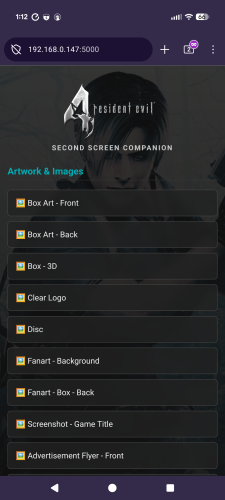
Second Screen Companion - View Manuals, Guides, & Media on your Phone! Second Screen Companion is a lightweight LaunchBox plugin that instantly turns your smartphone or tablet into a dedicated companion hub for whatever game you are currently playing. Whenever you launch a game, the plugin silently starts a local web server. Just scan a QR code, and your phone will instantly load a beautiful, dark-mode hub containing all of the game's manuals, strategy guides, artwork, and media so you can browse them while you play! 🌟 Features The Companion Hub: A sleek, mobile-optimized webpage that automatically uses your game's Clear Logo and Fanart Background for a premium look. Comprehensive Media Scanner: Automatically finds and serves: 📖 Documents: Game Manuals and Strategy Guides (pulled dynamically from your Additional Apps). 🖼️ Artwork: Front/Back Box Art, Discs, Carts, Clear Logos, Fanart, Storefront Posters, and dozens of other image folders. 🎵 Media: Automatically plays your game's Theme Music or Gameplay Videos right in your mobile browser via native HTML5 players. Smart Image Viewer: Transparent PNGs (like Clear Logos or isolated box art) are displayed over a dark-mode checkerboard background so they always look perfect and never vanish into a black screen. One-Click Network Setup: Built-in tools to automatically open the required Windows Firewall ports so you don't have to mess with command prompts. 🛠️ Installation Download the latest release zip file and unpack in your LaunchBox\Plugins\ directory. You might have to right-click the dll file, go to Properties, and check the "Unblock" box at the bottom (this is required by Windows for downloaded DLLs). Extract the Second Screen Companion folder directly into your LaunchBox\Plugins\ directory. (You should have a folder path that looks like: LaunchBox\Plugins\Second Screen Companion\WirelessScreenServer.dll and QRCoder.dll) 📱 How to Set Up & Use Open LaunchBox. Go to the top menu and click Tools -> Second Screen Companion Settings. You can leave the Default Port as 8080, or change it if you have conflicts. Click Apply Network Rules (Admin). This will trigger a Windows prompt to automatically open the port in Windows Firewall for the server. (You only need to do this once!) Click Test Connection QR. Scan it with your phone's camera. If your phone and PC are on the same Wi-Fi network, you will see a green "Success!" screen. Play a game! The next time you launch a game, access the host pc ip on the port assigned. The hub will automatically populate with all the media for the active game. ⚠️ Troubleshooting / Notes Same Network Required: Your phone/tablet and your LaunchBox PC must be connected to the same local network/Wi-Fi. Missing Media? The plugin strictly reads the media you have stored in your LaunchBox folders. If LaunchBox doesn't have a manual or video for the game, the hub won't display it. Browser Caching: Mobile browsers like to cache things. If you swap games and the phone still shows the old game, just pull down to refresh the page!- 2 comments
-
- 1
-

-
- media
- documemtation
- (and 4 more)
-
 Launchbox Second Screen Companion View File Second Screen Companion - View Manuals, Guides, & Media on your Phone! Second Screen Companion is a lightweight LaunchBox plugin that instantly turns your smartphone or tablet into a dedicated companion hub for whatever game you are currently playing. Whenever you launch a game, the plugin silently starts a local web server. Just scan a QR code, and your phone will instantly load a beautiful, dark-mode hub containing all of the game's manuals, strategy guides, artwork, and media so you can browse them while you play! 🌟 Features The Companion Hub: A sleek, mobile-optimized webpage that automatically uses your game's Clear Logo and Fanart Background for a premium look. Comprehensive Media Scanner: Automatically finds and serves: 📖 Documents: Game Manuals and Strategy Guides (pulled dynamically from your Additional Apps). 🖼️ Artwork: Front/Back Box Art, Discs, Carts, Clear Logos, Fanart, Storefront Posters, and dozens of other image folders. 🎵 Media: Automatically plays your game's Theme Music or Gameplay Videos right in your mobile browser via native HTML5 players. Smart Image Viewer: Transparent PNGs (like Clear Logos or isolated box art) are displayed over a dark-mode checkerboard background so they always look perfect and never vanish into a black screen. One-Click Network Setup: Built-in tools to automatically open the required Windows Firewall ports so you don't have to mess with command prompts. 🛠️ Installation Download the latest release zip file and unpack in your LaunchBox\Plugins\ directory. You might have to right-click the dll file, go to Properties, and check the "Unblock" box at the bottom (this is required by Windows for downloaded DLLs). Extract the Second Screen Companion folder directly into your LaunchBox\Plugins\ directory. (You should have a folder path that looks like: LaunchBox\Plugins\Second Screen Companion\WirelessScreenServer.dll and QRCoder.dll) 📱 How to Set Up & Use Open LaunchBox. Go to the top menu and click Tools -> Second Screen Companion Settings. You can leave the Default Port as 8080, or change it if you have conflicts. Click Apply Network Rules (Admin). This will trigger a Windows prompt to automatically open the port in Windows Firewall for the server. (You only need to do this once!) Click Test Connection QR. Scan it with your phone's camera. If your phone and PC are on the same Wi-Fi network, you will see a green "Success!" screen. Play a game! The next time you launch a game, access the host pc ip on the port assigned. The hub will automatically populate with all the media for the active game. ⚠️ Troubleshooting / Notes Same Network Required: Your phone/tablet and your LaunchBox PC must be connected to the same local network/Wi-Fi. Missing Media? The plugin strictly reads the media you have stored in your LaunchBox folders. If LaunchBox doesn't have a manual or video for the game, the hub won't display it. Browser Caching: Mobile browsers like to cache things. If you swap games and the phone still shows the old game, just pull down to refresh the page! Submitter spiritedusual Submitted 03/01/2026 Category Third-party Apps and Plugins
-
- 2
-
-
- media
- documemtation
- (and 4 more)
-

Here is a box art cover for the game, Asura The Striker
Orionsangel posted a topic in Platform Media
Asura The Striker
-


Version 5.0.0
13,710 downloads
V4.0 Update with all 130 tables as of December 12, 2024. The following includes media for Pinball FX. Media naming is formatted for ease of import assuming setup as noted below. Screenshots and Fanart are all 1920x1080 and in PNG format. Goal was to try to find high quality images. Unfortunately, Zen only ever releases some media for their tables so you have to hunt and peck. I will update pack periodically as get time. I also have about 25% of a video pack done but that may be awhile at this point and will release as separate download entry. Setup in Launchbox [ YOU FOLLOW POST BELOW FOR MEDIA TO MATCH AUTOMATICALLY] Media in this Pack Clear Logos (Clear Logo.zip). Grimm Tales was only table couldn't find a decent image. So recreated via an approximate font. It is close but not exact. If find better will upload. Tarcisio Style Wheels - Silver/Round (Box - Front - Reconstructed.zip). I have been playing around with another wheel format but only done one attached at end of this for Indy set. Screenshots (all 1920x1080 PNG format files): Gameplay (Screenshot - Gameplay.zip): Desktop View Game Select (Screenshot - Game Select.zip): Full Table View Game Title (Screenshot - Game Title.zip): These are typically backglass type images. For physical tables the images are from backglass (non-stretched). For others typically will be similar to fanart images but with various logos on image. Fanart - Background (Fanart - Background.zip): about half are similar to the Game Title images but others are more "simple" with no Zen logos and less textual clutter. Not all Zen tables have easy to find media so in some cases the fanart file will be identical to the Game Title above. Advertisement Flyers (front and back) for the physical tables: currently 28 as of 7/29/2023. In the Advertisement Flyer - Front.zip and Advertisement Flyer - Back.zip Steam Backglass Images (Cabinet.zip) - 2 monitor setups only: You only need this if you have two monitors and want a back glass image on the second monitor. Images are the same as the Game Title versions above but renamed as needed to properly work (need a "_" in the name and must be PNG format). These are to be placed here: C:\Program Files (x86)\Steam\steamapps\common\Pinball FX\PinballFX\Mods\Cabinet Note not to be confused with the Launchbox "arcade cabinet" media. This is for Steam folder only. Credits: Update 9/3/2003 with 3D Box since LB DB doesn't have separate entry for FX: Pinball FX.xml -
 ----This was posted in the RocketLauncher forums as well,so I basically copy and pasted the post to here..I figured a lot of my media might possibly be valuable to this community,even though it's purpose is for RocketLauncher----- -----EDIT: I'm not sure why my text is all black from here down,or if it's just my screen and doesn't effect anyone else,but sorry if it is----- Hey all! For anyone that does not know me,I have been running a Youtube channel for a while now,and collecting all sorts of media to fill Pause with,as well as making Fade screens and other various frontend artwork. I just wanted to extend an invite for anyone interested,to check out my channel,and see what I have available. I will provide the download links,a link to my channel, and some examples of my work below. I'm currently sitting at about 360gb of media...and I upped my subscription to my upload site to 2tb of space...so I have alot more to come. Some of the work includes.. --Custom Pause menu logos for 50+ systems /including a default set --Over 110 custom fade screens with Layer 4's --Over 700 NES soundtracks /tags and box art embedded --Over 700 SNES soundtracks /tags and box art embedded --Over 250 N64 soundtracks /tags and box art embedded --Over 900 MAME soundtracks / tags embedded --100's of soundtracks for various other systems /tags and box art embedded --Tons of videos and documentaries for multiple systems --System artwork (including console,controllers,boxes,carts,system boxes,and displays) for multiple systems --1000's of background images for multiple systems --1000's of Maps,Strategy guides,and Manuals for multiple systems --Custom 1080p Marquees (for use in HyperMarquee or other marquee software) covering 70 systems,which includes 1 marquee for the main wheel and 1 marquee for the sub-wheel for each system You can go here for my Youtube channel,which includes various release videos,and instructions - https://www.youtube.com/channel/UCeP60Vc-kRYCiJ1y2PvxryA Thank you everyone and Enjoy!
- 55 replies
-
- 15
-
-

-
- rocketlauncher
- fade
- (and 2 more)
-
Version 1.0.0
11 downloads
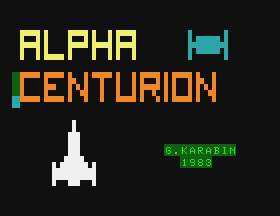
A collection of screenshots for the APF Imagination Machine (Not the MP-1000 Cartridges but the cassette tapes). A mix of gameplay screenshots and title screens taken from Virtual APF and compressed as PNG.- 2 comments
-
- 1
-
-
- apf
- screenshots
- (and 2 more)
-
Version 1.0.0
27 downloads
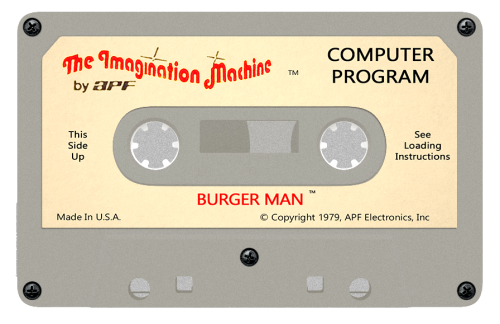
APF Imagination Machine Tape art for the 50 or so tapes I could get to run in Virtual APF. Nothing fancy. I tried to replicate the style of the original tapes, but obviously they're not perfect! -
Version 1.4.1
5,705 downloads
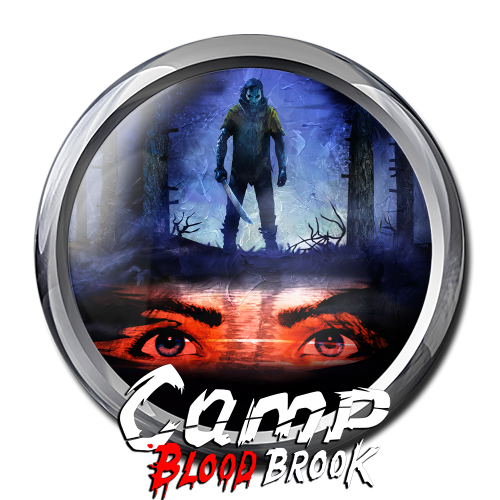
The following includes media for Pinball M a new system based off the Pinball FX (2023) engine but oriented towards Mature rated pinball themes. Media naming is formatted for ease of import assuming setup as noted below. This pack contains 8 tables as of 2024-10-24. Screenshots and Fanart are all 1920x1080 and in PNG format. Goal was to try to find high quality images. Unfortunately, Zen only ever releases some media for their tables so you have to hunt and peck. I will update pack periodically as additions are made by Zen. Video pack will follow at some point. Setup in Launchbox (details): Note: as of 12/3/2023 Cabinet Mode Direct Launch is currently broken. Fixed as of patch v 1.02 in Steam. Epic version apparently has issue where cabinet setting won't remain selected after restart. Media in this Pack: Current as of October 24, 2024. Clear Logos (Clear Logo.zip). Fortunately Zen had most in their Press release site so all high quality. Tarcisio Style Wheels - Silver/Round (Box - Front - Reconstructed.zip). Screenshots (all 1920x1080 PNG format files): Gameplay (Screenshot - Gameplay.zip): Desktop View Game Select (Screenshot - Game Select.zip): Full Table View Game Title (Screenshot - Game Title.zip): These are typically backglass type images. For physical tables the images are from backglass (non-stretched). For others typically will be similar to fanart images but with various logos on image. Fanart - Background (Fanart - Background.zip): similar to the Game Title images but with no Zen logos and less textual clutter. Not all Zen tables have easy to find media so in some cases the fanart file will be identical to the Game Title above. Pinball M LB XML: XML file which should have all data and match up to table naming convention. Has 5 tables at moment. The Data.Zip file containers the text pointer files for each table (see install details above). Front Cover Art: (Box-Front.zip): Box formatted cover art Zen created. Steam Backglass Images (Cabinet.zip) - 2 monitor setups only: You only need this if you have two monitors and want a back glass image on the second monitor. Images are the same as the Game Title versions above but renamed as needed to properly work (need a "_" in the name and must be PNG format). These are to be placed here: C:\Program Files (x86)\Steam\steamapps\common\Pinball FX\PinballFX\Mods\Cabinet Note note to be confused with the Launchbox "arcade cabinet" media. This is for Steam folder only Below are a few misc graphics including a 3D box for the Pinball M system and Silver Ring Logo. -
A little like Jonny Severn and SirCamel, I've been cleaning up box art for years now (I've hit 10,277 successful submissions to date....somehow). I don't have photoshop or anything fancy, just a few old art packages, some good free websites for enlarging images, creating transparencies and finding out what fonts are used - AND perseverance!). My biggest submission project to date has been the reconstructed Nintendo Game & Watch boxes (all previously uploaded to the Db) - which started as a challenge to myself to see how far I could push / punish PowerPoint - but my OCD drove me to recreate all the boxes inc. as many regional variations as I could (I'll upload one here as example). I don't have a lot of time - so I cannot take on any requests....but hope what I do upload helps someone out there to either use as is or take to the next level if they have Photoshop. First uploads: The Last Ninja - C64 Cassette version (front, back and spine) N64 Box Spines (28x USA Boxes, 2x EUROPE) Nintendo G&W (Chef - front, back, L+R spine, T+B spine) I'll keep posting as and when I complete anything...but as this is simply a hobby...no guarantees when
-
Hi, I have several working ROMs and the download media feature (cover, screenshots) isn't detecting any media to download. Here is a video recording of the issue: LaunchBox_yEST3PHJDi.mp4 I'm doing something wrong? Thanks.
-
This is after I download all the media through launch box. As you can see, a lot of the games don't have any media. Any way i can fix this? I also got an image folder with the rom set. have tried to put it in the images folder in the specified location. that didnt work for any game. so i just downloaded everything from launchbox. But it still leaves out a lot of the games media.
-
I was helping someone in chat last night and it occurred to me that it's probably worth posting about as a sortof FYI/FAQ for others. The topic was "proper" media naming for automatic matching in LB/BB. I think the majority of the confusion stemmed from the fact that there are multiple ways in which the media can be named and it will still match (which is a really awesome feature, but it's something not everyone is accustomed to); and they're matched on the basis of your own library and your own rom files. Let's say you have an entry in your library that's titled "Final Fantasy VI" and an associated rom file named "FF6(1994)(Squaresoft).zip". In this scenario, your media could be named in any of three ways (actually four if you include appended numbers but we'll get back to that) and it will automatically associate with your LB/BB entry. It could be named based on the library title, the rom file name minus special characters, or the rom file name with all special characters. Final Fantasy VI.jpg - matches the library title; this will work FF6.jpg - matches the rom file name minus special characters; this will work note however that appended numbers (-0#) do not work in this scenario. FF6(1994)(Squaresoft).jpg - matches the rom file name with all special characters; this will work FF6(1994).jpg - includes special characters from the rom file, but not all of them; this will not work FFVI.jpg - doesn't match either the library title or the rom name; this will not work If you're matching by title and the title includes characters that are invalid for Windows file names, that character needs to be replaced by an underscore in your media file name. So if your game title is Super Street Fighter II: The New Challengers, your media would need to be named Super Street Fighter II_ The New Challengers.jpg. This requirement also applies to titles that use an apostrophe, despite the fact that apostrophes are usable in Windows file names. Additionally, for most types of media you can append a number at the end of the file name (formatted as -0#) and they'll match in LB/BB. So if you have 4 images in your Screenshots - Gameplay folder for Final Fantasy VI, they could be named as below and they'll show up in order in LB. Final Fantasy VI-01.jpg Final Fantasy VI-02.jpg Final Fantasy VI-03.jpg Final Fantasy VI-04.jpg For media other than screenshots, doing this will typically cause them to cycle randomly each time you select the library entry. Platform media is unique in that the files can be named anything, they simply need to be in the correct folder. If you want to add in your own platform banner for Super Nintendo, it would need to go in Launchbox -> Images -> Platforms -> Super Nintendo -> Banner. The actual image file could be named anything but so long as it's in that folder it will show up as a banner for SNES. Additionally, you can put in multiple images for platform banners and platform fanart (again, named anything) and it will cycle between them randomly whenever you select the associated platform in BB. Note that this doesn't work for platform clear logos as you have to clear their image cache for them to reset. I think this covers just about everything. If anyone else has anything else to add though, I can add it into the post.
-
Hey there Just curious if there's a feature or plugin created to add media (covers, backgrounds, videos, etc) by pasting a URL and downloading it straight from the internet? I was wondering cos I've been using Playnite for a while and it does have a feature to add game art by Google search or pasting an online URL. Thanks in advance!!!
-
 This is a simple Python Qt5 UI app I designed to audit Launchbox Media, and also to learn about Python QT5 UI framework at the same time. Two birds in one stone eh? I found that the default audit mode in Launchbox is naiive, takes time to process, and doesn't do much. There are times where I wanted to quickly look at how many Clear Logos I am missing out for a playlist or platform, or platform games. Features: Perform fuzzy matching for media (pictures) that matches the XML (platform, platform games) with a selected matching ratio. (currently hard coded for now and not in UI) Ability to select the best matched pictures for a matching platform, platform games, etc. Ability to output all selected images to a single output folder. Current version v0.1 support only Playlist, Platform, and Platform Games audit mode. Let me know your thoughts!
 -

Version 1.0.0
30 downloads
Enjoy -
Hey there, I'm currently importing various MAME/MESS system that might have different media/medium for a system, e.g. Atari 800 that has cartridge, floppy disk, and casette. Is there any recommended way to create only a single platform but easier way to group by Media? Reason being the emulator command differ depending on the media, especially when using MAME emulator, using -cart for cartridge, -flop1 for floppy, etc. Wish LB has a native field called Media or Medium for us to sort. Also thinking of using Version field but it's best reserved for its original purpose. Initially I was thinking to use a Custom Field: Media, then generate auto playlist based on the filter. Unfortunately the auto playlist field didn't support custom field. Another approach is to create separate platform for it, such as Atari 800 (CS), Atari 800 (CT) and Atari 800 (FD). But doing is is convoluted and make BigBox navigation more cumbersome. Wish to see how you guys did it!
-
Version 7.0.0
14,508 downloads
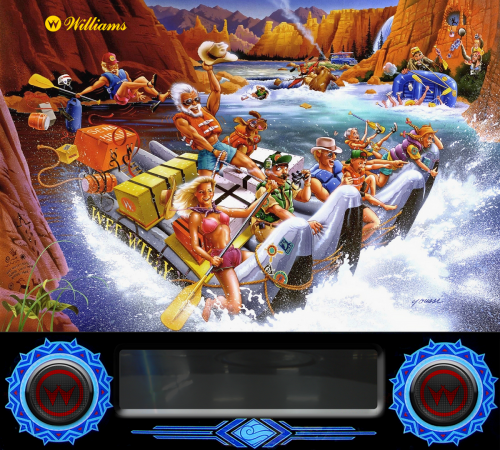
***Updated with new Indiana Jones - The Pinball Adventure table released March 2022.*** ***Volume 6 update includes Williams Pack for Funhouse, Dr. Dude, and Space Station *** ======================================= This includes media for all 96 100 Pinball FX3 tables through Volume 5 released in December 2019 Volume 6 and with Indiana Jones table released in March 2022. This pack includes: Clear Logo Docklet Gameplay Screenshot Full Table Gameplay Screenshot Background Pseudo-Backglass - I use these for Game Title snaps Advertisement - Front and Back (for the recreation tables only) I only made a few of the backglass/background images when no others were available. The rest are credited to others, gathered from Zen site, Steam, www.gameex.info pinballx media site, and around the web. If someone objects to an image they created being in this pack, let me know and I will remove it. For those that have two screen setups, then the images for the background on screen #2, named according to the PXP (Steam) file naming convention (which is not straightforward) are in the "Two-Screen Images - PXP Naming.zip" file. The Pinball FX3 Images.Zip file contains a zip of the Launchbox images folders. Within the folder structure they are as follows: Clear Logo = Clear Logo folder Docklet = Box-Front-Reconstructed folder Gameplay Screenshot = Screenshot-Gameplay Full Table Gameplay Screenshot = Screenshot-Game Select Background = Fanart-Background Pseudo-Backglass = Screenshot-Game Title Advertisement - Front and Back (for the recreation tables only) - Flyers folders If you want video snaps, you can find those here: Lastly this platform XML file contains data for each table, PXP name, year, manufacturer, brief description (usually from Zen site), and base information that would normally be downloaded from LB DB. NOTE: The XML file is now located with rest of image downloads. Just click "DOWNLOAD" button at top right, and it is the last entry. -
.thumb.png.62b6d3154e8b2f29e152127fbbe24c9e.png)
Version 1.0.0
318 downloads
Hello friends, hope you like this idea. It's hard to find a good quality carts for Sega Mega Drive and Genesis, so I created 3D Cartridges encapsulating the game logo. In this pack you'll find USA, Europe and Japan 3D cartridges. Take a look to my video to understand it better: Hope it is useful for someone. See ya soon! -
When scraping a platform as 'Pinball', it sometimes scrape metadata for a table from another system if that game couldn't be found in the target 'Scrape As' platform. Example Platform The table `The Addams Family` is scraped from another system It scrape from Amstrad CPC platform for some reason. See the matching description in Overview.
-
Hello, is anyone else basically completely unable to download any media from EmuMovies in LaunchBox right now? I start it and it takes like an hour to download 1 image. It's been stuck on image 2 for the past hour and a half. Image attached for refference.
-
Is there a way to select all games and have it check and download any missing media files? Even platform by platform would be better then 1 at a time I am looking to add a lot of missing videos after subbing to emumovies. I know how to do it for a single file but can not find how to mass update or even if possible.
-
my biggest irritation is how media is deleted without any concern or warning as I audited or did some function on this platform. downloading fine, deleting. STOP. DO NOT DELETE! I cannot count the number of times launchbox has deleted items for no reason which are still present on the system. Manage platforms fails to state if this is a game or media and I have also confused the first folder which states GAMES for my roms folder. just remove this. its costing massive time and data to reimplement media that I need.
-
.thumb.png.1c0e20dea2c943af62348e1f7828a5f4.png)
Version 1.0.0
634 downloads
Hello again, first of all I want to thank to Robin55 for sharing his work with me and let me use his Photoshop template to create the boxes I needed. now that I've finished my new Sega Mega Drive Wheel I would like to share with all of you this 3D BOX based on the originals from Robin55. I only share this ones because I didn't needed all of them and I don't have enough time to convert all, sorry. I gave them a little bit more definition and the cardboard ones I converted to 3D Box with the incredible template of Robin55. Hope you like it!!- 2 comments
- 1 review
-
- 8
-
-
-
- media
- sega genesis
- (and 1 more)
-
With the recent features touching game boxes and images I figured I'd bump an old pet peeve of mine, which is I'd love the ability to change the sorting order images are served in when browsing a game entry. Right now they seem to be loaded pretty much at random, no matter which order you added them in first. This makes it pretty much impossible to, for example, use the "Screenshots - Gameplay" tag to show a chronological order timeline of a game's levels or story bits, or to create any sort of situation where the order of images makes sense, such as showing images pertaining to different games in a series that share the same entry (think Mass Effect Legendary Edition or the Crash Nsane Trilogy) in the correct order when browsing them later. Ideally this would include a sorting menu where you can manually sort the images through the UI itself, but even just a dropdown "Sort by" in the media section would suffice, and a user would just need to make sure to name the files correctly (1, 2, 3 etc) or use the file's EXIF to determine its position in the list. I know this isn't a very requested improvement but I think a lot of people would actually welcome it despite not having bothered to ask!



.thumb.png.9e1ef4f507c8c8ab27ded38d4d991456.png)


.jpg.c34715768d1077039c51858f7a0851f5.jpg)
.jpg.71b38e1aee9ac249d80a359f48aaa2e0.jpg)


3.jpg.742da72ac43a94705002c210c5b6f7fd.thumb.jpg.f8fc1cacc611a7156fb5cc60847b357f.jpg)



.thumb.png.62b6d3154e8b2f29e152127fbbe24c9e.png)


.thumb.png.1c0e20dea2c943af62348e1f7828a5f4.png)
