Search the Community
Showing results for tags 'images'.
-
.thumb.png.c9faf450e4d2b690a819048b18173f61.png) Create marquee images from Clear Logos (for use with Pixelcade™ LED Marquee displays) View File Create marquee images from Clear Logos (for use with Pixelcade™ LED Marquee displays) Pixelcade already provides numerous marquee images for many Platforms. But you may come across one or more that are missing. This plugin will create 128x32 marquee-resolution png images using your games existing Clear Logo and place them in your Pixelcade directory**, under the corresponding Platform folder. What’s needed: The plugin files Pixelcade software installed (including LEDBlinky) [https://pixelcade.org] ffmpeg.exe (used to convert/create the marquee images) [https://ffmpeg.org] (included) (optional) An actual Pixelcade™ Marquee display Installing: Download and unblock the plugin zip file (Right-click the zip file, select Properties and check UnBlock) Copy the contents of the zip file into your ../LaunchBox/Plugins/ folder i.e. D:\LaunchBox\Plugins\PixelcadeMarquees\ Setting up the plugin: The default install location for Pixelcade is “C:\Program Files (x86)\Pixelcade”**. If you installed it somewhere else, edit “pixSettings.xml” located in the Plugin folder. (Notepad can be used to edit it) Change the path (line #3) to match your install location. Save and close. <?xml version="1.0" encoding="utf-8"?> <settings> <pixCadePath>C:\Program Files (x86)\Pixelcade</pixCadePath> </settings> **Note: If your Pixelcade installation is located under “C:\Program Files (x86)”, you will need to have Access Permission to be able to save the images there. The plugin will check for permissions when launched. If it doesn’t have the proper permission, images will be saved to the "Completed" subfolder. i.e. D:\LaunchBox\Plugins\PixelcadeMarquees\Completed\ You will then need to copy them manually when done. The images will be saved to their own Platform subfolder as Pixelcade sees them. (Pixelcade Platform naming conversions are taken from "console.csv" located in your Pixelcade directory.) Example: if your Platform is called "Arcade", images will be saved in the folder "mame". Using the plugin: Start LaunchBox. Select one or more games. Right Click and select Generate Pixelcade Marquee Image Click Create Marquee Game Title vs. ROM name: In most cases LaunchBox passes the games ROM name to LEDBlinky (which in turn passes it to Pixelcade). But for certain games (namely Steam games [and others?]), LaunchBox will pass the games Title. For these, you’ll want to check the box Use game Title for marquee image. If the games Title contains illegal characters (such as : [semicolon]), the image will not be created. When selecting multiple games, if you check Use game Title for marquee image and click Create Marquees, if the game Title contains illegal characters, a message will popup indicating that game will be skipped. You can bypass these messages by checking Skip warnings about Titles with invalid characters. Special thanks to @megashub for coming up with the idea for this plugin and for figuring out how to manipulate and convert the images to make them suitable for Pixelcade™ displays. As always, questions, comments and suggestions are always welcome. Submitter JoeViking245 Submitted 01/09/2022 Category Third-party Apps and Plugins
Create marquee images from Clear Logos (for use with Pixelcade™ LED Marquee displays) View File Create marquee images from Clear Logos (for use with Pixelcade™ LED Marquee displays) Pixelcade already provides numerous marquee images for many Platforms. But you may come across one or more that are missing. This plugin will create 128x32 marquee-resolution png images using your games existing Clear Logo and place them in your Pixelcade directory**, under the corresponding Platform folder. What’s needed: The plugin files Pixelcade software installed (including LEDBlinky) [https://pixelcade.org] ffmpeg.exe (used to convert/create the marquee images) [https://ffmpeg.org] (included) (optional) An actual Pixelcade™ Marquee display Installing: Download and unblock the plugin zip file (Right-click the zip file, select Properties and check UnBlock) Copy the contents of the zip file into your ../LaunchBox/Plugins/ folder i.e. D:\LaunchBox\Plugins\PixelcadeMarquees\ Setting up the plugin: The default install location for Pixelcade is “C:\Program Files (x86)\Pixelcade”**. If you installed it somewhere else, edit “pixSettings.xml” located in the Plugin folder. (Notepad can be used to edit it) Change the path (line #3) to match your install location. Save and close. <?xml version="1.0" encoding="utf-8"?> <settings> <pixCadePath>C:\Program Files (x86)\Pixelcade</pixCadePath> </settings> **Note: If your Pixelcade installation is located under “C:\Program Files (x86)”, you will need to have Access Permission to be able to save the images there. The plugin will check for permissions when launched. If it doesn’t have the proper permission, images will be saved to the "Completed" subfolder. i.e. D:\LaunchBox\Plugins\PixelcadeMarquees\Completed\ You will then need to copy them manually when done. The images will be saved to their own Platform subfolder as Pixelcade sees them. (Pixelcade Platform naming conversions are taken from "console.csv" located in your Pixelcade directory.) Example: if your Platform is called "Arcade", images will be saved in the folder "mame". Using the plugin: Start LaunchBox. Select one or more games. Right Click and select Generate Pixelcade Marquee Image Click Create Marquee Game Title vs. ROM name: In most cases LaunchBox passes the games ROM name to LEDBlinky (which in turn passes it to Pixelcade). But for certain games (namely Steam games [and others?]), LaunchBox will pass the games Title. For these, you’ll want to check the box Use game Title for marquee image. If the games Title contains illegal characters (such as : [semicolon]), the image will not be created. When selecting multiple games, if you check Use game Title for marquee image and click Create Marquees, if the game Title contains illegal characters, a message will popup indicating that game will be skipped. You can bypass these messages by checking Skip warnings about Titles with invalid characters. Special thanks to @megashub for coming up with the idea for this plugin and for figuring out how to manipulate and convert the images to make them suitable for Pixelcade™ displays. As always, questions, comments and suggestions are always welcome. Submitter JoeViking245 Submitted 01/09/2022 Category Third-party Apps and Plugins -
 Launchbox Precache Manager - Speed up your build View File LaunchBox Precache Manager (LPM) Mass image optimizer + precache system for LaunchBox libraries (PowerShell 5.1, ASCII-only). TL;DR LPM scans your LaunchBox Images folder, builds a compressed WebP/JPEG precache into: LaunchBox\Images\_Precache …then (optionally) swaps your original image folders for the precache using NTFS junctions. Original art is protected in: Images\_Originals LaunchBox/Big Box browsing gets faster and lighter You can restore originals at any time Designed for very large libraries (hundreds of thousands to millions of images). What’s included This package contains two main scripts: LB-Precache-Manager.ps1 – interactive front-end menu (the “manager”) Build-LaunchBox-Thumbnails-Parallel.ps1 – the “engine” that does the heavy lifting Optional (recommended): cwebp.exe – Google WebP encoder (best compression / speed) Launcher: Launch-LPM.cmd (optional convenience) You can also run the manager directly with PowerShell. High-level workflow Audit your Images folder (counts, types, savings estimates). Build thumbnails (create/update files in Images\_Precache). Backfill later (fill gaps only after partial runs or new content). Activate Precache (parks originals into _Originals, junction-swaps to _Precache). Restore Originals (undo junction swap, put everything back). Rebuild existing precache later with a new profile if you want tighter compression. Important notes up front Close LaunchBox and Big Box before running (especially Activate/Restore). Locked folders will be skipped. Back up first. Make a backup/snapshot of your LaunchBox folder if you’re cautious (recommended for first-time users). LPM does not change your game metadata except when you explicitly use: Clean XML references (only removes references to images already moved to _BadImages). Remote / network / external path warning (important) LPM is built for local, fixed disks. If your LaunchBox path is a mapped drive / UNC path / remote share, some operations will refuse to run and you will see: Remote paths not supported; run on the Launchbox PC. This prevents multi-day failures, broken junctions, and extreme slowdowns. SAFE vs FULL run mode At startup you’ll choose a run mode: SAFE: low impact (older/USB systems) FULL: uses hardware recommendations for faster multi-threaded work (best on SSD/NVMe) FULL mode will also show detected hardware and recommended defaults (workers/batch sizing). Why counts don’t always match It’s normal to see differences between: a simple file count script, and what the engine prints during scanning/building Reasons: The engine may walk additional internal paths (depending on mode and what already exists in your Images tree). “Visited directories” and “files matched” are progress counters, not a strict “real folder count.” Bottom line: don’t panic if counts don’t line up perfectly, especially after multiple runs or after Activate/Restore operations. Handling locked folders / “file in use” During Activate/Restore (and sometimes builds), you may see locked items skipped. What it means: LaunchBox/Big Box/Explorer/AV has something open. What LPM does: prints a warning continues with the rest (doesn’t abort the entire run) Fix: close LB/BB re-run the option (safe to re-run) Installation Extract the zip anywhere (Desktop/tools folder). Run one of: Launch-LPM.cmd (recommended convenience) or open PowerShell and run: .\LB-Precache-Manager.ps1 Recommended: Run PowerShell as Administrator for: junction swap operations optional Defender exclusion standby-cache clearing (RAM file cache) Logging LPM-Answers-Last.json This stores the last answered prompts so you can re-run the same build easily (Repeat mode uses this). This is NOT a log and remains on by default. Session logs can be viewed or deleted from the install folder. Batch mode also maintains small state/summary files so it can resume safely. Main Menu (Manager) You’ll see: Main Menu [0] Audit images (recommended first step) [1] Build Thumbnails [2] Activate Precache (junction swap) [3] WebP -> PNG hardlink aliases (LaunchBox compatibility) [4] Restore Originals [5] Clean XML references [6] Backfill missing precache from Images [7] Rebuild existing precache at new profile [8] Exit [B] Batch run-all (50,000 cap per session) [R] Repeat last build (use saved answers) [T] Clean LPM temp files (optional) WebP note (important): - LaunchBox / Big Box do not load images with a .webp extension. - LPM can still build WebP precache for disk savings, but you must create .png/.jpg filename aliases for LaunchBox. - Use menu option [3] to create .png hardlink aliases next to each .webp (no extra disk usage). - On startup, LPM checks whether Windows can decode WebP and (if missing) opens the Microsoft Store "WebP Image Extensions" page. [0] Audit images Walks the Images tree and produces: counts convertible totals rough space saving estimates planning hints per profile Outputs: lb_audit.json lb_audit.csv [1] Build Thumbnails Creates/updates the precache under: LaunchBox\Images\_Precache\... Profiles: Fast Balanced Extreme Custom Notes: If cwebp.exe is present, WebP is used (best compression). You can force JPEG-only (optional). [2] Activate Precache (junction swap) “Turns it on.” Moves originals to Images\_Originals\... Creates junctions under Images\... pointing to _Precache [3] WebP -> PNG hardlink aliases (LaunchBox compatibility) Run this after [1] or [2] to create replacement .png hardlinks for all the new .webp files for LB / BB compatibility. This will scan and create all the files in the _Precache folder. [4] Restore Originals Undoes Activate: removes junctions moves originals back from _Originals [5] Clean XML references Advanced/optional cleanup for broken image refs linked to _BadImages. [6] Backfill missing precache from Images Fills only what’s missing: finds originals without corresponding precache output generates precache copies only for those [7] Rebuild existing precache at new profile Re-encodes existing precache using a different profile (only replaces when beneficial, depending on settings). [B] Batch run-all (50,000 cap per session) This is for huge libraries with hundreds+ platforms/folders. What it does: Iterates through platform folders under Images Processes them in segments capped at 50,000 per batch session Writes output into: Images\_Precache\<Platform>\... Can resume where it left off in later runs using a state file Behavior: Prompts per platform with an auto-default (so you can run unattended) Designed so you can run overnight without bogging down the machine for days in one “run all” Batch state: LaunchBoxRoot\LPM-Batch-State.json (resume point / continuation) Batch summary: Writes short progress summaries to the LaunchBox root (easy to find) Also: Batch runs can clear standby cache automatically (admin required) before segments to reduce cache thrash. [R] Repeat last build (use saved answers) Re-runs your last answered configuration using: LPM-Answers-Last.json This is the “do exactly what I did last time” option. [T] Clean LPM temp files (optional) Cleans LPM temporary working files (typically under Windows %TEMP% related to LPM processing). This is safe housekeeping and does not change your LaunchBox Images content. Notes about WebP + LaunchBox LaunchBox can display WebP files when they’re in place in the Images tree, but: Drag/drop and scraping workflows typically expect PNG/JPG sources. LPM’s approach keeps originals safe, while precache improves performance. Clear Logos: PNG sources are strongly recommended (transparency matters). Recommendation for first-time users Run Audit Run Build Thumbnails with Balanced Test LaunchBox/Big Box performance Then consider Activate Precache Support / community If you like this and want to help me out, buy me a coffee https://buymeacoffee.com/mcflylpm Submitter -McFly- Submitted 11/22/2025 Category Third-party Apps and Plugins
 -
Version 1.0.1
362 downloads
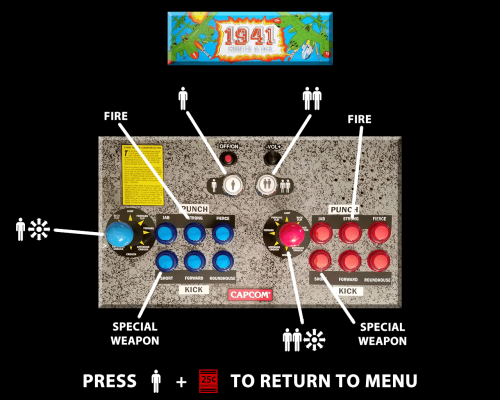
This theme gives you the ability to specify the startup images you want per game or platform. I created this as I wanted to display controller mapping for each game as it loads to go with the Game Control FS pause theme by @Retro808 and did not see a startup theme that already existed for this. It will display any image you have or create that is game or platform specific when the game loads. It displays the LaunchBox default "Game Over" screen with a clear logo added when a game is exited. All images must be placed in a specific folder structure and follow a standard LaunchBox naming convention to work with this theme. Instruction are provided in the read me text file in the download. The theme uses .png images by default but can easily be modified (1 edit) to use .jpg images. -
 I present Arcade media Manager. I preface that I built this for me thus the functionality may not suit everyone's needs but I'm open to feedback. 1.6 Updates Fixed bugs 1.5 Updates Renamed app to Arcade Media Manager based on discussion with Jason Carr Fixed bugs 1.4 Updates Added delete button for images and videos Added multi-image viewing Reworked code to account for images with -01,-02,-03 more effectively and reduce inaccurate results. 1.3 Updates Cleaned up interface Changed color scheme to gray Added support for manuals (adding, viewing) Added support for PinballX media management (this is disabled and will only be enabled by request as I'm not sure anyone else but me wants it and I want this to be Launchbox focused) 1.2 Updates I forget, lol 1.1 Updates: Added platform name to web search and remove "images" as well as open images tab in google Added functionality for videos (snaps and themes) Added ability to copy and paste images from the web (direct image and url) What it does: Select your root LaunchBox Directory. Platforms, Image types, and Game lists will populate. Select a platform and image type. Select a game and see the current image for that title and type. Choosing "Gallery" will show the Box-Front, Marquee, Fanart, and Clear Logo. Drag an image on top of another to replace it or add it to the appropriate folder and the with appropriate name for LaunchBox recognition. Click the "Missing items" filter to only show games that are missing that particular image type and quickly update them by dragging and dropping. Search the web for images for a game title. Open the images directory from the app. Screenshots: To be done (based on feedback): Add functionality for music AMM_1.6.zip
-
 Hello Some images and videos on the launchbox forums aren't working as expected. There are some broken images and videos that it is working before but now isn't working There are some kind of update in the forum? If so why did this happen? Can Someone fix this? Thanks
-
I keep running into an error whenever I try to remove an image for a game or a playlist directly in LaunchBox. I’ve already tried reinstalling LaunchBox, but the issue persists. I confirmed I don’t have another instance of LaunchBox running. This problem didn’t exist before—I used to be able to remove images without any issues. I think it may have started after a previous crash when images were in the middle of downloading during a game import (though I don’t remember exactly what the crash was). I’ve noticed the error seems to happen specifically when I’m trying to remove an image that is currently being displayed in the editor (e.g., the logo of the game I’m editing or the fanart of the playlist I’m editing). Error Message: Could not delete file "C:\Games\Launchbox\Images\Playlists\Darksiders\Fanart\Darksiders.png": The process cannot access the file 'C:\Games\Launchbox\Images\Playlists\Darksiders\Fanart\Darksiders.png' because it is being used by another process. Has anyone else run into this? Any suggestions on how to fix it would be greatly appreciated.
-
Version 1.0.0
290 downloads
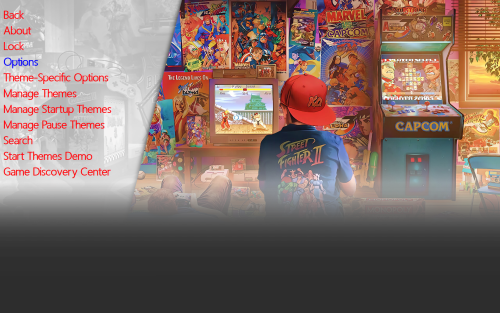
This is Alekfull-XN The theme is originally from Retrobat and Batocera and i really like it. I remember autumn 2024 i took the images and start make it for Launchbox Bigbox and then my laptop got broken luckly i got the files for the theme in (ctc) Community Theme Creator and with a new pc i finally complete this theme and i hope you like this feel free and downlad. cheers Ninjaman- 3 comments
-
- 10
-

-

-

-

-
Alekfull-XN View File This is Alekfull-XN The theme is originally from Retrobat and Batocera and i really like it. I remember autumn 2024 i took the images and start make it for Launchbox Bigbox and then my laptop got broken luckly i got the files for the theme in (ctc) Community Theme Creator and with a new pc i finally complete this theme and i hope you like this feel free and downlad. cheers Ninjaman Submitter Gameon100 Submitted 07/26/2025 Category Custom Themes
-
Version 1.0.0
11 downloads
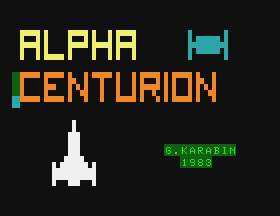
A collection of screenshots for the APF Imagination Machine (Not the MP-1000 Cartridges but the cassette tapes). A mix of gameplay screenshots and title screens taken from Virtual APF and compressed as PNG.- 2 comments
-
- 1
-
-
- apf
- screenshots
- (and 2 more)
-

Version 1.0.0
421 downloads
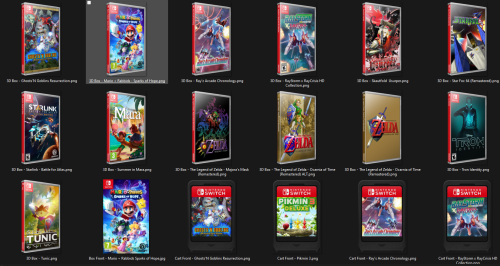
Was missing these from what Launchbox automatically downloaded so went ahead and made them from templates I found online, hope it helps somebody. Mainly needed these for the PC/Switch Ports I just found for: Ship of Harkinian (Ocarnia of Time) *included 2 versions for this one. 2 Ship 2 Harkinian (Majora's Mask) Starship Centauri Alpha (Star Fox 64) -
Hi there, I'm using version 10.14. I imported a bunch of mame games and then did the "Create Missing Arcade/MAME Playlists". All I have is 1 platform: Arcade. And a bunch of different playlist types. Also did finish the "Download Platform/Playlist Theme Videos." Everything looks fine in Launchbox, I can see the clear logos of each playlist, but when I go to Bigbox and hit the "show Playlists" button, nothing shows up. If I use the arrow keys, it feels like I can scroll through them because I hear the sound of scrolling, but the playlist logos are not showing up. I already did refresh Image cache and force all images. Not sure what else to do. Any help is appreciated. See attached screenshot.
-
Version 2023-1112_Images
1,844 downloads
This is my current collection of clear logos, banners etc from my ...Launchbox\Images folder. Drop these in the same place to add to your own collection of images. Overwrite or rename to suit. These are just these specific folders from the ...\Images folder, these aren't individual system specific folders (XBOX, NES, etc.). All 4 zip files extract to almost 8GB. Looking for my .XML files? New Update May 2024 - https://archive.org/details/snaapgames-repository_202404 has all my April 2024 images plus a bunch more. If you're looking for my Platform and Playlist .xml files, they're also at that link.- 1 comment
-
- 6
-
-
-
-
- clear logos
- banners
- (and 13 more)
-
I was helping someone in chat last night and it occurred to me that it's probably worth posting about as a sortof FYI/FAQ for others. The topic was "proper" media naming for automatic matching in LB/BB. I think the majority of the confusion stemmed from the fact that there are multiple ways in which the media can be named and it will still match (which is a really awesome feature, but it's something not everyone is accustomed to); and they're matched on the basis of your own library and your own rom files. Let's say you have an entry in your library that's titled "Final Fantasy VI" and an associated rom file named "FF6(1994)(Squaresoft).zip". In this scenario, your media could be named in any of three ways (actually four if you include appended numbers but we'll get back to that) and it will automatically associate with your LB/BB entry. It could be named based on the library title, the rom file name minus special characters, or the rom file name with all special characters. Final Fantasy VI.jpg - matches the library title; this will work FF6.jpg - matches the rom file name minus special characters; this will work note however that appended numbers (-0#) do not work in this scenario. FF6(1994)(Squaresoft).jpg - matches the rom file name with all special characters; this will work FF6(1994).jpg - includes special characters from the rom file, but not all of them; this will not work FFVI.jpg - doesn't match either the library title or the rom name; this will not work If you're matching by title and the title includes characters that are invalid for Windows file names, that character needs to be replaced by an underscore in your media file name. So if your game title is Super Street Fighter II: The New Challengers, your media would need to be named Super Street Fighter II_ The New Challengers.jpg. This requirement also applies to titles that use an apostrophe, despite the fact that apostrophes are usable in Windows file names. Additionally, for most types of media you can append a number at the end of the file name (formatted as -0#) and they'll match in LB/BB. So if you have 4 images in your Screenshots - Gameplay folder for Final Fantasy VI, they could be named as below and they'll show up in order in LB. Final Fantasy VI-01.jpg Final Fantasy VI-02.jpg Final Fantasy VI-03.jpg Final Fantasy VI-04.jpg For media other than screenshots, doing this will typically cause them to cycle randomly each time you select the library entry. Platform media is unique in that the files can be named anything, they simply need to be in the correct folder. If you want to add in your own platform banner for Super Nintendo, it would need to go in Launchbox -> Images -> Platforms -> Super Nintendo -> Banner. The actual image file could be named anything but so long as it's in that folder it will show up as a banner for SNES. Additionally, you can put in multiple images for platform banners and platform fanart (again, named anything) and it will cycle between them randomly whenever you select the associated platform in BB. Note that this doesn't work for platform clear logos as you have to clear their image cache for them to reset. I think this covers just about everything. If anyone else has anything else to add though, I can add it into the post.
-
Version 2022.08.3
2,954 downloads
Hey everyone, me again. This will be my last upload for likely a considerable while as I've reached a few personal milestones that I wanted to achieve. I'm scaling back my efforts for the foreseeable future, I'm happy with what I have... for now. Current count - 510 Platforms, 501 Playlists. I've included all my Data files, excluding my license file. Platform and Playlist images included. Sorry the file is big... Platforms: .Videos.xml (a collection of all the videos from all platforms, themes, etc. I wanted this to see what the games looked like directly from a single place.) 3D Groove GX.xml 3D NES.xml 3DO Interactive Multiplayer.xml 3DVIA Player.xml AAE (Another Arcade Emulator).xml Aamber Pegasus.xml Acorn Archimedes.xml Acorn Atom.xml Acorn Computers.xml Acorn Electron.xml Acorn Risc PC.xml ActiveX.xml Adventure Game Studio.xml Alambik.xml Aleck 64.xml Aleste 520EX OS.xml Alf TV Game.xml Altos Computer Systems.xml American Laser Games.xml Amstrad CPC.xml Amstrad GX4000.xml Android (Bluestacks) OS.xml Android.xml APF Imagination Machine.xml APF MP1000.xml Apogee BK-01.xml Apple I.xml Apple II.xml Apple IIGS.xml Apple Lisa.xml Apple Macintosh.xml Applied Technology Microbee.xml Apricot PC-XI.xml Aquaplus P-ECE.xml Arcade Music Trivia Challenger.xml Arcade.xml Arduboy.xml Atari 2600.xml Atari 5200.xml Atari 7800.xml Atari 8-Bit.xml Atari Falcon.xml Atari Flashback.xml Atari G42.xml Atari GX2.xml Atari Jaguar CD.xml Atari Jaguar.xml Atari Lynx.xml Atari ST.xml Atari STE.xml Atari TT.xml Atlus.xml Atmosphere.xml Authorware.xml AXEL Player.xml Bally Astrocade.xml Bandai Apple Pippin.xml Bandai Denshi MangaJuku.xml Bandai Playdia.xml Bandai RX-78.xml Bandai Super Vision 8000.xml Bandai WonderSwan Color.xml Bandai WonderSwan.xml Banpresto.xml BBC Ceefax.xml BBC Microcomputer System.xml Benesse Pocket Challenge V2.xml Benesse Pocket Challenge W.xml Big Fish.xml Bit Corporation Gamate.xml BitPlayer.xml Bondwell Model 12_14 OS.xml Bondwell Model 2.xml Brezzasoft Crystal System.xml Burster.xml Camputers Lynx.xml Canon X-07.xml Capcom 68000.xml Capcom Play System 1.xml Capcom Play System 2.xml Capcom Play System 3.xml Capcom Sony ZN.xml Casio CFX 9850.xml Casio Loopy.xml Casio PB-1000.xml Casio PV-1000.xml Casio PV-2000.xml Cave.xml CDC110 OS.xml ChaiLove.xml CHIP-8.xml CoinOps FE.xml Coleco Adam.xml Coleco Telstar.xml ColecoVision.xml Comad Co.xml Commodore 128.xml Commodore 64.xml Commodore 65.xml Commodore Amiga 1000.xml Commodore Amiga 1200.xml Commodore Amiga 2000.xml Commodore Amiga 3000.xml Commodore Amiga 4000.xml Commodore Amiga 500.xml Commodore Amiga 600.xml Commodore Amiga CD32.xml Commodore Amiga.xml Commodore BX256-80HP OS.xml Commodore C16.xml Commodore CDTV.xml Commodore MAX Machine.xml Commodore PET.xml Commodore Plus 4.xml Commodore VIC-20.xml Convergent Technologies AWS & NGEN OS.xml Cult3D.xml Cybiko Xtreme.xml Cybiko.xml Daphne.xml DEC PDP.xml DEC Rainbow 100 OS.xml DEC VT-180 OS.xml DeepV.xml Dendy 750 in 1.xml Diamonds 3 Micro FE.xml DICE.xml Doujin.xml Dragon.xml DreamGEAR.xml EACA EG2000 Colour Genie.xml Elektronika BK.xml Emerson Arcadia 2001.xml Enterprise 64 & 128.xml Entex Adventure Vision.xml Entex Electronic Baseball.xml Eolith Gradation 2D System.xml Epoch Game Pocket Computer.xml Epoch Super Cassette Vision.xml Epson PX-8.xml ETL Mark II.xml ETL Mark IV A.xml ETL Mark IV.xml Examu Ex-Board.xml Exelvision Exeltel.xml Exelvision EXL 100.xml Exidy Sorcerer.xml eXoDOS.xml Fairchild Channel F.xml Fightcade FE.xml Final Burn Alpha.xml Final Burn Delta.xml Final Burn Neo.xml Flash (Flashpoint).xml Flash.xml Flashpoint 10.1 Ultimate FE.xml Fujitsu FM Towns Marty.xml Fujitsu FM-7.xml Fujitsu FMR.xml Fukutake Studybox.xml Funtech Super Acan.xml Future Pinball.xml Galaksija Plus.xml Galaksija.xml GamePark GP2X.xml GamePark GP32.xml GameWave.xml GCE Vectrex.xml GoBit.xml GOG (Good Old Games).xml Handhelds.xml Hartung Game Master.xml Hector HRX.xml Hewlett-Packard HP 48.xml HiVE.xml HomeLab.xml HTML5.xml Hyper Electronic Games.xml Hypercosm.xml Hyper-G.xml IBM Compatibles.xml IBM System_360 OS.xml IBM.xml IcarOS.xml IGS - International Games System.xml IGT Slots.xml Infocom.xml Interact Family Computer.xml Interton VC 4000.xml Irem M27.xml Irem M52.xml Irem M62.xml Irem M72.xml Irem M92.xml Irem M97.xml ITV Teletext.xml Java (Flashpoint).xml Java.xml Jupiter Ace.xml Kaneko.xml Kaypro.xml Keio University K-1.xml Konami Bubble System.xml Konami e-AMUSEMENT.xml Konami Picno.xml Konix MultiSystem.xml Leapfrog - Leapster Learning Game System.xml LiveMath.xml Locomalito.xml LowRes NX.xml Lucas Nascom I & II.xml Lutro.xml Luxor ABC 1600 OS.xml Luxor ABC 80.xml Luxor ABC 800.xml Lviv PC-01.xml Magnavox Odyssey 2.xml Magnavox Odyssey 3000.xml Magnavox Odyssey 4000.xml Magnavox Odyssey.xml Matra and Hachette Alice.xml Matsushita National JR.xml Mattel Aquarius.xml Mattel Hyperscan.xml Mattel Intellivision.xml Mega Duck.xml Memorex VIS.xml Memotech MTX512.xml Microkey Primo.xml Microsoft MSX TurboR.xml Microsoft MSX.xml Microsoft MSX2.xml Microsoft MSX2+.xml Microsoft Xbox.xml Microvision.xml MITS Altair 8800.xml MS-DOS.xml MUGEN.xml Multiple Fruit Machine Emulator.xml Namco ES3A.xml Namco NA-1.xml Namco NB-1.xml NCR Decision Mate V.xml NEC APC OS.xml NEC PC Engine SuperGrafx.xml NEC PC-6001.xml NEC PC-8001.xml NEC PC-8801.xml NEC PC-88VA.xml NEC PC-9801.xml NEC PC-9821.xml NEC PC-FX.xml NEC TurboGrafx-16.xml NEC TurboGrafx-CD.xml Nesica x Live.xml Nichibutsu My Vision.xml Nichibutsu.xml Nintendo 3DS.xml Nintendo 64.xml Nintendo 64DD.xml Nintendo Amiibo.xml Nintendo DS.xml Nintendo DSi.xml Nintendo Entertainment System.xml Nintendo e-Reader.xml Nintendo Famicom Disk System.xml Nintendo Game and Watch.xml Nintendo Game Boy Advance.xml Nintendo Game Boy Color.xml Nintendo Game Boy.xml Nintendo GameCube.xml Nintendo iQue.xml Nintendo NES.xml Nintendo Play-Yan.xml Nintendo Pokemon Mini.xml Nintendo Satellaview.xml Nintendo SNES MSU-1.xml Nintendo SNES.xml Nintendo Sufami Turbo.xml Nintendo Super Game Boy.xml Nintendo Switch.xml Nintendo Virtual Boy.xml Nintendo Wii U.xml Nintendo Wii.xml Nintendo WiiWare.xml Nokia - N-Gage.xml North Star Advantage OS.xml Nuon.xml Octree View.xml OpenBOR.xml Osborne.xml Othello Multivision.xml Otrona Attache OS.xml Ouya.xml Pademonium Cinematics.xml (more videos) Palm Pilot.xml Panasonic 3DO.xml Parsec FE.xml Pecom 64.xml Pel Varazdin Orao.xml Phantom System.xml Philips CD-i.xml Philips P2000.xml Philips VG 5000.xml Philips Videopac+ G7400.xml Philips Videopac+.xml Pico-8.xml Pinball FX2.xml Pinball FX3.xml Pioneer Palcom LaserDisc.xml Play3D.xml Pocket Dream Console.xml PopCap Plugin.xml Popcap.xml Project Blank.xml ProtoPlay.xml Pub Fruit Machines.xml Pulse.xml Quiz Machines.xml Radio 86RK Mikrosha.xml Radio 86RK Partner.xml Radio 86RK YuT-88.xml Raine FE.xml Raw Thrills.xml RCA Studio II.xml RCA Superchip.xml REBOL.xml ResidualVM.xml Retro Arcade Neon FE.xml RetroBat FE.xml RetroFE.xml RM Nimbus PC-186.xml Robotron HC900, KC85 2, KC85 3 & KC85 4.xml Robotron KC Compact.xml Robotron Z1013.xml Robotron Z9001 & KC85 1.xml Run _n_ Gun.xml SABA Videoplay.xml SAM Coupé.xml Sammy Atomiswave.xml Sammy Seta Visco SSV.xml Samsung SPC-1000.xml Sanyo MBC-550 & 555 OS.xml ScummVM.xml Sega 32X.xml Sega Ages 2500.xml Sega Beena.xml Sega CD.xml Sega Chihiro.xml Sega Dreamcast VMU.xml Sega Dreamcast.xml Sega Europa- R.xml Sega Game Gear.xml Sega Genesis.xml Sega Hikaru.xml Sega Lindbergh.xml Sega Mark III.xml Sega Master System.xml Sega Mega CD 1+2.xml Sega Mega Tech System.xml Sega Megadrive MSU-1.xml Sega Model 1.xml Sega Model 2.xml Sega Model 3.xml Sega Naomi 2.xml Sega Naomi.xml Sega Nomad.xml Sega Pico.xml Sega Ring Edge.xml Sega Ring Wide.xml Sega Saturn.xml Sega SC-3000.xml Sega SF-7000.xml Sega SG-1000.xml Sega ST-V.xml Sega System 16.xml Sega System 18.xml Sega System 24.xml Sega System 32.xml Sega Triforce.xml Sega VR.xml Sega X Board.xml Sega Y Board.xml Seibu Kaihatsu.xml Seihou Project.xml Sharp MZ Family.xml Sharp X1.xml Sharp X68000.xml Sharp X68030, 2000.xml ShiVa3D.xml Shmups.xml Shockwave.xml Silverlight.xml Sinclair PC200.xml Sinclair QL.xml Sinclair ZX Spectrum +2.xml Sinclair ZX Spectrum +3.xml Sinclair ZX Spectrum 128.xml Sinclair ZX Spectrum 16.xml Sinclair ZX Spectrum.xml Sinclair ZX-80.xml Sinclair ZX-81.xml SNK Neo Geo AES.xml SNK Neo Geo CD.xml SNK Neo Geo MVS.xml SNK Neo Geo Pocket Color.xml SNK Neo Geo Pocket.xml SNK Neo Geo.xml Sol-20 Terminal Computer.xml Solarus.xml Sony Ericsson K800i.xml Sony Net Yaroze.xml Sony Playstation 2.xml Sony Playstation 3 - FE (RPCS3).xml Sony Playstation 4.xml Sony Playstation Vita.xml Sony Playstation.xml Sony PocketStation.xml Sony PSP Minis.xml Sony PSP.xml Sord M23 OS.xml Sord M5.xml Spectravideo SV-318-328.xml Super Nintendo Entertainment System.xml TAB Quizard.xml Taito Systems.xml Taito Type X.xml Tandy TRS-80 MC-10.xml Tandy TRS-80 Model 100.xml Tandy TRS-80 Model 4.xml Tandy TRS-80 Model I.xml Tandy TRS-80 Model III.xml Tangerine Microtan 65.xml Tangerine Oric Atmos.xml Tapwave Zodiac.xml Tatung Einstein.xml TCL.xml Technos Arcade.xml Tecmo.xml TeknoParrot FE.xml Telenova Compis.xml Terak 8510A & 8600 OS.xml Tesla PMD 85.xml Texas Instruments CC-40.xml Texas Instruments TI-73.xml Texas Instruments TI-80.xml Texas Instruments TI-81.xml Texas Instruments TI-82.xml Texas Instruments TI-92.xml Texas Instruments TI-99 4A.xml Thomson MO5.xml Thomson TO7.xml Thomson TO8.xml Tic-80.xml Tiger Electronics.xml Tiger Game.com.xml Tiger Gizmondo.xml Tiki-100.xml Timex Sinclair.xml TinyGiant HT68k SBC OS.xml Toaplan.xml Tomy Pyuuta.xml Tomy Tutor.xml Toshiba Pasopia.xml Toshiba Visicom.xml Touhou Project.xml Tremor Games.xml Ultimate Doom.xml Unico Electronics.xml Unity.xml University of Cambridge EDSAC.xml Uzebox.xml Vector-06C.xml Victor 9000 _ Sirius 1.xml Video Challenger.xml Video System Co.xml VideoBrain Family Computer.xml Videoton TV Computer.xml Virtual Reality.xml Viscape.xml Visual Pinball.xml Visual Technology Visual 1050.xml Visual WebMap.xml Vitalize.xml VMWare.xml Voxatron FE.xml Voxatron.xml VRML.xml VTech CreatiVision.xml VTech Laser 200.xml VTech Laser 2001.xml VTech Laser 310.xml VTech Socrates.xml VTech V.Smile.xml Wang.xml WASM.xml Watara Supervision.xml Windows 3x.xml Windows.xml Wolfenstein 3d Mods.xml WonderSwan.xml WoW Action Max.xml Xara Plugin.xml Xerox 820 OS.xml Yamaha Copera.xml Zeebo.xml Zilog MCZ-2 OS.xml ZiNc.xml Zorba OS.xml Playlists: [BIOS].xml 5 STARS.xml Adventure Games.xml Alien Collection.xml All Arcade.xml All Atari.xml All Commodore.xml All Games.xml All Microsoft OS.xml All Nintendo.xml All Sega.xml All Sinclair.xml All Sony.xml All Sport Games.xml All Windows PC Games.xml Amstrad CPC - 1. Best of Gold.xml Amstrad CPC - 2. Best Of Silver.xml Amstrad CPC - 3. Best Of Bronze.xml Amstrad CPC - The Best.xml Amstrad GX4000 - The Best.xml Apple III.xml Arcade - Atari.xml Arcade - Bally _ Midway.xml Arcade - Capcom.xml Arcade - Data East.xml Arcade - Konami.xml Arcade - Namco.xml Arcade - Neogeo.xml Arcade - Sega.xml Arcade - SNK.xml Arcade - Taito.xml Arcade - Toaplan.xml Arcade - Williams.xml Arcade 2-Player Games.xml Arcade 4-Player Games.xml Arcade Ace.xml Arcade Acorn Computers.xml Arcade Amcoe.xml Arcade American Laser.xml Arcade AMI.xml Arcade Amstar.xml Arcade Apple Computer.xml Arcade Aristocrat MK6.xml Arcade Aristocrat MKV.xml Arcade Aristocrat.xml Arcade Astra.xml Arcade Astro.xml Arcade Atari Classics.xml Arcade Ball & Paddle Games.xml Arcade Bally Midway.xml Arcade Bally.xml Arcade Banpresto.xml Arcade Beat Em Ups.xml Arcade BFM.xml Arcade Board & Card Games.xml Arcade Capcom Classics.xml Arcade Capcom Play System II.xml Arcade Capcom Play System III.xml Arcade Capcom Play System.xml Arcade Cave.xml Arcade Cinematronics.xml Arcade Comad.xml Arcade Commodore.xml Arcade Data East Classics.xml Arcade DECO Cassette System.xml Arcade Epoch.xml Arcade Exidy.xml Arcade Fighting Games.xml Arcade Flying Games.xml Arcade Gaelco.xml Arcade Gottlieb.xml Arcade Greyhound Electronics.xml Arcade IGS.xml Arcade Incredible Technologies.xml Arcade Irem Classics.xml Arcade Jaleco.xml Arcade Kaneko.xml Arcade Konami Classics.xml Arcade Konami System 573.xml Arcade Konami Viper.xml Arcade Leland.xml Arcade Light Gun Games.xml Arcade Mattel.xml Arcade Maze Games.xml Arcade Mazooma.xml Arcade Merit.xml Arcade Midway Classics.xml Arcade MultiGames.xml Arcade Namco Classics.xml Arcade Namco System 1.xml Arcade Namco System 11.xml Arcade Namco System 12.xml Arcade Namco System 2.xml Arcade Namco System 22.xml Arcade Namco System 23.xml Arcade Namco System 246.xml Arcade NEC.xml Arcade Neo-Geo MV-6F.xml Arcade Nichibutsu.xml Arcade Nintendo Classics.xml Arcade Nintendo PlayChoice-10.xml Arcade Nintendo Super System.xml Arcade Nintendo.xml Arcade NMK.xml Arcade Nova.xml Arcade Novotech.xml Arcade Platform Games.xml Arcade Playmatic.xml Arcade Puzzle Games.xml Arcade Qps.xml Arcade Racing Games.xml Arcade Rhythm Games.xml Arcade Roland.xml Arcade Romstar.xml Arcade Run & Gun Games.xml Arcade Sammy.xml Arcade Sega Classics.xml Arcade Sega G80.xml Arcade Sega Model 2.xml Arcade Sega OutRun.xml Arcade Sega ST-V.xml Arcade Sega Super Scaler.xml Arcade Sega System C.xml Arcade Sega System E.xml Arcade Sega SystemSP.xml Arcade Sega VCO Object.xml Arcade Sega Vic Dual.xml Arcade Seibu Kaihatsu.xml Arcade Seta.xml Arcade Shoot Em Ups.xml Arcade Shooter Games.xml Arcade SNK Classics.xml Arcade SNK Neo Geo MVS.xml Arcade Sports Games.xml Arcade Stern Electronics.xml Arcade Stern.xml Arcade Strata.xml Arcade Sunsoft.xml Arcade Taito Classics.xml Arcade Taito Corporation.xml Arcade Texas Instruments.xml Arcade Toaplan.xml Arcade Universal.xml Arcade Visco.xml Arcade Williams Classics.xml Arcade Yamaha.xml Arcade Yun Sung.xml Arcade Zaccaria.xml Atari 2600 - 1. Best Of Gold.xml Atari 2600 - 2. Best Of Silver.xml Atari 2600 - 3. Best Of Bronze.xml Atari 2600 - The Best.xml Atari 5200 - 1. Best Of Gold.xml Atari 5200 - 2. Best Of Silver.xml Atari 5200 - 3. Best Of Bronze.xml Atari 5200 - The Best.xml Atari 7800 - 1. Best Of Gold.xml Atari 7800 - 2. Best Of Silver.xml Atari 7800 - 3. Best Of Bronze.xml Atari 7800 - The Best.xml Atari Jaguar - 1. Best Of Gold.xml Atari Jaguar - 2. Best Of Silver.xml Atari Jaguar - 3. Best Of Bronze.xml Atari Jaguar - The Best.xml Atari Lynx - 1. Best Of Gold.xml Atari Lynx - 2. Best Of Silver.xml Atari Lynx - 3. Best Of Bronze.xml Atari Lynx - The Best.xml Atari System 1.xml Atari System 2.xml AVGN.xml Back To The Future.xml Bally Astrocade - The Best.xml Batman Collection.xml Best Exodos games.xml Best of Adult Swim.xml Best of VS fighters.xml Best Windows games.xml BMX Collection.xml Cartoon Capers!.xml Casino Games Collection.xml Castlevania Collection.xml CHD Required.xml Classics.xml Cola Wars.xml ColecoVision - 1. Best Of Gold.xml ColecoVision - 2. Best Of Silver.xml ColecoVision - 3. Best Of Bronze.xml ColecoVision - The Best.xml Commodore 264.xml Commodore 64 - 1. Best Of Gold.xml Commodore 64 - 2. Best Of Silver.xml Commodore 64 - 3. Best Of Bronze.xml Commodore 64 - The Best.xml Commodore 900.xml Commodore Amiga - 1. Gold Games.xml Commodore Amiga - 2. Silver Games.xml Commodore Amiga - 3. Bronze Games.xml Commodore Amiga - The Best.xml Contra Collection.xml Daewoo CPC OS.xml DEC 150, 300, 500 OS.xml Disney Collection.xml Donkey Kong Collection.xml Double Dragon Collection.xml Dual Stick Games.xml Educational Games.xml Emerson Arcadia 2001 - The Best.xml eXoDOS 3dfx Games.xml eXoDOS Games with CGA Composite.xml eXoDOS Games with Gravis Ultrasound.xml eXoDOS Games with MT-32.xml eXoDOS Games with Sound Canvas.xml eXoDOS Remote Multiplayer.xml Fairchild Channel F - The Best.xml Fatal Fury Collection.xml Fighter Classics.xml Fighting (Arcade 3D).xml Fighting Games.xml Final Fantasy Collection.xml First Past the Post.xml Flash Food.xml Flashpoint Hall of Fame.xml Flashpoint Super Hall of Fame.xml Frogger Collection.xml FUCK!.xml Fuuki.xml Gaelco.xml GCE Vectrex - The Best.xml Golden Age Games.xml Hacked Games.xml Halloween Haunts.xml Harry Potter Collection.xml Hasbro.xml Hentai.xml Hidden Gems.xml Homebrew.xml Horror Games.xml Hot Java Beans.xml Installed eXoDOS Games.xml Intellivision - 1. Best Of Gold.xml Intellivision - 2. Best Of Silver.xml Intellivision - 3. Best Of Bronze.xml Intellivision - The Best.xml James Bond 007 Collection.xml Jet Set Willy Collection.xml Jingle Jollies.xml King Of Fighters Collection.xml Konami Collection.xml Legend of Zelda Collection.xml Mario Collection.xml Mature.xml Mcfly_s Favorite Systems.xml Mega Man Collection.xml Metal Gear Collection.xml Metal Slug Complete.xml Metroid Collection.xml Mindset PC.xml Mitchell Corporation.xml Molleindustria_s Recommendations.xml Mortal Kombat Kollection.xml Motor Games.xml Movies.xml MS-DOS - 1. Best Of Gold.xml MS-DOS - 2. Best Of Silver.xml MS-DOS - 3. Best Of Bronze.xml MS-DOS - The Best.xml MSX - 1. Best Of Gold.xml MSX - 2. Best Of Silver.xml MSX - 3. Best Of Bronze.xml MSX - The Best.xml Music Games.xml Namco Collection.xml Neo Geo - 1. Best Of Gold.xml Neo Geo - 2. Best Of Silver.xml Neo Geo - 3. Best Of Bronze.xml Neo Geo - The Best.xml Neo Geo Pocket - 1. Best Of Gold.xml Neo Geo Pocket - 2. Best Of Silver.xml Neo Geo Pocket - 3. Best Of Bronze.xml Neo Geo Pocket - The Best.xml NES Black Box.xml Nintendo 3DS - The Best.xml Nintendo 3DS - 1. Best Of Gold.xml Nintendo 3DS - 2. Best Of Silver.xml Nintendo 3DS - 3. Best Of Bronze.xml Nintendo 3DS - Top 20.xml Nintendo 64 - 1. Best Of Gold.xml Nintendo 64 - 2. Best Of Silver.xml Nintendo 64 - 3. Best Of Bronze.xml Nintendo 64 - The Best.xml Nintendo 64 - Top 100.xml Nintendo 64 - Top 20.xml Nintendo 64 - Top 50.xml Nintendo DS - 1. Best Of Gold.xml Nintendo DS - 2. Best Of Silver.xml Nintendo DS - 3. Best Of Bronze.xml Nintendo DS - The Best.xml Nintendo DS - Top 100.xml Nintendo DS - Top 20.xml Nintendo DS - Top 50.xml Nintendo Entertainment System - Top 100.xml Nintendo Entertainment System - Top 20.xml Nintendo Entertainment System - Top 50.xml Nintendo Game & Watch - Top 10.xml Nintendo Game & Watch - Top 5.xml Nintendo Game Boy - 1. Best Of Gold.xml Nintendo Game Boy - 2. Best Of Silver.xml Nintendo Game Boy - 3. Best Of Bronze.xml Nintendo Game Boy - The Best.xml Nintendo Game Boy Advance - 1. Best Of Gold.xml Nintendo Game Boy Advance - 2. Best Of Silver.xml Nintendo Game Boy Advance - 3. Best Of Bronze.xml Nintendo Game Boy Advance - The Best.xml Nintendo Gameboy - Top 100.xml Nintendo Gameboy - Top 20.xml Nintendo Gameboy - Top 50.xml Nintendo Gameboy Advance - Top 100.xml Nintendo Gameboy Advance - Top 20.xml Nintendo Gameboy Advance - Top 50.xml Nintendo Gameboy Micro.xml Nintendo Gamecube - 1. Best Of Gold.xml Nintendo Gamecube - 2. Best Of Silver.xml Nintendo Gamecube - 3. Best Of Bronze.xml Nintendo Gamecube - The Best.xml Nintendo Gamecube - Top 100.xml Nintendo Gamecube - Top 20.xml Nintendo Gamecube - Top 50.xml Nintendo NES - 1. Best Of Gold.xml Nintendo NES - 2. Best Of Silver.xml Nintendo NES - 3. Best Of Bronze.xml Nintendo NES - The Best.xml Nintendo Super Game Boy 2.xml Nintendo Virtual Boy - The Best.xml Nintendo Virtual Boy - Top 10.xml Nintendo Wii - 1. Best Of Gold.xml Nintendo Wii - 2. Best Of Silver.xml Nintendo Wii - 3. Best Of Bronze.xml Nintendo Wii - The Best.xml Nintendo Wii - Top 100.xml Nintendo Wii - Top 20.xml Nintendo Wii - Top 50.xml Nintendo Wii U - 1. Best Of Gold.xml Nintendo Wii U - 2. Best Of Silver.xml Nintendo Wii U - 3. Best Of Bronze.xml Nintendo Wii U - The Best.xml Nintendo Wii U - Top 20.xml Nintendo WiiWare - The Best.xml Odyssey 2 - The Best.xml Origin.xml Outrun Collection.xml Pachinko.xml PacMan Collection.xml Panasonic 3DO - 1. Best Of Gold.xml Panasonic 3DO - 2. Best Of Silver.xml Panasonic 3DO - 3. Best Of Bronze.xml Panasonic 3DO - The Best.xml PC Engine & TurboGrafx 16 - 1. Best Of Gold.xml PC Engine & TurboGrafx 16 - 2. Best Of Silver.xml PC Engine & TurboGrafx 16 - 3. Best Of Bronze.xml PC Engine & TurboGrafx 16 - The Best.xml PC Engine & TurboGrafx CD - 1. Best Of Gold.xml PC Engine & TurboGrafx CD - 2. Best Of Silver.xml PC Engine & TurboGrafx CD - 3. Best Of Bronze.xml PC Engine & TurboGrafx CD - The Best.xml PC-FX - 1. Best Of Gold.xml PC-FX - 2. Best Of Silver.xml PC-FX - 3. Best Of Bronze.xml PC-FX - The Best.xml Philips CDI - 1. Best Of Gold.xml Philips CDI - 2. Best Of Silver.xml Philips CDI - 3. Best Of Bronze.xml Philips CDI - The Best.xml Pico Gr8s.xml Pinball Arcade.xml Pinball Collection.xml Player-Produced Perils.xml Playstation 1 - 1. Best Of Gold.xml Playstation 1 - 2. Best Of Silver.xml Playstation 1 - 3. Best Of Bronze.xml Playstation 1 - The Best.xml Playstation 2 - 1. Best Of Gold.xml Playstation 2 - 2. Best Of Silver.xml Playstation 2 - 3. Best Of Bronze.xml Playstation 2 - The Best.xml Playstation Portable - 1. Best Of Gold.xml Playstation Portable - 2. Best Of Silver.xml Playstation Portable - 3. Best Of Bronze.xml Playstation Portable - The Best.xml Pokemon.xml Pool and Billiards.xml Prince of Persia Collection.xml Prototypes.xml PSiKYO.xml Published by Activision.xml Published by Atari.xml Published by Atlus.xml Published by Electronic Arts.xml Published by Nintendo.xml Published by Sega.xml Published by Sony.xml Quake.xml Rage for the Ages.xml RDI Halcyon.xml Resident Evil Collection.xml Retro Learning Pack.xml Role Playing Games.xml Sandbox Games.xml ScummVM - 1. Best Of Gold.xml ScummVM - 2. Best Of Silver.xml ScummVM - 3. Best Of Bronze.xml ScummVM - The Best.xml Sega 32X - The Best.xml Sega CD - 1. Best Of Gold.xml Sega CD - 2. Best Of Silver.xml Sega CD - 3. Best Of Bronze.xml Sega CD - The Best.xml Sega CDX.xml Sega Dreamcast - 1. Best Of Gold.xml Sega Dreamcast - 2. Best Of Silver.xml Sega Dreamcast - 3. Best Of Bronze.xml Sega Dreamcast - The Best.xml Sega Game Gear - 1. Best Of Gold.xml Sega Game Gear - 2. Best Of Silver.xml Sega Game Gear - 3. Best Of Bronze.xml Sega Game Gear - The Best.xml Sega Genesis - 1. Best Of Gold.xml Sega Genesis - 2. Best Of Silver.xml Sega Genesis - 3. Best Of Bronze.xml Sega Genesis - The Best.xml Sega Master System - 1. Best Of Gold.xml Sega Master System - 2. Best Of Silver.xml Sega Master System - 3. Best Of Bronze.xml Sega Master System - The Best.xml Sega Saturn - 1. Best Of Gold.xml Sega Saturn - 2. Best Of Silver.xml Sega Saturn - 3. Best Of Bronze.xml Sega Saturn - The Best.xml Sega SG-1000 - 1. Best Of Gold.xml Sega SG-1000 - 2. Best Of Silver.xml Sega SG-1000 - 3. Best Of Bronze.xml Sega SG-1000 - The Best.xml Sharp X68000 - 1. Best Of Gold.xml Sharp X68000 - 2. Best Of Silver.xml Sharp X68000 - 3. Best Of Bronze.xml Sharp X68000 - The Best.xml Shockwave Shockers.xml Simpsons Collection.xml Slots Collection.xml SNK NeoGeo CD_Z.xml Sonic The Hedgehog Collection.xml Sony SMC-777 OS.xml South Park Collection.xml Space Invaders Collection.xml Spiderman Collection.xml Spinner Games.xml Spinner Racing Games.xml Star Wars Collection.xml Strategy Games.xml Street Fighter Collection.xml Super Nintendo - 1. Best Of Gold.xml Super Nintendo - 2. Best Of Silver.xml Super Nintendo - 3. Best Of Bronze.xml Super Nintendo - The Best.xml Super Nintendo Entertainment System - Top 100.xml Super Nintendo Entertainment System - Top 20.xml Super Nintendo Entertainment System - Top 50.xml Superheroes.xml Tasselfoot_s Favorites.xml Technos.xml Tomb Raider Collection.xml Tony_s Favorites.xml Toys to Enjoy.xml Trackball Games.xml UK Teletext Services.xml UK.xml Unreleased.xml Vertically Oriented Games.xml Visual Novel Games.xml Windows - Best of Bronze.xml Windows - Best of Gold.xml Windows - Best of Silver.xml Wolfenstein Collection.xml Wonderswan - 1. Best Of Gold.xml Wonderswan - 2. Best Of Silver.xml Wonderswan - 3. Best Of Bronze.xml Wonderswan - The Best.xml Wrestling Games.xml Years - 1970s.xml Years - 1980s.xml Years - 1990s.xml Years - 2000s.xml Years - 2010s.xml Years - Pre 1970s.xml Years - Unknown.xml Yu-Gi-Oh! Collection.xml Yun Sung.xml ZX Spectrum - 1. Best Of Gold.xml ZX Spectrum - 2. Best Of Silver.xml ZX Spectrum - 3. Best Of Bronze.xml ZX Spectrum - The Best.xml I'm missing a few playlist images for some VMWare titles and some newer Arcade 'X' playlists, I'll get around to them. The rest, I think, are there. Let me know if i'm missing anything else, or if you have something better. Comments welcome. Thanks everyone for all your comments and guidance throught the last 5 years, I really appreciate the passion and enthusiasm the community has shown. It has all helped me enormously. Game on. -
Version 1.1.0
173 downloads
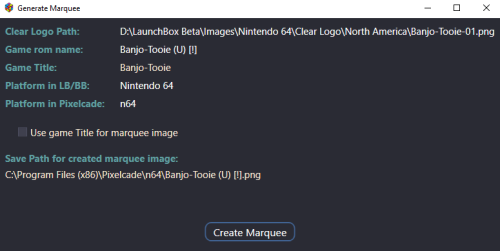
Create marquee images from Clear Logos (for use with Pixelcade™ LED Marquee displays) Pixelcade already provides numerous marquee images for many Platforms. But you may come across one or more that are missing. This plugin will create 128x32 marquee-resolution png images using your games existing Clear Logo and place them in your Pixelcade directory**, under the corresponding Platform folder. What’s needed: The plugin files Pixelcade software installed (including LEDBlinky) [https://pixelcade.org] ffmpeg.exe (used to convert/create the marquee images) [https://ffmpeg.org] (included) (optional) An actual Pixelcade™ Marquee display Installing: Download and unblock the plugin zip file (Right-click the zip file, select Properties and check UnBlock) Copy the contents of the zip file into your ../LaunchBox/Plugins/ folder i.e. D:\LaunchBox\Plugins\PixelcadeMarquees\ Setting up the plugin: The default install location for Pixelcade is “C:\Program Files (x86)\Pixelcade”**. If you installed it somewhere else, edit “pixSettings.xml” located in the Plugin folder. (Notepad can be used to edit it) Change the path (line #3) to match your install location. Save and close. <?xml version="1.0" encoding="utf-8"?> <settings> <pixCadePath>C:\Program Files (x86)\Pixelcade</pixCadePath> </settings> **Note: If your Pixelcade installation is located under “C:\Program Files (x86)”, you will need to have Access Permission to be able to save the images there. The plugin will check for permissions when launched. If it doesn’t have the proper permission, images will be saved to the "Completed" subfolder. i.e. D:\LaunchBox\Plugins\PixelcadeMarquees\Completed\ You will then need to copy them manually when done. The images will be saved to their own Platform subfolder as Pixelcade sees them. (Pixelcade Platform naming conversions are taken from "console.csv" located in your Pixelcade directory.) Example: if your Platform is called "Arcade", images will be saved in the folder "mame". Using the plugin: Start LaunchBox. Select one or more games. Right Click and select Generate Pixelcade Marquee Image Click Create Marquee Game Title vs. ROM name: In most cases LaunchBox passes the games ROM name to LEDBlinky (which in turn passes it to Pixelcade). But for certain games (namely Steam games [and others?]), LaunchBox will pass the games Title. For these, you’ll want to check the box Use game Title for marquee image. If the games Title contains illegal characters (such as : [semicolon]), the image will not be created. When selecting multiple games, if you check Use game Title for marquee image and click Create Marquees, if the game Title contains illegal characters, a message will popup indicating that game will be skipped. You can bypass these messages by checking Skip warnings about Titles with invalid characters. Special thanks to @megashub for coming up with the idea for this plugin and for figuring out how to manipulate and convert the images to make them suitable for Pixelcade™ displays. As always, questions, comments and suggestions are always welcome. -
Image Folders | Platforms | Playlists | Platform Categories | Platform Icons | complete zip packs. View File This is my current collection of clear logos, banners etc from my ...Launchbox\Images folder. Drop these in the same place to add to your own collection of images. Overwrite or rename to suit. These are just these specific folders from the ...\Images folder, these aren't individual system specific folders (XBOX, NES, etc.). All 4 zip files extract to almost 8GB. Looking for my .XML files? Submitter -McFly- Submitted 11/12/2023 Category Platform Media Packs
-

Version 1.0.0
194 downloads
Hey guys, I couldn't find any decent platform catagory images with most types needed so I created this, nothing fancy but looks pretty good. If you would like different types let me know. I might also add a few variations later on if this gets some interest, Please dont forget to 5 stars. Hope you Enjoy! -
Platform Category Clear Logo Collection View File Hey guys, I couldn't find any decent platform catagory images with most types needed so I created this, nothing fancy but looks pretty good. If you would like different types let me know. I might also add a few variations later on if this gets some interest, Please dont forget to 5 stars. Hope you Enjoy! Submitter EarthsDefect Submitted 11/09/2023 Category Platform Clear Logos
-
Ok So I have launchbox locally installed onto my win10 machine and previously had my images and roms set to my D drive. This was great until i looked at the amount of room the images was taking up. So i decided to move everything to the nas, which gives me the added benefit to playing games from multiple pc. The problem is that after setting up launchbox, the image population takes forever. I have tried maxing out my cache to 4 gb. It still takes about 15 seconds to change games. Would symbolic links fix my issue? if so where would i put the links and for what? Any help appreciated
-
With the recent features touching game boxes and images I figured I'd bump an old pet peeve of mine, which is I'd love the ability to change the sorting order images are served in when browsing a game entry. Right now they seem to be loaded pretty much at random, no matter which order you added them in first. This makes it pretty much impossible to, for example, use the "Screenshots - Gameplay" tag to show a chronological order timeline of a game's levels or story bits, or to create any sort of situation where the order of images makes sense, such as showing images pertaining to different games in a series that share the same entry (think Mass Effect Legendary Edition or the Crash Nsane Trilogy) in the correct order when browsing them later. Ideally this would include a sorting menu where you can manually sort the images through the UI itself, but even just a dropdown "Sort by" in the media section would suffice, and a user would just need to make sure to name the files correctly (1, 2, 3 etc) or use the file's EXIF to determine its position in the list. I know this isn't a very requested improvement but I think a lot of people would actually welcome it despite not having bothered to ask!
-
Colorful Dark Category Fixed Images View File There were a few images in the Colorful Big Box theme, I use the dark version, that didn't appear properly. I have changed the name of these few to fix the issue. I assume the fix will work with the normal colorful theme but the folder name will have to be changed. To Apply just unzip the archive and drop the folder into your Launchbox Folder, Replacing any images if asked. Submitter Sethenstien Submitted 03/13/2023 Category Platform Console Images
-
Version 1.0.0
166 downloads
There were a few images in the Colorful Big Box theme, I use the dark version, that didn't appear properly. I have changed the name of these few to fix the issue. I assume the fix will work with the normal colorful theme but the folder name will have to be changed. To Apply just unzip the archive and drop the folder into your Launchbox Folder, Replacing any images if asked. -
Hello everyone, I'm running LaunchBox 13.0 on Windows 11, just installed the program for the first time and purchased. When I go into Big Box mode and change the settings in Big Box under Options --> Images --> Game Image Type and change it to let's say carts or screenshots or anything, the games still show whatever they're set to show in Desktop mode instead. If I change the view type in Desktop mode, it will show how I want it in Big Box. Is there something I'm missing? I've looked through the program options in Desktop Mode and in Big Box for hours but couldn't figure this out. I'm using the default theme and I do have carts and screenshots (and boxes and 3D boxes) available for all 3 games I added (just installed for the first time yesterday). @Jason Carr said I should post this question here. Thanks for any help!
-
On previous versions of launchbox, the image view in fullscreen was stretched to fullfill the screen, but in recent versions, this was changed and now each image has a footer text, with this the image is smaller and in my opinion this is not useful, I don't want to see "image 1 of 7" for example. I looked many times in the options, but seems this cannot be disabled, any clues on how do this? Thanks a lot.
-
Mcfly Platforms + Playlists with Images | 2022.08 (1011 count) | “Do You Think He’s Maybe Compensating For Something?” View File Hey everyone, me again. This will be my last upload for likely a considerable while as I've reached a few personal milestones that I wanted to achieve. I'm scaling back my efforts for the foreseeable future, I'm happy with what I have... for now. Current count - 510 Platforms, 501 Playlists. I've included all my Data files, excluding my license file. Platform and Playlist images included. Sorry the file is big... Platforms: .Videos.xml (a collection of all the videos from all platforms, themes, etc. I wanted this to see what the games looked like directly from a single place.) 3D Groove GX.xml 3D NES.xml 3DO Interactive Multiplayer.xml 3DVIA Player.xml AAE (Another Arcade Emulator).xml Aamber Pegasus.xml Acorn Archimedes.xml Acorn Atom.xml Acorn Computers.xml Acorn Electron.xml Acorn Risc PC.xml ActiveX.xml Adventure Game Studio.xml Alambik.xml Aleck 64.xml Aleste 520EX OS.xml Alf TV Game.xml Altos Computer Systems.xml American Laser Games.xml Amstrad CPC.xml Amstrad GX4000.xml Android (Bluestacks) OS.xml Android.xml APF Imagination Machine.xml APF MP1000.xml Apogee BK-01.xml Apple I.xml Apple II.xml Apple IIGS.xml Apple Lisa.xml Apple Macintosh.xml Applied Technology Microbee.xml Apricot PC-XI.xml Aquaplus P-ECE.xml Arcade Music Trivia Challenger.xml Arcade.xml Arduboy.xml Atari 2600.xml Atari 5200.xml Atari 7800.xml Atari 8-Bit.xml Atari Falcon.xml Atari Flashback.xml Atari G42.xml Atari GX2.xml Atari Jaguar CD.xml Atari Jaguar.xml Atari Lynx.xml Atari ST.xml Atari STE.xml Atari TT.xml Atlus.xml Atmosphere.xml Authorware.xml AXEL Player.xml Bally Astrocade.xml Bandai Apple Pippin.xml Bandai Denshi MangaJuku.xml Bandai Playdia.xml Bandai RX-78.xml Bandai Super Vision 8000.xml Bandai WonderSwan Color.xml Bandai WonderSwan.xml Banpresto.xml BBC Ceefax.xml BBC Microcomputer System.xml Benesse Pocket Challenge V2.xml Benesse Pocket Challenge W.xml Big Fish.xml Bit Corporation Gamate.xml BitPlayer.xml Bondwell Model 12_14 OS.xml Bondwell Model 2.xml Brezzasoft Crystal System.xml Burster.xml Camputers Lynx.xml Canon X-07.xml Capcom 68000.xml Capcom Play System 1.xml Capcom Play System 2.xml Capcom Play System 3.xml Capcom Sony ZN.xml Casio CFX 9850.xml Casio Loopy.xml Casio PB-1000.xml Casio PV-1000.xml Casio PV-2000.xml Cave.xml CDC110 OS.xml ChaiLove.xml CHIP-8.xml CoinOps FE.xml Coleco Adam.xml Coleco Telstar.xml ColecoVision.xml Comad Co.xml Commodore 128.xml Commodore 64.xml Commodore 65.xml Commodore Amiga 1000.xml Commodore Amiga 1200.xml Commodore Amiga 2000.xml Commodore Amiga 3000.xml Commodore Amiga 4000.xml Commodore Amiga 500.xml Commodore Amiga 600.xml Commodore Amiga CD32.xml Commodore Amiga.xml Commodore BX256-80HP OS.xml Commodore C16.xml Commodore CDTV.xml Commodore MAX Machine.xml Commodore PET.xml Commodore Plus 4.xml Commodore VIC-20.xml Convergent Technologies AWS & NGEN OS.xml Cult3D.xml Cybiko Xtreme.xml Cybiko.xml Daphne.xml DEC PDP.xml DEC Rainbow 100 OS.xml DEC VT-180 OS.xml DeepV.xml Dendy 750 in 1.xml Diamonds 3 Micro FE.xml DICE.xml Doujin.xml Dragon.xml DreamGEAR.xml EACA EG2000 Colour Genie.xml Elektronika BK.xml Emerson Arcadia 2001.xml Enterprise 64 & 128.xml Entex Adventure Vision.xml Entex Electronic Baseball.xml Eolith Gradation 2D System.xml Epoch Game Pocket Computer.xml Epoch Super Cassette Vision.xml Epson PX-8.xml ETL Mark II.xml ETL Mark IV A.xml ETL Mark IV.xml Examu Ex-Board.xml Exelvision Exeltel.xml Exelvision EXL 100.xml Exidy Sorcerer.xml eXoDOS.xml Fairchild Channel F.xml Fightcade FE.xml Final Burn Alpha.xml Final Burn Delta.xml Final Burn Neo.xml Flash (Flashpoint).xml Flash.xml Flashpoint 10.1 Ultimate FE.xml Fujitsu FM Towns Marty.xml Fujitsu FM-7.xml Fujitsu FMR.xml Fukutake Studybox.xml Funtech Super Acan.xml Future Pinball.xml Galaksija Plus.xml Galaksija.xml GamePark GP2X.xml GamePark GP32.xml GameWave.xml GCE Vectrex.xml GoBit.xml GOG (Good Old Games).xml Handhelds.xml Hartung Game Master.xml Hector HRX.xml Hewlett-Packard HP 48.xml HiVE.xml HomeLab.xml HTML5.xml Hyper Electronic Games.xml Hypercosm.xml Hyper-G.xml IBM Compatibles.xml IBM System_360 OS.xml IBM.xml IcarOS.xml IGS - International Games System.xml IGT Slots.xml Infocom.xml Interact Family Computer.xml Interton VC 4000.xml Irem M27.xml Irem M52.xml Irem M62.xml Irem M72.xml Irem M92.xml Irem M97.xml ITV Teletext.xml Java (Flashpoint).xml Java.xml Jupiter Ace.xml Kaneko.xml Kaypro.xml Keio University K-1.xml Konami Bubble System.xml Konami e-AMUSEMENT.xml Konami Picno.xml Konix MultiSystem.xml Leapfrog - Leapster Learning Game System.xml LiveMath.xml Locomalito.xml LowRes NX.xml Lucas Nascom I & II.xml Lutro.xml Luxor ABC 1600 OS.xml Luxor ABC 80.xml Luxor ABC 800.xml Lviv PC-01.xml Magnavox Odyssey 2.xml Magnavox Odyssey 3000.xml Magnavox Odyssey 4000.xml Magnavox Odyssey.xml Matra and Hachette Alice.xml Matsushita National JR.xml Mattel Aquarius.xml Mattel Hyperscan.xml Mattel Intellivision.xml Mega Duck.xml Memorex VIS.xml Memotech MTX512.xml Microkey Primo.xml Microsoft MSX TurboR.xml Microsoft MSX.xml Microsoft MSX2.xml Microsoft MSX2+.xml Microsoft Xbox.xml Microvision.xml MITS Altair 8800.xml MS-DOS.xml MUGEN.xml Multiple Fruit Machine Emulator.xml Namco ES3A.xml Namco NA-1.xml Namco NB-1.xml NCR Decision Mate V.xml NEC APC OS.xml NEC PC Engine SuperGrafx.xml NEC PC-6001.xml NEC PC-8001.xml NEC PC-8801.xml NEC PC-88VA.xml NEC PC-9801.xml NEC PC-9821.xml NEC PC-FX.xml NEC TurboGrafx-16.xml NEC TurboGrafx-CD.xml Nesica x Live.xml Nichibutsu My Vision.xml Nichibutsu.xml Nintendo 3DS.xml Nintendo 64.xml Nintendo 64DD.xml Nintendo Amiibo.xml Nintendo DS.xml Nintendo DSi.xml Nintendo Entertainment System.xml Nintendo e-Reader.xml Nintendo Famicom Disk System.xml Nintendo Game and Watch.xml Nintendo Game Boy Advance.xml Nintendo Game Boy Color.xml Nintendo Game Boy.xml Nintendo GameCube.xml Nintendo iQue.xml Nintendo NES.xml Nintendo Play-Yan.xml Nintendo Pokemon Mini.xml Nintendo Satellaview.xml Nintendo SNES MSU-1.xml Nintendo SNES.xml Nintendo Sufami Turbo.xml Nintendo Super Game Boy.xml Nintendo Switch.xml Nintendo Virtual Boy.xml Nintendo Wii U.xml Nintendo Wii.xml Nintendo WiiWare.xml Nokia - N-Gage.xml North Star Advantage OS.xml Nuon.xml Octree View.xml OpenBOR.xml Osborne.xml Othello Multivision.xml Otrona Attache OS.xml Ouya.xml Pademonium Cinematics.xml (more videos) Palm Pilot.xml Panasonic 3DO.xml Parsec FE.xml Pecom 64.xml Pel Varazdin Orao.xml Phantom System.xml Philips CD-i.xml Philips P2000.xml Philips VG 5000.xml Philips Videopac+ G7400.xml Philips Videopac+.xml Pico-8.xml Pinball FX2.xml Pinball FX3.xml Pioneer Palcom LaserDisc.xml Play3D.xml Pocket Dream Console.xml PopCap Plugin.xml Popcap.xml Project Blank.xml ProtoPlay.xml Pub Fruit Machines.xml Pulse.xml Quiz Machines.xml Radio 86RK Mikrosha.xml Radio 86RK Partner.xml Radio 86RK YuT-88.xml Raine FE.xml Raw Thrills.xml RCA Studio II.xml RCA Superchip.xml REBOL.xml ResidualVM.xml Retro Arcade Neon FE.xml RetroBat FE.xml RetroFE.xml RM Nimbus PC-186.xml Robotron HC900, KC85 2, KC85 3 & KC85 4.xml Robotron KC Compact.xml Robotron Z1013.xml Robotron Z9001 & KC85 1.xml Run _n_ Gun.xml SABA Videoplay.xml SAM Coupé.xml Sammy Atomiswave.xml Sammy Seta Visco SSV.xml Samsung SPC-1000.xml Sanyo MBC-550 & 555 OS.xml ScummVM.xml Sega 32X.xml Sega Ages 2500.xml Sega Beena.xml Sega CD.xml Sega Chihiro.xml Sega Dreamcast VMU.xml Sega Dreamcast.xml Sega Europa- R.xml Sega Game Gear.xml Sega Genesis.xml Sega Hikaru.xml Sega Lindbergh.xml Sega Mark III.xml Sega Master System.xml Sega Mega CD 1+2.xml Sega Mega Tech System.xml Sega Megadrive MSU-1.xml Sega Model 1.xml Sega Model 2.xml Sega Model 3.xml Sega Naomi 2.xml Sega Naomi.xml Sega Nomad.xml Sega Pico.xml Sega Ring Edge.xml Sega Ring Wide.xml Sega Saturn.xml Sega SC-3000.xml Sega SF-7000.xml Sega SG-1000.xml Sega ST-V.xml Sega System 16.xml Sega System 18.xml Sega System 24.xml Sega System 32.xml Sega Triforce.xml Sega VR.xml Sega X Board.xml Sega Y Board.xml Seibu Kaihatsu.xml Seihou Project.xml Sharp MZ Family.xml Sharp X1.xml Sharp X68000.xml Sharp X68030, 2000.xml ShiVa3D.xml Shmups.xml Shockwave.xml Silverlight.xml Sinclair PC200.xml Sinclair QL.xml Sinclair ZX Spectrum +2.xml Sinclair ZX Spectrum +3.xml Sinclair ZX Spectrum 128.xml Sinclair ZX Spectrum 16.xml Sinclair ZX Spectrum.xml Sinclair ZX-80.xml Sinclair ZX-81.xml SNK Neo Geo AES.xml SNK Neo Geo CD.xml SNK Neo Geo MVS.xml SNK Neo Geo Pocket Color.xml SNK Neo Geo Pocket.xml SNK Neo Geo.xml Sol-20 Terminal Computer.xml Solarus.xml Sony Ericsson K800i.xml Sony Net Yaroze.xml Sony Playstation 2.xml Sony Playstation 3 - FE (RPCS3).xml Sony Playstation 4.xml Sony Playstation Vita.xml Sony Playstation.xml Sony PocketStation.xml Sony PSP Minis.xml Sony PSP.xml Sord M23 OS.xml Sord M5.xml Spectravideo SV-318-328.xml Super Nintendo Entertainment System.xml TAB Quizard.xml Taito Systems.xml Taito Type X.xml Tandy TRS-80 MC-10.xml Tandy TRS-80 Model 100.xml Tandy TRS-80 Model 4.xml Tandy TRS-80 Model I.xml Tandy TRS-80 Model III.xml Tangerine Microtan 65.xml Tangerine Oric Atmos.xml Tapwave Zodiac.xml Tatung Einstein.xml TCL.xml Technos Arcade.xml Tecmo.xml TeknoParrot FE.xml Telenova Compis.xml Terak 8510A & 8600 OS.xml Tesla PMD 85.xml Texas Instruments CC-40.xml Texas Instruments TI-73.xml Texas Instruments TI-80.xml Texas Instruments TI-81.xml Texas Instruments TI-82.xml Texas Instruments TI-92.xml Texas Instruments TI-99 4A.xml Thomson MO5.xml Thomson TO7.xml Thomson TO8.xml Tic-80.xml Tiger Electronics.xml Tiger Game.com.xml Tiger Gizmondo.xml Tiki-100.xml Timex Sinclair.xml TinyGiant HT68k SBC OS.xml Toaplan.xml Tomy Pyuuta.xml Tomy Tutor.xml Toshiba Pasopia.xml Toshiba Visicom.xml Touhou Project.xml Tremor Games.xml Ultimate Doom.xml Unico Electronics.xml Unity.xml University of Cambridge EDSAC.xml Uzebox.xml Vector-06C.xml Victor 9000 _ Sirius 1.xml Video Challenger.xml Video System Co.xml VideoBrain Family Computer.xml Videoton TV Computer.xml Virtual Reality.xml Viscape.xml Visual Pinball.xml Visual Technology Visual 1050.xml Visual WebMap.xml Vitalize.xml VMWare.xml Voxatron FE.xml Voxatron.xml VRML.xml VTech CreatiVision.xml VTech Laser 200.xml VTech Laser 2001.xml VTech Laser 310.xml VTech Socrates.xml VTech V.Smile.xml Wang.xml WASM.xml Watara Supervision.xml Windows 3x.xml Windows.xml Wolfenstein 3d Mods.xml WonderSwan.xml WoW Action Max.xml Xara Plugin.xml Xerox 820 OS.xml Yamaha Copera.xml Zeebo.xml Zilog MCZ-2 OS.xml ZiNc.xml Zorba OS.xml Playlists: [BIOS].xml 5 STARS.xml Adventure Games.xml Alien Collection.xml All Arcade.xml All Atari.xml All Commodore.xml All Games.xml All Microsoft OS.xml All Nintendo.xml All Sega.xml All Sinclair.xml All Sony.xml All Sport Games.xml All Windows PC Games.xml Amstrad CPC - 1. Best of Gold.xml Amstrad CPC - 2. Best Of Silver.xml Amstrad CPC - 3. Best Of Bronze.xml Amstrad CPC - The Best.xml Amstrad GX4000 - The Best.xml Apple III.xml Arcade - Atari.xml Arcade - Bally _ Midway.xml Arcade - Capcom.xml Arcade - Data East.xml Arcade - Konami.xml Arcade - Namco.xml Arcade - Neogeo.xml Arcade - Sega.xml Arcade - SNK.xml Arcade - Taito.xml Arcade - Toaplan.xml Arcade - Williams.xml Arcade 2-Player Games.xml Arcade 4-Player Games.xml Arcade Ace.xml Arcade Acorn Computers.xml Arcade Amcoe.xml Arcade American Laser.xml Arcade AMI.xml Arcade Amstar.xml Arcade Apple Computer.xml Arcade Aristocrat MK6.xml Arcade Aristocrat MKV.xml Arcade Aristocrat.xml Arcade Astra.xml Arcade Astro.xml Arcade Atari Classics.xml Arcade Ball & Paddle Games.xml Arcade Bally Midway.xml Arcade Bally.xml Arcade Banpresto.xml Arcade Beat Em Ups.xml Arcade BFM.xml Arcade Board & Card Games.xml Arcade Capcom Classics.xml Arcade Capcom Play System II.xml Arcade Capcom Play System III.xml Arcade Capcom Play System.xml Arcade Cave.xml Arcade Cinematronics.xml Arcade Comad.xml Arcade Commodore.xml Arcade Data East Classics.xml Arcade DECO Cassette System.xml Arcade Epoch.xml Arcade Exidy.xml Arcade Fighting Games.xml Arcade Flying Games.xml Arcade Gaelco.xml Arcade Gottlieb.xml Arcade Greyhound Electronics.xml Arcade IGS.xml Arcade Incredible Technologies.xml Arcade Irem Classics.xml Arcade Jaleco.xml Arcade Kaneko.xml Arcade Konami Classics.xml Arcade Konami System 573.xml Arcade Konami Viper.xml Arcade Leland.xml Arcade Light Gun Games.xml Arcade Mattel.xml Arcade Maze Games.xml Arcade Mazooma.xml Arcade Merit.xml Arcade Midway Classics.xml Arcade MultiGames.xml Arcade Namco Classics.xml Arcade Namco System 1.xml Arcade Namco System 11.xml Arcade Namco System 12.xml Arcade Namco System 2.xml Arcade Namco System 22.xml Arcade Namco System 23.xml Arcade Namco System 246.xml Arcade NEC.xml Arcade Neo-Geo MV-6F.xml Arcade Nichibutsu.xml Arcade Nintendo Classics.xml Arcade Nintendo PlayChoice-10.xml Arcade Nintendo Super System.xml Arcade Nintendo.xml Arcade NMK.xml Arcade Nova.xml Arcade Novotech.xml Arcade Platform Games.xml Arcade Playmatic.xml Arcade Puzzle Games.xml Arcade Qps.xml Arcade Racing Games.xml Arcade Rhythm Games.xml Arcade Roland.xml Arcade Romstar.xml Arcade Run & Gun Games.xml Arcade Sammy.xml Arcade Sega Classics.xml Arcade Sega G80.xml Arcade Sega Model 2.xml Arcade Sega OutRun.xml Arcade Sega ST-V.xml Arcade Sega Super Scaler.xml Arcade Sega System C.xml Arcade Sega System E.xml Arcade Sega SystemSP.xml Arcade Sega VCO Object.xml Arcade Sega Vic Dual.xml Arcade Seibu Kaihatsu.xml Arcade Seta.xml Arcade Shoot Em Ups.xml Arcade Shooter Games.xml Arcade SNK Classics.xml Arcade SNK Neo Geo MVS.xml Arcade Sports Games.xml Arcade Stern Electronics.xml Arcade Stern.xml Arcade Strata.xml Arcade Sunsoft.xml Arcade Taito Classics.xml Arcade Taito Corporation.xml Arcade Texas Instruments.xml Arcade Toaplan.xml Arcade Universal.xml Arcade Visco.xml Arcade Williams Classics.xml Arcade Yamaha.xml Arcade Yun Sung.xml Arcade Zaccaria.xml Atari 2600 - 1. Best Of Gold.xml Atari 2600 - 2. Best Of Silver.xml Atari 2600 - 3. Best Of Bronze.xml Atari 2600 - The Best.xml Atari 5200 - 1. Best Of Gold.xml Atari 5200 - 2. Best Of Silver.xml Atari 5200 - 3. Best Of Bronze.xml Atari 5200 - The Best.xml Atari 7800 - 1. Best Of Gold.xml Atari 7800 - 2. Best Of Silver.xml Atari 7800 - 3. Best Of Bronze.xml Atari 7800 - The Best.xml Atari Jaguar - 1. Best Of Gold.xml Atari Jaguar - 2. Best Of Silver.xml Atari Jaguar - 3. Best Of Bronze.xml Atari Jaguar - The Best.xml Atari Lynx - 1. Best Of Gold.xml Atari Lynx - 2. Best Of Silver.xml Atari Lynx - 3. Best Of Bronze.xml Atari Lynx - The Best.xml Atari System 1.xml Atari System 2.xml AVGN.xml Back To The Future.xml Bally Astrocade - The Best.xml Batman Collection.xml Best Exodos games.xml Best of Adult Swim.xml Best of VS fighters.xml Best Windows games.xml BMX Collection.xml Cartoon Capers!.xml Casino Games Collection.xml Castlevania Collection.xml CHD Required.xml Classics.xml Cola Wars.xml ColecoVision - 1. Best Of Gold.xml ColecoVision - 2. Best Of Silver.xml ColecoVision - 3. Best Of Bronze.xml ColecoVision - The Best.xml Commodore 264.xml Commodore 64 - 1. Best Of Gold.xml Commodore 64 - 2. Best Of Silver.xml Commodore 64 - 3. Best Of Bronze.xml Commodore 64 - The Best.xml Commodore 900.xml Commodore Amiga - 1. Gold Games.xml Commodore Amiga - 2. Silver Games.xml Commodore Amiga - 3. Bronze Games.xml Commodore Amiga - The Best.xml Contra Collection.xml Daewoo CPC OS.xml DEC 150, 300, 500 OS.xml Disney Collection.xml Donkey Kong Collection.xml Double Dragon Collection.xml Dual Stick Games.xml Educational Games.xml Emerson Arcadia 2001 - The Best.xml eXoDOS 3dfx Games.xml eXoDOS Games with CGA Composite.xml eXoDOS Games with Gravis Ultrasound.xml eXoDOS Games with MT-32.xml eXoDOS Games with Sound Canvas.xml eXoDOS Remote Multiplayer.xml Fairchild Channel F - The Best.xml Fatal Fury Collection.xml Fighter Classics.xml Fighting (Arcade 3D).xml Fighting Games.xml Final Fantasy Collection.xml First Past the Post.xml Flash Food.xml Flashpoint Hall of Fame.xml Flashpoint Super Hall of Fame.xml Frogger Collection.xml FUCK!.xml Fuuki.xml Gaelco.xml GCE Vectrex - The Best.xml Golden Age Games.xml Hacked Games.xml Halloween Haunts.xml Harry Potter Collection.xml Hasbro.xml Hentai.xml Hidden Gems.xml Homebrew.xml Horror Games.xml Hot Java Beans.xml Installed eXoDOS Games.xml Intellivision - 1. Best Of Gold.xml Intellivision - 2. Best Of Silver.xml Intellivision - 3. Best Of Bronze.xml Intellivision - The Best.xml James Bond 007 Collection.xml Jet Set Willy Collection.xml Jingle Jollies.xml King Of Fighters Collection.xml Konami Collection.xml Legend of Zelda Collection.xml Mario Collection.xml Mature.xml Mcfly_s Favorite Systems.xml Mega Man Collection.xml Metal Gear Collection.xml Metal Slug Complete.xml Metroid Collection.xml Mindset PC.xml Mitchell Corporation.xml Molleindustria_s Recommendations.xml Mortal Kombat Kollection.xml Motor Games.xml Movies.xml MS-DOS - 1. Best Of Gold.xml MS-DOS - 2. Best Of Silver.xml MS-DOS - 3. Best Of Bronze.xml MS-DOS - The Best.xml MSX - 1. Best Of Gold.xml MSX - 2. Best Of Silver.xml MSX - 3. Best Of Bronze.xml MSX - The Best.xml Music Games.xml Namco Collection.xml Neo Geo - 1. Best Of Gold.xml Neo Geo - 2. Best Of Silver.xml Neo Geo - 3. Best Of Bronze.xml Neo Geo - The Best.xml Neo Geo Pocket - 1. Best Of Gold.xml Neo Geo Pocket - 2. Best Of Silver.xml Neo Geo Pocket - 3. Best Of Bronze.xml Neo Geo Pocket - The Best.xml NES Black Box.xml Nintendo 3DS - The Best.xml Nintendo 3DS - 1. Best Of Gold.xml Nintendo 3DS - 2. Best Of Silver.xml Nintendo 3DS - 3. Best Of Bronze.xml Nintendo 3DS - Top 20.xml Nintendo 64 - 1. Best Of Gold.xml Nintendo 64 - 2. Best Of Silver.xml Nintendo 64 - 3. Best Of Bronze.xml Nintendo 64 - The Best.xml Nintendo 64 - Top 100.xml Nintendo 64 - Top 20.xml Nintendo 64 - Top 50.xml Nintendo DS - 1. Best Of Gold.xml Nintendo DS - 2. Best Of Silver.xml Nintendo DS - 3. Best Of Bronze.xml Nintendo DS - The Best.xml Nintendo DS - Top 100.xml Nintendo DS - Top 20.xml Nintendo DS - Top 50.xml Nintendo Entertainment System - Top 100.xml Nintendo Entertainment System - Top 20.xml Nintendo Entertainment System - Top 50.xml Nintendo Game & Watch - Top 10.xml Nintendo Game & Watch - Top 5.xml Nintendo Game Boy - 1. Best Of Gold.xml Nintendo Game Boy - 2. Best Of Silver.xml Nintendo Game Boy - 3. Best Of Bronze.xml Nintendo Game Boy - The Best.xml Nintendo Game Boy Advance - 1. Best Of Gold.xml Nintendo Game Boy Advance - 2. Best Of Silver.xml Nintendo Game Boy Advance - 3. Best Of Bronze.xml Nintendo Game Boy Advance - The Best.xml Nintendo Gameboy - Top 100.xml Nintendo Gameboy - Top 20.xml Nintendo Gameboy - Top 50.xml Nintendo Gameboy Advance - Top 100.xml Nintendo Gameboy Advance - Top 20.xml Nintendo Gameboy Advance - Top 50.xml Nintendo Gameboy Micro.xml Nintendo Gamecube - 1. Best Of Gold.xml Nintendo Gamecube - 2. Best Of Silver.xml Nintendo Gamecube - 3. Best Of Bronze.xml Nintendo Gamecube - The Best.xml Nintendo Gamecube - Top 100.xml Nintendo Gamecube - Top 20.xml Nintendo Gamecube - Top 50.xml Nintendo NES - 1. Best Of Gold.xml Nintendo NES - 2. Best Of Silver.xml Nintendo NES - 3. Best Of Bronze.xml Nintendo NES - The Best.xml Nintendo Super Game Boy 2.xml Nintendo Virtual Boy - The Best.xml Nintendo Virtual Boy - Top 10.xml Nintendo Wii - 1. Best Of Gold.xml Nintendo Wii - 2. Best Of Silver.xml Nintendo Wii - 3. Best Of Bronze.xml Nintendo Wii - The Best.xml Nintendo Wii - Top 100.xml Nintendo Wii - Top 20.xml Nintendo Wii - Top 50.xml Nintendo Wii U - 1. Best Of Gold.xml Nintendo Wii U - 2. Best Of Silver.xml Nintendo Wii U - 3. Best Of Bronze.xml Nintendo Wii U - The Best.xml Nintendo Wii U - Top 20.xml Nintendo WiiWare - The Best.xml Odyssey 2 - The Best.xml Origin.xml Outrun Collection.xml Pachinko.xml PacMan Collection.xml Panasonic 3DO - 1. Best Of Gold.xml Panasonic 3DO - 2. Best Of Silver.xml Panasonic 3DO - 3. Best Of Bronze.xml Panasonic 3DO - The Best.xml PC Engine & TurboGrafx 16 - 1. Best Of Gold.xml PC Engine & TurboGrafx 16 - 2. Best Of Silver.xml PC Engine & TurboGrafx 16 - 3. Best Of Bronze.xml PC Engine & TurboGrafx 16 - The Best.xml PC Engine & TurboGrafx CD - 1. Best Of Gold.xml PC Engine & TurboGrafx CD - 2. Best Of Silver.xml PC Engine & TurboGrafx CD - 3. Best Of Bronze.xml PC Engine & TurboGrafx CD - The Best.xml PC-FX - 1. Best Of Gold.xml PC-FX - 2. Best Of Silver.xml PC-FX - 3. Best Of Bronze.xml PC-FX - The Best.xml Philips CDI - 1. Best Of Gold.xml Philips CDI - 2. Best Of Silver.xml Philips CDI - 3. Best Of Bronze.xml Philips CDI - The Best.xml Pico Gr8s.xml Pinball Arcade.xml Pinball Collection.xml Player-Produced Perils.xml Playstation 1 - 1. Best Of Gold.xml Playstation 1 - 2. Best Of Silver.xml Playstation 1 - 3. Best Of Bronze.xml Playstation 1 - The Best.xml Playstation 2 - 1. Best Of Gold.xml Playstation 2 - 2. Best Of Silver.xml Playstation 2 - 3. Best Of Bronze.xml Playstation 2 - The Best.xml Playstation Portable - 1. Best Of Gold.xml Playstation Portable - 2. Best Of Silver.xml Playstation Portable - 3. Best Of Bronze.xml Playstation Portable - The Best.xml Pokemon.xml Pool and Billiards.xml Prince of Persia Collection.xml Prototypes.xml PSiKYO.xml Published by Activision.xml Published by Atari.xml Published by Atlus.xml Published by Electronic Arts.xml Published by Nintendo.xml Published by Sega.xml Published by Sony.xml Quake.xml Rage for the Ages.xml RDI Halcyon.xml Resident Evil Collection.xml Retro Learning Pack.xml Role Playing Games.xml Sandbox Games.xml ScummVM - 1. Best Of Gold.xml ScummVM - 2. Best Of Silver.xml ScummVM - 3. Best Of Bronze.xml ScummVM - The Best.xml Sega 32X - The Best.xml Sega CD - 1. Best Of Gold.xml Sega CD - 2. Best Of Silver.xml Sega CD - 3. Best Of Bronze.xml Sega CD - The Best.xml Sega CDX.xml Sega Dreamcast - 1. Best Of Gold.xml Sega Dreamcast - 2. Best Of Silver.xml Sega Dreamcast - 3. Best Of Bronze.xml Sega Dreamcast - The Best.xml Sega Game Gear - 1. Best Of Gold.xml Sega Game Gear - 2. Best Of Silver.xml Sega Game Gear - 3. Best Of Bronze.xml Sega Game Gear - The Best.xml Sega Genesis - 1. Best Of Gold.xml Sega Genesis - 2. Best Of Silver.xml Sega Genesis - 3. Best Of Bronze.xml Sega Genesis - The Best.xml Sega Master System - 1. Best Of Gold.xml Sega Master System - 2. Best Of Silver.xml Sega Master System - 3. Best Of Bronze.xml Sega Master System - The Best.xml Sega Saturn - 1. Best Of Gold.xml Sega Saturn - 2. Best Of Silver.xml Sega Saturn - 3. Best Of Bronze.xml Sega Saturn - The Best.xml Sega SG-1000 - 1. Best Of Gold.xml Sega SG-1000 - 2. Best Of Silver.xml Sega SG-1000 - 3. Best Of Bronze.xml Sega SG-1000 - The Best.xml Sharp X68000 - 1. Best Of Gold.xml Sharp X68000 - 2. Best Of Silver.xml Sharp X68000 - 3. Best Of Bronze.xml Sharp X68000 - The Best.xml Shockwave Shockers.xml Simpsons Collection.xml Slots Collection.xml SNK NeoGeo CD_Z.xml Sonic The Hedgehog Collection.xml Sony SMC-777 OS.xml South Park Collection.xml Space Invaders Collection.xml Spiderman Collection.xml Spinner Games.xml Spinner Racing Games.xml Star Wars Collection.xml Strategy Games.xml Street Fighter Collection.xml Super Nintendo - 1. Best Of Gold.xml Super Nintendo - 2. Best Of Silver.xml Super Nintendo - 3. Best Of Bronze.xml Super Nintendo - The Best.xml Super Nintendo Entertainment System - Top 100.xml Super Nintendo Entertainment System - Top 20.xml Super Nintendo Entertainment System - Top 50.xml Superheroes.xml Tasselfoot_s Favorites.xml Technos.xml Tomb Raider Collection.xml Tony_s Favorites.xml Toys to Enjoy.xml Trackball Games.xml UK Teletext Services.xml UK.xml Unreleased.xml Vertically Oriented Games.xml Visual Novel Games.xml Windows - Best of Bronze.xml Windows - Best of Gold.xml Windows - Best of Silver.xml Wolfenstein Collection.xml Wonderswan - 1. Best Of Gold.xml Wonderswan - 2. Best Of Silver.xml Wonderswan - 3. Best Of Bronze.xml Wonderswan - The Best.xml Wrestling Games.xml Years - 1970s.xml Years - 1980s.xml Years - 1990s.xml Years - 2000s.xml Years - 2010s.xml Years - Pre 1970s.xml Years - Unknown.xml Yu-Gi-Oh! Collection.xml Yun Sung.xml ZX Spectrum - 1. Best Of Gold.xml ZX Spectrum - 2. Best Of Silver.xml ZX Spectrum - 3. Best Of Bronze.xml ZX Spectrum - The Best.xml I'm missing a few playlist images for some VMWare titles and some newer Arcade 'X' playlists, I'll get around to them. The rest, I think, are there. Let me know if i'm missing anything else, or if you have something better. Comments welcome. Thanks everyone for all your comments and guidance throught the last 5 years, I really appreciate the passion and enthusiasm the community has shown. It has all helped me enormously. Game on. Submitter Mcfly. Submitted 07/20/2022 Category Playlists & Playlist Media
.thumb.png.c9faf450e4d2b690a819048b18173f61.png)




.thumb.png.9e1ef4f507c8c8ab27ded38d4d991456.png)


3.jpg.742da72ac43a94705002c210c5b6f7fd.thumb.jpg.f8fc1cacc611a7156fb5cc60847b357f.jpg)