Search the Community
Showing results for tags 'generator'.
Found 3 results
-
 Playlist Video Renderer Plugin 📽️ Hi everyone! 👋 I've created a new plugin that automatically generates 60-second video trailers for your playlists. It grabs short clips from the games in your playlist, stitches them together with random transitions (wipes, slides, fades), and overlays a custom music track. It's nothing flash, but better than nothing. Features ✨ One-Click Rendering: Accessible directly from the Tools menu. 🖱️ Smart Stitching: Grabs 5-second highlights from your existing Game Videos. 🎬 Dynamic Transitions: Uses FFmpeg xfade to apply random transitions (wipes, slides, circles, etc.) between clips. 🔄 Custom Music: Automatically detects and uses background music from: 🎵 Progress Tracking: Includes a progress bar so you know exactly how far along the render is. 📊 Open Folder: Quick access button appears once the render is finished. 📂 Looping Logic: If your playlist is small, it loops through games intelligently, offsetting the start time so you don't see the exact same clip twice. 🔁 Updates Video File Path: Automatically adds the video file path to your playlist .xml file. Installation 💾 Download the attached Open the zip file and drag the Plugins folder directly into your main LaunchBox folder. (This will automatically place the plugin here): Navigate to that folder, right-click PlaylistVideoRenderer.dll, select Properties, and check "Unblock" (if Windows blocked it). 🔒 Restart LaunchBox. How to Use ▶️ Optional Music: Place an MP3/WAV/FLAC file in your music folder named exactly like your playlist. Example: In LaunchBox, go to Tools > Render Playlist Video. Select your playlist and click Start. Wait for the progress bar to finish. ⏳ Click Open Folder to see your new video! Requirements ✅ LaunchBox (Latest Version) .NET 9.0 Runtime (Included with modern LaunchBox) Existing video snaps for your games. 🎞️ Happy Gaming! 🎮 README.md PlaylistVideoRenderer_EXTRACT_TO_ROOT.zip
 -
Version 2.0.0
390 downloads
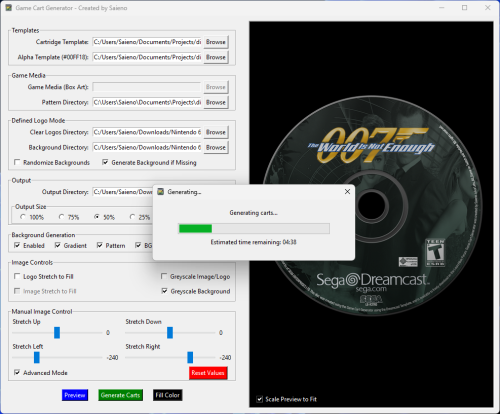
Game Cart Generator - Game Art Compositing Tool Created by Saieno - @Lets_All_Game on Twitch and LetsAllGame on YouTube Overview Game Cart Generator is a standalone desktop application for generating stylized cartridge or disc-based artwork. It's primarily for user-supplied template layers, clear logos or box art, and optionally background images or procedural backgrounds to compose polished output images. The app supports both standard label and defined logo area templates for advanced layouts, with options for pattern overlays, gradient fills, padding, scaling, compositing, and live color selection. This app is designed for batch generation and includes a threaded progress bar, preview support, auto-saving of settings per template, and example templates which you can use if you'd like. Template Requirements Cartridge Template (PNG): A top-layer graphic to overlay the final composition. Should contain transparency for visible underlying layers. Alpha Template (PNG): Must contain the color #00FF18 to define the artwork or logo area for the label. May contain the color #FF00FF to define a specific logo area which enables "Defined Logo Mode". These colors are used as masking keys and will be auto-detected and replaced during rendering. Key Features Support for both Standard and Defined Logo Area modes. Auto-detects and enables Defined Logo Mode based on Alpha Template contents. Background generation with: Solid color fill Vertical gradient Gradient with pattern overlay Optional greyscale conversion for logos and/or background layers. Background fallback logic when no matching background is found. Pattern overlays with optional grayscale masking. "BG Burn" effect for high-contrast multiply effect backgrounds. "Logo Burn" for blending greyscale logo and background together as a single burn layer. Fill Color: fills transparent areas inside the defined logo mask with a selectable color. Color Picker: choose fill color directly from anywhere on screen. Logo Stretch to Fill: stretches logos to fill the defined area, ignoring aspect ratio. Manual Image Stretching (up, down, left, right), with Advanced Mode extended range option. Scaled preview window with real-time updates and optional fit-to-window toggle. Threaded batch generation with estimated time remaining. Per-template configuration saved to settings.conf. Recursive input directory support for all asset folders. Defined Logo Mode Behavior When a template contains #FF00FF (magenta), the tool enables Defined Logo Mode: Clear logos are used in place of full box art. Backgrounds are matched by filename (e.g., Sonic.png). If no match is found: If "Generate Background if Missing" is disabled, a random background from the folder is used. If "Generate Background if Missing" is enabled, a generated gradient/pattern background is used automatically—even if background generation is off—to prevent transparency gaps. Greyscale Background option converts matched backgrounds to black & white. BG Burn applies a high-contrast multiply effect to background generation. Logo Burn composites the greyscale logo and background together, then blends that composite with the stylized background. If Fill Color is defined, it replaces any transparent pixels inside the logo mask area with the selected solid color. Logo Stretch to Fill forces the logo to completely fill the masked region, ignoring original aspect ratio. Output Final images are saved as .png to the selected output folder. Filenames are based on input image names for easy frontend installation. Composite includes background + logo/art + cartridge template overlay. Requirements No installation or required. Windows 10/11 Operating System Credits Created by @Saieno Twitch: https://www.twitch.tv/retr0sai YouTube: https://www.youtube.com/@LetsAllGame @Raindupon - Xbox, Xbox 360, PlayStation 2, PlayStation 3, and Sega Dreamcast disc template bases. @ABeezy13 - Hucard, Gameboy, Gameboy Color, Gameboy Advance, Nintendo 64, Super Nintendo template bases. @WallyWonka - Sega Genesis template base. @RetroNi - Sony PlayStation Portable and Super Famicom template bases. MarkusMcNugen on DeviantArt - Nintendo Switch template base. Bar0011 on DeviantArt - Nintendo 3DS template base. Omar Sacca (a.k.a. ortho*) - Famicom template base.- 36 comments
- 2 reviews
-
- 15
-

-

-

-
- game media
- cart art
- (and 3 more)
-
Game Cart Generator View File Game Cart Generator - Game Art Compositing Tool Created by Saieno - @Lets_All_Game on Twitch and LetsAllGame on YouTube Overview Game Cart Generator is a standalone desktop application for generating stylized cartridge or disc-based artwork. It's primarily for user-supplied template layers, clear logos or box art, and optionally background images or procedural backgrounds to compose polished output images. The app supports both standard label and defined logo area templates for advanced layouts, with options for pattern overlays, gradient fills, padding, scaling, compositing, and live color selection. This app is designed for batch generation and includes a threaded progress bar, preview support, auto-saving of settings per template, and example templates which you can use if you'd like. Template Requirements Cartridge Template (PNG): A top-layer graphic to overlay the final composition. Should contain transparency for visible underlying layers. Alpha Template (PNG): Must contain the color #00FF18 to define the artwork or logo area for the label. May contain the color #FF00FF to define a specific logo area which enables "Defined Logo Mode". These colors are used as masking keys and will be auto-detected and replaced during rendering. Key Features Support for both Standard and Defined Logo Area modes. Auto-detects and enables Defined Logo Mode based on Alpha Template contents. Background generation with: Solid color fill Vertical gradient Gradient with pattern overlay Optional greyscale conversion for logos and/or background layers. Background fallback logic when no matching background is found. Pattern overlays with optional grayscale masking. "BG Burn" effect for high-contrast multiply effect backgrounds. "Logo Burn" for blending greyscale logo and background together as a single burn layer. Fill Color: fills transparent areas inside the defined logo mask with a selectable color. Color Picker: choose fill color directly from anywhere on screen. Logo Stretch to Fill: stretches logos to fill the defined area, ignoring aspect ratio. Manual Image Stretching (up, down, left, right), with Advanced Mode extended range option. Scaled preview window with real-time updates and optional fit-to-window toggle. Threaded batch generation with estimated time remaining. Per-template configuration saved to settings.conf. Recursive input directory support for all asset folders. Defined Logo Mode Behavior When a template contains #FF00FF (magenta), the tool enables Defined Logo Mode: Clear logos are used in place of full box art. Backgrounds are matched by filename (e.g., Sonic.png). If no match is found: If "Generate Background if Missing" is disabled, a random background from the folder is used. If "Generate Background if Missing" is enabled, a generated gradient/pattern background is used automatically—even if background generation is off—to prevent transparency gaps. Greyscale Background option converts matched backgrounds to black & white. BG Burn applies a high-contrast multiply effect to background generation. Logo Burn composites the greyscale logo and background together, then blends that composite with the stylized background. If Fill Color is defined, it replaces any transparent pixels inside the logo mask area with the selected solid color. Logo Stretch to Fill forces the logo to completely fill the masked region, ignoring original aspect ratio. Output Final images are saved as .png to the selected output folder. Filenames are based on input image names for easy frontend installation. Composite includes background + logo/art + cartridge template overlay. Requirements No installation or required. Windows 10/11 Operating System Credits Created by @Saieno Twitch: https://www.twitch.tv/Lets_All_Game YouTube: https://www.youtube.com/@LetsAllGame @Raindupon - Xbox, Xbox 360, PlayStation 2, PlayStation 3, and Sega Dreamcast disc template bases. @ABeezy13 - Hucard, Gameboy, Gameboy Color, Gameboy Advance, Nintendo 64, Super Nintendo template bases. @WallyWonka - Sega Genesis template base. @RetroNi - Sony PlayStation Portable and Super Famicom template bases. MarkusMcNugen on DeviantArt - Nintendo Switch template base. Bar0011 on DeviantArt - Nintendo 3DS template base. Omar Sacca (a.k.a. ortho*) - Famicom template base. Submitter Saieno Submitted 04/01/2025 Category Third-party Apps and Plugins
-
- 2
-
-
- game media
- cart art
- (and 3 more)