Search the Community
Showing results for tags 'download'.
Found 18 results
-

Version 2
192 downloads
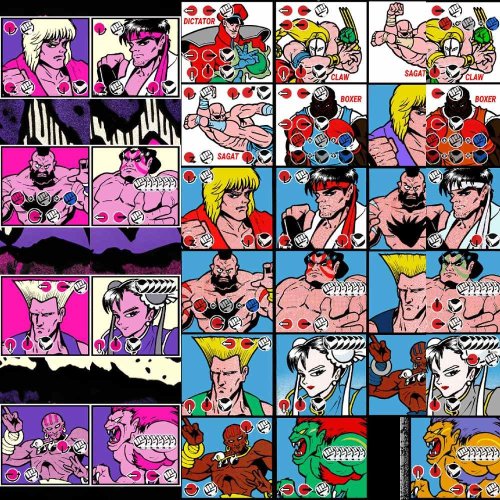
-Special moves added. -Dark Versions. -Tons of New Bezels made. They are 22 in total and come ready to be installed on MAME emulator. You can select them pressing TAB > Video. -(For Editors) 1440p Source Files. Feel free to edit any file. The Bezels are at 1080p 300kb, i feel this is the most efficient quality/size way to use them. Have fun! Credits to rodimusprimal he uploaded the original Hyper Fighting bezel eslewhere, i tweaked it and added the other ones. The post had 35 downloads. I removed it because i f*cked up.- 2 comments
-
- 4
-

-

-
- street fighter 2
- street fighter ii
- (and 29 more)
-
Street Fighter 2 Bezels Special Moves - World Warrior, Champion Edition, Hyper Fighting - Dark Version, 1080p, PSD 1440p Source File View File -Special moves added. -Dark Versions.-Tons of New Bezels made. They are 22 in total and come ready to be installed on MAME emulator. You can select them pressing TAB -> Video. -(For Editors) 1440p Source Files. Feel free to edit any file. The Bezels are at 1080p 300kb, i feel this is the most efficient quality/size way to use them. Have fun! Credits to rodimusprimal he uploaded the original Hyper Fighting bezel eslewhere, i tweaked it and added the other ones. The post had 35 downloads. I removed it because i f*cked up. Submitter EL REY BUGE Submitted 04/21/2024 Category Platform Bezels/Overlays
-
 Hello everybody, I'm an old premium user of LB and EmuMovies, but I haven't used LB in the few last years because I had not a PC for doing it anymore. In past it all worked fine and using EmuMovies Premium account I was able to download games' videos and I had all videos both for PC games and for ROMS. In the last 2 days I spent about 10 hours setting all up and manually importing a lot of games, but when I went to Big Box I've had the bad surprise. Only about 15 games on 300 got a video downloaded. I tried everything, many times, even asked the AI looking for solutions online, but everything I found didn't help me. There is the option to download from Steam and the other options in EmuMovies menu to download the videos and game video theme, but even if I select them there is no download. Please tell me that there is a solution.
 -
Hello I'm meo I use Computer I Open Launchbox And Install Retroarch But I reinstall,I Install Beta App And more but i failed any time I have this error in 24/9/2023 But today i can't fix this error Thank you

-
I initially got stuck when downloading metadata from EmuMovies I believe. It got stuck at "Player's Edge Plus Screenshot - Game Title" the first time and I waited about 15 minutes, tried to hit cancel and eventually had to End Task. After that I restarted LaunchBox again and it started downloading where it left off. Eventually it got to the same exact file name, "Player's Edge Plus Screenshot -Game Title," but this time as it is stuck where it lists filenames, it's still downloading other files as the numbers are changing...just not the names anymore. Not sure if there is some issue at emumovies with that particular file or not. Edit: This morning it has hung again on the file "Showdown - 3D." Once again it is after searching the Emumovies database. Apparantly there is some problem occurring between launchbox and emumovies involving metadata.
-
Hi, So I'm having a bit of trouble with the metadata image downloading. When I download the media everything downloads fine as shown in the first attached picture, but when I go back to edit metadata/media and go to images I find that it has downloaded a ton of duplicate images as shown in the second attached picture. I have everything set to download to a specific folder on my external hard drive to save space on my computer if that info helps. Any help would be greatly apricated.
-
Hi, I have a premium license and the version 11.12 version. I´ve been searching in the forum and google/youtube but I did not find any solution I have launchbox and big box installed in both pc, one in an arcade machine and other in my main pc, both windows 10. I try to install new version but it never ends downloading the last one. It happens in both computers. What can I do? I don want to install again becuase i have an amazing setup. Please help! Best regards from Malaga (Spain)
-
 For some reason it looks like Launchbox's Rushdownloader can't download any of the screenshots from the Steam storefront. It does fine with Steam Posters and Achievements, but when choosing to download just the Steam Screenshots option I get this error. I'm also going to include a Debug log from when I attempted it too. It's odd since GoG works alright (I noticed for EGS and Uplay games that trying to download the screenshots from the storefronts isn't really an option when you go to the Edit>Media>Images section of individual games to download them. Have to download the Screenshots Gameplay options I'm guessing from the LB Database despite it being an option when importing games.) I've tried adding Launchbox to my firewall settings too and that error still pops up so I'm kinda at my wits end here and wondering if anyone else has this problem? I have the current beta build of Launchbox, but I was using the current Stable build before trying it and it happened there so I thought that the beta version would work, but sadly it didn't. Debug 2021-07-24 02-15-51 AM.log
-
I'm running the latest LaunchBox/BigBox with the latest Windows10 on a i3-4130 PC with 16GB of memory and 250GB SSD and a Radeon HD5770. When I try to download the Metadata and Media for my game collection (less than 1000 from 9 platforms), it works for a little bit, then it eventually gets stuck/frozen trying to download a particular .png. Like right now, at the moment it's stuck downloading 4 file 7: Fanart - Background xxxxxxxxx.png for the game Puchi-Carat... Pressing cancel doesn't do anything but I can close the LaunchBox normally via alt-F4 or the clicking the X window button.. Also, if I try with less media types and/or only with a platform with few games, then it works.. but as soon I try to to download more media types or selecting a larger platform, the same thing happens.. It always gets stuck trying to download something... I'm not a premium member for EmuMovies, but I'm not downloading any videos or using premium features.. And I've also tried not using EmuMovies at all, with the same results... I don't think it's the issue with my computer or Windows or my Internet connection... Any ideas? Thank you!
-
 I was adding some steam games last night and one of them kept giving me the error "Could not import game "": An item with the same key has already been added. " The game was Nights of Azure 2, and I did have the previous game, but I didn't have the game already synced. I'm not sure what is causing it, or what to do to fix it. I found kind of a work around by just adding it manually and directing it to the link in the steam file, but that is not a very clean solution as the steam menu pops up and then the game screen is tiny unlike the others that open full screen, and the screen that pops up asks me if i want to start the game, as in start the booting into the game process, this is very clunky and annoying, but it's the best I could do. I'm hoping that someone can help me fix this problem and get it working correctly, or if i will just keep getting this era every time i sync a new steam game, unless i scroll through and uncheck it. any help would be very much appreciated. ?
 -
Greetings. I'm using version 11.11 and 11.12 of Launchbox, but still having trouble updating metadata and media for close to a month now. I have a lifetime membership of Launchbox and lifetime membership of Emumovies, but as my picture above, I'm currently downloading 23,280 files but they've all timed out. This had happened countless times and I've tried uninstalling and reinstalling everything including using the beta version, but the result has been similar - they all timed out. How do I fix this problem, as I have yet another batch of 116,000 games to update, but can't even do an update of my first 30,266 games. Any help would be greatly appreciated, thank you
-
Hello guys! i'm looking for Metadata.xml do you have at least updated file?! mine is old, can't identify what roms am i searching when adding rom because my metadata isn't updated... I've also tried to update the Metadata file.. when adding games but it's freezes when almost completed... then it'll close... Ahmm.. guys could you give me one file of your Metadata file?! :) :) thanks in advance and considerations!
-
If anyone could help me with a quick question on my plugin download page, I would greatly appreciate it. I'm the author of the "SteamLauncher" plugin, and I just spent the last hour trying to help a user with an issue he was having with my plugin. I finally figured out what the problem was, and it had nothing to do with my plugin, and was quite unexpected. After the Steam client updated, I had to make some changes to my plugin to maintain compatibility, so I uploaded an updated version (v0.9.0.1). The problem is, the main "Download" button on the plugin page still downloads the old version of the plugin, which for all intents and purposes is totally non-functional now. Although a link to the updated version of the plugin is available at the bottom of the plugin page, most people by default are just going to click the download button and not pay attention to anything else. Am I doing something wrong here, and if so, how do I change the version that the download button points to. If I'm not doing anything wrong, is there some way to fix this? Thanks!
-
Hey there, I had to re install my OS and tried to redownload my License.xml from the mail I got. It should be valid until 4 November 2017, but If i click on the link in the mail I get this: Is the link just expired? Or is it not possible to re-download my license? Thank you for you time!
-
Hi, The download does not provide me with any email. I've tried two email accounts and I've checked the trashbin on both of them. Greetings, Kim
-
So I have tried many front ends to Launch my Game Collection. I already have a Vast Collection of Roms, Videos and Themes. Now come the Questions 1. How do you import a collection into LaunchBox without having to downlaod everything again? 2. What you get a Licenses how does BigBox work and how do you set up a theme.
-
Hey, I'm in the UK and my download speeds for anything from the LaunchBox server are REALLY slow. I'm on an 80 Mb/s connection and normally see download speeds around 8 MB/s. From the LaunchBox server it's around 40-50 KB/s, or worse it just stops downloading. When updating to the latest beta this morning, it took me around 2 hours to update and downloading a theme is saying it will take 45 minutes, twice now it's just stopped downloading (see attachment). It seems to be fine around the forums, but any downloads are super slow. Any ideas? Thanks.




.thumb.webp.2f80431addae4e5b51f51b0084b9e6a7.webp)

.png.ae09c21f90efdda3058b79a6b1507b87.png)
.png.03471a4accb4a5e93cd416019dfba560.png)