Search the Community
Showing results for tags 'coverbox'.
Found 16 results
-
Coverbox Remastered View File DESCRIPTION: I am quite possibly the biggest Coverbox fan in these forums, I've loved it since the first day I used it. It was my go to for over a year of retro gaming. After using it for a while I started to notice areas that could be improved upon, eventually leading to me wanting to do something about it. After getting permission from Faeran I started adding in all the stuff I wished Coverbox had. Its got all the flashy stuff of a modern theme but still retains that sweet warm glow of Coverbox. After a couple of years I started to feel the same way about my old fragments, all the new stuff Dave was adding to the CTC was missing from those old fragments. Now, here I am again doing that same thing. Redoing the coverbox views, its become my 2nd hobby. I also have an obsession with adding more and more to my gaming library, sometimes I just sit and look through it for hours and never play anything. I like to tinker endlessly with the games, this entire theme from the beginning was designed around my obsessive compulsive habits. You might notice that I take it way too far with the small details, this is because of my ocd, and will likely never change as it's part of who I am. I spent many months listening to what you guys wanted from the previous themes, I took all that information and mashed it together into what you see here. Something for everybody. It's been a long road, I've learned alot over the years and finally feel like I can bring my vision to life. Please keep in mind this is still a very early version of the theme, stick with me while I polish up and add more game list views. To any newcomers, do not be scared off by the massive overload of information in this thread! It works out of the box with no extra work required. It works without installing any of the addons, or adding any custom options. It adapts to what you have installed and it adapts to what media you have. This will only improve as time goes by and people help me test the logic, eventually it will adapt to anything you throw at it. If you want to use all the custom options it can "seem" complex when in fact it's very simple. Making it was not, but using it should be. The custom options are for advanced users that want more out of their game lists. Give it a try, it might be your new go-to theme. Be sure to read the guides I wrote below to get the most out of this theme. Especially the one about how to change global settings! FILE DESCRIPTION: Coverbox Remastered v2.XX.zip - This is the most current version of Coverbox Remastered. Coverbox Remastered - BGM Addon.zip - This is a addon for Coverbox Remastered v2.XX. It adds background music support. It will not work with the old fragments version! Coverbox Remastered - BG Videos Addon.zip - This is a addon for Coverbox Remastered v2.XX. It adds background video support to most of the game list views. It will not work with the old fragments version! Coverbox Remastered Holiday Event Addon.zip - This is a addon for Coverbox Remastered v2.XX. It adds support for a few holiday events. It will not work with the old fragments version! _CUSTOM FIELDS (vX.XX).zip - This a copy of the _CUSTOM FIELDS.txt file that is included in the theme. It contains all the custom options for the game list views Coverbox Fragments (v1.XX) OLD.zip - This is the old Coverbox Fragments project I did a few years ago. This might get removed after I'm finished remastering all of them. FEATURES: Totally Re-Remastered Coverbox views Even more details Insane amount of logic added View box back when in game details in 2D or 3D mode! On-the-fly region changes to UI, cases, logos, buttons, icons, even the background! Many many custom options, so many options. Now with a ton of new customization options! Most of the game views allow you to easily customize them Tons of bonus media is now supported. You can add avatars, official icons, banners, xmb waves, change the color of handhelds, ui themes, the list goes on and on. Make it yours. Cart & disc animations! You can turn them on/off now with the global settings! Working battery levels for portable bigbox users, for all views. Handheld's in game list view even reflect real charge levels! Now with a set of Global Settings so you can get your Coverbox just right Seamless game details menu (just like CoverBox!) Absolutely ridiculous amount of ways to customize this theme. Like seriously man, you won't find anything with more options. Extend your gaming library even further with detailed information on the cover and icon dock, via metadata and custom fields. The tinkering continues well after your setup is complete. Easy to modify! Almost all assets are layered for added flexibility! Don't like a logo I added? root around in the media folder and delete it, edit it, change the color, modify anything you want! EXTREMELY detailed box art options More than just a cover! Under the hood each cover is a fully constructed box. Complete with inlay, disc, cart, wrapper, everything. When missing media happens, what you see underneath feels authentic. Custom startup & pause themes (still working on them for v2) Tremendous amount of hidden detail, some of which you won't even notice until you use it for a while, or add certain games to your collection. Now with Addon Support! Adapts immediately to what you have installed, and what you don't. Background Videos are now installed as a addon! For those who prefer them off, the theme will adapt and switch to static bg. Holiday Events Addon! New Holiday stuff added for those who enjoy a decent jump scare and good ol saint nick. (4th of July, Christmas, Halloween) Now with proper Retroachievements Support! Get them cheevs (Thanks Dave!) Background Music Addon! Listen to some sweet synth beats when you browse the platform list (can be turned off in global settings) Now with Game Save/State Support! IDK what it even is, or how to even activate it, but it's in there. VIDEOS: 2025-09-26 19-14-09.mp4 I'LL MAKE BETTER VIDEOS LATER VIEWS: Platform View 1 - Blades (WIP) Settings View 25 Remastered Coverbox Views Default View (for platforms with no theme yet) More platform/game list views on the way REQUIREMENTS: This theme no longer has many requirements! If the theme is running slow just disable some of the features using the global settings guide BigBox Version: 13 or later Region Metadata Filled Out Gameplay Videos (Its Coverbox after all) Platforms MUST be named using official Launchbox names, listed below. This theme almost requires the use of a dedicated GPU. It will not run very well with onboard GPU. SUPPORTED PLATFORM/PLAYLIST NAMES: Microsoft XBox Microsoft XBox 360 Nintendo Entertainment System Nintendo Famicom Nintendo Famicom Disk System Super Nintendo Entertainment System Nintendo Super Famicom Super Famicom Nintendo Sufami Turbo Nintendo Satellaview Nintendo Super Disc Nintendo Game Boy Nintendo Game Boy Color Nintendo Game Boy Advance Nintendo Super Game Boy Nintendo DS Nintendo DSi Nintendo 3DS Sega Game Gear Sony Net Yaroze Sony Playstation Sony Playstation 2 Sony Playstation 3 Sony Pocketstation Sony PSP If you do not wish to change your platform names you can rename the view files to match your platform/playlist names. EXTRAS: (OLD STARTUP/PAUSE STUFF) NEW ONES NOT READY YET These are the OLD startup/pause themes from Coverbox Fragments, they work but won't match the new Coverbox Remastered version. I'm still working on them and I'm way behind on it, I only have maybe 2 finished. I'll get to these at some point they are a big part of the theme, and wont be forgotten. Coverbox - Fragments Startup Themes Coverbox - Fragments Pause Themes *Installing these old versions will NOT reflect the install status on the Settings View like the new versions. REMASTERED PLATFORMS: 25 Nintendo Entertainment System (Remastered) Nintendo Famicom Nintendo Famicom Disk System Super Nintendo Entertainment System (Remastered) Nintendo Super Famicom (Remastered) EUROPE Super Famicom (Remastered) JAPAN Nintendo Sufami Turbo Nintendo Satellaview Nintendo Super Disc MSU-1 Nintendo 64 Nintendo 64DD Nintendo Gamecube Nintendo Wii Nintendo WiiU Nintendo Switch Nintendo Gameboy (Remastered) Nintendo Gameboy Color (Remastered) Nintendo Gameboy Advance (Remastered) Nintendo Super Gameboy Nintendo DS (Remastered) Nintendo DSi Nintendo 3DS (Remastered) Sony Playstation (Remastered) Sony PocketStation Sony Net Yaroze Sony Playstation 2 (Remastered) Sony Playstation 3 (Remastered) Sony PSP (Remastered) Sega Game Gear Sega Master System Sega Genesis Sega Saturn Sega Dreamcast MS-DOS Microsoft XBox (Remastered) Microsoft Xbox 360 (Remastered) and more...once I get all caught up. Any platform in red has not been ported to the new system yet, trying to enter the game list for any platform in red will fallback to the default theme. ICON DOCK LEGEND: I added new icon docks to all of the remastered game list themes. These usually are consistent between platforms (with a few exceptions). They are all usually the same unless the platform has icons for that type of thing already, then i use those instead. Ill list what the icons mean below: - game has additional applications - game is favorited - game is completed - game has achievements - game is broken - game has manual - game has game save - game has lightgun support (only if platform supports it) - game has mouse support (only if platform supports it) - game has keyboard support (only if platform supports it) *other values exist and are usually tied to the Custom Fields stuff. DLC, adhoc, wifi, etc sometimes have dock icons. EARLY ACCESS PROGRESS: Remaster all the fragment game list views (21/30) Remaster the Start/Shutdown themes for all platforms (2/30) Remaster Pause Themes (2/30) Finish Platform view 1 and make 3 new platform views (1/4) Finish game/platform Marquee views (0) Polish all the game list views and try to remove any lag (0) Possibly remove things to speed up some of the troublesome game lists? (0) GUIDES: READ THEM!!!! INSTALL GUIDE: SUGGESTED BIGBOX SETTINGS: CUSTOM OPTIONS GUIDE: GLOBAL SETTINGS GUIDE: READ THIS! ON-THE-FLY REGION CHANGES GUIDE: BONUS MEDIA GUIDES: NEW INFO ADDED! (9/16/25) EDITING THE THEME: WANT TO HELP? PATREON: Become a member of my Patreon, a place where you can help keep me up late by buying me Starbucks. It's no longer a place of paywall, I don't even spend alot of time there it's just a place for people to donate to my long nights of theming. I spend alot of time in my gaming room making these themes, if you feel that using these themes has brought you $3 worth of joy, please consider donating to my coffee pot. Any person that donates (even just once) will get their name permanently listed in the "Supporter" section on the settings page of this theme. You can subscribe then immediately unsubscribe, it doesn't hurt my feelings. As a added bonus you can make requests and let me know how you feel about anything really. I try to post every few days and show what I've been working on, stop by and check it out! It's free. If you decide to become a member of my super secret club, I will listen to your stories, requests, and criticism. I will use your donation money to buy large stockpiles of Bustelo, and Giovani's pizza. Your voices will be heard, your money will be spent on snacks, and I will do my best to make the magic happen. I will say...I don't do this for money. I am grateful for every dollar, but....I really WILL spend your money on fast food and coffee. If you don't buy it for me, I buy it myself lol. I stay up late regardless, and I will make these whether people pay me or not. I think it's fun, making these. It's another way for me to re-live these platforms aside from browsing the game lists (which also bring me joy). I spend a ton of time reading about the platforms, watching videos, all kinds of fun stuff. I don't think of it as a job, I WANT to make them, for free even. I jump at the chance to squash bugs because I truly want this to be the best I can possibly make it, to pay proper homage to the original Coverbox and also for anybody that enjoys Coverbox as much as I do. I may not make alot of money, but, I don't need it to be happy. I have everything I need, God has blessed me with such. I prefer that you donate your money to Dave, he deserves it more so than I. Without his CTC we would have WAAAAY less themes here to choose from, this one included. It's made ENTIRELY with his CTC app, I used nothing else. I will list his Patreon page below with mine. Again, I'm grateful for all of you that choose to share your snack money with me, and also with Dave. Dave's Patreon KingSlayer420 Patreon CREDITS: ASSETS: Coverbox - By Faeran Photoreal Controller Vectors - By Pineapple Graphics Platform Backgrounds from Unified - By CriticalCid COLORFUL Hardware PNG media - By viking COLORFUL platform video set - By viking LaunchBox Logos - By Dan Patrick Default assets - By dragon57 Color Logos Wallpaper - By dragon57 Blank Box art - By Pyrometheous Console Platform Box Pack - By Rlad SNES Console Front Face - By BMovieBen Super Gameboy Cartridges - By Duimon HD PS1 BIOS Theme - By mrgonaka Retroarch PSX Bios Theme - By Sir5ur Super Gameboy Borders - By ruckage Platform Fanart - By BlazingRyuu Cart-Case Borders - By ABeezy1388 Case Borders - By Robin55 Gameboy Kiosk Overlay - By p3st HyperSpin Platform Pointers - By thatman84 Unified Pointers - By CriticalCid PS2 5K Wallpaper - By adamlbiscuit Sega Game Gear Sound Pack - By drmalouf PS2 Soundpack - By Jodanzuki Classic DS Menu - By Gemdation DSi Sprites - By Citra Nintendo 3DS - By reon 3DS Theme - By Malixx Famicom Disk Case - By Dedaloso TendoMode - By ryback2501 OEM Unleashed - By FrontlineMist57 Xbox 360 NXE - By Riquenunes NXE Ultimate Pack - By TheBusterZX Playstation X - By pajarorrojo Assets from CTC Examples - By Dave Paterson PSP 1G1R No-Case - By Signum Platform System Boxes - By Styphelus SNES MSU-1 Media Set - By CTRL-ALT-DEFEAT MUSIC: RetroSynth - By Bastien Agussol This is Halloween - By Universfield Tetris Theme - By SpookyDave Flower Garden Remix - By Qumu Super Mario Land Remix - By Qumu Holly Jolly Christmas - By Don Salmon Music Star Spangled Banner - By Music Unlimited Underground Remastered 80s Style - By Aqua MIDI Focused - By 8-BrickDMG Pokemon Synthwave - By Chillboy Beats Somebody's Watching Me - By Rockwell Emerald Hill Zone Remix - By Player2 Astro Advancement - By Sponzi Castle Theme Remix - By PIXELIZER GTA Retrowave Remix - By RetroCiri Yoshi's Island - Underground - By JuunJuubei Rainbow Road 80's Synthwave - By Chillboy Beats DSi Shop Theme Remix - By mfgecko 3DS Theme Shop Remix - By Player2 Chemical Plant Zone Remix - By Xennon Perfect Dark Remix - By Ryuquency Yoshi Story Remix - By Synoxsis Halo 2 Synthwave - By MS Synthwave GTA V Pause Remix - By EurocorpFx Halo 3 Rain - By MS Synthwave FFVII Battle Remix - By DI Steven Papo Satellaview BSX - By New Nova UNATCO Remix - By CVDash Final Fantasy Prelude - By Chillboy Beats Super Mario Bros 1-2 Synth - By RetroShred Super Mario Bros Synth - By Lucid Memory Dreams of the Shore - By Leon Night Dark Lavender Town - By Turbo Sinner Aquatic Ambience Remix - By HEPHESTOS Donkey Kong Intro Remix - By JGS Music VIDEO: Rainbow Neon Stairs - By Anton Nikolaienko PS2 Game List Video - By DonellHD Futuristic Pixel Neon - By Siam Ahmad Halloween Festival - By Potjanun Surirug Christmas Scene - By Cahya Sunandar Digital LCD Pattern - By Ponravin Phom-in Merry Christmas - By Black Spade Design Happy Independence Day - By Saad Ur Rehman American Flag Wave - By Dwi Rustiyanto 3D Grid Tunnel - By Paduret Dan Cristian Abstract Radiating Lightburst - By Ibna Foysal Abstract Geometric Shapes - By Pipat Sungwises Elegant Moving Shapes - By Chandresh Uike White Color Grid - By Digital Background Gray Grid - By Syahrul Iman Colorful Lines - By Herlangga Perkasa Abstract Lighting - By Shajahan Ali Lens Flare - By Herlangga Perkasa Pink Curved Lines - By Happy Dwi Sulaspriyono Abstract Brick Wall - By Okan Akdeniz Endless Sci-Fi Corridor - By Iryna Nikolaienko White Squares - By Chandresh Uike Elegant White - By Chandresh Uike NES Mini Screensaver - By GraphicsGod Playstation 3 XMB Waves - By VoltPlayz PSP Wave Videos - By AYZAK 94 SPECIAL THANKS TO: Faeran - For making Coverbox, letting me use your assets, helping me when I get stuck, making all the CTC videos, your like a mentor to me. y2guru - For making Community Theme Creator, none of this would be possible without it! Also thank you for all the help, examples, assets, and instructional videos! Cnells2000 - For helping me make some videos, making some assets and helping me test Vahn65 - For helping me test updates Zyute - For helping me test updates Patreon Supporters - For keeping the coffee comin' and helping me with the themes. REPORT BUGS IN THE COMMENTS (OR DM ME) I'LL GET THEM FIXED ASAP *_CUSTOM FIELDS.txt is included in the theme, and also available for download in a separate zip above. If you like this theme, please leave a review and tell me about it! It keeps me motivated! FEED ME TASTY MUSHROOM! Submitter KingSlayer420 Submitted 07/05/2024 Category Custom Themes
- 12 replies
-
- 5
-

-

-

-
- coverbox
- customizable
- (and 1 more)
-

Version 1.0.2
70 downloads
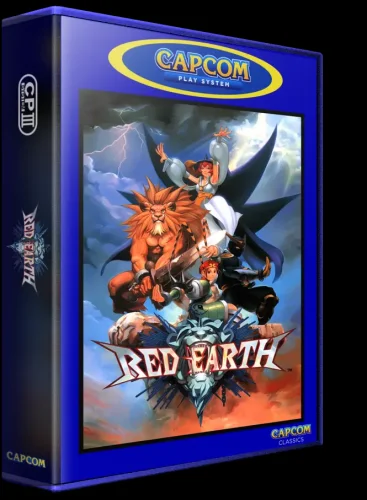
I know there are a few 3DBoxes for Arcade and especial for the Capcom play systems, but i wanted to do my own. I have more projects lined up that i want to complete, so i look forward to getting those out to you guys soon.- 8 comments
-
- 3
-
-
-

-
- coverbox
- 3d box art
- (and 2 more)
-
Version v2.23.1 - Early Access
5,266 downloads
DESCRIPTION: I am quite possibly the biggest Coverbox fan in these forums, I've loved it since the first day I used it. It was my go to for over a year of retro gaming. After using it for a while I started to notice areas that could be improved upon, eventually leading to me wanting to do something about it. After getting permission from Faeran I started adding in all the stuff I wished Coverbox had. Its got all the flashy stuff of a modern theme but still retains that sweet warm glow of Coverbox. After a couple of years I started to feel the same way about my old fragments, all the new stuff Dave was adding to the CTC was missing from those old fragments. Now, here I am again doing that same thing. Redoing the coverbox views, its become my 2nd hobby. I also have an obsession with adding more and more to my gaming library, sometimes I just sit and look through it for hours and never play anything. I like to tinker endlessly with the games, this entire theme from the beginning was designed around my obsessive compulsive habits. You might notice that I take it way too far with the small details, this is because of my ocd, and will likely never change as it's part of who I am. I spent many months listening to what you guys wanted from the previous themes, I took all that information and mashed it together into what you see here. Something for everybody. It's been a long road, I've learned alot over the years and finally feel like I can bring my vision to life. Please keep in mind this is still a very early version of the theme, stick with me while I polish up and add more game list views. To any newcomers, do not be scared off by the massive overload of information in this thread! It works out of the box with no extra work required. It works without installing any of the addons, or adding any custom options. It adapts to what you have installed and it adapts to what media you have. This will only improve as time goes by and people help me test the logic, eventually it will adapt to anything you throw at it. If you want to use all the custom options it can "seem" complex when in fact it's very simple. Making it was not, but using it should be. The custom options are for advanced users that want more out of their game lists. Give it a try, it might be your new go-to theme. Be sure to read the guides I wrote below to get the most out of this theme. Especially the one about how to change global settings! FILE DESCRIPTION: Coverbox Remastered v2.XX.zip - This is the most current version of Coverbox Remastered. Coverbox Remastered - BGM Addon.zip - This is a addon for Coverbox Remastered v2.XX. It adds background music support. It will not work with the old fragments version! Coverbox Remastered - BG Videos Addon.zip - This is a addon for Coverbox Remastered v2.XX. It adds background video support to most of the game list views. It will not work with the old fragments version! Coverbox Remastered Holiday Event Addon.zip - This is a addon for Coverbox Remastered v2.XX. It adds support for a few holiday events. It will not work with the old fragments version! _CUSTOM FIELDS (vX.XX).zip - This a copy of the _CUSTOM FIELDS.txt file that is included in the theme. It contains all the custom options for the game list views Coverbox Fragments (v1.XX) OLD.zip - This is the old Coverbox Fragments project I did a few years ago. This might get removed after I'm finished remastering all of them. FEATURES: Totally Re-Remastered Coverbox views Even more details Insane amount of logic added View box back when in game details in 2D or 3D mode! On-the-fly region changes to UI, cases, logos, buttons, icons, even the background! Many many custom options, so many options. Now with a ton of new customization options! Most of the game views allow you to easily customize them Tons of bonus media is now supported. You can add avatars, official icons, banners, xmb waves, change the color of handhelds, ui themes, the list goes on and on. Make it yours. Cart & disc animations! You can turn them on/off now with the global settings! Working battery levels for portable bigbox users, for all views. Handheld's in game list view even reflect real charge levels! Now with a set of Global Settings so you can get your Coverbox just right Seamless game details menu (just like CoverBox!) Absolutely ridiculous amount of ways to customize this theme. Like seriously man, you won't find anything with more options. Extend your gaming library even further with detailed information on the cover and icon dock, via metadata and custom fields. The tinkering continues well after your setup is complete. Easy to modify! Almost all assets are layered for added flexibility! Don't like a logo I added? root around in the media folder and delete it, edit it, change the color, modify anything you want! EXTREMELY detailed box art options More than just a cover! Under the hood each cover is a fully constructed box. Complete with inlay, disc, cart, wrapper, everything. When missing media happens, what you see underneath feels authentic. Custom startup & pause themes (still working on them for v2) Tremendous amount of hidden detail, some of which you won't even notice until you use it for a while, or add certain games to your collection. Now with Addon Support! Adapts immediately to what you have installed, and what you don't. Background Videos are now installed as a addon! For those who prefer them off, the theme will adapt and switch to static bg. Holiday Events Addon! New Holiday stuff added for those who enjoy a decent jump scare and good ol saint nick. (4th of July, Christmas, Halloween) Now with proper Retroachievements Support! Get them cheevs (Thanks Dave!) Background Music Addon! Listen to some sweet synth beats when you browse the platform list (can be turned off in global settings) Now with Game Save/State Support! IDK what it even is, or how to even activate it, but it's in there. VIDEOS: 2025-09-26 19-14-09.mp4 I'LL MAKE BETTER VIDEOS LATER VIEWS: Platform View 1 - Blades (WIP) Settings View 25 Remastered Coverbox Views Default View (for platforms with no theme yet) More platform/game list views on the way REQUIREMENTS: This theme no longer has many requirements! If the theme is running slow just disable some of the features using the global settings guide BigBox Version: 13 or later Region Metadata Filled Out Gameplay Videos (Its Coverbox after all) Platforms MUST be named using official Launchbox names, listed below. This theme almost requires the use of a dedicated GPU. It will not run very well with onboard GPU. SUPPORTED PLATFORM/PLAYLIST NAMES: Microsoft XBox Microsoft XBox 360 Nintendo Entertainment System Nintendo Famicom Nintendo Famicom Disk System Super Nintendo Entertainment System Nintendo Super Famicom Super Famicom Nintendo Sufami Turbo Nintendo Satellaview Nintendo Super Disc Nintendo Game Boy Nintendo Game Boy Color Nintendo Game Boy Advance Nintendo Super Game Boy Nintendo DS Nintendo DSi Nintendo 3DS Sega Game Gear Sony Net Yaroze Sony Playstation Sony Playstation 2 Sony Playstation 3 Sony Pocketstation Sony PSP If you do not wish to change your platform names you can rename the view files to match your platform/playlist names. EXTRAS: (OLD STARTUP/PAUSE STUFF) NEW ONES NOT READY YET These are the OLD startup/pause themes from Coverbox Fragments, they work but won't match the new Coverbox Remastered version. I'm still working on them and I'm way behind on it, I only have maybe 2 finished. I'll get to these at some point they are a big part of the theme, and wont be forgotten. Coverbox - Fragments Startup Themes Coverbox - Fragments Pause Themes *Installing these old versions will NOT reflect the install status on the Settings View like the new versions. REMASTERED PLATFORMS: 25 Nintendo Entertainment System (Remastered) Nintendo Famicom Nintendo Famicom Disk System Super Nintendo Entertainment System (Remastered) Nintendo Super Famicom (Remastered) EUROPE Super Famicom (Remastered) JAPAN Nintendo Sufami Turbo Nintendo Satellaview Nintendo Super Disc MSU-1 Nintendo 64 Nintendo 64DD Nintendo Gamecube Nintendo Wii Nintendo WiiU Nintendo Switch Nintendo Gameboy (Remastered) Nintendo Gameboy Color (Remastered) Nintendo Gameboy Advance (Remastered) Nintendo Super Gameboy Nintendo DS (Remastered) Nintendo DSi Nintendo 3DS (Remastered) Sony Playstation (Remastered) Sony PocketStation Sony Net Yaroze Sony Playstation 2 (Remastered) Sony Playstation 3 (Remastered) Sony PSP (Remastered) Sega Game Gear Sega Master System Sega Genesis Sega Saturn Sega Dreamcast MS-DOS Microsoft XBox (Remastered) Microsoft Xbox 360 (Remastered) and more...once I get all caught up. Any platform in red has not been ported to the new system yet, trying to enter the game list for any platform in red will fallback to the default theme. ICON DOCK LEGEND: I added new icon docks to all of the remastered game list themes. These usually are consistent between platforms (with a few exceptions). They are all usually the same unless the platform has icons for that type of thing already, then i use those instead. Ill list what the icons mean below: - game has additional applications - game is favorited - game is completed - game has achievements - game is broken - game has manual - game has game save - game has lightgun support (only if platform supports it) - game has mouse support (only if platform supports it) - game has keyboard support (only if platform supports it) *other values exist and are usually tied to the Custom Fields stuff. DLC, adhoc, wifi, etc sometimes have dock icons. EARLY ACCESS PROGRESS: Remaster all the fragment game list views (21/30) Remaster the Start/Shutdown themes for all platforms (2/30) Remaster Pause Themes (2/30) Finish Platform view 1 and make 3 new platform views (1/4) Finish game/platform Marquee views (0) Polish all the game list views and try to remove any lag (0) Possibly remove things to speed up some of the troublesome game lists? (0) GUIDES: READ THEM!!!! INSTALL GUIDE: SUGGESTED BIGBOX SETTINGS: CUSTOM OPTIONS GUIDE: GLOBAL SETTINGS GUIDE: READ THIS! ON-THE-FLY REGION CHANGES GUIDE: BONUS MEDIA GUIDES: NEW INFO ADDED! (9/16/25) EDITING THE THEME: WANT TO HELP? PATREON: Become a member of my Patreon, a place where you can help keep me up late by buying me Starbucks. It's no longer a place of paywall, I don't even spend alot of time there it's just a place for people to donate to my long nights of theming. I spend alot of time in my gaming room making these themes, if you feel that using these themes has brought you $3 worth of joy, please consider donating to my coffee pot. Any person that donates (even just once) will get their name permanently listed in the "Supporter" section on the settings page of this theme. You can subscribe then immediately unsubscribe, it doesn't hurt my feelings. As a added bonus you can make requests and let me know how you feel about anything really. I try to post every few days and show what I've been working on, stop by and check it out! It's free. If you decide to become a member of my super secret club, I will listen to your stories, requests, and criticism. I will use your donation money to buy large stockpiles of Bustelo, and Giovani's pizza. Your voices will be heard, your money will be spent on snacks, and I will do my best to make the magic happen. I will say...I don't do this for money. I am grateful for every dollar, but....I really WILL spend your money on fast food and coffee. If you don't buy it for me, I buy it myself lol. I stay up late regardless, and I will make these whether people pay me or not. I think it's fun, making these. It's another way for me to re-live these platforms aside from browsing the game lists (which also bring me joy). I spend a ton of time reading about the platforms, watching videos, all kinds of fun stuff. I don't think of it as a job, I WANT to make them, for free even. I jump at the chance to squash bugs because I truly want this to be the best I can possibly make it, to pay proper homage to the original Coverbox and also for anybody that enjoys Coverbox as much as I do. I may not make alot of money, but, I don't need it to be happy. I have everything I need, God has blessed me with such. I prefer that you donate your money to Dave, he deserves it more so than I. Without his CTC we would have WAAAAY less themes here to choose from, this one included. It's made ENTIRELY with his CTC app, I used nothing else. I will list his Patreon page below with mine. Again, I'm grateful for all of you that choose to share your snack money with me, and also with Dave. Dave's Patreon KingSlayer420 Patreon CREDITS: ASSETS: Coverbox - By Faeran Photoreal Controller Vectors - By Pineapple Graphics Platform Backgrounds from Unified - By CriticalCid COLORFUL Hardware PNG media - By viking COLORFUL platform video set - By viking LaunchBox Logos - By Dan Patrick Default assets - By dragon57 Color Logos Wallpaper - By dragon57 Blank Box art - By Pyrometheous Console Platform Box Pack - By Rlad SNES Console Front Face - By BMovieBen Super Gameboy Cartridges - By Duimon HD PS1 BIOS Theme - By mrgonaka Retroarch PSX Bios Theme - By Sir5ur Super Gameboy Borders - By ruckage Platform Fanart - By BlazingRyuu Cart-Case Borders - By ABeezy1388 Case Borders - By Robin55 Gameboy Kiosk Overlay - By p3st HyperSpin Platform Pointers - By thatman84 Unified Pointers - By CriticalCid PS2 5K Wallpaper - By adamlbiscuit Sega Game Gear Sound Pack - By drmalouf PS2 Soundpack - By Jodanzuki Classic DS Menu - By Gemdation DSi Sprites - By Citra Nintendo 3DS - By reon 3DS Theme - By Malixx Famicom Disk Case - By Dedaloso TendoMode - By ryback2501 OEM Unleashed - By FrontlineMist57 Xbox 360 NXE - By Riquenunes NXE Ultimate Pack - By TheBusterZX Playstation X - By pajarorrojo Assets from CTC Examples - By Dave Paterson PSP 1G1R No-Case - By Signum Platform System Boxes - By Styphelus SNES MSU-1 Media Set - By CTRL-ALT-DEFEAT MUSIC: RetroSynth - By Bastien Agussol This is Halloween - By Universfield Tetris Theme - By SpookyDave Flower Garden Remix - By Qumu Super Mario Land Remix - By Qumu Holly Jolly Christmas - By Don Salmon Music Star Spangled Banner - By Music Unlimited Underground Remastered 80s Style - By Aqua MIDI Focused - By 8-BrickDMG Pokemon Synthwave - By Chillboy Beats Somebody's Watching Me - By Rockwell Emerald Hill Zone Remix - By Player2 Astro Advancement - By Sponzi Castle Theme Remix - By PIXELIZER GTA Retrowave Remix - By RetroCiri Yoshi's Island - Underground - By JuunJuubei Rainbow Road 80's Synthwave - By Chillboy Beats DSi Shop Theme Remix - By mfgecko 3DS Theme Shop Remix - By Player2 Chemical Plant Zone Remix - By Xennon Perfect Dark Remix - By Ryuquency Yoshi Story Remix - By Synoxsis Halo 2 Synthwave - By MS Synthwave GTA V Pause Remix - By EurocorpFx Halo 3 Rain - By MS Synthwave FFVII Battle Remix - By DI Steven Papo Satellaview BSX - By New Nova UNATCO Remix - By CVDash Final Fantasy Prelude - By Chillboy Beats Super Mario Bros 1-2 Synth - By RetroShred Super Mario Bros Synth - By Lucid Memory Dreams of the Shore - By Leon Night Dark Lavender Town - By Turbo Sinner Aquatic Ambience Remix - By HEPHESTOS Donkey Kong Intro Remix - By JGS Music VIDEO: Rainbow Neon Stairs - By Anton Nikolaienko PS2 Game List Video - By DonellHD Futuristic Pixel Neon - By Siam Ahmad Halloween Festival - By Potjanun Surirug Christmas Scene - By Cahya Sunandar Digital LCD Pattern - By Ponravin Phom-in Merry Christmas - By Black Spade Design Happy Independence Day - By Saad Ur Rehman American Flag Wave - By Dwi Rustiyanto 3D Grid Tunnel - By Paduret Dan Cristian Abstract Radiating Lightburst - By Ibna Foysal Abstract Geometric Shapes - By Pipat Sungwises Elegant Moving Shapes - By Chandresh Uike White Color Grid - By Digital Background Gray Grid - By Syahrul Iman Colorful Lines - By Herlangga Perkasa Abstract Lighting - By Shajahan Ali Lens Flare - By Herlangga Perkasa Pink Curved Lines - By Happy Dwi Sulaspriyono Abstract Brick Wall - By Okan Akdeniz Endless Sci-Fi Corridor - By Iryna Nikolaienko White Squares - By Chandresh Uike Elegant White - By Chandresh Uike NES Mini Screensaver - By GraphicsGod Playstation 3 XMB Waves - By VoltPlayz PSP Wave Videos - By AYZAK 94 SPECIAL THANKS TO: Faeran - For making Coverbox, letting me use your assets, helping me when I get stuck, making all the CTC videos, your like a mentor to me. y2guru - For making Community Theme Creator, none of this would be possible without it! Also thank you for all the help, examples, assets, and instructional videos! Cnells2000 - For helping me make some videos, making some assets and helping me test Vahn65 - For helping me test updates Zyute - For helping me test updates Patreon Supporters - For keeping the coffee comin' and helping me with the themes. REPORT BUGS IN THE COMMENTS (OR DM ME) I'LL GET THEM FIXED ASAP *_CUSTOM FIELDS.txt is included in the theme, and also available for download in a separate zip above. If you like this theme, please leave a review and tell me about it! It keeps me motivated! FEED ME TASTY MUSHROOM!- 113 comments
- 8 reviews
-
- 26
-
-
-
-
-
- coverbox
- customizable
- (and 1 more)
-
Version 2.0.2
139 downloads
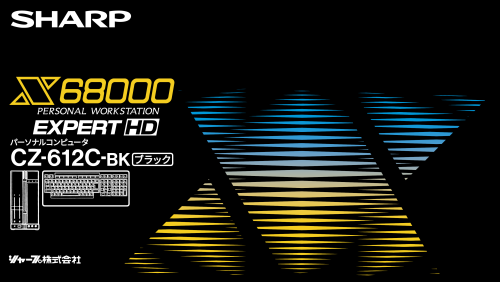
I use the console boxes from Coverbox by @faeran as platform banners in Launchbox and I really liked the additional ones created by @Rlad and thought I would have a go myself. I love me some Speccy and thought the 48K+ doesn't get enough love so created a box for it. Also created ZX Spectrum Next boxes. 4 variants. 2 for each Kickstarter release (red/blue & big/small). Sega Games Library has 2 variants. Flicky is the official Sega Channel Mascot but the original brown box it came in has Sonic on. (Sorry for any fluent Japanese readers if there are any spelling errors or the font is way off) European variant of the Dreamcast box. Pico-8 is as 'official' a box as I can find. For MegaNet I've used the Sega Games Library as I think all the games for MegaNet are via this cartridge. For those that prefer a different gradient colour on the Sharp X68000, you can easily change it in the GIMP file. Full List Atari Jaguar CD Atari ST Lexaloffle Pico-8 MGT SAM Coupé Panic Playdate Sega Channel Sega Dreamcast Sega Games Library Sharp X68000 SMS ZX Spectrum Next WoW Action Max ZX Spectrum 48k+ I've also uploaded my GIMP files If anyone has a better image for the Next or the SAM Coupé, let me know. I AI up-scaled the best ones I could find. -
Extra Box Banners for Coverbox View File I use the console boxes from Coverbox by @faeran as platform banners in Launchbox and I really liked the additional ones created by @Rlad and thought I would have a go myself. I love me some Speccy and thought the 48K+ doesn't get enough love so created a box for it. Also created ZX Spectrum Next boxes. 4 variants. 2 for each Kickstarter release (red/blue & big/small). Sega Games Library has 2 variants. Flicky is the official Sega Channel Mascot but the original brown box it came in has Sonic on. (Sorry for any fluent Japanese readers if there are any spelling errors of the font is way off) European variant of the Dreamcast box. Pico-8 is as 'official' a box as I can find. For MegaNet I've used the Sega Games Library as I think all the games for MegaNet are via this cartridge. For those that prefer a different gradient colour on the Sharp X68000, you can easily change it in the GIMP file. Full List Atari Jaguar CD Atari ST Lexaloffle Pico-8 MGT SAM Coupé Panic Playdate Sega Channel Sega Dreamcast Sega Games Library Sharp X68000 SMS ZX Spectrum Next WoW Action Max ZX Spectrum 48k+ I've also uploaded my GIMP files If anyone has a better image for the Next or the SAM Coupé, let me know. I AI up-scaled the best ones I could find. Submitter azazel_1125 Submitted 07/08/2024 Category Platform Media Packs
-
Coverbox - Fragments View File Ever since I first laid eyes on Faeran's Coverbox I fell in love with it. It's by far my favorite BigBox theme, I've been using it for quite some time now. Along the way, I noticed a few things that could be improved or expanded. Faeran was nice enough to share his CTC files for coverbox so I figured I'd take a stab at making it look more modern. When I first started modifying the CTC files I had all the platforms mashed together in one theme, as you usually see people do when they make a BB theme. I realized later that splitting them up into stand-alone themes was way more flexible. I made a choice later to split them all up, I just couldn't do what I wanted to do with them all in one theme. At first this project was just something I wanted to do for my for my own collection, I started tinkering with the CTC creating frankenstein-coverbox variations out of themes from the downloads section and had alot of fun doing it. I had this idea of what i wanted Coverbox to look like in my head, but had trouble bringing it to life with the CTC. I went back and watched alot of faeran's tutorial videos, and y2guru's videos and set out (again) to recreate Coverbox in a way that pays tribute to the original and also adds all the elements I felt it was lacking. I didn't want to just tear through Coverbox making it my own, I wanted it to retain some of it's original feel while adding in some new stuff. These themes are my 3rd attempt at a Coverbox remaster, this attempt is at least worthy of sharing. The experience with CTC from the previous attempts, and a better understanding when I went back to watch the videos helped tremendously. After I completed a few I was surprised at how good they looked. I msged faeran and asked how he felt about me sharing them, he is such a nice guy of course he told me to go for it 😄 It takes me a while to finish them but I'll upload them as I complete them. Each theme only has 1 list view just like Coverbox, there are no other views so this theme can only be applied while within the game list menu in bigbox. Also don't forget to enable "remember separate view for each platform" in bigbox settings. After about 7-8 secs of inactivity in the game list the disc/cart stuff will display, pressing up or down will bring back the game list. I try to test them pretty well before uploading them but I may have overlooked something, it's alot to keep track of sometimes. This is my first experience sharing a theme and perhaps I took it a little too far with the small details, once it's all said and done I will go back over all of them and try to optimize them a bit more than I already have. If you find anything out of place feel free to leave a comment and I'll get it fixed up. NOTE: These themes may or may not work well on low performance machines and have only been tested on my current setup. These were made with CTC 3.XX and Launchbox 13.8, I'm unsure if it works with any lower versions. Should also state that I used 1080 resolution, not sure if it will scale properly or not. Platforms Completed: 20 Nintendo Entertainment System / Famicom / Famicom Disk System Super Nintendo / Super Famicom / Satellaview / Sufami Turbo Nintendo 64 / 64DD Nintendo Gamecube Nintendo Wii Nintendo GameBoy Nintendo GameBoy Color Nintendo Gameboy Advance / GBA Video Nintendo DS / DSi / DSiWare Nintendo 3DS / eShop Microsoft XBox Microsoft XBox 360 / Arcade Microsoft MS-DOS / Windows 3.11 Sega Genesis / Mega Drive / 32x / Sega CD / Mega CD Sega Dreamcast Sega Saturn Sony PlayStation Sony PlayStation 2 Sony PlayStation 3 / PSN Sony PSP / Mini / UMD Video / UMD Music Video Some of the things I've added: Reworked Coverbox Layout Startup/Shutdown Themes (Optional) Pause Themes (Optional) More Publisher/Developer Logos Animated Elements Video Backgrounds Custom Metadata Options More Information Displayed Try to stay true to each platforms official menu Official UI Sounds (when available) Custom Animated Marquee On the Fly Region/Feature Changes View Box Back when in details Each theme must be applied individually in BigBox, enter platform game list, hit your theme hotkey, and apply the Coverbox - Fragment theme that matches that platform/playlist. Repeat for each platform Each Pause/Startup theme must be installed individually into your Launchbox folder for them to display. If you do not plan to use the pause/startup themes you can skip installing them. Custom Field metadata must be entered for some of the platform extras to display (FDS,GBA Video, etc) Region metadata must be entered for region specific cases to display. Supported Values are North America, United States, Europe, United Kingdom, and Japan INSTALLING THE THEMES: CUSTOM FIELD OPTIONS: (Optional) Each theme has custom options that can be enabled by adding custom values to a games metadata. Enter any of the values in the txt file below into a games "Custom Fields" metadata section (via launchbox) to enable certain features within each theme. Each setting is on a per-game basis, to add custom values to many games just select them all and do a bulk edit. All the options are listed in the txt file posted below. Custom Options.txt HOW TO USE CUSTOM OPTIONS: Credits: CoverBox 4.02 - By faeran DOS Matrix - [Theme Workshop] 1.1 - By faeran GenesisMini - [Theme Workshop] 1.0 - By faeran Sega-CD-Mini theme - By Arcanthur Default assets - By dragon57 COLORFUL Hardware Device Images - By viking Platform Logos Professionally Redrawn - By Dan Patrick Kyosuke Room Backgrounds - By arsenixc Photoreal Controller Vectors - By Pineapple Graphics Community Theme Creator 3.0 - By y2guru Xbox 360 Sound Pack 1.0.0 - By RetroNi Xbox Sound Pack - By Random420 PS2 Background 1.0.0 - By tbm PS2 Soundpack 1.0.0 - By Jodanzuki PlayStation 3 Sound Pack 1.0.0 - By RetroNi Nintendo 3DS 1.0.0 - By reon Nintendo Famicom Disk - Pure Real Serie - Cartridge 2.5D By Dedaloso Nes Classic Navigation Sounds 1.0.0 - By ea4492 Dreamcast Sound Pack 1.1.0 - By RetroNi Submitter KingSlayer420 Submitted 09/07/2023 Category Custom Themes
-
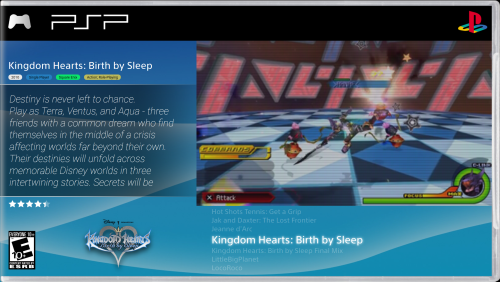
Colorful - Dark & Coverbox TV Redux View File For a long, long time I searched for the perfect Bigbox Theme to use with my TV. Every time I found one I thought was pretty cool, there were just so many little things that didn't sit right with me. Either it didn't have game descriptions in the platform menus, or the game descriptions they had were too small (I use Bigbox on my TV), or the platform views of the theme were unappealing. Well, no longer! I discovered what I thought was the absolute best combination of themes, Colorful - Dark by Viking for it's incredible platform wheel 2 system views, and Coverbox by Faeran for it's incredible Text game views (which have a unique look for almost every popular emulated system out there). Luckily, both Viking and Faeran made their theme's community theme creator files publicly available for anyone to edit, so all my minor (and in some cases not so minor) annoyances were very possible to fix. After months of on and off work, I'm very pleased to release my custom versions of both themes so everyone can enjoy them as I have. At the end of the day, this is a series of relatively minor and moderate tweaks I made to two already fantastic Bigbox themes, and all of that credit goes to the original creators of those themes, Viking for Colorful - Dark, and Faeran for Coverbox. Part of my hope in releasing this to the community is that they take notice and possibly implement some of my changes into the mainline releases of these themes in the future. The optimal configuration for these themes in my opinion is Colorful's Platform Wheel 2 for platform selection and Coverbox for Text List with Details, with any system not covered using Colorful's Text LIst with Details. That's the configuration this modification is aimed towards, but you can use any combination you wish. This release includes a changelog of everything I've changed in both themes, down to the positioning of the elements X and Y positions and their Width and Height. Since going through every change I made would be impossible in this description, Here's a list of the most significant ones. Main Changes Platform Descriptions in Colorful's platform wheels have had their font increased and their sizes expanded. This was to make the text more legible if playing on a TV, which I do exclusively. If the font were bigger by default I may not have modified Colorful at all. Game Descriptions in Colorful's game wheels have had their font increased and their text boxes expanded. This compliments the change from above. Personally I prefer the Text list with details view for any system Coverbox doesn't cover, but the others are usable. Text Scrollers for Game Descriptions has been added to every platform theme in Coverbox that didn't already have one except for the Atari Lynx, Nintendo Virtual Boy and the Famicom Disk System. Each systems Text Scrollers have been given fonts that are related to that system in some way (I did reuse some of them though). For instance, Sega Genesis uses the HUD font from Sonic the Hedgehog, Game Boy Advance uses the Gen 3 Pokemon font, etc. Coverbox Text Scrollers that were too small had their fonts increased. The biggest beneficiary of this change was PSP, that font was TINY and impossible to read on a television. This change was also made to the Wii and the Wii U Background elements have been erased and replaced with modifiable image placements to make room for text scrollers, which makes them editable for those looking to make their own changes. I have included a complete changelog documenting every change I made to both Colorful - Dark and Coverbox, as well as included the logos and fonts I found and created for use in this modification, both of which can also be downloaded here if you want to revert any of my changes or recreate them in some way. If you like what you see, make sure to show your support to Viking and Faeran on their respective theme pages, they created two incredible Bigbox themes and are the ones that deserve most of the credit. I hope you enjoy my changes! Submitter AncientCarthage Submitted 12/06/2022 Category Custom Themes
-
Version 1.0.0
568 downloads
For a long, long time I searched for the perfect Bigbox Theme to use with my TV. Every time I found one I thought was pretty cool, there were just so many little things that didn't sit right with me. Either it didn't have game descriptions in the platform menus, or the game descriptions they had were too small (I use Bigbox on my TV), or the platform views of the theme were unappealing. Well, no longer! I discovered what I thought was the absolute best combination of themes, Colorful - Dark by Viking for it's incredible platform wheel 2 system views, and Coverbox by Faeran for it's incredible Text game views (which have a unique look for almost every popular emulated system out there). Luckily, both Viking and Faeran made their theme's community theme creator files publicly available for anyone to edit, so all my minor (and in some cases not so minor) annoyances were very possible to fix. After months of on and off work, I'm very pleased to release my custom versions of both themes so everyone can enjoy them as I have. At the end of the day, this is a series of relatively minor and moderate tweaks I made to two already fantastic Bigbox themes, and all of that credit goes to the original creators of those themes, Viking for Colorful - Dark, and Faeran for Coverbox. Part of my hope in releasing this to the community is that they take notice and possibly implement some of my changes into the mainline releases of these themes in the future. The optimal configuration for these themes in my opinion is Colorful's Platform Wheel 2 for platform selection and Coverbox for Text List with Details, with any system not covered using Colorful's Text LIst with Details. That's the configuration this modification is aimed towards, but you can use any combination you wish. This release includes a changelog of everything I've changed in both themes, down to the positioning of the elements X and Y positions and their Width and Height. Since going through every change I made would be impossible in this description, Here's a list of the most significant ones. Main Changes Platform Descriptions in Colorful's platform wheels have had their font increased and their sizes expanded. This was to make the text more legible if playing on a TV, which I do exclusively. If the font were bigger by default I may not have modified Colorful at all. Game Descriptions in Colorful's game wheels have had their font increased and their text boxes expanded. This compliments the change from above. Personally I prefer the Text list with details view for any system Coverbox doesn't cover, but the others are usable. Text Scrollers for Game Descriptions has been added to every platform theme in Coverbox that didn't already have one except for the Atari Lynx, Nintendo Virtual Boy and the Famicom Disk System. Each systems Text Scrollers have been given fonts that are related to that system in some way (I did reuse some of them though). For instance, Sega Genesis uses the HUD font from Sonic the Hedgehog, Game Boy Advance uses the Gen 3 Pokemon font, etc. Coverbox Text Scrollers that were too small had their fonts increased. The biggest beneficiary of this change was PSP, that font was TINY and impossible to read on a television. This change was also made to the Wii and the Wii U Background elements have been erased and replaced with modifiable image placements to make room for text scrollers, which makes them editable for those looking to make their own changes. I have included a complete changelog documenting every change I made to both Colorful - Dark and Coverbox, as well as included the logos and fonts I found and created for use in this modification, both of which can also be downloaded here if you want to revert any of my changes or recreate them in some way. If you like what you see, make sure to show your support to Viking and Faeran on their respective theme pages, they created two incredible Bigbox themes and are the ones that deserve most of the credit. I hope you enjoy my changes! -
Version 1.0.2
288 downloads
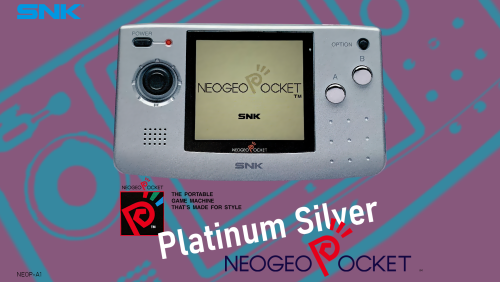
These are 16:9 representations of console boxes i made in the same style as the ones in the Coverbox theme. Put them in Coverbox/Media/Platform Boxes/ or use them in your own themes if you wish. Included systems: Amstrad CPC (came in a standard brown cardboard box, there's a purely fan-art ALT also) Bandai Wonderswan Casio PV-1000 Commodore VIC-20 Emerson Arcadia 2001 (this one is a screenshot as no better source was available Credit @mcfilmmakers) Entex Adventure Vision Fujitsi FM Towns Marty Microsoft Xbox 360 Microsoft XBox Nintendo Sufami Turbo Nintendo Switch SNK Neo Geo Pocket Color Sony Playstation Classic Watara Supervision Philips CD-i Magnavox Odyssey Magnavox Odyssey 2 Super Nintendo Classic Edition- 3 comments
- 1 review
-
- 10
-
-
-

-
-
- console box
- coverbox
- (and 1 more)
-
Console Platform Box Pack View File These are 16:9 representations of console boxes i made in the same style as the ones in the Coverbox theme. Put them in Coverbox/Media/Platform Boxes/ or use them in your own themes if you wish. Included systems: Amstrad CPC (came in a standard brown cardboard box, there's a purely fan-art ALT also) Bandai Wonderswan Casio PV-1000 Commodore VIC-20 Emerson Arcadia 2001 (this one is a screenshot as no better source was available Credit @mcfilmmakers) Entex Adventure Vision Fujitsi FM Towns Marty Microsoft Xbox 360 Microsoft XBox Nintendo Sufami Turbo Nintendo Switch SNK Neo Geo Pocket Color Sony Playstation Classic Watara Supervision Submitter Rlad Submitted 04/23/2022 Category Platform Media Packs
-
Version 1.0.1
298 downloads
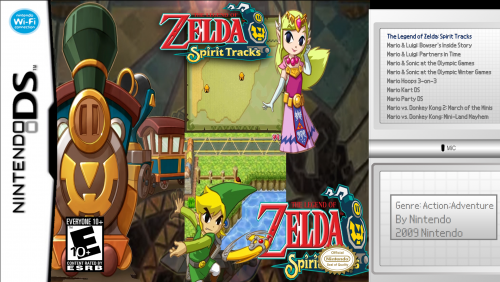
Hi there, this is the second theme that I made as an extension to the excellent Coverbox themes made by @faeran if you want more platform-specific themes, go check out his Coverbox main theme down below. I recommend using this with Coverbox. However, this theme is different compared to others that it's actually a theme that only plays when you are on the Wii U game selection screen. In order to make it work you have to do the following: (Before starting Big Box, go to Launchbox/Themes/Coverbox - Nintendo DS/Fonts and install the Nintendo-DS-BIOS.ttf font in order to properly display the theme) 1. Head over to Options in the Big Box Menu 2. Scroll down to Keyboard Shortcuts 3. Look through the list of options until you find "Switch Theme". 4. Choose a key for the shortcut and head over to your Nintendo DS Platform Game Selection Screen 5. Press the Key and choose the theme from the list that pops up. 6. Congratulations you now have a Nintendo DS Theme that launches no matter what another theme you're using. I hope that this theme will help you show off your Wii U collection even more and I will soon upload Wii U Video Snaps so stay tuned. My Nintendo Wii U Coverbox Theme: Link to Coverbox by @faeran -
Coverbox - Sega 32X View File Giving full credit to faeran for creating the great coverbox themes originally I present a modified Genesis theme to fit the Sega 32X. It includes the original copperplate font referenced by the theme. Unzip the file to your Launchbox/Themes directory Install the copperplate font located in the fonts folder if you haven't already navigate to your 32X platform in bigbox set the theme to coverbox 32X Enjoy. I thank faeran for their great work on these and hope I'm not coming off as crass by aping these and making mods to them. Submitter whoozwah Submitted 06/12/2018 Category Big Box Custom Themes
-
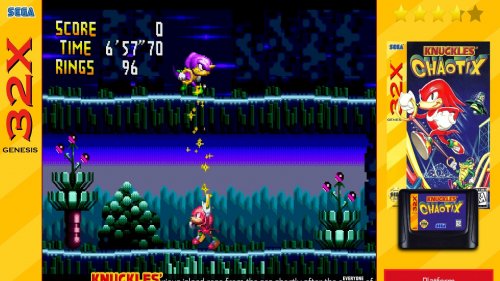
Version 1.0.0
123 downloads
Giving full credit to faeran for creating the great coverbox themes originally I present a modified Genesis theme to fit the Sega 32X. It includes the original copperplate font referenced by the theme. Unzip the file to your Launchbox/Themes directory Install the copperplate font located in the fonts folder if you haven't already navigate to your 32X platform in bigbox set the theme to coverbox 32X Enjoy. I thank faeran for their great work on these and hope I'm not coming off as crass by aping these and making mods to them. -
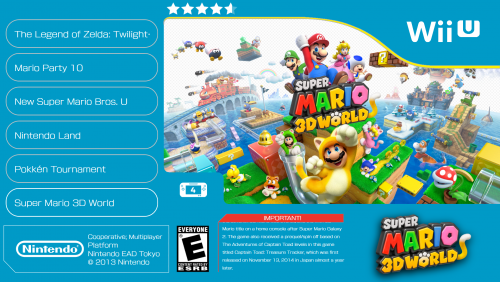
Version 1.0.1
735 downloads
Hi there, this is my first ever theme that I made as an extension to the excellent Coverbox themes made by @faeran if you want more platform-specific themes, go check out his Coverbox main theme down below. I recommend using this with Coverbox. However, this theme is different compared to others that it's actually a theme that only plays when you are on the Wii U game selection screen. In order to make it work you have to do the following: 1. Head over to Options in the Big Box Menu 2. Scroll down to Keyboard Shortcuts 3. Look through the list of options until you find "Switch Theme". 4. Choose a key for the shortcut and head over to your Wii U Platform Game Selection Screen 5. Press the Key and choose the theme from the list that pops up. 6. Congratulations you now have a Wii U Theme that launches no matter what another theme you're using. I hope that this theme will help you show off your Wii U collection even more and I will soon upload Wii U Video Snaps so stay tuned. Link to Coverbox by @faeran -
CoverBox Nintendo DS Theme View File Hi there, this is the second theme that I made as an extension to the excellent Coverbox themes made by @faeran if you want more platform-specific themes, go check out his Coverbox main theme down below. I recommend using this with Coverbox. However, this theme is different compared to others that it's actually a theme that only plays when you are on the Wii U game selection screen. In order to make it work you have to do the following: (Before starting Big Box, go to Launchbox/Themes/Coverbox - Nintendo DS/Fonts and install the Nintendo-DS-BIOS.ttf font in order to properly display the theme) 1. Head over to Options in the Big Box Menu 2. Scroll down to Keyboard Shortcuts 3. Look through the list of options until you find "Switch Theme". 4. Choose a key for the shortcut and head over to your Nintendo DS Platform Game Selection Screen 5. Press the Key and choose the theme from the list that pops up. 6. Congratulations you now have a Nintendo DS Theme that launches no matter what another theme you're using. I hope that this theme will help you show off your Wii U collection even more and I will soon upload Wii U Video Snaps so stay tuned. My Nintendo Wii U Coverbox Theme: Link to Coverbox by @faeran Submitter broskiplays Submitted 04/28/2018 Category Big Box Custom Themes
-
CoverBox Wii U Theme View File Hi there, this is my first ever theme that I made as an extension to the excellent Coverbox themes made by @faeran if you want more platform-specific themes, go check out his Coverbox main theme down below. I recommend using this with Coverbox. However, this theme is different compared to others that it's actually a theme that only plays when you are on the Wii U game selection screen. In order to make it work you have to do the following: 1. Head over to Options in the Big Box Menu 2. Scroll down to Keyboard Shortcuts 3. Look through the list of options until you find "Switch Theme". 4. Choose a key for the shortcut and head over to your Wii U Platform Game Selection Screen 5. Press the Key and choose the theme from the list that pops up. 6. Congratulations you now have a Wii U Theme that launches no matter what another theme you're using. I hope that this theme will help you show off your Wii U collection even more and I will soon upload Wii U Video Snaps so stay tuned. Link to Coverbox by @faeran Submitter broskiplays Submitted 04/28/2018 Category Big Box Custom Themes