Search the Community
Showing results for tags 'controllers'.
-
Version 1.0.0
7 downloads
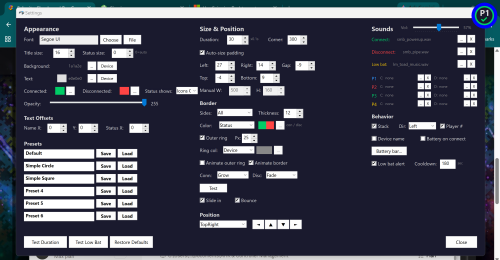
ControllerHUD is a lightweight AutoHotkey v2 utility that displays fully customizable on-screen notifications with connect and disconnect sounds and volume adjustment when game controllers connect and disconnect — even over fullscreen games. Built for multi-controller setups, it monitors USB and Bluetooth devices in real time and shows styled OSD pop-ups with XInput player number detection, per-device naming and color coding, and battery level display for Xbox controllers. The notification system features deep visual customization including adjustable fonts, colors, opacity, corner radius, padding, and text offsets. Borders support per-side control with color modes (device, status, or custom) and an optional outer ring. Three animation styles — Brightness, Grow, and Fade — can be assigned independently for connect and disconnect events, with slide-in entry, bounce easing, and configurable stacking in any direction. Sound notifications support global, per-player, and per-device overrides for connect, disconnect, and low battery events, with a volume slider that scales relative to system volume without changing the system master. A low battery monitor periodically checks Xbox controllers and blinks an alert when battery is critical. Six saveable presets store complete visual configurations and can be assigned per device, allowing different controllers to trigger different notification styles. Three factory presets are included out of the box: a classic bordered look, a minimal circle, and a clean square design. A hover-preview system lets you compare all animation styles side by side from the settings panel. ControllerHUD is designed to work seamlessly alongside DS4Windows and HidHide for PlayStation controller setups.- 2 comments
-
- 3
-

-

-
- controller
- controllers
- (and 3 more)
-
ControllerHUD View File ControllerHUD is a lightweight AutoHotkey v2 utility that displays fully customizable on-screen notifications with connect and disconnect sounds and volume adjustment when game controllers connect and disconnect — even over fullscreen games. Built for multi-controller setups, it monitors USB and Bluetooth devices in real time and shows styled OSD pop-ups with XInput player number detection, per-device naming and color coding, and battery level display for Xbox controllers. The notification system features deep visual customization including adjustable fonts, colors, opacity, corner radius, padding, and text offsets. Borders support per-side control with color modes (device, status, or custom) and an optional outer ring. Three animation styles — Brightness, Grow, and Fade — can be assigned independently for connect and disconnect events, with slide-in entry, bounce easing, and configurable stacking in any direction. Sound notifications support global, per-player, and per-device overrides for connect, disconnect, and low battery events, with a volume slider that scales relative to system volume. A low battery monitor periodically checks Xbox controllers and blinks an alert when battery is critical. Six saveable presets store complete visual configurations and can be assigned per device, allowing different controllers to trigger different notification styles. Three factory presets are included out of the box: a classic bordered look, a minimal circle, and a clean square design. A hover-preview system lets you compare all animation styles side by side from the settings panel. ControllerHUD is designed to work seamlessly alongside DS4Windows and HidHide for PlayStation controller setups. Submitter Daxtonius Submitted 04/12/2026 Category Third-party Apps and Plugins
-
I'm encountering an issue in Windows 11 using a Dualshock 4 controller via bluetooth (have not tested wired). When opening Big Box, the controller works correctly to navigate initially. However, if the controller has been used by another application Big Box no longer appears to receive any input from it. I can no longer navigate with it, and cannot map the inputs. Disconnecting and reconnecting the controller resolves the issue, but only until the controller is used in another application. The order does not matter, i.e. if I connect a controller, launch a game in Dolphin, close Dolphin, and open Big Box, the controller does not work; if I connect a controller, open Big Box (controller works), launch a Steam game via Big Box, then close it and return to Big Box, the controller does not work. This issue does not impact any other applications, I can switch between RetroArch, PCSX2, Dolphin, and Steam and they all recognize and use the controller successfully. I haven't noticed any changes in the device description in the device list. Also, to address some basic things I've already tried: Using a different gamepad: I had access to an old 3rd party USB Xbox360 controller, and it did not experience this issue. However, it's not practical for me to by a full set of new gamepads and configure them for all my other applications (assuming they'd even work) Using another of the same gamepad: This has the exact same issues. Including the same behavior of working until another application uses it. So if the first gamepad stops working, I can connect a second one and use it to launch one game, at which point it will also stop working in Big Box. Toggling controller related settings inside Big Box: I've toggled all three settings (use controllers, use all controllers, problematic controllers) to all of their various options, both before and after the issue arises, with and without restarting Big Box, as well as having two controllers in the non-working state and switching between them as the selected controller (all controllers: off). None of this helps DS4Windows: unfortunately not a good option for me since it breaks controller input for all of my RetroArch cores. RetroArch has an open issue on GitHub about it (#14063), but it doesn't look like it's moving much, although maybe I'll take a swing at it. After writing all of this, I worry that this should have been a bug ticket rather than a troubleshooting request, but if anyone has ideas I'm happy to give them a shot.
- 15 replies
-
- 2
-
-
- dualshock 4
- dualshock
- (and 8 more)
-

Version 2.1.4
18,118 downloads
Ok, here is version 2 of my Retro Console Theme. This is a MASSIVE overhaul and Includes ANIMATIONS. Thanks to @y2guru and his unending support and development of the 'Community Theme Creator', which now offers an animation tool, I was able to completely rebuild this theme and make it the way I originally intended. Thank You as always my man! * Language issues have been fixed. Should work now! 5-1-2020 The original theme without animations can be found here: Retro Console Version 1 Pretty much every single view has been redone with at least more flare and details, but some of them are totally re-imagined. I have also added several new views and many more platform specific views. All with animations, subtle but informative (hopefully). One of the game views that has a smaller monitor window on the right side of the screen now plays a video in a loop of the matching consoles original startup or boot screen. Not all are included as I have not been able to find them on YouTube. Please let me know if you have any suggestions on where to look for more, would be very helpful! NEW: Playmode Icons - All custom and added all over the theme. NEW: I made a new view that is intended for use with newer consoles like PS3 and XBOX360. Looks good but does not require as much artwork since there is not much available yet. NEW: New version available, "Retro Console Theme Anim V2-center videos.zip". This version is designed to let users select a platform video set other than the Nostalgia set that I have been using. It is much better for center aligned videos. ALSO NEW are several controller button packs that can be swapped out to match your setup. These include 4 buttons each and are color coded throughout the theme: GREEN = Select RED = Back Blue = Search Yellow = Game info screen To use these you should just download the pack you want and drop it in the following folder: ?\LaunchBox\Themes\Retro Console Theme Anim V2\Media\buttons\. Make sure to overwrite the existing ones. controller buttons - arcade.zip: This is a set of generic arcade buttons that can be used for any setup. Just colored and round. controller buttons - numbered.zip: This is a set of numbered controller buttons (1 - 4) for controllers that have numbered buttons. controller buttons - ps3.zip: This is a set of PlayStation controller buttons controller buttons - xbox.zip: This is a set of Microsoft XBOX controller buttons controller buttons - SN30 Pro: This is a set of black buttons with white lettering, glossy I will gladly take any requests for additional controller buttons as long as they don't require changing the theme. (max of 4 buttons in a pack) ALSO: @Wanderer189 has made a huge contribution to this theme in the form of several downloadable add-on packs full of clear logos for each platform. These include literally thousands of logos made for each Genre, Playmode, ETC. This is an amazing thing and I thank you for your hard work Wanderer. You are awesome. If you would like to get these logos for your setup they can be found here: And yet another great contribution from our community: @kidshoalin has created several missing logos to go with your setup. All credit goes to him. Thank you so much for the contribution! INSTALL: First - Download the file: Arcade Defualt Clear Logos.zip, unzip it and then follow below instructions... place clear logos in the Retro-Console Theme Anim V2/images//Playlists Folder make sure to go into options in BigBox and refresh all images. What is this theme: This is a video snap based BigBox theme. Heavily designed around the use and display of video snaps. This theme has over a hundred views including one that offers a different look for each platform including handhelds. There is a large amount of custom graphics and logos and images and icons etc. Hence the large file size. Use the startup and pause themes to complete the seamless setup. (also included here) All icons including stars for 'consumer ratings' and 'ESRB rating' and the new 'playmode icons' are custom and included in the theme file. Use them all you want. I am using the nostalgia platform videos and these are perfect for this theme. I may make my own someday but for now these are Great. @Wanderer189 is currently making videos for every genre and playmode. (you are awesome buddy, thank you so much for all your hard work and contributions to this and other themes) Available Downloads: Retro Console Theme Anim V2.zip - This is the entire theme including platform and platform device logos as well as all icons so you don't have to download them individually. This does not include the startup video, startup or pause themes, collection logos, etc. Retro Console Theme Anim V2-center videos.zip - This an alternate version of the theme. This version is designed to let users select a platform video set other than the Nostalgia set that I have been using. It is much better for center aligned platform videos. controller buttons - arcade.zip - Arcade panel based controller buttons controller buttons - numbered.zip - Number based controller buttons controller buttons - ps3.zip - PlayStation based controller buttons controller buttons - xbox.zip - XBOX based controller buttons Retro-Console-Pause.zip - The pause theme I made also to match this theme. (screens below) Retro-Console-Startup.zip - The startup and shutdown theme I made to match with this theme. (screens below) Platform Clear Logos.zip - Included in the theme download but also here in case you just want them alone. These were made specifically for this theme. Platform Device Logos.zip - Also made for this theme for the platform view that uses device images. Collection Device Logos.zip - Made to match this theme for the platform view that uses device images for each collection I use. I can make more upon request. Collection Logos.zip - Same as the platform logos. Made to match so they can be used in this theme. Platform Categories.zip - A bunch of category logos also made to match this theme. Startup Video.zip - A startup video I made just to add to the overall completeness of the theme. Not at all necessary but here if you want it. Retro Console Sound Pack.zip - Again not required but here if you want it. This is what i use in the video below. Just unzip it to your launchbox sounds folder and then select it in BigBox. Platform Original Boot Videos.zip - This is a pack of just the new startuo videos for each console or platform I could find. (included in theme so no need to download unless you want just these) Arcade Defualt Clear Logos.zip - A new community contribution including several new arcade logos for playlists. Recommendations: Set your Image priorities in Launchbox as follows - Cart Front ( add disc images to the list - this is used in many views in this theme) Set your startup and shutdown time limits in launchbox settings. (mine are: startup=5 sec and shutdown=3.5 sec) I designed this around the Nostalgia Platform Videos. You can use anything but those will fit and line up best. This theme assumes an xbox controller setup: A=Select, B=Back, X=Search, Y=Game Details and Select Button=Change View (not required) I also set the left bumper to platforms and right bumper to platform categories. (not required but helpful) Get as many Banner, Steam Banner and Marquee images as you can. This theme offers a unique view for all arcade cabinet based games and will use those images. There is also a custom view for systems like Windows that also use them. Future Plans: Create a new view that uses the original loading video from each console. (started on 1-3-2020) DONE Complete the white silhouette console and controller images that are used in the startup theme. DONE Add animations to the theme ( @y2guru is working on this ability for his theme creator as we speak and I will update once it is ready) DONE Make platform videos to match this theme (maybe) - In the works How to Install: Extract Retro Console Theme.zip to your launchbox themes folder. This includes all the platform and device logos you need and will automatically use them. ( In order to use other logos just delete the ones in this theme folder) You can also use the startup and pause themes to add more of a consistent flow. Drop the startup video (if you want it) in the launchbox videos root folder. This theme currently has over 80 different platforms and includes the matching device logos, collection logos, category logos and more but some of these have to be added manually through launchbox (sorry). I can not figure out how to make them automatic. Startup Video: Theme Video: Screenshot System View: Screenshots of each Logo Type: Screenshots - Startup and Shutdown and Pause Theme: Screenshots - Random and Extra Stuff: Screenshots - Random Icons and Controllers Made for This Theme:- 93 comments
- 7 reviews
-
- 20
-
-
-

-

-
- pause theme
- controllers
- (and 6 more)
-


Version 2.1b
3,371 downloads
This is a collection of incredible vector drawings graciously donated by Pineapple Graphics (Aka Snowway22) https://www.instagram.com/pineapple.graphics/ https://www.etsy.com/shop/PineappleGraphicsShp https://www.reddit.com/user/Snowway22/ These drawings take Snowway 10 to 15 hours each! I found this artist on Reddit accidentally and was instantly blown away by the quality of his work. Having a lot of experience in Adobe Illustrator myself, I was shocked to find that these were vector and not 3D models. His artwork showcases very clever techniques to sell the 3D effects including stunning imitations of various materials. Snowway said, “I ended up really enjoying the process and just kept going. I work as a graphic designer so I can make stuff like this in between ‘real’ work stuff. Everything for my job is rush rush. So, it’s really nice to relax, listen to some music, take my time and get lost in the detail. “ I told Snowway about LaunchBox and how this kind of artwork would be a huge boon for the frontend community. He was willing to contribute and even asked for suggestions on more controllers to draw. I gave him a list and some references to help. He said that he’d get to most of them, but he doesn't want to be rushed. I said take your time! Snowway later said, “If you could in any way shout out or plug my Instagram however or to whoever… that would be amazing. I, of course, don’t make any money from that but it’s been a fun hobby and the validation is a good motivator.” Guys, show your appreciation to this artist and enjoy his awesome work! Most of the “favorite” platforms are represented here. Feel free to suggest things here but just know that these drawings take a lot of time. While I’ve made carefully chosen suggestions based on what systems I think are most important and that people actually play, Snowway is the one crafting the art. I will continue to post more as this project grows! The current list of included platforms is as follows: Arcade (multiple versions) Analogue Pocket (Black and White) Atari 2600 (also paddle controllers) Atari 7800 (Controller and Joystick) Atari Jaguar Atari Lynx Atari VCS 2021 Bandai Wonderswan Color (2 Colors) Colecovision Commodore 64 (Mouse and Keyboard Variants) GCE Vectrex Logitech Steering Wheel Mattel Intellivision Microsoft Xbox Microsoft Xbox 360 Microsoft Xbox One Microsoft Xbox Series (Also Elite Controller) NEC TurboGrafx-16 / CD / DUO (also Turbo Express) Nintendo 3DS Nintendo 64 / DD Nintendo DS Nintendo Entertainment System (Also Dog Bone & Zapper) Nintendo Famicom Nintendo Game & Watch (Mario & Zelda) Nintendo Game Boy Nintendo Game Boy Advance (Original and SP) Nintendo Game Boy Color (5 colors!) Nintendo Switch (Original, OLED, Light, Pro Controller + more) Nintendo Virtual Boy Nintendo Wii Nintendo Wii U Nintendo GameCube Nintendo Super Famicom Panasonic 3DO Playdate SNK Neo Geo AES SNK Neo Geo CD SNK Neo Geo MVS SNK Neo Geo Pocket Color Sega Dreamcast (US and PAL) Sega Game Gear Sega Genesis / 32X / CD (3 & 6 button) (also Sega Nomad) Sega Master System Sega Saturn (Original & 3D Controller) (Japan versions also) Sony PS Vita Sony PSP Sony PlayStation (Original, Dual Analog and DualShock) Sony PlayStation 2 Sony PlayStation 3 (also boomerang prototype & move controller) Sony PlayStation 4 Sony PlayStation 5 Super Nintendo Entertainment System (US and PAL) -
Hello community! Quick question: Is there a easy way to connect 4 ps3 controllers to play any 4 player games in BigBox? I use BthPS3 + DsHidMini (by Nefarius) + ViGEmBus (virtual Xbox controller driver). I find it hard to use it for WII/GameCube and MAME emulators, specifically. I see that when I turn it on, each joystick is labeled (e.g., Xinput #0,#1,#2 and #3) but when I play on the consoles mentioned after setting them up individually, it tends to get confused and some work and some don't. Some controllers have just the d-pad working and not the action buttons and visa versa. I would appreciate it if someone found an easy solution to this and please let me know if you need any images/more info, to make the solution easier. Thank you in advance!
-
 Retro Console - BB Theme, added animations and more! View File Ok, here is version 2 of my Retro Console Theme. This is a MASSIVE overhaul and Includes ANIMATIONS. Thanks to @y2guru and his unending support and development of the 'Community Theme Creator', which now offers an animation tool, I was able to completely rebuild this theme and make it the way I originally intended. Thank You as always my man! * Language issues have been fixed. Should work now! 5-1-2020 The original theme without animations can be found here: Retro Console Version 1 Pretty much every single view has been redone with at least more flare and details, but some of them are totally re-imagined. I have also added several new views and many more platform specific views. All with animations, subtle but informative (hopefully). One of the game views that has a smaller monitor window on the right side of the screen now plays a video in a loop of the matching consoles original startup or boot screen. Not all are included as I have not been able to find them on YouTube. Please let me know if you have any suggestions on where to look for more, would be very helpful! NEW: Playmode Icons - All custom and added all over the theme. NEW: I made a new view that is intended for use with newer consoles like PS3 and XBOX360. Looks good but does not require as much artwork since there is not much available yet. NEW: New version available, "Retro Console Theme Anim V2-center videos.zip". This version is designed to let users select a platform video set other than the Nostalgia set that I have been using. It is much better for center aligned videos. ALSO NEW are several controller button packs that can be swapped out to match your setup. These include 4 buttons each and are color coded throughout the theme: GREEN = Select RED = Back Blue = Search Yellow = Game info screen To use these you should just download the pack you want and drop it in the following folder: ?\LaunchBox\Themes\Retro Console Theme Anim V2\Media\buttons\. Make sure to overwrite the existing ones. controller buttons - arcade.zip: This is a set of generic arcade buttons that can be used for any setup. Just colored and round. controller buttons - numbered.zip: This is a set of numbered controller buttons (1 - 4) for controllers that have numbered buttons. controller buttons - ps3.zip: This is a set of PlayStation controller buttons controller buttons - xbox.zip: This is a set of Microsoft XBOX controller buttons controller buttons - SN30 Pro: This is a set of black buttons with white lettering, glossy I will gladly take any requests for additional controller buttons as long as they don't require changing the theme. (max of 4 buttons in a pack) ALSO: @Wanderer189 has made a huge contribution to this theme in the form of several downloadable add-on packs full of clear logos for each platform. These include literally thousands of logos made for each Genre, Playmode, ETC. This is an amazing thing and I thank you for your hard work Wanderer. You are awesome. If you would like to get these logos for your setup they can be found here: And yet another great contribution from our community: @kidshoalin has created several missing logos to go with your setup. All credit goes to him. Thank you so much for the contribution! INSTALL: First - Download the file: Arcade Defualt Clear Logos.zip, unzip it and then follow below instructions... place clear logos in the Retro-Console Theme Anim V2/images//Playlists Folder make sure to go into options in BigBox and refresh all images. What is this theme: This is a video snap based BigBox theme. Heavily designed around the use and display of video snaps. This theme has over a hundred views including one that offers a different look for each platform including handhelds. There is a large amount of custom graphics and logos and images and icons etc. Hence the large file size. Use the startup and pause themes to complete the seamless setup. (also included here) All icons including stars for 'consumer ratings' and 'ESRB rating' and the new 'playmode icons' are custom and included in the theme file. Use them all you want. I am using the nostalgia platform videos and these are perfect for this theme. I may make my own someday but for now these are Great. @Wanderer189 is currently making videos for every genre and playmode. (you are awesome buddy, thank you so much for all your hard work and contributions to this and other themes) Available Downloads: Retro Console Theme Anim V2.zip - This is the entire theme including platform and platform device logos as well as all icons so you don't have to download them individually. This does not include the startup video, startup or pause themes, collection logos, etc. Retro Console Theme Anim V2-center videos.zip - This an alternate version of the theme. This version is designed to let users select a platform video set other than the Nostalgia set that I have been using. It is much better for center aligned platform videos. controller buttons - arcade.zip - Arcade panel based controller buttons controller buttons - numbered.zip - Number based controller buttons controller buttons - ps3.zip - PlayStation based controller buttons controller buttons - xbox.zip - XBOX based controller buttons Retro-Console-Pause.zip - The pause theme I made also to match this theme. (screens below) Retro-Console-Startup.zip - The startup and shutdown theme I made to match with this theme. (screens below) Platform Clear Logos.zip - Included in the theme download but also here in case you just want them alone. These were made specifically for this theme. Platform Device Logos.zip - Also made for this theme for the platform view that uses device images. Collection Device Logos.zip - Made to match this theme for the platform view that uses device images for each collection I use. I can make more upon request. Collection Logos.zip - Same as the platform logos. Made to match so they can be used in this theme. Platform Categories.zip - A bunch of category logos also made to match this theme. Startup Video.zip - A startup video I made just to add to the overall completeness of the theme. Not at all necessary but here if you want it. Retro Console Sound Pack.zip - Again not required but here if you want it. This is what i use in the video below. Just unzip it to your launchbox sounds folder and then select it in BigBox. Platform Original Boot Videos.zip - This is a pack of just the new startuo videos for each console or platform I could find. (included in theme so no need to download unless you want just these) Arcade Defualt Clear Logos.zip - A new community contribution including several new arcade logos for playlists. Recommendations: Set your Image priorities in Launchbox as follows - Cart Front ( add disc images to the list - this is used in many views in this theme) Set your startup and shutdown time limits in launchbox settings. (mine are: startup=5 sec and shutdown=3.5 sec) I designed this around the Nostalgia Platform Videos. You can use anything but those will fit and line up best. This theme assumes an xbox controller setup: A=Select, B=Back, X=Search, Y=Game Details and Select Button=Change View (not required) I also set the left bumper to platforms and right bumper to platform categories. (not required but helpful) Get as many Banner, Steam Banner and Marquee images as you can. This theme offers a unique view for all arcade cabinet based games and will use those images. There is also a custom view for systems like Windows that also use them. Future Plans: Create a new view that uses the original loading video from each console. (started on 1-3-2020) DONE Complete the white silhouette console and controller images that are used in the startup theme. DONE Add animations to the theme ( @y2guru is working on this ability for his theme creator as we speak and I will update once it is ready) DONE Make platform videos to match this theme (maybe) - In the works How to Install: Extract Retro Console Theme.zip to your launchbox themes folder. This includes all the platform and device logos you need and will automatically use them. ( In order to use other logos just delete the ones in this theme folder) You can also use the startup and pause themes to add more of a consistent flow. Drop the startup video (if you want it) in the launchbox videos root folder. This theme currently has over 80 different platforms and includes the matching device logos, collection logos, category logos and more but some of these have to be added manually through launchbox (sorry). I can not figure out how to make them automatic. Startup Video: Theme Video: Screenshot System View: Screenshots of each Logo Type: Screenshots - Startup and Shutdown and Pause Theme: Screenshots - Random and Extra Stuff: Screenshots - Random Icons and Controllers Made for This Theme: Submitter cemfundog Submitted 03/11/2020 Category Big Box Custom Themes
 -
Version 3.0.0 - The final version.
744 downloads
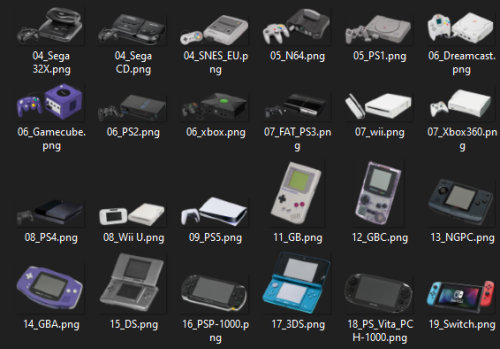
This set contains images of various consoles, mobile, computers .png format, all drawings from the site Dimensions.com , as well as device logos on a white background: -There are several device images in the Device folder in the format .png with different orientation in space, but first, these are consoles with a horizontal arrangement (handheld tilts so that the screen is facing left. The consoles are on the right facing the center, and the controllers are on the left facing the center), then for other console models / revisions, after the image of of controllers and accessories. (Not all images are from third party sites, some are cropped by me, so there will be a lot of 'unnecessary' images in some folders in case you don't like the ones I use, such as handheld with screens not turned off (I use the first few images and number them in order, and then when the beginning of the file name is repeated, then 'unnecessary' images follow)). -The Default 3D Box folder contains controller mappings, schematics, and drawings from Dimensions.com. (You will notice that on some platforms there is no controller mapping, and this is because I downloaded them from the user: @Pyrometheous 🛐, for which I am grateful. Therefore, I will also recommend you to supplement the missing images from Controller Mapping .6). -The Default Box folder contains .png images of consoles packed in boxes (well, those that could be found (or their 'mini' editions)). Except for: Sega Saturn, Xbox One, Xbox Series (To be honest, I didn't want to add folders for these platforms at all and add drawings from the site Dimensions.com into the 4-Genesis and 7-Xbox 360 folder).- 1 comment
- 1 review
-
- 11
-
-
-
-
-
- png
- platform images
- (and 7 more)
-

Version 1.2
478 downloads
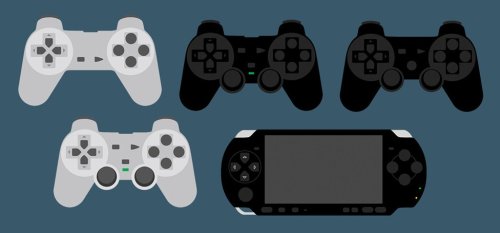
This is another controller image pack based on my previous Stencil pack. They are colour-cutout style icons representing the controllers of each system, e.g. Amiga mouse, Sega Mega Drive Control Pad, ZX Joystick, various handhelds etc. I've also included a few variations of some of the images, e.g different colours or regional variations. I've only done the what are probably the most popular systems but I'm willing to take requests for any systems missing, as long as there are reference images available on the internet. All my own work, but if anyone uses them all I ask for is a quick credit. Cheers! - Systems included: Apple II, Arcade, Atari 2600, Atari 5200, Atari 7800, Atari Jaguar, Atari Lynx, Atari ST, Bandai Wonderswan, Bandai Wonderswan Color, Colecovision, Commodore 64, Commodore CD32, Commodore Amiga, Commodore CDTV, GCE Vectrex, Magnavox Odyssey, Microsoft Xbox, Microsoft Xbox 360, Microsoft Xbox One, Microsoft Xbox Series, MS-DOS, NEC Turbografx 16/CD, Nintendo 3DS, Nintendo 64, Nintendo DS, NES, Nintendo Game & Watch, Nintendo Game Boy Advance, Nintendo Game Boy, Nintendo Game Boy Color, Nintendo Gamecube, Nintendo Switch (full handheld, Pro controller & Joycon grip), Nintendo Virtual Boy, Nintendo Wii (Wiimote, Wiimote + nunchuck & Classic controller), Nintendo Wii U, SNES, Panasonic 3DO, Philips CD-i, Sega 32X, Sega Dreamcast, Sega Game Gear, Sega Genesis, Sega Master System, Sega Mega Drive, Sega Saturn, Sinclair ZX Spectrum, SNK Neo Geo AES, SNK Neo Geo CD, NK Neo Geo Pocket, Sony Playstation, Sony Playstation 2, Sony Playstation 3, Sony PSP, Windows, Steam Deck -
Hardware / 3D Box .png images + all drawings from Dimensions.com + Controller mapping / Shemes View File This set contains images of various consoles, mobile, computers .png format, all drawings from the site Dimensions.com , as well as device logos on a white background: -There are several device images in the Device folder in the format .png with different orientation in space, but first, these are consoles with a horizontal arrangement (handheld tilts so that the screen is facing left. The consoles are on the right facing the center, and the controllers are on the left facing the center), then for other console models / revisions, after the image of of controllers and accessories. (Not all images are from third party sites, some are cropped by me, so there will be a lot of 'unnecessary' images in some folders in case you don't like the ones I use, such as handheld with screens not turned off (I use the first few images and number them in order, and then when the beginning of the file name is repeated, then 'unnecessary' images follow)). -The Default 3D Box folder contains Keymaps, Schemes and drawings from the site Dimensions.com. (You will notice that some platforms are missing Keymaps, and this is because I downloaded them from the user: @Pyrometheous 🛐, for which I am grateful. Therefore, I will also recommend you to supplement the missing images from Controller Mapping .6). -The Default Box folder contains .png images of consoles packed in boxes (well, those that could be found (or their 'mini' editions)). Except for: Sega Saturn, Xbox One, Xbox Series (To be honest, I didn't want to add folders for these platforms at all and add drawings from the site Dimensions.com into the 4-Genesis and 7-Xbox 360 folder). Submitter Dmi3y.646 Submitted 09/07/2024 Category Platform Console Images
-
Photoreal Controller Vectors by Pineapple Graphics View File This is a collection of incredible vector drawings graciously donated by Pineapple Graphics (Aka Snowway22) https://www.instagram.com/pineapple.graphics/ https://www.etsy.com/shop/PineappleGraphicsShp https://www.reddit.com/user/Snowway22/ These drawings take Snowway 10 to 15 hours each! I found this artist on Reddit accidentally and was instantly blown away by the quality of his work. Having a lot of experience in Adobe Illustrator myself, I was shocked to find that these were vector and not 3D models. His artwork showcases very clever techniques to sell the 3D effects including stunning imitations of various materials. Snowway said, “I ended up really enjoying the process and just kept going. I work as a graphic designer so I can make stuff like this in between ‘real’ work stuff. Everything for my job is rush rush. So, it’s really nice to relax, listen to some music, take my time and get lost in the detail. “ I told Snowway about LaunchBox and how this kind of artwork would be a huge boon for the frontend community. He was willing to contribute and even asked for suggestions on more controllers to draw. I gave him a list and some references to help. He said that he’d get to most of them, but he doesn't want to be rushed. I said take your time! Snowway later said, “If you could in any way shout out or plug my Instagram however or to whoever… that would be amazing. I, of course, don’t make any money from that but it’s been a fun hobby and the validation is a good motivator.” Guys, show your appreciation to this artist and enjoy his awesome work! Most of the “favorite” platforms are represented here. Feel free to suggest things here but just know that these drawings take a lot of time. While I’ve made carefully chosen suggestions based on what systems I think are most important and that people actually play, Snowway is the one crafting the art. I will continue to post more as this project grows! The current list of included platforms is as follows: Arcade (multiple versions) Atari 2600 (also paddle controllers) Atari Lynx Atari Jaguar Mattel Intellivision Microsoft Xbox Microsoft Xbox 360 Microsoft Xbox One Microsoft Xbox Series (Also Elite Controller) NEC TurboGrafx-16 / CD (also Turbo Express) Nintendo 3DS Nintendo 64 / DD Nintendo DS Nintendo Entertainment System Nintendo Famicom Nintendo Game Boy Nintendo Game Boy Advance (Original and SP) Nintendo Game Boy Color (5 colors!) Nintendo Switch (Many variants) Nintendo Virtual Boy Nintendo Wii Nintendo Wii U Nintendo GameCube Nintendo Super Famicom Panasonic 3DO SNK Neo Geo AES SNK Neo Geo CD SNK Neo Geo MVS SNK Neo Geo Pocket Color Sega Dreamcast (US and PAL) Sega Game Gear Sega Genesis / 32X / CD (3 & 6 button) (also Sega Nomad) Sega Master System Sega Saturn (Original & 3D Controller) (Japan versions also) Sony PS Vita Sony PSP Sony PlayStation (Original, Dual Analog and DualShock) Sony PlayStation 2 Sony PlayStation 3 (also boomerang prototype) Sony PlayStation 4 Sony PlayStation 5 Super Nintendo Entertainment System (US and PAL) Submitter Dan Patrick Submitted 11/12/2022 Category Platform Console Images
-

Requesting support for Gen Game S3 Controllers & Launchbox
jcyshin posted a topic in Troubleshooting
Good morning Team, I am a noob that is still trying to figure out how to get launchbox working and really need some help. I have these Gen Game S3 Controllers, and have the USB receivers for them. For some reason I can't get them to work in LaunchBox. There are some games like Mario Kart SNES, which I can get 1 x controller to work but not both. Questions: 1) Do I need to map these controllers, if so, how do I do it? SNES seems to defaut emulates via RetroArch, so do I do it in that, if so, where? 2) Do I need to do it for each console i.e. NES, SNES, SegaMegaSystem, N64, Wii, PS1/2/3/4? I know there is alot to learn, however the above are the main questions I have. If someone would be so kind and help me out, that would be much appreciated. Thank you. CY
-
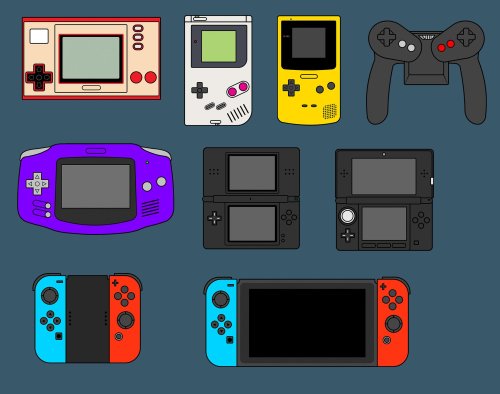
Version 1.2
514 downloads
This is another controller image pack based on my previous Stencil pack, similar to my recently uploaded Colour Cutout set. They are coloured icons with stark black outlines representing the controllers of each system, e.g. Atari ST mouse, Sega Saturn Control Pad, Commodore 64 Joystick, various handhelds etc. I've also included a few variations of some of the images, e.g different colours or regional variations. I've only done the what are probably the most popular systems but I'm willing to take requests for any systems missing, as long as there are reference images available on the internet. All my own work, but if anyone uses them all I ask for is a quick credit. Cheers! - Systems included: Apple II, Arcade, Atari 2600, Atari 5200, Atari 7800, Atari Jaguar, Atari Lynx, Atari ST, Bandai Wonderswan, Bandai Wonderswan Color, Colecovision, Commodore 64, Commodore CD32, Commodore Amiga, Commodore CDTV, GCE Vectrex, Magnavox Odyssey, Microsoft Xbox, Microsoft Xbox 360, Microsoft Xbox One, Microsoft Xbox Series, MS-DOS, NEC Turbografx 16/CD, Nintendo 3DS, Nintendo 64, Nintendo DS, NES, Nintendo Game & Watch, Nintendo Game Boy Advance, Nintendo Game Boy, Nintendo Game Boy Color, Nintendo Gamecube, Nintendo Switch (full handheld, Pro controller & Joycon grip), Nintendo Virtual Boy, Nintendo Wii (Wiimote, Wiimote + nunchuck & Classic controller), Nintendo Wii U, SNES, Panasonic 3DO, Philips CD-i, Sega 32X, Sega Dreamcast, Sega Game Gear, Sega Genesis, Sega Master System, Sega Mega Drive, Sega Saturn, Sinclair ZX Spectrum, SNK Neo Geo AES, SNK Neo Geo CD, SNK Neo Geo Pocket, Sony Playstation, Sony Playstation 2, Sony Playstation 3, Sony PSP, Windows, Steam Deck -
 Hi Here is the list of wirelesss controllers i have 4x NSO N64 Controllers 4x PS3 dualshock 2x NSO SNES 2x NSO NES 4x 8bitdo genesis and 2x NSO 3-button genesis controllers (will probably use the 8bit do ones) 2x 8bitdo arcade sticks Here is the list of wired controllers i have 2x Siden lightguns (not setup at all though) 4x GameCube controllers + mayflash USB adapter I have the complete romset of all games from Atari to PS2 on a mini NUC. I want to set them up for a business so the process and friction of turning it on, and entering to play a game should be seamless. I had it setup with just the n64+dualshock for awhile but realised the onboard Bluetooth was bad with the ps3 controllers and bought a dongle which required me to disable my onboard, then the programs/tools that allowed me to pair my ps3 controllers stopped working. But even when it was working, it was hard to turn OFF controllers once they were paired and connected and retroarch tried to use ps3 controllers for n64 games, etc. etc. My question is firstly - is there a way in retroarch or bigbox to DISABLE using a controller which is pair+connected(on) and only use the controllers which is configured for it? For example. If we are playing N64 with the nso controllers, then swap to PS1 game and turn those controllers on, usually retroarch will identify the nso controllers and plug them into port1/2 etc. I am using retroarch for all emulators EXCEPT PS2 and GC. So far the biggest issue for me is the PS3 controllers. When i used my onboard it connects but it has massive intermittent delay (even my official switch struggles with joycons [too much bluetooth in the area?]) Then i tried using a dongle but scptoolkit doesn't work without intel Bluetooth and the dongle was giving me driver issues after i disabled the onboard and didn't install the software/driver provided on the manufacturer website Baesus. Any advices/hardware to buy to get this setup working would be greatly appreciated! Thanks for reading
 -
812 downloads
I made this custom Launchbox icon for personal use and wanted to share it with the community. I wish I had more to give but it's a small gesture to say thanks for all your help and making this the best frontend on the market. Also I'm sorry if this is posted in the wrong section but I did not find an option for icons. -
Hi - noob question I am trying to set up Retroarch with a hard wired PS3 controller. The PC recognised the controller and I can test button pushes with GamePad Detector. Retroarch 1.14.0 also recognises the controller. However, I dont understand the button mapping. On Port1 Controls (Settings > Input > Port1 Controls) the up/down/left/right are mapped to Seek + 60 Seconds etc (see screenshot) So, in game when I press up it seeks + 60 seconds forwards. I am really confused. Any advice very much appreciated Dom
-
Controllers - Outlined Colour Platform Images View File This is another controller image pack based on my previous Stencil pack, similar to my recently uploaded Colour Cutout set. They are coloured icons with stark black outlines representing the controllers of each system, e.g. Atari ST mouse, Sega Saturn Control Pad, Commodore 64 Joystick, various handhelds etc. I've also included a few variations of some of the images, e.g different colours or regional variations. I've only done the what are probably the most popular systems but I'm willing to take requests for any systems missing, as long as there are reference images available on the internet. All my own work, but if anyone uses them all I ask for is a quick credit. Cheers! - Systems included: Apple II, Arcade, Atari 2600, Atari 5200, Atari 7800, Atari Jaguar, Atari Lynx, Atari ST, Bandai Wonderswan, Bandai Wonderswan Color, Colecovision, Commodore 64, Commodore CD32, Commodore Amiga, Commodore CDTV, GCE Vectrex, Magnavox Odyssey, Microsoft Xbox, Microsoft Xbox 360, Microsoft Xbox One, Microsoft Xbox Series, MS-DOS, NEC Turbografx 16/CD, Nintendo 3DS, Nintendo 64, Nintendo DS, NES, Nintendo Game & Watch, Nintendo Game Boy Advance, Nintendo Game Boy, Nintendo Game Boy Color, Nintendo Gamecube, Nintendo Switch (full handheld, Pro controller & Joycon grip), Nintendo Virtual Boy, Nintendo Wii (Wiimote, Wiimote + nunchuck & Classic controller), Nintendo Wii U, SNES, Panasonic 3DO, Philips CD-i, Sega 32X, Sega Dreamcast, Sega Game Gear, Sega Genesis, Sega Master System, Sega Mega Drive, Sega Saturn, Sinclair ZX Spectrum, SNK Neo Geo AES, SNK Neo Geo CD, SNK Neo Geo Pocket, Sony Playstation, Sony Playstation 2, Sony Playstation 3, Sony PSP, Windows, Steam Deck Submitter AsparagusTrevor Submitted 06/30/2022 Category Platform Console Images
-
Controllers - Colour Cutout Platform Images View File This is another controller image pack based on my previous Stencil pack. They are colour-cutout style icons representing the controllers of each system, e.g. Amiga mouse, Sega Mega Drive Control Pad, ZX Joystick, various handhelds etc. I've also included a few variations of some of the images, e.g different colours or regional variations. I've only done the what are probably the most popular systems but I'm willing to take requests for any systems missing, as long as there are reference images available on the internet. All my own work, but if anyone uses them all I ask for is a quick credit. Cheers! - Systems included: Apple II, Arcade, Atari 2600, Atari 5200, Atari 7800, Atari Jaguar, Atari Lynx, Atari ST, Bandai Wonderswan, Bandai Wonderswan Color, Colecovision, Commodore 64, Commodore CD32, Commodore Amiga, Commodore CDTV, GCE Vectrex, Magnavox Odyssey, Microsoft Xbox, Microsoft Xbox 360, Microsoft Xbox One, Microsoft Xbox Series, MS-DOS, NEC Turbografx 16/CD, Nintendo 3DS, Nintendo 64, Nintendo DS, NES, Nintendo Game & Watch, Nintendo Game Boy Advance, Nintendo Game Boy, Nintendo Game Boy Color, Nintendo Gamecube, Nintendo Switch (full handheld, Pro controller & Joycon grip), Nintendo Virtual Boy, Nintendo Wii (Wiimote, Wiimote + nunchuck & Classic controller), Nintendo Wii U, SNES, Panasonic 3DO, Philips CD-i, Sega 32X, Sega Dreamcast, Sega Game Gear, Sega Genesis, Sega Master System, Sega Mega Drive, Sega Saturn, Sinclair ZX Spectrum, SNK Neo Geo AES, SNK Neo Geo CD, NK Neo Geo Pocket, Sony Playstation, Sony Playstation 2, Sony Playstation 3, Sony PSP, Windows, Steam Deck Submitter AsparagusTrevor Submitted 06/30/2022 Category Platform Console Images
-
Hello! First of, sorry if I am posting in the wrong forum, but I saw the thread "noob" so I automatically thought this was the best place for me. Anyways.. I have just got from using Steam as my front-end to play my emulators. Works fine, but not much fun to look at. So I did buy LaunchBox/BigBox. It looks so great for my setup, and works fine.. But I don't own an Xbox controller of any kind. Right now I am using my PS4 controller through DS4Windows just to navigate in BigBox because I cant get any other controllers to work. I have turned on the option "Enable Game Controllers" and "Use All Attached Controllers" in L-Box's options, but only my emulated Xbox360 (PS4) controller works. I got a ton of other controllers I use for different emulators because I love the feeling of using generic controllers with the advantage of better graphics. I just want to be able to use the controller I am going to play with to navigate in BigBox and get around the annoying step of being forced to navigate with my PS4 controller and then pick up my controller generic controllers after starting my game. A loooot of headaches, head scratching, time and effort has already been implemented when getting all the controllers I have to work with all of the emulators I have, so I really would like to get at least my GameCube controllers to work in BigBox My setup and controllers I use: In PCSX2 I am able to use PS5, PS4 and 3 controllers without any struggle as I use LilyPad plugin which supports Dinput (But it interferes with DS4Windows so I re-mapped it to Xinput with DS4) In CEMU I use my Switch pro controller with some downloaded drivers to get gyro support and full controller functionality (also works with my PS4 and PS5 controller, but gyro does not work if I got DS4 running,So I made an exception in DS4 Auto Profiles that turns DS4 off when using CEMU only because I was forced to use my PS4 controller instead of Switch Pro in BigBox, But with DS4 off, my mappings to return to BigBox doesn't work... In Dolphin I use the "GameCube adapters for WIIU" in all the ports for GC controllers, and "Real Wiimotes" for Wii games. Both of the controllers needed drivers from the intraweb to work correctly, and only the GC controllers worked without too much hazzle.But the problem here is that I cant use controller mappings from LaunchBox to get back into BigBox.. N64 controllers is using mappings from steam at the time which is Xinput, But the controllers doesn't work in either BigBox or in the Project64 by themselves. So my questions is: Is there a software like DS4Windows that will work with the majority of my controllers to get them to Xinput? Is there some drivers or plugins to download just for LaunchBox/BigBox that unlocks my controllers? (That isn't to shady, unreliable or too time consuming to get working that is) Or is there just a step in LaunchBox's options I have haven't found to make the "Use All Attached Controllers" option to work with none Xinput controllers? Many thanks in advance to the people that has taken their time to read this and for you'r guidance, If you know anything, or if there is a tutorial video from Unbroken software/ETA Prime or someone else for that matter that I still haven't watched, please point me in the right direction! And I am sorry for a really long story before the actual question, but I wanted to explain why I want this to work so badly, At least with the GC controllers, as it is the emulated system that I play the most. I know I could just map my ps4 controller for the majority of he systems and then be done with it, but that kills the feeling and the fun in playing these nostalgic titles.. Peace!!
-
Hi, this is my first post although have had launchbox for a couple of years. I had to reinstall as windows 10 went bad and when I lost my arcade cabinet controller drivers. I have now got then back working , however I think I changed the mapping on big box but deleted some of the big box controller mapping so now I can't make any changes on the settings so basically I can't move up and down on the big box screen with the controller or keyboard. I tried deleting the settings file in the big Bix folder but still no good. The controller work fine if I enter via launchbox but I just can't use bigbox Can you assist please Mark
-
Launchbox Icon View File I made this custom Launchbox icon for personal use and wanted to share it with the community. I wish I had more to give but it's a small gesture to say thanks for all your help and making this the best frontend on the market. Also I'm sorry if this is posted in the wrong section but I did not find an option for icons. Submitter RebelResurrected Submitted 03/13/2021 Category LaunchBox Custom Badges
-
Hi I am using a Xbox One Wireless Controller (Joy Stick 1, Wireless Xbox Controller Adapter) and a Zero Delay Arcade Stick (Joy Stick 2, Plugged in USB Port) I set them both up in the Mame UI controller settings to work simultaneously but when I turn one of them off the controls automatically default to (Joy Stick 1) controls. How can I make them both work with the controls that I set even if one of them is off? Any advise would be greatly appreciated. Thank you
-
I am working on an arcade box that will be running MAME along with emulators for console games. My goal is is to use the built in arcade controls for MAME and then be able to plug in USB gamepad(s) to use for console games (RetroArch). This is all running on a PC. Thinking about going with Mag-Stick plus and Mini-PAC and using the USB connection. Is there a way to setup MAME to ignore the USB gamepads and only recognize commands from the Mini-PAC? Conversely, if I bind the P1 and P2 controls in RA to the gamepads, the Mini-PAC joysticks will be ignored correct?
-
So far i’ve placed 4x 8bitdo Sfc30pro-controllers and 4x Xbone controllers on 3D-printed wall mounts using 3m-tape. I use these when playing om my bigbox-running high end pc desktop. I’ve long thought about mounting ps1-controllers, N64, Sega, NES-controllers, Joysticks as well, and i’ve been wondering would it technically be possible to use Ledblinky to «highlight» the controllers depending on what game is selected in bigbox? (Ps1-games would light up my ps1-controllers) Or does ledblinky require further wiring to buttons rather than just being rgb-lights?
-
Hey everyone, how are you all doing? I have a little issue with my PS4 controllers on the Snes9X emulator. I use the utility DS4windows. So basicially, everything is working fine, except the triggers when mapping them on the emulator, under input configuration. For the "L" and "R" buttons on the emulator, I use the Left and Right Trigger buttons on my PS4 controllers, however...they are being recognized and mapped as "Z down" and "Z up"; and in-game the triggers don't work. Any help would be greatly appreciate it. Thank you guys and have a nice day.


