Search the Community
Showing results for tags 'consoles'.
Found 16 results
-

Version 2.2.5
5,826 downloads
The inception of this project was catalyzed by observing the theme presented by exodus_cl. Inspired, I set out to architect a theme that would not only epitomize the unique ethos, ambience, and distinctiveness of each gaming platform I personally had the experience of using, but also pay reverence to their original design principles. Delving deep, I recreated and sometimes re-imagined themes of official mini consoles. Concurrently, I envisioned and formulated how other platforms, not originally themed by their respective manufacturers, might have been conceived. A nuanced observation would reveal that each Atari platform, while retaining its distinct character, embodies a similar ambience. This pattern can be observed across platforms like Nintendo and SEGA. For contemporary consoles, my approach gravitated towards capturing the essence of their dashboards, trying to evoke a profound sense of nostalgia. Distinctive views have also been crafted for platforms like PS2 and Xbox, reminiscent of the Demo Disks prevalent during their era. Theme Features: Aesthetic Integrity: Each console view crafted is a celebration of its unique vibe, endeavoring to pay the highest tribute to its original design. Dashboard Designs: Faithful recreations of existing Mini-Console dashboards are accompanied by imaginative conceptions of those that remain uncharted by official designers. Nostalgic Inclusions: Optional views are available replicating the classic Demo Disks for platforms like PS2 and Xbox. Auditory Experience: Background music encapsulates either iconic tunes from system games or melodies crafted using the genuine hardware. Re-imaginative Themes: Mini console themes, including those for the original Playstation and Sega Genesis, have been re-envisioned to seamlessly blend with the overarching theme. Regional Nuances: Alternate views tailored for specific regions encompass platforms like Famicom, Super Famicom, and the Sega Mega Drive series, to name a few. Universal View: A generic default games view is present, suitable for any console devoid of a custom design. UI Recreation: Emulating the ethos of newer consoles, UIs like the Xbox 360 Blades, PS3 XMB, and the WiiU Gamepad have been faithfully recreated. Recommended Configuration: Startup View: Platforms Games List View: Horizontal Wheel 1 Platforms List View: Platform Wheel 1 View Consistency: Ensure separate views are maintained for each platform. Please refrain from bypassing the game details screen, as bespoke game details screens have been designed in alignment with the native console/platform system menus where pertinent. Critical Information: Within each custom platform, the Game Details View Menu is subtly concealed, simulating the initiation of a game. To reveal this concealed menu, one must navigate either up or down whilst in the Game Detail View. Specific View Instructions: The primary view for most platforms aligns with the Horizontal Wheel 1 view. However, specific cases are outlined as: Systems devoid of a custom view should adopt the CoverflowGamesView. For the Playstation 2 Demo Disk View, resort to the HorizontalWheel2GamesVIew. Platforms like the Microsoft Xbox One, Nintendo Wii, WiiU, and Playstation Vita are best represented by the WallGamesView. For the Microsoft Xbox Demo Disk, Playstation 3, and Playstation Portable, the WheelGamesView is recommended. To ensure the Sega Master System/Sega Mark III/Sega SG-1000 Card Games are displayed appropriately, annotate "Card Media." at the conclusion of the Metadata Notes section for each game. Navigational Caution: When interacting with the WiiU, restrict your navigation downwards to prevent the game title from overlapping with other games. Supported Platforms with Distinct Themes: Duplicate listings are for accommodating particular naming conventions. 3DO Interactive Multiplayer Arcade Atari 2600 Atari 5200 Atari 7800 Atari Jaguar CD Atari Jaguar Atari Lynx Bandai WonderSwan Color Bandai WonderSwan ColecoVision Commodore 64 Commodore Amiga CD32 Commodore Amiga MAME Mattel Intellivision Microsoft Windows Microsoft Xbox 360 Microsoft Xbox One Microsoft Xbox MS-DOS NEC PC Engine CD NEC PC Engine NEC PC-FX NEC TurboGrafx-16 NEC TurboGrafx-CD Nintendo 3DS Nintendo 64 Nintendo DS Nintendo Entertainment System Nintendo Famicom Nintendo Famicom Disk System Nintendo Game Boy Advance Nintendo Game Boy Color Nintendo Game Boy Nintendo GameCube Nintendo Super Game Boy Nintendo Switch (Longbox Alt View) Nintendo Virtual Boy Nintendo VirtualBoy Nintendo Wii U Nintendo Wii Nokia N-Gage Panasonic 3DO Panasonic 3DO Interactive Multiplayer Philips CD-i PC Games SNK Neo Geo AES SNK Neo Geo CD SNK Neo Geo Pocket Color SNK Neo Geo Pocket Sega 32X Sega CD (Longbox Alt View) Sega Dreamcast Sega Game Gear Sega Genesis Sega Mark III Sega Master System Sega Mega CD JP Sega Mega CD Sega Mega Drive 32X Sega Mega Drive JP Sega Mega Drive Sega Saturn JP Sega Saturn (Longbox Alt View) Sega SG-1000 Sega Super 32X Sony PSP Sony Playstation 2 Sony Playstation 3 Sony Playstation 4 Sony Playstation Portable Sony Playstation Vita Sony Playstation Steam Super Famicom/Nintendo Super Famicom Super Game Boy Super Game Boy 2 Super Nintendo/Super Nintendo EU Super Nintendo Entertainment System Windows WonderSwan Color WonderSwan Xbox 360 (Metro Theme) Regional Specificities: Ensure the naming convention for region-specific views aligns precisely with the following: Sega Mark III Sega Mega Drive Sega Mega Drive JP Sega Mega CD Sega Mega CD JP Sega Mega Drive 32X Sega Super 32X Sega Saturn JP Nintendo Famicom Super Famicom or Nintendo Super Famicom Super Game Boy Super Game Boy 2 Super Nintendo or Super Nintendo EU NEC PC Engine NEC PC Engine CD Sony PlayStation Regional Specificities: Your PlayStation game cases will automatically adjust based on the region you've specified in LaunchBox North America: Set region to North America Japan: Set region to Japan (This is the default setting) PAL: Set region to Europe DreamCast Regional Specificities: Your Dreamcast game cases will automatically adjust based on the region you've specified in LaunchBox North America White: Set region to North America (This is the default setting) North America Black: Set region to North America Alt European: Set region to Europe Japan White: Set region to Japan Japan Black: Set region to Japan Alt Nintendo Switch Advisory: Every effort has been expended to ensure standard box art is visually appealing. Nonetheless, for an optimized aesthetic, please download the Square Switch Game Library Images and supersede your existing Front - Box Art. Platform selection Generic GameList View Supported Platforms Mini View (This one is Sega Saturn) Region Alternate Platforms Mini View (This one is Sega Saturn JP) Alternate Demo Disk View (This one is Playstation 2) ----------------------------------------------------- Added Nokia N-Gage Platform View Video Demonstration Nokia N-Gage Platform Theme.mp4 ----------------------------------------------------- Added Sega CD alternate view, Horizontal View 2, which features North American Longboxes. Make sure to set your region for the game correctly for the box art you have. North America region will show Long Boxes. Mega CD does not have this alternate view. Added new Platform View for long requested Philips CD-i. It's based on the Philips CD-i 1.0 Shell As usual, pushing up or down while in the Game Details screen will show additional details and the Game Details menu. If a game has a video, it will automatically fade in while in the Game Details screen. Video Demonstration MiniConsoleTheme222.mp4 ----------------------------------------------------- Added new Xbox 360 Metro Style Theme Note: "Microsoft Xbox 360" is Blades, "Xbox 360" is Metro. Name your Platform accordingly. The Platform Logo Intro no longer replays when exiting from the Game Details Screen back to the Dashboard. It will reset if you exit the Dashboard back to the Platforms View, so it will play again when entering the same platform again. Added a generic Wall view that can be used for all platforms. Note: Nintendo Wii is using Wall View 2 for the alternate Video view. Additionally, the Game Details Screen will be the same themed one you'd usually see for each platform that has one. Video Demonstration MiniConsoleTheme221.mp4 ----------------------------------------------------- Updated code base for latest version of LaunchBox (13.12) Updated Nintendo Wii View to feature Screenshots by default. Added Nintendo Wii alternate view, Wall 2, which features videos for the games. WARNING! The alternate Wii View (Wall 2) requires a high-spec PC. Performance WILL be diminished. Video Demonstration MiniConsoleTheme220.mp4 ----------------------------------------------------- Nintendo Famicom Disk System Demo Video NintendoFamicomDiskSystem.mp4 Screenshots ----------------------------------------------------- Added long requested alternate views (Horizontal Wheel 2) for Nintendo Switch and Sega Saturn with Long Box Art. ----------------------------------------------------- Sega Saturn is region based and intended for just the Box Art images and not Box Art that contains images including the case itself. North America - Long Plastic Jewel Case Europe - Black Edge Long Cardboard Box Japan - Small Jewel Case ----------------------------------------------------- MS-DOS View: ----------------------------------------------------- Platform View Demo: Redesign_Mini_Console_Theme.mp4 The Platform View has undergone a complete overhaul inspired by the COLORFUL theme, incorporating the same vibrant colors found in COLORFUL Platform videos. The new Platform View has been adjusted to seamlessly accommodate any Platform video, resulting in a colored border surrounding the video for a cohesive and visually appealing theme experience. ----------------------------------------------------- Audio Adjustment Script: To assist with adjusting the volume of the Background Music for the theme, I've created a PowerShell script which will allow you to adjust the volume however you like! Feel free to check out the post here: ----------------------------------------------------- Nintendo Game Boy View: A brand-new Nintendo Game Boy view has been introduced to replace the existing Nintendo Game Boy view. This new view is designed to more accurately represent the Nintendo Game Boy platform, addressing the previous view's closer resemblance to the Nintendo Super Game Boy. Nintendo Super Game Boy Views: As a result of the Nintendo Game Boy view replacement, three distinct Nintendo Super Game Boy views have been introduced: North America Super Game Boy View (Nintendo Super Game Boy): Tailored to North American users, this view captures the essence of the North American Super Game Boy experience. PAL Regions Super Game Boy View (Super Game Boy): Designed specifically for PAL regions, this view provides a unique representation of the PAL Super Game Boy setup. Super Game Boy 2 View (JP Regions) (Super Game Boy 2): For users in Japanese regions, the Super Game Boy 2 view has been created to replicate the JP Super Game Boy experience. ----------------------------------------------------- Default Coverflow View and Default Game Details View Revamp: In addition to the Platform View overhaul, both the Default Coverflow View and Default Game Details View have undergone a complete redesign. These views have been transformed to align seamlessly with the COLORFUL style, while still preserving the distinctive backgrounds and colors associated with each platform. ----------------------------------------------------- Arcade/Steam/Intellivision/Dreamcast Case Video Demo Version-2.0.0-Overview.mp4 Arcade/MAME View: Imagine walking into a dimly lit room, only to be greeted by the vibrant glow of neon lights, screens reflecting off sleek surfaces and rows of brightly colored cabinets. The energizing cacophony of game sounds, chiptunes, and playful challenges fills the air, beckoning players to try their hand at conquering pixelated realms. This was the magic of a 90s arcade – a sanctuary for gamers, where stories were not just told but lived, one coin at a time. Diverse Cabinet Showcase: Just as arcades offered a smorgasbord of games, this view boasts over 48 unique arcade cabinets, each presenting a doorway into the past. Variants Included: The 90s arcade was never just about the joystick and buttons. Racing wheel games that simulated high-speed chases and light gun cabinets that brought first-person shooter scenarios to life were all the rage. This view recreates these specialties, ensuring that every gamer finds their niche. Atmospheric Navigation: It's not just about the games; it's about the experience. As you navigate from one cabinet to another, the shifting atmosphere and audio ambiance transport you back in time, simulating the sensation of wandering through an arcade, deciding where to drop your next coin. Detailed Reflections: Attention to detail is key. The glow of the game screen softly reflecting off the control panels, especially in the game details screen, doesn't just add to the visuals—it revives memories of intense focus and fingers dancing over buttons in rhythmic gameplay. Arcade BIOS Game Details Menu: To round off this authentic trip down memory lane, the game details menu mirrors the look and feel of an Arcade BIOS. It's not just about playing; it's about immersing oneself in the entire arcade ethos. Notes: "Screenshots", "Marquees", "Clear Logos", and "Videos" are utilized for the view. The cabinet style is designated by the game "Publisher" metadata. Racing cabinets are designated by the "Racing" and "Driving / ..." variant genres and Lightgun cabinets are designated by the "Shooter / Gun" genre. If you wish to manually change the cabinet to fit a specific aesthetic for a game, here are the supported publishers you can update the metadata for the specific game to: "Arika" "Atari Corporation" "Atari Games" "Atari" "Bally Midway" "Capcom Co., Ltd." "Capcom" "Cave (AMI license)" "Cave (Atlus license)" "Cave (Capcom license)" "Cave (Nihon System license)" "Cave" "Data East Corporation" "Data East" "Irem Corp." "Irem" "Konami Industry Co. Ltd." "Konami" "Midway Games" "Midway" "Namco" "Nintendo R&D3" "Nintendo" "SNK Corporation" (This is the red SNK cabinet) "SNK" (This is the MVS cabinet) "Sega AM1" "Sega AM2" "Sega AM3 R&D Division" "Sega Enterprises Ltd." "Sega" "Taito America Corporation" (Black Buttons) "Taito Corporation Japan" (Red Buttons) "Taito Corporation" (Red Buttons) "Taito" (Black Buttons) "Williams Entertainment" "Williams" Steam/PC Games/Windows/Microsoft Windows View: Especially designed for Windows/PC Games/Steam enthusiasts, this view is inspired by the UI of the Steam Deck. Currently, I'm harnessing the metadata provided by LaunchBox, but hopefully in the future I'll be able to integrate the Steam, GOG, and Epic metadata for a richer experience. Until then, I'm confident you'll love what you see. Steam Deck Inspiration: This view is designed after the Steam Deck version of Steam OS. Library View: A seamless browsing experience to navigate through your games. Game Details View: Get all the information you need about a game with a visually appealing presentation. Overlay Menu: An intuitive overlay menu for the Game Details Menu, so you get all the additional details without any hassle. Notes: "Box - Front", "Clear Logo", "Screenshots", "Videos" and "Banners" are utilized for this theme. Unfortunately Fan Background and Steam/Epic/GOG metadata is not available for me to use for the theme currently. Screenshots are utilized first, then Banners as a fall back. Mattel Intellivision View: This view brings the nostalgia right to your fingertips. Every time you select a game, the Controller Overlay will change to match that specific game. This is perfect for those who love authenticity. But there's more! This view also includes the iconic "My Intellivision" track from Intellivision Lives! which will hopefully set the mood. Classic Console Presentation: Experience the nostalgic Mattel Intellivision console front and center. Dynamic Controller Overlays: Game-specific controller overlays are showcased, ensuring that the controls displayed are accurate for each game if available. Accurate Cartridge Port: With the Mattel Intellivision's cartridge port usually on the side of the console, its been placed at the top with accurate cart insertion depth! "My Intellivision" Theme Song: Fans of Intellivision Lives! will be delighted to hear the "My Intellivision" theme song incorporated into the theme. Note: The Controller Overlays are handled via the "Arcade - Controls Information" metadata. Dreamcast Region Specific Game Cases: Now, your Dreamcast game cases will automatically adjust based on the region you've specified in LaunchBox. Here's a breakdown of the region-specific cases: North America White: Set region to North America (This is the default setting) North America Black: Set region to North America Alt European: Set region to Europe Japan White: Set region to Japan Japan Black: Set region to Japan Alt Note: Changing regions for games is best handled via LaunchBox by selecting all games you'd like to change to a specific region, then mass editing the Region field and updating them. Supported Views (Switch View key may need to be mapped in BigBox): To help with the initial configuration of the Theme, if a Platform attempts to utilize a view that is not supported, a customized view displaying supported options will appear. For example, the default view for the theme is Horizontal Wheel 1, however not all platforms utilize this view and a screen displaying the supported views for the specific Platform will be displayed. Note: Supported Views allows for BigBox wide Search, results will just need to be set to Fullscreen CoverFlow. The Platform View Searching works as expected, and so does Game Detail Menu options like Related Games, etc ----------------------------------------------------- Acknowledgments and Credits: I wish to express my profound gratitude and acknowledgment to the following individuals and entities for their invaluable contributions and inspirations that greatly enriched this project: Files and Design Elements: y2guru: For their always impressive and incredibly helpful Community Theme Creator application. faeran: I am grateful for his provision of the Unified CTC files, which were instrumental in shaping the Coverflow view with its accompanying backgrounds. viking: For the base arcade cabinets from the COLORFUL Hardware CAD designs, and for the inspiration from the COLORFUL theme! Dan Whelan: For allowing me to use their remastered N-Gage Boot Animation WIP for the animated background, and their enthusiasm for remastering N-Gage assets and UI elements. Music Contributions: VinsCool: For his original piece "Voyager 1" rendered on Atari TIA and recorded using genuine hardware. RushJet1: For the evocative track "5-bit Thief," crafted on Atari 2600 TIA. BlueElectric05: Contributed the unique "Bytey" track, created on Atari 2600 TIA and classified under originals. newcoleco: For "ColecoVision - Original Music 1," which enlivened the project with its nostalgic tones. I extend my warmest appreciation to all the contributors for their dedication, talent, and passion that have immensely enriched this endeavor. -
 Mini Consoles Theme - RetroSai Nostalgia - Form over Function View File The inception of this project was catalyzed by observing the theme presented by exodus_cl. Inspired, I set out to architect a theme that would not only epitomize the unique ethos, ambience, and distinctiveness of each gaming platform I personally had the experience of using, but also pay reverence to their original design principles. Delving deep, I recreated and sometimes re-imagined themes of official mini consoles. Concurrently, I envisioned and formulated how other platforms, not originally themed by their respective manufacturers, might have been conceived. A nuanced observation would reveal that each Atari platform, while retaining its distinct character, embodies a similar ambience. This pattern can be observed across platforms like Nintendo and SEGA. For contemporary consoles, my approach gravitated towards capturing the essence of their dashboards, trying to evoke a profound sense of nostalgia. Distinctive views have also been crafted for platforms like PS2 and Xbox, reminiscent of the Demo Disks prevalent during their era. Theme Features: Aesthetic Integrity: Each console view crafted is a celebration of its unique vibe, endeavoring to pay the highest tribute to its original design. Dashboard Designs: Faithful recreations of existing Mini-Console dashboards are accompanied by imaginative conceptions of those that remain uncharted by official designers. Nostalgic Inclusions: Optional views are available replicating the classic Demo Disks for platforms like PS2 and Xbox. Auditory Experience: Background music encapsulates either iconic tunes from system games or melodies crafted using the genuine hardware. Re-imaginative Themes: Mini console themes, including those for the original Playstation and Sega Genesis, have been re-envisioned to seamlessly blend with the overarching theme. Regional Nuances: Alternate views tailored for specific regions encompass platforms like Famicom, Super Famicom, and the Sega Mega Drive series, to name a few. Universal View: A generic default games view is present, suitable for any console devoid of a custom design. UI Recreation: Emulating the ethos of newer consoles, UIs like the Xbox 360 Blades, PS3 XMB, and the WiiU Gamepad have been faithfully recreated. Recommended Configuration: Startup View: Platforms Games List View: Horizontal Wheel 1 Platforms List View: Platform Wheel 1 View Consistency: Ensure separate views are maintained for each platform. Please refrain from bypassing the game details screen, as bespoke game details screens have been designed in alignment with the native console/platform system menus where pertinent. Critical Information: Within each custom platform, the Game Details View Menu is subtly concealed, simulating the initiation of a game. To reveal this concealed menu, one must navigate either up or down whilst in the Game Detail View. Specific View Instructions: The primary view for most platforms aligns with the Horizontal Wheel 1 view. However, specific cases are outlined as: Systems devoid of a custom view should adopt the CoverflowGamesView. For the Playstation 2 Demo Disk View, resort to the HorizontalWheel2GamesVIew. Platforms like the Microsoft Xbox One, Nintendo Wii, WiiU, and Playstation Vita are best represented by the WallGamesView. For the Microsoft Xbox Demo Disk, Playstation 3, and Playstation Portable, the WheelGamesView is recommended. To ensure the Sega Master System/Sega Mark III Card Games are displayed appropriately, annotate "Card Media." at the conclusion of the Metadata Notes section for each game. Navigational Caution: When interacting with the WiiU, restrict your navigation downwards to prevent the game title from overlapping with other games. Supported Platforms with Distinct Themes: Duplicate listings are for accommodating particular naming conventions. 3DO Interactive Multiplayer Arcade Atari 2600 Atari 5200 Atari 7800 Atari Jaguar CD Atari Jaguar Atari Lynx Bandai WonderSwan Color Bandai WonderSwan ColecoVision Commodore 64 Commodore Amiga CD32 Commodore Amiga MAME Mattel Intellivision Microsoft Windows Microsoft Xbox 360 Microsoft Xbox One Microsoft Xbox MS-DOS NEC PC Engine CD NEC PC Engine NEC TurboGrafx-16 NEC TurboGrafx-CD Nintendo 3DS Nintendo 64 Nintendo DS Nintendo Entertainment System Nintendo Famicom Nintendo Famicom Disk System Nintendo Game Boy Advance Nintendo Game Boy Color Nintendo Game Boy Nintendo GameCube Nintendo Super Game Boy Nintendo Switch (Longbox Alt View) Nintendo Virtual Boy Nintendo VirtualBoy Nintendo Wii U Nintendo Wii Nokia N-Gage Panasonic 3DO Panasonic 3DO Interactive Multiplayer Philips CD-i PC Games SNK Neo Geo AES SNK Neo Geo CD SNK Neo Geo Pocket Color SNK Neo Geo Pocket Sega 32X Sega CD (Longbox Alt View) Sega Dreamcast Sega Game Gear Sega Genesis Sega Mark III Sega Master System Sega Mega CD JP Sega Mega CD Sega Mega Drive 32X Sega Mega Drive JP Sega Mega Drive Sega Saturn JP Sega Saturn (Longbox Alt View) Sega Super 32X Sony PSP Sony Playstation 2 Sony Playstation 3 Sony Playstation 4 Sony Playstation Portable Sony Playstation Vita Sony Playstation Steam Super Famicom/Nintendo Super Famicom Super Game Boy Super Game Boy 2 Super Nintendo/Super Nintendo EU Super Nintendo Entertainment System Windows WonderSwan Color WonderSwan Xbox 360 (Metro Theme) Regional Specificities: Ensure the naming convention for region-specific views aligns precisely with the following: Sega Mark III Sega Mega Drive Sega Mega Drive JP Sega Mega CD Sega Mega CD JP Sega Mega Drive 32X Sega Super 32X Sega Saturn JP Nintendo Famicom Super Famicom or Nintendo Super Famicom Super Game Boy Super Game Boy 2 Super Nintendo or Super Nintendo EU NEC PC Engine NEC PC Engine CD Sony PlayStation Regional Specificities: Your PlayStation game cases will automatically adjust based on the region you've specified in LaunchBox North America: Set region to North America Japan: Set region to Japan (This is the default setting) PAL: Set region to Europe DreamCast Regional Specificities: Your Dreamcast game cases will automatically adjust based on the region you've specified in LaunchBox North America White: Set region to North America (This is the default setting) North America Black: Set region to North America Alt European: Set region to Europe Japan White: Set region to Japan Japan Black: Set region to Japan Alt Nintendo Switch Advisory: Every effort has been expended to ensure standard box art is visually appealing. Nonetheless, for an optimized aesthetic, please download the Square Switch Game Library Images and supersede your existing Front - Box Art. Platform selection Generic GameList View Supported Platforms Mini View (This one is Sega Saturn) Region Alternate Platforms Mini View (This one is Sega Saturn JP) Alternate Demo Disk View (This one is Playstation 2) ----------------------------------------------------- Added Nokia N-Gage Platform View Video Demonstration Nokia N-Gage Platform Theme.mp4 ----------------------------------------------------- Added Sega CD alternate view, Horizontal View 2, which features North American Longboxes. Make sure to set your region for the game correctly for the box art you have. North America region will show Long Boxes. Mega CD does not have this alternate view. Added new Platform View for long requested Philips CD-i. It's based on the Philips CD-i 1.0 Shell As usual, pushing up or down while in the Game Details screen will show additional details and the Game Details menu. If a game has a video, it will automatically fade in while in the Game Details screen. Video Demonstration MiniConsoleTheme222.mp4 ----------------------------------------------------- Added new Xbox 360 Metro Style Theme Note: "Microsoft Xbox 360" is Blades, "Xbox 360" is Metro. Name your Platform accordingly. The Platform Logo Intro no longer replays when exiting from the Game Details Screen back to the Dashboard. It will reset if you exit the Dashboard back to the Platforms View, so it will play again when entering the same platform again. Added a generic Wall view that can be used for all platforms. Note: Nintendo Wii is using Wall View 2 for the alternate Video view. Additionally, the Game Details Screen will be the same themed one you'd usually see for each platform that has one. Video Demonstration MiniConsoleTheme221.mp4 ----------------------------------------------------- Updated code base for latest version of LaunchBox (13.12) Updated Nintendo Wii View to feature Screenshots by default. Added Nintendo Wii alternate view, Wall 2, which features videos for the games. WARNING! The alternate Wii View (Wall 2) requires a high-spec PC. Performance WILL be diminished. Video Demonstration MiniConsoleTheme220.mp4 ----------------------------------------------------- Nintendo Famicom Disk System Demo Video NintendoFamicomDiskSystem.mp4 Screenshots ----------------------------------------------------- Added long requested alternate views (Horizontal Wheel 2) for Nintendo Switch and Sega Saturn with Long Box Art. ----------------------------------------------------- Sega Saturn is region based and intended for just the Box Art images and not Box Art that contains images including the case itself. North America - Long Plastic Jewel Case Europe - Black Edge Long Cardboard Box Japan - Small Jewel Case ----------------------------------------------------- MS-DOS View: ----------------------------------------------------- Platform View Demo: Redesign_Mini_Console_Theme.mp4 The Platform View has undergone a complete overhaul inspired by the COLORFUL theme, incorporating the same vibrant colors found in COLORFUL Platform videos. The new Platform View has been adjusted to seamlessly accommodate any Platform video, resulting in a colored border surrounding the video for a cohesive and visually appealing theme experience. ----------------------------------------------------- Audio Adjustment Script: To assist with adjusting the volume of the Background Music for the theme, I've created a PowerShell script which will allow you to adjust the volume however you like! Feel free to check out the post here: ----------------------------------------------------- Nintendo Game Boy View: A brand-new Nintendo Game Boy view has been introduced to replace the existing Nintendo Game Boy view. This new view is designed to more accurately represent the Nintendo Game Boy platform, addressing the previous view's closer resemblance to the Nintendo Super Game Boy. Nintendo Super Game Boy Views: As a result of the Nintendo Game Boy view replacement, three distinct Nintendo Super Game Boy views have been introduced: North America Super Game Boy View (Nintendo Super Game Boy): Tailored to North American users, this view captures the essence of the North American Super Game Boy experience. PAL Regions Super Game Boy View (Super Game Boy): Designed specifically for PAL regions, this view provides a unique representation of the PAL Super Game Boy setup. Super Game Boy 2 View (JP Regions) (Super Game Boy 2): For users in Japanese regions, the Super Game Boy 2 view has been created to replicate the JP Super Game Boy experience. ----------------------------------------------------- Default Coverflow View and Default Game Details View Revamp: In addition to the Platform View overhaul, both the Default Coverflow View and Default Game Details View have undergone a complete redesign. These views have been transformed to align seamlessly with the COLORFUL style, while still preserving the distinctive backgrounds and colors associated with each platform. ----------------------------------------------------- Arcade/Steam/Intellivision/Dreamcast Case Video Demo Version-2.0.0-Overview.mp4 Arcade/MAME View: Imagine walking into a dimly lit room, only to be greeted by the vibrant glow of neon lights, screens reflecting off sleek surfaces and rows of brightly colored cabinets. The energizing cacophony of game sounds, chiptunes, and playful challenges fills the air, beckoning players to try their hand at conquering pixelated realms. This was the magic of a 90s arcade – a sanctuary for gamers, where stories were not just told but lived, one coin at a time. Diverse Cabinet Showcase: Just as arcades offered a smorgasbord of games, this view boasts over 48 unique arcade cabinets, each presenting a doorway into the past. Variants Included: The 90s arcade was never just about the joystick and buttons. Racing wheel games that simulated high-speed chases and light gun cabinets that brought first-person shooter scenarios to life were all the rage. This view recreates these specialties, ensuring that every gamer finds their niche. Atmospheric Navigation: It's not just about the games; it's about the experience. As you navigate from one cabinet to another, the shifting atmosphere and audio ambiance transport you back in time, simulating the sensation of wandering through an arcade, deciding where to drop your next coin. Detailed Reflections: Attention to detail is key. The glow of the game screen softly reflecting off the control panels, especially in the game details screen, doesn't just add to the visuals—it revives memories of intense focus and fingers dancing over buttons in rhythmic gameplay. Arcade BIOS Game Details Menu: To round off this authentic trip down memory lane, the game details menu mirrors the look and feel of an Arcade BIOS. It's not just about playing; it's about immersing oneself in the entire arcade ethos. Notes: "Screenshots", "Marquees", "Clear Logos", and "Videos" are utilized for the view. The cabinet style is designated by the game "Publisher" metadata. Racing cabinets are designated by the "Racing" and "Driving / ..." variant genres and Lightgun cabinets are designated by the "Shooter / Gun" genre. If you wish to manually change the cabinet to fit a specific aesthetic for a game, here are the supported publishers you can update the metadata for the specific game to: "Arika" "Atari Corporation" "Atari Games" "Atari" "Bally Midway" "Capcom Co., Ltd." "Capcom" "Cave (AMI license)" "Cave (Atlus license)" "Cave (Capcom license)" "Cave (Nihon System license)" "Cave" "Data East Corporation" "Data East" "Irem Corp." "Irem" "Konami Industry Co. Ltd." "Konami" "Midway Games" "Midway" "Namco" "Nintendo R&D3" "Nintendo" "SNK Corporation" (This is the red SNK cabinet) "SNK" (This is the MVS cabinet) "Sega AM1" "Sega AM2" "Sega AM3 R&D Division" "Sega Enterprises Ltd." "Sega" "Taito America Corporation" (Black Buttons) "Taito Corporation Japan" (Red Buttons) "Taito Corporation" (Red Buttons) "Taito" (Black Buttons) "Williams Entertainment" "Williams" Steam/PC Games/Windows/Microsoft Windows View: Especially designed for Windows/PC Games/Steam enthusiasts, this view is inspired by the UI of the Steam Deck. Currently, I'm harnessing the metadata provided by LaunchBox, but hopefully in the future I'll be able to integrate the Steam, GOG, and Epic metadata for a richer experience. Until then, I'm confident you'll love what you see. Steam Deck Inspiration: This view is designed after the Steam Deck version of Steam OS. Library View: A seamless browsing experience to navigate through your games. Game Details View: Get all the information you need about a game with a visually appealing presentation. Overlay Menu: An intuitive overlay menu for the Game Details Menu, so you get all the additional details without any hassle. Notes: "Box - Front", "Clear Logo", "Screenshots", "Videos" and "Banners" are utilized for this theme. Unfortunately Fan Background and Steam/Epic/GOG metadata is not available for me to use for the theme currently. Screenshots are utilized first, then Banners as a fall back. Mattel Intellivision View: This view brings the nostalgia right to your fingertips. Every time you select a game, the Controller Overlay will change to match that specific game. This is perfect for those who love authenticity. But there's more! This view also includes the iconic "My Intellivision" track from Intellivision Lives! which will hopefully set the mood. Classic Console Presentation: Experience the nostalgic Mattel Intellivision console front and center. Dynamic Controller Overlays: Game-specific controller overlays are showcased, ensuring that the controls displayed are accurate for each game if available. Accurate Cartridge Port: With the Mattel Intellivision's cartridge port usually on the side of the console, its been placed at the top with accurate cart insertion depth! "My Intellivision" Theme Song: Fans of Intellivision Lives! will be delighted to hear the "My Intellivision" theme song incorporated into the theme. Note: The Controller Overlays are handled via the "Arcade - Controls Information" metadata. Dreamcast Region Specific Game Cases: Now, your Dreamcast game cases will automatically adjust based on the region you've specified in LaunchBox. Here's a breakdown of the region-specific cases: North America White: Set region to North America (This is the default setting) North America Black: Set region to North America Alt European: Set region to Europe Japan White: Set region to Japan Japan Black: Set region to Japan Alt Note: Changing regions for games is best handled via LaunchBox by selecting all games you'd like to change to a specific region, then mass editing the Region field and updating them. Supported Views (Switch View key may need to be mapped in BigBox): To help with the initial configuration of the Theme, if a Platform attempts to utilize a view that is not supported, a customized view displaying supported options will appear. For example, the default view for the theme is Horizontal Wheel 1, however not all platforms utilize this view and a screen displaying the supported views for the specific Platform will be displayed. Note: Supported Views allows for BigBox wide Search, results will just need to be set to Fullscreen CoverFlow. The Platform View Searching works as expected, and so does Game Detail Menu options like Related Games, etc ----------------------------------------------------- Acknowledgments and Credits: I wish to express my profound gratitude and acknowledgment to the following individuals and entities for their invaluable contributions and inspirations that greatly enriched this project: Files and Design Elements: y2guru: For their always impressive and incredibly helpful Community Theme Creator application. faeran: I am grateful for his provision of the Unified CTC files, which were instrumental in shaping the Coverflow view with its accompanying backgrounds. viking: For the base arcade cabinets from the COLORFUL Hardware CAD designs, and for the inspiration from the COLORFUL theme! Dan Whelan: For allowing me to use their remastered N-Gage Boot Animation WIP for the animated background, and their enthusiasm for remastering N-Gage assets and UI elements. Music Contributions: VinsCool: For his original piece "Voyager 1" rendered on Atari TIA and recorded using genuine hardware. RushJet1: For the evocative track "5-bit Thief," crafted on Atari 2600 TIA. BlueElectric05: Contributed the unique "Bytey" track, created on Atari 2600 TIA and classified under originals. newcoleco: For "ColecoVision - Original Music 1," which enlivened the project with its nostalgic tones. I extend my warmest appreciation to all the contributors for their dedication, talent, and passion that have immensely enriched this endeavor. Submitter Saieno Submitted 06/26/2023 Category Custom Themes
-
.thumb.png.76e8e60f897fe446500e908a8981a3d2.png)
Version 1.0.0
285 downloads
I created some Platform Category Clear Logos! I had been using a set created by @knewlife which I really liked (found here). I just ran into a problem with the images scaling quite like I'd like to see. I decided to go ahead and recreate a couple of my favorites from scratch for a refresh, and riffed on his original idea with the others. These all started as 4K images @ 600 ppi and trimmed down from there. Arcade = Capcom Logo (recreation) Computers = IBM Logo (recreation) Consoles = PlayStation Logo Handhelds = Gameboy Logo Pinball = Williams Logo I made sure to use colors pulled from what I consider the definitive collection of logos created by @Dan Patrick where I could. I also made variations with white and black outlines with a couple of different line weights to accommodate light or dark themes.- 1 comment
-
- 3
-

-

-
- platform categories
- clear logo
- (and 5 more)
-
Original set and most logos by @viking Various other logos created by @sundogak, @rheelee and Me Thanks to @ci2own and @dragon57 for other help Wheels.zip 8/28/2025: Added 19 New Platforms
- 3 replies
-
- 1
-
-
- silver ring
- clearlogo
- (and 3 more)
-
Version 1.0.0
312 downloads
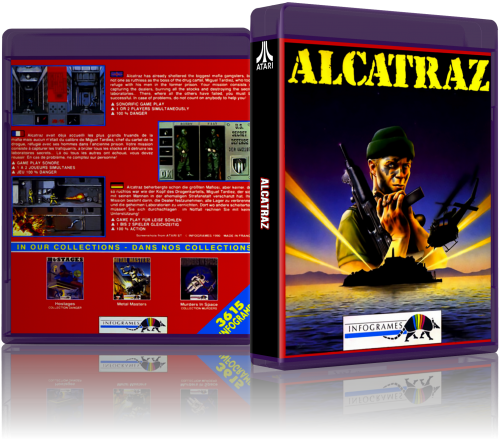
Hi all, Follow my "New Standard" for 3D covers "BLURAY MODE" (HD/UHD version). Atari ST - 874 files - 2028x1778 They use the rom name pattern but it works perfectly on any frontend. Enjoy!! Cauptain Inc. - [email protected] - youtube.com/c/cauptain -
812 downloads
I made this custom Launchbox icon for personal use and wanted to share it with the community. I wish I had more to give but it's a small gesture to say thanks for all your help and making this the best frontend on the market. Also I'm sorry if this is posted in the wrong section but I did not find an option for icons. -

Version 1.0.0
77 downloads
A clear logo pack, inspired by Sonic Mega/Gems Collection, to go with this startup video: Available for the following platform categories: Arcade Computers Consoles Handhelds Media (an experimental category for Comics and Movies) Mobile Pinball Font used: FOT-NewRodin Pro B-
- 1
-
-
- clear logo
- clear logos
- (and 11 more)
-
Sonic Big Box Collection - Platform Categories View File A clear logo pack, inspired by Sonic Mega/Gems Collection, to go with this startup video: Available for the following platform categories: Arcade Computers Consoles Handhelds Media (an experimental category for Comics and Movies) Mobile Pinball Font used: FOT-NewRodin Pro B Submitter biosonic417 Submitted 09/19/2022 Category Platform Clear Logos
-
Machtendo - Platform Categories View File I created some Platform Category Clear Logos! I had been using a set created by @knewlife which I really liked (found here). I just ran into a problem with the images scaling quite like I'd like to see. I decided to go ahead and recreate a couple of my favorites from scratch for a refresh, and riffed on his original idea with the others. These all started as 4K images @ 600 ppi and trimmed down from there. Arcade = Capcom Logo (recreation) Computers = IBM Logo (recreation) Consoles = PlayStation Logo Handhelds = Gameboy Logo Pinball = Williams Logo I made sure to use colors pulled from what I consider the definitive collection of logos created by @Dan Patrick where I could. I also made variations with white and black outlines with a couple of different line weights to accommodate light or dark themes. Submitter machjas Submitted 06/13/2022 Category Platform Clear Logos
-
- 1
-
-
- platform categories
- clear logo
- (and 5 more)
-
Styphelus Platform Boxes
-
Launchbox Icon View File I made this custom Launchbox icon for personal use and wanted to share it with the community. I wish I had more to give but it's a small gesture to say thanks for all your help and making this the best frontend on the market. Also I'm sorry if this is posted in the wrong section but I did not find an option for icons. Submitter RebelResurrected Submitted 03/13/2021 Category LaunchBox Custom Badges
-
 Hello. I am new to the LaunchBox forums, but I have a good amount of experience with LaunchBox itself. I have a collection of Sonic the Hedgehog ROM hacks which I would like to import into LaunchBox. I tried importing them into the Sega Genesis section, and several hacks, such as Sonic Classic Heroes and Sonic 3 Complete, actually have boxart attributed to them despite not being official Genesis games (instead being modified from an existing game series). bHowever, having many Sonic ROM hacks in the Genesis category without descriptions or boxart attributed to the vast majority of them makes me feel that there should be a seperate category for ROM hacks for a certain system, such as the Genesis or NES. On the other hand, a separate category could definitely overcomplicate things more than necessary. Should there be separate categories for ROM hacks? Thank you in advance for any replies.
 -
New Standard 3D Boxes - Atari ST (HD/UHD version) View File Hi all, Follow my "New Standard" for 3D covers "BLURAY MODE" (HD/UHD version). Atari ST - 874 files - 2028x1778 They use the rom name pattern but it works perfectly on any frontend. Enjoy!! Cauptain Inc. - [email protected] - youtube.com/c/cauptain Submitter Cauptain Submitted 04/23/2018 Category Game Box Art
-
tried not to overload w so many pics but wanted display marquees as well..I seperated my collection into 4 diff installations. consoles,playlists coin-ops and jukebox. allows me to be selective on images and cut out the fat so to speak .My baby is running mint tight and clean . wanna say im done tweakin but thanks to the awesome community here who knows what comes next .loving the bezels thanks for lookin
-
Version 1.0.0
215 downloads
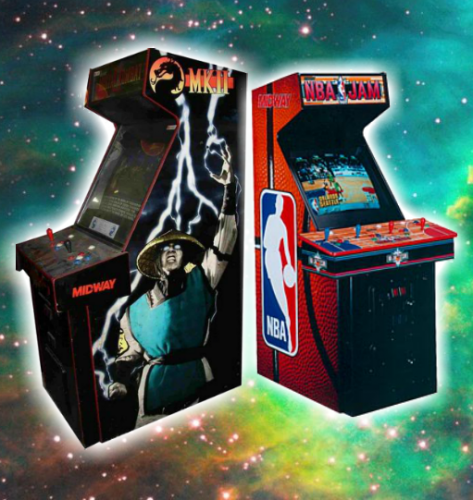
This is a collection of banners I made using each system floating in a galaxy background, and I'd like to share them with the community! Don't forget to like, review or comment, I'd really appreciate it! The ZIP file includes all banners for the systems I own, as well as a few custom playlist platforms: Arcade Atari Lynx Super Nintendo (PAL) Nintendo Game Boy Nintendo Game Boy Advance Nintendo Entertainment System Nintendo Gamecube Nintendo Wii Nintendo WiiU Sega 32X Sega Model 2 Sega Model 3 Sega CD Sega Genesis/Mega Drive Sega Dreamcast Sega Master System Sony Playstation Sony Playstation 2 Sony PSP Panasonic 3DO Playlist Banners: Mortal Kombat Street Fighter Grand Theft Auto Tony Hawks Pro Skater Super Nintendo Mini (PAL) zer0s_Banners.zip -
zer0's Banners View File This is a collection of banners I made using each system floating in a galaxy background, and I'd like to share them with the community! Don't forget to like, review or comment, I'd really appreciate it! The ZIP file includes all banners for the systems I own, as well as a few custom playlist platforms: Arcade Atari Lynx Super Nintendo (PAL) Nintendo Game Boy Nintendo Game Boy Advance Nintendo Entertainment System Nintendo Gamecube Nintendo Wii Nintendo WiiU Sega 32X Sega Model 2 Sega Model 3 Sega CD Sega Genesis/Mega Drive Sega Dreamcast Sega Master System Sony Playstation Sony Playstation 2 Sony PSP Panasonic 3DO Playlist Banners: Mortal Kombat Street Fighter Grand Theft Auto Tony Hawks Pro Skater Super Nintendo Mini (PAL) zer0s_Banners.zip Submitter DaveC Submitted 11/02/2017 Category Platform Banners


.thumb.png.76e8e60f897fe446500e908a8981a3d2.png)