Search the Community
Showing results for tags 'arcade'.
-
 These Realistic Arcade Bezels were made by Orionsangel and tested on Windows 10 with Mame and Retroarch. Thanks to HyperSpaceMadness, Mr. RetroLust, ArsInvictus, Duimon, Dreamstate & MQC. As well as Mr. Do. Most of these realistic arcade bezels could not have been made without them. Check out my youtube channel here - https://www.youtube.com/orionsangel
- 827 replies
-
- 18
-

-

-

-

-

-
.thumb.png.9332e12cab6cec0213b9ffd456a9a968.png)
Version Updated at 0.283
10,299 downloads
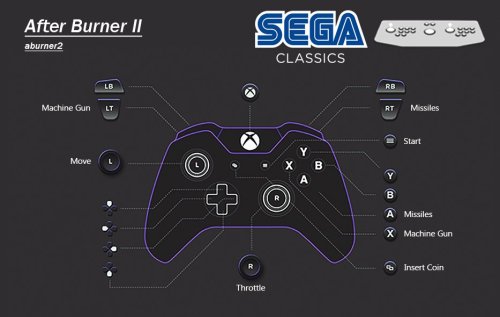
UPDATE 09/01/2026 All of Namco System 12 had it's controls updated at some point. This caused the map files to be incorrect. This has now been sorted. Only the .cfg have been updated, so just grab those if updating! Also, War: Final Assault has had digital analog applied so the crosshair doesn't snap back to centre. It plays like a proper FPS now. UPDATE: Its been 2 years since I "finished" this, and its taken until now for the MAME burnout to lift. But it's back to add some more games and overall improvements. Thanks to past me futureproofing the project, now me only needed to add 35 games. Stuff I missed first time around and stuff that's been added to MAME over the past 2 years. However, about 100 games need fixing. Thanks to help from the community I was able to easily identify which ones I messed up with double inputs or left the test menu on like a dumbass! MAME of course have changed some stuff and hopefully I've caught everything that pertains to this project. Improved platform xml, with almost all games now having a DB entry. I've also made a bunch of Hardware Playlists! Most of the popular ones beyond what LB creates. Stuff like Capcom ZN, Cave 68000, Seta 1st Generation and a bunch of Sega stuff just to name a few. Open to suggestions to add more! This is the bit you really want to pay attention to with the update! CHDs and the size of this build when culled. So, just to break this down: 3571 Non-Merged Roms (No CHD's) = 15.5GB 3571 Games in Merged Roms (No CHD's) = 16.7GB A culled Non-Merged set is actually smaller in size than a culled merged set. Due to merged including "all versions in one zip", independently, they are overall larger in size. Despite non-merged roms including bios files per rom, making it larger for a full set, a non-merged set ends up being overall smaller when culled like this. Not by much! But, I still fully recommend non-merged as they "just work", being overall smaller in size is an unexpected but added bonus. Now, CHD's. Exactly what is needed is in the documentation. For a full set, for this list of games, it's 110GB! However, 65GB (OVER HALF) of this is Rhythm games. Only 48 of them, Beatmania being the main offender. Another 12GB is occupied by ONE GAME....Fire Fox. A LaserDisc game that probably isn't wort the 12GB. These have been configured and added to the project for completeness. But, I have added these to a playlist (also in documentation) so you can easily delete/not use/exclude these Rhythm games from your build. They don't translate well to a controller anyway, so ya really not missing out on much, but saving 65GB across 48 games. Fire Fox is in that playlist also, do what you want. However.... A Non-Merged Culled set with all CHD's for this list (excluding Rhythm + Fire Fox) = 49 GB I had to double take the first time I calculated this. Almost all of MAME Arcade, 1G1R "ish", excluding games better emulated outside of MAME and oversized CHDs, fits into just under 50GB. Amazing! These figures will of course increase as time goes on, this is just a snapshot of now! Namco System 23 and Model 2 will be added once they are in a better state. They are really, really close to running well enough to add. --END OF UPDATE-- If you want show your appreciation and support the project and myself please check put my Patreon https://www.patreon.com/warpedpolygon No need to use the importer with the provided custom platform xml. I fully recommend using this to get the most out of what's been done. If you have been following along you know what the score is. If you are new here, let me explain what all this is. MAME is awesome, however like many other emulators it doesn't know what your use case is, how can it. So, it's defaults are more of a 'one size fits all... but not perfectly' kind of deal. As a result getting things setup can be a mine field. This isn't just down to MAME defaults, plenty of games present you with a bunch of hoops to jump through just to play the damn thing. This, on top of figuring out controls, (which is the main point here) can be a very frustrating experience. Even google can come up short sometimes leaving you to fumble around in the dark. Removing this frustration is the whole point of the project. I see lots of github requests for MAME that aren't emulation issues, they're configuration and setup issues. This project should alleviate the rage of most users. FOR CONTROL PAD USERS. So, let's just get into the stuff you wanna hear. To keep it simple I'm gonna list what IS here and what ISN'T here: WHAT IS HERE Every working Parent ROM has been configured. Although, some games listed as NOT WORKING do indeed work to some degree. These have also been configured to future proof the project. Clones and/or preferred versions have been identified, configured and added in ADDITION to their parent counterparts. This could be an uncensored Japanese version, control hack, translation or even a sequel. In some instances an entirely different game can be a clone version. This is such an important part of the project. All English region Names/Versions have been configured. You may know a game by a completely different name depending on your region. All English versions with different names have been configured. So, if it's Buck Rogers: Planet of Zoom, or just Zoom 909 to you, you'll be able to find it. It'll have that title in game also. I haven't just duplicated the parent version and changed the name in LB. All games have been tested and controls configured for XINPUT Controllers. This has been done per game. Some games needed ages spent on them to figure what the hell was going on. Robocop 2 has diagonals that need mapping to the second player joystick, despite being a one player game. So, you can imagine the time and testing that went in. Multiplayer games set to work with maximum players. Pretty much 70% of 4 player games were setup for 2 players by default. Games that remove the character selection for 4 players have had their 2 player versions also added so you have the choice. Multi screen games set for both one and two screen use. You will have the choice to launch the 1 screen or 2 screen version without having to set everything up. These maybe listed a 1 and 2 player variants. All analog games have had their sensitivity checked and changed if needed. Yes, the trackball Sonic game works just fine despite what people say. Every configured game has a control layout image. Working Prototypes are here. English set for Japanese only games wherever possible. There's more than you think. Unlockable/hidden content pre unlocked. Keep in mind some cheats for hidden content are a one time use and don't save to NVRAM. Fighting game button layouts are setup to all be the same. Exactly the same as Street Fighter 2 on SNES for 6 button fighters. Light gun games set for controller AND mouse usage. Inaccurate games have been calibrated. Widescreen games set to pixel aspect. Technical hoops already jumped through. Much, much, much more. WHAT ISN'T HERE Mah-jong games that use a Mah-jong panel. These simply have too many inputs to map to a controller. Mah-jong games that use a joystick are here. Japanese quiz games. Gambling and video poker games. Basically anything with a BET, HOLD input system. Japanese clone versions, UNLESS they are preferred or have additional content. Truly non working games that simply black screen. Any arcade platforms better emulated outside of MAME for e.g. Sega Model 2 & 3. ABOUT THE PLATFORM XML A lot of work has gone into making sure these games are all accounted for in the xml. There were a bunch of roms that weren't recognised by the importer or games that simply haven't yet been added to the Database. I have made sure that these have been added and named correctly before I start changing/updating the database. Also, I have gone the extra mile and added version info in the title of the game if there are multiples of the same game. So, you will see The Simpsons (2 Player) and The Simpsons (4 Players) as separate versions for extra convenience. PlayChoice-10 games and mega play games have also had this info added to the title so you know exactly what version is being selected, despite sharing the same name as other versions/games. MAME SET ADVICE AND MERGED ROMS Despite my previous statements, Non-Merged is the best for sooo many reasons. I plead with you, just go non merged and you'll have a better time. However, merged will work just fine as long as you have your bios setup correctly. INSTRUCTIONS Download CFG, NVRAM and Control Layout Images Put CFG and NVRAM files in the cfg and nvram folders of MAME Use Images however you want. I like to put these in the Screenshot - Gameplay images folder so they display in the side bar. If you don't use a gameplay screenshots this is a nice solution outside of BigBox. This has been made for use with XINPUT controllers. If you aren't using an XINPUT controller you can use DS4windows or it's alternative. USING THE ARCADE PLATFORM XML Download the Arcade.xml Backup your old xml just in case if you have one. Make sure LaunchBox is not running Place Arcade.xml into Data->Platforms folder in LaunchBox Start LaunchBox. The Arcade platform should be showing now. Select all games in the Arcade platform (Ctrl+A), then go to Tools->File Management->Change ROMs Folder Path for Selected Games (Merged Only) It will say some roms are missing, they're not, just in other zips. Make sure to change paths for these also, when asked. Find your ROMs folder and select it. Don't forget to set your emulator path and set it as the default for Arcade platform. PLAY!!! This project will be kept up to date moving forward. If you have any info, suggestions or whatever just holler in the comments. -
Version 2.0.0
15 downloads
I finally got MAME to work using LaunchBox. So after adding the ROM's I wanted to, I did not like the quality of the downloaded Arcade Cabinet Images, and some of then didn't have any Cabinet Images. So I either downloaded and enlarged and cleaned up my own, or enlarged and cleaned up the downloaded ones I didn't replace. So there's 126 files for 101 ROM's in this pack - I made contact sheets to preview the contents. Hope you like them, and if anyone has Arcade Cabinet images of the ones I do not have please let me know and provide them, thanks. P.S. All images are around the 2500 to 3000 pixels high range. The post for Version 2 says I attached a Contact Sheet as a PDF, but when I saw the size of the file, I removed it - so only the new Contact Sheets below available. -

Version 1.0.2
49 downloads
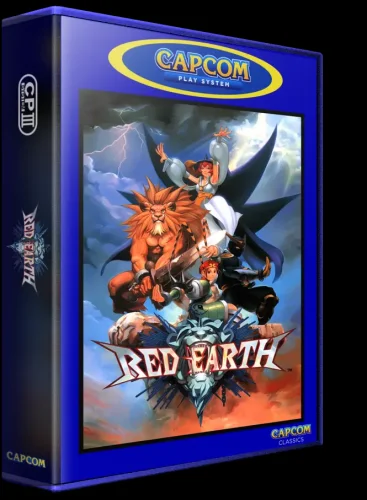
I know there are a few 3DBoxes for Arcade and especial for the Capcom play systems, but i wanted to do my own. I have more projects lined up that i want to complete, so i look forward to getting those out to you guys soon.- 8 comments
-
- 3
-
-
-
-
- coverbox
- 3d box art
- (and 2 more)
-
Tatsumi Arcade Logo View File I recreated a hard to find Tatsumi logo used during the 80's arcade era. It can be found online but in poor quality. Hope it comes in handy for someone. Submitter Orionsangel Submitted 03/16/2026 Category Platform Clear Logos
-

Version 1.0.0
1 download
I recreated a hard to find Tatsumi logo used during the 80's arcade era. It can be found online but in poor quality. Hope it comes in handy for someone. -

Version 22.0
70,374 downloads
Note: This thread will not be pushed to the front in the "whats new" section, if you want notifications for future updates to this file be sure to follow this page by using the follow button in the upper right corner Part of the "Lights Out - Realistic Bezels" series, for RetroArch bezels in this series see: https://forums.launchbox-app.com/files/file/1950-mr-retrolusts-lights-off-retroarch-bezels/ About: NOTE: This original project uses a reflection and scratch layer to add a realistic effect, it defines the style of the project, this is not for everyone. But please don't request "a clean verion" as I haven't kept the layer formats for all these 2000 games, this project is what it is. Realistic bezels in 3840x2160 resolution for MAME. My goal was to make bezels for around 1300 MAME games I had in my collection but I ended up making many bezels more. I started this project in 2019 and finished it in 2026. I used existing high quality artwork but also cleaned a lot of previously unavailable artwork which @Mr. Do had in his amazing collection. I searched high and low with google images to find existing artwork, which took me to Japanese websites often using google translate and research to get to those obscure images. The quality isn't always as high but I made sure I always used the highest quality I could find. Note: These artwork packs are made for older versions of Mame, if you use Mame 0.226 and upwards and find these files don't work right please see this post as you need to have them in a different lay structure: ============== Installation: Place the zip files inside the packs in mame/artwork/ Also be sure to curve the screen in Mame effects, you can use the preset files I've included in the downloads but they are for an older version of Mame (0.198) so they might not work on newer versions. To learn more about effects in Mame be sure to read this well: https://docs.mamedev.org/advanced/hlsl.html ============== Credits: Most of the artwork used are from the most excellent @Mr. Do & the many team members: http://mrdo.mameworld.info/index.php For NeoGeo artwork much artwork came from: http://www.neogeosoft.com/ For Flyer artwork the amazing: https://flyers.arcade-museum.com/ and https://www.flyerfever.com/ Some artwork used from: https://www.verticalarcade.com/ which has amazing vertical bezels, be sure to pay them a visit. Some artwork used from imbord3rlin3: https://www.arcade-projects.com/threads/high-resolution-scan-database-scans-as-a-free-service.24725/ Photos from Museum of the Game® & International Arcade Museum® https://forums.arcade-museum.com/ For research the great Arcade Database by: http://adb.arcadeitalia.net/ Special thanks to the following people, without them this project wouldn't be what it is: @ArsInvictus John Merrit, @Briball @cmgssilva @Orionsangel @Boz1978 @L4ZYD4NE @Manson976 UDb23 @IainSA TheGuru, Smitdogg, CAG, DrVectrex, tbombaci, italie, MAMEWorld, Ad_Enuff, UDb Raspbear, @destrowade @CKL @Thoggo @Antny @Dreamstate Andyaust @zugswang Spinnhacker, CCF Gameplay, jkburks, Comboman, Tim Lindquist, TrevEB, Aaron Giles, Jumpman1981, @kloug666, Tormod, yaggy, @NightVoice, Dillweed, @NeoKarnage, Vaughan, Zorg, Divemaster, Ad_Enuff, ranger lennier, Kiltron, @damageinc86, AntoPISA -
Version 0.16
36,862 downloads
LIGHTS OUT! BEZELS UPDATED TO THE NEWEST MAME CODE Mr. RetroLust created a series of bezels which is a masterpiece : Yet as he uses a rather old version of MAME, some of those bezels are not compatible with the latest releases which use a redesigned artwork system (MAME 0.226 onwards). As I intend to continue to enjoy his creations in optimal conditions, I have undertaken to update all the lay files and to correct recent incompatibilities. The original project uses a reflection and scratch layer to add a realistic effect which defines its style. You will find here the complete arcade 4K widescreen collection updated to the most recent lay code and expanded in various ways. Mainly based on the version 17.0 of the original collection : I’ve updated/edited all the lay files. Renamed files in sync with latest MAME release (0.281 at the time of this writing). Merged some archives to avoid any conflict with the classic artworks of Mr. Do and progetto-SNAPS. Converted and integrated some of Mr. RetroLust's non-MAME specific arworks*. Added Xeno Crisis bezel by Layer0730. Added blue MAME cab bezel by d66dle. Added some new artworks in the same style (Ex: Darius II Dual-Screen). Replaced most of the screen overlays based on pics with lay-coded ones according to the latest MAME sources (ex : Circus). Corrected some MAME artwork display known bugs (ex : Dead Eye). Added switchable gear shift for racing games when possible (ex : Pole Position). Added optional custom enhancements (ex : Galaga). Added color variations (ex : Barricade). Added BIOS specific bezels (ex : Deco Cassette System). Added generic horizontal and vertical bezels to use as fallback art files for every game missing individual artwork. Included a folder INI file to display a list of all games of the collection. If you spot a bug, or a game I forgot to add a gear shift, please indicate it in the comments, I will try to rectify it ASAP. * : Converted for MAME and upscaled to 4K some artworks from HD Lights Out! Retroarch Bezels 8.5. Converted for MAME the Sammy Atomiswave 4K Lights Out! Realistic Bezels 1.0.0. Converted for MAME the Sega Naomi 4K Lights Out! Realistic Retroarch Bezels 1.3. INSTALLATION Easy 'n' dirty way (not recommended) : Unzip all LightsOutRevisited0-Z archives in MAME/ARTWORK/ Install updates one after the other, just unzip and replace all files when asked. Put horizontal and vertical INIs in the root folder of your MAME installation or in MAME/INI/PRESETS/ Advanced 'n' clean way : Use the provided DAT to rebuild the collection with Clrmamepro, Romcenter or your favorite ROMs manager. Place the resulting ZIP files in MAME/ARTWORK/ Put horizontal and vertical INIs in the root folder of your MAME installation or in MAME/INI/PRESETS/ It is ESSENTIAL to use the included horizontal and vertical INIs to make the generic fallback bezels work. Optional : Put vector, vector-mono and raster INIs in the root folder of your MAME installation or in MAME/INI/PRESETS/ Put Lights Out Bezels Revisited INI in MAME/FOLDERS/ The FOLDERS INI file is entirely optional. The vector and the vector-mono INIs are highly recommended but not essential. The raster INI is ONLY to be used if you use the D3D HLSL graphics mode. I personally use the BGFX graphics mode for the rasters and the fantastic ArcCabView shader from Ducon2016 and Houb (included in UPDATE TO LIGHTS OUT 10.0 - MAME 0.276). Let's play ! All hails to Mr. RetroLust for the incredible work that he made with his original bezels. Special thanks to the following people who directly or indirectly inspired and/or helped me with this project : AntoPISA, d66dle, Ducon2016, Houb, Layer0730, Mr. Do, numerous members from MAMEWorld, Starman99x, Vaughan and Widge-5. After downloading and testing the release, if you enjoyed it, please come back and react by reviewing or liking the page. It will take you just a few seconds and help me give visibility to this project. -
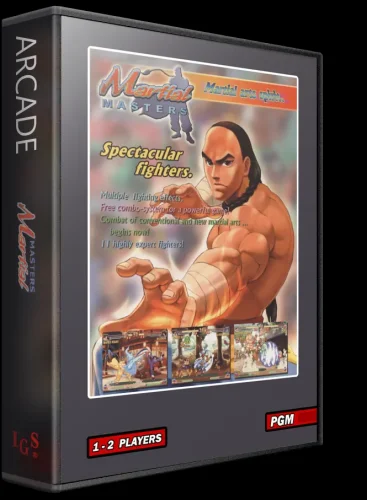
Version 1.0.0
13 downloads
3D Version in webp & png. Original 2D version by spycat-
- 1
-
-
- cover
- 3d box art
- (and 1 more)
-
This is how I setup the Sega/Nintendo/Namco Triforce Arcade which uses the GameCube hardware: Required Emu: latest know version (March 2023): Archive "Dolphin Triforce builds by Crediar" version dolphin_tri_x64_15_03_2023.rar Required Latest Triforce bios v3 needed for one of the soccer games: online "Triforce_Firm_v3.12_TYPE3_ONLY.BIN" Required Roms: need to be the .iso versions not the "Mame bins/chds Archives. Look for "Triforce iso" online. I also attached the patches/Geeko codes for each game beside Kart version C since E/D are patched to work. Launchbox emu setting uses"-b -C Dolphin.Interface.ConfirmStop=False -C Dolphin.Display.Fullscreen=True -e" -- Now the secret sauce is done on Dolphin Triforce branch: 1st setup your GC controller. make sure to set the servive button Z to something like L thumb click and same for test button to fit your controller After change standard controler to Triforce AM Baseboard for port 1 and 2 2nd setup iso path 3rd set game cube settings as follow SlotA mem card Sp1 triforce am baseboard Bios: Triforce v3 4th Enable if needed all assigned patches for each game and each geeko codes 5th test each game 🙂 Games works perfectly and I don't have any slow downs with the Geeko patches and all motor check, boot checks are bypassed. On Kart gp sometimes the aspect ratio jumps rarely in gameplay between 16/9 to 4/3. I forced 4/3 in the vulkan graphic settings Cheers DolphinTriforce.7z DolphinTriforce.zip

-
Antny's Transparent Cabinets View File For a long time, I thought it would be great to have quality arcade cabinet images for my favorite frontend, Launchbox. What else, lol? I think that the artwork and images of these cabinets should be preserved. These have transparent backgrounds to maximize their use in themes, especially now that we have the wonderful Community Theme Creator (Thanks y2guru!). These cabinets have been resized & cleaned up, where feasible. I will upload the higher resolution copies of these to an FTP. They can be added to the Launchbox database if someone feels up to doing it. This is YEARS in the making, so I hope you enjoy. I originally strived for accuracy, as far as region goes. I could not determine if the some of the U.S. cabinets were the same in other regions. So, I kind of gave up in the middle. You may have to copy/rename some to your liking. I was going to spend more time going through them but at this point I thought I would just share them. I'm a little burned out at this point anyway. If you would like to help out to make this project continue/better, I could use the following: - finding images on the net or if you live close to an arcade or go to shows you can take high-resolution shots (the higher the better). If you can take super high-resolution images that would be perfect. Full cabinet at an angle, not partial or blocked (minimum 1600 pixels high, preferably much higher). Additionally, straight on shots can be added also. You can see what I'm looking for by checking out the images in the packs. Maybe you have friends at KLOV or other forums and can get them to take pictures. - Cleaning & cutting out images. Quality cutouts and cleaning only. I'm trying to create the ultimate reference for these cabinets. - Identifying region. Anyone with knowledge of the cabinets. It would come in handy. - Errors. See something wrong. I forgot something. - Thoughts. I would love feedback. Do you like the sizing? Should they be bigger? Smaller? Ideas to make this project better? - Thoughts on making a thread on one of the forums so people can upload their images? Maybe a forum category? ------------------------------------------------------------------------------------------------------------------- Teknoparrot, Dice & Daphne packs on the way...... I have high resolution control panel packs just about ready for release. They look great. I'm going to release them at 1200 pixels wide. Thoughts on size? If you are taking pictures, take a bunch of the control panels straight on at different heights. Side art also. Feel free to PM me. I hope you like them. Tony (AKA Antny) Submitter Antny Submitted 05/21/2022 Category Arcade
-
Primal Rage sound pack View File Sounds recorded from arcade pcb. Startup sounds include trimmed character themes and short tracks. Other notes: Recorded using OBS / Soundblaster AE-7 pci-e card Trimmed and fade out effect using Audacity Track ReplayGain applied using Foobar plugin (amplitude for a couple of files were manually adjusted) MOVE001.wav STARTUP004.wav BACK015.wav SELECT001.wav Submitter la vache qui rit Submitted 05/30/2025 Category Sound Packs
-
I Im trying to add some single ROMs for Arcade, but none of the games show up, so they can't be added. I downloaded the ROM game Gunforce II, but it doesn't add. What do I have to do? The ROM I downloaded from here xxxx Im just looking for some hidden gems that I don't have. The platform I have is MAME 0.253, if that matters. PLEASE HELP!!!
-

Version 1.0.0
610 downloads
168 Clear Logos! I was looking around, and didn't see that anyone else had done this. I pulled all the clear logos from TeknoParrot's compatibility page and renamed them so that LaunchBox would pick them up properly. This package is complete as of 7/1/22. I'm not clear as to whether or not their compatibility page lists everything in their scope or if there are others. Enjoy!- 1 comment
- 1 review
-
- 6
-
-
-
- teknoparrot
- taito type x
- (and 4 more)
-
Version 5.8
14,582 downloads
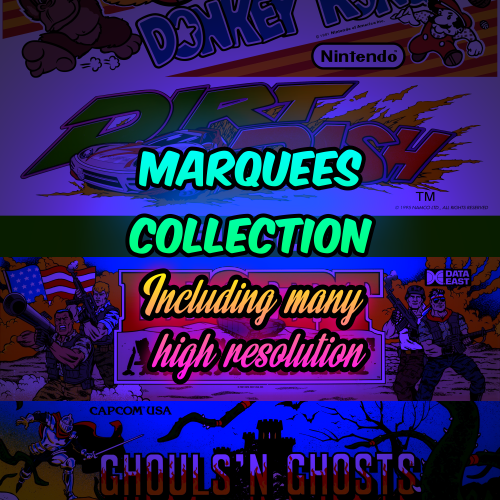
I use the awesome Bigbox function to display marquees on a secondary monitor. For years I've been collecting high res Mame arcade marquees from all over the internet and since the start of this project got huge help from people in the community to expand this collection, please see the credits below. Not all marquees are in 4K but many are, I've down scaled the resolution to max 3840 pixels wide and max 2160 pixels high and saved all in .jpg format for a good size and quality balance. This project includes Naomi and Atomiswave marquees as well as other arcade systems. These marquees go hand in hand with this bezel project: Credits I have forgotten where I got all marquees through the years but I know many came from the legendary @Mr. Do collection see: https://mrdo.mameworld.info/index.php and the many members that create artwork at: https://www.mameworld.info/ubbthreads/ubbthreads.php?Cat= @ArsInvictus is certainly one of the providers as well. A huge thank you to @mOa and @JonnyModlin for providing many many marquees to this collection. Many lower resolution marquees came from the legendary team of AntoPisa at https://www.progettosnaps.net/ Also a huge thanks to the following people and sites: @PapaShine, @Dreamstate, @flanx, imbord3rlin3, @djweevil666, http://adb.arcadeitalia.net/, @THK, https://flyers.arcade-museum.com/, https://www.flyerfever.com/, https://www.recreativas.org/, Ken at https://www.flickr.com/photos/10707024@N04/, zzzaccaria.com, Hasan Tasdemir from Nationaal Video Game Museum for the opportunity to photograph at your amazing museum. https://www.nationaalvideogamemuseum.nl, https://segaretro.org/, @seijurou and all the logo makers and artwork scanners and submitters for the LB database and other databases. Hope you enjoy this collection. -
.thumb.png.76e8e60f897fe446500e908a8981a3d2.png)
Version 1.0.0
285 downloads
I created some Platform Category Clear Logos! I had been using a set created by @knewlife which I really liked (found here). I just ran into a problem with the images scaling quite like I'd like to see. I decided to go ahead and recreate a couple of my favorites from scratch for a refresh, and riffed on his original idea with the others. These all started as 4K images @ 600 ppi and trimmed down from there. Arcade = Capcom Logo (recreation) Computers = IBM Logo (recreation) Consoles = PlayStation Logo Handhelds = Gameboy Logo Pinball = Williams Logo I made sure to use colors pulled from what I consider the definitive collection of logos created by @Dan Patrick where I could. I also made variations with white and black outlines with a couple of different line weights to accommodate light or dark themes.- 1 comment
-
- 3
-
-
-
- platform categories
- clear logo
- (and 5 more)
-
===========Dreamstate's - 4K and 8K - Realistic Vertical MAME Overlays=========== These overlays are in 2160X3840 and 4000X7111 resolution. I'll be making these with a focus on the artwork and not the game play. There's already lots of overlays available If you like a large game screen with minimal artwork. It's very easy to add those others to an overlay zip file like this so I leave that to you. I use these as show pieces when I want to just watch the game go through it's attract mode and admire the cabinet art. I hit crop when it's time for game play. My goal here is to create something that doesn't look like a photo complete with flash bulb reflections. It's not to make the cabs look like they're in a 711 or Zeller's atmosphere with 5000 watts of super bright florescent lighting. I'm attempting to make them look like a window view of an arcade cabinet in it's native habitat, a dimly lit arcade. The lighting on these overlays will primarily be on the darker side with a touch of arcade lighting from the CRT, black lighting or other lights in the arcade and lighting from the marquees on the machines themselves. These overlays will have English instructions since I don't know how to read any other language but English. The source artwork used on these overlays will be as accurate as possible with no fan made, blurry, AI up scaled artwork or photos used as a substitute for artwork I don't have. You also won't see any 8X10 inch game flyers reduced in size by 50% and placed on the bezels in some lame attempt to substitute for artwork that was never created for the game cabinet. High levels of detail are a priority at this resolution as well. Why make a 4k or 8k overlay and use blurry low res artwork? Makes no sense to me. Overlays will be posted here occasionally and in non alphabetical order when I complete them. As you would expect, they take a long time to complete and I have lots of other artwork to make and round up just to have all the needed material to start one of these pieces. Huge thanks to: Giulio Bettini, Jorg Ehrenstein, Q*ris, Franz Cros, Mike Holly, Denis Braun, Ivan Arcade, Joshua Axelrod, Gib Ranx, Frame, Raspbear, Etienne Macgyver, Paul Swan, Orionsangel, Nightvoice, MrRetrolust, Jibmums and many others for the contributions they've made to the community and inspiration they have given me. Radarscope 8k radarscp.zip
- 92 replies
-
- 10
-
-
-
-
Version 1.0.1
81 downloads
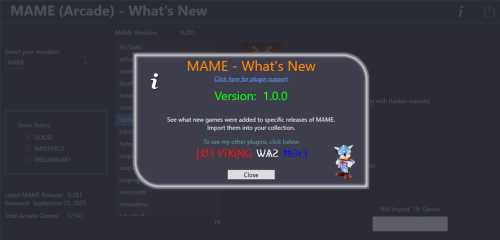
See what new Arcade machines (games) were added for a specific MAME release. Import some or all of those games from your updated MAME ROM set, into your LaunchBox collection. The intent of this plugin is to be able to see what new Arcade machines were added in the latest release of MAME. Then, along with your updated ROM set, provide a means of importing just those new machines into your LaunchBox collection without having to reimport the entire set or attempting to Scan for Added ROMs (which doesn't really work with the Arcade platform anyway). Features: See what new Arcade (ONLY) games were added specific MAME release Hyperlink to Arcade Games Database site for selected game Filter games by Status (Good, Imperfect, Preliminary) Import the new games (from your updated MAME ROM set) (Optional) Add an Additional Application direct link to the Arcade Database for the game A huge and special thanks to motoschifo and his Arcade Database (ADB) website! All data used comes direct from the Arcade Database and is what makes this plugin possible. http://adb.arcadeitalia.net Prerequisites: Requires LaunchBox version 13.19 or newer. Nothing else if you only wish to see what new games were added. If you wish to import the new games An updated MAME romset [containing those ROMs] Installing: Copy the contents of the zip file into your /Plugins/ folder e.g. D:\LaunchBox\Plugins\MAMEarcadeWhatsNew\MAMEarcadeWhatsNew.dll Using: In LaunchBox, go to Tools and select MAME (Arcade) What's New The plugin will attempt to find your MAME emulator If found, the MAME Revision field will populate with your MAME's version and populate the games for that revision To see new games that were added in a different release Change the number in the MAME Revision field Must be formatted 0.xxx e.g. 0.281 Press Enter Un-check/check the Show Status checkboxes to see only ROMs with those status(es) Click a ROM to see brief details about that game Click the Arcade Database logo to navigate to that game on ADB Existing: as seen below the game details refers to, if the game exists anywhere in your collection. Checks across ALL games in ALL platforms (by ROM filename). Below it will show the platform it is in (if "existing") This is useful if you're checking previous releases for that hidden gem you didn't know you were missing Importing: If you've updated your MAME set, you can import the new ROMs into your collection. All new ROMs shown will be imported. You can multi-select games to add just those games selected. If you wish to import just a single game, close the plugin. Then in LaunchBox, press Ctrl+N to add a new game. Click Add Games Select a platform (Arcade is set by default if exists) (optional) Un-Check Use Platforms Default Emulator Select an emulator to assign to the games being imported from the dropdown list Select the folder containing your ROMs (default is the folder your game files are in for the selected platform) If you keep a curated set separate from your MAME fullset, you can select the folder your fullset is in. Then after importing, have LaunchBox copy the ROMs and reset the game ROM path. **(see more below) If you've already placed your new ROMs in your curated set folder, select that. (Optional) Check the box Add link to ADB as Additional App Click Import Games Importing Notes: Games already existing (based on ROM filename) in the platform (step 2) will not be imported Games whose ROM file doesn't exist (step 4) will not be imported After import, a report will show the # of games added and/or skipped Anything in the games Title that is in (parenthesis) will get moved to the games Version field e.g. "Hacha Mecha Fighter (bootleg with Raiden sounds)" Game Title will be saved as "Hacha Mecha Fighter" Game Version will be set to "(bootleg with Raiden sounds)" (Optional) Add an Additional Application direct link to the Arcade Database for the game This will appear as an "Arcade Database" clickable link in the Game Details section (except for LaunchBox version 13.24). Game data set when importing: Title Platform ROMs application path Date Added/Modified Associated Emulator Version (if available) Getting Metadata and Images: After importing, in LaunchBox select all the newly added games Hint: Click Arrange By and select Date Added. Select the 1st new game. Hold down Shift then click the last, new game. Go to Tools - Download - Update Metadata and Media for selected games When asked "Would you like to update games with existing metadata and/or media?" Select "Yes, but do not replace and existing fields and media" Selecting otherwise will remove the Version data (if exists) Metadata Notes: If importing from the latest MAME revision, when you go to Download/Update metadata, the game(s) may not be found. ** Copying the new imported games ROM files to a different ("curated") folder: To Copy the ROMs and reassign their location (as seen by LaunchBox)... After importing, (in LaunchBox) select the newly added games Copying: Go to Tools - File Management and select Export ROM Files from Selected Games to New Folder Have LaunchBox copy the ROMs to the Folder your curated set is in Reassigning: With those games still selected, go to Tools - File Management and select Change Roms Folder Path for Selected Games Change to the Folder your curated set is in Plugin Updates: If an Update for this plugin has been released on the forums, - The Info/Support icon will flash red. - Click the Info/Support icon, then click the Update Available button. This will open the plugins download page in your default browser. Again, a big thanks to the Arcade Database and all its contributors! As always, all thoughts, views, suggestions, comments and accolades are welcome. -
So I'm not trying to emulate a Naomi Arcade game, however I am trying to extract models from a game called World Kicks. Unfortunately for some reason every guide online has me use a .chd or .gdi file however the rom I have has: -A couple of .bin files -.ic31 file -a .bios file -A bunch of .ic27 files -.ipl file -A few files with the .4(varied letter) files Dunno what to do with these or how to get to what I want to achieve.
-
Unibox View File Intro Unibox allows you to add roms to any Launchbox installation you have running on your local network on the fly. It also automatically adds metadata and media. This can be done in real-time, making it useful for installations such as arcade machines or rigs dedicated to running BigBox. No manual adding of roms to folders required, or going into Launchbox to add more games. Project thread here for more up to date features and screenshots etc. The videos below were made on the first version so there's been a number of improvements since then. Video of it in action: Getting started guide: Presently in Beta, so maybe test on a test installation first. Hope helps! Submitter stigzler Submitted 08/13/2025 Category Third-party Apps and Plugins
-

Version 1.1.0 - Bootle
71 downloads
Intro Unibox allows you to add roms to any Launchbox installation you have running on your local network on the fly. It also automatically adds metadata and media. This can be done in real-time, making it useful for installations such as arcade machines or rigs dedicated to running BigBox. No manual adding of roms to folders required, or going into Launchbox to add more games. Project thread here for more up to date features and screenshots etc. The videos below were made on the first version so there's been a number of improvements since then. Video of it in action: Getting started guide: Presently in Beta, so maybe test on a test installation first. Hope helps! -
.thumb.png.c9faf450e4d2b690a819048b18173f61.png) MAME (Arcade) - What's New View File See what new Arcade machines (games) were added for a specific MAME release. Import some or all of those games from your updated MAME ROM set, into your LaunchBox collection. The intent of this plugin is to be able to see what new Arcade machines were added in the latest release of MAME. Then, along with your updated ROM set, provide a means of importing just those new machines into your LaunchBox collection without having to reimport the entire set or attempting to Scan for Added ROMs (which doesn't really work with the Arcade platform anyway). Features: See what new Arcade (ONLY) games were added specific MAME release Hyperlink to Arcade Games Database site for selected game Filter games by Status (Good, Imperfect, Preliminary) Import the new games (from your updated MAME ROM set) (Optional) Add an Additional Application direct link to the Arcade Database for the game A huge and special thanks to motoschifo and his Arcade Database (ADB) website! All data used comes direct from the Arcade Database and is what makes this plugin possible. http://adb.arcadeitalia.net Prerequisites: Requires LaunchBox version 13.19 or newer. Nothing else if you only wish to see what new games were added. If you wish to import the new games An updated MAME romset [containing those ROMs] Installing: Copy the contents of the zip file into your /Plugins/ folder e.g. D:\LaunchBox\Plugins\MAMEarcadeWhatsNew\MAMEarcadeWhatsNew.dll Using: In LaunchBox, go to Tools and select MAME (Arcade) What's New The plugin will attempt to find your MAME emulator If found, the MAME Revision field will populate with your MAME's version and populate the games for that revision To see new games that were added in a different release Change the number in the MAME Revision field Must be formatted 0.xxx e.g. 0.281 Press Enter Un-check/check the Show Status checkboxes to see only ROMs with those status(es) Click a ROM to see brief details about that game Click the Arcade Database logo to navigate to that game on ADB Existing: as seen below the game details refers to, if the game exists anywhere in your collection. Checks across ALL games in ALL platforms (by ROM filename). Below it will show the platform it is in (if "existing") This is useful if you're checking previous releases for that hidden gem you didn't know you were missing Importing: If you've updated your MAME set, you can import the new ROMs into your collection. All new ROMs shown will be imported. You can multi-select games to add just those games selected. If you wish to import just a single game, close the plugin. Then in LaunchBox, press Ctrl+N to add a new game. Click Add Games Select a platform (Arcade is set by default if exists) (optional) Un-Check Use Platforms Default Emulator Select an emulator to assign to the games being imported from the dropdown list Select the folder containing your ROMs (default is the folder your game files are in for the selected platform) If you keep a curated set separate from your MAME fullset, you can select the folder your fullset is in. Then after importing, have LaunchBox copy the ROMs and reset the game ROM path. **(see more below) If you've already placed your new ROMs in your curated set folder, select that. (Optional) Check the box Add link to ADB as Additional App Click Import Games Importing Notes: Games already existing (based on ROM filename) in the platform (step 2) will not be imported Games whose ROM file doesn't exist (step 4) will not be imported After import, a report will show the # of games added and/or skipped Anything in the games Title that is in (parenthesis) will get moved to the games Version field e.g. "Hacha Mecha Fighter (bootleg with Raiden sounds)" Game Title will be saved as "Hacha Mecha Fighter" Game Version will be set to "(bootleg with Raiden sounds)" (Optional) Add an Additional Application direct link to the Arcade Database for the game This will appear as an "Arcade Database" clickable link in the Game Details section (except for LaunchBox version 13.24). Game data set when importing: Title Platform ROMs application path Date Added/Modified Associated Emulator Version (if available) Getting Metadata and Images: After importing, in LaunchBox select all the newly added games Hint: Click Arrange By and select Date Added. Select the 1st new game. Hold down Shift then click the last, new game. Go to Tools - Download - Update Metadata and Media for selected games When asked "Would you like to update games with existing metadata and/or media?" Select "Yes, but do not replace and existing fields and media" Selecting otherwise will remove the Version data (if exists) Metadata Notes: If importing from the latest MAME revision, when you go to Download/Update metadata, the game(s) may not be found. ** Copying the new imported games ROM files to a different ("curated") folder: To Copy the ROMs and reassign their location (as seen by LaunchBox)... After importing, (in LaunchBox) select the newly added games Copying: Go to Tools - File Management and select Export ROM Files from Selected Games to New Folder Have LaunchBox copy the ROMs to the Folder your curated set is in Reassigning: With those games still selected, go to Tools - File Management and select Change Roms Folder Path for Selected Games Change to the Folder your curated set is in Plugin Updates: If an Update for this plugin has been released on the forums, - The Info/Support icon will flash red. - Click the Info/Support icon, then click the Update Available button. This will open the plugins download page in your default browser. Again, a big thanks to the Arcade Database and all its contributors! As always, all thoughts, views, suggestions, comments and accolades are welcome. Submitter JoeViking245 Submitted 10/30/2025 Category Third-party Apps and Plugins
MAME (Arcade) - What's New View File See what new Arcade machines (games) were added for a specific MAME release. Import some or all of those games from your updated MAME ROM set, into your LaunchBox collection. The intent of this plugin is to be able to see what new Arcade machines were added in the latest release of MAME. Then, along with your updated ROM set, provide a means of importing just those new machines into your LaunchBox collection without having to reimport the entire set or attempting to Scan for Added ROMs (which doesn't really work with the Arcade platform anyway). Features: See what new Arcade (ONLY) games were added specific MAME release Hyperlink to Arcade Games Database site for selected game Filter games by Status (Good, Imperfect, Preliminary) Import the new games (from your updated MAME ROM set) (Optional) Add an Additional Application direct link to the Arcade Database for the game A huge and special thanks to motoschifo and his Arcade Database (ADB) website! All data used comes direct from the Arcade Database and is what makes this plugin possible. http://adb.arcadeitalia.net Prerequisites: Requires LaunchBox version 13.19 or newer. Nothing else if you only wish to see what new games were added. If you wish to import the new games An updated MAME romset [containing those ROMs] Installing: Copy the contents of the zip file into your /Plugins/ folder e.g. D:\LaunchBox\Plugins\MAMEarcadeWhatsNew\MAMEarcadeWhatsNew.dll Using: In LaunchBox, go to Tools and select MAME (Arcade) What's New The plugin will attempt to find your MAME emulator If found, the MAME Revision field will populate with your MAME's version and populate the games for that revision To see new games that were added in a different release Change the number in the MAME Revision field Must be formatted 0.xxx e.g. 0.281 Press Enter Un-check/check the Show Status checkboxes to see only ROMs with those status(es) Click a ROM to see brief details about that game Click the Arcade Database logo to navigate to that game on ADB Existing: as seen below the game details refers to, if the game exists anywhere in your collection. Checks across ALL games in ALL platforms (by ROM filename). Below it will show the platform it is in (if "existing") This is useful if you're checking previous releases for that hidden gem you didn't know you were missing Importing: If you've updated your MAME set, you can import the new ROMs into your collection. All new ROMs shown will be imported. You can multi-select games to add just those games selected. If you wish to import just a single game, close the plugin. Then in LaunchBox, press Ctrl+N to add a new game. Click Add Games Select a platform (Arcade is set by default if exists) (optional) Un-Check Use Platforms Default Emulator Select an emulator to assign to the games being imported from the dropdown list Select the folder containing your ROMs (default is the folder your game files are in for the selected platform) If you keep a curated set separate from your MAME fullset, you can select the folder your fullset is in. Then after importing, have LaunchBox copy the ROMs and reset the game ROM path. **(see more below) If you've already placed your new ROMs in your curated set folder, select that. (Optional) Check the box Add link to ADB as Additional App Click Import Games Importing Notes: Games already existing (based on ROM filename) in the platform (step 2) will not be imported Games whose ROM file doesn't exist (step 4) will not be imported After import, a report will show the # of games added and/or skipped Anything in the games Title that is in (parenthesis) will get moved to the games Version field e.g. "Hacha Mecha Fighter (bootleg with Raiden sounds)" Game Title will be saved as "Hacha Mecha Fighter" Game Version will be set to "(bootleg with Raiden sounds)" (Optional) Add an Additional Application direct link to the Arcade Database for the game This will appear as an "Arcade Database" clickable link in the Game Details section (except for LaunchBox version 13.24). Game data set when importing: Title Platform ROMs application path Date Added/Modified Associated Emulator Version (if available) Getting Metadata and Images: After importing, in LaunchBox select all the newly added games Hint: Click Arrange By and select Date Added. Select the 1st new game. Hold down Shift then click the last, new game. Go to Tools - Download - Update Metadata and Media for selected games When asked "Would you like to update games with existing metadata and/or media?" Select "Yes, but do not replace and existing fields and media" Selecting otherwise will remove the Version data (if exists) Metadata Notes: If importing from the latest MAME revision, when you go to Download/Update metadata, the game(s) may not be found. ** Copying the new imported games ROM files to a different ("curated") folder: To Copy the ROMs and reassign their location (as seen by LaunchBox)... After importing, (in LaunchBox) select the newly added games Copying: Go to Tools - File Management and select Export ROM Files from Selected Games to New Folder Have LaunchBox copy the ROMs to the Folder your curated set is in Reassigning: With those games still selected, go to Tools - File Management and select Change Roms Folder Path for Selected Games Change to the Folder your curated set is in Plugin Updates: If an Update for this plugin has been released on the forums, - The Info/Support icon will flash red. - Click the Info/Support icon, then click the Update Available button. This will open the plugins download page in your default browser. Again, a big thanks to the Arcade Database and all its contributors! As always, all thoughts, views, suggestions, comments and accolades are welcome. Submitter JoeViking245 Submitted 10/30/2025 Category Third-party Apps and Plugins -
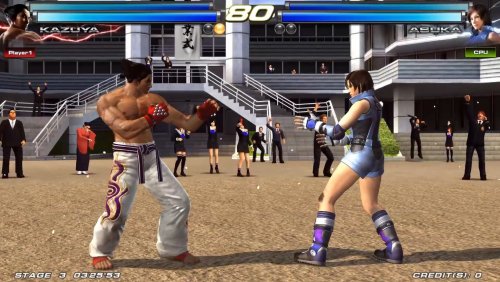
Namco System 357/369 View File Hope you like it. Submitter codetvirus Submitted 10/07/2025 Category Platform Theme Videos
-
Version 1.0.0
99 downloads
Hope you like it. -
Version 0.278
151 downloads
Latest Release: .278 ----279 has a compiler error, will try again tonight ARCADE64 is a Windows-based frontend for MAME, a multi-arcade emulator. Its useful if you want mame but want a nice gui for settings. No support will be provided, due to me checking the forum very infrequently. https://arcade.mameworld.info/ ARCADE64 is a continuation of the MAMEUIFX project. It is based on the latest MAME source at the time of release. It is in maintenance only (no active development of new features). What's in it? Arcade games only NO mechanical games (pinball, crane games, etc) NO computers, consoles, terminals, appliances, etc Only playable games are included –-------- This is the No-Nag version of MAME front end, Arcade64 You need to have setup Arcade 64 in advance. This is only a replacer for the exe. source code and project files available through my Github: https://github.com/xechostormx/arcade64-No-Nag I will upload new versions as long as I am still using the software. Changes are made to ui.cpp as shown below. virus scan results here: https://www.virustotal.com/gui/url/2560d1667ac15800ac23011d93a6ae75b60932ad9596b3a250a2c536501cd835/detection Line 629: void mame_ui_manager::display_startup_screens(bool first_time) { const int maxstate = 3; int const str = machine().options().seconds_to_run(); bool show_gameinfo = !machine().options().skip_gameinfo(); bool show_warnings = false; bool video_none = strcmp(downcast<osd_options &>(machine().options()).video(), OSDOPTVAL_NONE) == 0; // Removed conditional logic for nonag build
.thumb.png.9332e12cab6cec0213b9ffd456a9a968.png)



.thumb.png.76e8e60f897fe446500e908a8981a3d2.png)



.thumb.png.c9faf450e4d2b690a819048b18173f61.png)