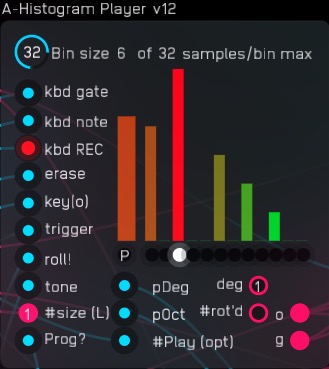
Builds a histogram of notes played and creates partial scales based on a random probability test of the histogram. Each bin (one for each tone of the 12-tone chromatic scale) stores the velocity and the octave. Playback is controlled by the Arpeggiator Box, designed to control two histogram players.
This patch hooks up two Histogram players and an Arpeggiator Box to my White Key Scale MIDI Converter, so I can easily put interesting scales into the player with the convenience of using the black keys as controls: C# and Eb to put the histogram players into record mode, F# to clear, Ab to pause, and Bb to re-sync channels or set a delay on one channel. (All black keys map the same way in the white key scale player.)
New in this version is the ability to play progressions.

You choose a scale to play through by selecting it and pressing the flashing button.
The white key thing just makes it easy for non-piano players to play in-scale.
The same flashing button feature is used on the clock source module so that you can set up a new clock frequency and launch it only after it’s all dialed in.
The big patch features a resonant bell synthesizer and a “windy” or “whistling” bandpass biquad filter-based synthesizer.
The Allpass Ring Reverb (from the standard library, but squished down to fit in my packed patch) gives a mellow background vibe.
You can set up interesting and more natural-sounding rhythms by re-syncing one channel that’s recording relative to the other that’s not. If both channels are recording, then the sync process restarts the pair’s master clock without affecting channel-to-channel delay. Delay can be set by either turning a knob (knob delay) or by tapping a note or reset pulse while the patch is playing (live delay.) A zero button sets the channel-to-channel delay to zero.
A major addition is progressions. The histogram distribution display rotates the scale to put the current degree of the progression into slot one.
Histogram Player Progression-2 voice 26.10.26.01.audulus4 (1.6 MB)
A much simpler DEMO is here:
Random Tones by Histogram DEMO 26.09.26.01.audulus4 (1.2 MB)
A movie of it working, “black keys” scale in C-sharp (this on google photos: a discord version was uploaded directly):
| Histogram Player: | |
|---|---|
| Screenshot | |
| The Histogram Player modules create scales with 1 to 12 tones, each tone represented by a bin in the histogram. By “rolling the dice,” the player module creates new scale subsets to play by sampling play history stored in the histogram, producing a custom scale at each roll.” |
| Arpeggiator Box: | ||
|---|---|---|
| Screenshot | ||
| This module controls two Histogram Player modules, enabling recording and immediate looping playback of arpeggios or random tones produced by sampling the play-history histogram. The arpeggiator box module issues the “roll!” pulses and uses the scale length returned, along with user input, to determine tones/beats per measure. Various timing choices are possible. The custom scale returned by the histogram player determines what notes will play. That scale’s length (number of tones) can set the number of beats per loop, or a fixed value can be chosen. The mix of fixed or scale-derived beats is set by the %Fixed knob. Tempo can be increased for either channel, allowing a fixed number of loops per measure from 1 to 17 by adjusting the pace knob. |

Trigger pulses from the “trig” outputs pass through the velocity (amplitude) of the gate pulse from the MIDI keyboard. Triggers can be randomly output or muted with a 0% to 100% range. Gate width/sustain can be set from minimal to the full note duration by adjusting the “hang time” knob, the original velocity value setting the height of the gate pulse.
Channel-to-channel Delay
Knob Delay
To allow a little “feel,” a channel-to-channel delay can be set for one channel by setting a knob (endless knob module) to the amount of delay desired. Top dead center gives no delay. Rotation to the left delays channel A and rotation to the right delays channel B. Delay set by the knob is displayed inside the knob in red, in 32nds of a measure. The knob pointer remains at that set position. The delay in seconds is displayed below the knob.
Live Delay
As an alternative to “knob delay,” you can set delay by feel by hitting a note or pulse the sync input at the time you want the channel to play. I’m calling this “live delay.” With the desired channel only in REC(ord) mode, you apply the sync pulse at the time you want that channel to play, or you can do it at the keyboard by tapping the “gate” button, then hitting any note at the time you want that channel to play. The live delay is displayed in blue over the delay knob, and the knob pointer is set to the ”knob delay” equivalent position. The delay in seconds is displayed below the knob.
Channel-to-channel delay can be reset by tapping the “zero” button directly below the delay knob.
Again, this applies only when one channel is in REC mode. For all other cases, doing the above steps will reset the master clock time, leaving any channel-to-channel delay intact.
Roll Hold
The “Roll!” pulse for a channel can be held for an integer number of loops, rather than once every loop, keeping patterns over multiple measures.
Arpeggiation styles
Scale tones can arpeggiate starting with the root, heading up, or with the last tone, heading down, or starting at a random tone, up or down. It can also run with random tones. These five arpeggiator modes can randomly switch when the channel performs a “roll” or can be set manually.
| Progression section: | |
|---|---|
| Screenshot | |
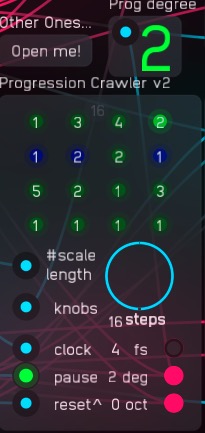
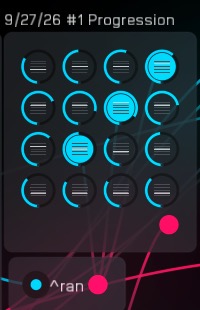
| Steps through up to 16 progression steps over three octaves, with one high tonic. Knob sets the number of steps. The knob values are fed in from a separate knob array module, via a 16-channel poly connection. The number of tones used in calculating degree of scale are set at the #scale length input. (note: Only degree 1 is available at octave 2) Display colors: red for -1 octave green for middle octave blue for +1 full octave violet for +2 octaves Progression progresses with each clock cycle. Pause: stop at the current step. Reset: move progression to before step 1. |
Scale Selector:
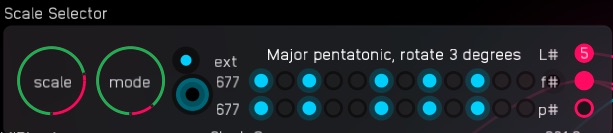
This is a rework of my older selector, this time with a “mode” knob that allows scale rotation so you can create modes on any scale. Displayed are preliminary, output at “p#,” and final, output at “#f.” The button sets the final to match the preliminary. A canvas lookup is used to name the scales, with standard mode names for diatonic scales and a rotation number for non-diatonic scales, such as the major pentatonic. The length of the current scale, used for the progression feature of the histogram players, is output at “L#.”


