
Fantastic - could not be better! The support has been amazing and I now have three different Stripe payment forms that I can keep on duplicating and changing the name of the product.

Last updated on July 28, 2023 by Formidable Team
Formidable PDF: Custom WordPress PDF Generator Plugin
Simplify your tasks with Formidable PDF, a powerful WordPress PDF generator plugin. Customize, generate, and download PDFs directly from WordPress!

Approximate read time: 8 minutes
Managing and sharing data in a professional format shouldn't be a hassle — especially in WordPress.
But, if you've ever tried, that's exactly what it is without the right plugin. Whether creating invoices, generating certificates, or detailed reports, having a reliable WordPress PDF generator is essential.
That's where Formidable Forms comes in.
With its powerful PDF features, you can turn any form submission into a custom, downloadable PDF in a few clicks. (And no coding knowledge is needed!)
And this post will show you why and how to set it up. Let's get started!
Upgrade your WordPress site with powerful, flexible forms.
Who needs a WordPress PDF creator plugin?
If you want to generate a PDF after a user interacts with your WordPress website, you need to add a PDF plugin. And Formidable Forms' PDF generator plugin is just the ticket.
Here are some everyday use cases:
- Non-profits: Provide printable PDFs for donation receipts or personalized thank yous for donors.
- Businesses: Automatically make PDF invoices, contracts, or agreements.
- Government agencies: Create official PDF documents, such as permits, licenses, or certificates.
- Schools and Training Programs: Generate PDF certificates or awards.
Take note of online organizations, eCommerce stores, and professional firms: Formidable PDF is here to simplify doing business online! You'll love this plugin if you need to maintain a paper trail or generate and send PDFs by email.
Before we get started, though, let's quickly clear up one common mix-up.
From Idea to Reality in Minutes. Build Powerful Forms, Dashboards, Apps and More.
Formidable Forms makes advanced site building simple. Launch forms, directories, dashboards, and custom WordPress apps faster than ever before.
Wait! Are you looking for a PDF converter instead?
If you need to convert a page or post into a PDF format, that’s easier than you’d think. There are a lot of ways to do this without a WordPress plugin:
- Chrome print to PDF
- Chrome browser extension
- Website PDF converter
- Adobe Acrobat
For most people, pressing the ‘Print to PDF’ button in Chrome will do the job. But if you want a truly seamless PDF, opt for the FireShot Chrome Extension.
You can convert any WordPress page or post to PDF in only a few clicks! It's also the easiest option if you're using custom post types.

Now that's cleared up, let's look at Formidable: the plugin PDF generator you’ve been after!
How does Formidable’s WordPress PDF generator work?
If you want to create a custom fillable PDF form for any situation, a WordPress PDF generator is exactly what you’re looking for. So, how can Formidable Forms help you do this?
It all starts with a form. Luckily, they’re easy to build using Formidable’s drag and drop form builder:

Formidable Forms is a world-class form builder for WordPress. Just install the included PDF Add-on, and voilà! It’s now also a PDF generator WordPress plugin.
Once you’ve created the PDF form and installed the add-on, the power is at your fingertips!
Next, let’s see what all this supercharged PDF creator WordPress plugin can do.
How to generate a PDF in WordPress
There are a few different ways you can use Formidable’s WordPress PDF generator to turn form submissions into custom PDFs:

1. Manually export form submissions as PDF
If you want to convert a WordPress form to PDF, it’s easy. You can download PDFs straight from the WP admin. Head to the Entries tab within any form and select Download as PDF.
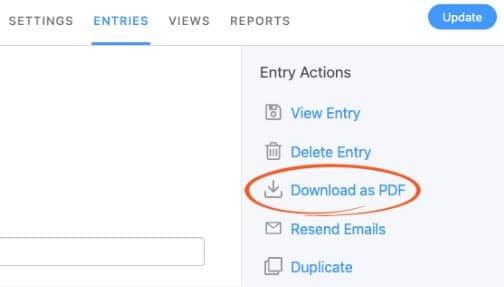
And that's it. The file will then open in your PDF reader or viewer.
2. Automatically send a PDF file as an email attachment
Formidable already offered the option to automatically send a PDF as an attachment by email, but now you can send your new-and-improved custom, dynamically created PDFs!
As soon as a user submits your form, the generated PDF file is sent to the email address entered in the form.

This feature makes it easy to automate your processes and can save you tons of time—you won't need to manually email invoices or awards to your users anymore!
3. Generate a downloadable PDF file
Let your users download a PDF with a single click. Add a shortcode to your WordPress posts, pages, or email notifications to insert a file download link or create a PDF download button.
Hmm, shortcode. That sounds complicated. It isn’t! You only need to copy and paste it from your Formidable Forms plugin.
It should look something like this:
[frm-pdf id=x]In place of the “x,” insert the id of your PDF form provided in Formidable. This quick trick even works with page builders like Elementor or Divi!
4. Use the Views Builder to create a custom PDF
You can make your file look the way you want by using the online PDF editor and builder under the Views tab.
Drag and drop content blocks to change the layout of your document in our WordPress PDF builder, then click the + to select, then add data from your form fields:
- Use columns to design the PDF structure
- Insert your logo (or even a user-uploaded image) with an image block
- Create a header/footer by adding blocks to the top or bottom of the page
- Add a signature to your PDF wherever you choose
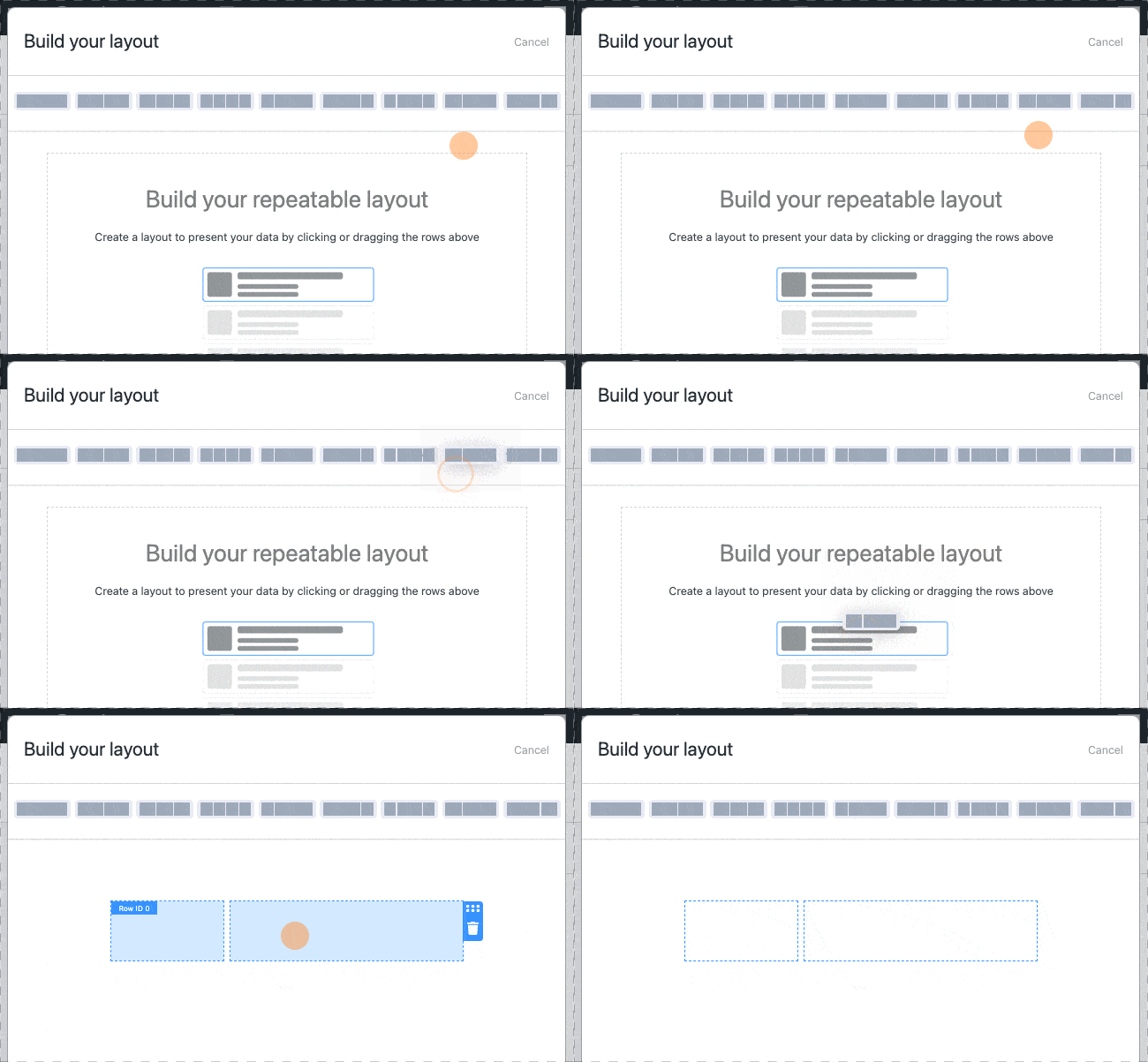
As you can see, the Views add-on essentially turns Formidable into a custom PDF generator for WordPress. Pretty cool, right?
5. Personalize a PDF template
Already have a design in mind for the document you’d like to create? Customize one of our PDF templates for WordPress to make it in half the time!
For example, if you’d like to make an award PDF, start with our ready-to-use Certificate Template. Right out of the box, you’ll get:
- A pre-made form for collecting entries and signatures
- Two different designs (Views)
- A PDF with editable text
- A shortcode to copy/paste a link to download the PDF
- Options to adjust font and document size

We also have handy, ready-to-use templates so you can use WordPress to generate PDF invoices, contract agreements, and letters of recommendation.
Plus more PDF generation features
So, we've seen how a form-to-PDF plugin lets you design your PDF document, dynamically pull in data from forms to fill in the PDF, and then share it with your users in many different ways.
But what else can it do?
- Custom Headers
- Custom Footers
- Sign PDFs in WordPress
- WPML / Polylang Translation
- RTL Support
- Pre-Built PDF Templates
1. Custom headers
Creating a custom header to appear on all your PDFs is easy. Add a text or image block to the top of your PDF builder to add your company name, logo, banner image, or whatever else you can think of.
You can change the font size and color or the background color. Any change you make will instantly appear as a header on your custom PDF.
2. Custom footers
In the same way you can customize a header in the PDF builder, you can create and customize a footer. Insert a single block or a column section at the bottom of the layout builder, then add any text(s) or image(s) you like.
3. Sign PDFs in WordPress
Want to add a signature to your PDF automatically? This add-on makes it easy! Ask for a signature on your form and add it wherever you choose in your PDF layout.
4. WPML / Polylang translation
Need bilingual or multilingual forms and PDFs? We’ve got you. Formidable’s integrations with WPML and Polylang mean you can show forms in users' native language and generate PDFs in their language.
5. RTL support
Looking to create forms and PDFs using right-to-left languages (or fonts) like Arabic or Hebrew? No problem. Formidable’s form builder and PDF generator come with RTL support.
6. Pre-Built PDF templates
No time to spend designing your downloadables? You can use and customize one of our ready-made PDF templates in only a couple of clicks.
So, why choose Formidable PDF?
Sure, there are many WordPress PDF plugins that can create PDFs or embed PDF files into your website, such as Fluent Forms, Gravity Forms / Gravity PDF, or Contact Form 7.
But they don’t all let you create customizable PDF files from form entries.
Formidable PDF offers all these powerful form options and an easy-to-use drag-and-drop PDF editor. Not to mention all the extra features you get with Formidable; it can go beyond creating pretty PDFs.
More than just a PDF generator for WordPress
Formidable Forms offers many amazing ways to create custom PDFs in WordPress, but it can do much more!
Instead of installing different plugins to create forms, manage contacts and submissions, and analyze that data, Formidable Forms Pro can handle all that and then some.
Still aren't sure? You can try any of our premium plans risk-free!
Our premium online form maker comes with a 14-day money-back guarantee. Love it or get a full refund, no questions asked!
To create custom PDFs from form entries in WordPress, all you need are Formidable’s PDF and Visual Views add-ons, which are included in Formidable’s Business Plan.
Get the Formidable Forms Newsletter
Read more: PDFs with Formidable!
 Add Charts and Graphs in Emails & PDFs with Formidable Forms!
 How To Sell Digital Downloads on WordPress [Step by Step!]
 How To Add a WordPress PDF Viewer to a Website
This article may contain affiliate links. Once in a while, we earn commissions from those links. But we only recommend products we like, with or without commissions.
