
Fantastic - could not be better! The support has been amazing and I now have three different Stripe payment forms that I can keep on duplicating and changing the name of the product.

Last updated on December 12, 2023 by Formidable Team
How To Sign a PDF in WordPress With a PDF Signature Plugin
Learn how to sign a PDF in WordPress using a signature plugin. Follow these quick and easy steps to add your signature to a PDF online. Try it today!

Approximate read time: 6 minutes
We don’t know about you, but we find it annoying when we need to sign a document and have to print the PDF, sign it, scan it, and send it back.
Who has the time and patience — not to mention the printer, paper, and ink? — to do all that nowadays? Not only is it a bad user experience, but it can also cause an organizational nightmare for small businesses.
Luckily, it’s easy to avoid all these problems.
Just add a digital signature field to your online forms, and presto! You can automatically sign PDFs right on your website.
If you have a WordPress website, there are a few different ways to sign PDFs. Let’s look at why you may want to add digital signatures to your PDFs, the types of documents you can make, and how to add an electronic signature in WordPress.
Upgrade your WordPress site with powerful, flexible forms.
Why sign PDFs in WordPress?
There are a lot of benefits to adding digital signatures to WordPress forms and documents.
🤖 Automate and streamline processes
Hate wasting time sending emails back and forth? So do we!
Make signature collection quick and easy by letting your users or colleagues sign a form once and instantly generate a PDF with their signature. And go even further by sending automated emails to your team or collaborators with the signed PDF file attached.
✅ Add security and authenticity
Collecting signatures on your forms adds an extra layer of security and authenticity.
Asking users to sign their form submissions protects against fake or fraudulent submissions. However, adding the signature of a CEO or president lets users know your PDF is an official company document.
🗄️ Easily keep a paper trail
Dream of having all your signed documents instantly saved in the same place? When you add a digital signature to WordPress forms, your form entries are all grouped together in a centralized location. Then, it’s easy to export all the PDFs whenever you want.
Plus, your signed PDFs are a digital audit trail, allowing you to track and verify who signed a form easily and when. This is very helpful for clearing up any confusion and resolving any disputes!
From Idea to Reality in Minutes. Build Powerful Forms, Dashboards, Apps and More.
Formidable Forms makes advanced site building simple. Launch forms, directories, dashboards, and custom WordPress apps faster than ever before.
What can you use WordPress PDF signatures for?
Collecting signatures on a WordPress form or PDF is super useful for all kinds of online/signed contracts and forms like:
- Non-Disclosure agreements (NDAs)
- Rental applications & lease agreements
- Employment contracts
- Letters of recommendation
- Parental consent forms
- Online petitions
- Certificates & awards
- Registration forms

💡 Good to know — WordPress e-signature PDFs don't necessarily count as legally binding contracts, depending on where you live. Be sure to look into local laws concerning digital signatures and online contracts.
Need to use your WordPress forms for UETA- and ESIGN-compliant signatures? You can connect an ApproveMe WP E-Signature account to Formidable Forms. Here’s how.
How to sign a PDF in WordPress
You have two options for signing a PDF in WordPress:
- connect a third-party application like DocuSign with Zapier
- use a WordPress signature plugin.
You probably already guessed which method we prefer 😊 (PSST: It’s our form and PDF plugin with signatures.)
But we promise it isn’t only because we make the plugin.
It can be tricky to set up all the integrations if you choose to use a third-party application. Plus, your files will be hosted on their platform rather than saved on your WordPress site. You’d need to sign up for another account and may even need a paid plan, depending on the number of documents signed.

On the other hand, WordPress digital signature plugins make it simple to add a signature to a PDF and let you keep your data inside your site.
So, let’s show you how to add a digital signature to your website quickly and easily:
1. Install and activate Formidable Forms
If you haven’t already, grab a Formidable Forms Pro plan. You’ll need the Formidable Business plan or higher for digitally signing PDFs.
Next, install and activate Formidable Forms on your WordPress site.
Once the plugin is activated, go to Formidable → Add-Ons to install and activate the Signature Add-On and the PDF Add-On. Both are included in your plan.

All set up? Great! 👍 On to the fun stuff!
2. Make your form with signature field
Head to Formidable → Forms. Click + Add New in the upper right to create a new form or add a signature field to an existing form by hovering over the name of your form and clicking Edit.
You can choose to use a template or start with a Blank Form for new forms.
And voilà! Welcome to our user-friendly drag-and-drop form builder!

Drag and drop the signature field and any other fields you want into your form. Once a field’s been added to your form, click on it to edit the settings like field name, description, layout, and more.
You can choose whether to allow users to draw or type their signature for the signature field.
When you’re happy with your form, click Update to save.
👉 Did you know you can make forms faster using one of our pre-made templates? Add a signature field to our basic contact form template or use this all-in-one signed agreement PDF template for longer forms like contracts and applications.

3. Build your PDF
It's time to insert the signatures collected in your form into a PDF! We’ll do this by creating a View.

First, click on the Views tab above the form builder, then hit + Add New.
You can choose whichever View type you like. We recommend using the Grid type to make PDFs like letterheads, contracts, and certificates.

Name your new view and click Create a view. Head to the Layout Builder to start making your custom PDF!
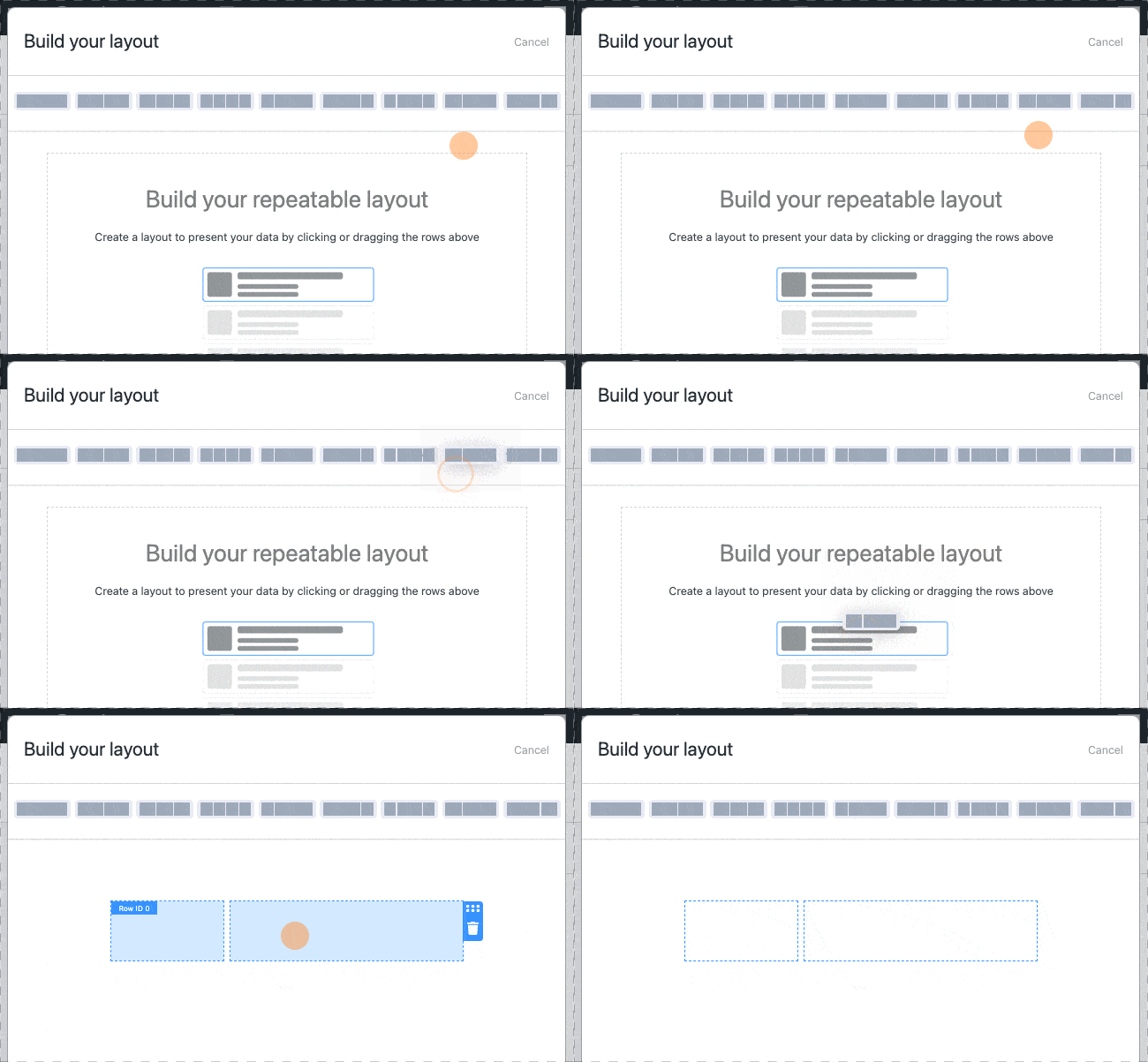
Drag and drop rows and columns to design the layout of your PDF file, then hit Save Layout.
Next, insert your form content into your PDF. Click on the ⊕ in a layout block to add or edit the block’s content.

In the content editor, scroll down to find your custom form field content on the right side.
Click to insert the signature into your PDF and then hit Update.

All left is to finish filling in the PDF with your content!
Need a little help making your PDF? Check out our complete guide to How to use the WordPress PDF editor or use one of our pre-built View templates.
Once you’re done building your PDF, you want to take note of your View ID for the next step. The ID is displayed on the left side of the View window. It should look something like this:
[display-frm-data id=x]The “x” is your View ID.

4. Share your PDF
Now, we need to put our PDF on our website for the world to see!
We’ll use the View shortcode to insert the PDF into automated emails, a WordPress page or post, or form submission actions.
Just copy and paste the following shortcode:
[frm-pdf id=x]Paste it wherever you want your signed PDF to appear, replacing the “x” with your View ID number.
Learn more about displaying your signed PDF in our Knowledge Base.

5. Display your form
Whew, almost done! And luckily, the last step is an easy one!
Above the View Builder, go to the Build tab to return to your form. Next, click the Embed button to show your form wherever you want on your website.

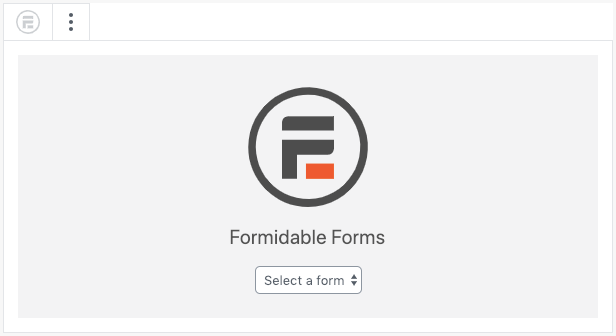
You can add your form to any WordPress page or post by inserting the Formidable Forms block. Head to the page or post where you want to display your form, then click to add a new WordPress block.
Add the Formidable Forms WordPress block and choose your form from the dropdown menu.
Publish or Update, and that’s it! Your form and signed PDFs are now online! 🙌
Ready to Sign PDFs in WordPress?
When you combine the power of our forms, signature tools, and custom WordPress PDF generator, you can do so much. And this is just the start of what you can do using WordPress to sign a PDF.
What will you create with our plugin? Let us know in the comments—yes, we want to know!
Be sure to follow us on Twitter, Facebook, and YouTube for more WordPress tips and tricks. See you there!
Read more from the Formidable blog
 Typeform Signature Fields Don't Exist... Here's What To Do
 The Ultimate WordPress E-Signature Plugin
 How to Draw Signatures Online in Ajax Forms
Get the Formidable Forms Newsletter
This article may contain affiliate links. Once in a while, we earn commissions from those links. But we only recommend products we like, with or without commissions.
