
Fantastic - could not be better! The support has been amazing and I now have three different Stripe payment forms that I can keep on duplicating and changing the name of the product.

Last updated on February 2, 2024 by Formidable Team
Print to PDF on WordPress (Posts, Form Entries, & More)
Wondering how to print to PDF on WordPress? These WordPress print-to-PDF plugins make it simple! Let's show you how to export different kinds of content.

Approximate read time: 6 minutes
Whether you want to print a page to PDF, add a PDF print button, or print WordPress form entries as a PDF, we have the answer!
There are a lot of PDF plugins out there, although they all seem to do something different.
- Some are PDF embedder plugins.
- Others are great for uploading PDFs.
- And a rare few let you create a custom PDF from form entries.
However, if you want to print WordPress blog posts in PDF format, the best tool is E2Pdf. If you want to print form entries in PDF format, Formidable Forms is your best bet.
Today, we’ll first show you how to use this plugin to print WordPress pages in PDF format. Then, we'll show you a streamlined way to save online form submissions as PDFs.
Ready to get started? Let’s go!
Upgrade your WordPress site with powerful, flexible forms.
How to print WordPress posts or pages to PDF
Using WordPress to print a page in PDF format is be useful for many reasons.
It allows you to save backups of articles for offline reading, create downloadable resources for your audience, and keep a printer-friendly version of your content on hand.
And with the E2Pdf plugin, it's quick and easy to do.
Step 1: Install the E2Pdf print to PDF WordPress plugin
Before saving your WordPress website as a PDF, you must install and activate the E2Pdf.
To do this, open your WordPress admin and head to Plugins → Add New Plugin. Next, search for "E2Pdf", then click the button to Install and Activate the plugin.

☝️ The free E2Pdf plugin only allows one web page and one template, so you must upgrade to E2Pdf Pro to save multiple WordPress pages or posts as PDFs.
Step 2: Create a PDF template
Now, it's time to create your PDF template. Go to E2Pdf → Templates and click the Add New button.

Name your template, set the document size and fonts, and choose the type of content to print as PDF.
You can now use the drag and drop PDF builder to create your template. Double-click on a block to insert or edit text, change the featured image size, resize the field, or delete the block.
When you're done, Save your template.
Step 3: Pick the page content to print to PDF
Almost done! All that's left is to make your WordPress pages printable.
Under E2Pdf → Export, select the template and data set to convert to PDF.

Click Export, and you'll now see a print-ready PDF file of your post.
Easy peasy! Now, you can create printed versions of your website pages or articles and even create a PDF download button for visitors to click to download the document.
🔒 Want to create password-protected PDFs or require an email to download? Here's how to add gated content to WordPress.
From Idea to Reality in Minutes. Build Powerful Forms, Dashboards, Apps and More.
Formidable Forms makes advanced site building simple. Launch forms, directories, dashboards, and custom WordPress apps faster than ever before.
How to print WordPress form entries to PDF
To print form entries, you must create a form and collect submissions.
And in case you were wondering, E2Pdf can't make forms (no contact forms, surveys, quizzes, etc.).
But E2Pdf does have an integration with our favorite free form builder for WordPress, Formidable Forms Lite! So click the button below to download, install, and activate the plugin for free now.

So let’s see how to use E2Pdf + Formidable to print to PDF from WordPress for free:
- Step 1: Create a form in Formidable Forms
- Step 2: Create a template for your WordPress form entries to PDF
- Step 3: Add the shortcode to the form submission settings
Step 1: Create a form in Formidable Forms
Once you’ve installed and activated Formidable Forms Lite and E2Pdf, go to Formidable → Forms and click + Add New.
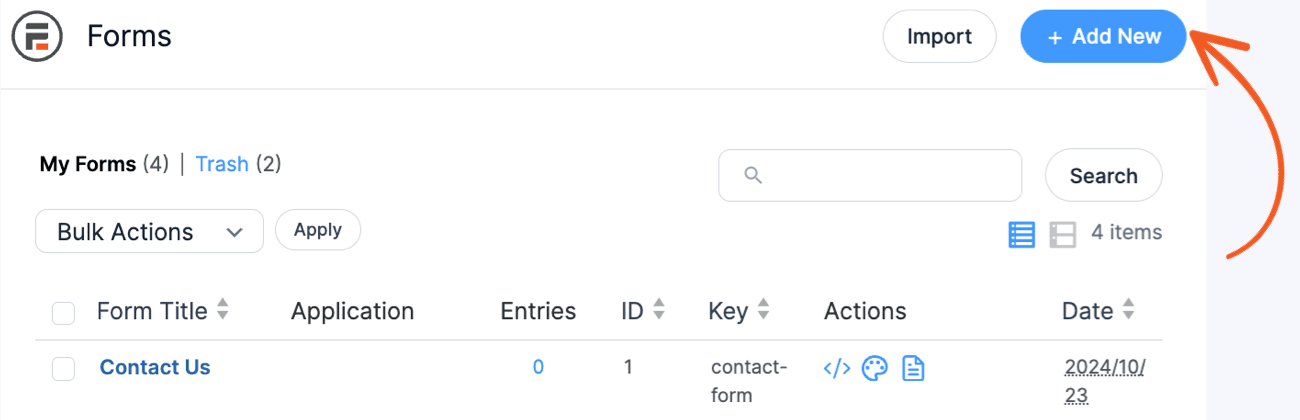
Choose Create a blank form and then click the Create button.
Welcome to our drag and drop form builder!
Select a form field from the left side of the screen and drag it to the form canvas on the right to drop it into your form.

You can customize any fields you add with a quick click on the field in your form.
Want to change colors, size, border thickness, or fonts? The Style tab at the top gives you total control! For even more styling options, you can add custom CSS under Formidable → Global Settings.
Once you’ve made your form, click Update in the upper right corner to save.
Step 2: Create your PDF template in E2Pdf
In your WordPress dashboard, go to E2PDF → Templates. Choose Add New.
Fill in your PDF title, size, and font options.
Then, in the Extension dropdown menu, select Formidable Forms.

For the Item field, select the name of the form you created in Step 1.
And finally, click Auto PDF to create the PDF automatically from form entries.
Step 3: Use the WordPress print PDF shortcodes
Next, go to E2PDF → Export and select your template and the dataset you want to export.
Under the Shortcodes list, you’ll see two options: Download and View.

If you want WordPress to display the PDF on submission, copy the View shortcode. If you want the form to download the PDF automatically, pick the Download option.
Then, go back into Formidable and open up the form you created.
In Settings → General → Messages, add the E2Pdf shortcode to the On Submit field.

And that’s it! You now have a free way to create dynamic PDF documents from your WordPress forms without any programming or coding!
Print to PDF from WordPress with Formidable Forms Pro
Why use two different plugins when one will do?
If you’re using Formidable Forms Lite, you don’t need E2Pdf to export form entries to PDF. You need to upgrade to Formidable Forms Pro!
The premium version of Formidable is way more than just an online form maker. It can also be a WordPress print form plugin, quiz maker, survey tool, calculator builder, and more.
Here’s a peek at how it works:

All you have to do is snag a license (if you don’t have one already), install the Formidable form-to-PDF add-on, and you’re set!
With our add-on, turning a WordPress form into a PDF only takes a few clicks.
Plus, you can export results as PDFs, automatically send PDFs as email attachments, or display downloadable PDFs when users hit “Submit.”
🎨 Want to make those PDFs prettier? Here’s how to use our WordPress PDF generator plugin.
On top of letting you easily create PDFs from form responses, the Formidable Business Plan also comes with all of these great features:
- 225+ form templates
- Online calculators and quizzes
- Conversational forms
- Stripe and PayPal integrations
So, how do you plan on using PDFs for your WordPress site? Let us know in the comments below! 👇 💬
Remember to follow us on Facebook, Twitter, LinkedIn, and YouTube for more WordPress tips and tricks, or sign up for our newsletter to receive them straight to your inbox.
Get the Formidable Forms Newsletter
Read more about PDFs!
 Add Charts and Graphs in Emails & PDFs with Formidable Forms!
 How To Sell Digital Downloads on WordPress [Step by Step!]
 How To Add a WordPress PDF Viewer to a Website
This article may contain affiliate links. Once in a while, we earn commissions from those links. But we only recommend products we like, with or without commissions.
