
Fantastic - could not be better! The support has been amazing and I now have three different Stripe payment forms that I can keep on duplicating and changing the name of the product.

Last updated on September 8, 2023 by Formidable Team
How To Create an Ajax Contact Form in WordPress Fast!
Learn how to create an Ajax contact form in WordPress with this step-by-step guide. Improve user experience and streamline communication on any WordPress site.

Approximate read time: 5.5 minutes
An Ajax contact form sounds like something that would be labeled "top secret" or "classified."
But this simple feature can lead to a better overall user experience and more conversions for you and your website. Normally, this feature would require some coding and testing.
And we're here to give you the easy route. We'll show you how to create an AJAX contact form in WordPress with our favorite AJAX form plugin, Formidable Forms.
So, let's get started.
Upgrade your WordPress site with powerful, flexible forms.
Why use Formidable for Ajax contact forms?
Formidable Forms is the best WordPress form plugin to create and manage forms easily.

From its drag and drop form builder to its more powerful feature list, it takes complicated and time-consuming tasks and speeds them up for you. And its Formidable’s AJAX powers separate it from the pack. In fact, it only takes three clicks to turn any web form into an AJAX form with Formidable.
Normally, this process means creating a form using JQuery AJAX and PHP, which could take hours of your time for one form. Instead, a WordPress plugin can create multiple forms in minutes.

From Idea to Reality in Minutes. Build Powerful Forms, Dashboards, Apps and More.
Formidable Forms makes advanced site building simple. Launch forms, directories, dashboards, and custom WordPress apps faster than ever before.
How to create an Ajax contact form in WordPress
Building an Ajax contact form with Formidable Forms is a breeze.
Whether you start with a pre-built form template or build a custom form from scratch, the drag and drop form builder makes the process quick and efficient.
So, let’s see how to create our WordPress contact form with Ajax:
Step 1: Install and activate the Formidable Forms plugin
To start, you’ll need Formidable Forms Pro.
If you don’t already have a premium version of our plugin, pick up our form maker here. Our premium plans offer the Ajax form submit function, so choose whichever option’s right for you!
Once you have your copy, install and activate Formidable Forms on your WordPress site. Don't worry, it's very straightforward, and you’ll be on to the next step quickly.
Step 2: Make your contact form
Let's create your WordPress Ajax contact form!
Start by going to Formidable → Forms → Add New. Next, you’ll have the option to:
- Use our WordPress contact form template to kickstart your design.
- Generate a Blank Form to start from scratch.
Click to choose, and you'll be taken to Formidable’s form builder.

You can customize your form by adding, removing, rearranging, and editing form fields. You’ll want to include fields for an email, message, and name for a typical contact form. After you click a field on the left and drop it into your form, you can click on the field to change its settings.
This is where you can add an email placeholder, type text to change field descriptions, adjust the form layout, and more.
When you're happy with your form, click Update to save the changes.
Step 3: Turn on the Ajax form function
Now that your contact form is ready, head to the Settings tab in Formidable Forms and click the General tab. Scroll down to the AJAX section.

You'll see three options here:
- Load and save form builder page with AJAX — reduces Ajax requests to make long forms load faster.
- Submit this form with AJAX — avoids full-page refreshes when users submit the form.
- Validate this form with JavaScript — ensures data entries in each field are valid as users fill them out.
Check the second and third boxes (or all three for longer forms), and click on Update. And voila! Your users can now fill out your form seamlessly without pesky page refreshes!
Customize your form actions under the Actions & Notifications tab, and you'll be ready to proceed to the next step!
Step 4: Publish your Ajax contact form to WordPress
Almost done! You must get your spiffy new WordPress Ajax contact form on your website.
Go to the WordPress page or post where you want your form to appear. Then, in the editor, click to add a Formidable Forms block and select your form from the dropdown menu.

Update or Publish the page, and you’ll now see your form on the front end of your site!
Want to add your form into a widget area instead? No problem! Copy the shortcode generated by Formidable Forms and paste it into the desired location on your WordPress site.
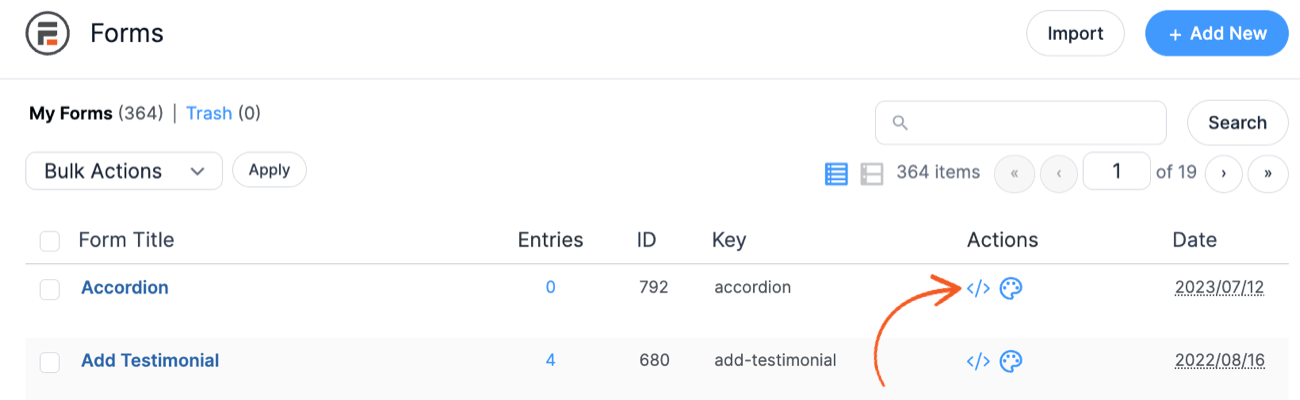
And that's it! With a few clicks, you've successfully created an Ajax contact form using Formidable Forms. Way to go!
The plugin will now handle all the Ajax-related processes in the background, allowing you to submit forms seamlessly without reloading the page.
Go even further with Formidable
Do more with WordPress Ajax forms
Formidable Forms works great with different platforms to do more with an Ajax contact form. For instance, you can connect it to email marketing services like Mailchimp and create a cool newsletter signup form with Ajax.
If capturing leads and growing a subscriber list is most important, you can even team up Formidable Forms with OptinMonster to make a WordPress popup survey.

Or maybe you want to make it easier for your customers to contact you. A WordPress Bootstrap modal popup plus Ajax lets users see and send a contact form with a click!
Extend your website with Formidable
If you were wondering, Formidable Forms can do more than make contact forms.
With 225+ WordPress form templates and an intuitive drag-and-drop form maker, you can build any form if you want to get creative.
You can even make Ajax multi-step forms on WordPress with Bootstrap. Formidable also offers an impressive Visual Views tool to help you display form data and create full-on web applications without coding. It’s pretty darn cool!
Curious about what else Formidable Forms can do for you? See the full list of features.
All set to create your contact form?
Using an Ajax contact form in WordPress is a quick and easy way to improve user experience and make form submissions smoother. And a better experience means more form submissions and more conversions!
If you want to reap these benefits but don’t know how to code (or don’t want to), your best bet is to use the Formidable Forms plugin. It makes creating WordPress Ajax contact forms super simple and seriously speeds up the process, too!
So what are you waiting for? You’ve got this. Grab Formidable and get started!
Remember to keep up with the Formidable on Facebook, Twitter, and YouTube for more tips, tricks, and tutorials on Ajax WordPress forms.
Read more from the Formidable blog
 The Best WordPress Ajax Form Plugin (And How To Use It)
 How To Create an Ajax Registration Form in WordPress
 How To Create a Mailchimp Ajax Form in WordPress
This article may contain affiliate links. Once in a while, we earn commissions from those links. But we only recommend products we like, with or without commissions.
