
Fantastic - could not be better! The support has been amazing and I now have three different Stripe payment forms that I can keep on duplicating and changing the name of the product.

Last updated on July 16, 2025 by Ryan Cordoni
How to Create a WordPress Photo Rating Form
Want to learn how to create a WordPress photo rating form? With the right rating plugin, you can easily add star ratings to images on any WordPress site!
 Approximate read-time: 4 mins
Are you looking for a way to add star ratings to your images? There are a lot of reasons to do this. Maybe you want people to rate products. Or, perhaps you are running a photo contest.
Whatever your reason, we're going to show you how to set up a WordPress photo rating form the easy way: using a multi-functional WordPress plugin!
When you think of a web form, it's normal to think about contact forms or registration forms. But a form is really just a tool to collect information from a user. With today's method, we will create a form that includes an HTML section for your photos and a star-rating field.
The tool we'll be using is one of the best WordPress photo rating plugins out there. In fact, this plugin will work with any WordPress theme, has tons of customization options, and allows you to publish your photo rating form to any post or page.
So without further ado, let's get started!
Approximate read-time: 4 mins
Are you looking for a way to add star ratings to your images? There are a lot of reasons to do this. Maybe you want people to rate products. Or, perhaps you are running a photo contest.
Whatever your reason, we're going to show you how to set up a WordPress photo rating form the easy way: using a multi-functional WordPress plugin!
When you think of a web form, it's normal to think about contact forms or registration forms. But a form is really just a tool to collect information from a user. With today's method, we will create a form that includes an HTML section for your photos and a star-rating field.
The tool we'll be using is one of the best WordPress photo rating plugins out there. In fact, this plugin will work with any WordPress theme, has tons of customization options, and allows you to publish your photo rating form to any post or page.
So without further ado, let's get started!
Upgrade your WordPress site with powerful, flexible forms.
Setting up photo ratings in WordPress
To set up photo ratings on your WordPress website, we need to follow a simple 5-step process:- Install and activate Formidable Forms
- Upload your photos and/or images
- Create your new photo rating form
- Add photo ratings to your form
- Publish your photo rating form
1. Install and activate Formidable Forms
 The first thing we are going to do is install our WordPress image rating plugin. Rather than go with a plugin that only does one thing, we are installing a drag and drop form builder with a whole lot of features.
That plugin is called Formidable Forms. To install it, click here, or search for it from the plugin area of your WordPress admin. Simple as that!
If you are curious about all the other things this WordPress form maker can do, check out our blog. We've got a huge number of tutorials there that should give you an idea. Or you could read one of our many case studies like this one.
Long story short, Formidable totally solves the issue of having too many plugins on your WordPress site. Unless you don't want to speed up load times, you should be worried about that!
The premium versions of our form builder even include a user-registration system. This would be useful if you only want registered users to give ratings on your images (which is a very common thing to do).
We are going to show you how to set up your WordPress photo ratings using a Star Rating field. Star ratings are a premium feature, but you can still following this tutorial using our free plugin All you need to do is insert radio buttons instead of a star rating field!
The first thing we are going to do is install our WordPress image rating plugin. Rather than go with a plugin that only does one thing, we are installing a drag and drop form builder with a whole lot of features.
That plugin is called Formidable Forms. To install it, click here, or search for it from the plugin area of your WordPress admin. Simple as that!
If you are curious about all the other things this WordPress form maker can do, check out our blog. We've got a huge number of tutorials there that should give you an idea. Or you could read one of our many case studies like this one.
Long story short, Formidable totally solves the issue of having too many plugins on your WordPress site. Unless you don't want to speed up load times, you should be worried about that!
The premium versions of our form builder even include a user-registration system. This would be useful if you only want registered users to give ratings on your images (which is a very common thing to do).
We are going to show you how to set up your WordPress photo ratings using a Star Rating field. Star ratings are a premium feature, but you can still following this tutorial using our free plugin All you need to do is insert radio buttons instead of a star rating field!
2. Upload your photos and/or images
This part is pretty easy. Just upload your photos or images to your WordPress site using the media library. Once you've uploaded your photos, all you'll need is the URL. We'll be using an HTML field in our photo rating form, so you'll need to use the Media button to insert the images in the form.3. Create your new photo rating form
Now we are going to create our photo rating form. In the WordPress admin area, click on Formidable. From there, click the Add New button to create your form. Name the form whatever you want and then we can add the fields we need. The first thing we should add is our HTML field. This is where you will put the image code for your image.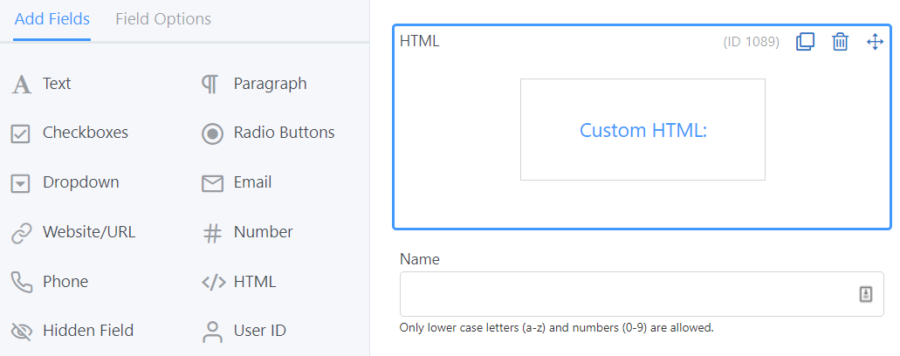 Click to add or drag this to your form in whatever position you want it in the form. Select the field and this should pull up the field options where you’ll find a space to paste your HTML into.
 You can have up to six photos per row on your form. To add more photos, add more HTML fields, then insert the correct CSS layout classes.
 Just be aware that the classes will span the full width of the content area where you place the form. Other than that, feel free to experiment however you want!
4. Add photo ratings to your form (star ratings)
Next, we'll add our star rating fields. Simply drag and drop from the left to the right form-building area... that was easy! The only thing you need to make sure: that your star rating fields line up with the images above. Once you've finished setting everything up, don't forget to save your form by clicking Update. If you want, you can also take a look at how your form will look using the Preview button.5. Publish your photo rating form
Now all you need to do is click into your form settings and find the shortcode for your form. The easiest way to publish your newly created rating is to copy and paste this shortcode into any post or page. With Formidable, you can publish a form almost anywhere. That includes any landing page, widget area, or custom post type. If you can paste a shortcode into a text editor, you can publish your form there!From Idea to Reality in Minutes. Build Powerful Forms, Dashboards, Apps and More.
Formidable Forms makes advanced site building simple. Launch forms, directories, dashboards, and custom WordPress apps faster than ever before.
Wrapping up
That's all there is to it! Of course, you can make this system a lot more complex - it all depends on you. If you only want users to rate photos/images, then you can hide the star rating field for non-users, for example. If you are creating a public review system, you can add a Paragraph Text field. That way, your audience can add a review along with their rating. A similar system could work for product reviews, photography portfolios, web designers - anything where a rating system is required. We really believe that Formidable is one of the best WordPress plugins for photo ratings and much more! Thanks for your time. If you are interested in more WordPress tips and tricks, be sure to check out our blog. Bye for now!Read more articles about customer feedback
 14 Customer Satisfaction Survey Questions You Can Steal
 How To Create a Customer Survey [With Examples and Tips!]
 6 Social Proof Examples that Boost Trust & Conversions
 How to Calculate Your Net Promoter Score
 How to Add Star Ratings in WordPress
 How to Add a Feedback Form in WordPress
 How to Add Testimonials to Your WordPress Website
 How to Add Reviews to Your WordPress Website
 How to Calculate a 5 Star Ratings Average in Wordpress
With the Formidable drag and drop form builder, forms are just the starting point. Formidable Forms is truly the most advanced WordPress form builder on the market. Give it a try risk-free for 14-days - and get 100% of your money back if you don't love it.
This article may contain affiliate links. Once in a while, we earn commissions from those links. But we only recommend products we like, with or without commissions.
