
I have this installed on several sites. For most, I use the free version, as it works perfectly for simple contact forms.


Last updated on April 17, 2023 by Formidable Team
Formidable Forms vs. Gravity Forms [Side-By-Side Comparison]
Trying to decide which form plugin is best for you? Our comparison of Formidable Forms vs. Gravity Forms helps you make the right decision based on your needs.

Approximate read time: 10 minutes
You’ve got a difficult decision ahead of you.
You need a powerful form builder to take care of multiple projects. And the projects often go beyond just form building. So it's a tough choice.
So, this post will match up a popular WordPress Gravity Forms alternative that lets you build any custom form you want: Formidable Forms. With this Formidable Forms and Gravity Forms breakdown, you'll know exactly which plugin is right for a WordPress site.
So, let’s dive right into it.
Upgrade your WordPress site with powerful, flexible forms.
What's the best Gravity Forms alternative for WordPress?
We’ll discuss the pros and cons of both WordPress plugins and what to look for in the best form builder.
Many options exist (Ninja Forms, Typeform, Fluent Forms, WPForms, and more).
However, Gravity Forms and Formidable Forms are the top options for responsive online forms.
So, let’s look at each plugin.
What is Formidable Forms?

Formidable Forms is a powerful form builder for WordPress with a simple drag and drop form builder.
Its builder helps you build forms quickly to move on to other tasks. And you can create unlimited forms fast! Formidable simplifies complex forms and makes the form-building process to make it user-friendly.
For example, if you want to create complex forms using conditional logic, all it takes is clicking a button, and you've got it!
But Formidable Forms also handles what happens after it collects form data from the form using its integrations and add-ons.
With some of the industry's top features and a highly rated support team, Formidable Forms is a top-notch plugin for form building. Plus, if you want basic forms, including contact forms, the free version of the plugin makes a great free alternative to Gravity Forms!
Want to make the switch to Formidable Forms?
Use our Gravity Forms free importer and transfer all your data to Formidable in just a few clicks! Migrating to a new form builder has never been so easy.
What is Gravity Forms?

Gravity Forms is a WordPress form builder plugin that uses a drag-and-drop form builder as well.
It allows you to create forms with ease. And it's a popular WordPress form builder because it offers many ways to integrate your forms with add-ons and extensions. One thing to note is that most of these add-ons are 3rd-party, but we’ll get to that later.
Plus, you can create multiple types of forms like:
- Payment forms and order forms
- Registration forms
- Contact forms
One thing to remember is that Gravity Forms doesn't have a free version, though.
From Idea to Reality in Minutes. Build Powerful Forms, Dashboards, Apps and More.
Formidable Forms makes advanced site building simple. Launch forms, directories, dashboards, and custom WordPress apps faster than ever before.
Key features to look for in a Gravity Forms alternative
- Ease of use
- Support
- Price
- Integrations and add-ons
Ease of use

Like Gravity Forms, Formidable is easy to use with a drag-and-drop builder that helps you manage your forms and makes the form-building process beginner-friendly.
Formidable Forms is designed to make building a web form straightforward so anyone can pick it up. With a beautiful UI and styling options, you can make each form your own with little effort using our form editor.
If you'd rather use a template, Formidable Forms lets you start quickly with great form templates (even more templates than Gravity Forms).
On the other hand, Gravity Forms has a simple design.
And it allows you to choose exactly what to include in your forms. You can choose from pre-built form fields to build your form.
Please note that both plugins have advanced features and a learning curve for new WordPress users.
This leads us to the next crucial feature: support!
Support

Formidable Forms has a massive library of docs to help you build your form. And the support team is one of the most highly rated. Plus, it has a wonderful community where you can ask questions and get quick answers.
Gravity Forms has a similar system and an online community where developers can help users with add-ons.
Pricing
Here's how the pricing compares:
Formidable Forms pricing (freemium)
Not everyone has the cash to invest in WordPress plugins, particularly new businesses.
So Formidable Forms offers a free version.
We want to offer you a great Gravity Forms alternative, and providing a free plan is one way to do that.
But, if you want more, Formidable Forms is a freemium product. It also offers a premium version with many more features to fit everyone's needs.

Gravity Forms pricing (premium)
Gravity Forms does not offer a free version.
Unfortunately, Gravity Forms is a premium plugin, so you'd need to spend money upfront or look for a free alternative.

Price comparison
Formidable Forms: Prices start with the free version and go up to the Elite package at $299.50 for the first year.
Gravity Forms: Prices range from $59 to $259 without any add-ons (or $600+ for views and editing functionality)
Here's an example of what you might pay to use Gravity Forms to create polls, forms, and surveys:
| Create survey forms | $259 (Gravity Forms Elite) |
|---|---|
| Radio button images | $49 (Gravity Image Choices) |
| Graphs and charts | $199 (GFChart) |
| Total | $507 per year |
As an alternative to Gravity Forms' pricey plans, you can choose Formidable Plus, which will get you all that (including our new Views feature) for only $99.50 for the first year!
Or, let’s imagine you want to build a directory or similar application:
| Create custom posts and forms with chained select | $259 (Gravity Forms Elite) |
|---|---|
| Display tables and lists and front-end editing | $159 (Gravity Views) |
| Graphs and charts | $199 (GFChart) |
| Scheduled listing removal | $129 (ForGravity Entry Automation) |
| Limit number of listings per user & Preview listings | $149 (Gravity Wiz) |
| Total | $895 per year |
In this case, you'd get all this in the Formidable Business plan starting at $199.50.
So, for the money, Formidable is a better option.
Features and integrations
Formidable Forms supports many features and integrations with your favorite apps, including Mailchimp, HubSpot, Salesforce, Stripe, PayPal, and more.
And Formidable also works with Zapier to offer even more integrations.
Gravity Forms also has many features and integrations. They feature some of the top options to have a great experience.
So, let’s look at these a bit deeper.
Field types
Since there is no free Gravity Forms option, we'll start by comparing the form fields.
First, we’ll compare the free form fields in Formidable to Gravity Forms’ standard fields.


There are differences in how each plugin shows the field type, but these are included in both plugins.
The free Formidable plugin includes all the form fields you need to create forms without paying a dime. And you can easily create spam-protected forms, too!
Next, let's take a look at the advanced fields each form plugin has to offer:


The advanced fields are also very similar.
Both plugins include pricing fields and can create posts, although they aren't included in the screenshots above. Both plugins include file uploads, date, time, chained selects/lookups, quizzes, passwords, and more.
However, Formidable includes several additional fields.
For example, with Formidable Forms, you can add scale, slider, or toggle fields in your forms. Plus, there are dynamic fields, repeaters, and summaries to preview before submitting. You can also use Formidable's flexible features to replace radio buttons with images.

Lastly, both plugins feature multi-page forms, so you can make the form easier for visitors.
Dynamic fields for entry relationships
Formidable's dynamic fields are similar to chained select WordPress forms.
They allow you to create dropdowns, checkboxes, and radio buttons filled with categories or submitted entries in other forms.
Dynamic fields link data from multiple forms so users can choose without duplicating information.

This also creates parent-child relationships, which Formidable Views can then use to display data with charts and graphs on other site pages.
Super handy, right?
Add-ons
Both plugins come with a variety of add-ons to supercharge the plugins.
You’ll get things like conversational forms and quizzes. Those are included in-house.
But, with Gravity Forms, most of their add-ons are 3rd party.
That means not all their code is in-house, which can cause delays when troubleshooting bugs that may pop up. It also usually means a higher price tag, as each plugin adds dollars to the yearly price you have to pay.
For example, let's look at Gravity PDF options. If you want to convert forms to a PDF, that’s extra money.

With Formidable, PDFs are included in our Business plan and above with our Form to PDF add-on.
Plus, Formidable Forms creates its add-ons itself. This means fewer customer issues, and that’s our primary goal.
So, less support and update issues mean fewer headaches for you. We test everything to ensure it works; if there are any issues, we’re on them faster than a cat after a mouse.
The integrations and add-ons show that Formidable Forms is an all-in-one solution for your WordPress website.
Here are a few add-ons that can help you today:
- ChatGPT Form Field
- Form to PDF and PDF generator
- Powerful form styler
- Formidable Views
Super handy, right?
Why is Formidable Forms the best Gravity Forms alternative?
If you’re reading this article, you’re looking for an awesome alternative to Gravity Forms. And Formidable is your best option.
Formidable matches or exceeds Gravity Forms on most features. And all that without the need for expensive third-party plugins. That means a lower bill every year!
What's more, Formidable has many more built-in features you can't find in Gravity Forms. You can switch to Formidable with a handy Gravity Forms importer to simplify things. So, there's no need to worry about losing your data!
With the free Gravity Importer plugin, you can migrate your forms and data in a few clicks.
Then you'll be able to take advantage of all these great Formidable features:
Built-in Views + Graphs and Charts
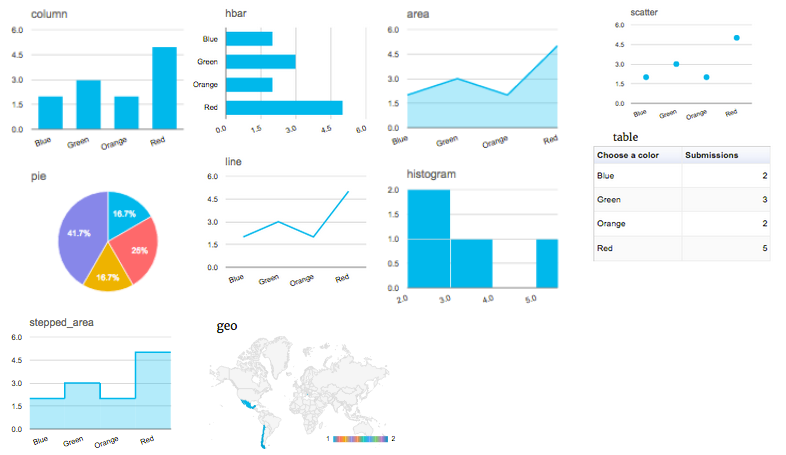
With Views, any website can have beautiful graphs and charts that show real-time data from submitted entries.
Consider using this for real estate listings, job boards, event calendars, and more! The possibilities are endless.
And now you can get Formidable Views for free with any Plus plan or higher. We meant it when we said we're an all-in-one plugin.
🔎 Take a closer look to see how Formidable Views and Gravity View compare.
Front-end editing
Users can update form submissions and posts from the front end of your site when logged in.
This means you can decide exactly what submissions are editable by a site's users.
It could be a View, a list of clickable entries with a shortcode, or a user's only entry.
Styling options
Why have an elegant WordPress theme if ugly forms ruin it?
With Formidable Forms' huge library of styling options and templates, you have complete control to make everything look how it should.

Import entries
You can keep all the data you collect in one secure location and import and export it as you see fit. (Gravity importing is available for more money in the Gravity View plugin.)
Customizable form HTML
With customizable HTML, you can fully control how your form fields look. You can add a CSS class to your form and move fields around.
Need a Gravity Forms reset button?
With Gravity Forms, it takes some coding! But, with Formidable Forms you get a no-code reset button easily!
Which is the best form builder plugin?
What are the results of our Gravity Forms vs Formidable Forms smackdown?

Formidable and Gravity Forms include vital features for advanced forms like file uploads, conditional logic, conversational forms, captcha, ajax submit, subscription forms, and user registration.
In other words, both form builder plugins offer many features to fit your needs. But let's take a closer look.
If you need a Gravity Forms alternative with free contact forms or advanced applications and need many features without paying a high yearly premium, Formidable Forms provides you with the best options. Or if you're looking for an affordable all-in-one plugin option that provides beautiful charts and graphs with real-time updates, a large library of templates, and awesome support, Formidable is still an excellent choice for you to build your forms.
But we’d be biased if we didn’t admit that Gravity Forms offers some integrations that Formidable doesn’t. Even though Formidable is one of the best Gravity Forms alternatives, it doesn't have all the form features Gravity Forms offers.
If you switch to Formidable, our Gravity Forms importer plugin and eager support staff can help make the transition quick!
You can choose which plugin you use! We've also compared a few other WordPress form builder plugins if you're still seeking more information.
Form builder plugin comparisons
 When Teams Outgrow WPForms (And What Breaks First)
 The Best WordPress Form Builder Plugins for Agencies
 The Gravity Forms Repeater Alternative - That Works!
 Gravity Forms Reset Button Alternative [No Code Solution!]
 12 Best Typeform Alternatives (Free & Premium)
 Outgrow vs Typeform, How To Choose
 11 Best Fluent Forms Alternatives [Detailed Breakdown!]
 10 Best Gravity Forms Alternatives [Compared]
 9 Best WPForms Alternatives for Any WordPress Site
 The Best Gravity Forms Google Maps Alternative
 Jetpack Forms Alternative: Formidable Forms vs Jetpack Compared
 7 Best Contact Form 7 Alternatives To Use Today!
 11 Best Formstack Alternatives [Form Builders Compared]
 Caldera Forms Alternative: Formidable Forms vs Caldera Compared
 12 Best Google Forms Alternatives [Compared]
This article may contain affiliate links. Once in a while, we earn commissions from those links. But we only recommend products we like, with or without commissions.

