
Fantastic - could not be better! The support has been amazing and I now have three different Stripe payment forms that I can keep on duplicating and changing the name of the product.

Last updated on November 3, 2025 by Kyle Cash
How to Build a Conversational Form in WordPress (3 Steps!)
Want to put a conversational form on WordPress? This guide will help you do it easily with the Formidable Forms Conversation Forms feature.

Did you know that marketing automation (like a WordPress conversational form) can increase lead generation by 451%?
Filling out standard website forms reminds everyone of going to the doctor. It’s no fun.
Website visitors enjoy a more natural experience while filling out conversational forms. It's more like speaking to a person.
Today’s post will guide you through how to build your own conversational form using a powerful plugin, Formidable Forms.
Let's get into it.
Upgrade your WordPress site with powerful, flexible forms.
What is a conversational form?
A conversational form is a way to turn a normal form into a conversation. Instead of filling out standard fields, you move one question at a time through a form. Chatbots and conversational forms work similarly.
And it's a key piece of conversational marketing.
Let’s look at an example.
Imagine you have a property business. You rent out properties to people for short and long-term stays.
One of the best ways to increase your business is customer reviews.
You direct customers to your review form landing page after their stay. You placed a conversational form on this page.
Instead of looking like a standard form everyone knows (and hates), it’s one question at a time, like a conversation.

It’s more interactive. It’s more fun. And increases engagement with your customers/subscribers.
And more engagement means more reviews to show on your website. When 88% of customers trust user reviews as much as they do personal recommendations, those reviews are crucial.
So this is just a small example of how conversational forms help. Let’s highlight the benefits quickly.
How is using a conversational form beneficial?
Past online forms always followed a standard pattern. Fill out field after field, verify some of them, then submit.
So when something different comes along, it naturally catches people’s eyes.
Conversational forms have a few more benefits, though. Here are a few:
- Closer to natural communication
- More personal (like using the name they typed in)
- Gets users' attention more easily
- Less form abandonment leads to higher completion rates
Everyone is used to average WordPress forms. That’s why we all scroll right past them.
You know what people don’t scroll past?
An attractive and well-designed conversational form. Many plugins handle this: WPForms conversational, Fluent Forms, and Typeform alternatives.
But there’s one plugin that does it best.
Formidable Forms.
From Idea to Reality in Minutes. Build Powerful Forms, Dashboards, Apps and More.
Formidable Forms makes advanced site building simple. Launch forms, directories, dashboards, and custom WordPress apps faster than ever before.
How do I make a conversational form in WordPress?
There are three easy steps to follow to put a Formidable Forms conversational form on your website:
- Create and customize your form
- Set up conversational form settings
- Add the form to your website
The ability to make conversational forms is a part of our Business plan. So, head to our website and grab our plugin to get started.
We get it if you're uneasy about paying for a form-building plugin. That's why we included a way to get your money back.
Try it for 14 days. Contact us if you don't like it, and we'll get your money back to you.
We think you'll like what you try, though. We've worked hard on it.

Step 1: Create and customize your form
Once you've installed and activated Formidable Forms, head into the plugin inside your WordPress dashboard.
Now, create a form, or use one of our 150+ form templates to make things easier for you.
To do this, go to Formidable → Forms → Add New.

Inside this editor, create your form using our drag-and-drop form builder to place the form fields you want to use.
You can edit the form's look from the customization panel on the left. Change the color of the buttons, borders, text, and more.

Once finished, go to the Settings tab and give your form a title and description. This is where you can find the shortcode if you want to add HTML to display your form.
Step 2: Set up conversational form settings
Under the Settings tab, click Conversational Forms in the left panel.
Enable the conversational form by clicking the Turn on conversational form mode toggle.
Once you enable this feature, more options appear.
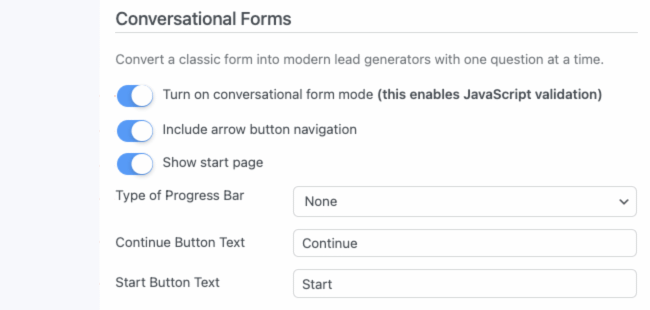
Set the progress bar a visitor sees, the Continue, and Start Button text.
Once finished, click Update to save the settings.
Step 3: Add the form to your website
Now, it's time to display your form. If you'd like to preview it first, click Preview in the top left and select On Blank Page, In Theme, or On Landing Page.

To embed the form on a page, go to the page and open the block editor. Search 'Formidable Forms'.

Next, choose the block and the conversational form from the dropdown menu.
Then update the page, and your conversational form is live!
Why use Formidable Forms to create a conversational form
Formidable Forms is a WordPress plugin that makes creating forms effortless. From design to functionality, it’s all covered.
For example, a customer comes to your site to leave you a review. With a standard form, they may get bored and end up not filling it out.
That's valuable feedback lost.
With a conversational form, they get one question at a time, simulating a conversation-like experience. This means higher completion rates and better feedback for you!
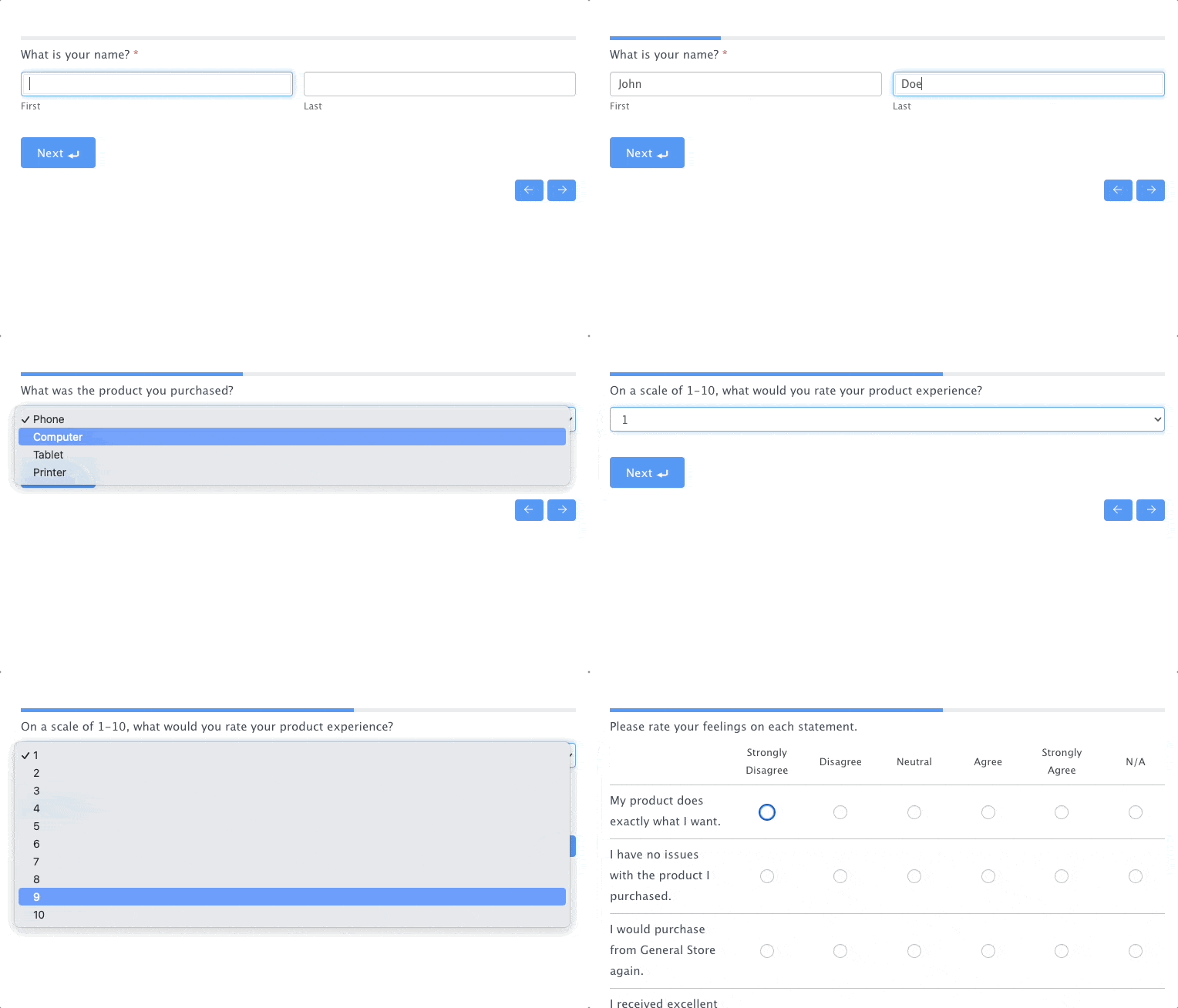
This may seem small, but it greatly affects how customers interact with your forms.
Interactive forms become more personable and less computerable (did we just make a new word?)
With a conversational form, take a visitor through a process step-by-step with only one question per page. Plus, set up the questions more naturally and fun to create a better customer experience.
These options are great for survey forms, contact forms, and more.
But that's not all. You also get:
And so much more. Check our complete list of features for everything Formidable can do.
Ready to make your conversational form in WordPress?
Now you see how easy it is to build a conversational form in WordPress.
If you enjoyed this post, you'd enjoy learning more about conversational form design. And we've got all you need to know.
If you're still unsure of Formidable Forms, check out the complete list of features. The value you get for the money is fantastic value.
Also, if you're on social media, follow us on Facebook and Twitter for more tips on improving your WordPress website!
Read more about conversational forms!
 You Can't Export Typeform to PDF. Here's Something Better!
 7 Amazing Conversational Marketing Examples That Work
 A Reliable Fluent Forms Conversational Forms Alternative
This article may contain affiliate links. Once in a while, we earn commissions from those links. But we only recommend products we like, with or without commissions.
