
Fantastic - could not be better! The support has been amazing and I now have three different Stripe payment forms that I can keep on duplicating and changing the name of the product.

Last updated on June 19, 2025 by Formidable Team
The Ultimate Guide to Conditional Forms in WordPress
Looking for a conditional logic plugin for your web forms? Formidable Forms helps you make smart, conditional forms in WordPress without any code. Try it now!

Approximate read time: 7.5 minutes
Ever wish the forms on a website could just be smarter?
Allow us to introduce conditional forms for WordPress. Whether building sites for clients or managing a WordPress site, this guide covers everything needed to build smarter forms.
We'll walk through simple, effective strategies for making forms that resonate with a website's audience and convert. Practical tips, real-world examples, and the perfect plugin are all here.
So let's get started!
Upgrade your WordPress site with powerful, flexible forms.
What is a conditional form in WordPress?
A conditional form in WordPress uses conditional logic to show or hide the right questions and information.
If visitors choose one option, they’ll see one thing. If they select another, they’ll see something different.

For example, a customer may visit your website looking for winter boots. Since they chose “winter boots,” you don’t want to show them fall, summer, or spring boots. That's not why they're there, and they'll probably leave.
Instead, you filter out the products that don't apply, so shoppers only see the relevant items.
They will stay on your site longer and may even find exactly what they want to buy, which is great for your site!
This is the same strategy you want to use with your forms. People don't like wasting time on things that don't apply to them!
From Idea to Reality in Minutes. Build Powerful Forms, Dashboards, Apps and More.
Formidable Forms makes advanced site building simple. Launch forms, directories, dashboards, and custom WordPress apps faster than ever before.
Why make conditional forms?
Why use forms with conditional fields? So more people click "Submit"!
Let's take a little trip down memory lane to see why it works.
Remember when you went to the doctor's office, and they gave you a 10-page form to fill out? How did you feel?
Probably like you would have thrown the clipboard across the room if you weren't so sick. You don't want your site visitors to feel the same way, right? Especially because it's a lot easier to leave a website than a doctor's office.
So, if you want your forms to convert, they should be as short as possible and easy to fill out.
Here are the three keys to effective online forms:
- Reduce distractions
- Simplify questions
- Keep it short!
Form landing pages are an excellent way to limit distractions. But conditional logic is the best way to only ask the necessary questions.
Conditional form WordPress examples
Now we know why we should use conditional forms, let's see them in action! Check out these five examples of conditional logic forms to get inspired and learn how to create great ones of your own:
- Contact forms
- Marketing & feedback surveys
- Customer support reviews
- Event registration or RSVP forms
- Product or service recommendations
1. Contact forms
With contact forms, use conditional logic to adjust fields based on new or returning customers.
For example, returning customers could be shown a streamlined form with fewer fields. There's no need for an email field if they're already logged into their account. That's just user experience common sense!
Or, direct a contact request to the appropriate person or department based on why they're contacting you.
2. Marketing & feedback surveys
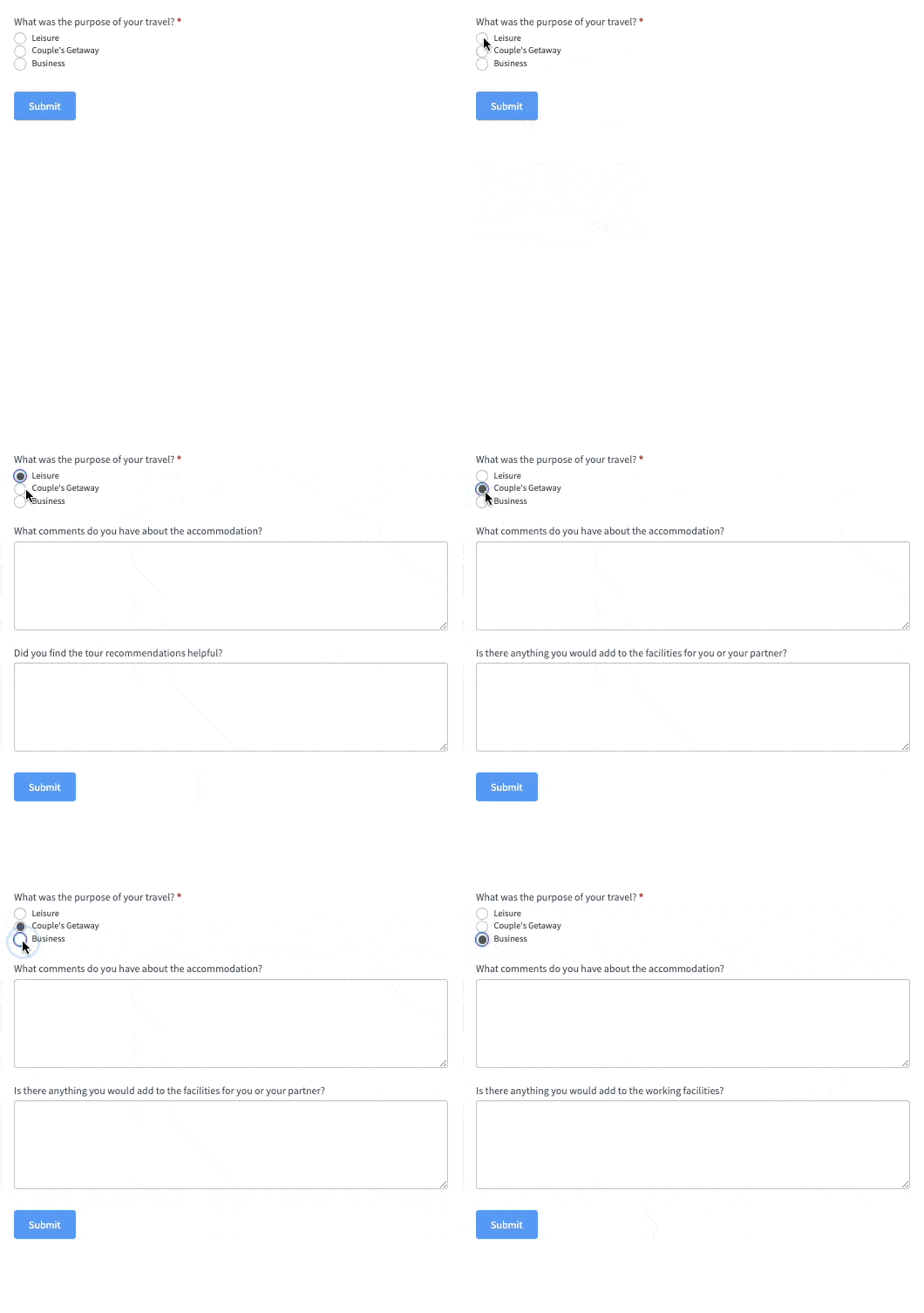
When customers fill out a survey, it's best to adapt the questions based on their answers.
For instance, if they show interest in a specific product or service, the form can ask them more about it. This way, you get precise feedback that makes the survey more relevant and engaging for the customer. And the results will be a lot more helpful, too!
3. Customer support reviews
Conditional forms can greatly impact your online reputation and customer satisfaction.
Let's say you have a feedback form on your website. The form can ask different questions based on the customer's rating. Happy customers could be encouraged to leave a review, and unhappy customers could contact support to fix the problem.
4. Event registration or RSVP forms
These flexible forms are ideal for gathering attendance info.
You could have a dropdown list for an online workshop that asks about skill levels. A wedding or other social event might ask about the number of guests and food preferences.

Thanks to conditional logic, you can tailor the form to the situation and make event planning much easier!
5. Product or service recommendations
You've probably run into product recommendation quizzes while online shopping. But did you realize they're just forms with conditional outcomes?
It takes some of the magic away. Although, that means they're easier to make than you might think.
All you need to do is create a conditional form to ask shoppers about their preferences. Then, set up the logic to point them toward the product or service that fits those needs.
Visitors get a personalized shopping experience and a big boost in sales and customer satisfaction.

Want to make a conditional logic form just for fun? Create a choose-your-own-adventure story in WordPress instead! 📖
How to create a conditional logic form in WordPress
So, now that you're craving conditional logic for your WordPress forms, let's show you how to set it up!
Luckily, you don't need to be a code wizard or nerd whisperer. All you need is the right WordPress plugin.

But we'll warn you: we don't know of any free online form builder with a conditional logic feature. So, you'll have to pick a premium plugin to create a conditional form in WordPress.
The good news, though, is there's a very affordable form maker that can handle conditionals and a lot more...
And it's called Formidable Forms, and it's the best WordPress form plugin
Step 1: Get Formidable Forms
With a user-friendly drag and drop form builder, Formidable helps you create conditional logic forms without much effort.
Although the free WordPress form builder doesn’t have conditional logic like the premium form maker, it’s still a great way to test what you’re getting!
With Formidable, you can set up conditions to:
- Show or hide what field displays based on what a user selects
- Conditionally display a section
- Skip a page in a multi-step form
- Send an email notification on form submission based on user input
But don't limit yourself! There are many other creative ways to apply it to online forms!
Step 2: Create your conditional form in Formidable
Once you've installed and activated the plugin, open your WordPress dashboard and head to Formidable → Forms → Add New.
Choose a form template or Create a blank form to start from scratch, and then use the builder to create or customize your form.

After you've added fields to your form, click on a form field to open the Field Options menu.
This is where you can enable conditional logic.

Click Save when you're done, and now we can get your form online!
Want to kick it up a notch?
Combine conditional logic with conversational form design. This means you can weed out unnecessary questions as you take users through a survey one question at a time!

And with Formidable, turning any boring form into a sleek conversational-style one takes a second.
👉 Learn more: How to create a conversational form in WordPress.
Step 3: Publish your form
Last step! Open the WordPress post or page where you want to display your fancy new form. Add a block in the editor, and insert the Formidable Forms block.
Select your form from the dropdown menu and then publish your page! Congrats, you just made a conditional form in WordPress!

For more detailed instructions, see our step-by-step guide to creating a conditional logic quiz.
More than just WordPress conditional forms
The best thing about Formidable Forms is that it’s much more than a conditional logic plugin. It's a full-scale WordPress form solution with features you'd never expect.
With this plugin, you can build everything from custom calculators to directory sites. And all without coding!
Start building WordPress forms with conditional logic today
Isn’t conditional logic amazing?
And we can't wait to see how you use it now that you know how to create an interactive form in WordPress!
So, are you ready to take your WordPress forms to the next level? Get started now!
Did you know Formidable Forms is the best WordPress form builder available today? Get started with our free plugin, or try the full-featured pro version risk-free with our 14-day money-back guarantee!
Read more about conditional logic!
 Unlock Advanced WordPress Form Date Logic & Lookup with Formidable
 8 Ways Conditional Logic Forms Can Boost Conversions!
 How To Create a Conditional Logic Quiz in WordPress (aka Chained Quiz!)
This article may contain affiliate links. Once in a while, we earn commissions from those links. But we only recommend products we like, with or without commissions.
